
By Michael Branson
Quick answer. As of September 2026, according to Microsoft, Entra ID keeps audit and sign-in logs seven days on Free and 30 days on P1 or P2, and an upgrade recovers nothing expired. Older records survive only where something was already archiving them, such as diagnostic settings or, for audit records, Purview Audit.
The look-back request arrives after the period it covers. An external auditor, an assessor or internal audit asks for sign-in history, admin changes and access review decisions across a fiscal year or an assessment period, and Entra’s own retention is measured in days, so the only records that exist are the ones something was already keeping. Microsoft’s Microsoft Entra data retention page, read on 2026-09-23, lists audit logs and sign-ins at “Seven days” on Microsoft Entra ID Free and “30 days” on P1 and on P2, and says “Log retention changes aren’t retroactive.”
So before the look-back window opens, route both logs through diagnostic settings to the destination the evidence needs: a Log Analytics workspace if you will query it, an Azure storage account with a lifecycle policy if you only need to keep it, and an event hub if another SIEM must receive it. Where users carry an E5-level license, Microsoft Purview Audit (Premium) also keeps Entra audit records. Download each access review history report inside the 30 days Microsoft keeps it available, according to Microsoft’s access review documentation.
How long you must keep any of it is set by your auditors, assessors and counsel reading your own obligations, not by any Microsoft setting. This page covers what Microsoft keeps, where to route the rest, and what the regulation text itself says about duration.
If a colleague says the tenant keeps a year of audit history, they are usually describing Microsoft Purview, not Entra. Entra does not keep audit logs for one year by default, according to Microsoft’s data retention table; the one-year figure is Microsoft Purview Audit (Premium) holding Entra audit records in the unified audit log for users with an E5-level license.
The Microsoft Entra data retention page lists, for audit logs and for sign-ins, “Seven days” on Microsoft Entra ID Free and “30 days” on Microsoft Entra ID P1 and on P2. For risky sign-ins it lists 7, 30 and 90 days across the same three tiers, and for risky users “No limit”. Its table has columns for Free, P1 and P2 only. The same page says: “Microsoft Entra ID audit and sign-in logs are separate from the Microsoft 365 Unified Audit Log (UAL). UAL retention is managed through Microsoft Purview Audit and is not affected by Microsoft Entra ID licensing changes.”
Purview’s own figures carry conditions. Microsoft’s Learn about auditing solutions in Microsoft Purview page says “In Audit (Standard), the system retains records for 180 days, which means you can search for activities that occurred within the past six months.” It adds that Audit (Standard) logs generated before October 17, 2023, are retained for 90 days. Microsoft’s Manage audit log retention policies page says the default Audit (Premium) policy “only applies to audit records for activity performed by users who are assigned an Office 365 or Microsoft 365 E5 license or have a Microsoft Purview Suite (formerly known as Microsoft 365 E5 Compliance) or E5 eDiscovery and Audit add-on license.” For those E5-licensed users, according to Microsoft, Audit (Premium) keeps Microsoft Entra ID audit records for one year by default. Purview keeps less for everyone else: “If you have non-E5 users or guest users in your organization, their corresponding audit records are retained for 180 days.”
Longer retention in Purview takes more licensing. Microsoft’s Learn about auditing solutions in Microsoft Purview page says “Retaining audit logs for 10 years requires an additional per-user add-on license.” It says that policy “isn’t retroactive and can’t retain audit logs that were generated before the 10-year audit log retention policy was created.” Records from service principals and system activity sit apart in Purview; the same page says “Audit records generated by non-user entities (such as service principal actions, system events, and application activities) are retained for a fixed period of one year.” Service principal activity is one part of non-human identity governance in Microsoft Entra. How Purview Audit fits an export-control program is covered in Redesigning an ITAR Export-Control Compliance Program to Be Efficient, Not Just Compliant.
If the tenant ran on Microsoft Entra ID Free until recently, the sign-in history from before the upgrade is already gone. The Microsoft Entra data retention page says: “Log retention changes aren’t retroactive. When you upgrade from Microsoft Entra ID Free to P1 or P2, only data still within the free retention period (up to seven days) is available. Data that has already expired can’t be recovered unless it was previously archived.”
Microsoft Graph activity logs have no default window at all. The same Microsoft Entra data retention page says “Microsoft Graph activity logs are only available for Microsoft Entra ID P1 and P2 licenses. Data isn’t retained unless it’s archived to a storage account or integrated with analytics tools.”
The decision rule follows from both sentences. Turn on routing before the look-back window opens, and treat a license bought during an audit as a fix for the next audit, because it recovers nothing that has already expired.
When the auditor asks for last year’s access review decisions, the review history report is the artifact, and it expires. Microsoft’s Create and manage downloadable access review history report in Microsoft Entra access reviews page says “The report pulls the decisions taken by reviewers when a report is created.” You “Specify a review start and end date.” Then: “Once a review history report is created, you can download it. All reports that are created are available for download for 30 days in CSV format.”
The review activity also lands in the audit log. Microsoft’s Plan a Microsoft Entra access reviews deployment page says “Access reviews activities are recorded and available from the Microsoft Entra audit logs.” That record sits under the audit log limits above. The same page says: “For more advanced queries and analysis of access reviews, and to track changes and completion of reviews over time, export your Microsoft Entra audit logs to Azure Monitor Log Analytics or Azure Event Hubs.” On licensing, it says “This feature requires Microsoft Entra ID Governance or Microsoft Entra Suite subscriptions, for your organization’s users. Some capabilities, within this feature, may operate with a Microsoft Entra ID P2 subscription.”
Two actions keep the evidence. Generate each review’s history report after the cycle closes and file the CSV before the 30-day download window runs out, according to Microsoft’s access review page, and route the audit log so the activity record survives as well. Which Entra ID Governance capabilities to buy and scope is covered in Microsoft Entra ID Governance for Regulated Enterprises: Product Scope, Licensing, and Audit-Defensible Implementation.
Once you know what an auditor will ask for, pick each destination by what that evidence has to do. Microsoft’s What are the Microsoft Entra activity log integration options? page says “Using Diagnostic settings in Microsoft Entra ID, you can route activity logs to several endpoints for long term data retention and insights.” Microsoft’s Configure Microsoft Entra diagnostic settings for activity logs page lists the prerequisites: “An Azure subscription”, “Security Administrator access to create general diagnostic settings for the Microsoft Entra tenant” and “A destination that is already set up.”
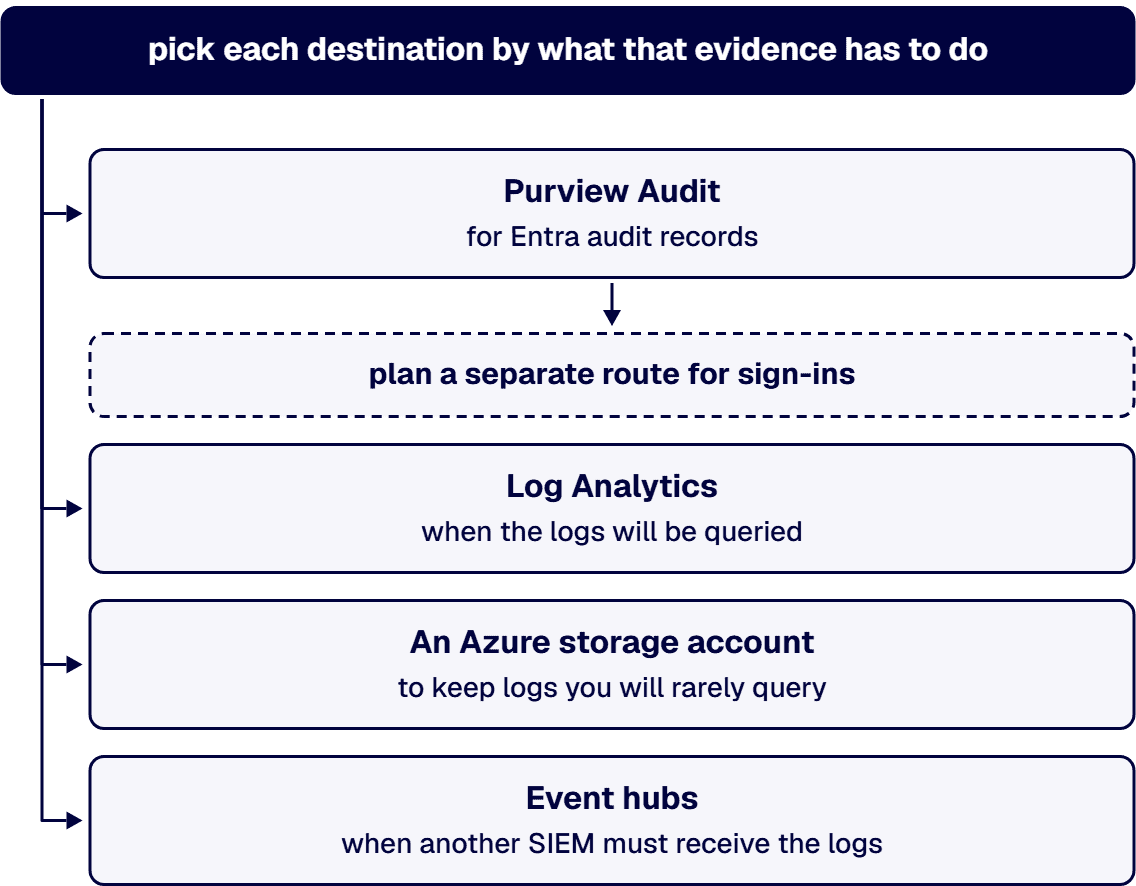
Purview Audit, for Entra audit records. Where the E5 condition above is met, the Microsoft Entra data retention page says “Organizations with Microsoft 365 E5, Office 365 E5, Microsoft Purview Suite, or E5 eDiscovery and Audit add-on licenses can also use Microsoft Purview Audit (Premium) to retain Microsoft Entra ID audit logs beyond the default period, providing an alternative to exporting logs to Azure Storage.” Microsoft’s Manage audit log retention policies page shows a Purview retention policy for the “User logged in” activity, but none of the Microsoft pages read for this guide says Purview keeps the full Entra sign-in logs, so plan a separate route for sign-ins.
Log Analytics, when the logs will be queried. Microsoft’s Manage data retention in a Log Analytics workspace page says “By default, all tables in a Log Analytics workspace retain data for 30 days, except for log tables with 90-day default retention.” It says you can “Extend the analytics retention period of tables with the Analytics plan up to two years.” and “extend the table’s total retention to up to 12 years.” It notes that “31 days of analytics retention are included in the ingestion price, lowering the retention period below 31 days doesn’t reduce costs.” Raising retention also covers data already in the workspace: “When you increase total retention, the new retention period applies to all data that was already ingested into the table and wasn’t yet removed.”
An Azure storage account, to keep logs you will rarely query. The integration options page describes a storage account as the ideal option when you do not plan to query the data often or need to store logs for compliance purposes. Retention there is no longer a diagnostic setting. Microsoft’s Migrate from diagnostic settings storage retention to Azure Storage lifecycle management page says “The diagnostic settings storage retention feature is deprecated. All retention functionality for this feature was disabled across all environments on September 30, 2025.” Set retention with a lifecycle management policy on the storage account, and treat a retention value on an older diagnostic setting as inactive. The same page says “Deleting a diagnostic setting doesn’t delete the logs in the storage account.”
Event hubs, when another SIEM must receive the logs. The integration options page says “If you use a non-Microsoft SIEM tool, we recommend setting up an Event Hubs namespace and event hub where you can stream your data.” When the Log Analytics workspace is also a Microsoft Sentinel workspace, Sentinel’s own retention and cost are a separate design question.
Every route has a running cost. Microsoft’s What are the Microsoft Entra activity log integration options? page says “There’s a cost for sending data to a Log Analytics workspace, archiving data in a storage account, or streaming logs to an event hub.” and “Changing an existing diagnostic setting might incur new charges.” For sizing, it says “Audit log events use around 2 KB of data storage” and “Sign-in log events use on average 11.5 KB of data storage”.
When a request list cites a regulation, read what the regulation says about duration before you set a retention period. The eCFR text below is current as of September 21, 2026.
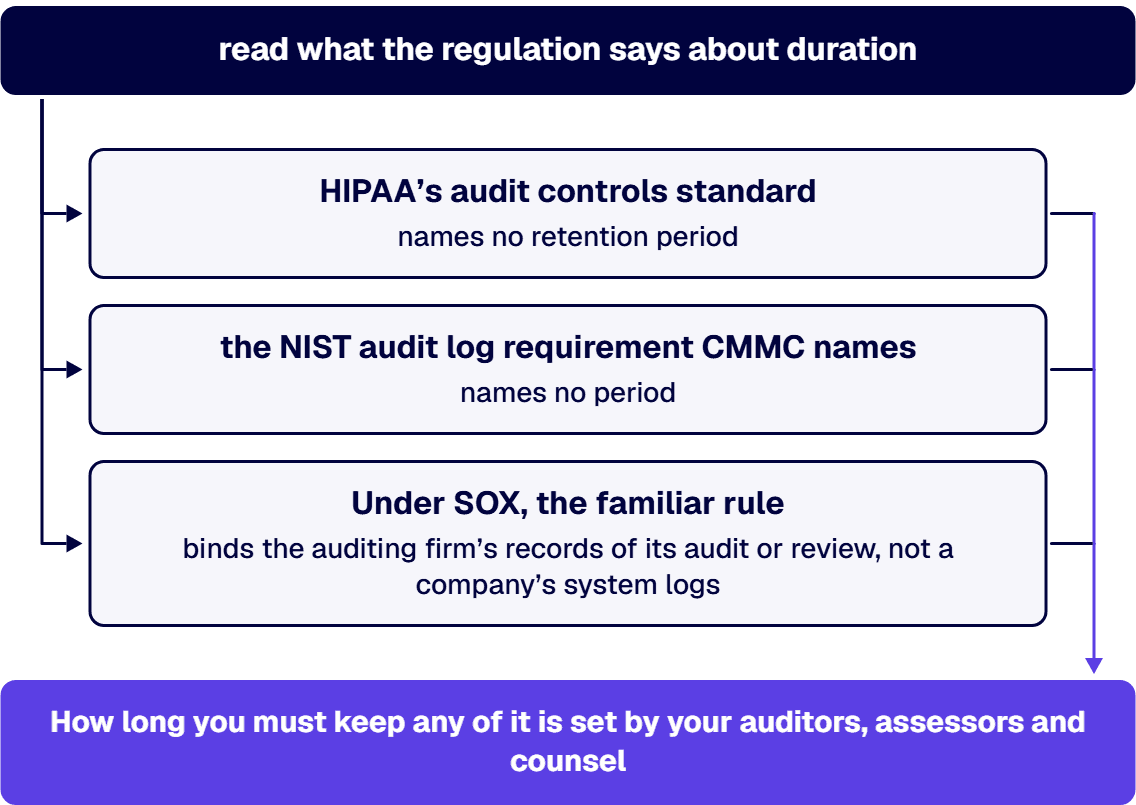
For HIPAA, 45 CFR 164.312 states: “(b) Standard: Audit controls. Implement hardware, software, and/or procedural mechanisms that record and examine activity in information systems that contain or use electronic protected health information.” It names no retention period. The six-year figure sits in 45 CFR 164.316: “(i) Time limit (Required). Retain the documentation required by paragraph (b)(1) of this section for 6 years from the date of its creation or the date when it last was in effect, whichever is later.” Paragraph (b)(1) covers written policies and procedures and a “written (which may be electronic) record of the action, activity, or assessment” the subpart requires. Whether a given log is documentation under that paragraph is for your counsel and your privacy and security officials to decide.
The CMMC rule, 32 CFR Part 170, lists AU.L2-3.3.1 among its requirements and names “NIST SP 800-171 R2” as incorporated by reference. Requirement 3.3.1 of NIST SP 800-171 Rev. 2, Protecting Controlled Unclassified Information in Nonfederal Systems and Organizations, reads: “Create and retain system audit logs and records to the extent needed to enable the monitoring, analysis, investigation, and reporting of unlawful or unauthorized system activity.” It names no period. NIST lists Rev. 2 as withdrawn on May 14, 2024 and superseded by Rev. 3; the CMMC rule still names Rev. 2. The six years in CMMC applies to assessment artifacts: 32 CFR 170.17 says “Artifact retention and integrity. The hashed artifacts used as evidence for the assessment must be retained by the OSC for six (6) years from the CMMC Status Date.” Section 170.16 carries the same six years for artifacts from a Level 2 self-assessment.
Under SOX, the familiar seven-year rule in 17 CFR 210.2-06 binds the auditing firm’s records of its audit or review, not a company’s system logs. No SOX text read for this guide sets a retention period for a company’s logs, so the window your auditors ask for, agreed with your control owners, is the working figure.
If the tenant sits in a US government cloud, confirm each service separately. Microsoft’s Microsoft Entra feature availability page says “Microsoft Entra ID Governance is available in the US Government community cloud (GCC), GCC-High, and Department of Defense cloud environments.” For Purview, Microsoft’s Plan for Microsoft Purview compliance and risk management solutions: GCC High deployments page lists “Log retention (1 year)” and “Longer term retention on audit logs (10 years)” under Audit (Premium) as “Available”, and Plan for Microsoft Purview compliance and risk management solutions: GCC deployments lists the same two rows as available.
Some teams answer an audit finding by streaming every log at full analytics retention, and that is often the wrong fix:
If nobody can say today where the tenant’s sign-in logs go or how long each destination keeps them, the gap needs an owner before the next look-back opens. The work is planning and scoping the retention design as a project: which logs, which route, and which retention per table or storage container. It does not include watching, reviewing or alerting on the logs as an ongoing service, or running a SIEM or a SOC.
The wider identity practice is Establish Identity as a Governed Enterprise Capability.
i3solutions took ownership of the control architecture against AC.L2-3.1.1 and the audit-log design against AU.L2-3.3.1 and delivered the evidence the C3PAO required. i3solutions governs identity and access for regulated Microsoft estates with senior, U.S.-based engineers and leaves an audit-defensible record. i3solutions is a Microsoft Systems Integrator with 30 years of experience implementing identity and access management solutions for enterprises in regulated industries.

US-Based | Est. 1997
© i3solutions. All rights reserved.
US-Based | Est. 1997
© i3solutions. All rights reserved.


