

Microsoft 365 Copilot licensing for an enterprise is a $30 per user per month add-on that requires a qualifying base plan such as Microsoft 365 E3 or E5. The governed all-in cost runs higher once you account for the compliance tier your framework requires, the tenant readiness work, and the adoption program that turns paid seats into measurable productivity.

Microsoft 365 Copilot licensing looks like a line item and behaves like an architecture decision. For the VP of IT or the IT Director at a regulated enterprise, the per-user add-on price is the easy part of the math. The expensive part is everything the license quietly assumes: a base plan that carries your compliance tooling, a tenant that is ready for an AI to read it, and an adoption program that turns paid seats into delivered work.
Treat Microsoft 365 Copilot licensing as the first control decision in your AI rollout, not as a price comparison. When a regulated enterprise buys the Copilot add-on, it is choosing how much of its existing Microsoft governance estate the assistant will be allowed to use, which audit and data-protection tooling will sit underneath it, and how exposed the tenant will be on day one. Those are commercial and compliance decisions a VP of IT has to defend, and they are decided by the license you attach Copilot to, not by Copilot itself.
The add-on is straightforward. Microsoft 365 Copilot for enterprise costs $30 per user per month on an annual commitment, and it requires a qualifying base plan such as Microsoft 365 E3, E5, Business Standard, or Business Premium, as published on Microsoft’s enterprise Copilot pricing page. All pricing here is current as of mid-2026; verify against Microsoft’s current pricing page before you commit, since Microsoft raised several base plans on July 1, 2026. What that single add-on price hides is that Copilot does not bring its own compliance controls. It reads across SharePoint, OneDrive, Teams, and Exchange using your existing permissions, and it is governed by your existing tooling. The license decides which tooling that is.
Copilot inherits the governance posture of the plan it sits on. That is the single most important sentence in any enterprise Copilot licensing conversation, and it is where the E3 versus E5 question stops being a budget line and becomes a compliance one.
Microsoft 365 E3, $39 per user per month since July 1, 2026 (it was $36), carries the controls most organizations think of as baseline: core Purview data loss prevention for Exchange, SharePoint, and OneDrive, manual sensitivity labels, Microsoft Entra ID P1, Defender for Endpoint P1, and audit with standard retention. For an organization with light regulatory exposure, E3 plus Copilot can be a defensible starting posture. The limits show up at the edges that regulated work lives in: endpoint DLP, DLP for Teams chat, automatic labeling with trainable classifiers, Insider Risk Management, Communication Compliance, and longer audit retention are not in E3.
For a regulated enterprise, several of the capabilities that only appear at the E5 tier are framework requirements rather than nice-to-haves. Endpoint DLP and DLP for Teams chat close the channels where an AI assistant is most likely to surface or move regulated content. Information Barriers, an E5 capability, is a working control for financial-services firms managing conflicts of interest. Communication Compliance and Audit Premium with one-year retention map directly onto the kind of evidence an examiner or assessor expects to see. When a control your regulatory framework names is only available at E5, the tier is no longer a discretionary choice. A modular path of E3 plus the Defender and Purview suite add-ons can close most of the gap without a full E5 commitment, and that comparison is exactly the work a readiness assessment should do before any seats are purchased.
The discipline is simple to state and easy to skip. Decide the compliance controls your framework requires first. Then choose the base plan that delivers them. Then add Copilot. Doing it in the other order, buying Copilot and discovering the controls are missing, is how organizations end up paying twice, once for the license and again for the emergency remediation that should have come first.
Price a governed Copilot deployment in four components, not one. The add-on is the most visible and usually the smallest as a share of the real number. Naming the other three is what separates a committee-ready budget from a sticker price. For the full cost breakdown, see What Does Microsoft 365 Copilot Really Cost: Licensing, Capacity, and Readiness.
| Cost Component | What It Covers | Budget Notes |
|---|---|---|
| Copilot add-on license | $30 per user per month for enterprise on annual commitment, qualifying base plan required. | Enterprise Agreement customers can often negotiate against list on volume; treat $30 as a ceiling. |
| Compliance tooling tier | The base-plan delta between what you run today and the tier your controls require. | E3 to E5 delta is roughly $21 per user per month at mid-2026 list; E7 at $99 bundles E5, Copilot, Agent 365, Entra Suite. |
| Readiness and governance work | Oversharing and permissions remediation, sensitivity labeling, DLP tuning, monitoring wired to the audit log. | Budget as a project with its own line, not folded into licensing. |
| Activation gap | The distance between licenses purchased and value realized after rollout. | The largest hidden waste in enterprise Copilot spend; sized by adoption program, not by license count. |
The seat price covers agents that licensed staff use inside Copilot Chat, Teams, and SharePoint for answers grounded in your tenant. Agents that take actions, serve unlicensed users, or run outside those surfaces draw Copilot Credits that Microsoft bills by the month. Microsoft’s Copilot Studio licensing documentation states that classic answers, generative answers, and Microsoft Graph tenant grounding from agents in Copilot Chat, Microsoft Teams, or SharePoint have zero-rated usage. Use outside that list is counted in Copilot Credits, the common currency across Copilot Studio capabilities.
How that use is paid for decides which cost you are exposed to. Microsoft sells Copilot Credits through pay-as-you-go meters, prepurchase plans, and Copilot Credit prepaid pack subscriptions. On the pay-as-you-go meter, your organization pays only for the actual number of Copilot Credits its agents use during the month, billed as a variable charge on whichever cost center owns the Azure subscription. On purchased capacity, unused Copilot Credits do not carry over to the next month, and if your usage exceeds your purchased capacity, technical enforcement applies and can result in service denial. The meter risks a charge no one budgeted; purchased capacity risks an agent the business depends on stopping before the month ends. Size the expected Copilot Credits and name the billing route before those agents go live. Copilot Cowork draws on the same credits, and Is Copilot Cowork Included in the Microsoft 365 Copilot License sets out that the seat unlocks Cowork while every task it runs is billed separately in Copilot Credits.
i3solutions delivers Copilot readiness, enablement, and agent development as governed programs: classified data, enforced boundaries, named owners, and evidence your compliance team can use.
The activation gap is the distance between licenses purchased and value realized. An organization buys 2,000 Copilot seats, switches them on, and twelve months later discovers that a few hundred people use it daily, several hundred tried it twice, and the rest never built it into how they work. The invoice did not care. You paid for 2,000 seats whether 200 people or 2,000 people used them.
This is not a technology failure. It is an adoption failure, and it is the most common reason a Copilot business case fails to show return. The fix is not more license. The fix is treating activation as a program with named owners, role-targeted rollout, and a feedback loop. Three levers move the number most reliably: a phased rollout that starts with the roles where Copilot has the clearest task fit, role-targeted licensing so seats land where they will be used, and a periodic seat-reclaim audit that pulls licenses back from users who are not engaging and redeploys them.
Put a number on the gap so the committee can see it. If a quarter of a 2,000-seat deployment is idle, that is 500 seats at $30 per user per month, roughly $180,000 a year of spend producing nothing, and that is before the base-plan delta riding underneath those seats. The activation program that closes the gap costs a fraction of the waste it prevents, which is why a governed rollout funds it on purpose rather than discovering it at renewal. None of those levers is exotic. All of them require someone to own the outcome after the seats are bought, which is precisely the work an ungoverned rollout skips.
Run a governed Copilot deployment as a named, four-phase sequence so each phase has a deliverable and an exit criterion the steering committee can see. i3solutions runs this as Discovery, Architecture, Build, and Optimize, and the structure is deliberately boring, because a rollout a committee can audit is a rollout that survives an audit.
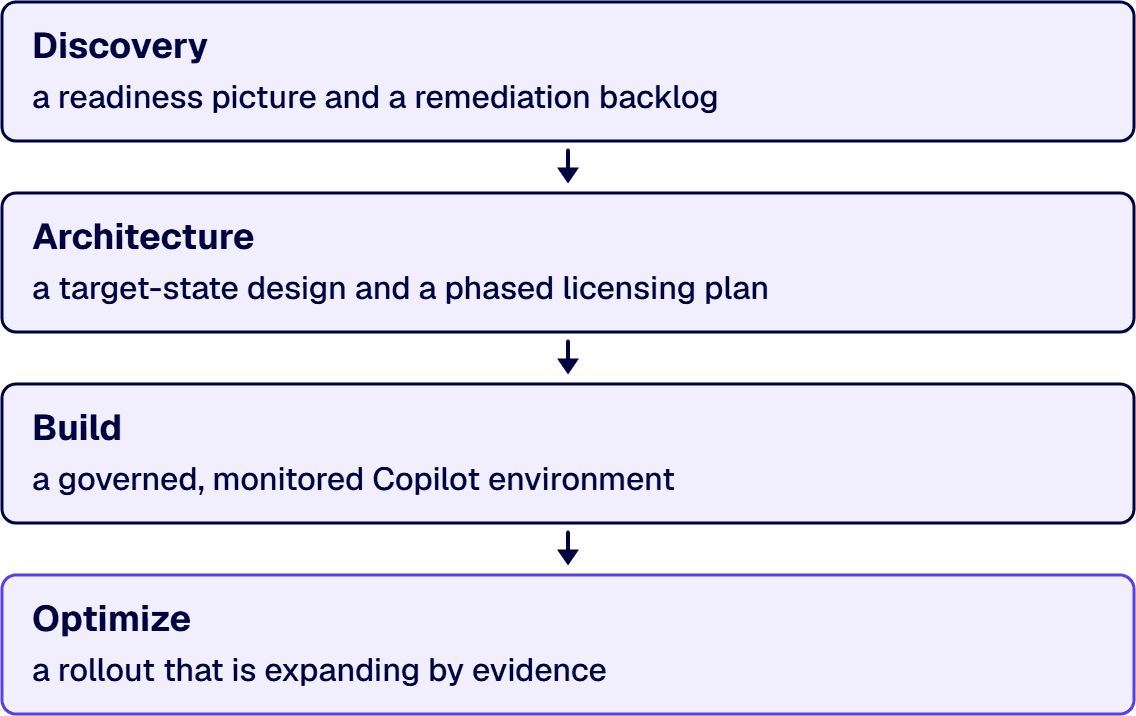
Inventory the tenant the way Copilot will see it. Where does sensitive content live, who can already reach it, which permissions are over-broad, and which compliance controls does your framework actually name. The deliverable is a readiness picture and a remediation backlog. The exit criterion is a documented oversharing and control baseline, the artifact an assessor will ask for later.
Decide the base plan and tier against the controls Discovery surfaced, design the sensitivity-labeling and DLP scheme, and define the rollout cohorts. The deliverable is a target-state design and a phased licensing plan. The exit criterion is a committee-approved architecture, including the explicit E3-plus-add-ons versus E5 versus E7 decision with its reasoning recorded.
Remediate oversharing, apply labels and DLP, wire monitoring into the audit log, and switch on the first cohort. The deliverable is a governed, monitored Copilot environment for the initial roles. The exit criterion is the first cohort live with controls verified, not assumed.
Run the adoption program, measure usage against the activation levers, and run the seat-reclaim audit on a cadence. The deliverable is a rollout that is expanding by evidence rather than by hope. The exit criterion is a measured adoption curve the business case can stand on. This is the phase the activation gap punishes when it is skipped.
A guide that only ever says buy is a sales pitch, not a decision aid. There are tenants where the right call is to wait, and naming them is part of earning the budget you do ask for.
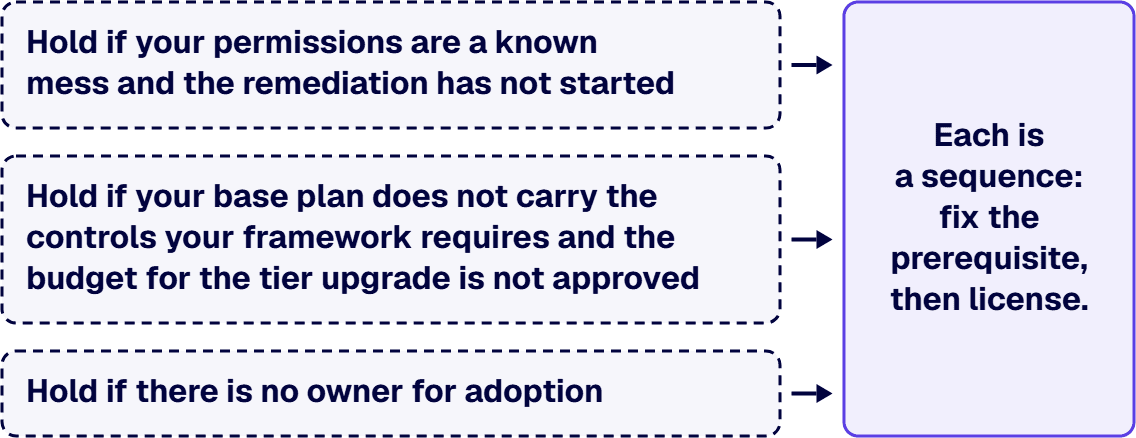
Hold if your permissions are a known mess and the remediation has not started, because Copilot will surface every over-broad share you have, faster than any human ever would, and a regulated organization does not want to discover its oversharing through an AI. Hold if your base plan does not carry the controls your framework requires and the budget for the tier upgrade is not yet approved, because licensing Copilot onto an undersized plan creates an audit gap with no audit trail. Hold if there is no owner for adoption, because seats with no activation program become the activation gap by default. None of these is a permanent no. Each is a sequence: fix the prerequisite, then license. The cost of waiting a quarter is small. The cost of a compliance finding traced to an ungoverned AI rollout is not.
If you bring in outside help for a Copilot rollout, evaluate the partner on the three dimensions that predict whether the deployment survives an audit, not on slide quality. First, regulated-sector delivery record: has the firm run governed Microsoft deployments in environments with real compliance obligations, and can it name the control families it worked against. Second, governance depth: does the partner lead with tenant readiness, labeling, and DLP, or does it lead with enabling features. Third, knowledge transfer: will your team be able to operate the environment after the engagement, or will you have bought a dependency.
Two patterns from regulated deployments show what governance-first looks like in practice. A defense contractor preparing for a CMMC assessment engaged i3solutions to enable Copilot only inside an enclave holding controlled unclassified information, with the 110 controls across 14 families of NIST SP 800-171 verified against the tenant before a single seat went live; the work was sequencing and evidence, not feature enablement. A financial-services firm under SOC 2 engaged i3solutions after an internal review flagged that Information Barriers and Communication Compliance were not yet proven against its E5 tier, because an assistant inheriting an unmonitored mailbox was the exact exposure the audit was looking for. In both, the license was the last decision, not the first, and the deliverable the buyer kept was the control evidence, not just a switched-on feature.
i3solutions is a Microsoft Solutions Partner with more than 1,500 Microsoft engagements delivered for regulated enterprises across aerospace, defense, financial services, and healthcare. Our Enterprise Delivery Assurance practice exists to keep complex Microsoft programs on-time, in-scope, in-production, with the governance and audit evidence regulated buyers are accountable for. We deploy Microsoft 365 Copilot the way an examiner would want it deployed: controls first, seats last.

Michael Branson co-founded i3solutions 30 years ago and brings executive, operational, and technical perspective to organizations working in complex, secure, and mission-critical environments. His insights focus on business process consulting, automation, data analytics, collaboration, secure operating models, and the operational discipline required to turn technology investments into practical business systems with measurable value.
Connect on LinkedInMicrosoft 365 Copilot licensing for an enterprise is $30 per user per month on an annual commitment as of mid-2026, and it requires a qualifying base plan such as Microsoft 365 E3 or E5. The figure to budget against, though, is the governed all-in cost rather than the add-on alone. That all-in number has four parts: the $30 add-on, any base-plan upgrade your compliance controls require, the one-time readiness and governance work to make the tenant safe for an AI to read, and the ongoing adoption program that turns paid seats into realized value. For a regulated organization the base-plan delta and the readiness work are often larger than the add-on itself, which is why a sticker-price comparison understates the real commitment.
You do not technically need E5 to add Copilot; E3, Business Standard, and Business Premium also qualify. The real question is whether the controls your regulatory framework requires are available on your base plan. Several controls that regulated organizations depend on, including endpoint DLP, DLP for Teams chat, Information Barriers, and Audit Premium retention, are E5 capabilities. If your framework names one of them, the tier becomes a requirement. A modular path of E3 plus the Defender and Purview add-ons can close much of the gap, and a readiness assessment should make that comparison explicit before you buy seats.
Microsoft 365 E7 became generally available on May 1, 2026 at $99 per user per month and bundles Microsoft 365 E5, Copilot, Agent 365, and the Microsoft Entra Suite into one agreement. For an organization already on or moving to E5 and adding Copilot, E7 can price below assembling those components separately, so it is worth a direct comparison rather than a reflex. It is aimed at enterprises that intend to operate AI agents at scale and want the governance and identity tooling for that in a single suite. Verify the current figure against Microsoft's pricing page before committing.
No. The consumer Copilot and Copilot Pro tiers are not built for compliance-bound organizations and are not the same product as the enterprise add-on. Microsoft states that Copilot Chat offers enterprise data protection for prompts and responses, and that its Data Protection Addendum does not apply to the web search queries Copilot generates. Enterprise Microsoft 365 Copilot is the version that grounds in your organizational data through your existing permissions, inherits your Microsoft 365 compliance commitments, and does not train foundation models on your data. For any regulated workload, the enterprise add-on on a qualifying base plan is the only appropriate license.
The activation gap is the distance between licenses purchased and value actually realized: seats that are paid for but never built into how people work. It is the most common reason a Copilot business case fails to show return, and it is an adoption problem, not a licensing one. Avoid it by treating adoption as a program with an owner: roll out in phases starting with the roles where Copilot has the clearest task fit, target licensing to where it will be used, and run a periodic seat-reclaim audit that redeploys idle seats. The levers are simple; what they require is someone accountable for the outcome after the seats are bought.
The hidden costs sit outside the seat price. The base-plan upgrade your compliance controls require, the readiness work before the first seat goes live, the adoption program that closes the activation gap, and metered agent use are the four that matter. Microsoft counts agent use in Copilot Credits once agents take actions, serve users without a Copilot license, or run outside Copilot Chat, Teams, and SharePoint. Purchased Copilot Credit capacity that runs out can end in service denial, and pay-as-you-go metering can produce a variable charge nobody budgeted; size expected credits and pick the billing route before agents go live.
Oversharing, unlabeled content, and ungoverned agents decide what an AI rollout exposes, and they are set before the first prompt. i3solutions' senior AI advisors work with enterprise IT leaders who need the readiness gaps closed under a scoped program.
Schedule an AI and Copilot Scoping Discussion
US-Based | Est. 1997
© i3solutions. All rights reserved.
US-Based | Est. 1997
© i3solutions. All rights reserved.


