
By Scot Johnson, Founder / CEO, i3solutions. Scot Johnson co-founded i3solutions 30 years ago with a focus on expert-led delivery, strategic advisory, and complex Microsoft-centered solutions for organizations where technology decisions carry operational, financial, and mission risk.
To migrate SharePoint to Microsoft 365 without breaking permissions and governance, map permissions before you move a single site: inventory every site collection’s unique permissions, broken inheritance, orphaned users, and legacy Active Directory groups, then decide deliberately which of those structures should survive the move and which should be replaced by Microsoft 365 groups and a governed target model. Permissions break in migrations for two reasons: legacy identities that have no valid mapping in the target tenant, and inheritance structures the migration tool flattens silently. Both are findable in assessment, before they become an outage.
That is the answer in two sentences and a warning. The rest of this page is the sequence that preserves access wave by wave, the restructure or carry-over decision that determines whether the migration retires permission sprawl or relocates it, and the tenant governance work that has to be in place before broad cutover.
SharePoint Server estates accumulate years of item-level permission exceptions, broken inheritance, and Active Directory groups whose members left long ago. Migration tooling copies what it can resolve and silently drops what it cannot, which is why the failure surfaces as a help desk queue two days after cutover rather than an error during the move. The second failure is subtler: governance features that did not exist on the server side, such as tenant sharing policies, sensitivity labels, and external access rules, default to values nobody chose. An estate can arrive with every permission technically intact and still be ungoverned in ways an auditor will find.
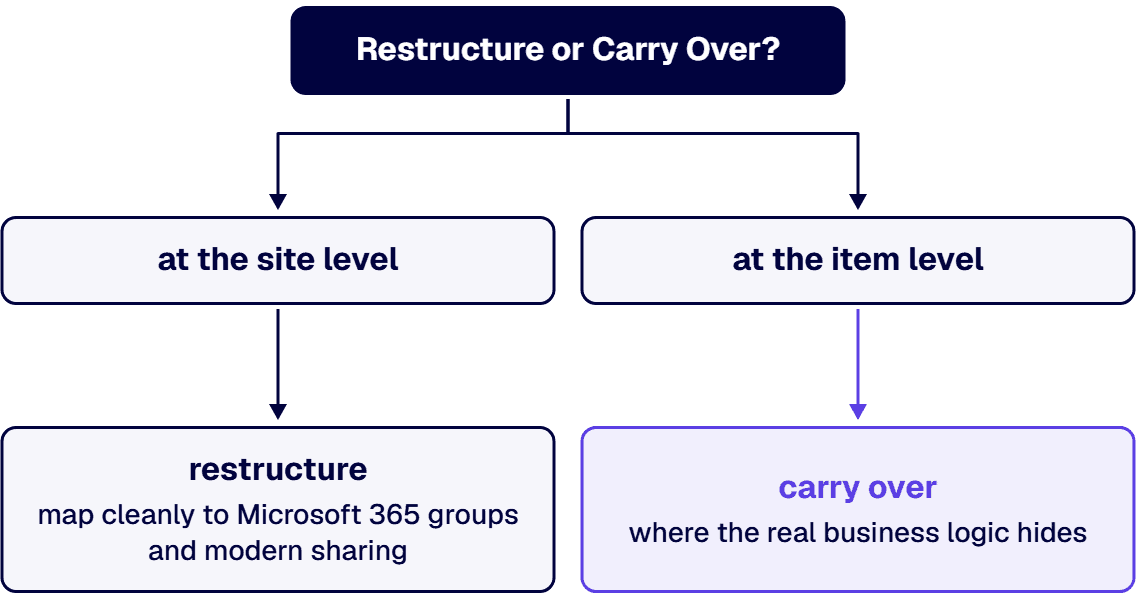
The default answer is restructure at the site level and carry over at the item level. Site-level structures map cleanly to Microsoft 365 groups and modern sharing, and rebuilding them is cheap during a migration and expensive afterward. Item-level exceptions are where the real business logic hides, and flattening them wholesale is how a migration breaks the one library a contracts team depends on. The inventory from step one is what lets you make this call per site instead of guessing estate-wide.
i3solutions has run SharePoint migrations since 1997, including staged multi-version paths from SharePoint 2010 and 2013 through an interim 2016 farm into SharePoint Online, and moves into GCC and other regulated configurations where the permission model is an audited artifact rather than an afterthought. i3solutions plans and runs governed Azure and Microsoft 365 migrations with senior, U.S.-based teams, and the usual first step is a SharePoint Migration Review that maps your environment, flags the risks, and sequences the waves. The full practice is described on our SharePoint migration services page, with migration consulting available when you want the plan reviewed before committing to execution.
Permissions, in two forms: legacy identities and AD groups that have no valid mapping in the target tenant, and item-level permission exceptions that migration tooling flattens without an error. Both are detectable in a pre-migration inventory, which is why assessment is the step that decides how the cutover goes.
During, using the migration as the forcing function. Cleaning up first on the server side means doing the work twice, since the target model uses Microsoft 365 groups and modern sharing that do not exist on the source. Inventory first, design the target model, and retire the sprawl as each wave moves.
Set tenant-level governance before broad cutover, not after: sharing policies, sensitivity labels, external access rules, and site provisioning. A migrated estate without provisioning rules starts sprawling on day one, and retrofitting governance onto an active tenant is harder than arriving with it.
Yes, with staging. Very old versions cannot jump directly to SharePoint Online, so the path runs through an interim farm, and the permission inventory has to be validated at each hop. i3solutions has run staged multi-version paths from SharePoint 2010 and 2013 through an interim 2016 farm into SharePoint Online.
Scope drives it, and compliance scope drives it hardest. Full migration project cost for defense contractors with SharePoint customizations and CMMC compliance scope typically lands in the $100,000 to $300,000 range. A migration review scopes the real number for your estate before you commit.
It is the fastest high-value step in the project: automated tooling enumerates the estate, and the analysis effort scales with how many sites carry unique permissions rather than with raw content volume. It runs inside the assessment phase, before any migration wave is scheduled.

US-Based | Est. 1997
© i3solutions. All rights reserved.
US-Based | Est. 1997
© i3solutions. All rights reserved.


