
By Michael Branson, Founder and COO, i3solutions
After an AI agent goes live, an accountable operator maintains four things: the knowledge it reads, the identity it runs under, the policies that fence it, and the change process that ships new versions. In a Microsoft-centric estate, that operator manages Copilot Studio agents through the Power Platform admin center (data policies, Copilot Hub credit caps, Managed Environments), governs identity and access in Microsoft Entra, monitors activity through Microsoft Purview audit logs and Microsoft Sentinel alerts, and controls change with Power Platform pipelines and deploy from Git. Data freshness comes from re-grounding the agent’s knowledge sources and honoring sensitivity labels. Security comes from DLP data policies, the automatic security scan, and customer-managed keys. Lifecycle comes from environment separation and versioned releases. Most regulated organizations run this as a governed operate-phase subscription with a named senior architect, not an ad hoc help desk. i3solutions runs a governed Power Platform for a federal defense agency supporting roughly 10,000 personnel across about 180 locations, which works because it is governed, not despite it.
The sections below name the admin surface for each maintenance job, because “who maintains the agent” is really four questions: who keeps its data fresh, who secures it, who controls change, and who pays for what.
An agent is only as current as the documents and data it is grounded on, so knowledge review belongs on the operations calendar, not in a backlog. Re-grounding happens on a defined, recurring cycle owned by the team that owns the agent. The platform’s labeling controls determine what the agent may surface.
Microsoft’s platform controls carry most of the enforcement load here. When a Copilot Studio agent uses SharePoint content as a knowledge source, the agent’s responses honor the highest sensitivity label applied to that content, so a mislabeled response is a labeling defect you can find and fix, not a mystery (see Copilot Studio security and governance documentation). For regulated and federal estates, administrators can also enforce geographic data residency and disable data movement outside the United States for generative AI features.
Neither Microsoft’s documentation nor a responsible operator prescribes one universal re-grounding interval. The right cadence depends on how fast the underlying content changes and what the agent is trusted to answer. What matters is that the cadence is written down, assigned to a named owner, and reviewed when the agent’s scope changes.
Treat a live agent the way you treat any other production identity: it gets an identity, access rules, a fence, and a log. In a Microsoft estate, each of those has a named home.
Monitoring is where most in-house teams thin out, because it is unglamorous and permanent. It is also where the gap closes: i3solutions Azure Sentinel monitoring reduces high-risk security findings by 85% or more.
Ship agent changes the way you ship code: separate environments, versioned releases, and a deployment history an auditor can read. An agent edited live in production has no rollback point and no record of what changed before an answer went wrong.
Managed Environments in the Power Platform admin center carry the operational controls for this: environment groups, sharing limits, solution checker enforcement, weekly usage insights, extended backup, and export to Azure Application Insights (see Managed Environments overview). Power Platform pipelines and GitHub-backed deploy from Git give you versioned releases across development, test, and production with an auditable deployment history.
This is standard application lifecycle management applied to agents, and it is where an experienced operator earns their keep. i3solutions delivery includes ALM practices with Power Platform pipelines or Azure DevOps integration, environment separation strategies, and change control processes. The paper trail is part of the deliverable. An i3solutions SharePoint consulting engagement produces named deliverables: a governance documentation package, architecture artifacts, and runbooks. That documentation package is what makes the operate phase board-defensible rather than tribal knowledge.
Plan for two Microsoft licenses plus pooled capacity, then a separate line for the people who operate the agents, whether that is an internal platform team or ongoing post-implementation support. On the Microsoft side, Copilot Studio requires a tenant license (“Copilot Studio”) and a per-user “Copilot Studio User License,” purchased in the Microsoft 365 admin center under Billing, then Purchase services, then Add-ons (see Copilot Studio licensing requirements). Capacity is pooled across the tenant as billed sessions and Copilot Credits, per-agent consumption is visible to administrators, and pay-as-you-go credit caps are set in Copilot Hub. Managed Environments are entitled with Copilot Studio licenses. Microsoft does not publish a fixed per-user dollar figure on that documentation page; it points to the Copilot Studio Licensing Guide and a usage estimator, so treat any hard per-user number you read elsewhere with suspicion.
The operate-phase cost is the number most budgets miss. At i3solutions, Governance Subscription engagements come as two distinct offerings. Matrix-refresh: Governance Subscription engagements run from $18,000 to $42,000 per quarter, refreshing the recommendation matrix as the estate evolves. Named-architect governance: Governance subscription engagements start at $18,000 per month covering ongoing governance framework maintenance, compliance alignment monitoring, and named senior architect availability. For organizations still deciding whether their tenant is ready for agents at all, there is a scoped precursor. An i3solutions Microsoft 365 Copilot readiness engagement typically runs $18,000 to $35,000.
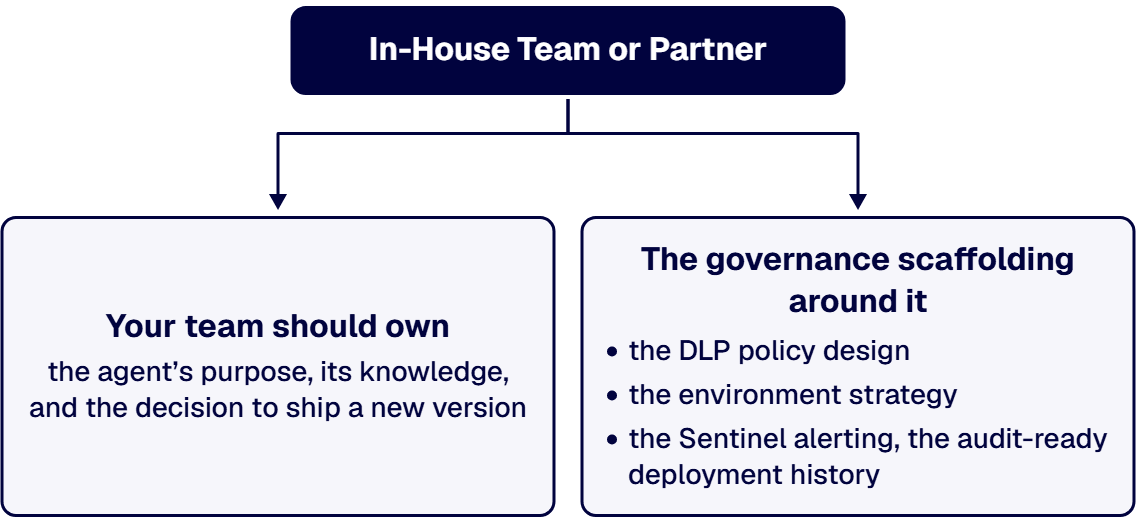
Keep accountability in-house and borrow the pattern recognition. Your team should own the agent’s purpose, its knowledge, and the decision to ship a new version. The governance scaffolding around it (the DLP policy design, the environment strategy, the Sentinel alerting, and the audit-ready deployment history) is a pattern a specialist has already built many times and your team should not have to invent from scratch.
That is the case for a partner in the operate phase, and it is a resume question as much as an architecture question. When an auditor or a board asks who maintains the AI agents and how you know they are secure, the defensible answer is a named operator, a documented cadence, and artifacts. i3solutions has been a Microsoft Partner with 30 years of enterprise technology delivery experience. i3solutions has completed more than 1,500 Microsoft platform implementations. i3solutions has implemented governance frameworks for organizations managing 200+ integrations across Microsoft ecosystems. Michael Branson co-founded i3solutions 30 years ago and brings executive, operational, and technical perspective to organizations working in complex, secure, and mission-critical environments.
If you are building the agent first and asking the operations question early, that is the right order. Start with our custom AI Copilot development services, where the operate phase is designed in from the first architecture decision rather than bolted on after launch.
If the agents are already live, bring what you have: the agent inventory, the environment layout, and whatever change record exists. A thirty-minute scoping conversation is usually enough to identify whether the gap is policy, monitoring, or lifecycle, and what closing it would take. That conversation also produces the artifact set your team needs before bringing a remediation case to committee, so it is worth having before any commitment.
A named, accountable operator, whether an internal platform team or a partner under a subscription with named accountability. The role covers four jobs: keeping knowledge sources fresh, managing identity and security policy, controlling versioned change, and managing license capacity and cost. An agent with no named operator degrades quietly until an answer goes wrong in front of a user.
Re-ground its knowledge sources on a defined, recurring review cycle owned by a named person, and rely on sensitivity labels for enforcement: a Copilot Studio agent’s responses honor the highest sensitivity label applied to its SharePoint knowledge content. No universal interval fits every agent; set the cadence by how fast the source content changes and revisit it when the agent’s scope changes.
Identity and access run through Microsoft Entra, with Conditional Access and role-based or attribute-based control via the Microsoft Agent 365 control plane. Data policies in the Power Platform admin center fence knowledge sources, connectors and actions, HTTP requests, channels, and triggers. An automatic security scan flags data exfiltration risk before publish, customer-managed keys and Customer Lockbox cover encryption and access approval, maker audit logs land in Microsoft Purview, and activity alerting runs through Microsoft Sentinel.
Copilot Studio takes a tenant license plus a per-user Copilot Studio User License, purchased in the Microsoft 365 admin center under Billing, then Purchase services, then Add-ons. Capacity is pooled across the tenant as billed sessions and Copilot Credits, with per-agent consumption visible and pay-as-you-go credit caps set in Copilot Hub. Microsoft’s licensing documentation points to its Licensing Guide and usage estimator rather than publishing a fixed per-user price.
At i3solutions, Governance Subscription engagements come as two distinct offerings. Matrix-refresh: Governance Subscription engagements run from $18,000 to $42,000 per quarter, refreshing the recommendation matrix as the estate evolves. Named-architect governance: Governance subscription engagements start at $18,000 per month covering ongoing governance framework maintenance, compliance alignment monitoring, and named senior architect availability. An i3solutions Microsoft 365 Copilot readiness engagement typically runs $18,000 to $35,000.
Keep ownership of the agent’s purpose and content in-house; use a partner for the policy design, monitoring, and change control patterns that a specialist has already built repeatedly. The test is auditability: if you cannot show a deployment history, a policy record, and a named operator today, a structured operate-phase engagement closes that gap faster than hiring for it.
Usually it can be repaired. Distrust tends to trace to three fixable things rather than to the agent itself: what it is grounded on, whether it may answer from the model’s general knowledge when no source covers the question, and the lack of a fixed test set. Narrow the knowledge sources to approved, current content with correct permissions. For regulated uses, turn off Copilot Studio’s Allow ungrounded responses setting, which blocks any response from a turn where the agent used no knowledge source or tool. Write a test set of real questions with expected responses and run it after every change. Start over only when the agent sits in an environment with no separation and no solution to move it, or rests on sources that cannot be governed.

US-Based Microsoft System Integrator | Est. 1997
© i3solutions. All rights reserved.
US-Based Microsoft System Integrator | Est. 1997
© i3solutions. All rights reserved.


