
By Michael Branson
When the access rule you have to enforce changes while the person’s job stays the same, no role can express it: start with RBAC for standing access, and add ABAC where project, data classification, time or location has to gate the decision. PAM is a separate control layer for privileged accounts, whichever model governs ordinary access.
An assessor has asked why everyone holding the same job title holds the same access, or why administrative rights sit open with nothing time-boxing them. The question arrives attached to that event, not to curiosity, and the answer has to be a model rather than a product name. Getting it wrong is expensive in both directions. Building attribute-level policy into an estate whose constraints are already expressible as roles slows every access request and buys nothing an auditor scores. Treating privileged access as ordinary access with stricter approval leaves standing administrative rights exactly where an assessment finds them.
What follows is the decision rule, the boundary between identity and access management and privileged access management, the single-sign-on question that gets folded into this one, and the counter-case for leaving your current model alone. Which platform enforces the model, and which vendor you buy it from, are separate decisions that other pages own.
Role-based access control grants access by what someone is: a job function, a position, a group. It maps cleanly onto an organization chart, it is straightforward to review, and it is the shape an assessor is used to reading first. Attribute-based access control grants access by the conditions in play at the moment of the request: which project the record belongs to, how the data is classified, where the request comes from, when it arrives.
The decision rule is not which model is more advanced. It is whether a stable role can state the rule you actually have to enforce.
Start from the constraint, not from the model. Write down the access rule your assessment finding demands, in the words the finding uses. If that rule reduces to a job function, RBAC expresses it and anything richer is machinery you will maintain for no scored benefit. If the rule contains a condition that changes while the person’s job stays the same, a project boundary, a classification level, a time window, a location, then no stable role expresses it and attribute-based policy is what the constraint is asking for.
Three inputs move the answer, and they can disagree:
When two of those disagree, the directory settles it. In practice that looks like a project-code or classification attribute nobody updates when a person moves: the policy keeps granting against the stale value, and the access review export cannot show why the grant was right on the day it was made. Attribute-based policy written against attributes the directory does not reliably hold is not a stronger control than a role; it is an undocumented one. Fix the attribute governance first, or express the rule as a role and accept the coarser grain, and say in the record which of the two you chose and why.
Roles carry standing access, and attribute conditions are layered on the narrow set of decisions a role genuinely cannot express. That hybrid is the answer the constraint test produces whenever the role model already covers the standing grants and the exceptions are still countable. The failure mode is choosing globally when the constraint was local.
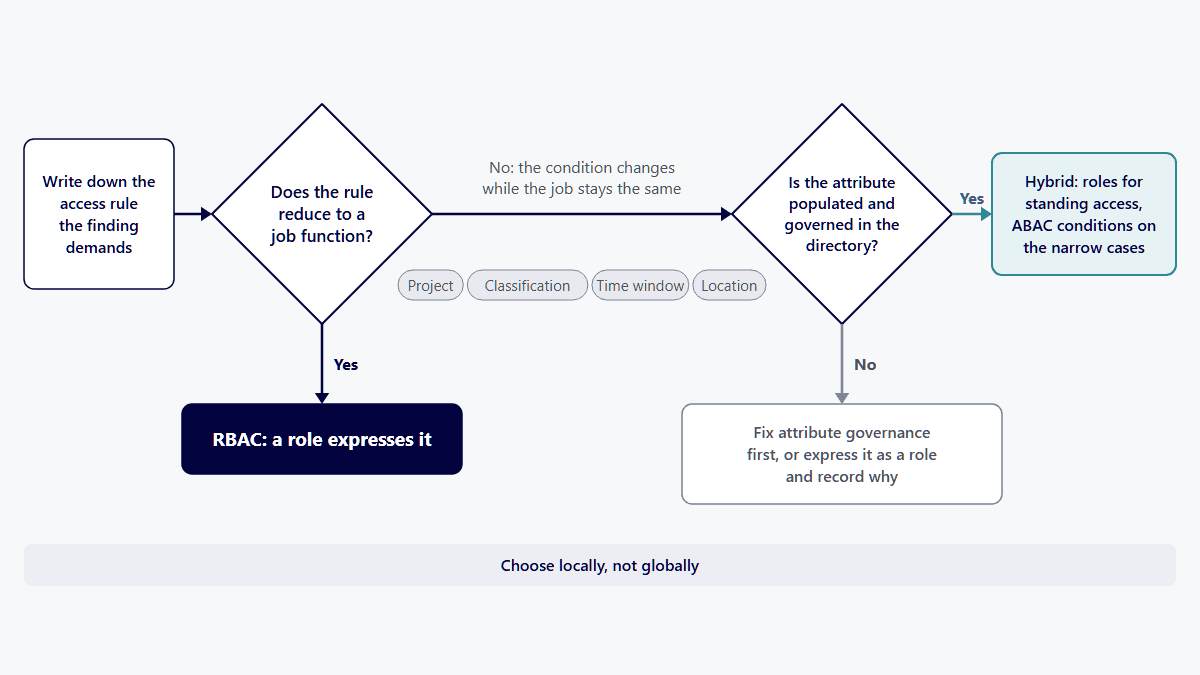
In Azure, attribute-based access control is not a separate system: Microsoft describes Azure ABAC as building on Azure RBAC by adding conditions to role assignments, and for data access those conditions currently reach only blob storage and queue storage data actions. For the rest of Azure authorization, role assignments carry access, so the RBAC-first rule above holds.
Microsoft’s page “What is Azure attribute-based access control (Azure ABAC)?” (last updated May 19, 2025) sets that scope: “Currently, conditions can be added to built-in or custom role assignments that have blob storage or queue storage data actions.” The same page states what a condition does: “A condition filters down permissions granted as a part of the role definition and role assignment.” A condition narrows what a role grants; it adds nothing the role does not already carry.
A condition can also read attributes on the person making the request. Microsoft’s table of condition features lists “Use custom security attributes on a principal in a condition” with the status GA and the date November 2023. In this estate, then, the attributes the directory-settles-it rule above applies to are Microsoft Entra custom security attributes, and a condition written against one that no one maintains is the undocumented control that rule warns about.
This is also where the two halves of this page meet. Microsoft states: “You can also add conditions to eligible role assignments using Microsoft Entra Privileged Identity Management (Microsoft Entra PIM) for Azure resources.” The attribute narrows what a borrowed role reaches; the eligible assignment bounds when it is held.
In an Azure and Microsoft Entra estate, Microsoft’s own documentation puts three practical bounds on this decision: where role assignment conditions work today, how many role assignments a scope can hold, and which license each control needs.
Where conditions work today. Microsoft’s page “Authorize access to Azure Blob Storage using Azure role assignment conditions” (last updated July 8, 2025) states: “Azure attribute-based access control (Azure ABAC) is generally available (GA) for controlling access to Azure Blob Storage, Azure Data Lake Storage, and Azure Queues using request, resource, environment, and principal attributes in both the standard and premium storage account performance tiers.” The same page adds: “Currently, the list blob include request attribute and snapshot request attribute for hierarchical namespace are in PREVIEW.”
What a condition can and cannot do. Microsoft’s page “What is Azure attribute-based access control (Azure ABAC)?” (last updated May 19, 2025) names role assignment volume as one reason to use conditions: “In these scenarios, you could potentially add conditions to use significantly fewer role assignments.” The same page sets the limit of the tool: “You cannot explicitly deny access to specific resources using conditions.” A condition narrows what a role assignment grants; a requirement to block access outright is not met by adding one.
How far roles alone scale. Microsoft’s page “Troubleshoot Azure RBAC limits” (last updated October 15, 2025) states: “Azure supports up to 5000 role assignments per subscription.” One level up, it states: “Azure supports up to 500 role assignments per management group.” Neither ceiling moves: “The 5000 role assignments limit per subscription is fixed and cannot be increased.” The same page notes: “Eligible role assignments and role assignments scheduled in the future do not count towards this limit.” Those two ceilings are the Microsoft-documented point at which adding more role assignments stops being an option and a condition, or a different scope design, has to do the work.
Which license the Entra side needs. Microsoft’s page “Overview of role-based access control in Microsoft Entra ID” (last updated June 1, 2026) states: “Using custom roles require a Microsoft Entra ID P1 license for every user with a custom role assignment.”
Microsoft’s page “Microsoft Entra ID Governance licensing fundamentals” (last updated July 29, 2026) states: “You need either Microsoft Entra ID Governance licenses or Microsoft Entra ID P2 licenses to use PIM and all of its settings.” That is the license behind the eligible assignments described above.
The attributes a condition reads carry their own terms. Microsoft’s page “What are custom security attributes in Microsoft Entra ID?” (last updated October 28, 2024) lists custom security attributes as “Available in all editions of Microsoft Entra ID”, and its limits table reads “Attribute definitions per tenant 500”, for active attributes, and “Attribute values assigned per object 50”. An attribute scheme has to fit inside those numbers before a condition can depend on it.
Attributes are only as reliable as the directory that holds them, so the identity estate underneath matters to this choice. i3solutions regularly delivers Okta to Microsoft Entra ID migrations for enterprises.
If the open question is really which platform enforces this in a hybrid estate, that is a different decision and it is answered at Which IAM Platforms Fit a Complex Hybrid Enterprise: How to Decide. If it is really which vendor, Okta vs Entra ID: What’s the Difference for Enterprise IT? owns that comparison.
Identity and access management answers a standing question: who is entitled to what, and it keeps that entitlement current as staff arrive and move on. Privileged access management answers a temporary one: how administrative privileges are elevated for a single named task, what bounds them, and what they leave in the record.
The boundary is not the size of the permission. It is whether the access is meant to be held or borrowed.
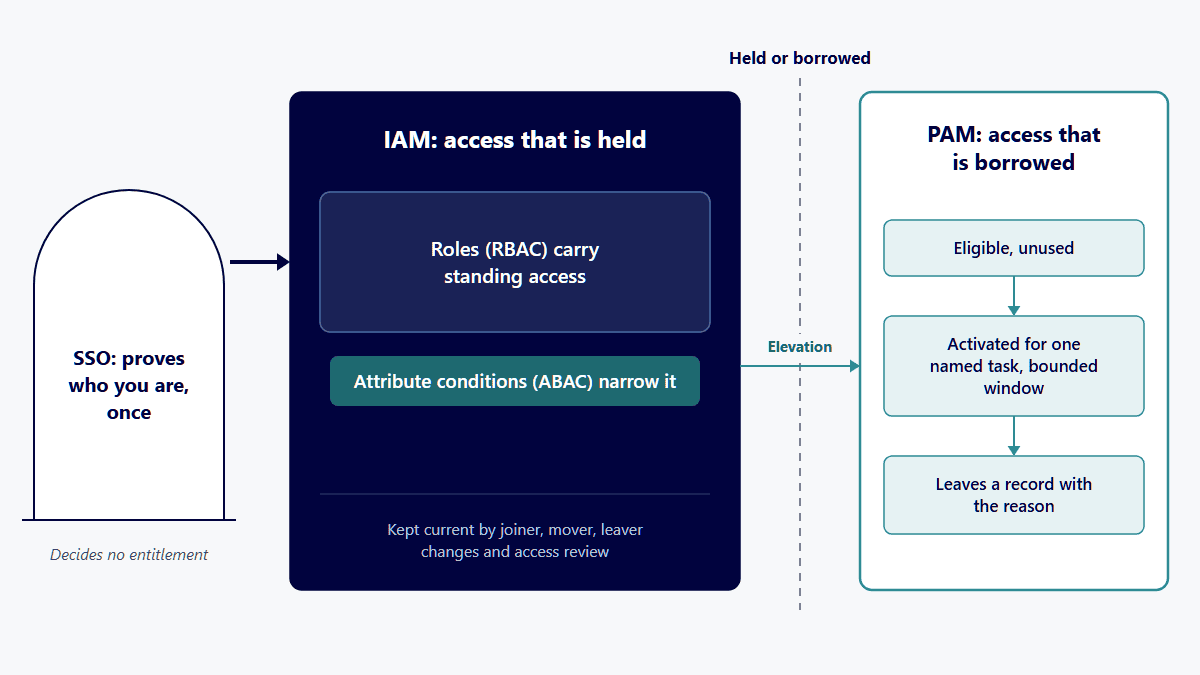
An account that holds administrative rights permanently is an identity and access management object with an unsolved privileged access problem. The same rights, requested against a named task, granted for a bounded window, and logged with the reason, are a privileged access management object. The model underneath does not change that. Roles and attributes describe standing access. Elevation sits outside both.
This is why “we already have RBAC” does not answer a finding about administrative accounts. That finding is not about who holds the rights. It is that the rights are standing, that nothing expires them, and that the audit trail cannot show why any particular use of them happened. A role grants; it neither time-boxes nor records intent.
Practically, the boundary shows up as a small set of questions with directory-level answers: which accounts hold administrative roles today, whether any of those assignments are permanent, whether an elevation leaves a record naming the task, and whether the access review that covers ordinary access covers these accounts on the same cadence. Those answers come out of the directory’s own access review and role assignment exports, not out of a policy document.
Privileged access management tooling is a category, not a required purchase. Some estates satisfy the control with the directory features they already license and a governed process around them; others need dedicated tooling because the privileged population or the session-recording requirement outgrows what the directory does. The criterion is what the directory can already do: if it can bound an elevation to a named task, hold it behind an approval, and leave a record naming the reason, a governed process over the features you already license closes the control. If it cannot, or if a recorded session is an assessment obligation, dedicated tooling is the answer. Draw the boundary first, then run that test.
In Microsoft Entra ID, identity and access management is who holds which role and group assignments, kept current as people join, move and leave, and recertified through access reviews. Privileged access management starts where an administrative role is made eligible rather than active in Privileged Identity Management, so rights are borrowed for a bounded window and leave a record.
Microsoft’s own two assignment types draw the held-or-borrowed line this page draws above. Its page “What is Microsoft Entra Privileged Identity Management?” (last updated April 23, 2026) states: “Eligible assignments require the member of the role to perform an action to use the role.” It also states: “Active assignments don’t require the member to perform any action to use the role.” In Entra terms, then, an administrative role left as an active assignment is the unsolved privileged access problem described above, and the same role assigned as eligible is where privileged access management takes over.
IAM and PAM side by side in a Microsoft Entra estate
What Microsoft Entra ID Governance adds on the identity and access management side is covered at Microsoft Entra ID Governance for Regulated Enterprises: Product Scope, Licensing, and Audit-Defensible Implementation. Whether Privileged Identity Management alone is enough for a given pr
No. Single sign-on is an authentication convenience: it lets one verified session serve many applications, so a person proves who they are once instead of repeatedly. Identity and access management is the surrounding discipline: it settles what the verified person may reach, keeps that settlement current, and produces the record.
Single sign-on sits in front of whatever access model identity and access management enforces. It makes access easier to use and easier to observe, because sign-in activity lands in one log instead of scattering across applications. It decides nothing about entitlement. An estate with excellent single-sign-on coverage and no access review has solved the front door and left the question of who should be inside unanswered.
The practical consequence for the access-model decision: single sign-on coverage does not argue for or against RBAC or ABAC, and it leaves the privileged access question untouched. Administrative access reached through a single-sign-on session is still standing administrative access.
Platform-level coverage of single sign-on, multifactor authentication and access governance on one of the major identity platforms is covered at Authentication & Identity Solutions With Okta.
An assessor working from CMMC, FedRAMP or HIPAA control language will not accept a bare model choice as the answer. Each regime expresses its access expectations in its own control catalog or rule text, in its own vocabulary, at its own level of prescription, and choosing a model does not substitute for reading the control text that applies to you.
What they have in common is the shape of the record an export has to show. Access is given on purpose. The grant can be reviewed. Privileged use is time-limited and leaves a trace. And the whole picture comes out of a system export instead of being reconstructed from memory. A model that produces that record defensibly is defensible. A model that cannot is a finding, however modern it is.
The determination is not ours to make and it is not yours to infer from a page. Which controls apply to your environment, at which level, and what satisfies them for your assessment is a question for your assessor, your contracting officer, or the applicable control text itself. Bring them the model you are proposing and the review export it produces, and let them rule.
The narrower control-catalog question that comes up alongside this one, whether multifactor authentication is required in a given baseline, is answered separately at MFA and NIST SP 800-53: Your Baseline Decides, Not the Catalog.
i3solutions governs identity and access for regulated Microsoft estates with senior, U.S.-based engineers and leaves an audit-defensible record. i3solutions has deep experience implementing identity governance for enterprises in aerospace and defense manufacturing, financial services, and healthcare, including environments with CMMC and ITAR obligations.
One published engagement is available to read in full, including its scope and its own account of what it delivered: Improving IT Operations and Security With Okta.
What is not attested here, said plainly because the alternative is implying it. No time saving, cost figure, adoption percentage, user count, engagement count or delivery duration is claimed here for any of that work. Figures of that kind exist for specific engagements, they belong to those engagements, and attaching one to a different engagement would misstate both. Where a number matters to your decision, ask for it against a named engagement and read it there.
The wider identity and access governance picture, the capability question and not the model decision, sits at Establish Identity as a Governed Enterprise Capability.
The honest counter-case, because both over-corrections are common.
RBAC alone is enough when the constraint is genuinely role-shaped. If access follows job function, if the exceptions are few enough to name, and if the access review over those roles produces a clean export, attribute-based policy adds maintenance and audit surface without changing what an assessor finds. The right move is to keep the model and fix whatever made the finding, which is review cadence or joiner-mover-leaver hygiene rather than the model itself.
Dedicated privileged access management tooling is premature when the privileged population is small enough to govern by process. If every account holding an administrative role can be listed from a single directory export and reviewed one at a time, if the directory already supports bounded elevation with an approval and a record, and if nothing in your assessment requires session recording, then a governed process over existing features closes the control. Buying tooling first produces a product deployment with the original problem intact, because the tool inherits whatever the directory could not tell it about who should hold what.
The condition that flips both of these is scale you cannot enumerate. When nobody can list the privileged accounts from an export, or when the exception list to the role model has stopped being listable, the process answer has already failed and the tooling question is real.
When an assessor asks why everyone with the same job title holds the same access, start with RBAC for standing access and add ABAC only where a role cannot express the constraint, such as a project boundary, a data classification, a time window or a location. The estate ends up hybrid wherever roles carry the bulk of it and only a few decisions need a condition. Where attribute-based policy would run against directory attributes nobody governs, express the rule as a role instead and record why.
A joiner or a leaver changes who holds standing access; an administrator borrowing rights for one task changes nothing about who holds what. Identity and access management owns the first question, deciding who holds standing access to what and keeping that answer current as people join and move on. Privileged access management owns the second, deciding how privileges are elevated for one named task, how long they last, and what record they leave. The boundary is whether access is held or borrowed, not how large the permission is.
The gap shows up when someone asks who is entitled to what and the only answer on hand is that everyone signs in once. Single sign-on lets one verified session serve many applications. Identity and access management decides what the verified person is allowed to reach and produces the access review record behind it. SSO sits in front of the access model; it settles no entitlement question.
No, and the difference surfaces the day an access review is due. Single sign-on solves how often a person proves who they are. Identity and access management solves what that person is entitled to reach, how the entitlement is reviewed, and what an assessor can be shown. An estate with single sign-on everywhere and no access review has answered the first question and not the second.
When the finding is about standing administrative rights rather than about who holds them. A role grants access; it sets no expiry and records no reason for a privileged action. If administrative assignments are permanent, or if the sign-in log cannot show why a privileged action happened, the gap is a privileged access one and no access model closes it.
An assessor will not accept a model name as the answer, so the choice between role-based and attribute-based control does not decide a CMMC or FedRAMP outcome on its own. It turns on whether access is granted deliberately, whether the grant is reviewable, whether privileged use is bounded and recorded, and whether the role assignment export, the access review record and the sign-in log can show all three without reconstruction. Bring the model you propose and those three artifacts to your assessor or contracting officer for that program, and let them make the determination.
An active assignment is in force the moment it is made and stays in force until it is removed or expires, so the person holds the role. An eligible assignment has to be activated before it can be used, for a bounded window and with a justification, so the person borrows the role. Microsoft’s Privileged Identity Management manages the eligible kind, and the difference is where identity and access management ends and privileged access management begins.
Both, and they are one system. In Microsoft’s words, Azure ABAC builds on Azure RBAC by adding role assignment conditions, and as of its May 19, 2025 documentation data access conditions can be added only to role assignments with blob storage or queue storage data actions. For other Azure resources the role assignment is the control, so start with roles and add a condition where storage data needs one.

US-Based | Est. 1997
© i3solutions. All rights reserved.
US-Based | Est. 1997
© i3solutions. All rights reserved.


