
By Michael Branson
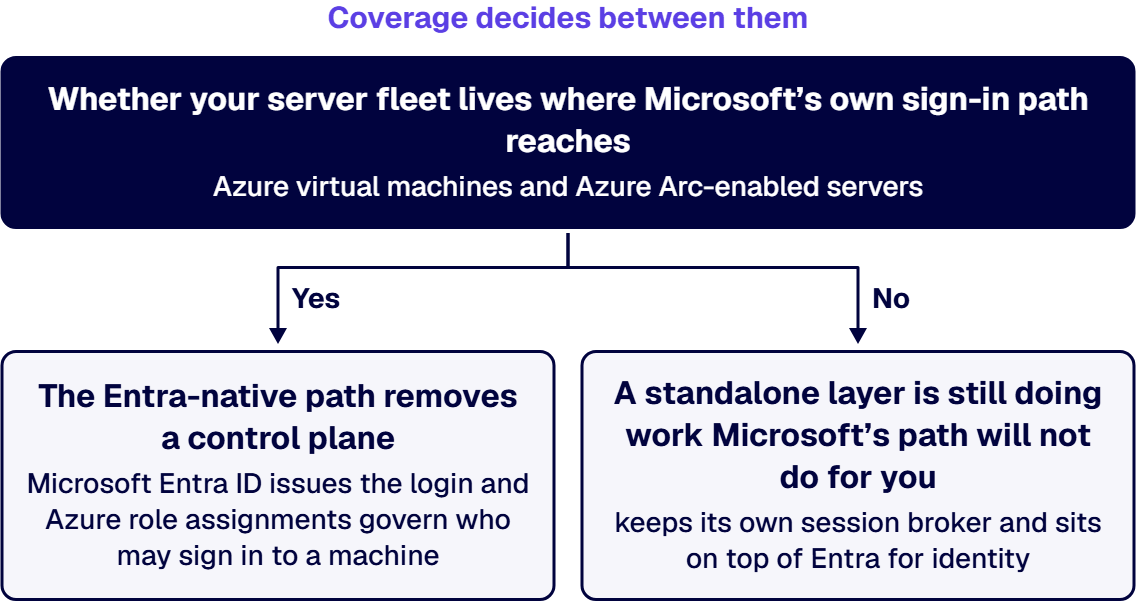
Okta Advanced Server Access alternatives fall into two shapes once your estate already runs Entra ID, and the product itself reached its end-of-sale date on May 1, 2026: Okta’s own documentation states that “Effective May 1, 2026, Okta will no longer sell or renew Advanced Server Access. Existing customers must migrate to Okta Privileged Access within one year of their next scheduled renewal date to maintain service” (Advanced Server Access documentation, according to Okta, as read on 22 September 2026). Okta describes what the product does in one sentence: “Using Okta as its source of truth, Advanced Server Access reconciles accounts to manage SSH and RDP access to Linux and Windows servers” (Get started with Advanced Server Access, as read on 22 September 2026). The two alternative shapes are an Entra-native path, where Microsoft Entra ID issues the login and Azure role assignments govern who may sign in to a machine, and a third-party privileged access management layer that keeps its own session broker and sits on top of Entra for identity. Coverage decides between them. The question is whether your server fleet lives where Microsoft’s own sign-in path reaches, which Microsoft documents as Azure virtual machines and Azure Arc-enabled servers, or spans clouds and platforms it does not reach. If the fleet sits inside that documented reach, the Entra-native path removes a control plane; if it does not, a standalone layer is still doing work Microsoft’s path will not do for you.
You are most likely reading this because two conversations landed in the same quarter. One is a renewal: a standalone privileged-access contract for your server fleet is coming up, and somebody has to sign it. The other is a question from security or audit, or from finance, asking why a second privileged-access control plane exists at all when the identity platform for everything else is already Entra ID and already paid for.
Both conversations are really the same decision, and it is not a product bake-off. Getting it wrong in one direction strands the organization on tooling nobody can justify at the next audit. Getting it wrong in the other direction removes working controls from the servers an attacker would most want, and replaces them with something that does not yet reach the same machines.
For a Microsoft-centric estate already running Entra ID, the real choice for privileged server access is not which vendor’s marketing is loudest, it is whether you extend the identity platform you already operate or keep a standalone PAM layer running beside it, and that choice turns on four criteria: session brokering without standing credentials, who owns the audit trail, the agent footprint left on the server fleet, and cost against the Microsoft licensing you already carry.
This page evaluates those four criteria. A different question, which platform should own your directory, single sign-on and standing administrative roles at the platform level, is answered on Okta vs Entra ID: What’s the Difference for Enterprise IT?, and this page does not repeat that comparison.
If you inherited this product rather than bought it, the first thing worth establishing is what job it is doing on your servers today, because that job is what any alternative has to keep doing. Okta’s documentation describes the mechanism in its own words: “Using Okta as its source of truth, Advanced Server Access reconciles accounts to manage SSH and RDP access to Linux and Windows servers.” Okta’s product page describes the reader-facing effect as the ability to “seamlessly extend SSO to your Linux and Windows servers via SSH and RDP” (Advanced Server Access, as read on 22 September 2026).
The part that matters to a security committee is how the login is authorized. Okta’s own documentation for automation scenarios describes the approach as one that lets you “eliminate the static credential” and instead “use the security of ephemeral certificates when building automation”, and it names the software that has to be present on each machine: “Install the Advanced Server Access agent” (Services, as read on 22 September 2026). Two facts follow from Okta’s own text and neither is an inference: the credential presented at login is short-lived instead of standing, and there is an agent on every enrolled server.
On the audit side, Okta describes the product as producing “login and session audit logs that you can view via dashboard or API.” That is a real capability, and it also fixes where the evidence lives: the record of who reached which server sits in that vendor’s system, and reaching it means a dashboard or an API call into a platform outside your tenant.
The fact that changes the shape of the decision is the one quoted in the answer block above. Okta’s documentation states that effective 1 May 2026 the product is no longer sold or renewed, and that existing customers must move to Okta Privileged Access within one year of their next scheduled renewal date to keep service. Read that carefully before you frame the choice internally: a renewal of the status quo is not on the table as Okta documents it. The comparison is between moving to a Microsoft-native path and moving to a different standalone product, and both are migrations. One note on where that notice appears, stated because it affects what your team will find: it is published on Okta’s documentation pages, and Okta’s marketing page for the product carried no such notice when this page was written in September 2026, so a colleague who checks only the product page may reasonably report back that nothing has changed.
Once a migration is happening either way, the choice collapses to two shapes, and the useful comparison is by criterion instead of by vendor. No ranking of makers appears below, and none is needed: the criteria decide it.
Shape one is the Entra-native path. Microsoft documents two distinct pieces here, and a proposal that treats them as one piece is describing a capability neither of them has on its own. Microsoft Entra Privileged Identity Management governs privileged ROLES. Microsoft describes it as “a service in Microsoft Entra ID that enables you to manage, control, and monitor access to important resources in your organization”, providing “just-in-time privileged access to Microsoft Entra ID and Azure resources”, “time-bound access to resources using start and end dates”, the ability to “require approval to activate privileged roles”, and the ability to “download audit history for internal or external audit” (What is Privileged Identity Management?, Microsoft-stated date 23 April 2026, as read on 22 September 2026). Microsoft lists what it manages as Microsoft Entra roles, Azure resource roles and PIM for Groups. Microsoft’s page states that using it “requires licenses”. What that Microsoft page does not name anywhere is SSH, RDP or signing in to a virtual machine’s operating system, and that absence is the scope fact the rest of this decision turns on: role activation is not session brokering to a server.
The server-login half is a separate Microsoft capability. Microsoft documents it this way: “To improve the security of Azure Linux virtual machines (VMs) or Azure Arc-enabled Linux servers, you can integrate with Microsoft Entra authentication”, using “Microsoft Entra ID as a core authentication platform and a certificate authority to SSH into a Linux VM by using Microsoft Entra ID and OpenSSH certificate-based authentication” (Sign in to a Linux virtual machine in Azure by using Microsoft Entra ID and OpenSSH, Microsoft-stated date 27 June 2025, as read on 22 September 2026). Microsoft names the two Azure role assignments that decide who may log in, “Virtual Machine Administrator Login” and “Virtual Machine User Login”, and states the separation plainly: “There’s an intentional (and audited) separation between the set of people who control virtual machines and the set of people who can access virtual machines.” Taken together, those two capabilities are what people mean by the Entra-native path, and a proposal that names only one of them is describing half of it.
Shape two is a standalone privileged access management layer on top of Entra. Here a dedicated product keeps its own session broker, its own policy engine and its own recording, and takes identity from Entra ID through federation. The category includes the successor product Okta names in its own migration notice, and it includes other vendors; this page compares the SHAPE, not the makers, and it does not rank them.
Here is how the two shapes read against the four criteria, in the order this page uses everywhere:
When two of these criteria disagree, coverage outranks the other three, and the next section is why.
The criteria above will not all point the same way, and when they conflict the tie-breaker is not cost and it is not audit convenience. It is reach: whether Microsoft’s documented sign-in path actually covers the machines you need to govern. A cheaper, better-audited control that does not reach half your fleet has not solved the problem, it has split it in two.
Microsoft states the reach of the Entra-native server login in its own documentation, and it is wider than “Azure only” but narrower than “everything”. Microsoft names Azure Linux virtual machines and Azure Arc-enabled Linux servers, lists the supported Linux distributions in a published table, and lists the supported Azure regions as Azure Global, Azure Government and Microsoft Azure operated by 21Vianet. Azure Arc is the part people miss: it is how a server outside Azure can be brought inside that documented path.
So the fork is a question you can answer from your own inventory, not from a vendor conversation. Read your server list out of the surface that already holds it, the Azure portal’s virtual machine list plus your Azure Arc-enabled servers inventory, and set it against the machines your current privileged-access tool has enrolled. Where the two lists match, the Entra-native path is governing the same population, and keeping a second control plane means operating two systems to do one job. Where the current tool’s list contains machines that are not in Azure and not Arc-enabled, on a platform or in a cloud Microsoft’s documentation does not name, the standalone layer is still doing work nothing in your Microsoft licensing does for you, and removing it would leave those machines governed by whatever was underneath.
One more input belongs in the same read, and a mixed estate turns on it: the Windows and Linux split. The Microsoft documentation quoted above is specifically the Linux SSH path. Confirm the current documented position for your Windows server population separately before you treat the fleet as one population, because a plan built on a Linux-shaped assumption will surface that gap during migration instead of during planning.
Where the answer comes out mixed, the honest reading is that this is a phased consolidation and not a single cutover: the covered population moves to the Entra-native path, and the uncovered population keeps a standalone layer with a named owner and a dated re-examination, sized to the machines that actually need it.
If your estate matches one of the four situations below, consolidating onto the Microsoft path would be the wrong move, and a page that did not say so would be selling instead of advising.
A genuinely multi-cloud fleet is the first. Where a meaningful share of your privileged targets sit in another public cloud or on platforms Microsoft’s documented path does not name, a standalone broker is covering machines the Entra-native path does not reach; your own target inventory is the evidence for that, read from the current tool’s enrolled-server list, and consolidating would hand those machines back to local accounts and whatever policy already applies to them.
Second is a non-Windows, non-Azure estate at scale. Azure Arc widens Microsoft’s reach beyond Azure, but enrolling a large fleet into Arc is itself a project with its own operational surface, and it has to be planned as one instead of assumed away inside a licensing discussion.
An existing, accepted audit position is the third. If your auditors have already accepted the current tool’s session records for a regime you are assessed against, replacing that evidence chain mid-cycle introduces a new question at exactly the wrong moment. Whether a given arrangement satisfies your obligations under any specific regime is a determination for your own compliance function and your assessor, not one this page can make for your environment; the point here is only that changing the evidence source is itself an event your compliance function should be told about in advance.
Timing is the fourth. Okta’s published end-of-sale notice puts a clock on the current product, and the migration to a Microsoft-native path is a different size of project from the vendor’s own upgrade path. If your renewal date is close and your Azure and Arc coverage is not yet in place, the defensible sequence may be to take the vendor’s migration first and run the consolidation as a planned piece of work afterwards, with the coverage question answered before it starts instead of during it.
None of the four is an argument against consolidating eventually. Each is an argument for deciding on coverage and evidence instead of on the renewal calendar, and for writing down which of the four applies to you so the next person who inherits this decision can see the reasoning.
Where this work lands with us, it lands as identity work and not as a tooling purchase. i3solutions regularly delivers Okta to Microsoft Entra ID migrations for enterprises. On the governance side of the same estate, i3solutions maps governance to named control families, enforces it in the platform through Entra ID, Purview, and Azure Policy, and evidences it continuously rather than reconstructing it at audit. Identity as a governed capability is the frame the whole pillar is built on, set out at Establish Identity as a Governed Enterprise Capability.
The alternatives fall into the two shapes described above, and each maker below is quoted in its own words, in no order of preference. Okta’s own successor is Okta Privileged Access, named in the end-of-sale notice quoted at the top of this page; for it, Okta states: “Reduce the attack surface by eliminating static SSH keys and passwords, and automate access controls to protect your modern server infrastructure.” (Okta) On the Entra-native path, alongside the Linux sign-in covered above, Microsoft states: “You can now use Microsoft Entra ID as a core authentication platform to Remote Desktop Protocol (RDP) into supported versions of Windows Server.” (Microsoft Learn) Microsoft’s page shows it was last updated on 2025-06-27. Among standalone products, for its Privileged Remote Access product BeyondTrust states: “PRA securely manages remote access to sensitive systems, ensuring that only authorized users can access critical resources with the appropriate level of privilege.” (BeyondTrust) For its server privilege controls, Delinea states: “Seamlessly manage just-in-time and just enough privileged access across Windows, Linux, and Unix servers while enforcing Multi-Factor Authentication (MFA) at log-in and privilege elevation for additional identity assurance.” (Delinea) Teleport states: “Teleport protects servers through the Teleport SSH Service, which is a Teleport Agent service.” (Teleport) Whichever you shortlist, test it against the four criteria on this page and against your own server inventory, not against this list.

US-Based | Est. 1997
© i3solutions. All rights reserved.
US-Based | Est. 1997
© i3solutions. All rights reserved.


