

Azure application architecture for Microsoft-centric enterprises settles four decisions before code: identity, hosting, data and integration boundaries, and the operating model that runs the result. A named question decides each one, and writing the answers down is what stops a build drifting into a snowflake.
The request that starts this work rarely arrives in architectural language. A director says the team needs a real application to replace the thing that grew out of a spreadsheet, that it has to sign people in the way everything else does, that finance wants to know what it costs to run, and that the two people who will support it already support nine other systems. Underneath those four sentences sit four architecture decisions, and the order they are answered in decides how much of the design survives contact with the estate. An organization already standing on Microsoft identity, data, and integration is not choosing from a blank catalogue.
An enterprise running on Entra ID, Microsoft 365, SQL Server, and a Power Platform tenant has already settled four constraints that a greenfield architecture diagram pretends are open.
Identity is settled. The directory exists, conditional access policies exist, and employees already have accounts. An application that invents its own user store is not a simpler design; it is a second directory to keep in step with the first, and a second offboarding process nobody runs.
The data gravity is known. The reference data lives in SQL Server, in Dataverse, or in a line-of-business system with a supported interface. Where the new application’s data sits relative to those stores decides more about latency, reporting, and migration cost than the hosting choice does.
The integration surface is inherited. Microsoft 365, Dynamics, SharePoint, and whatever ERP the finance team runs each impose a connection pattern. The application gets to decide which of them it depends on synchronously and which it tolerates being late.
The support model is fixed. The team that will hold the pager already runs the estate, with the skills it has. An architecture requiring a skill nobody on that team holds is a decision to hire, whether or not anybody wrote it down.
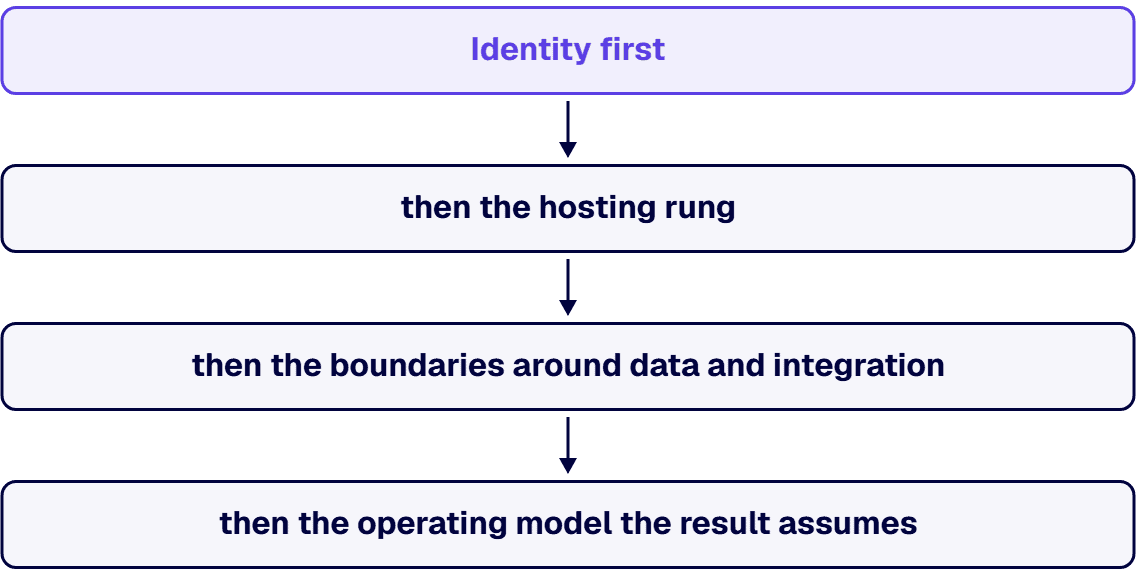
Identity gets treated as a configuration task late in a build, and that sequencing is what sends enterprise Azure builds back for rework. Identity belongs first: the hosting rung has to carry the application’s identity, and data access and integrations authorize against it.
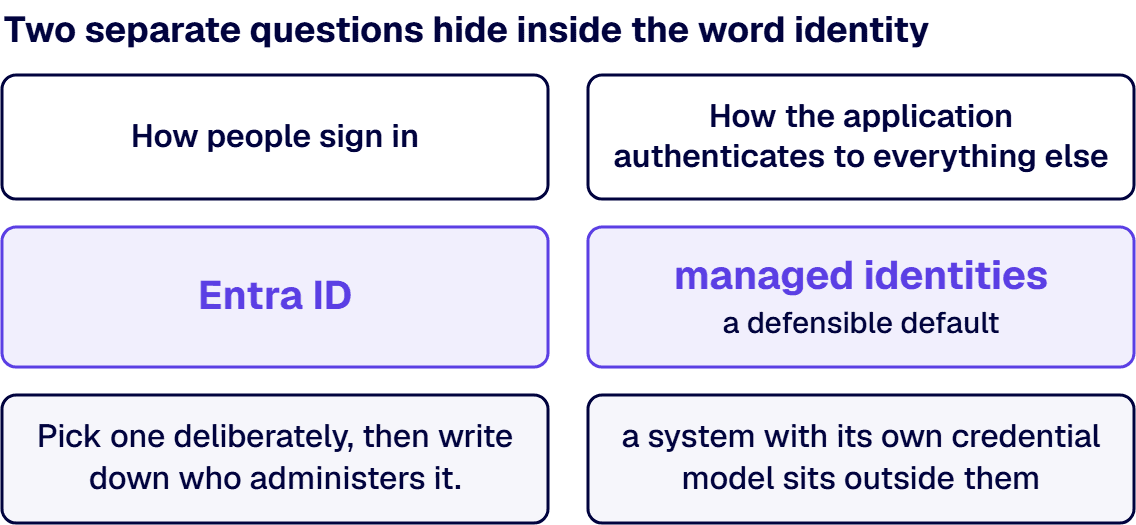
Two separate questions hide inside the word identity. The first is how people sign in. In a Microsoft-centric estate that answer is Entra ID, and the real design work is what the application does with the token afterwards: which claims it trusts, whether authorization lives in group membership, in application roles, or in a table the business owns. Group-based authorization puts control in the directory team’s hands. Table-based authorization gives the business owner control, and gives you an access review nobody runs unless a person is accountable for it. Pick one deliberately, then write down who administers it.
The second question is how the application authenticates to everything else, and this one has a defensible default: managed identities. Manual handling of secrets and certificates is a known source of security issues and outages, and managed identities eliminate the need for developers to manage those credentials at all. A design that still moves a secret through a deployment pipeline to reach an Entra-authenticated resource has kept the credential handling the platform already eliminates, and that choice needs a reason in writing. The limit: managed identities authenticate only to resources that support Microsoft Entra authentication: a system with its own credential model sits outside them, and that boundary is where a secret store and a named rotation owner earn their place.
Hosting is the decision buyers ask about first and the one that matters second. Read the ladder downward, once per deployable component, and stop at the first rung that answers yes, unless a rung further down carries a requirement the one above it cannot express.
| Rung | The question that settles it | What it charges in operational attention |
|---|---|---|
| App Service | Is this a web application or API that ships as one deployable unit, with no requirement for custom container orchestration? | Least: the team owns the application, not the platform underneath it |
| Azure Functions | Is the work event-driven or scheduled, short-lived, and idle for long stretches between runs? | Low, with a design tax: cold starts, execution limits, and idempotency become the application’s problem |
| Azure Container Apps | Does the application ship as containers with several services that scale independently, without needing direct control of the cluster? | Moderate: the team owns images, revisions, and a build pipeline; the platform owns the cluster |
| Azure Kubernetes Service | Does something concrete require cluster-level control: a networking, operator, or portability requirement the managed options cannot express? | Highest: cluster management, upgrades, security, node pools, and platform skills belong to whoever runs the cluster |
The expensive mistake is choosing AKS for a requirement nobody wrote down, then discovering that cluster upgrades belong to a two-person team already carrying an estate. The counter-case is real: an application with a genuine networking or operator requirement, or a portability commitment somebody signed, belongs on AKS, and putting it on App Service to look simple is the same error reversed. The rung also decides who you have to hire, so the support team belongs in the room while the rung is decided.
Business-critical rebuilds are single-threaded, senior work: logic recovery, data migration, and cutover under a deadline. i3solutions’ engineers are senior-level, 100% US-based, and have rebuilt these systems in regulated environments.
The data tier decision in an estate that already runs on Microsoft is rarely a database bake-off. It is a boundary question: what does the application own, what does it borrow, what does it merely display.

What it owns goes in a store the application controls, commonly Azure SQL, on the strength of the team’s existing skills rather than any abstract superiority. Ownership means the application’s schema, its migrations, and its backup and retention obligations.
What it borrows lives somewhere else and is read through a defined interface. Dataverse is the frequent case: an application that treats Dataverse as its own transactional database has taken a dependency whose limits and licensing another team owns, without having chosen either. Reading across a service boundary is a design; writing in a tight loop from a custom application is a decision nobody made.
What it merely displays should not be copied at all. A copy is a synchronization problem with a schedule attached, and it needs an owner, a freshness expectation, and a plan for the day it drifts. The Microsoft 365 boundary is the sharpest version: files, sites, and messages already have a governance model, a retention model, and a compliance surface. An application that duplicates that content into a store without those controls has moved it outside that governance, and the copy becomes its own compliance obligation.
For each dependency, name the direction, the failure behavior, and the acceptable staleness. A dependency without a documented failure behavior is one the application will inherit an outage from.
An architecture is a commitment about who operates the result. Four things belong in the design because they are expensive to add later.
Environments. How many, who deploys to them, and what has to be true to promote. Two environments and an honest promotion rule beat four nobody trusts: this is architecture rather than process because environment count drives subscription layout, network design, and cost.
Landing zones. A platform landing zone is the centralized foundation that establishes governance, security, and shared resources for all Azure workloads; application landing zones are where workload teams deploy and operate within the guardrails of that platform. That split tells an application team what it controls and what it inherits. Where the platform component already exists in your tenant, the guardrails are given. Where none exists, platform foundations have to be built before the application lands, and who funds that work belongs on the plan, not in a surprise.
Observability. The useful test is not how many dashboards exist. It is whether the on-call engineer at two in the morning learns three things quickly: that something is wrong, which dependency is wrong, and whether users are affected. That implies a correlation identifier that survives across service boundaries, dependency-level tracing, structured logs with a retention period somebody chose on purpose, and alerts on user-visible symptoms rather than resource metrics alone.
Cost ownership. Every resource carries a tag naming the owning application and the paying cost center, applied by the deployment rather than a quarterly cleanup, because untagged spend becomes a shared mystery nobody is accountable for reducing.
Predictable Azure cost is an architecture property before it is a finance exercise, and three decisions carry the bulk of it.
The hosting rung sets the floor: a managed platform tier bills on a shape the team can reason about, while a cluster bills for nodes whether or not the application is busy, plus the salaried cost of the people who keep it current. The data tier sets the slope: storage growth follows the retention decision rather than an accident. The chattiness sets the surprise: cross-region traffic, per-transaction integration services, and log ingestion at volume are the three lines that arrive larger than expected.
The discipline that makes the number hold is unglamorous: estimate before building on published rates for the shape you chose, tag at deployment, and put one named person in front of a monthly review with authority to act on it. A dashboard does not switch off an idle environment on its own.
Not every application on this ladder should be custom code. The honest test is what the application has to do that a low-code platform does not do well: a complex or high-volume transactional model, a user population whose licensing arithmetic breaks, an interface the platform’s connectors do not reach, performance behavior that has to be tuned rather than accepted, or a lifecycle that has to sit inside the same release process as the rest of the estate. Where none of those apply, a Power Platform build is the shorter road to production. Where any of them applies, that trigger is the case for custom.
Between the two lies a hybrid solution, where a Power Platform front end sits over custom Azure services and APIs: a legitimate architecture with its own boundary rules about which side owns data, which side owns business logic, and how the two are released together.
The artifact that keeps all of this from evaporating is a short record per decision, written when the decision is made rather than reconstructed later. Six fields carry the weight: the decision, stated in one sentence naming what was chosen; the context, the constraints that were real at the time; the alternatives considered, each with the reason it lost; the consequences, including the ones the organization accepts rather than avoids; the owner, a named person accountable for revisiting the decision; and the revisit trigger, a condition rather than a date: a user count, a transaction volume, a licensing change.
A record set covering identity, hosting, data ownership, integration boundaries, and the operating model runs to a handful of pages. It is the difference between an architecture a new engineer can join and a system whose shape has to be inferred from its code.
Some readers should route elsewhere. If the question is whether to modernize the application at all, and in which direction, that decision comes before this page. If the application already exists and nobody can say what it does, architecture is premature: discovery comes first. If what you have is a working prototype, that’s a different question this framework doesn’t own. And if integrations across the estate are designed case by case with no reference pattern, that is integration architecture at estate altitude, not a single application’s shape.
What is left is the case this page was written for: one application that matters, a Microsoft estate that already sets the binding constraints, and a decision about shape that somebody has to make defensibly. Identity first, then the hosting rung, then the boundaries around data and integration, then the operating model the result assumes.

Michael Branson co-founded i3solutions 30 years ago and brings executive, operational, and technical perspective to organizations working in complex, secure, and mission-critical environments. His insights focus on business process consulting, automation, data analytics, collaboration, secure operating models, and the operational discipline required to turn technology investments into practical business systems with measurable value.
Connect on LinkedInThe one that reads the constraints the estate already sets before it opens a service catalogue. Four decisions carry the design. Identity comes first, because Entra ID already holds the employee accounts and the application's authorization model has to be administered by a named person. Hosting comes next, chosen by working down four rungs and stopping at the first that answers the requirement. Boundaries for data and integration come third, deciding what the application owns, borrows, and merely displays. The operating model comes fourth, covering environments, landing-zone guardrails, observability and cost ownership. Recording each decision with its alternatives is what keeps the result a standard pattern rather than a snowflake.
Work down four rungs and stop at the first that answers yes, unless a rung further down carries a requirement the one above it cannot express. App Service fits a web application or API that ships as one deployable unit with no need for custom orchestration. Azure Functions fits event-driven or scheduled work that is short-lived and idle between runs, at the price, on the serverless plans, of cold starts, execution limits and idempotency becoming your problem. Azure Container Apps fits several containerized services that scale independently without cluster-level control. Azure Kubernetes Service fits a concrete networking, operator or portability requirement the managed options cannot express, and it charges cluster management, upgrades and security to whoever runs the cluster.
Three architecture decisions carry the bulk of the number, and one operating habit protects it. The hosting rung sets the floor, because a cluster bills for its nodes whether or not the application is busy. The data tier sets the slope, since storage growth follows the retention decision. Chattiness sets the surprises, and the three lines that arrive larger than expected are traffic crossing regions, integration services billed per transaction, and log ingestion at volume. The habit is ownership. Estimate on published rates before building, treating that as a baseline your discounts and reservations then move, tag every resource at deployment with its application and cost centre, and give one named person a monthly review with authority to act.
Enough that whoever is paged overnight learns three things fast: that something is wrong, which dependency is wrong, and whether users are affected. In practice that means telemetry carrying one correlation identifier the whole way through a request, tracing at dependency level so a slow downstream call is told apart from slow code, structured logs whose retention period somebody chose on purpose, and alerting on symptoms a user would notice, such as failed sign-ins or a rising queue, rather than on resource metrics alone. A processor-utilization alert says a machine is busy. A failed-sign-in alert says a person cannot work.
Because data access and the integrations authorize against the application's identity, and hosting has to support it, retrofitting identity late means rework in a build already underway. Two questions sit inside the word identity. How people sign in, which in a Microsoft estate is Entra ID, leaving the real work of deciding whether authorization lives in directory groups, in application roles, or in a business-owned table, and naming who administers that. And how the application authenticates to everything else, where the documented mechanism is managed identities, which eliminate the need to manage credentials by hand, the practice Microsoft names as a known source of security issues and outages.
That depends on whether the application owns that data or borrows it. Dataverse is a strong system of record for Power Platform solutions and for data the business already governs there, and reading from it across a defined service boundary is a sound design. Treating it as the transactional database of a custom application is different: the application has taken a dependency whose limits and licensing another team owns, and chose neither. The general rule is to own what you are accountable for in a store you control, read what belongs elsewhere through an interface, and copy nothing you only display.
When none of the custom triggers apply. Those triggers are a complex or high-volume transactional model, a user population whose licensing arithmetic breaks under per-user platform costs, an interface no connector reaches, performance behaviour that has to be tuned rather than accepted, and a lifecycle that must sit inside the same release process as the rest of the estate. Where none apply, a low-code solution is the shorter road to production and the cheaper one to change. Where any one of them applies, that trigger is what makes the case for custom code. Between the two, a low-code front end over custom Azure services is a hybrid architecture with its own boundary rules.
Rebuilds blow their budgets on the rules no one documented. i3solutions' senior architects work with enterprise IT leaders who want the discovery, the architecture, and the build scoped as one accountable program.
Talk to a Senior Application Architect
US-Based | Est. 1997
© i3solutions. All rights reserved.
US-Based | Est. 1997
© i3solutions. All rights reserved.


