5 Signs Your Excel Workflows Need Spreadsheet Modernization

The five signs your Excel workflows need spreadsheet modernization are collaboration breaking down, security and compliance exposure, error-prone manual processes, friction when you try to scale, and hidden maintenance costs that quietly grow. The tell underneath all five is the same: business processes start bending to fit the spreadsheet instead of the spreadsheet serving the process. Modernization is not about replacing a file; it is about replacing a workflow model with one that is automated, integrated, auditable, and built to grow, most often on Microsoft Power Platform, SharePoint, or a custom web application on Azure. i3solutions helps regulated organizations move Excel-bound workflows onto governed, scalable Microsoft-native platforms.
Key Takeaways
- Excel is a tool, not a platform. When business processes start bending to fit the spreadsheet instead of the other way around, modernization is overdue.
- The five most reliable signals are collaboration breakdowns, security and compliance exposure, error-prone manual processes, scaling friction, and hidden maintenance costs.
- Excel workflow modernization is not about replacing a file. It is about replacing a workflow model with one that is automated, integrated, auditable, and built to grow.
- Microsoft Power Platform, SharePoint, and custom web applications on Azure are the most common modernization paths for organizations already operating in the Microsoft ecosystem.
- The cost of staying on Excel compounds over time. Rework, reconciliation, compliance risk, and lost productivity often exceed modernization investment within the first 18 months.
- i3solutions has helped organizations across defense, financial services, and healthcare move from Excel-based workflows to governed, scalable Microsoft-native solutions with 30 years of enterprise delivery experience.
Excel spreadsheets have served as a reliable operational backbone for decades. For small teams managing limited data, they work. The problem appears when the business grows and the spreadsheet does not, when processes start bending to fit the file instead of the file supporting the process.
For IT Directors, operations leaders, and CISOs at mid-to-large enterprises, the question is rarely whether to modernize. It is recognizing when the signals have crossed the threshold that makes staying on Excel more expensive than moving off it. This article identifies the five most reliable signs, explains what they cost in operational terms, and outlines the modernization paths that fit organizations already operating in the Microsoft environment.
What Is Excel Workflow Modernization?
Excel workflow modernization is not about replacing a file. It is about replacing a workflow model. The spreadsheet typically holds data, drives calculations, and serves as the communication layer between teams, functions that belong in a governed, integrated platform when the organization reaches a certain scale.
Web enablement is the most common modernization approach: transitioning the logic, data, and collaboration patterns from Excel into a web-based system that provides real-time access, role-based permissions, automated workflows, and audit trails. For organizations in the Microsoft ecosystem, that typically means Power Apps, Power Automate, SharePoint, Dataverse, or a custom application built on Azure, depending on the complexity of the workflow and the compliance requirements involved.
The distinction matters because modernization decisions made without understanding the workflow often produce a new system with the same operational problems the spreadsheet had.
The 5 Signs Your Excel Workflows Need Spreadsheet Modernization
Sign 1: Collaboration Is Breaking Down
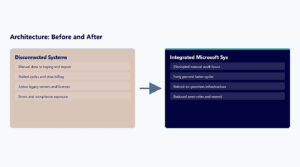
Teams are emailing different versions of the same file. Someone overwrites another person’s changes. The morning routine includes reconciling two copies of a spreadsheet to figure out which one is current. Approval cycles happen over email because the spreadsheet cannot route a request. A department makes a decision based on data that was already corrected in a different file no one sent them.
Excel was designed for individual use. Multi-user collaboration was added later and remains structurally limited. When a workflow requires more than one person to touch the same data, across departments, locations, or time zones, the spreadsheet becomes a coordination bottleneck rather than a productivity tool.
Web-enabled platforms are built for simultaneous access. Changes save in real time. Permission structures define who can view, edit, or approve. Version history is automatic. The coordination overhead that consumed hours per week in spreadsheet maintenance disappears because the platform handles it as a baseline function.
Sign 2: Security and Compliance Exposure Is Growing
Sensitive data (customer records, financial figures, employee information, contract terms) is moving through email as an attachment. Files are saved on personal devices or shared drives with no access controls. An auditor asks for a record of who accessed the data and when, and there is no log to produce. A compliance review identifies the spreadsheet workflow as a gap in the control environment.
For organizations subject to HIPAA, CMMC, SOC 2, DFARS, or NIST 800-171, an Excel-based workflow is not a neutral choice. It is a compliance exposure. Spreadsheets do not enforce role-based access, do not produce audit logs, and cannot enforce retention or classification policies. When regulated data moves through a spreadsheet workflow, the compliance posture degrades proportionally to how much of the process depends on the file.
Web-enabled solutions built on Microsoft platforms bring encryption at rest and in transit, Entra ID-governed access controls, Microsoft Purview-based data classification, and audit logging as standard capabilities. The compliance evidence chain that auditors request exists because the platform generates it by design, not because someone reconstructed it from email threads.
Sign 3: Manual Errors Are Compounding
A formula references the wrong cell after someone inserted a row. A value was entered in the wrong column and propagated through three downstream calculations before anyone noticed. Two departments are reporting different totals from the same underlying data because each maintains its own copy. A decision was made on a number that turned out to be from last quarter’s file.
Manual data entry introduces error at a rate that compounds with scale. The larger the spreadsheet, the more opportunity for a formula break, a data entry mistake, or a structural change to corrupt downstream outputs. The real cost is not the error itself: it is the time spent finding it, tracing it, correcting it, and rebuilding trust in the data.
Web-based systems enforce validation rules at the point of entry. Integrations pull data directly from source systems instead of requiring manual transcription. Calculations run on a governed data model rather than a formula chain that breaks when someone edits the structure. The error rate drops because the workflow removes the manual steps that produce the errors.
Sign 4: The Spreadsheet Cannot Scale With the Business
The file is too large to open quickly. Adding a new product line, region, or team requires restructuring the entire workbook. A new reporting requirement means someone spends two days reformatting columns. The spreadsheet that worked for 50 employees is now being used by 300 and no one can explain all of its logic. A new hire cannot be onboarded to the workflow without a dedicated training session just for the spreadsheet.
Excel scales vertically (more rows, more columns, more sheets), but not architecturally. A workflow that depends on a spreadsheet becomes harder to maintain, harder to document, and harder to hand off as the organization grows. The knowledge of how the spreadsheet works concentrates in the person who built it, creating single points of failure that surface when that person changes roles or leaves.
Web-enabled platforms are designed to accommodate growth at the infrastructure level. Data volume, user count, and workflow complexity scale without requiring a structural rebuild. New users access the same system with appropriate permissions. New reporting requirements are configuration changes, not manual reformatting exercises.
Sign 5: Maintenance Is Consuming More Time Than the Workflow Produces
Someone spends hours each week updating the spreadsheet, fixing broken links, refreshing data, and checking formulas. The monthly close process includes a half-day reconciliation session just for the Excel files. A senior analyst spends time on spreadsheet maintenance instead of analysis. When the person who manages the spreadsheet is out sick, the workflow stops.
The maintenance burden of a mature Excel workflow often exceeds the value it produces. The cumulative cost appears in employee hours spent on reconciliation, formula debugging, data refreshes, and structural upkeep, time that does not produce business value and that grows as the spreadsheet ages and accumulates complexity.
Web-enabled platforms automate the maintenance functions that consume spreadsheet administrator time. Scheduled data refreshes, automated report generation, workflow routing, and notification systems run without manual intervention. The team’s time shifts from maintaining the tool to using the output it produces.
The Cost of Staying on Excel
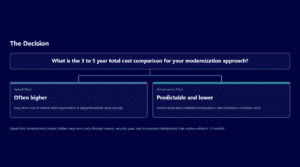
The decision to stay on Excel is rarely made explicitly. It accumulates through deferred modernization decisions, each one individually defensible, collectively compounding. The cost appears in several forms that rarely show up in a single budget line:
Hours spent each month finding, tracing, and correcting errors that a governed platform would have prevented at the point of entry. This time is invisible in the budget but measurable in lost productivity.
For regulated organizations, the cost of an Excel-based compliance gap is not hypothetical. Audit findings, remediation work, and the time spent reconstructing evidence chains from email threads and manual logs represent real costs that compound with each audit cycle.
Senior analysts, operations managers, and IT staff spending time on spreadsheet maintenance are not spending that time on analysis, strategy, or innovation. The opportunity cost is the value of what those hours could have produced in a governed platform environment.
Microsoft Modernization Paths for Excel Workflows
For organizations already operating in the Microsoft ecosystem, modernization does not require leaving the platform. The right path depends on the workflow’s complexity, the compliance requirements involved, and the level of integration needed with other enterprise systems.
The most common path for workflow modernization within the Microsoft ecosystem. Power Apps replaces the data entry and form functions of the spreadsheet; Power Automate replaces the manual routing, notification, and approval steps. Best suited for workflows that need to move quickly and do not require complex data architecture or deep integration with enterprise systems.
The right path when the Excel workflow is primarily a data repository, tracking system, or document management process. SharePoint provides governed storage, metadata, permissions, and version history. Microsoft Lists provides structured data management with views, filtering, and workflow integration without requiring a custom application build.
The right path when the workflow involves complex relationships between data entities, requires role-based security at the record level, or needs to connect with Dynamics 365. Dataverse provides an enterprise-grade data platform that scales beyond what a spreadsheet or a simple list can support.
The right path when the workflow has logic, integration requirements, or scale that exceeds what the Power Platform can support without extensive workarounds. Custom applications built on Azure can replicate the full complexity of a mature Excel workflow while providing the governance, auditability, and integration capability that enterprise operations require.
How i3solutions Approaches Excel Workflow Modernization
i3solutions structures Excel workflow modernization engagements around the workflow, not the tool. The starting point is understanding what the spreadsheet is actually doing: the logic it carries, the data it holds, the people who depend on it, and the compliance requirements it needs to satisfy, before recommending a modernization path.
This distinction matters because modernization projects that start with a tool recommendation and work backward to the workflow consistently produce systems that solve the technical problem without resolving the operational one.
i3solutions has delivered Excel modernization engagements for organizations across aerospace and defense, financial services, and healthcare with 30 years of Microsoft platform and enterprise delivery experience. The engagements produce governed, automated, and auditable systems that the internal team can operate and maintain after handoff.
Frequently Asked Questions
How do I know if my Excel workflow is ready for modernization?
The five most reliable signs are: collaboration is breaking down across teams or locations, security and compliance risk is growing as sensitive data moves through the spreadsheet, manual errors are compounding and requiring regular reconciliation, the spreadsheet cannot scale with the business without structural rebuilding, and maintenance is consuming more senior staff time than the workflow produces in value. If two or more of these are present, the modernization case is typically strong.
What Microsoft tools replace Excel workflows?
The most common paths for organizations in the Microsoft ecosystem are Power Apps and Power Automate for workflow-heavy processes, SharePoint and Microsoft Lists for tracking and document management processes, Dataverse and model-driven apps for complex data relationships, and custom web applications on Azure for workflows that require enterprise-grade logic, integration, or compliance posture beyond what Power Platform supports.
How long does Excel workflow modernization take?
Duration depends on the complexity of the workflow, the number of integrations required, and the compliance requirements involved. A focused single-workflow modernization to Power Apps typically runs four to eight weeks. A multi-workflow program with enterprise integrations and compliance scope typically runs three to six months. i3solutions scopes each engagement after assessing the current workflow state, not before.
What does Excel workflow modernization cost?
Cost depends on the modernization path, the workflow complexity, the number of users, and the integration requirements. Simple Power Apps modernization of a single workflow runs substantially less than a custom Azure application with enterprise integrations and compliance architecture. i3solutions provides specific engagement pricing after the workflow assessment, not before, because the cost of building the wrong solution for a workflow i3solutions understands is always higher than the cost of understanding the workflow first.
Do we have to replace Excel entirely?
Not always. Some workflows are appropriate for Excel and benefit from connection to a governed platform rather than replacement. The modernization decision is workflow-specific, not application-specific. i3solutions evaluates each workflow against the five signs and recommends modernization only where the operational case supports it.
Is Power Platform enough for enterprise Excel modernization?
For many workflows, yes. Power Platform handles a significant range of workflow complexity with low-code tools that deploy faster and cost less than custom development. For workflows with complex data models, deep enterprise system integrations, or compliance requirements that exceed Power Platform’s governance controls, custom application development on Azure is the appropriate path. The assessment determines which applies.
If more than one of these signs reads familiar, use a 30-minute scoping call to pick the one worth acting on first.