
By Justin Bowen, Sr. Vice President, Delivery Services, i3solutions
No. A third-party firm can run Power Apps end to end, because Power Platform administration is a scoped tenant role that cannot touch user accounts, licenses, or Exchange and SharePoint settings. What must stay in-house is smaller than most teams assume: decision rights, license purchasing, and one named approver.
The question usually arrives after the apps do. Somebody in finance built a canvas app that four departments now depend on, a second one is quietly writing to a production system, and the person who built both has moved to another team. IT is now accountable for a platform it did not choose, on a schedule it did not set. The budget conversation that follows is almost always framed as a hiring question: do we need a Power Apps person, or two, or a team. That is the wrong first question. The right one is which parts of running Power Apps can be held by someone outside your organization, and which parts cannot.
The rest of this page sets out what the recurring work actually is, where the security boundary sits, the three jobs that do not delegate, and what each operating model costs.
The staffing argument goes badly when nobody has written down the work. Managing Power Apps is not app development. It is a standing administrative load that continues whether or not anyone is building anything, and most of it lives in the Power Platform admin center rather than in the maker experience.
Microsoft groups the governance capabilities under managed environments, described as “a suite of premium capabilities that allow admins to manage Power Platform at scale with more control, less effort, and more insights.” The named features tell you what the recurring job is: environment groups, sharing limits, weekly usage insights, data policies, pipelines, solution checker, IP firewall, customer managed key, lockbox, extended backup, data policies for desktop flows, export to Azure Application Insights, default environment routing, and controls over which apps are allowed in an environment.
Read that as a duty roster rather than a feature list. Somebody has to set the data loss prevention policies and then re-evaluate them every time a connector is added. Somebody has to decide which environments exist, who can create them, and where a new maker’s first app lands. Somebody has to move solutions from development to test to production without hand-editing anything. Somebody has to look at usage insights and retire the apps whose owner left. Every line of that recurs on a schedule, which is why it is an operating cadence and not a project.
One licensing fact settles a question that comes up in every one of these conversations. Microsoft states that “managed environments are included as an entitlement with standalone Power Apps, Power Automate, Microsoft Copilot Studio, Power Pages, and Dynamics 365 licenses.” If your makers already hold standalone licenses, the governance layer is not a separate purchase. It is an entitlement you are probably already paying for and not using.
The reason most IT leaders assume they need in-house staff is a security assumption rather than a technical one: that letting an outside firm administer the platform means letting them into the tenant. That is not how the role is built.
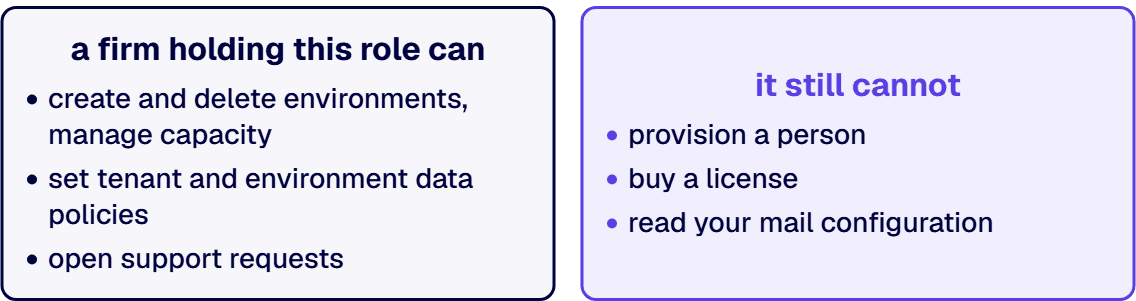
Microsoft’s guidance on service admin roles opens by describing exactly this separation: “you can assign users to manage the service at the tenant level without having to assign a role that provides access to other services within the tenant.” The boundary is then stated explicitly. “Both service admin roles cannot do functions such as manage user accounts, manage subscriptions, access settings for Microsoft 365 apps like Microsoft Exchange or Microsoft SharePoint.”
Microsoft’s own permission matrix makes the limits concrete. A Power Platform administrator cannot create users, cannot add security roles at the Microsoft 365 level, and cannot add licenses. Those three rows read “No” for the Power Platform admin column and “Yes” only for the Microsoft 365 global admin. So a firm holding this role can create and delete environments, manage capacity, set tenant and environment data policies, and open support requests, and it still cannot provision a person, buy a license, or read your mail configuration.
Two caveats belong in the same paragraph, because a page that gives you only the reassuring half is not useful in a security review.
First, the role is broad inside its boundary. Microsoft notes that “Power Platform admins are not affected by security group membership and can manage environments even if not added to an environment’s security group.” That is convenient for administration and it is the specific thing your security team will flag. The mitigation Microsoft points to is time-based activation through Microsoft Entra Privileged Identity Management, so the role is held on request and on record rather than standing.
Second, you cannot hand the role to a mailbox or a shared group and call it governed. Microsoft is direct: “Service Admin roles must be assigned directly to users, as inheriting from security groups is not fully supported.” Every administrator from the firm is a named identity in your directory, individually assignable and individually removable. For most regulated buyers that is better evidence than an internal arrangement, because it produces a reviewable list.
An honest answer to this question has to name what stays. Three things do, and none of them is a full-time role.
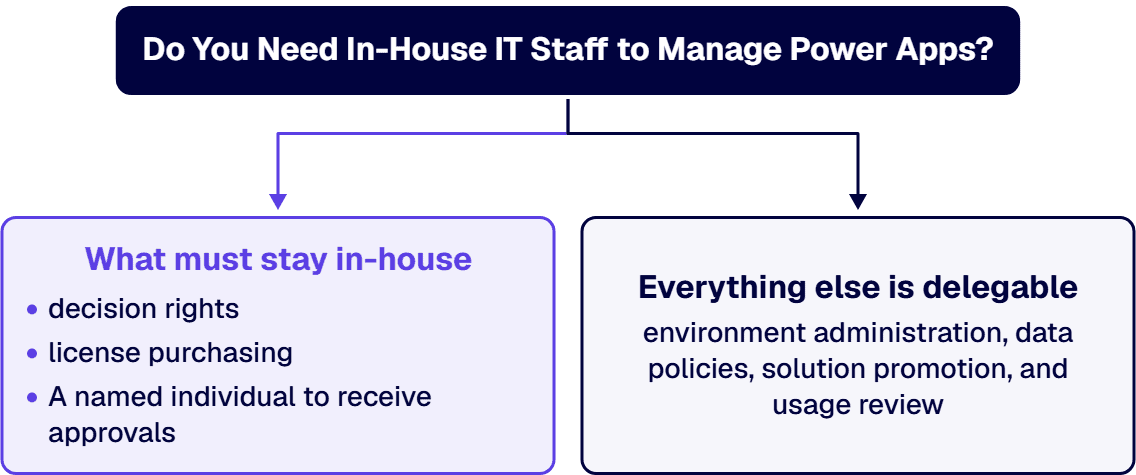
Decision rights. Which processes get automated, which data is allowed to leave which boundary, and which app is worth building are business decisions with regulatory consequences. A firm can recommend and document. It should not be the party that decides. This is the single largest cause of governance programs that technically function and are politically rejected.
License purchasing and identity. Because the Power Platform admin role explicitly cannot add licenses or create users, license allocation and account provisioning stay with your Microsoft 365 global administrators no matter who runs the platform. That is a fraction of a role, and it is usually already somebody’s job.
A named individual to receive approvals. This one is easy to miss until setup stalls. Microsoft’s CoE Starter Kit setup guidance states that some processes send Power Automate approvals and adaptive cards for Microsoft Teams, and that “these cards can’t be assigned to a group. You need an individual named admin to receive these communications.” Governance workflows need a human on the receiving end. That human should be inside your organization.
Everything else on the roster in section 1 is delegable, and the specific items are worth naming so a statement of work can list them: tenant-level and environment-level DLP policy sets, default environment routing, sharing limits, solution promotion through Power Platform pipelines or Azure DevOps, solution checker results, and the monthly review of usage insights that identifies orphaned apps. In most enterprises delegating that list produces a better result than hiring for it, because each item is intermittent and the specialties behind them rarely sit in one person.
The cost comparison is where the hiring instinct usually loses. For Microsoft-centric environments requiring multi-specialty coverage across M365, Azure, Power Platform, and security, external consulting typically costs $40K-$100K annually versus $125K-$175K+ for a single fully-loaded in-house hire who covers only one primary area. The asymmetry is not about rates. It is about coverage: the platform needs environment administration, ALM, licensing judgment, connector security, and Dataverse design, and one person is rarely strong in more than two of those.
Where the work is genuinely continuous and you want dedicated capacity rather than a retained team, the market rate is knowable. Typical engagement ranges land at $28,000 to $48,000 per specialist per month for senior US-based Microsoft specialists with named platform depth (SharePoint, Power Platform, Microsoft 365 compliance, Azure security, Dataverse, .NET enterprise integration) and compliance literacy in CMMC 2.0 Level 2, HIPAA Security Rule, NIST 800-171 Rev 2, SOC 2, or DFARS 252.204-7012. That is the honest upper bound on the outsourced answer, and it is the number to compare against a loaded internal team rather than against a single salary. Once you decide to use a firm, see how to hire Microsoft developers by specialty, with senior US based engineers.
Build work is priced separately from management, and conflating the two is how these budgets go wrong. Power Apps development work ranges from $50,000 to $350,000 per project, depending on size, complexity and length. Management is the recurring line. Development is the project line. A proposal that quotes one number for both has not separated the two jobs.
There is also a cost to choosing neither, which is the option most organizations actually pick. Power Platform environments without ALM discipline accumulate technical debt requiring 40-60% more maintenance effort within 18 months, making governance frameworks essential from implementation start rather than as an afterthought. That figure is the real comparison baseline, and the question it settles is whether the spend lands before the debt compounds or after.
The call these numbers support, stated plainly: retain a firm for the management line, scope development project by project against a separate budget, and revisit the hiring question only when the estate spans multiple business units. A first hire made before that point buys one specialty out of five and leaves the other four unowned.
If your situation sits in the middle three rows, the useful next conversation is with someone who has already run the separated Dev, Test, UAT, and Production environments and the promotion path described in section 8, rather than with a recruiter. Talk to a senior Power Platform architect.
Anyone deciding this question on advice more than a year old is deciding it on a retired premise. Microsoft’s CoE Starter Kit setup page now opens with a notice: “The Power Platform CoE Starter Kit is no longer actively maintained.” It adds that “its core capabilities are part of the Power Platform admin center” and that “issues are no longer reviewed or addressed.”
That matters for staffing in two directions. It lowers the argument for hiring somebody purely to run the kit, because the capabilities are moving into the product. It raises the argument for a firm that tracks these changes, because an organization running the kit today owns an unmaintained dependency and needs a migration path into the admin center rather than a surprise.
The prerequisites in the same document are worth reading before anyone budgets an internal hire. The identity that runs the kit needs Microsoft Power Platform service admin or global tenant admin, a non-trial Power Apps Per User license, a Power Automate Per User or Per Flow license, Power BI Premium per user or per capacity if you export inventory data, mailbox access meeting the Office 365 Outlook connector requirements, and an Azure app registration with permission to read the Microsoft 365 audit log if you want app launch telemetry. Microsoft adds that “these roles and licenses must be available to a user directly and permanently.” That is an entitlement stack, not a job description.
Two more operational facts from the same Microsoft setup documentation belong in any plan. A new version was released monthly, and Microsoft recommends upgrading “at least every three months,” warning that longer gaps “can result in unexpected issues with your next update.” And the cloud flow inventory method “is suitable for small to medium sized tenants but can cause performance issues in tenants where Power Platform inventory exceeds 10,000 objects,” counting environments, apps and flows together. If you are near that number, your governance approach has a scaling decision in it that no amount of headcount solves.
Four steps produce a defensible answer, and none of them requires a vendor.
Count the estate before pricing anything. Environments, apps, flows, connectors in use, premium connectors specifically, and the owner of record for each asset. For calibration, a single i3solutions customer environment commonly runs 15 to 20 Power Automate flows. If your count is far above that, you are past the point where an unstaffed answer works.
Write the duty roster from section 1 and assign every line. Not “IT owns Power Platform.” Line by line: who sets data policies, who approves environment creation, who promotes solutions, who reviews usage insights, who retires orphaned apps. Any line with no name is the line that fails an audit.
Separate the recurring load from the project load. Management and development are different budgets with different cadences. Price them separately and the hiring question usually answers itself, because the recurring load is smaller and more specialized than the project load.
Decide the three non-delegable jobs first. Decision rights, license and identity authority, and the named approver. Once those are placed internally, every remaining line is a sourcing decision rather than a governance one, and you can evaluate a firm against a written roster instead of against a capability deck.
For any line that needs a specialist working inside your own team, that roster is also the brief for dedicated Power Platform developers.
No. Running Power Automate does not add a role to your org chart, and the reason is the one section 2 already gives: flows are administered through the same scoped tenant role, in the same environments, under the same data policies, and through the same solution promotion path as the apps. Whoever holds that role is already positioned to run the flows. What flows add is not headcount. It is four lines on the duty roster that apps do not generate, and each of them fails quietly when nobody is named against it.
Those four are intermittent, in the same way the app roster in section 1 is intermittent, and they call for different specialties: identity, connector security, and the licensing judgment behind premium connectors. That is the case against a dedicated hire rather than for one. The failure mode here is not an under-resourced team. It is an unassigned line, and on the flow side an unassigned line does not announce itself, because the thing that stops is a process nobody is watching.
The threshold where the answer changes is the one section 5 already sets. Once flows cross business units, carry regulated data, or sit under a contract with a reporting obligation attached, the load stops being intermittent and an internal owner earns the seat. Below that, name an approver inside your organization, put the four lines above on the roster with the rest, and let whoever administers the platform run them.
Our answer to this question is not theoretical. i3solutions can state, from delivery experience, what staffing a client actually needs to run Power Automate day to day, including whether a dedicated IT team is required and what the alternative looks like. i3solutions has built and supports hundreds of production Power Automate flows across its client base. That breadth is where the judgment comes from.
The operating model is the deliverable. i3solutions runs client Power Platform work on a multi-tenant Center of Excellence model with separate Dev, Test, UAT, and Production environments promoted through managed solutions. i3solutions governs client Power Platform tenants with the Center of Excellence Starter Kit, tenant-level and environment-level DLP policies, and managed environment controls. Microsoft guidance dated May 7, 2026 says the Center of Excellence Starter Kit is no longer actively maintained, that it remains available, and that its core capabilities are part of the Power Platform admin center. i3solutions delivery includes ALM practices with Power Platform pipelines or Azure DevOps integration, environment separation strategies, and change control processes. On the licensing side, i3solutions implements Power Platform licensing across Power Apps per-app and per-user plans, Power Automate per-flow and per-user plans, and the Microsoft 365 default entitlements where app complexity is low.
Scale is the usual objection to an outsourced model, so here is the counterexample. i3solutions runs a governed Power Platform for a federal defense agency supporting roughly 10,000 personnel across about 180 locations, which works because it is governed, not despite it. All i3solutions Power Automate developers and consultants are U.S.-based. That is a practical constraint rather than a positioning line when the data in scope is export-controlled or contract-restricted.
Two outcomes show what the management side is actually worth. Replacing 32 outdated InfoPath forms with Power Apps reduced maintenance demands by 40%, saving an estimated $150K-$200K annually in IT labor and support. The case study carries the engagement detail. Separately: One defense contractor client reduced monthly IT support tickets by 40% after implementing assessment recommendations that consolidated three separate approval workflows into a single Power Automate solution with proper governance controls. In both cases the saving landed in the support budget rather than the project budget, which is the line item this decision actually moves.
Where a client wants to end up running the platform themselves, that is a supported destination rather than a lost engagement. i3solutions Power Automate developers follow a three-phase delivery model designed to minimize risk while building internal capability. The handover is planned from the start, which is the difference between a managed service and a dependency.
If your situation is narrower than this page, these go deeper on the specific piece: the Power Platform CoE operating model covers how the roster is actually run, citizen developer Power Apps governance covers the case where makers are already building, shadow IT versus a governed Power Platform covers the inventory problem that usually precedes this decision, and comparing costs of in-house IT versus external consultants covers the wider staffing economics.
The cheapest way to settle this is against your own numbers rather than against a general argument. Bring your environment and app counts, the connectors in use, and any audit finding or contract clause with a date attached. A first conversation should end with a written duty roster, a named owner for each line, and a straight answer about which of the three operating models your estate needs. If the decision has to clear a steering committee or a budget review, that roster is the document to take into the room, because it shows the choice was made against a count rather than a preference.
No, not in most enterprises. Power Platform administration is a defined tenant role that Microsoft designed to be delegable: its guidance describes assigning users to manage the service at the tenant level “without having to assign a role that provides access to other services within the tenant.” Three things do have to stay internal, and none is a full-time job: decision rights over what gets automated and what data may move, license purchasing and account provisioning, and one named individual to receive governance approvals. Everything else, including environment administration, data policies, solution promotion, and usage review, can be held by a third-party firm.
The role is scoped, which is the point. Microsoft states that both Power Platform service admin roles “cannot do functions such as manage user accounts, manage subscriptions, access settings for Microsoft 365 apps like Microsoft Exchange or Microsoft SharePoint,” and its permission matrix shows a Power Platform admin cannot create users, add security roles, or add licenses. Two caveats belong in your security review. The role is broad inside its boundary, since Power Platform admins “are not affected by security group membership and can manage environments even if not added to an environment’s security group,” and Microsoft points to Entra Privileged Identity Management for time-based activation. And the role cannot be assigned to a group: “Service Admin roles must be assigned directly to users, as inheriting from security groups is not fully supported.” Every external administrator is therefore a named, individually revocable identity.
It is an operating cadence rather than a project. Microsoft’s managed environments are described as “a suite of premium capabilities that allow admins to manage Power Platform at scale with more control, less effort, and more insights,” and the named features map to the recurring duties: environment groups, sharing limits, weekly usage insights, data policies, pipelines, solution checker, IP firewall, customer managed key, lockbox, extended backup, desktop flow data policies, export to Azure Application Insights, default environment routing, and control over which apps are allowed in an environment. Someone has to set data policies and revisit them as connectors change, decide which environments exist and where a new maker’s first app lands, promote solutions without hand edits, and retire apps whose owner has left.
Usually, and the reason is coverage rather than rate. For Microsoft-centric environments requiring multi-specialty coverage across M365, Azure, Power Platform, and security, external consulting typically costs $40K-$100K annually versus $125K-$175K+ for a single fully-loaded in-house hire who covers only one primary area. Where you want dedicated capacity instead of a retained team, typical engagement ranges land at $28,000 to $48,000 per specialist per month for senior US-based Microsoft specialists with named platform depth (SharePoint, Power Platform, Microsoft 365 compliance, Azure security, Dataverse, .NET enterprise integration) and compliance literacy in CMMC 2.0 Level 2, HIPAA Security Rule, NIST 800-171 Rev 2, SOC 2, or DFARS 252.204-7012. Development is a separate line: Power Apps development work ranges from $50,000 to $350,000 per project, depending on size, complexity and length.
The cost arrives later and larger. Power Platform environments without ALM discipline accumulate technical debt requiring 40-60% more maintenance effort within 18 months, making governance frameworks essential from implementation start rather than as an afterthought. The practical version is orphaned apps nobody can retire, data policies that were set once and never revisited, and production changes made by hand because there is no promotion path. None of that is visible in month three, and all of it is expensive in month eighteen.
Not if your makers already hold standalone licenses. Microsoft states that “managed environments are included as an entitlement with standalone Power Apps, Power Automate, Microsoft Copilot Studio, Power Pages, and Dynamics 365 licenses,” and adds that managed environment “isn’t included as an entitlement in the Developer Plan when users run their assets.” For most enterprises the governance layer is an entitlement already being paid for and not switched on, which changes the build-versus-buy conversation before any staffing decision is made.
Read Microsoft’s current notice before you plan around it. The setup documentation states that “the Power Platform CoE Starter Kit is no longer actively maintained,” that “its core capabilities are part of the Power Platform admin center,” and that “issues are no longer reviewed or addressed.” If you run the kit today you own an unmaintained dependency and need a migration path into the admin center. The prerequisites are also heavier than most internal plans assume: the running identity needs Power Platform service admin or global tenant admin, a non-trial Power Apps Per User license, Power Automate Per User or Per Flow, Power BI Premium per user or per capacity for inventory export, mailbox access for the Office 365 Outlook connector, and an Azure app registration to read the Microsoft 365 audit log. Microsoft notes these “must be available to a user directly and permanently.”
When the load stops being intermittent. A useful calibration point: a single i3solutions customer environment commonly runs 15 to 20 Power Automate flows. At that scale the administrative work is real but does not fill a role. Once the estate spans multiple business units and carries a dedicated platform budget, the load is continuous and the internal knowledge is worth owning, with a firm retained for the specialist depth a generalist team will not carry. Microsoft’s own scaling note is a second marker: the CoE Starter Kit setup documentation says the cloud flow inventory method “can cause performance issues in tenants where Power Platform inventory exceeds 10,000 objects” across environments, apps and flows.
It should be planned that way from the start. i3solutions Power Automate developers follow a three-phase delivery model designed to minimize risk while building internal capability. The artifacts are what make handover possible rather than theoretical: environment separation, documented data policies, ALM practices with Power Platform pipelines or Azure DevOps integration, and change control processes. A managed service that cannot describe its handover is a dependency, and that distinction belongs in the statement of work rather than in the relationship.
No. Staff augmentation puts named engineers inside your team, working under your direction, and your team keeps the outcome. A partner-led engagement puts the outcome and the accountability for governance with the firm. i3solutions delivers under a partner-led engagement model with named accountability and governance that holds up under a client audit, as distinct from contractor-only staff augmentation. For organizations that want dedicated engineers embedded in their own team rather than a fully managed model, i3solutions also provides IT staff augmentation services on flexible terms.
Yes, and it is the arrangement to require. i3solutions engineers work inside the client’s own tenant as Microsoft Entra B2B guest accounts with scoped Dataverse security roles, not from an i3solutions-owned tenant. Each person is a named identity your security team grants, reviews and removes, and the Power Platform administrator role they may hold cannot create users, add licenses, or access settings for Exchange or SharePoint.

US-Based | Est. 1997
© i3solutions. All rights reserved.
US-Based | Est. 1997
© i3solutions. All rights reserved.


