

A National Guard organization needed to migrate its readiness infrastructure ahead of a compliance inspection, without months of manual downtime.
The client is a state National Guard organization that serves both state and federal missions, providing trained units to support national defense and assist civil authorities during emergencies. Comprising both army and air components, it maintains readiness to deploy anywhere, at any time, and it relies extensively on its SharePoint environment to manage documents, workflows, and forms, and to facilitate collaboration across teams working at state and federal levels.
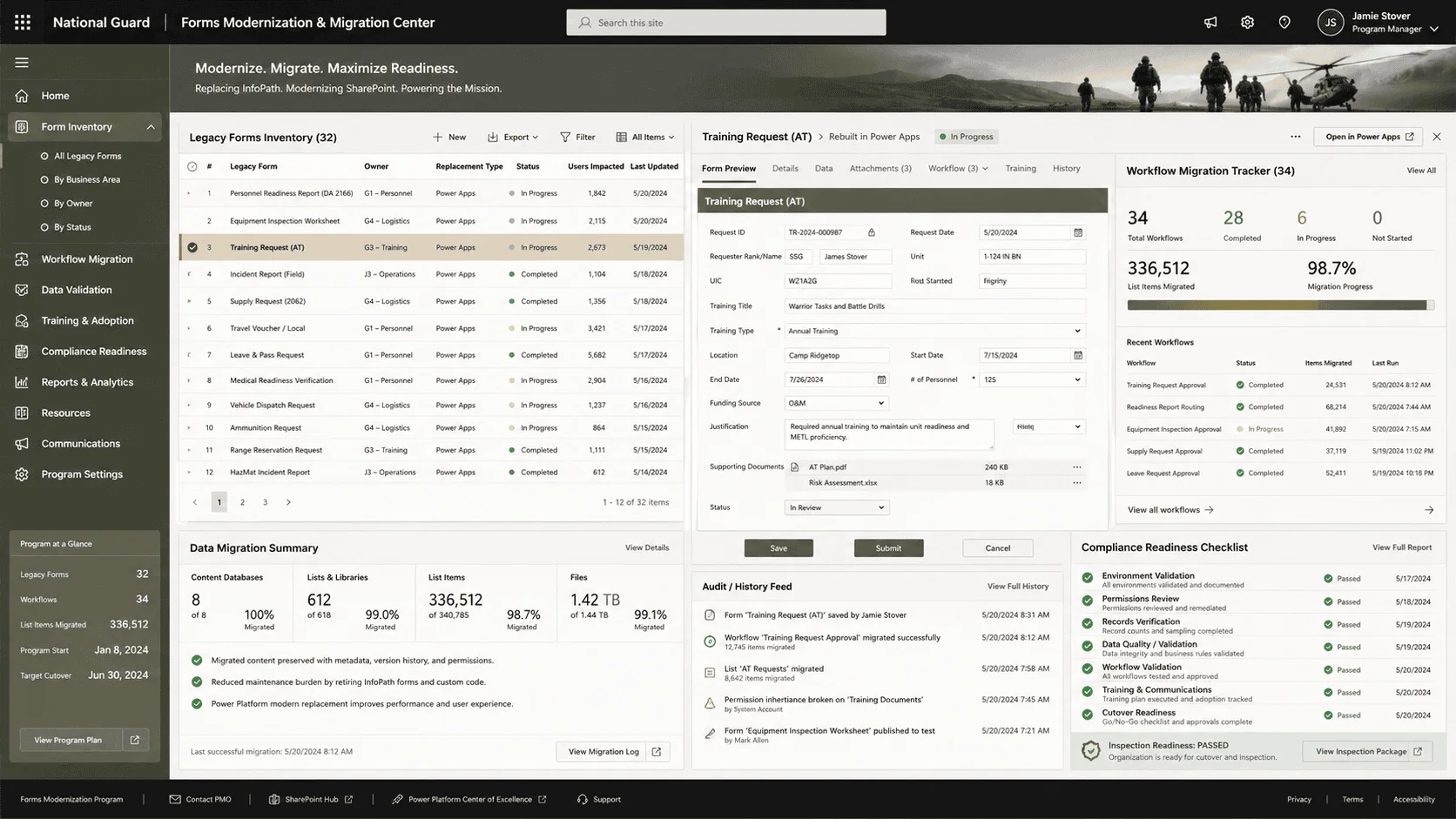
That environment had aged into a liability. The existing SharePoint instance was outdated, struggling to meet growing demands for scalability and performance, and an upcoming compliance inspection required the environment to meet standards it could not. With Microsoft phasing out InfoPath, 32 forms and the workflows behind them were at risk of becoming unsupported, threatening the continuity of critical operations.
Facing an InfoPath sunset and a looming compliance inspection, this National Guard organization needed its forms and workflows off unsupported technology fast. i3solutions rebuilt the environment on Power Apps without disrupting operations, cutting ongoing IT maintenance costs by 40%.
Rebuilding the 32 forms in Power Apps cut maintenance costs 40% (worth $150K to $200K a year), document search time dropped 20% for more than $300K in reclaimed staff productivity, and the migration passed a compliance inspection that was previously at risk.
An Inspection Date and a Product Retirement
Two clocks were running at once. The compliance inspection set a hard date by which the SharePoint environment had to meet standards, and InfoPath’s end of support set a second deadline behind it, after which 32 forms carrying critical operations would sit on an unsupported product with no vendor path forward.
The organization committed to addressing both in one engagement: migrate the aging SharePoint environment to a supported on-premises SharePoint release, and replace the InfoPath forms with Power Apps and Power Automate, all planned around minimal disruption to ongoing operations, because readiness does not pause for IT projects.
At 34 workflows and more than 336,000 list items, manual migration would have carried months of rework and risk this organization’s inspection timeline couldn’t absorb. If your own InfoPath retirement is at a similar scale, tooling is usually the deciding factor, not headcount.
A Failed Inspection Has a Price Tag
The inspection stake was quantified after the fact: passing avoided costly penalties and mission delays valued at over $250K. A failed inspection for an organization with state and federal missions is not a paperwork problem; it is a readiness finding with operational consequences.
The InfoPath stake compounded annually. Unsupported forms carrying critical operations meant every form fix got harder and riskier over time, and the maintenance burden, later cut by 40%, worth an estimated $150K to $200K a year in IT labor and support, would only have grown as the platform decayed beneath the forms.
Migrate Everything, Disrupt Nothing
The migration had to move an operational environment without interrupting it: 34 workflows essential for automating key processes, more than 336,000 custom list items, and content-rich pages and documents, all preserved with structure and relationships intact. Manual migration at that volume meant months of effort, and it carried rework and integrity risks the inspection timeline could not absorb.
The organizational constraint was the mission itself. With both state and federal obligations and units that must be ready to deploy at any time, the work was planned around minimal disruption to ongoing operations, with close engagement of leadership and IT teams, regular updates, and training to carry users onto the new platform.
Senior Microsoft Specialists with Proven Delivery Depth
The engagement demanded a firm that could carry a full SharePoint farm migration and an InfoPath-to-Power-Platform conversion in one program, on a fixed inspection timeline, and that could build tooling where off-the-shelf migration would fall short.
The organization engaged i3solutions, a Microsoft Partner with 30 years of delivery experience and 1,500+ Microsoft engagements, delivered by an all-senior, all US-based delivery team. SharePoint migration and InfoPath replacement are core disciplines in that record, and this engagement added the proof: a custom migration tool built for the organization’s specific needs that cut the project cost by a quarter.
i3solutions planned and executed the migration around the two deadlines, delivering a modernized, compliant SharePoint environment with the forms rebuilt on platforms that have a supported future.
PHASE 01
Migration Planning Around Operations
i3solutions partnered closely with the organization to plan the SharePoint migration, addressing technical and operational challenges together and sequencing the work for minimal disruption to ongoing state and federal missions.
PHASE 02
Custom Migration Tool Build
i3solutions developed a proprietary migration tool tailored to the organization’s needs, automating the transfer of sites, lists, documents, workflows, and pages while ensuring data integrity, preserving content structure and relationships, and avoiding the rework of manual migration.
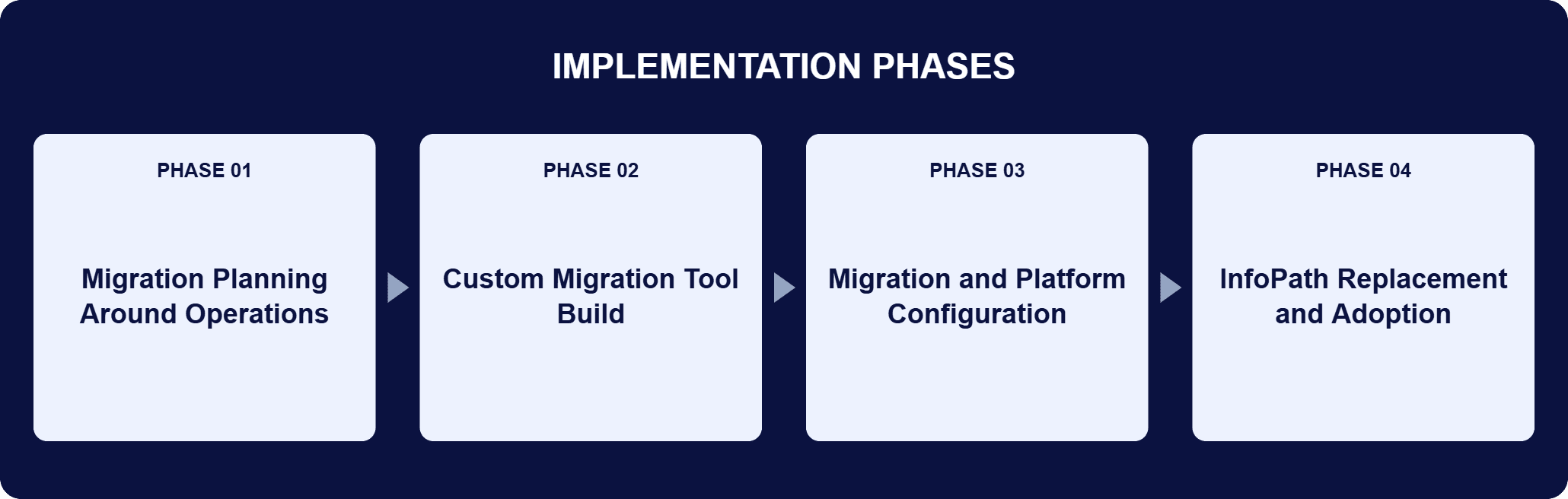
PHASE 03
Migration and Platform Configuration
The tool moved 34 workflows and more than 336,000 custom list items in three weeks. Installation and configuration of the newer on-premises SharePoint release covered permissions, libraries, and workflows matched to operational requirements, with performance optimized for growing data needs, and testing confirmed all data accurately mapped and fully functional.
PHASE 04
InfoPath Replacement and Adoption
i3solutions replaced 32 outdated InfoPath forms with Power Apps, put the workflows behind them on Power Automate, and ran training sessions that familiarized users with the new SharePoint environment and the Power Platform before go-live, carrying adoption.
The newer on-premises SharePoint release was selected for its improved performance, modern user interface, and expanded functionality, giving the organization a platform that keeps pace with growing data and collaboration needs on compliance-ready infrastructure. Power Apps replaced the 32 outdated InfoPath forms with forms the organization can maintain itself: form-building the team adjusts as requirements change, reducing dependency on extensive IT support. Power Automate carries the workflows behind the forms, creating and automating processes that integrate directly with SharePoint and freeing teams from repetitive manual tasks. The custom migration tool, developed by i3solutions specifically for this organization, automated and optimized the content migration: sites, lists, documents, workflows, and pages transferred with accuracy, structure and relationships preserved, and errors minimized, which is how 34 workflows and more than 336,000 custom list items moved in three weeks. The new forms offer improved responsiveness, deeper integration with existing systems, and greater customization, and the platform’s collaboration tools serve teams working across state and federal levels.
Three Weeks, Inspection Passed
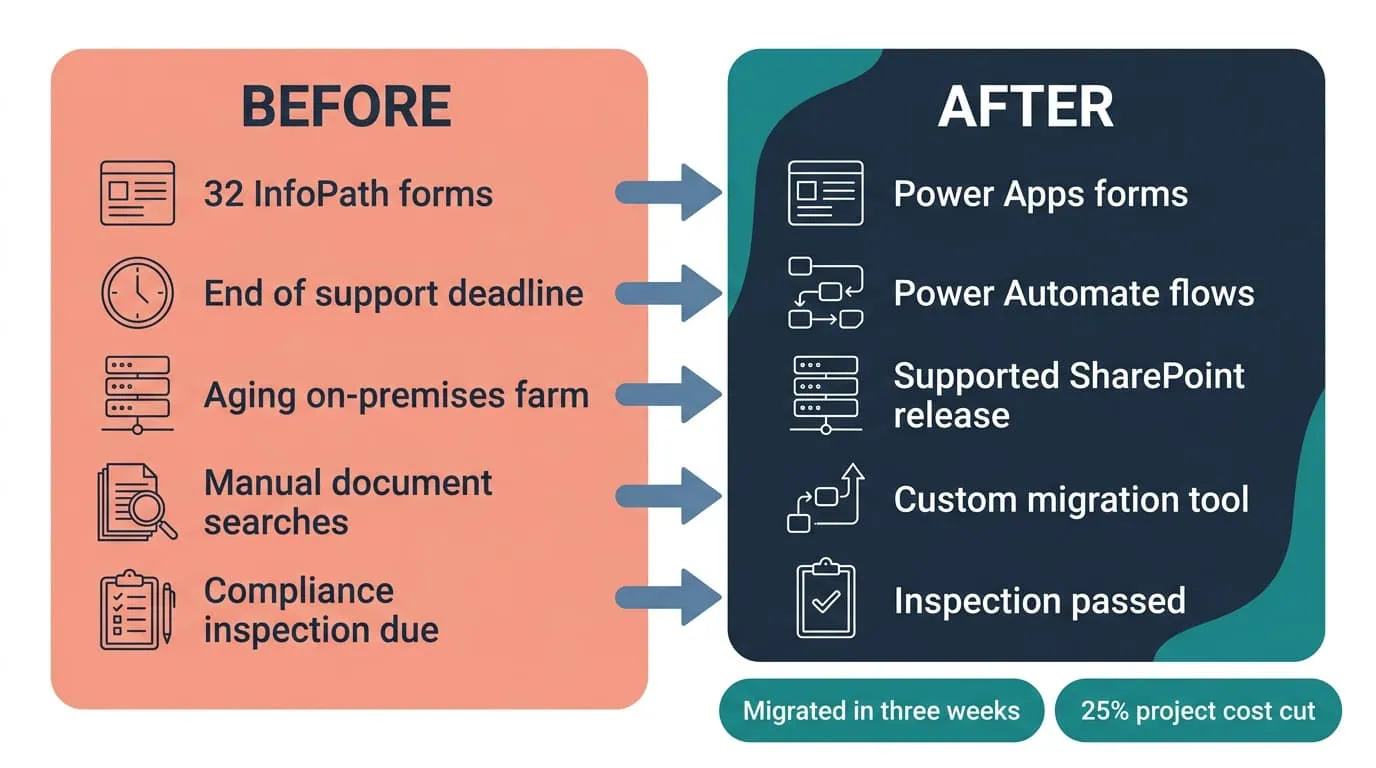
A custom migration tool cut the timeline to three weeks and project cost by 25%, and the upgraded environment passed inspection.
| Outcome | Before | After |
|---|---|---|
| Migration timeline | Months of manual migration | Three weeks with the custom migration tool |
| Compliance inspection | At risk on the legacy SharePoint environment | Passed, avoiding penalties and mission delays valued over $250K |
| InfoPath forms | 32 forms heading for unsupported status | Rebuilt in Power Apps, maintenance down 40% ($150K to $200K saved annually) |
| Document search time | Manual searches across an aging farm | Reduced 20%, more than $300K annually in reclaimed staff productivity |
| Infrastructure investment | Scaling pressure on old platform | Deferred, valued at $100K+ annually |
| Migrated content | 34 workflows, 336,000+ list items at risk | Fully functional and verified in the new SharePoint environment |
i3solutions’ custom migration tool shortened the migration timeline to three weeks and preserved data accuracy, reducing overall project cost by 25% and saving approximately $200K to $250K compared to manual migration. Replacing 32 outdated InfoPath forms with Power Apps reduced maintenance demands by 40%, saving an estimated $150K to $200K annually in IT labor and support.
The modern SharePoint environment improved usability and document access, reducing time spent on manual searches by 20%, an efficiency gain worth more than $300K annually in reclaimed staff productivity. The upgraded environment ensured the organization passed its inspection, meeting all compliance requirements and avoiding costly penalties or mission delays valued at over $250K, and the platform now supports 336,000+ list items and 34 workflows without performance issues, deferring infrastructure investments valued at $100K+ annually.

[PENDING-CLIENT-QUOTE: Replace with approved direct or paraphrased statement from [role] at [organization type] before final publication. A missing client quote does not block publication but must be resolved within 30 days of go-live.]
[PENDING ATTRIBUTION]
[role], [organization type]
This engagement is relevant for
Less relevant for
A Migration Tool Pays for Itself at Scale
The engagement established where tooling beats effort. At 34 workflows and more than 336,000 list items, manual migration carried months of effort plus rework and integrity risks the inspection timeline could not absorb. The custom migration tool turned that volume into a three-week execution while cutting project cost by a quarter. It also established the InfoPath exit pattern: forms rebuilt in Power Apps, workflows in Power Automate, maintenance down 40%, and the whole estate on platforms with a supported future. The inspection passed, and every figure that followed, from the $300K in annual reclaimed productivity to the $100K+ in deferred infrastructure, compounds yearly rather than once.
It is the replacement of InfoPath forms, a product Microsoft has retired, with forms rebuilt in Power Apps and workflows rebuilt in Power Automate, usually alongside the SharePoint upgrade the forms live on. In this engagement, a state National Guard organization’s 32 InfoPath forms were rebuilt in Power Apps while its aging SharePoint environment migrated to a supported on-premises SharePoint release ahead of a compliance inspection. The new forms integrate more deeply with existing systems and sit on supported platforms, which is what removed the continuity risk and cut form maintenance demands by 40%, an estimated $150K to $200K saved annually in IT labor and support.
In this engagement, i3solutions planned the migration around the mission rather than around the software. The organization’s units serve state and federal missions and cannot pause for IT projects, so the work was sequenced for minimal disruption, with leadership and IT teams engaged throughout, regular updates, and training sessions to carry users onto the new SharePoint environment and the Power Platform. Where off-the-shelf migration would have meant months of manual effort and rework risk, i3solutions built a custom migration tool for the organization’s specific needs, which is what compressed the timeline to three weeks and cut the project cost by 25%.
The tool automated the transfer of sites, lists, documents, workflows, and pages from the legacy SharePoint environment, ensuring data integrity and reducing the risk of errors. Its tailored approach preserved the structure and relationships of key content, which is what avoids the rework that comes with manual migration at scale. In this engagement it moved 34 workflows essential to key processes and more than 336,000 custom list items in three weeks, and testing confirmed that all data was accurately mapped and fully functional in the new SharePoint environment, where permissions, libraries, and workflows were configured to match operational requirements.
This engagement’s measured returns: project cost down 25%, approximately $200K to $250K saved versus manual migration; form maintenance down 40%, an estimated $150K to $200K saved annually; manual search time down 20%, worth more than $300K annually in reclaimed staff productivity; infrastructure investments deferred at $100K+ annually; and the inspection passed, avoiding penalties and mission delays valued at over $250K. Note which figures recur: the migration savings land once, but the maintenance, productivity, and infrastructure figures compound every year. An organization sizing its own return should start from its form count, list-item volume, and the annual IT labor its current estate consumes.
i3solutions is a Microsoft Partner with 30 years of delivery experience and 1,500+ Microsoft engagements, with every engagement staffed by an all-senior, all US-based delivery team. SharePoint migration and InfoPath replacement sit at the center of that record, and this engagement shows the full pattern: farm migration, 32 forms rebuilt on Power Apps and Power Automate, a custom migration tool where tooling beat effort, and a compliance inspection passed on schedule. If InfoPath retirement or an aging farm is on your risk register, bring your form inventory and farm version to a scoping conversation and leave with a concrete read on scope, sequence, where a migration tool pays for itself, and comparable engagements to reference when you build the internal case.
Yes. i3solutions delivered training sessions on the new SharePoint platform and the features of Power Apps and Power Automate, and the new forms reduce dependency on extensive IT support, so the organization can adapt them as business needs evolve.
The figures here, from reclaimed productivity to deferred infrastructure spend, compound every year rather than paying out once. We can talk through what a comparable InfoPath exit would look like for your environment.

US-Based Microsoft System Integrator | Est. 1997
© i3solutions. All rights reserved.
US-Based Microsoft System Integrator | Est. 1997
© i3solutions. All rights reserved.


