

Orphaned accounts kept surfacing across HR, identity, and finance systems, and a security audit flagged the pattern.
The client is a global consumer-brand cookware manufacturer best known for its enameled cast iron cookware, sold to professional and home kitchens worldwide. Behind the brand sits an enterprise systems estate: UKG Pro managing HR, payroll, talent, and scheduling; Microsoft Entra ID managing identity and access; and Dynamics 365 Finance and Operations running accounting, supply chain, manufacturing, and distribution.
The company could not reliably manage user accounts from its HR system. Account creation, modification, and deletion all had gaps, and orphaned accounts persisted after employees left; a security audit flagged them as a real risk. Onboarding had its own failure mode: the system reported accounts as created when they were not, and new hires arrived to find nothing working. The fix had to cover the whole account lifecycle, connecting UKG Pro to Microsoft 365 and making user account management dependable.
A global cookware manufacturer’s security audit kept flagging orphaned accounts left behind across HR, identity, and finance systems after employees departed. i3solutions integrated Entra ID with the HR platform so access now follows employment status automatically, with a full audit trail.
Access is now disabled automatically the moment someone departs, eliminating the orphaned accounts a security audit had flagged, and role and permission changes take effect quickly instead of through manual, error-prone updates, freeing HR and IT staff for work that actually needs judgment.
The Audit Put a Name on the Risk
The security audit converted a chronic annoyance into a named vulnerability. Orphaned accounts are standing access with no owner: a path into sensitive systems that nobody is watching. Every departed employee whose account survived them widened that surface, and the manual process that was supposed to close accounts was the same process that was failing to open them correctly for new hires.
The company committed to fixing the lifecycle end to end, not just the audit finding: account creation, modification, and deletion driven automatically from the HR system of record, so access would follow employment status instead of trailing it.
No amount of process discipline kept this manufacturer’s accounts aligned with employment status when HR events traveled by hand. If your organization is relying on manual process to catch the same gap, that’s the mechanism worth fixing first.
Every Departure Left a Door Open
The security stake was the audit finding itself. Each orphaned account was an unwatched entry point into systems holding confidential company and customer data, and the accounts accumulated with every departure, meaning the exposure grew on its own schedule, not the company’s.
The operational stake ran in the other direction: every hire was a race the company kept losing. Accounts that did not exist on day one meant new employees without tools, HR and IT staff absorbed in manual corrections, and an account database whose accuracy nobody could vouch for, which is a compliance problem as much as a productivity one.
Three Systems, One Lifecycle, No Re-Keying
The integration had to span three platforms with different roles: UKG Pro as the HR source of truth, Microsoft Entra ID as the identity and access layer, and Dynamics 365 Finance and Operations as the financial system whose records had to stay consistent with HR. An HR event (hire, role change, or departure) had to propagate to all of them without manual re-keying.
The mechanism had to work with what UKG Pro provides: a .csv file containing user account changes, exported from the HR system. The integration had to read those exports and execute them accurately: account creation, role updates, disabling departed employees, Exchange shared mailbox permissions, and Dynamics 365 record incorporation. Controls and audit trails had to sit behind every change.
Senior Microsoft Specialists with Proven Delivery Depth
The work demanded fluency across the Microsoft identity and business platform stack, Entra ID, Exchange, Dynamics 365, Power Automate, PowerShell Core, plus the discipline to build lifecycle automation that an auditor can trust: every account action traceable, every change controlled.
The manufacturer engaged i3solutions, a Microsoft Partner with 30 years of delivery experience and 1,500+ Microsoft engagements, delivered by an all-senior, all US-based delivery team. Identity lifecycle integration is exactly the class of work where that experience compounds: the failure modes are known, and the fix is engineering, not experimentation.
i3solutions built the integration around the account lifecycle itself: HR events in UKG Pro drive every downstream change, automatically and auditably.
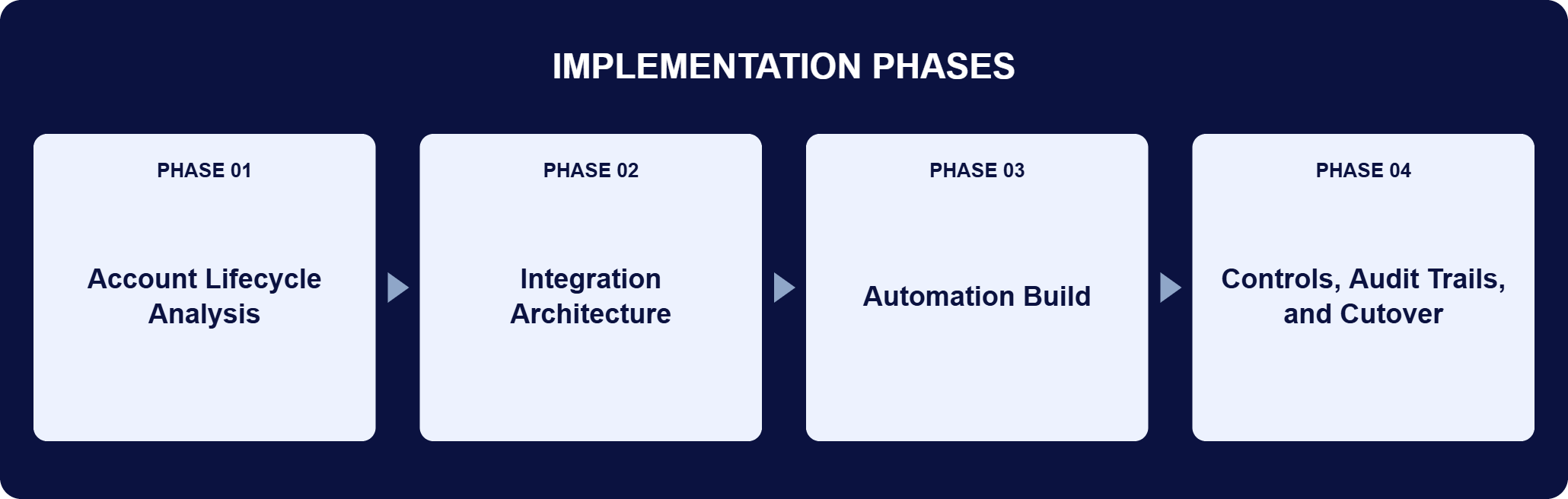
PHASE 01
Account Lifecycle Analysis
i3solutions traced how accounts were created, modified, and deleted across UKG Pro, Entra ID, and Dynamics 365, mapping where the gaps produced orphaned accounts, failed onboarding, and inconsistent records.
PHASE 02
Integration Architecture
The integration was designed to read account changes exported from UKG Pro as .csv reports and apply them across the estate: Microsoft Entra ID for identity, Exchange for shared mailbox permissions, and Dynamics 365 Finance and Operations for financial records.
PHASE 03
Automation Build
i3solutions implemented the automation with PowerShell Core executing the account actions specified in the UKG Pro reports, Power Automate flows moving data between applications, and HTTP connectors carrying communication between the company’s operational systems.
PHASE 04
Controls, Audit Trails, and Cutover
Every provisioning, modification, and deletion action was put behind controls and audit trails, so the company can monitor changes, enforce security policy, and address issues as they surface, and the orphaned accounts the audit flagged were eliminated.
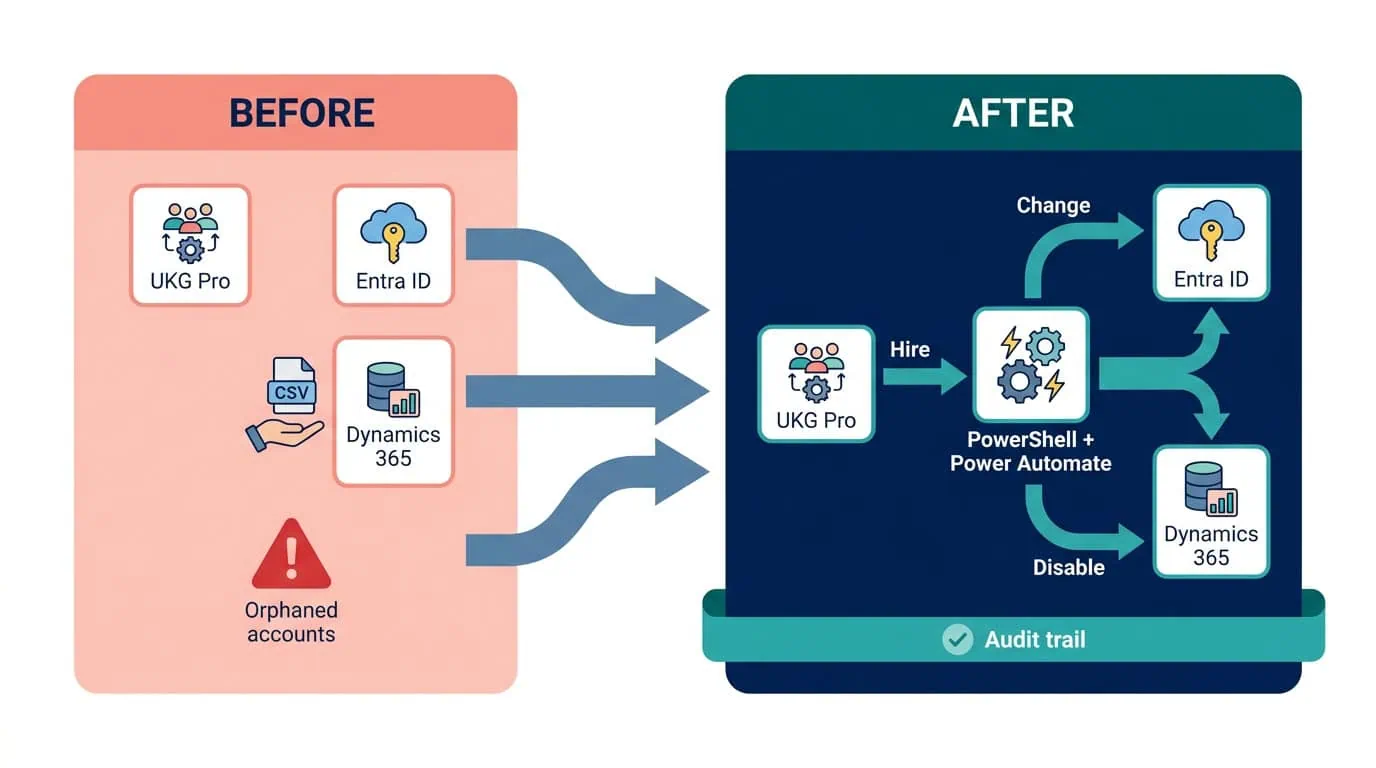
The integration connects three platforms the manufacturer already ran. UKG Pro is the HR source of truth, managing HR, payroll, talent management, and workforce scheduling; it exports a .csv file of user account changes that the integration processes to keep every application consistent. Microsoft Entra ID centralizes user authentication, access control, and the safeguarding of sensitive data; the integration creates new-hire accounts, updates roles, disables departed employees, and assigns Exchange shared mailbox permissions there automatically. Dynamics 365 Finance and Operations, which runs accounting, supply chain, manufacturing, and distribution, receives new records through a Power Automate flow, keeping financial and HR systems consistent. PowerShell Core executes the account management actions specified in the UKG Pro reports, and Power Automate with HTTP connectors carries the workflow between operational systems. The result is one connected lifecycle: when new employees join, their accounts are promptly and accurately generated; when roles change, permissions follow; and when employees leave, their access is disabled, with controls and audit trails behind every change.
The Audit Finding, Closed at the Source
Integrating UKG Pro, Entra ID, and Dynamics 365 eliminated orphaned accounts and disabled access automatically at departure.
| Outcome | Before | After |
|---|---|---|
| Orphaned accounts | Persisting after every departure, flagged by security audit | Eliminated, access disabled automatically at departure |
| New-hire onboarding | Accounts reported created but not working | Accounts promptly and accurately generated, tools ready day one |
| Account modifications | Manual, error-prone | Automatic, with role and permission changes taking effect quickly |
| HR-to-finance consistency | Records re-keyed between systems | Dynamics 365 records added automatically via Power Automate |
| Administrative overhead | HR and IT staff absorbed in corrections | Cut, staff freed for work needing judgment |
| Auditability | Gaps nobody could vouch for | Controls and audit trails behind every change |
Eliminating orphaned accounts closed the vulnerability the audit flagged. An orphaned account is standing access with no owner: a path into sensitive systems that nobody is watching. Access privileges now stay aligned with employee status and responsibilities, and the company’s user account database stays clean and current automatically, which is what actually defends against unauthorized access.
Each employee has the tools and access their role requires from day one, and the automated account process cut administrative overhead, freeing HR and IT staff for work that needs their judgment. UKG Pro, Entra ID, and Dynamics 365 now operate as one connected system: HR events propagate to identity and finance without re-keying, which is what keeps the whole chain trustworthy.
Eliminating ‘orphaned’ accounts and synchronizing UKG with Dynamics 365 keeps user access rights matched to current employment status and roles. Dormant accounts no longer accumulate as unwatched entry points. Account modifications run automatically, which removes the manual errors that used to creep in. Role and permission changes take effect quickly and the records stay accurate, which keeps compliance intact.
Key processes run without manual intervention or duplicate entry. Data moves between systems as changes happen, so departments work from the same current information. Accounts are provisioned, modified, and deleted accurately across systems, with controls and audit trails behind every change. The company can monitor modifications, enforce security policy, and address issues as they surface.

[PENDING-CLIENT-QUOTE: Replace with approved direct or paraphrased statement from [role] at [organization type] before final publication. A missing client quote does not block publication but must be resolved within 30 days of go-live.]
[PENDING ATTRIBUTION]
[role], [organization type]
This engagement is relevant for
Less relevant for
Access Should Follow Employment, Automatically
The engagement established that the account lifecycle is an integration problem, not a diligence problem. No amount of process reminders keeps accounts aligned with employment status when HR events travel by hand; the fix is a pipeline where the HR system’s own exports drive account creation, modification, and deletion across identity and finance. It also established that the security payoff and the operational payoff are the same mechanism: the automation that gives a new hire working accounts on day one is the automation that disables a departed employee’s access the day they leave. For the manufacturer, that single mechanism closed an audit finding, cleaned up onboarding, and connected three platforms into one trustworthy chain.
It is automation that makes a company’s HR system the single driver of user accounts everywhere else. In this engagement, account changes exported from UKG Pro flow through an integration that creates new-hire accounts in Microsoft Entra ID, updates roles, disables departed employees, assigns Exchange shared mailbox permissions, and adds Dynamics 365 Finance and Operations records through a Power Automate flow. Access follows employment status automatically: when someone joins, their accounts exist and work on day one; when their role changes, permissions follow; when they leave, access is disabled. The company’s security audit had flagged orphaned accounts as a real risk, and this lifecycle automation is what eliminated them.
In this engagement, i3solutions started from the failure modes rather than the tools: orphaned accounts persisting after departures, onboarding that reported accounts created when they were not, and modifications that drifted between systems. The integration was designed to close the whole lifecycle, not just the audit finding, using the mechanisms the platforms already provide, UKG Pro’s .csv change exports, PowerShell Core execution, Power Automate flows, and HTTP connectors. Every action runs behind controls and audit trails, because lifecycle automation an auditor cannot verify has not actually fixed the compliance problem. The measure of success is that the account database stays clean and current without anyone maintaining it by hand.
UKG Pro exports a .csv file containing user account changes: hires, role modifications, and departures. The integration processes that export and executes the specified actions across the estate. PowerShell Core carries out the account management operations in Microsoft Entra ID, creating accounts, updating roles, disabling departed employees, and assigning Exchange shared mailbox permissions. A Power Automate flow adds corresponding records to Dynamics 365 Finance and Operations, and HTTP connectors handle communication between the company’s operational systems. Because every application reads from the same HR-driven change stream, records stay consistent across HR, identity, and finance, with controls and audit trails behind every change.
In this engagement the returns arrived on three fronts. Security: the orphaned accounts a security audit had flagged were eliminated, and dormant accounts no longer accumulate as unwatched entry points. Productivity: new employees have the tools and access their role requires from day one, instead of arriving to accounts that do not work. Overhead: account processes run without manual intervention or duplicate entry, cutting administrative load and freeing HR and IT staff for work that needs judgment. A company sizing its own return should count its current orphaned accounts, the manual hours spent on account administration, and the onboarding delays its new hires actually experience.
i3solutions is a Microsoft Partner with 30 years of delivery experience and 1,500+ Microsoft engagements, with every engagement staffed by an all-senior, all US-based delivery team. This engagement is representative of where that depth pays: an integration spanning UKG Pro, Microsoft Entra ID, Exchange, Dynamics 365 Finance and Operations, Power Automate, and PowerShell Core, built so an HR event propagates through identity and finance without re-keying and with an audit trail at every step. A scoping conversation traces your account lifecycle from HR system to identity platform, shows exactly where automation closes the gaps, and gives you comparable engagements to reference when you build the internal case.
Two, both flagged operationally: orphaned accounts that persisted after employees left, which a security audit identified as a risk, and new-hire accounts that showed as created but were not. Account creation, modification, and deletion now run from a single UKG Pro export.
It closes it at the source. Account creation, modification, and disabling now run from a single UKG Pro export instead of separate manual steps across HR, identity, and finance, so an employee’s departure disables access automatically rather than depending on someone remembering to do it. That is what eliminated the orphaned accounts a security audit had flagged for this global cookware manufacturer, not just reduced how often they occurred.
The automation that provisions a new hire on day one is the same automation that disables access the day someone leaves. We can talk through what a comparable mechanism would look like for your environment.

US-Based Microsoft System Integrator | Est. 1997
© i3solutions. All rights reserved.
US-Based Microsoft System Integrator | Est. 1997
© i3solutions. All rights reserved.


