
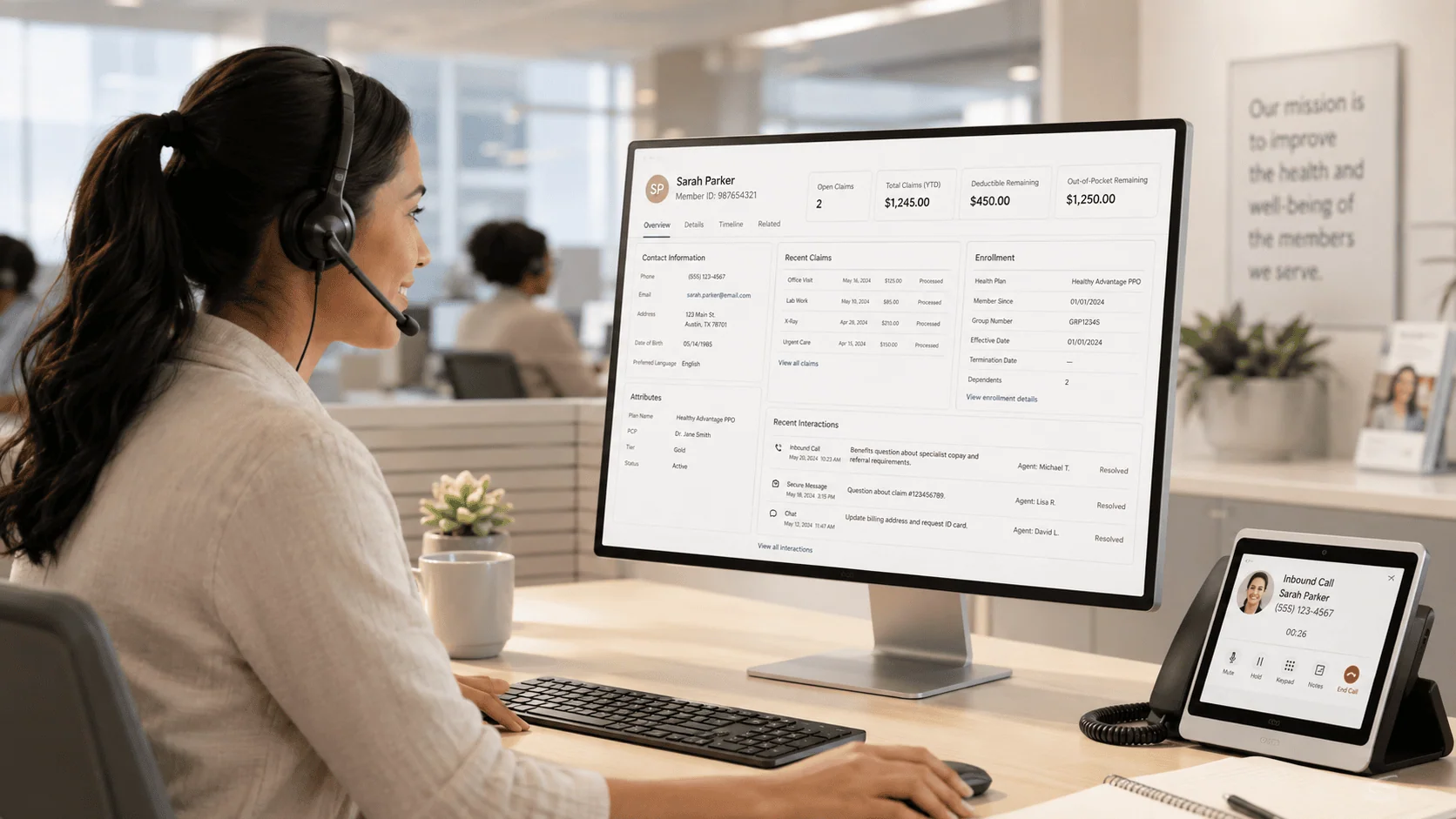
Representatives switched between applications to find member data while callers waited on the line.
The client is a healthcare services company focused on healthcare management and claims repricing, whose stated mission is to keep its clients from overpaying for healthcare. It serves American associations, unions, brokers, employers, and individuals, helping them navigate an increasingly complex healthcare system. That mission puts the call center at the center of the business. When a member calls about eligibility, a claim, or an enrollment payment, the answer has to be assembled from whatever the company knows about that member, and it has to be assembled while the caller is still on the line.
As the company continued to grow, it faced a significant challenge of handling an increasing amount of customer data and its management. Representatives spent time switching between applications to find data, and members spent that same time waiting. The company needed an IT consultant to craft, develop, and integrate a new Microsoft Dynamics 365 system that could manage healthcare eligibility and claims while addressing the stringent requirements of HIPAA and PHI privacy. Integration with various Microsoft and third-party tools was crucial. The ultimate need was an efficient system that made client profile management easier.
A healthcare call center’s representatives had to search multiple systems for member data while patients waited on hold. i3solutions unified eight of them into a single HIPAA-compliant Dynamics 365 record, so a caller’s full history is ready before the conversation starts.
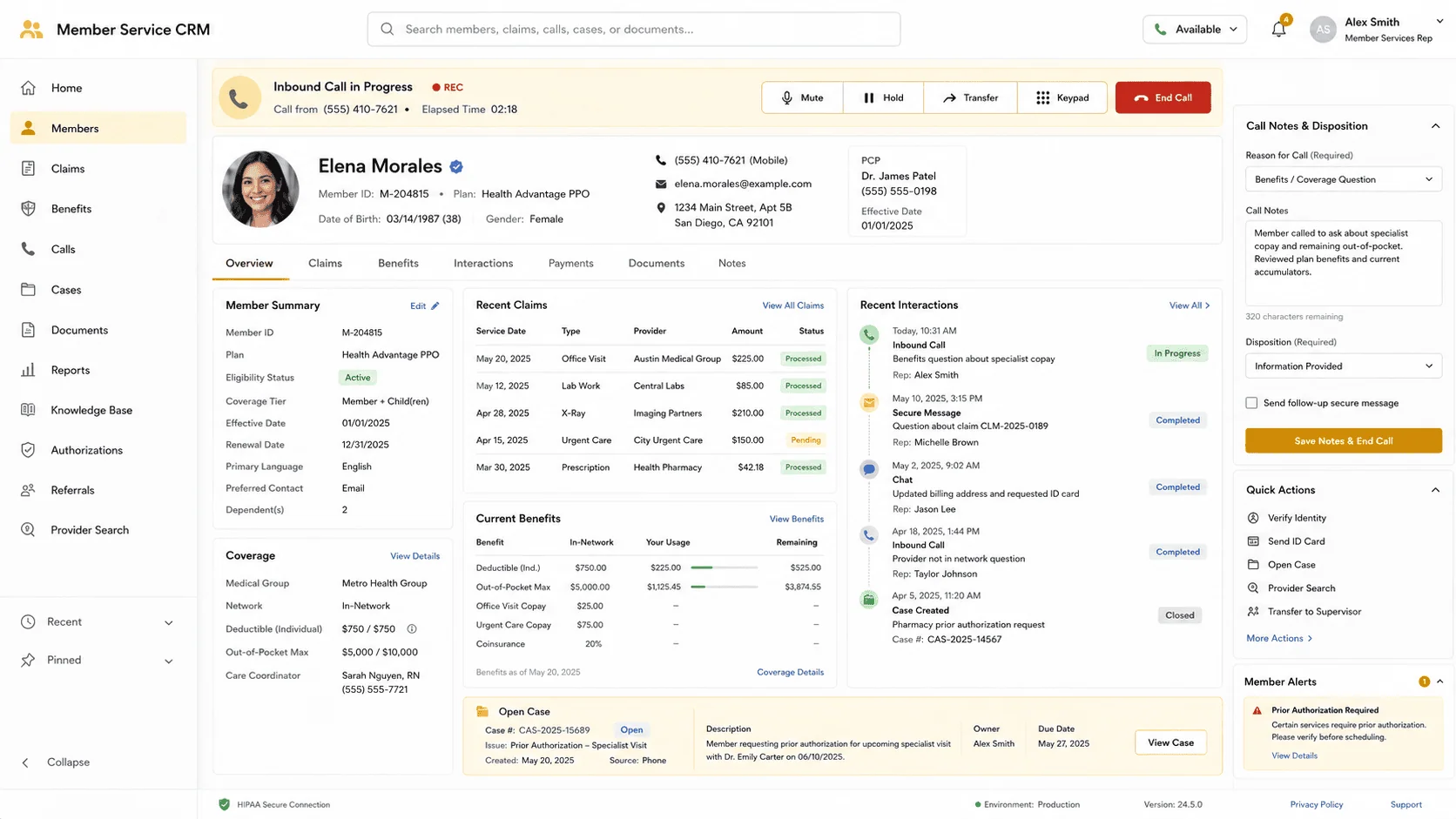
Representatives who once switched between applications to find data while a member waited now have Ring Central surface the caller’s profile and case details as soon as the call is picked up, and enrollment data that used to be entered by hand into every system that needed it now flows automatically into Dynamics and Ring Central through Microsoft Flow.
Growth Turned Client Data Into the Constraint
The company’s work is knowing what a client’s coverage, claims, and enrollment actually say and repricing against it. Growth did not change that job. It changed how much data the job ran on, and how many places that data lived: client profiles, claims, the sales pipeline, enrollment records, telephony, email, forms, and payments each held a piece of the picture.
The cost of that dispersion showed up in one specific place, the call. Representatives spent time switching between applications to find data, so the member’s wait was a function of how many systems the representative had to visit before answering. The company decided the answer was a single system of record rather than more diligence at the desk: a custom Customer Relationship Management application on Microsoft Dynamics 365, with the other tools integrated into that record rather than sitting beside it.
This call center’s representatives were switching between applications while callers waited; the fix was one CRM record instead of several open windows. If your team is doing the same juggling across systems, that’s a solvable integration problem.
A Complex System to Navigate, With a Clock Running on Every Call
The company exists to keep its clients from overpaying for healthcare, and the people who deliver on that are call center representatives serving American associations, unions, brokers, employers, and individuals. If the representative cannot see the caller’s profile and case details, the promise is not broken so much as delayed, and it is delayed on the phone, in front of the member. Left as it was, the call and wait times members experienced would keep tracking the growth in customer data rather than falling as the tooling improved.
The second exposure was regulatory rather than operational. The system had to manage healthcare eligibility and claims while meeting HIPAA and PHI privacy requirements, and every tool the CRM reached, telephony, email, payments, forms, documents, was another path patient data would travel. A CRM assembled without privacy in the requirement from the start would have made the compliance problem larger with each integration it added, which is the opposite of what the integration was for.
One Client Profile, and PHI in Every Integration Path
The requirement was never a CRM in isolation. Dynamics 365 had to hold client data, track claims, manage the sales pipeline and enrollment data, and connect to Ring Central telephony, email, Stripe payments, Cognito Forms, SharePoint Online, Microsoft Teams, and the rest of Office 365. Integration with various Microsoft and third-party tools was crucial, which made the engagement as much systems integration and data management work as Dynamics 365 development.
The telephony path carried the tightest constraint. For a representative to see the caller’s profile and case details as soon as the call is picked up, Dynamics and Ring Central have to stay synchronized continuously rather than on a periodic refresh. Uploaded enrollment data had the same property: once it arrives it has to reach both Dynamics and Ring Central without anyone retyping it. And all of it had to be designed for compliance with HIPAA and PHI privacy standards, because the data moving through those paths is patient data.
Senior Microsoft Specialists with Proven Delivery Depth
The requirements described a specific vendor profile. The team had to design and build a custom CRM application on Microsoft Dynamics 365 and also do the systems integration and data management work that connects it to telephony, email, payments, forms, documents, and collaboration tools, with HIPAA and PHI privacy handled as a design input rather than a later review. The scope also reached past the platform: the geospatial analytics that map hospitals and related care facilities are not a Dynamics feature, so custom software development had to be part of the same engagement.
The company engaged i3solutions, a Microsoft Partner with 30 years of delivery experience and 1,500+ Microsoft engagements, delivered by an all-senior, all US-based delivery team. That profile matched the work: senior engineers who have built on the Microsoft stack repeatedly, working across Dynamics 365 development, systems integration and data management, and i3solutions’ custom software development team, which built the geospatial analytics layer.
i3solutions designed and built the company a custom Customer Relationship Management application on Microsoft Dynamics 365, combining Dynamics 365 development with the systems integration and data management work needed to connect it to the tools the business already ran on.
PHASE 01
Client Data and Integration Mapping
i3solutions worked through what the CRM had to hold and what it had to reach. On the Dynamics side that meant client data, claims, the sales pipeline, and enrollment data. On the integration side it meant Ring Central telephony, email, Stripe payments, Cognito Forms, SharePoint Online, Microsoft Teams, and the rest of Office 365. HIPAA and PHI privacy requirements were part of the scope from the start rather than a later addition.
PHASE 02
Dynamics 365 CRM Design
The application was designed with Dynamics as the backbone of the system, holding all client data, tracking claims, and managing the sales pipeline, customer information, and enrollment data, with customer service agents able to access that data in real time. Centralizing customer data on that record is what gives the company one view of a client’s interactions, preferences, and history rather than a picture reassembled from several systems on every call.
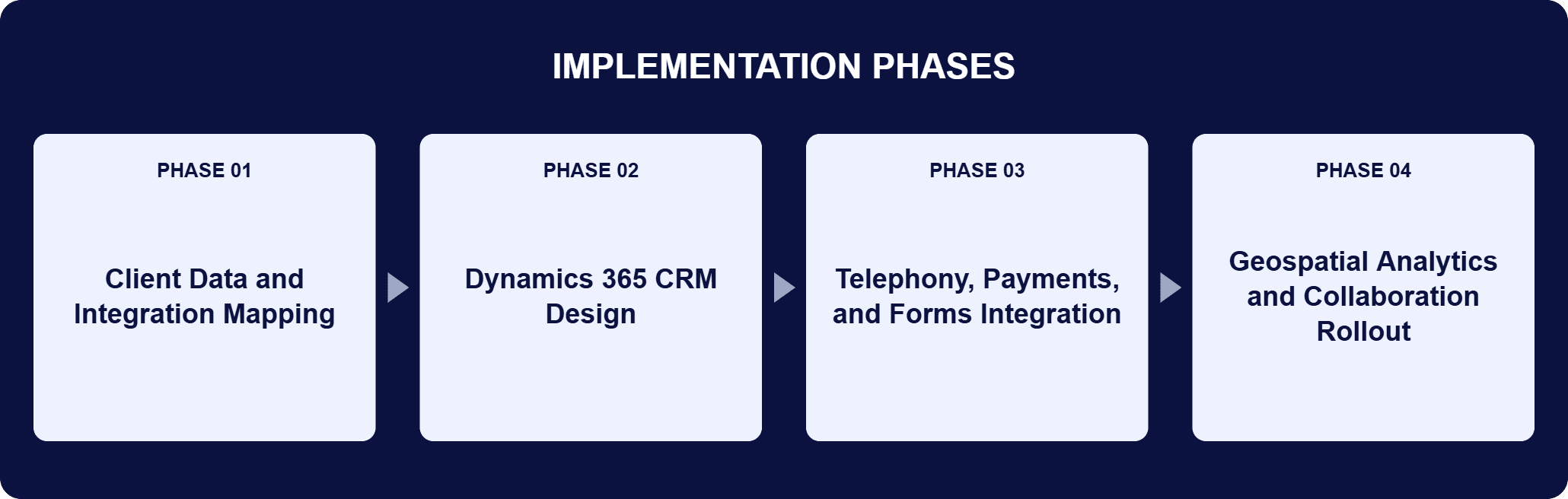
PHASE 03
Telephony, Payments, and Forms Integration
Dynamics was synchronized with Ring Central so a call center representative sees the caller’s profile and case details as soon as the call is picked up. Microsoft Flow was built out with triggers, conditions, and actions so uploaded enrollment data moves into Dynamics and Ring Central automatically. Stripe was integrated into the company’s website to accept healthcare enrollment payments with automated reminders and confirmations, and Cognito Forms was set up to route each submitted form to the appropriate person at each step of the process.
PHASE 04
Geospatial Analytics and Collaboration Rollout
i3solutions’ custom software development team added geospatial analytics that map hospitals and related care facilities so clients can see which one offers the best price for the care they need. SharePoint Online was established as the centralized document management and collaboration platform for case documents, enrollment data, and corporate operations records, with Microsoft Teams for internal messaging and Office 365 for meeting scheduling and document collaboration.
Dynamics is the backbone of the system. It stores all client data, tracks claims, and helps manage the sales pipeline and customer information, and it gives customer service agents access to that data in real time, so case management and customer service run from one record instead of several. Ring Central sits directly against that record: as soon as a client calls in, the software automatically brings up that client’s profile and case details, so the representative is reading rather than searching. Microsoft Flow carries the data that arrives in bulk, sending uploaded enrollment data to both Dynamics and Ring Central through workflows built from triggers, conditions, and actions tailored to the company’s needs. Stripe processes healthcare enrollment payments from the company’s website and sends automated payment reminders and confirmations. Cognito Forms automates data collection and routes each form to the appropriate person at each step, which eliminates repetitive manual data entry. SharePoint Online houses the strategic documents for cases and enrollment data, Microsoft Teams carries internal messaging, and Office 365 covers Outlook scheduling and document collaboration in OneDrive and SharePoint. Geospatial analytics, built by i3solutions’ custom software development team, display hospital and related care information on a map.
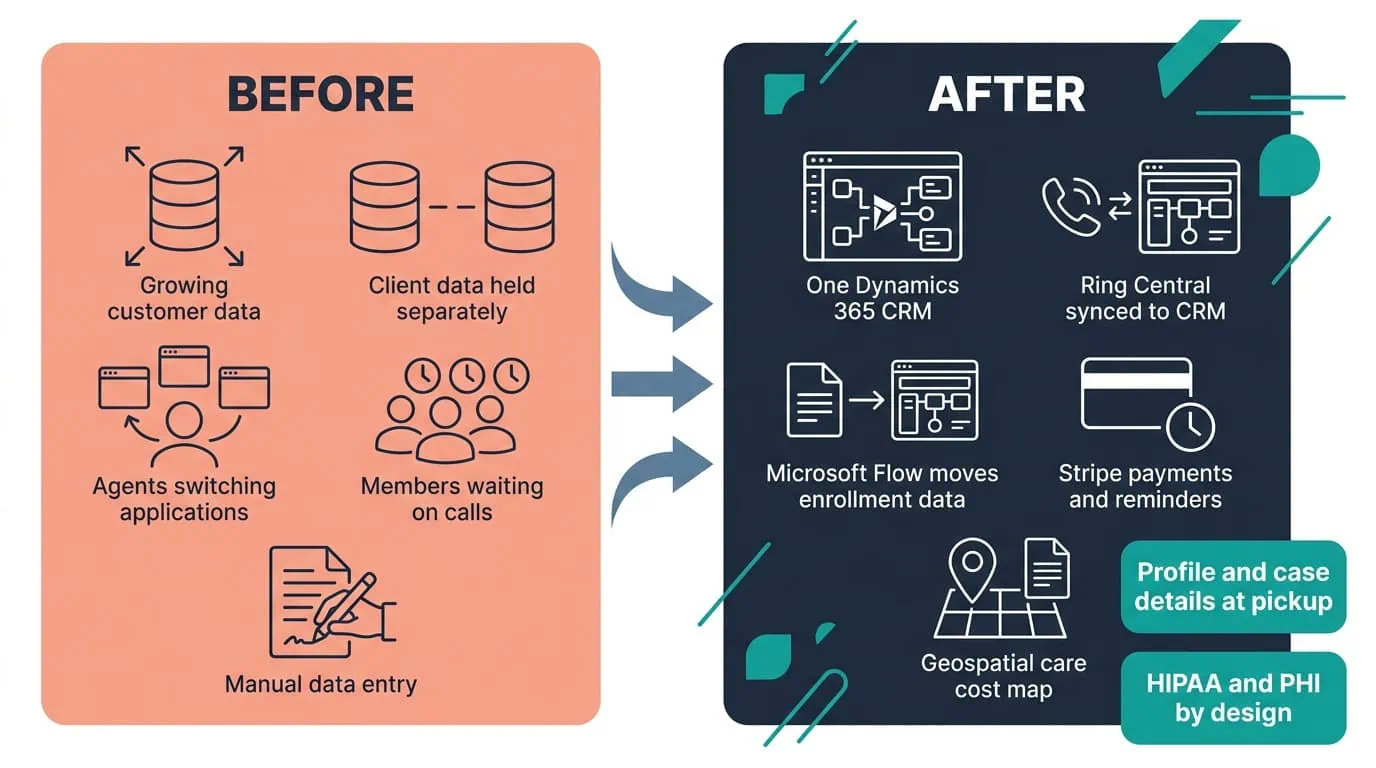
One Record, Instant Context
A Dynamics 365 CRM integrated with telephony now brings up a caller’s profile and case details the moment the call connects.
| Outcome | Before | After |
|---|---|---|
| Call handling | Representatives switching between applications to find data while a member waits | Ring Central brings up the caller’s profile and case details as soon as the call is picked up |
| Client and claims data | An increasing amount of customer data and its management | One Dynamics 365 record holding client data, claims, the sales pipeline, and enrollment data |
| Enrollment data | Uploaded enrollment data entered by hand into the systems that need it | Microsoft Flow sends uploaded enrollment data to Dynamics and Ring Central automatically |
| Care cost guidance | Clients navigating an increasingly complex healthcare system | Geospatial analytics map hospitals and related care facilities so clients can see which one offers the best price for the care they need |
| Privacy and data security | Eligibility and claims to be managed under HIPAA and PHI privacy requirements | A CRM designed for full compliance with HIPAA and PHI privacy standards |
The results this engagement records are directional rather than numeric, and they are carried here as the company states them. With real-time access to patient information, call and wait times are reduced. Integration with the various tools means less time switching between applications, which leads to more efficient call handling. Those are one saving read from two ends of the same call: what the member waits through, and what the representative has to go looking for before answering.
Two further results are not about time at all. Geospatial analytics give call center representatives the ability to guide patients toward the highest level of care at the most affordable cost, which is the company’s mission applied at the scale of a single phone call rather than an annual plan. And the system’s design ensures full compliance with HIPAA and PHI privacy standards, so patient data remains secure across every path the integrations opened, from telephony and email through payments, forms, and document storage.

PENDING-CLIENT-QUOTE
This engagement is relevant for
Less relevant for
One Client Record at the Moment the Phone Is Answered
The engagement established that a claims repricing operation can run its call center from one record instead of a row of open applications. A custom Customer Relationship Management application on Microsoft Dynamics 365 holds client data, claims, the sales pipeline, and enrollment data, and the systems integration and data management work around it brought Ring Central telephony, email, Stripe payments, Cognito Forms, SharePoint Online, Microsoft Teams, and the rest of Office 365 into that record rather than alongside it.
A representative sees the caller’s profile and case details as soon as the call is picked up, Microsoft Flow moves uploaded enrollment data into Dynamics and Ring Central without manual entry, and geospatial analytics show which hospital offers the best price for the care a client needs. The CRM was designed for compliance with HIPAA and PHI privacy standards, so making patient data reachable did not make it less protected.
Yes, that’s the exact gap this build closed. This healthcare services company’s representatives had been reconciling client data, claims, telephony, payments, and forms across separate tools during live calls; the custom Dynamics 365 CRM integrates the phone system and third-party tools into one screen so a representative sees the caller’s full profile and case history the instant the call connects. If your team is still assembling that picture manually while someone waits, that’s the same problem this was built to solve.
A custom Customer Relationship Management application on Microsoft Dynamics 365 that manages healthcare eligibility and claims. It centralizes customer data so the company has one view of a client’s interactions, preferences, and history, and it gives call center representatives the client profile and case details they need at the moment a call comes in. Around that core, i3solutions did the systems integration and data management work needed to connect the CRM to Ring Central telephony, email, Stripe payments, Cognito Forms, SharePoint Online, Microsoft Teams, and the rest of Office 365. i3solutions’ custom software development team also added geospatial analytics that map hospitals and related care facilities, so clients can see which one offers the best price for the care they need. The application was designed for compliance with HIPAA and PHI privacy standards.
Yes. Dynamics synchronizes with Ring Central, which brings up the caller’s profile and case details automatically. Microsoft Flow sends uploaded enrollment data to both Dynamics and Ring Central using triggers, conditions, and actions, with the workflows tailored to the company’s needs so data stays synchronized and teams are informed of crucial developments. Stripe handles healthcare enrollment payments from the website along with automated payment reminders and confirmations. Cognito Forms collects data through web-based forms and routes each one to the right person at each step of the process, which eliminates repetitive manual data entry. Office 365, SharePoint Online, and Microsoft Teams cover documents, scheduling, and internal communication: Outlook for meetings, OneDrive and SharePoint for real-time document collaboration, SharePoint Online for case and enrollment documents, and Teams for internal messaging.
Privacy was part of the requirement from the start. The company needed a system that could manage healthcare eligibility and claims while meeting HIPAA and PHI privacy requirements, and the design keeps patient data secure and compliant with those standards. SharePoint Online serves as the centralized platform holding the case and enrollment documents. Each tool the CRM reaches, telephony, email, payments, forms, and collaboration, is another path patient data can travel. Treating privacy as a design input rather than a later review is what let the integration surface grow without weakening the privacy position. The company’s own statement of the result is direct: the system’s design ensures full compliance with HIPAA and PHI privacy standards, so patient data remains secure.
i3solutions’ custom software development team used geospatial analytics to display hospitals and related care facilities on a map. Call center representatives use it to guide a patient toward the highest level of care at the most affordable cost, which is how the map supports the wider goal of keeping clients from overpaying for care. In practice it turns a pricing question into a visible one: instead of the representative describing options from memory, the map shows hospital and related care information, and the choice can be made against the price of the care the client actually needs. That capability sits outside standard Dynamics functionality, which is why it came from i3solutions’ custom software development team rather than from platform configuration.
The defining constraint in this kind of operation is that the answer has to arrive during the call, so the build is judged by what a representative can see at pickup rather than by the length of a feature list. i3solutions designed to that constraint: Dynamics 365 as the single record for client data, claims, the sales pipeline, and enrollment data, then the systems integration and data management work that makes the record reachable from telephony, email, payments, forms, documents, and collaboration tools. Where a requirement fell outside the platform, custom software development covered it, which is how the geospatial analytics mapping hospitals and related care facilities came to exist. HIPAA and PHI privacy requirements were design inputs from the start, because a CRM that centralizes patient data has to be compliant before it is useful.
i3solutions is a Microsoft Partner with 30 years of delivery experience and 1,500+ Microsoft engagements, with every engagement staffed by an all-senior, all US-based delivery team. This engagement shows why that profile matters for healthcare CRM work. The build spanned Dynamics 365 development, systems integration and data management across telephony, payments, forms, documents, and collaboration tools including Ring Central, Stripe, Cognito Forms, SharePoint Online, Microsoft Teams, and Office 365, custom software development for the geospatial analytics layer, and a HIPAA and PHI privacy position that had to hold across all of it. Senior engineers who have built on the Microsoft stack repeatedly can hold that scope together rather than delivering a CRM plus an integration backlog. For organizations weighing similar work, a short scoping conversation establishes what the equivalent build would take in your environment.
This CRM was designed for HIPAA and PHI compliance from the start, so making data reachable didn’t make it less protected. We can talk through what a comparable compliant CRM consolidation would look like for your environment.

US-Based Microsoft System Integrator | Est. 1997
© i3solutions. All rights reserved.
US-Based Microsoft System Integrator | Est. 1997
© i3solutions. All rights reserved.


