
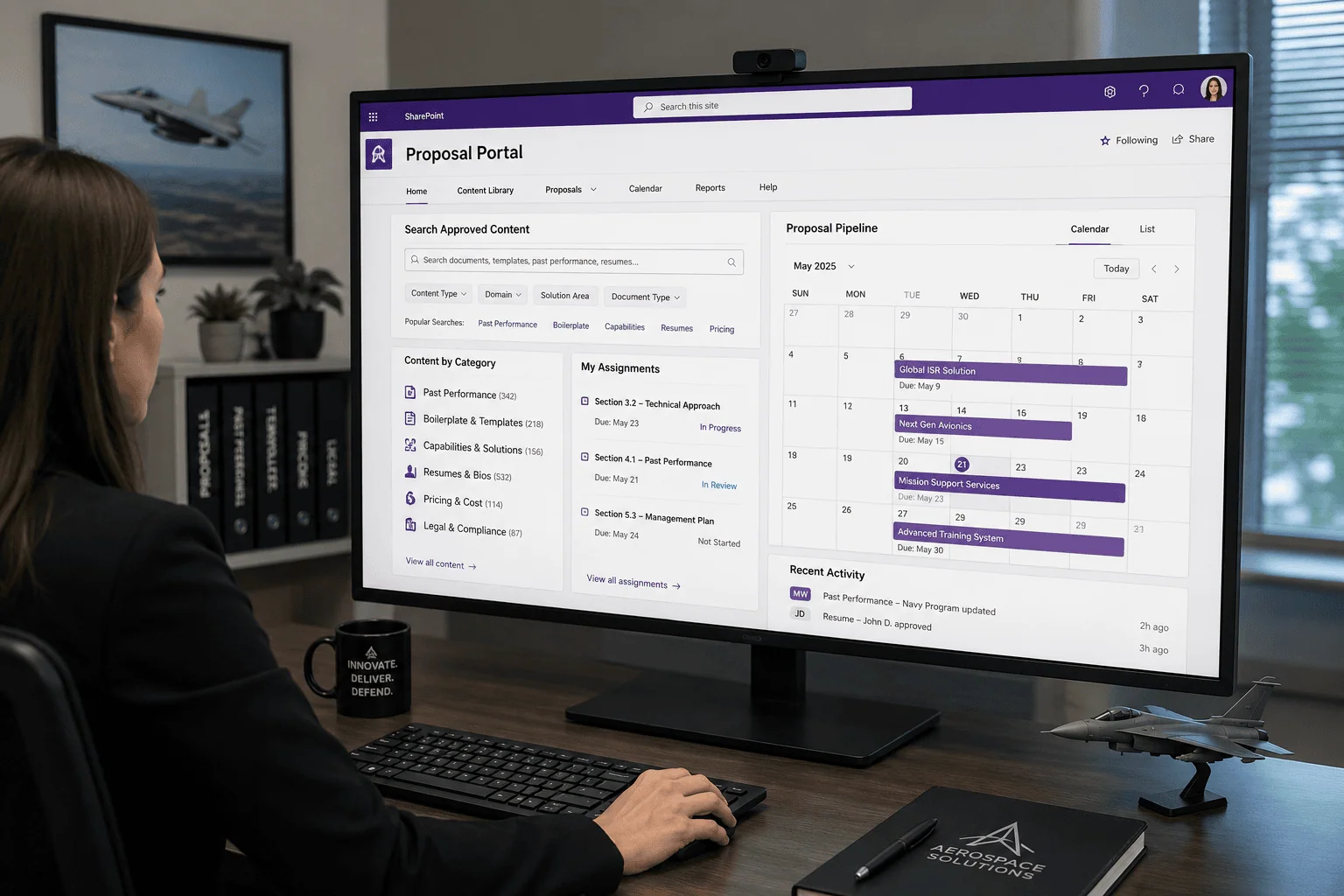
Every new proposal collaboration site required IT intervention and hand-applied security configuration.
The client is a nonprofit defense research organization that serves government entities, public agencies, and private subcontractors across operations research, scientific testing, modeling and simulation, program management, systems engineering, and training services. Work of that breadth arrives through proposals, and every proposal the organization pursues needs its own self-contained collaboration site: somewhere the team assembling the response can work on it, closed to everyone who is not entitled to see it.
Standing up those sites was a manual job. SharePoint Online did not support creating them automatically through custom workflows or Microsoft Flow, so IT had to build each new environment by hand, and the proposal work waited on the setup. The organization needed its own users to be able to create secure and functional collaboration sites on demand, carrying the specific security configurations that keep sensitive proposals limited to authorized users, without relying on IT support.
A defense research nonprofit’s IT team had to manually configure security for every new proposal collaboration site it spun up. i3solutions built self-service provisioning that applies the correct security groups and permissions automatically the moment a site is requested.
Security groups, role assignments, and permissions are now applied automatically from a JSON definition at the moment a site is created, and each new environment arrives with a calendar pre-populated from the proposal’s milestones, with no IT intervention between the request and the site.
Proposal Work Was Queued Behind a Manual Setup Step
A proposal organization runs on response time, and this one pursues work across operations research, scientific testing, modeling and simulation, program management, systems engineering, and training services for government entities, public agencies, and private subcontractors. Each pursuit begins the same way: a team needs a place to collaborate that is separate from every other pursuit and closed to everyone not working it. Until that site existed, the pursuit had nowhere to happen.
The setup step could not be handed to the platform, because the platform could not do it. SharePoint Online did not support automated site creation using custom workflows or Microsoft Flow, so the request went to IT, and IT built the environment by hand together with the security configuration that had to go with it. Leadership concluded that the answer was not faster ticket handling but a system that lets the people requesting a site create it themselves, with the right permissions already applied.
IT no longer has to hand-build every new collaboration site here, because security groups and permissions are applied automatically from a template. If IT intervention is still the bottleneck for new site creation in your environment, that’s the same problem.
A Setup Queue That Grows With Every Pursuit
The cost of the manual step scaled with the organization’s own pipeline. Every proposal it pursued added another environment for IT to build, and the delay landed on exactly the work least tolerant of it: critical processes were held up while a collaboration site was provisioned. Nothing about the pattern improved with volume, because each site was set up individually.
Getting the security wrong carried a different kind of cost. Proposal material is sensitive, and each site required specific security configurations so that only authorized users could access and collaborate on it. Hand-built permissions are hand-verified permissions. Any system that created sites on demand had to apply that access model correctly every time, or self-service would trade a delay problem for an exposure problem.
Self-Service Provisioning on a Platform That Would Not Provision
The binding constraint was the platform itself. Because SharePoint Online did not support automated site creation using custom workflows or Microsoft Flow, the provisioning path had to be built rather than configured, and it had to run from something an end user touches rather than from an administrative console. That put the work squarely in custom application development: forms that capture the proposal information, business logic that validates what is entered and retrieves related data from other lists, and code that talks to SharePoint Online directly.
A site created that way also had to be as correct as one built by IT. Each new site needed its own security groups, its users assigned to the appropriate roles, and unique permissions applied to it, all as part of creation rather than as a follow-up task. The organization wanted something that would serve every pursuit after this one rather than a single-purpose script, which pushed the design toward modular components whose code could be reused instead of rewritten.
Senior Microsoft Specialists with Proven Delivery Depth
The requirement profile was specific: a team that could write Angular, jQuery, and JavaScript against SharePoint Online’s REST API, express a site’s security as a JSON definition applied at creation, and package the result as a modular system rather than a one-off automation. It also had to be a team comfortable designing around a documented platform limit, since the whole engagement exists because SharePoint Online’s own automation tools could not do the job.
The organization engaged i3solutions, a Microsoft Partner with 30 years of delivery experience and 1,500+ Microsoft engagements, delivered by an all-senior, all US-based delivery team. That profile matched the work: senior engineers who have built provisioning and permissions against SharePoint Online repeatedly, and who could hand back a code library the organization keeps rather than a black box it depends on.
i3solutions built a modular proposal site creation system on SharePoint Online and the custom application development around it, so that a user requesting a proposal site gets a configured, secured environment without an IT ticket.
PHASE 01
Proposal Site Requirements and Security Model
i3solutions worked through what a proposal collaboration site has to be, namely self-contained, limited to authorized users, and consistent across every pursuit. That defined the predefined template each site is created from, the security groups a site needs, the roles users are assigned to, and the unique permissions expressed as a JSON definition.
PHASE 02
Request Forms and Business Logic
Custom forms were built with Angular, jQuery, and JavaScript to capture detailed proposal information. The forms apply business logic that validates user input and dynamically retrieves relevant data from other lists, so a request arrives complete and consistent rather than as free text an administrator has to interpret.
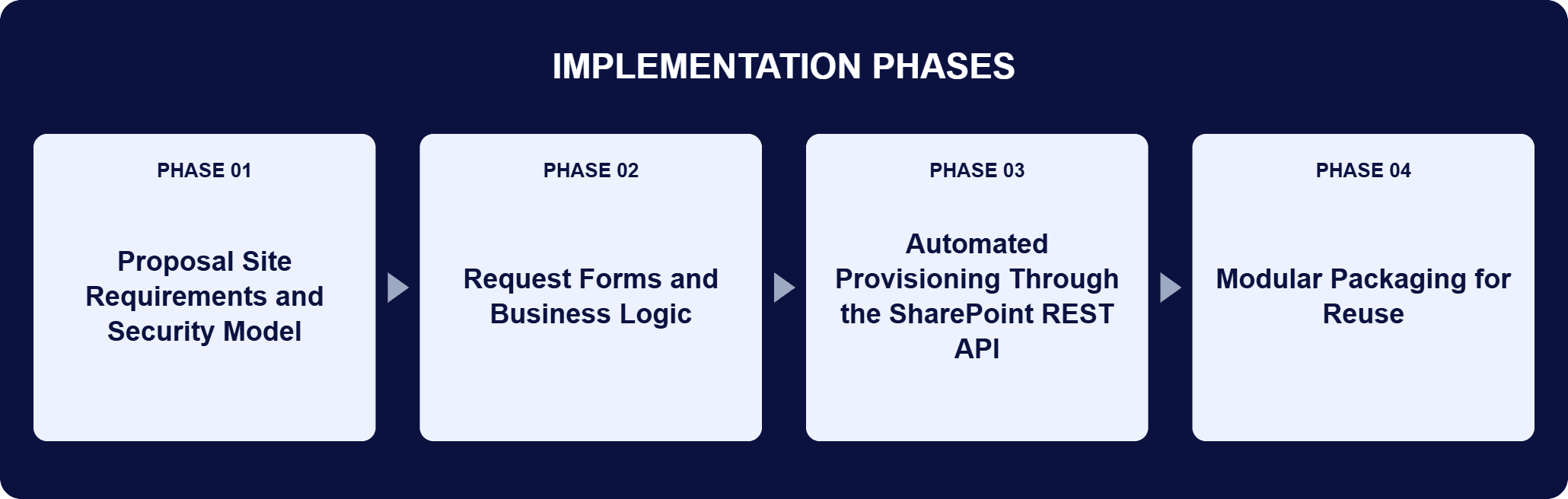
PHASE 03
Automated Provisioning Through the SharePoint REST API
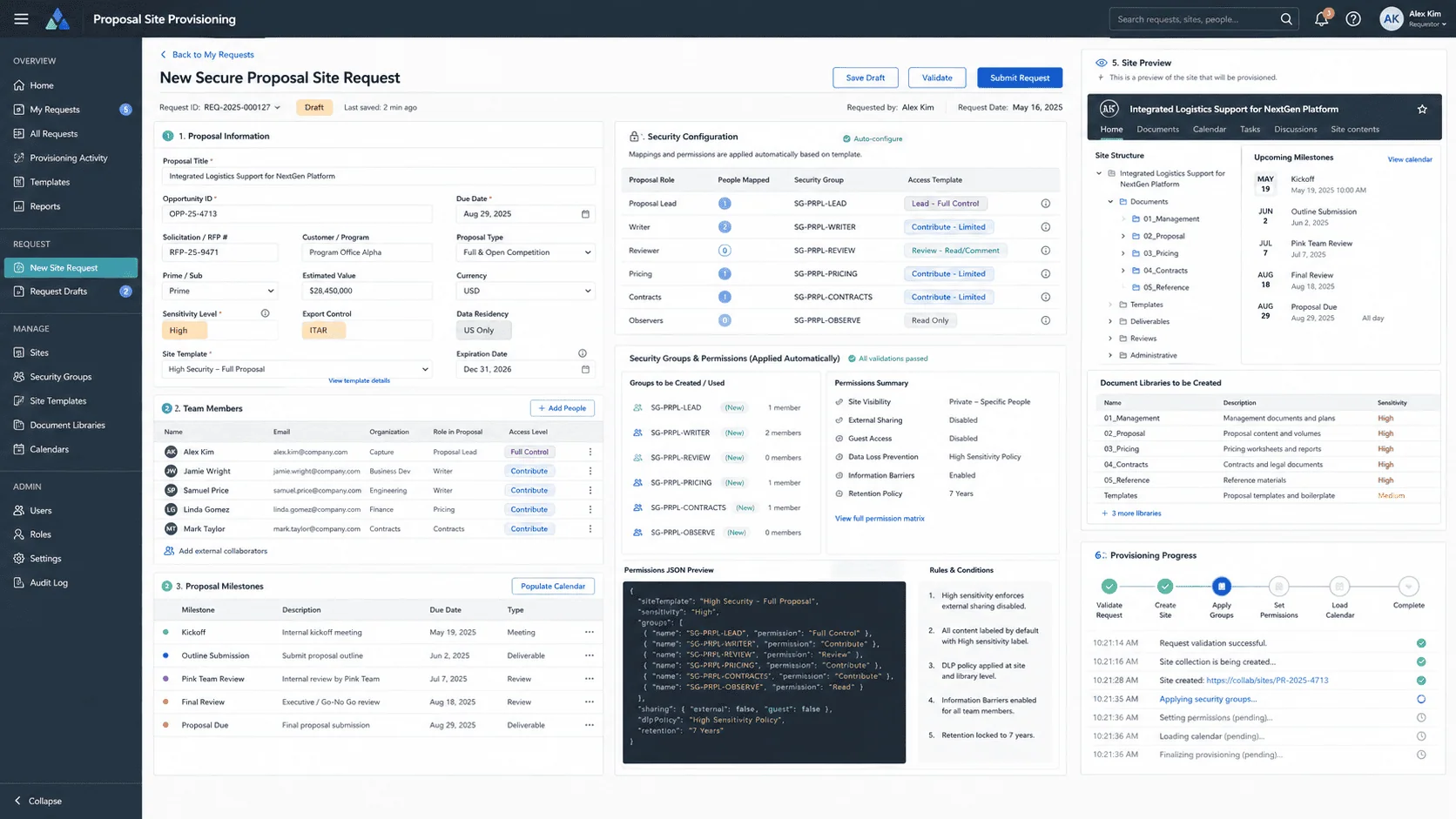
On form submission, jQuery and JavaScript make REST API calls to SharePoint Online. Those calls create the new site from the predefined template, customize its security groups, assign users to the appropriate roles, and apply unique permissions through a JSON definition. Sites arrive minimally configured, with a calendar already populated from the proposal milestones.
PHASE 04
Modular Packaging for Reuse
The system was built as modular components rather than one automation script, and the code library behind it is reusable on later projects, both for the organization and for other clients. Modularity and scalability were the design emphasis, so the components can be picked up by a later project instead of being rewritten.
The system is a custom application layered onto SharePoint Online, which stays the platform of record: it stores the proposal data, holds the sites, and applies the security and permissions they carry through REST API calls. The entry point is a form built with Angular, jQuery, and JavaScript, with HTML structuring the layouts and interfaces and CSS styling the forms and the proposal sites so the experience stays consistent. Business logic in the form validates what a user enters and dynamically retrieves relevant data from other lists, which is what makes a request usable as provisioning input rather than as a description of one. On submission, jQuery and JavaScript issue REST API calls to SharePoint Online that create the site from a predefined template, then set its security groups, place each user in the role that fits, and write the site’s unique permissions from a JSON definition. Security is therefore part of creation, not a task after it. SharePoint Designer Workflows handle automated task management and process flows for specific business needs inside the SharePoint environment. Each new site arrives with little in it beyond a calendar already populated from the proposal milestones.
Sites On Demand, Security Built In
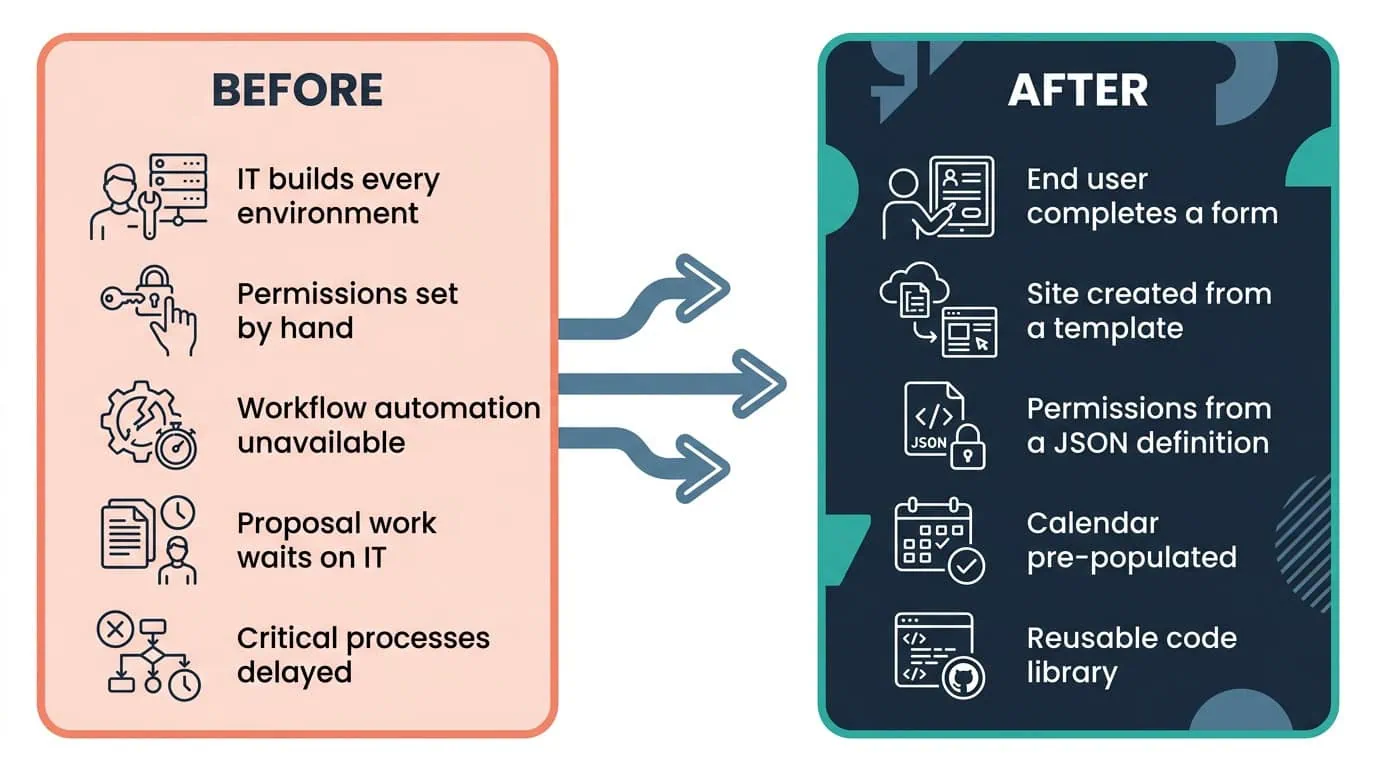
End users now provision their own secure sites from a template, with roles and permissions applied automatically from a JSON definition.
| Outcome | Before | After |
|---|---|---|
| Proposal site provisioning | IT intervention required to set up each new collaboration environment | End users create secure collaboration sites independently, on demand |
| Security configuration | Specific security configurations applied to each site by hand | Security groups, role assignments, and unique permissions applied from a JSON definition as the site is created |
| IT capacity | Every new proposal environment built by IT, delaying critical processes | No IT intervention between the request and the site |
| New site readiness | Each environment configured by hand after it was created | Minimally configured site with a calendar pre-populated from the proposal milestones |
| Reuse on later projects | Each site set up individually | A reusable code library that can be applied to later projects for the organization and for other clients |
The system moved the setup step from IT to the person who needs the site. End users can now create secure collaboration sites independently, so the manual environment build that used to delay critical processes is no longer in the path between a request and a working site. What arrives is not a bare site: it is created from the predefined template, with its security groups and role assignments in place, unique permissions applied from a JSON definition, and a calendar already populated from the proposal milestones.
The security requirement is met by construction rather than by discipline. Custom security groups and permissions ensure that sensitive proposal information is accessible only to authorized personnel, and because those permissions come from a definition the provisioning code applies, every site created through the system carries the same access model. The reusable code library i3solutions developed can be applied to later projects, both for the organization and for other clients, because the system was built as modular components rather than as one automation script.

PENDING-CLIENT-QUOTE
This engagement is relevant for
Less relevant for
Site Provisioning Moved from the IT Queue to the Person Who Needs the Site
The engagement established that a platform limit on automated site creation is not a limit on self-service provisioning. A modular proposal site creation system on SharePoint Online, with Angular, jQuery, and JavaScript forms in front of it, takes a validated request and makes REST API calls that stand the site up from a predefined template with its own security groups, its users in the appropriate roles, and unique permissions applied from a JSON definition.
End users create their own secure sites, each site arrives as a blank canvas for collaboration with a calendar populated from the proposal milestones, and only authorized personnel can reach the proposal information inside. The code library behind the system is reusable, so the next provisioning requirement starts from working components rather than from another manual build.
Yes, that manual provisioning load is what this system replaced. This defense research nonprofit’s IT team had been standing up a new site by hand for every pursuit, each with its own security groups and permissions, until self-service provisioning took that over and applied the right access automatically at creation. If your team is still building those sites one request at a time, that’s the same manual step this system was built to remove.
SharePoint Online’s limit was not negotiable, so the design had to work around it. SharePoint Online did not support automated site creation using custom workflows or Microsoft Flow, so i3solutions built the provisioning path in custom application development: Angular, jQuery, and JavaScript forms with business logic that validates user input and dynamically retrieves relevant data from other lists, and REST API calls that carry out the creation. The second decision was to treat security as part of creation. Security groups, role assignments, and unique permissions come from a JSON definition applied when the site is made, so a self-service site is configured the way an IT-built site would have been. The third was modularity: the code library is reusable, so later projects start from components rather than a rewrite.
A user completes a custom form built with Angular, jQuery, and JavaScript. The form applies business logic to validate the input and dynamically retrieves relevant data from other lists, so the request is complete and consistent before anything is provisioned. On submission, jQuery and JavaScript make REST API calls to SharePoint Online, which creates the new site from a predefined template, customizes its security groups, assigns users to the appropriate roles, and applies unique permissions through a JSON definition. No IT intervention sits between the request and the site. What the requester gets is a self-contained collaboration site for that proposal, minimally configured on purpose, with a calendar already populated from the proposal milestones so the team starts against the dates it has to work to.
SharePoint Online did not support automated site creation using custom workflows or Microsoft Flow. Every new collaboration environment therefore required IT intervention to set up, and the proposal work waited on it, which delayed critical processes. That limit is the reason the engagement exists: the organization needed a dynamic and scalable way for users to create secure and functional collaboration sites on demand, and the platform’s own automation tools could not provide it. The system i3solutions built moves that step to the people requesting the site. End users create secure collaboration sites independently through a custom form, the creation itself runs as REST API calls against SharePoint Online, and IT resources go to other strategic tasks instead of standing up environments by hand.
Each site gets its own security groups and permissions, defined in JSON and applied as the site is created, so sensitive proposal information is accessible only to authorized personnel. That requirement shaped the project. The sites had to be self-contained, with specific security configurations limiting access and collaboration to authorized users, and self-service could not be allowed to weaken it. Because the permissions come from a definition the provisioning code applies rather than from configuration done by hand afterward, every site created through the system carries the same access model. Users are assigned to the appropriate roles as part of creation, and the site is closed to everyone else from the moment it exists.
Deliberately little. The sites are minimally configured, which gives the team a blank canvas for collaboration, and they include key features such as a calendar pre-populated from the proposal milestones. The security configuration is the part that is not minimal: security groups, role assignments, and unique permissions are applied through a JSON definition as the site is created. Everything else is left to the team working the pursuit, which is why the same template suits proposals of different shapes without being customized one at a time. The code library behind the site creation system is reusable, so it can be applied to later projects for the organization and for other clients.
i3solutions is a Microsoft Partner with 30 years of delivery experience and 1,500+ Microsoft engagements, with every engagement staffed by an all-senior, all US-based delivery team. Provisioning work rewards that depth, because it sits where custom code meets a platform’s security model, and an error in the permissions applied at creation is an error repeated on every site the system makes. This engagement is representative: custom Angular, jQuery, and JavaScript forms with validation and lookups against other lists; REST API calls that create each site from a predefined template with its own security groups, roles, and JSON-defined permissions; and a modular code library the organization keeps for later projects. For organizations weighing this class of work, a short scoping conversation establishes what the equivalent build would take in your tenant.
The code library behind this system is reusable, so the next provisioning requirement starts from working components. We can talk through what a comparable, reusable provisioning pattern would look like for your environment.

US-Based Microsoft System Integrator | Est. 1997
© i3solutions. All rights reserved.
US-Based Microsoft System Integrator | Est. 1997
© i3solutions. All rights reserved.


