

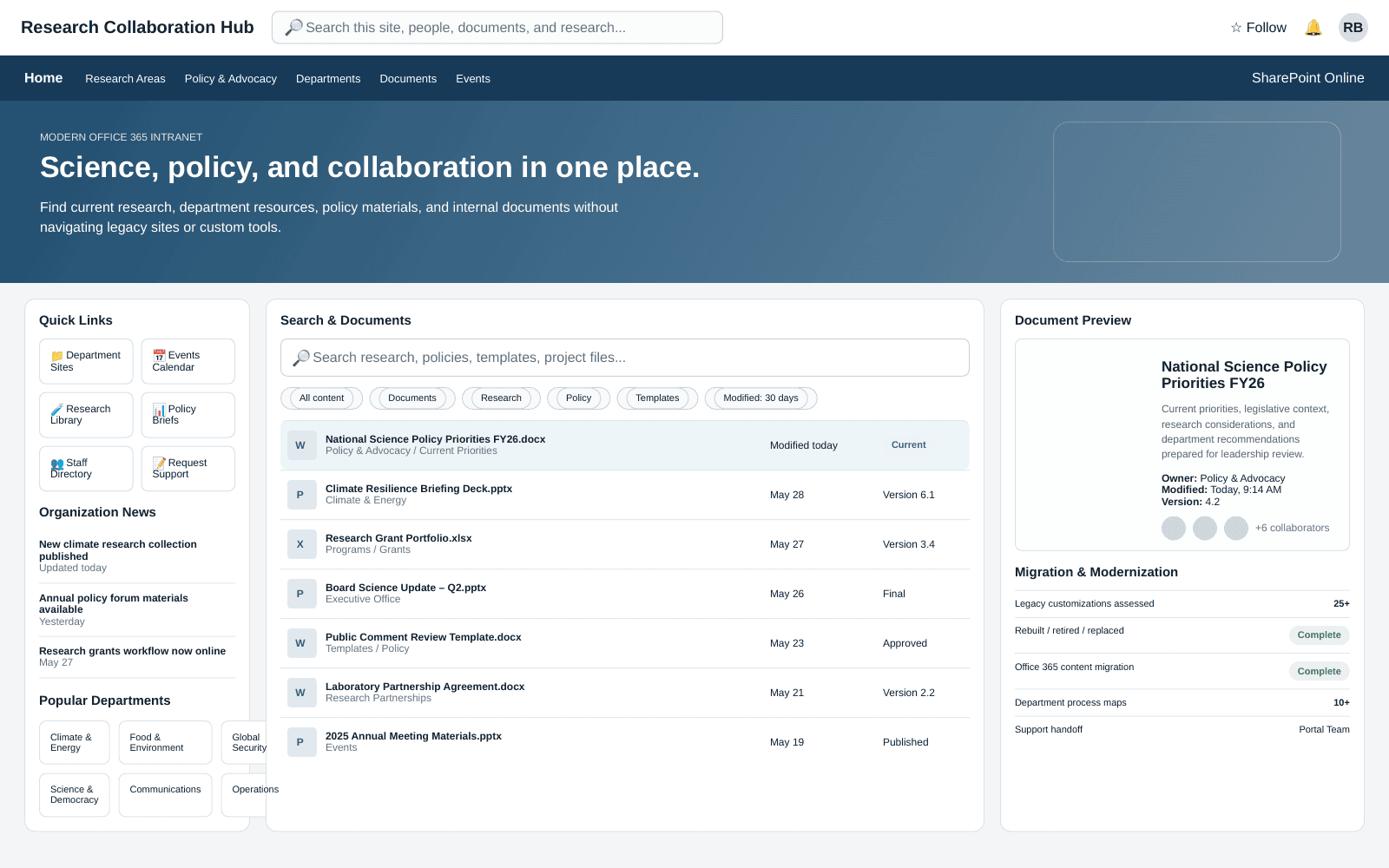
An on-premises SharePoint farm was nearing the end of its support lifecycle, with more than 25 custom compiled-code customizations riding on it.
The client is a national science advocacy nonprofit committed to advancing scientific knowledge. The platform underneath its internal work was an on-premises SharePoint farm, and that farm was nearing the end of its support lifecycle. End of support is a date, not an event: the environment would keep running afterward while the risk of diminished functionality and increased vulnerabilities compounded behind it. The limitations of the on-premises farm were already becoming more apparent, and the organization needed a modern, supported solution to sustain its operational efficiency and effectiveness, along with a strategic approach that would mitigate potential disruptions to its workflow.
The content was not the difficult part. The code was. The farm held over 25 customizations with compiled source code, and compiled customizations of that generation do not move to Office 365 as they are. Every one of them had some part of the organization depending on it. Moving to the cloud-based Office 365 platform offered better system performance and security and an opening to automate processes with modern tools, but only if each of those customizations was accounted for individually and the transfer itself did not interrupt the people doing the work.
i3solutions retired the organization’s out-of-support on-premises SharePoint farm, migrated it to SharePoint Online in Office 365 across four weekends, and rebuilt more than 25 surviving customizations in JavaScript, jQuery, and AngularJS.
The organization’s systems stayed functional throughout, with no data loss, and the move to Office 365 immediately qualified it for Microsoft’s free cloud hosting for eligible nonprofits.
The Support Lifecycle Set the Deadline; the Custom Code Set the Difficulty
A support lifecycle ending is one of the few IT deadlines that arrives whether or not anyone plans for it. For this organization the date applied to the platform its internal work sat on, and the consequence was cumulative rather than sudden: diminished functionality and increased vulnerabilities on a farm that would continue to serve users the entire time. Waiting did not reduce the work. It only shortened the window in which the work could be done deliberately.
What made the deadline hard was the over 25 customizations with compiled source code. A migration of content alone can be scheduled and executed. A migration of content plus compiled custom code is a decision about each customization: is it still relevant, does it still function, and does the organization still need what it does. The organization engaged i3solutions to migrate the heavily customized on-premises SharePoint environment to the cloud-based Office 365 platform and to answer that question for every customization in the farm.
More than 25 customizations were evaluated one by one and either replaced, retired, or rebuilt, rather than treated as a blanket porting exercise. If custom code is what’s holding up your own SharePoint migration, that inventory approach is what makes it tractable.
The Farm Would Keep Running While the Risk Accumulated
Doing nothing was the option that looked cheapest and was not. An unsupported SharePoint farm carries the risk of diminished functionality and increased vulnerabilities, and both of those land on an organization whose operational efficiency and effectiveness depend on the platform every day. The impending obsolescence was what made the need urgent rather than optional.
The migration carried its own risk in the other direction. Content moved carelessly loses integrity; a farm cut over without planning takes daily activities down with it; and customizations retired without evaluation take away capability that a department was quietly relying on. The organization needed the move executed so that its systems remained functional throughout, users transitioned without disruption to daily activities, and no data was put at risk in the process.
Over 25 Customizations, and a Workweek That Could Not Stop
The first constraint was the compiled code. Each of the over 25 customizations had to be evaluated for its relevance and functionality before anything could be decided about it, and the outcome of each evaluation was one of three: replace, retire, or reengineer for Office 365. That is an inventory exercise before it is an engineering exercise, and it cannot be shortened by moving faster, because the risk is not in the effort but in guessing wrong about which customization someone still depends on.
On a farm like this today, we recommend that every replace, retire, or reengineer decision is written down with three things: the business owner who confirmed it, what the customization does for that owner, and how the result will be checked after the move. In our experience, a retired customization should be announced to the people who use it before the cutover weekend, so the first sign that it is gone is not a help-desk ticket on Monday.
The second constraint was the calendar. Given the substantial volume of content to be migrated, the transfer could not be absorbed inside the working week, and the impact on key processes had to stay minimal. That put the schedule itself in scope: the content transfer was planned over four weekends, and the plan depended on knowing which processes were sensitive to interruption, which is knowledge held by the organization’s stakeholders rather than by any tool.
Senior Microsoft Specialists with Proven Delivery Depth
The requirements defined the vendor profile: a team that could evaluate a legacy SharePoint farm in depth, build a phased migration plan around the organization’s business requirements, reach a replace, retire, or reengineer call on over 25 compiled customizations, and rebuild the survivors in front-end client scripting that runs on Office 365. This is migration work and software development work in the same engagement, and the two halves cannot be handed to different teams without losing the reasoning that connects them.
The organization engaged i3solutions, a Microsoft Partner with 30 years of delivery experience and 1,500+ Microsoft engagements, delivered by an all-senior, all US-based delivery team. That profile matched the work: senior engineers who have moved SharePoint farms to Office 365 repeatedly, who know what compiled customizations cost to reengineer before committing to a plan, and who could stay on afterward as second-tier escalation while the organization’s own IT portal team took the support volume back.
i3solutions evaluated the legacy SharePoint farm, built a phased migration plan and an optimized site structure around the organization’s business requirements, moved the environment to SharePoint Online in Office 365 across four weekends, and reengineered the customizations that survived the evaluation.
PHASE 01
Legacy Farm Evaluation
i3solutions began with an in-depth evaluation of the organization’s legacy on-premises SharePoint farm. That assessment is what a well-structured, phased migration plan is built from, and on this farm it had to reach the compiled source code as well as the content, because over 25 customizations were part of what had to move.
PHASE 02
Pre-Migration Planning and Site Structure
During pre-migration planning, i3solutions worked closely with the organization to assess its business requirements and create an optimized site structure that better aligned with its organizational framework. In parallel, each customization was evaluated for its relevance and functionality, producing a replace, retire, or reengineer decision for every one of them.
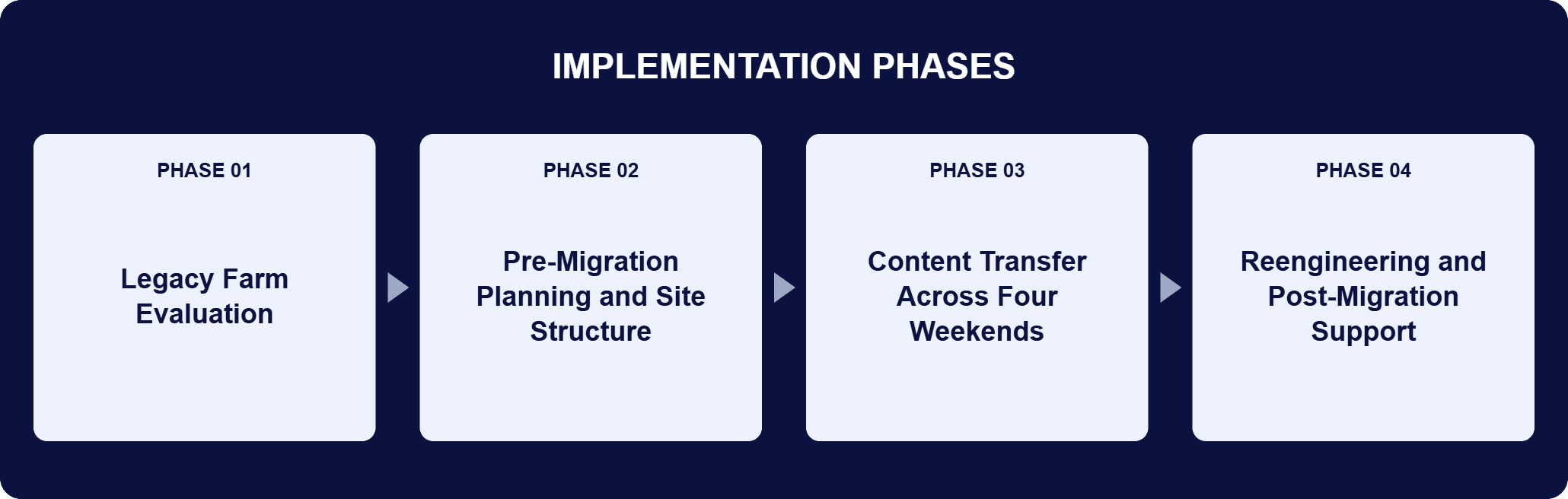
PHASE 03
Content Transfer Across Four Weekends
Given the volume of content, the transfer was scheduled over four weekends rather than through the working week. Both ShareGate and SharePoint’s internal migration tool were used to move data from the on-premises farm to SharePoint Online in Office 365, preserving data accuracy and consistency. i3solutions engaged extensively with stakeholders so the migration’s impact on key processes stayed minimal.
PHASE 04
Reengineering and Post-Migration Support
The customizations kept were rebuilt with lightweight front-end client scripting in JavaScript, jQuery, and AngularJS. i3solutions then served as a second-tier escalation point for the organization’s IT portal team so the team could gradually take over the volume of support requests, and a second phase reengineered selected applications for Office 365, documented in process maps, wireframe diagrams, and detailed application documentation produced with over 10 different departments.
SharePoint Online in Office 365 replaced the on-premises farm, so the platform under the organization’s internal work is no longer one approaching the end of its support lifecycle. SharePoint remains the collaboration layer inside it, managing documents and automating business processes through custom workflows, and i3solutions used SharePoint workflows to track the organization’s internal processes with tailored solutions for individual departments covering document approvals, collaboration, and data management. The customizations that survived evaluation were rebuilt in front-end client scripting rather than compiled code. JavaScript carried the largest share of that work, adapting over 25 customizations with compiled source code for the Office 365 environment, with JavaScript forms handling dynamic interfaces and data entry. jQuery simplified HTML document manipulation, event handling, and animation during the reengineering, and AngularJS supplied a client-side MVC architecture that let i3solutions modularize the front-end scripting rather than port it one file at a time. The content itself moved on two tools in tandem: ShareGate and SharePoint’s internal migration tool, chosen to preserve data integrity and keep downtime short.
Migrated Without Missing a Beat
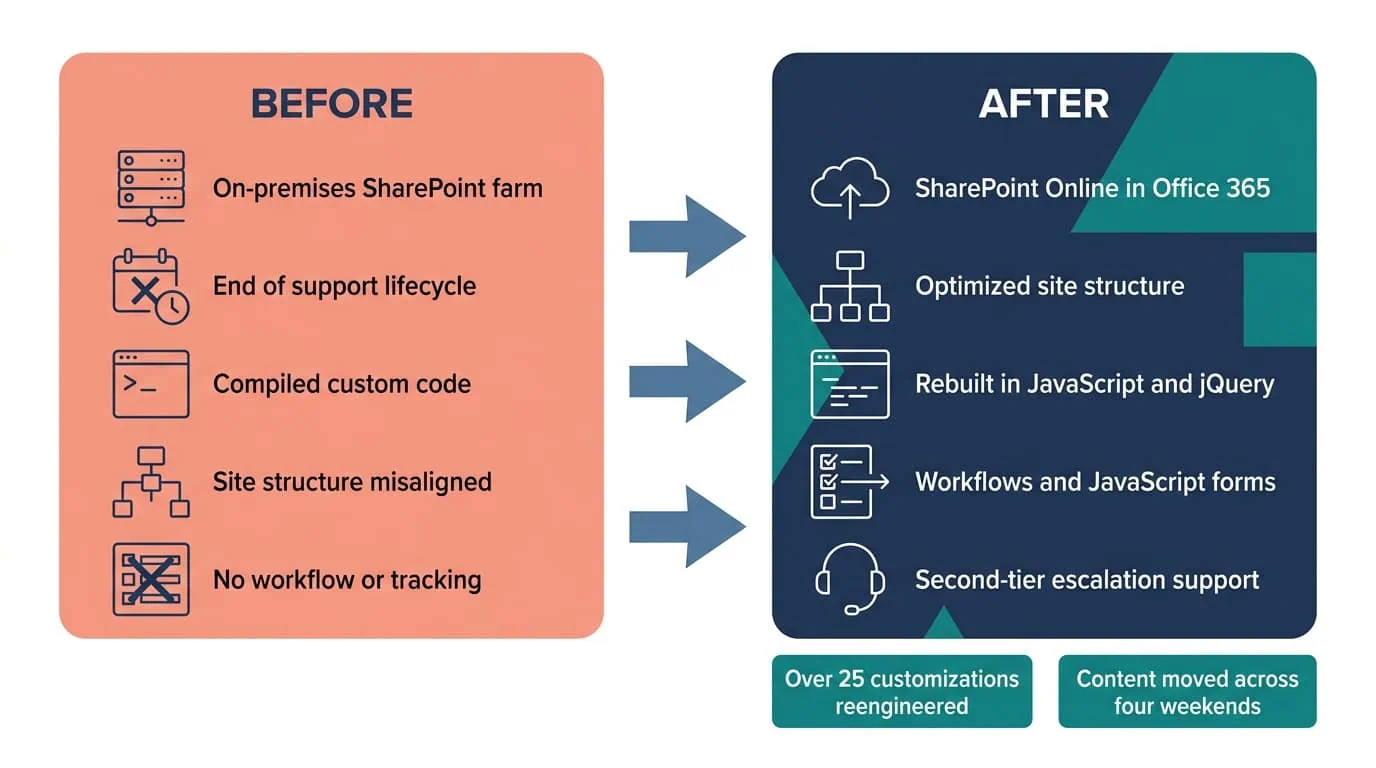
Every customization was replaced, retired, or rebuilt in JavaScript and AngularJS, and content moved to SharePoint Online in Office 365.
| Outcome | Before | After |
|---|---|---|
| SharePoint platform | On-premises SharePoint farm nearing end of support lifecycle | SharePoint Online in the cloud-based Office 365 platform |
| Custom code | Over 25 customizations with compiled source code | Each one replaced, retired, or reengineered; survivors rebuilt in JavaScript, jQuery, and AngularJS |
| Content transfer | Volume too large to move inside the working week | Scheduled across four weekends, with systems remaining functional and no data loss |
| Site structure | A structure that no longer matched the organization | An optimized site structure aligned to assessed business requirements |
| Internal processes | Processes running without automated workflow or tracking | SharePoint workflows and JavaScript forms that automate and track internal processes |
| Hosting cost | Hosting expenses for the on-premises environment | Immediate savings through Microsoft’s free hosting for eligible nonprofits |
Over 25 customizations with compiled source code were each evaluated for relevance and functionality and then replaced, retired, or reengineered, which is the number that describes how much of this farm was not standard SharePoint. The content moved across four weekends because the volume required it and the workweek could not absorb it, and the organization’s systems remained functional throughout, so users transitioned without disruption to daily activities or risk of data loss. Reliable migration tools and post-migration support preserved data accuracy and consistency, which is what lets an organization rely on migrated data for decisions rather than re-checking it.
The second phase is where the platform change turned into process change. i3solutions developed process maps, wireframe diagrams, and detailed application documentation through direct engagement with over 10 different departments, then built SharePoint workflows and JavaScript forms to automate and track the organization’s internal processes and to improve information flow between departments. The move to the cloud also changed the hosting bill: through Microsoft’s free hosting for eligible nonprofits, the organization realized immediate savings in hosting expenses, money it can direct to its advocacy work instead. The engagement’s other recorded benefits follow the same shape, named and attributable rather than quantified: minimized downtime from the weekend scheduling, increased data integrity from reliable migration tools and post-migration support, and improved adaptability from the new site structure and the reengineered applications.
This engagement is relevant for
Less relevant for
A Heavily Customized Farm Can Leave Its Support Lifecycle Behind Without Leaving Its Capabilities Behind
The engagement established that the hard part of a legacy SharePoint migration is the custom code, and that it is tractable when it is treated as an inventory decision instead of a porting exercise. Over 25 customizations with compiled source code were each evaluated for relevance and functionality and then replaced, retired, or reengineered, with the survivors rebuilt in lightweight front-end client scripting that runs on Office 365.
The content moved across four weekends on ShareGate and SharePoint’s internal migration tool, so the organization’s systems stayed functional and users transitioned without disruption to daily activities. Support did not end at go-live: i3solutions stayed on as second-tier escalation while the IT portal team took the volume back, and a second phase turned documented processes from over 10 different departments into SharePoint workflows and JavaScript forms.
Yes, that’s exactly the scenario this migration was built for. This national nonprofit’s on-premises SharePoint farm carried enough custom, compiled code that a straight content transfer wasn’t an option, so the reengineering work and the migration were scoped and sequenced together, and the transfer itself was completed in eight days without taking the platform offline during the working week. If your own SharePoint environment carries similar custom code, that’s the same starting condition, not a blocker.
It begins with an in-depth evaluation of the legacy farm, which becomes a phased migration plan. For this client, the pre-migration phase assessed business requirements and produced a site structure better aligned with the organization, the content transfer was scheduled over four weekends because of the volume involved, and both ShareGate and SharePoint’s internal migration tool were used to preserve data integrity and keep downtime short. Alongside that, every one of the farm’s over 25 customizations with compiled source code was evaluated for relevance and functionality and given a replace, retire, or reengineer decision. i3solutions engaged extensively with the organization’s stakeholders throughout, because the knowledge of which processes are sensitive to interruption sits with them and not with any migration tool.
Each customization is evaluated for relevance and functionality first, then replaced, retired, or reengineered. The organization’s farm held over 25 customizations with compiled source code, and the ones that were kept were rebuilt with lightweight front-end client scripting in JavaScript, jQuery, and AngularJS so they run on the Office 365 platform. The shift from compiled code to client-side scripting is the substance of the change: JavaScript handles the client-side interactions and the dynamic forms, jQuery simplifies HTML document manipulation and event handling so the code stays concise, and AngularJS contributes a client-side MVC architecture that lets the front end be modularized rather than reproduced piece by piece. Retiring a customization is a legitimate outcome too, and the relevance evaluation is what identifies the ones no longer earning their place.
The content transfer was scheduled around the workweek, across four weekends, and i3solutions worked closely with the organization’s stakeholders so the migration’s impact on key processes stayed minimal. The organization’s systems remained functional through the move, and users transitioned without disruption to daily activities or risk of data loss. The scheduling is deliberate rather than incidental: with a substantial volume of content to move, the transfer window is a project constraint that has to be planned against the organization’s operating calendar, not fitted in afterward. Knowing which processes cannot pause is what makes that plan correct, which is why stakeholder engagement runs through the whole migration rather than only at the start.
Both ShareGate and SharePoint’s internal migration tool were used to transfer data from the on-premises farm to SharePoint Online in Office 365. ShareGate is a migration and management tool that handles the transfer of content and configurations between SharePoint environments and Office 365; SharePoint’s own migration tool covers what it is built to cover. Using them together on this farm was a decision about data integrity and downtime: the pairing let i3solutions preserve data accuracy and consistency and keep the outage short enough to fit inside weekend windows. The result is the part that matters after go-live, which is that the organization can rely on the migrated data for critical decision-making and operational processes rather than treating it as provisional.
i3solutions served as a second-tier escalation point for the organization’s IT portal team, so the team could take over the volume of support requests gradually. A second phase then reengineered selected applications for Office 365, with process maps, wireframe diagrams, and detailed application documentation produced through direct engagement with over 10 different departments, plus SharePoint workflows and JavaScript forms to automate and track internal processes. The handover shape is the point: an in-house team inherits a platform it did not build, and the support volume in the first period after go-live is higher than the steady state. Second-tier escalation lets the team absorb that volume at its own pace instead of all at once.
i3solutions is a Microsoft Partner with 30 years of delivery experience and 1,500+ Microsoft engagements, with every engagement staffed by an all-senior, all US-based delivery team. This engagement shows why that profile matters when a farm is heavily customized: over 25 customizations with compiled source code each needed a replace, retire, or reengineer judgment, the survivors had to be rebuilt in JavaScript, jQuery, and AngularJS, and the content had to move across four weekends without disrupting daily activities. Migration skill alone does not cover the second half of that, and application development alone does not cover the first. For organizations weighing a move off a legacy SharePoint farm, a short scoping conversation establishes what the equivalent work would take in your environment.
i3solutions stayed on as second-tier escalation after go-live while the internal team took the volume back. We can talk through what a comparable migration and handoff plan would look like for your environment.

US-Based Microsoft System Integrator | Est. 1997
© i3solutions. All rights reserved.
US-Based Microsoft System Integrator | Est. 1997
© i3solutions. All rights reserved.


