

Which SharePoint content to migrate, archive, or retire is a signed decision made per content class, not a storage cleanup task run by IT alone. It runs on a triage grid, a named signer per class, a written record, and retention and hold verification before any disposition executes.
A migration forces a question the estate has spent years avoiding. Something has to happen to the finance share nobody has opened since the last audit, to the departed director’s project site, and to the scanned invoices that arrived with a filing cabinet. The technical answer comes fast, because migration tooling moves whatever it is pointed at. The question that stalls programs is different: on whose authority does content stop existing, and what evidence proves the choice was sound later, when an auditor or opposing counsel asks. The readers who land here are the ones expected to produce that evidence. A records manager handed a tenant report and asked to bless it. A migration lead whose scope grows every week because nothing gets cut. A compliance officer who has learned that an undocumented deletion is a worse finding than the content it removed.
The question of which SharePoint content to migrate, archive, or retire is answered across several layers, and this guide holds one of them. It holds the decision layer: the grid that attaches a default disposition to each content class, the approval model that says which role signs that disposition and what the signed record has to contain, and the verification of holds and retention that runs at content level before anything moves, archives, or goes.
It does not hold the layer underneath. How content is tiered before a migration, and the sequence that puts tiering ahead of the move, are worked through in Data Classification Before SharePoint Migration. Readers whose content has not been tiered yet should start there and come back with the tiers in hand. This guide assumes they exist and asks who signs for what happens next.
The layers above sit outside this guide too, and there are two of those. When the unit of decision is a whole site, the questions change: who owns it, when it is next reviewed, whether the site itself is archived or removed. That is site-level lifecycle work, and it belongs to the practice described at Enterprise SharePoint Development Services & Integration Services Built for Scale and Governance rather than to this decision layer. When the unit is an application, a workspace, or a custom solution, the retire, replace, rebuild, or migrate question is answered in Legacy SharePoint Modernization, and this guide restates none of that decision model.
Migration plans assume somebody else has already built the layer this guide holds. Four things make it up: a class-by-class default, one named signer per class, a record an auditor can read without a translator, and a verification step that runs at execution time rather than at planning time.
Migration scoping starts as a size problem and has to become a class problem. Bytes tell you what the move will cost. Class tells you what the move is allowed to do. The grid below is the working artifact: one row per content class, a default disposition attached to that class, the single role that signs for it, and the evidence that has to exist before the disposition runs.
| Content class | Default disposition | Who signs | Evidence that makes the disposition defensible |
|---|---|---|---|
| Declared record under a published retention schedule | Archive | Records manager | Schedule reference and remaining obligation period captured before the move |
| Content frozen by a legal hold or an active matter | Migrate as is | Legal counsel | Hold scope re-queried at execution time with the output attached, plus legal’s written statement that scope, custody, and preservation survive the move |
| Contractual or regulatory content with an obligation still running | Migrate | Records manager | Obligation end date and its source document named in the record |
| Business content actively in use | Migrate | Business owner | Named owner attests the content is in use and still accurate |
| Reference content with residual value and no current use | Archive | Business owner | Owner states the residual value and the review date that tests it again |
| Superseded working copies of an original that survives | Retire | Business owner | The surviving original is identified by location before the copies go |
| Personal or non-business material held in a corporate workspace | Retire | Business owner | A written review of the location before notice, then the owner is notified with a stated window to remove anything they claim |
| Content that no scan could classify | Migrate, then re-triage | IT service owner | Sampled and read by a person, with a re-triage date recorded; no retire or archive outcome is signed for this row until a class is assigned |
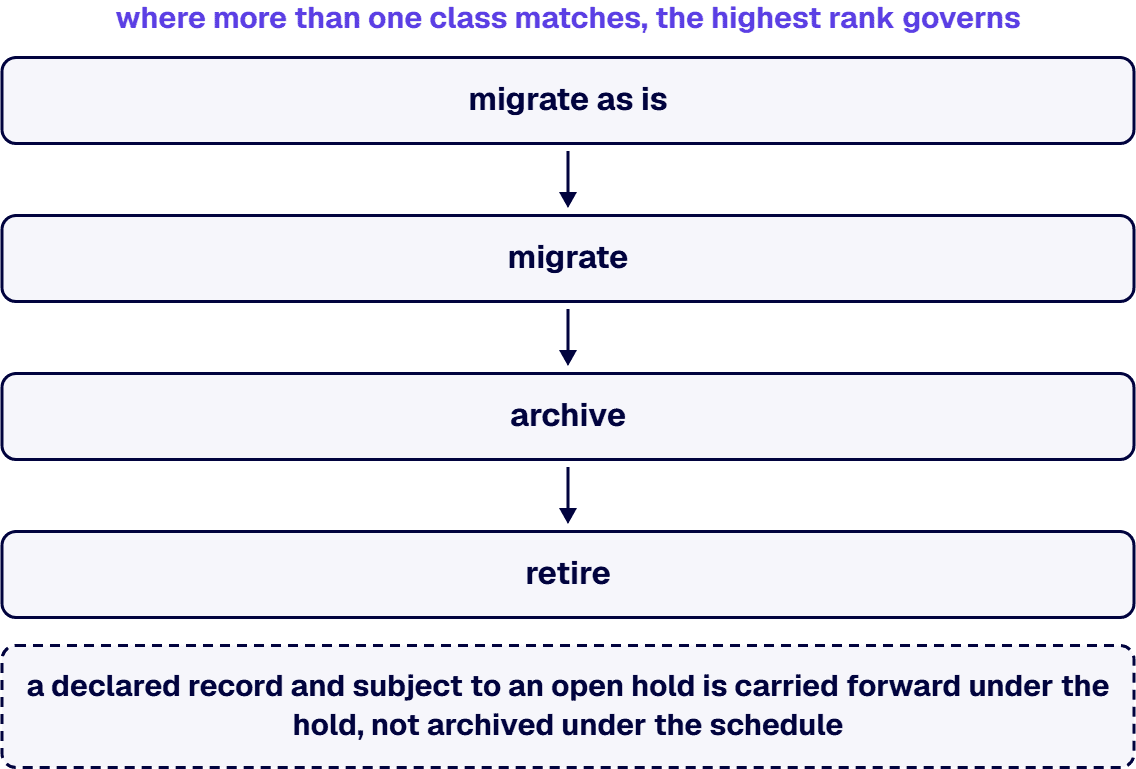
Four properties hold across the eight rows as written, and they are what separate the grid from a cleanup spreadsheet. Each row names one signer, and that signer is a role and not a person, so the grid survives a reorganization. Each row’s disposition is a default rather than a verdict, so the accountable role can move the outcome and the movement is recorded as a decision. Each row carries evidence that has to exist before the disposition runs, so a missing artifact blocks execution more reliably than an objection does. And no row authorizes an outcome on the strength of its class by itself: the class proposes, the signer decides, the evidence proves. One rule sits beside those four properties rather than among them. Where more than one class matches the same content, the dispositions rank and the highest rank governs: migrate as is, then migrate, then archive, then retire; the eighth row’s default sits at migrate’s rank, and re-triage follows. Content that is both a declared record and subject to an open hold is carried forward under the hold, not archived under the schedule. The signer is the role on the governing row, and where a second matching row still carries an unexpired obligation or an open hold over the same content, that row’s signer signs alongside.
The distribution across those eight rows is deliberate: four carry content forward, two send content to an archive, and two retire it. The count is not, though, what makes a grid defensible; authority, evidence, and a checked obligation are. What the weighting buys is recovery room, because retire is the outcome an organization has the least chance of undoing once recycle bins and retention windows have run out. The model is judged on whether the volume it removes survives explanation afterwards.
The eight classes above are a starting set, and regulated estates add rows: research data carrying a funder’s terms, case or clinical files with statutory periods, safety records with a fixed floor. The test for a new row is the fourth column. If you are unable to state what evidence would prove the disposition correct, the row is not ready, and putting it in the grid anyway moves an unresolved question into a document that looks resolved.
A program with a class list and no signers is carrying a schedule risk, not a tooling gap, and the schedule is where it will surface. Closing that gap is a conversation about which roles your organization already has and which of them can carry a disposition signature without a new committee being stood up first. It is a scoping conversation, so it happens before you commit to a disposition date, and it gives an internal case its numbers rather than asking you for a decision. What comes back is a draft grid with your classes in the first column and a role named against every row.
A disposition decision has four participants, and confusing them is how programs stall. The records manager owns the retention schedule and answers whether an obligation still runs. Legal counsel owns holds and open matters and answers whether anything freezes the content regardless of the schedule. The business owner answers whether the content still carries value to the work it was created for. The IT service owner answers what is technically true about it: where it lives, when it was last touched, and what the scan could read. One of those four signs any given row. The other three are consulted, and their input is filed with the decision as input, because four signatures on one decision is how a decision fails to happen. Where policy or a regulator requires joint approval for a class, that row carries two signers and says so.
Roles, not people, is the rule that keeps the grid usable through a reorganization. A grid that names the sitting legal counsel and the sitting records manager by their own names is obsolete the day either of them changes jobs, and the decisions they signed become unattributable at exactly the moment somebody asks who approved them. Name the role, resolve the role to a person at signing time, and the grid still reads correctly two reorganizations later.
The sign-off record itself is four fields, and those fields are what a later reader actually reads.
Store it where the program already works, one item per decision, with those fields as columns. The four fields index the record rather than exhaust it: the row’s evidence, the verification output, and any movement from the default ride with the item. A SharePoint list is fine once it is governed like evidence: versioning on, deletion restricted, access controlled, and its own retention applied. A spreadsheet a contractor keeps on a laptop is not, because the record has to outlive the program that produced it, and the questions that make it valuable arrive after the migration team has gone.
Disagreement is built into the model, because it puts four roles with different obligations around the same content, so the model needs a written precedence order instead of a standing meeting. An open hold or an unexpired obligation outranks a business preference, and that is not a negotiation: the content is carried forward and re-triaged when the obligation ends. A business owner who wants to keep content that records sees no basis for keeping gets a dated review rather than an indefinite keep, so the argument is scheduled instead of won by whoever outlasts the other. Disputes about whether content is genuinely in use are tested against last-touched evidence, because telemetry is a fact and recollection is a memory of one. The date does not close it alone: reference material, seasonal work, and service accounts all read without changing it, so an owner who names the process that still reads the content beats the timestamp. What survives those three rules is a thin population of genuine judgment calls, and those escalate to whoever owns the migration’s risk, with a decision deadline attached and the disagreement itself written into the record. Classification, permission rebuilds, and defensible retirement are decisions your auditors will read back to you. i3solutions provides senior SharePoint specialists who have run these programs in regulated enterprises since 1997 and work inside your governance standards, not around them.
Staff the Migration Like the Record Depends on It
The failure mode this section exists to stop is the stale check: a grid signed in March, a disposition executed in June, and a legal hold that opened in April against content the March check cleared. In that gap a matter opens, a Microsoft Purview retention label gets applied, a schedule is revised, and a decision that was correct when it was made stops being correct without anybody noticing. Verification is therefore an execution-time step, not a planning-time step, and its output belongs in the sign-off record beside the decision it validates.
Microsoft’s platform carries three of the mechanics, and not one of them is free of a limit worth stating in the same breath as the capability.
Retention precedence is the first. Microsoft’s guidance on retention policies and retention labels sets out the principle that retention wins over deletion: content is not permanently deleted while it also carries retention settings to retain it, which means a mistaken deletion action against retained content does not destroy it. The limit is what that protection is for: a backstop against an error in execution that says nothing about whether the item should have been kept, which is the question a signed decision has to answer. A program that treats retention precedence as a substitute for the check has outsourced its judgment to a safety net.
Disposition review is the second, and the name covers two things. Disposition of content describes a review that runs before disposal, where a reviewer decides at the end of a retention period what happens to the content, and it describes the Disposition page, which surfaces metadata for items marked as records that were automatically deleted at the end of their retention period. The documentation puts the review on a retention label and says a retention policy does not carry it. Its prerequisites are stated plainly: auditing has to be turned on and specific permissions are required before that view holds anything. The limit is a sequencing one. The auditing requirement runs ahead of the work as documented: auditing has to be enabled before the first disposition action, which makes it a configuration decision taken before the disposition work starts rather than a switch found on the day somebody wants a report.
The archival resting state is the third, and the decision it forces is whether the thing you are archiving is a site or a class of content inside one. Microsoft 365 Archive describes moving inactive data into a cold storage tier within SharePoint, where archived data automatically retains the same searchability, security, and compliance standards at a reduced cost, a site retains its metadata and permissions upon reactivation, and Copilot is not trained on archived content. The same guidance states the access limit beside it: content in the archived tier is no longer directly accessible to anyone, while search still reaches it through Purview Content Search, end-user search, and eDiscovery. The second limit is the unit it acts on. It archives a site, which makes it the resting state for a site whose fate is settled at site level, and it is not the instrument for archiving one library or one content class inside a site that stays live. Content-class archival inside a live site is a process decision about where the content lives and who still reaches it, not a behavior a Purview retention label performs, and it belongs to the grid above. The criterion to write down is reachability. Where the class still has to be found by name from the live site, move it to a separate library with its own permissions and record that library as the archive location; where it does not, the site archive tier is the cheaper resting state and the site, not the class, is the unit you act on.
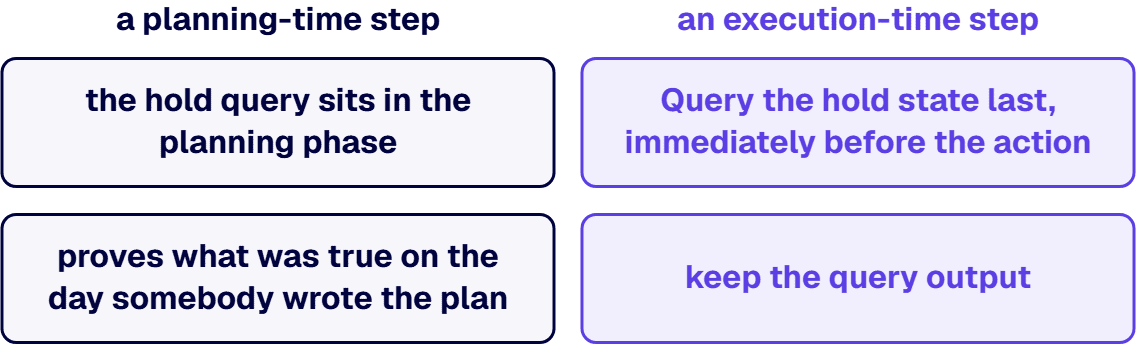
Underneath the three mechanics sits an ordering rule that has nothing to do with Microsoft. Query the hold state last, immediately before the action, and keep the query output. That output proves what it covered on the day it ran, not that the picture holds tomorrow, so the record pairs it with legal’s written statement of the matters legal knows to be open. A hold check performed at planning time and cited at execution time is evidence of one thing only, that somebody checked once, and the gap between those two moments is where the finding lives.
The runbooks that fail this test have all three checks in them. What they have wrong is the placement: the hold query sits in the planning phase, where it proves what was true on the day somebody wrote the plan and nothing about the day the disposition runs. Getting the verification sequence right is therefore an argument about where in the runbook each check belongs, not a build. It is a scoping conversation rather than a proposal, so it happens before you commit to a cutover window, and what comes out of it is the check sequence written into your own runbook at the step each check has to run.
Estates keep everything because the exposure is asymmetric, not because anybody judged the content worth keeping. The person who deletes the wrong thing is named in the incident review. The organization that keeps the wrong thing pays a storage bill with nobody’s name on it. Given those two outcomes, retaining everything is the rational move for an individual and a compounding liability for the organization, and encouragement does not change that arithmetic, because it leaves the exposure where it was.
A sign-off model changes the arithmetic by moving the exposure off the individual. When a role signs a disposition under a written basis on a recorded date, the person who executed the deletion was carrying out a decision rather than making one. That is the whole mechanism, and it is why the record matters more than the grid. The grid gives a decision its default, the record gives it an owner, and the verification gives it a proof.
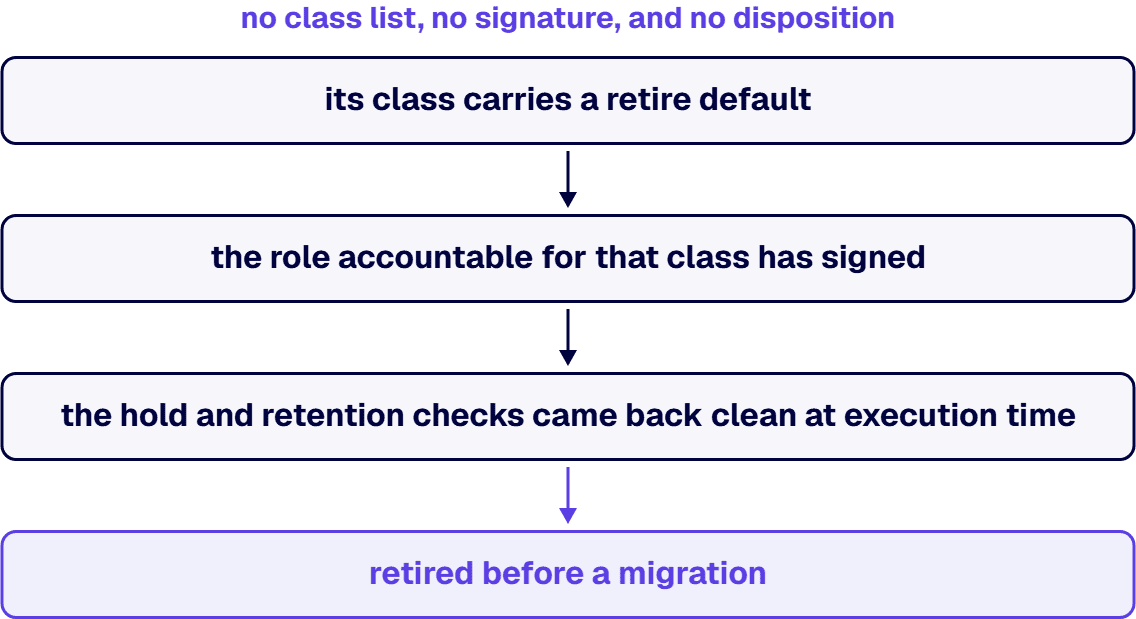
This is also where the question of what to retire before a migration gets its answer, and the answer is narrower than the question sounds. Content is retired before a migration when its class carries a retire default, the role accountable for that class has signed, and the hold and retention checks came back clean at execution time. Which content falls into which class is settled by the classification work that runs ahead of this decision layer, and the sequencing rule is absolute: no class list, no signature, and no disposition. A retirement pass run without that classification behind it produces the exact outcome this model exists to prevent, a defensible-looking process applied to content nobody had read.
In one Office 365 consolidation for a federal research organization, the program took a deliberate approach to retiring and archiving older sites instead of carrying the whole estate forward untouched. The pattern behind that approach is ordinary: settle the classes, name the signers, then let the tooling do what it was pointed at.
Programs already on a schedule should do two things differently. Run the grid against a sample of the estate before running it against the whole, because a first pass finds the classes the grid is missing and the signers who do not exist yet. Then start the sign-off calendar before the tooling, because approvals arrive at the speed of the slowest role, and a program that discovers this during cutover has discovered it past the point where its schedule can absorb the wait.
Several readers should route elsewhere, and it is cheaper to say so here than to let them read on.
If the content has not been classified, there is nothing for a signer to sign against. Tiering comes first, and Data Classification Before SharePoint Migration is the sequence for it.
If the unit of decision is the site rather than the content inside it, the questions change to ownership, review cadence, and whether the site itself retires. Those are lifecycle questions about the site, and the SharePoint practice holds them, not this decision layer.
If the unit needing a disposition is an application, or a workspace, or a custom solution, then the retire, replace, rebuild, or migrate decision belongs to Legacy SharePoint Modernization, and applying a content grid to a custom solution produces a confident answer to the wrong question.
If the pressing problem is the move itself, the tooling, the sequencing, the cutover window, then disposition sits upstream of your bottleneck and SharePoint migration services for enterprise Microsoft environments is closer to the work in front of you. And if the estate is small enough that one person can say what is in each library, a formal grid is overhead: write the class list down, put a review date on it, and spend the budget on the move.
What is left is the case this guide was written for. A migration whose scope will not close because nobody is authorized to remove anything. A records function holding obligations the migration plan never asked about. A business that has been told to decide without being told what it is deciding. The model is a grid, a signer, a record, and a check that runs at execution time.

Michael Branson co-founded i3solutions 30 years ago and brings executive, operational, and technical perspective to organizations working in complex, secure, and mission-critical environments. His insights focus on business process consulting, automation, data analytics, collaboration, secure operating models, and the operational discipline required to turn technology investments into practical business systems with measurable value.
Connect on LinkedInDecide it by content class, not by folder. Content in current use, content inside an unexpired contractual or regulatory obligation, and content frozen by an open legal hold are carried forward. Declared records under a retention schedule, and reference material with residual value but no current use, go to an archive instead. The class sets the default, one named role signs the decision for that class, and holds, retention labels, and retention policies are verified at execution time rather than at planning time. The tiering method behind those classes is a separate discipline, and it runs before any disposition decision is signed.
Content earns a retire disposition when a content-class triage grid gives its class that default, the role accountable for the class approves it, and the hold and retention verification returns clean at the moment the disposition runs. In practice that means superseded working copies of an original that survives, personal material stored on a business site, and content that tiering has confirmed carries no residual value and no obligation attached to it. Retiring content that was never classified is not a shortcut. It is the failure that a triage grid and a named signer exist to prevent, because the process looks defensible and the content behind it was never read.
Verify immediately before you execute, and keep what the verification returned. Re-query legal holds at execution time, because a hold issued after the decision was signed makes that decision stale. The query output shows what it covered on the day the query ran, so file legal's written statement of the open matters beside that output. Confirm the retention labels and policies that apply to the items in scope. In Microsoft Purview, retention wins over deletion, so content carrying settings to retain it is not permanently deleted even when a deletion action reaches it; treat that as a backstop against error rather than a substitute for the check. Then keep the decision, the signing role, the date, and the retention basis where an auditor can find them.
One role per content class, named in advance. The records manager signs for declared records and for content inside an unexpired regulatory or contractual obligation. Legal counsel signs for anything under an open hold or an active matter. The business owner signs for content in current use, reference material, superseded copies, and personal material sitting on a business site. The IT service owner signs for content that no scan could classify. The other roles are consulted and their input is recorded as input. A decision that needs all four signatures, absent a rule that says otherwise, does not get made. That rule is a regulator's or a written policy's joint-approval requirement for the class.
Four fields. The first is the decision itself: the content in scope, described so an outsider could reproduce the selection, and the disposition it received. The second is the authority, meaning the role that signed and the person who held that role on the day. The third is the date the decision was taken and the date it executed, which any later hold gets measured against. The fourth is the retention basis: the schedule or obligation supporting the outcome, or the recorded finding that neither applies, cited to a source rather than asserted. The fourth field is the easiest to leave blank, and it is the one that carries the argument later.
Settle it with a written precedence order rather than a meeting. An open legal hold or an unexpired retention obligation outranks a business preference, and the content is carried forward and re-triaged once the obligation ends. A business owner who wants to keep content that records sees no basis for gets a review with a date on it, which schedules the argument instead of settling it by attrition. A claim that content is actively in use is tested against last-touched evidence, which an owner answers by naming the process that still reads it. Anything still open escalates to whoever owns the migration's risk, with a deadline, and the disagreement goes into the record too.
When a platform decision carries migration budgets, audit exposure, and the credibility of the recommendation you sign, internal consensus is not the same as an expert read. i3solutions' senior SharePoint advisors work with enterprise IT leaders who have gathered the evidence and are ready to move from findings to a scoped engagement.
Schedule a SharePoint Scoping Discussion
US-Based Microsoft System Integrator | Est. 1997
© i3solutions. All rights reserved.
US-Based Microsoft System Integrator | Est. 1997
© i3solutions. All rights reserved.


