Dynamics 365 Integration with SharePoint and Line-of-Business Systems
Dynamics 365 delivers most of its value when it is integrated, not when it stands alone, and the integrations that matter connect it to SharePoint for documents and to your line-of-business systems for the data that lives elsewhere. The goal is that a customer, case, or deal in Dynamics reflects the full picture, the related documents in SharePoint, the financials or orders in the line-of-business system, without anyone re-keying data between them. The discipline is to integrate where the value is real and not to wire together everything just because you can. i3solutions has built Dynamics and SharePoint as an integrated system of record with reporting on top.
A global consumer-goods manufacturer integrated its cloud HRIS with Microsoft Entra ID and Dynamics 365 through Power Automate, so account creation, changes, and mailbox permissions flowed automatically from HR events.
Dynamics 365 on its own is a capable system for managing relationships and cases, but in most enterprises the information a record needs is not all in Dynamics. The documents are in SharePoint. The financials, orders, or inventory are in a line-of-business system. The result, when nothing is integrated, is the familiar pattern: people work in Dynamics, then switch to SharePoint to find the contract, then log into the ERP to check the order status, and re-key data between them to keep the picture current. The integration is what removes that, and removing it is most of the value Dynamics can deliver.
Two integrations carry the most weight for a typical enterprise.
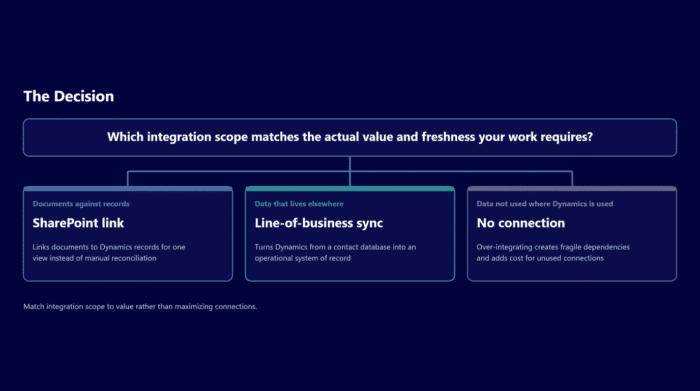
Dynamics with SharePoint, for documents against records. A Dynamics record, a customer, an opportunity, a case, almost always has documents attached to it: contracts, proposals, statements of work, correspondence. SharePoint is the right home for those documents, with its version control, permissions, and retention, and the integration links them to the Dynamics record so the document management and the relationship management are one view rather than two systems someone reconciles by hand. On a business-development setup for an aerospace and defense manufacturer, i3solutions had Dynamics and SharePoint working together as the system of record for the pipeline, with the relationship data in Dynamics, the supporting documents managed in SharePoint, and reporting drawing from both.
Dynamics with line-of-business systems, for the data that lives elsewhere. The financial, ERP, HR, or operational systems hold data a Dynamics record needs to be complete and current. Integrating them so that, for example, an order status or an account balance is visible against the customer record without a manual lookup is what turns Dynamics from a contact database into an operational system of record. This is the integration with the most variation, because every enterprise’s line-of-business landscape is different, and it is where the integration architecture, how the systems connect and stay consistent, matters most.
The honest discipline is to match integration scope to value rather than to maximize connections. Not every line-of-business system needs a real-time, bidirectional integration with Dynamics; some need a nightly sync, some need a read-only view, and some do not need to be connected at all because the data is not used where Dynamics is used. Over-integrating creates exactly the fragile, hard-to-change web of dependencies that good integration architecture exists to avoid, and it adds cost and risk for connections nobody relies on. The right design connects what the work actually needs together, at the freshness the work actually requires, and leaves the rest alone.
So a Dynamics 365 integration project is really an architecture decision about which data needs to meet, where, and how fresh. Get SharePoint linked so documents live against records. Get the line-of-business systems connected where their data is genuinely used in the Dynamics context, at the right cadence, through stable interfaces rather than brittle direct links. Done that way, Dynamics becomes the integrated system of record it is meant to be, and the re-keying and the system-switching that drain a team’s time simply stop. Choosing which firm actually delivers that architecture is its own decision; see our guide to ranking the best Dynamics 365 integration partners on evidence.
Key Takeaways
- Dynamics 365 delivers most of its value when integrated; on its own it holds only part of what a record needs.
- The two highest-value integrations are Dynamics with SharePoint (documents against records) and Dynamics with line-of-business systems (the data that lives elsewhere).
- Linking SharePoint makes document management and relationship management one view instead of two systems reconciled by hand.
- Integrating line-of-business systems turns Dynamics from a contact database into an operational system of record; this is where the integration architecture matters most.
- Match integration scope to value: not every system needs real-time bidirectional integration, and over-integrating creates fragile dependencies. (i3solutions ran Dynamics and SharePoint as an integrated system of record with reporting on top.)
Frequently Asked Questions
Why integrate Dynamics 365 with other systems?
Because the information a Dynamics record needs is usually not all in Dynamics; documents are in SharePoint and financial or operational data is in line-of-business systems. Integration removes the re-keying and system-switching that otherwise keep the picture current by hand.
What is the value of integrating Dynamics with SharePoint?
Documents like contracts and proposals live in SharePoint with version control, permissions, and retention, linked to the related Dynamics record. Document management and relationship management become one view instead of two systems reconciled manually.
What does integrating Dynamics with line-of-business systems do?
It makes the financial, ERP, HR, or operational data a record needs visible in the Dynamics context without a manual lookup, turning Dynamics from a contact database into an operational system of record.
Should every system be integrated with Dynamics in real time?
No. Some systems need a nightly sync, some a read-only view, and some no connection at all. Over-integrating creates fragile dependencies and cost for connections nobody uses. Match the integration to how the data is actually used.
What makes a Dynamics integration durable?
Connecting systems through stable interfaces rather than brittle direct links, at the data freshness the work genuinely requires. That keeps the integration changeable as systems evolve, rather than freezing it in place.
If your team works in Dynamics but keeps switching to SharePoint and other systems to complete the picture, the fix is a deliberate integration architecture, not more connectors. Bring us your Dynamics setup and the systems around it and we will design which integrations are worth building, at what freshness, so Dynamics becomes the integrated system of record it should be, without wiring together connections you do not need.
About the Author
Michael Branson, Founder and COO, i3solutions.