
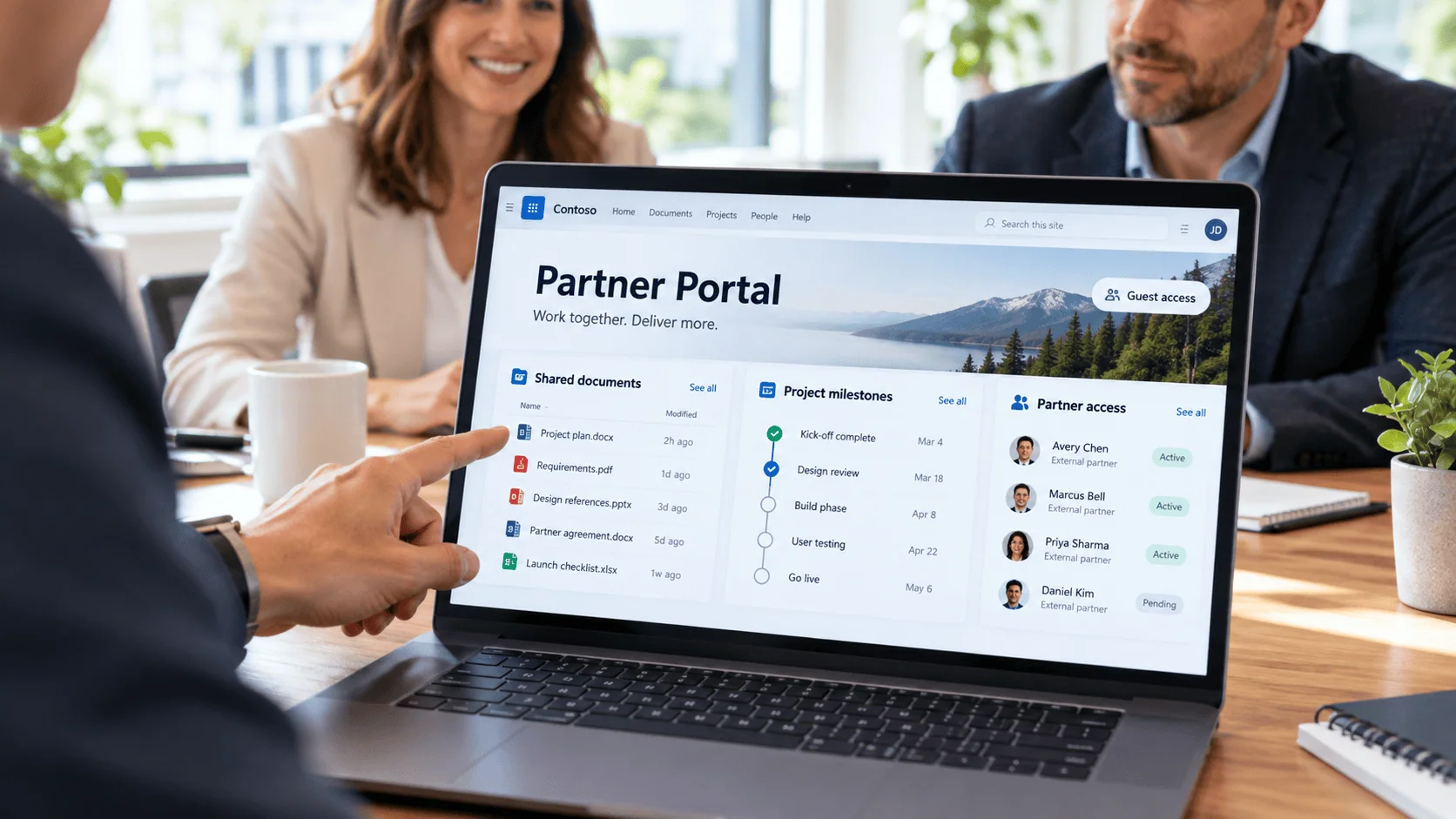
Quick Answer
SharePoint extranet design for large enterprise partner collaboration requires architecting the complete identity lifecycle with Microsoft Entra B2B guest access, implementing role-based access patterns, and establishing governance frameworks that prevent guest accounts from accumulating beyond their intended scope. Success depends on automated onboarding workflows, proper Conditional Access policies, and comprehensive audit trails that maintain security boundaries while enabling productive external collaboration at scale.
Large enterprises face mounting pressure to collaborate securely with external partners, suppliers, and vendors while maintaining strict governance and compliance standards. Traditional approaches (email-based document sharing, FTP sites, or custom-built portals) create security gaps, administrative overhead, and audit challenges that scale poorly as partner ecosystems expand.
SharePoint Online provides a compelling foundation for enterprise extranets that addresses these challenges through integrated identity management, comprehensive audit trails, and scalable access controls. When properly implemented with Microsoft Entra B2B guest access, SharePoint extranets can reduce partner onboarding time from weeks to days while maintaining the security boundaries that regulated organizations require.
SharePoint extranet design requires more than enabling external sharing. Success depends on architecting the complete identity lifecycle, implementing role-based access patterns, and establishing governance frameworks that prevent guest accounts from accumulating beyond their intended scope.
SharePoint Online provides enterprise-grade infrastructure that addresses the core challenges of external collaboration: identity management, content governance, audit visibility, and scalable access control. Unlike custom-built portals or third-party collaboration platforms, SharePoint leverages your existing Microsoft 365 investment while maintaining the security boundaries and compliance posture that large organizations require.
SharePoint extranets inherit Microsoft 365’s security framework, including Conditional Access policies, Microsoft Purview DLP, and comprehensive audit logging. External users operate within the same governance boundaries as internal users, but with restricted permissions that prevent access to internal content. This alignment eliminates the security gaps that often emerge when organizations deploy separate collaboration platforms for external partners.
SharePoint extranets with proper Conditional Access policies block 85-90% of risky sign-in attempts from external users without impacting legitimate access, providing enterprise-grade security that scales automatically as partner relationships expand.
SharePoint’s document libraries, metadata management, and version control provide the structured foundation that partner collaboration requires. External users can access shared documents, participate in co-authoring sessions, and receive automated notifications without compromising internal document organization. Partner portals with centralized document libraries reduce email-based file sharing by 70-80% and eliminate version control issues that plague traditional collaboration approaches.
Enterprise extranets rarely serve just one partner type. Most organizations need to support multiple external audiences simultaneously: key suppliers, distribution partners, joint venture collaborators, regulatory bodies, and temporary project teams. SharePoint’s architecture handles this complexity through tenant-level policies that scale across partner programs without requiring separate infrastructure.
The scalability advantage comes from SharePoint’s unified identity and access management. Microsoft Entra B2B guest access works consistently whether you’re onboarding 50 suppliers or 500 distribution partners. Guest users authenticate once and access multiple SharePoint sites based on their assigned roles, eliminating the password fatigue and access confusion that plague custom portal solutions.
Role-based portal access with SharePoint groups and Microsoft Entra B2B reduces administrative overhead by 50-60% compared to individual permission management, making it feasible to support thousands of external collaborators across multiple business units and geographic regions.
The extranet user experience determines whether partners engage productively or abandon the platform after initial frustration. Unlike internal SharePoint sites where users receive training and IT support, external users expect intuitive, self-explanatory interfaces that work immediately.
Effective extranet information architecture maps to partner workflows, not internal organizational charts. A defense contractor portal might organize content by program phase (proposal, award, execution, closeout) rather than by internal department. Financial services partner portals often structure access around regulatory requirements and compliance deadlines rather than product categories.
External users lack internal context. They cannot navigate by knowing “who owns what” internally. Instead, they need task-oriented pathways: “I need to submit monthly reports,” “I need to access technical specifications,” or “I need to update my company profile.” This requires mapping partner touchpoints to content locations before designing the site structure.
External users should immediately understand they are in a partner environment, not the main corporate site. Navigation should be simplified compared to internal sites: external users typically need access to 3-5 key areas, not dozens of departmental sites. Microsoft Entra B2B allows custom branding during the invitation process, but the SharePoint site itself needs visual cues that reinforce the external user’s role and available actions. Clear labeling like “Partner Resources,” “Supplier Documentation,” or “Vendor Portal” eliminates confusion about intended audience and access scope.
Deciding which interactions partners can complete independently versus which require internal approval affects both user experience and administrative overhead. Self-service works well for document downloads, profile updates, and standard form submissions. Managed interactions are necessary for access requests, contract modifications, and sensitive data exchanges.
The balance depends on partner sophistication and risk tolerance. Aerospace suppliers often require managed interactions due to ITAR compliance, while commercial partners may prefer self-service efficiency. Power Automate workflows can bridge this gap by automating approval routing while maintaining governance controls.
SharePoint extranet success depends on choosing the right identity and access pattern for your external audience. Microsoft provides several approaches, each with distinct security, governance, and operational characteristics.
Microsoft Entra B2B guest access is the most common pattern for enterprise extranets. External users receive guest accounts in your tenant, allowing them to authenticate with their existing work credentials while maintaining clear separation from internal resources. Guest users appear in your directory for audit purposes but cannot access internal applications unless explicitly granted permission.
At $0.00325 per monthly active user, Entra B2B is significantly more cost-effective than dedicated external tenant licensing ($8-12 per user) for large partner ecosystems. Entra B2B supports automated lifecycle management through Power Automate workflows that handle guest account creation, access reviews, and offboarding based on business events.
Ungoverned environments, legacy workflows, and undocumented customizations don't stabilize on their own. They become more expensive and more disruptive to remediate with every quarter they stay in production. i3solutions delivers senior-level SharePoint development, modernization, and governance services built for enterprise environments where the stakes are high and the margin for error is narrow.
Assess i3solutions SharePoint ServicesFor scenarios requiring lighter-weight access, SharePoint supports one-time passcode sharing and authenticated sharing links. External users receive time-limited access codes via email or can authenticate using their existing Microsoft, Google, or other social identity accounts. This pattern works well for document reviews, vendor submissions, or short-term project collaboration where full guest account provisioning creates unnecessary overhead. One-time passcodes expire automatically and do not create persistent directory entries, reducing long-term governance burden.
Entra B2B can federate with external identity providers, allowing partners to authenticate using their own Active Directory, Azure AD, or other SAML/OIDC-compliant identity systems. This eliminates password management for external users while maintaining enterprise-grade authentication policies on both sides of the relationship. Social identity providers offer broader accessibility but may not meet compliance requirements in regulated industries.
External Identity Patterns: Choosing the Right Approach
The most critical operational aspect of any SharePoint extranet is managing the complete lifecycle of external user access. Standard B2B invitations lack the context, approval workflows, and automated provisioning that large organizations need to maintain governance at scale. Without proper invitation workflows and automated lifecycle controls, organizations accumulate 40-60% inactive external accounts within 12 months.
Most enterprises require a structured onboarding process that includes partner verification, role assignment based on business relationship type, and automated provisioning of appropriate SharePoint site access. Effective onboarding workflows integrate Power Automate to handle invitation approval chains, automatically assign users to appropriate security groups, and trigger welcome communications with portal orientation materials. Some enterprises report 25-35% reduction in help desk tickets related to external user access after implementing automated lifecycle management.
Offboarding presents an even greater challenge because it requires coordination between HR systems, contract management platforms, and Microsoft Entra ID. Automated offboarding triggers should monitor for contract expiration dates, employment status changes at partner organizations, and project completion milestones. Automated offboarding through Power Automate reduces orphaned external access by 90% compared to manual processes.
Partner Access Lifecycle Governance Requirements
Onboarding Controls
Automated Offboarding Triggers
Enterprise SharePoint extranets require layered access controls that align with your organization’s risk tolerance while maintaining usability for external partners. These must be configured as a coherent system, not individual features.
SharePoint Online tenant-level sharing policies establish the baseline for all external collaboration. Organizations typically configure external sharing to “Existing guests only” or “New and existing guests” while blocking anonymous sharing for extranet scenarios. Conditional Access policies in Microsoft Entra ID can enforce device compliance, location restrictions, and multi-factor authentication requirements specifically for guest users.
For regulated environments, Microsoft Purview DLP policies should scan shared content for sensitive information patterns before external users gain access. In aerospace and defense scenarios, organizations typically implement geographic restrictions through Conditional Access to ensure ITAR-controlled content remains accessible only from approved locations.
SharePoint permission inheritance provides the foundation for role-based access, but extranet scenarios often require custom permission levels that align with partner relationships. Unique permissions on document libraries allow granular control over which partner organizations can access specific content areas, while SharePoint groups can be mapped to partner company domains for easier management.
Power Automate flows can automate permission assignments based on partner onboarding data, reducing manual administrative overhead while ensuring consistent access patterns. For example, when a new supplier completes vendor registration, automated workflows can provision appropriate SharePoint group membership and library access based on their contract scope.
Enterprise SharePoint projects stall when the team executing them lacks the depth to navigate complex migrations, custom development, or governance requirements. i3solutions' SharePoint specialists are senior-level, 100% US-based, and experienced in regulated-industry delivery environments.
Hire i3solutions SharePoint SpecialistsFor organizations dealing with external sharing problems stemming from inconsistent permission models, see our guide on navigating common SharePoint issues.
Microsoft 365 audit logs capture all external user activities within SharePoint, including document access, downloads, and sharing actions. The unified audit log provides searchable records that support compliance reporting and security investigations, meeting SOC 2 and ISO 27001 requirements for external collaboration.
Regular access reviews through Microsoft Entra ID identify guest accounts that may no longer require access, supporting the principle of least privilege over time. Automated reporting through Power BI can surface usage patterns and potential security anomalies, such as unusual download volumes or access from unexpected locations. For organizations with advanced compliance requirements, Microsoft Purview Audit (Premium) offers longer retention periods and more granular activity tracking.
When partners need to reach a few sites and a full portal is not justified, controlled sharing comes down to a short set of rules. Each one below is something to check, ask your administrators about, or decide before the first invitation goes out.
Microsoft states both dated changes for commercial tenants. Do not read them as applying to GCC or GCC High tenants unless Microsoft documentation for that cloud says so. For the audit view of external sharing at tenant, site and item level, see SharePoint Security for High-Risk, Compliance-Heavy Organizations.
Our approach to SharePoint extranet implementation centers on risk reduction and predictable delivery for enterprise environments that require audit-ready external collaboration.
We begin every extranet engagement with a structured assessment that maps your partner ecosystem, compliance requirements, and existing identity infrastructure. This includes documenting current external sharing patterns, identifying high-risk collaboration scenarios, and establishing clear boundaries between internal and external content.
Our assessment covers Microsoft Entra B2B capacity planning, Conditional Access policy requirements, and integration points with existing identity providers. We document guest access lifecycle requirements upfront (including automated offboarding triggers and access review cadence) so that governance doesn’t become an afterthought.
Our deployment follows a phased approach: pilot partner onboarding, controlled rollout, and full production deployment. We implement the complete Microsoft ecosystem stack: SharePoint external sharing policies, Microsoft Purview DLP controls, audit logging configuration, and our SharePoint developers implement Power Automate workflows for lifecycle automation
Each extranet includes role-based portal access, automated partner communications, and centralized content management that reduces administrative workload while maintaining security boundaries. Our reference architecture ensures that guest accounts don’t accumulate beyond their intended scope.
The Trex Partner Portal engagement demonstrates this approach in practice: Trex reduced partner onboarding time from 2-3 weeks to 2-3 days through automated SharePoint extranet workflows and role-based access provisioning, while maintaining the security controls required for their partner ecosystem.
Post-deployment, we provide governance frameworks that include access review automation, guest account cleanup procedures, and audit trail documentation, ensuring your extranet remains compliant and manageable as your partner ecosystem grows. Our governance approach includes quarterly access reviews, automated guest account lifecycle management, and comprehensive audit reporting that meets regulatory requirements.

Scott Singleton has spent more than 19 years at i3solutions and more than 30 years designing, developing, migrating, and implementing enterprise technology solutions. His expertise is grounded in SharePoint architecture, large-scale migration, custom application development, workflow modernization, technical training, and hands-on delivery across Microsoft platforms, including SharePoint, SPFx, Power Apps, Power Automate, Power BI, and enterprise database systems.
View LinkedIn ProfileRequire documented experience with Microsoft Entra B2B implementations at enterprise scale, including guest access lifecycle automation and Conditional Access policy design. Ask for reference architectures showing how they handle external user onboarding, role-based access controls, and automated offboarding triggers. Verify they can demonstrate audit logging capabilities and compliance reporting that meets your regulatory requirements.
Implement automated access review workflows through Power Automate that trigger quarterly reviews of guest accounts, with automatic notifications to business owners for approval or removal. Configure Conditional Access policies that require periodic re-authentication and establish clear offboarding triggers tied to project completion or contract expiration. Most organizations see 20-30% reduction in orphaned guest accounts within the first review cycle.
Guest access via Microsoft Entra B2B keeps external users in your tenant with controlled permissions, suitable for document collaboration and structured workflows. Dedicated tenant patterns create separate environments for each major partner, providing stronger isolation but requiring more complex federation setup and significantly higher licensing costs. Guest access typically handles 80% of enterprise extranet scenarios with lower administrative overhead.
Configure Microsoft Purview audit logging to capture all external user activities, including document access, sharing events, and permission changes. Implement DLP policies that monitor sensitive content sharing and establish regular access certification processes. Document your guest access governance framework and maintain evidence of periodic access reviews for compliance auditors.
SharePoint Online supports up to 50,000 guest users per tenant, which handles most enterprise extranet scenarios. For larger partner ecosystems, consider hybrid architectures that combine SharePoint extranets for core collaboration with Azure B2B Commerce or custom Power Platform portals for broader partner self-service. Design the information architecture to segment partner audiences before hitting platform limits.
Set the rules before the first invitation goes out. Microsoft states, on a sharing settings page last updated on 2026-06-30, that a site setting must be at the same or more restrictive setting as the organization, so decide the organization level first. Microsoft states that a sensitivity label can set the external sharing of a labeled SharePoint site (page last updated on 2026-05-07), and that guest access can be put on automatic, recurring access reviews (page last updated on 2026-03-12). Microsoft states, on a page last updated on 2025-03-28, that by default B2B collaboration with other Microsoft Entra organizations is enabled and B2B direct connect is blocked. Two dated changes matter now, and Microsoft states both for commercial tenants only. Between May and July 2026 it enabled SharePoint and OneDrive integration with Microsoft Entra B2B for new external sharing, and starting in October 2026 it will retire SharePoint Online one-time passcode authentication, after which users without a matching guest account receive access denied on previously shared Specific people links (page last updated on 2026-10-07). Do not assume either change applies to GCC or GCC High. Before you invite anyone, decide who sets the organization level, which label each partner site receives, who re-certifies guests, and which partners need a guest account created now.


Enterprise SharePoint environments accumulate years of undocumented decisions, ungoverned customizations, and technical debt that compounds silently until something breaks. i3solutions' senior SharePoint delivery advisors work with IT leaders who already know the environment is a liability and need a structured approach to remediation.
Talk to a SharePoint Delivery Advisor
US-Based Microsoft System Integrator | Est. 1997
© i3solutions. All rights reserved.
US-Based Microsoft System Integrator | Est. 1997
© i3solutions. All rights reserved.


