

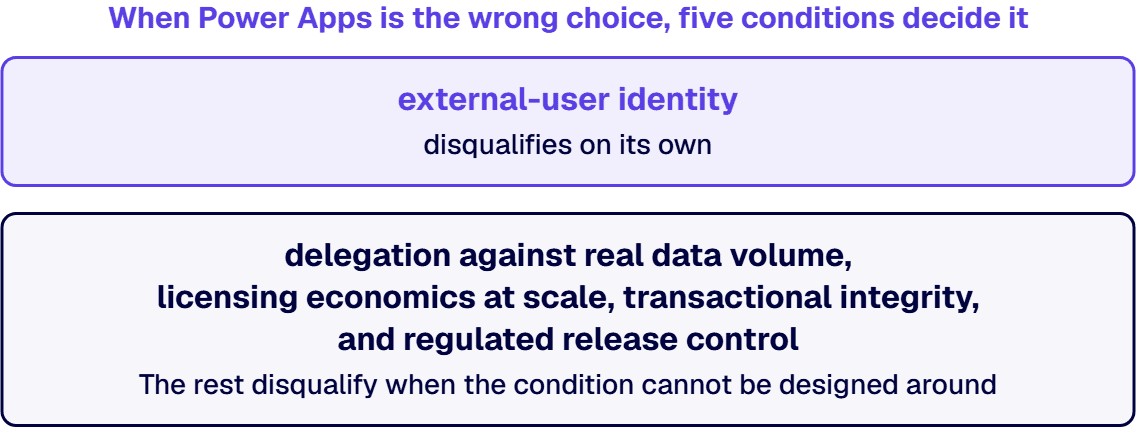
When Power Apps is the wrong choice, five conditions decide it: delegation against real data volume, licensing economics at scale, external-user identity, transactional integrity, and regulated release control. Identity disqualifies on its own. The rest disqualify when the condition cannot be designed around.
The people who reach this question rarely arrive with a preference. An enterprise architect has a Power Apps estate that works. An IT director has a request the estate cannot absorb. An application development manager has a maker who says the platform has hit the limits. This guide is written for that room. It sets out the conditions under which Power Apps stops being the right primary architecture, the mechanism behind each, and a test you can run this week.
This guide answers one question: whether a specific application requirement has moved outside what Power Apps should carry as the primary architecture. It does not compare platforms feature by feature, and it does not pick an app model. Those are separate decisions with their own guides, and running all three at once is how architecture reviews stall.
The platform comparison, worked across complexity, governance, and integration depth, belongs to Power Apps vs. Custom .NET: Decision Guide. Read that one when the live question is which platform to choose for new work. Read this one when the platform is already chosen, already running, and no longer fits.
Choosing between canvas and model-driven architecture is a within-platform decision, set out in Canvas vs Model Driven Apps in Regulated Microsoft Environments. That guide assumes Power Apps is right and picks the shape. This guide tests the assumption underneath it. The custom path, where a requirement earns one, runs through Custom Application Development Services for Enterprise Performance, and how that delivery works is described there rather than here.
Three further boundaries. Licensing detail belongs to the licensing guides, so licensing appears here as a mechanism and this guide carries no prices. Low-code site versus commissioned web property is not covered. Integration architecture gets a pointer and no discussion.
What remains is the negative space: five disqualifying conditions, the mechanism behind each, and a test. A condition that fires does not automatically mean a rebuild. It means the requirement has outgrown what the platform was built to hold, and the next decision is which of three routes fits: stay with a narrower scope, go hybrid, or commission the build.
A disqualification list is worth nothing without the qualification list beside it. Power Apps holds a large class of enterprise work well, and moving that work into custom code buys a maintenance obligation nobody asked for.
The platform fits when five things hold at once. The audience sits inside your Microsoft Entra tenant. The data lives in Dataverse or in Microsoft 365 sources the platform already speaks to. The business rules are expressible as conditions over fields. The record counts an individual screen touches stay small. The release cadence tolerates a governed but lightweight change process. Those conditions describe a great deal of internal operational software: request intake, inspections, approvals, field capture, asset registers, and the long tail of forms that once lived in spreadsheets.
Power Apps also fits when the honest alternative is nothing at all. An application a business unit builds and runs itself, under a governance model IT accepts, beats a backlog item nobody staffs. Architecture reviews that only weigh finished states skip that comparison.
Where an estate has grown faster than the governance around it, the answer is rarely a rebuild. It is ownership, environment strategy, and a support model, and that work is described in Governing Citizen-Developer Power Apps IT Now Has to Own. Stabilizing an app costs less than replacing it, and a stabilized app that still fails a test below makes a far better subject for a rebuild decision.
One thing to do before reading further. Write down the requirement causing the argument, in a single sentence, with the number attached: how many records, how many concurrent users, which users, which system of record, which control. If you cannot write that sentence, discovery comes first, and the conditions below are what discovery looks for.
The first condition is mechanical, and it is the one teams hit without a warning shot. Power Apps pushes query work down to the data source when the query translates. When it does not translate, the platform pulls a bounded set of records to the client and finishes the work there.
Microsoft states the rule plainly in Delegation and query limits. If any part of a query expression is nondelegable, Power Apps does not delegate any part of the query. A nondelegable query returns the first 500 records from the data source, and the rest of the formula then runs against that slice. The ceiling is raised to 2,000 records in app settings, and 2,000 is the top of it.
Read that for correctness before you read it for speed. A filter that fails to delegate does not throw an error. It returns an answer computed over a slice of the table, and the answer looks like an answer. A total on a dashboard is a number, and the reader cannot see that it came from a truncated set.
That is what separates the data-volume wall from a performance problem. Performance degrades visibly and gets escalated by the people it slows down. Delegation failures degrade silently and get trusted.
The test. Open the app in the studio, count the delegation warnings, then count the tables behind those warnings that already hold more rows than the record limit. Every intersection is a live correctness defect, noticed or not. Then ask how fast the largest of those tables is growing. An application built against a table under the limit inherits the defect the day the table crosses it, and no step in the release process catches that crossing.
Delegation alone disqualifies Power Apps as the primary architecture in one case. The core job of the application is arithmetic over a large table that keeps growing. The compensations for that fact have become the design rather than exceptions inside it: pre-aggregation flows, staging summary tables, one query split into several.
The second condition is arithmetic, turning on two variables the platform makes you declare: how many people need access, and which capabilities the application reaches for.
Power Apps licensing runs on a per-user or a per-app basis, and a capability tier sits underneath both. The Power Apps entitlement that arrives with Microsoft 365 covers a narrower surface than a standalone license. The Licensing overview for Microsoft Power Platform puts access to on-premises data and the use of premium or custom connectors outside that entitlement. So the moment an application reaches a line-of-business system through a premium connector or a gateway, everyone who opens it moves into a licensed population.
That is the mechanism, and the economics follow in a shape worth naming. Custom development front-loads cost: the build is expensive, and the running cost is hosting plus maintenance, which grows with change. Platform licensing does the opposite: the build is cheap, and the running cost tracks population, which grows with headcount. Two curves with different shapes cross somewhere, and the crossing point is set by how many people you license and for how long.
The tier comparison inside Power Apps licensing belongs to Power Apps Premium vs Per App: What Actually Differs, and Where the Break-Even Sits, and this guide does not restate it. What matters here is the case where no tier choice helps, because the population itself is the driver.
Settle it with a count. Take three populations separately: staff who open the application daily, staff who open it a handful of times a year, and people outside your tenant. Apply the entitlement the connectors actually require to each group. Hold the result against the build-and-run cost of the same functionality over the same horizon. Then run the count again against the population you expect in three years.
Licensing does not disqualify Power Apps on its own, and treating it as the whole argument produces a bad decision in both directions. It disqualifies the platform when the curve is driven by a population you have no way to shrink: every employee, every field technician, every external party, indefinitely.
The third condition is identity, and it disqualifies faster than the other four because it is structural rather than incremental.
Power Apps assumes a directory. Share a canvas app with guest users sets three conditions. Canvas apps are shared with guest users of a Microsoft Entra tenant. B2B external collaboration has to be enabled on the tenant. A guest opening an app that connects to Dataverse must hold a license with Power Apps use rights that matches the capability of the app. That is a workable model, and for named partners and contractors it is the right one.
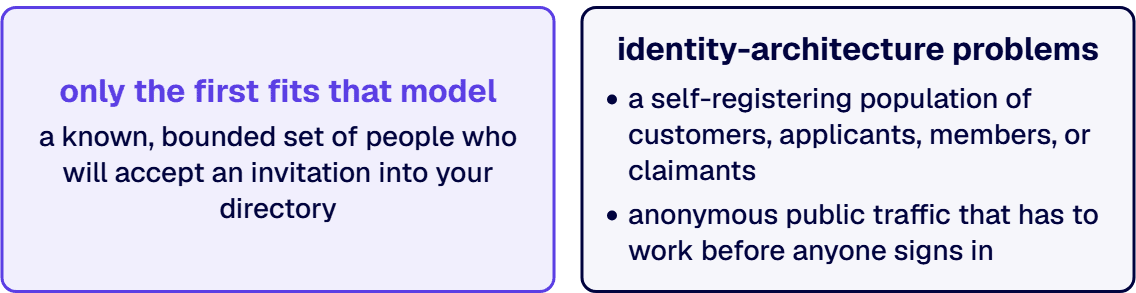
External audiences come in three shapes, and only the first fits that model. The first is a known, bounded set of people who will accept an invitation into your directory: partners, contractors, auditors, a supplier’s operations team. The second is a self-registering population of customers, applicants, members, or claimants, people who arrive without anyone provisioning them. The third is anonymous public traffic that has to work before anyone signs in at all.
The second and third shapes are not guest-sharing problems with a longer guest list. They are identity-architecture problems. Power Pages, the Power Platform product for external-facing sites, answers a portion of that space, and the condition fires past it. Where the requirement includes a bespoke registration flow, a customer identity provider you already own, or terms acceptance recorded as evidence, the identity model has itself become the application.
Test the identity model this way. Write down who the external user is, how they come to exist as an identity in your systems, and who is accountable for that record. Then write down what happens the day one of them asks for their data to be deleted. If any answer requires a process the platform does not have, the identity model is disqualifying on its own.
If two of these conditions are firing on an application you own, the next step is a conversation with an architect who reads your record volumes, your user populations, and your control obligations before offering an opinion. That conversation can end with stay on Power Apps, and it can end with i3solutions saying this is not our work. Both are actionable. An enterprise Power Apps build still carries delegation limits, solution layering, and identity decisions that junior teams discover in production. i3solutions’ Power Platform specialists are senior-level, 100% US-based, and build inside enterprise governance from day one.
Low-Code Doesn't Mean Low Stakes
The fourth condition is about what happens when a process fails halfway through.
Power Apps and Power Automate compose work from discrete steps, and each step succeeds or fails on its own terms. A process that writes to four tables and calls two external systems has six places to fail and no single place to undo. Compensating logic gets written by hand for each failure path, and nobody writes all of them. The gap shows up as records that exist in one system and not another, with no error to explain the divergence.
Ask three questions about the application’s most consequential transaction. Does it have to be atomic across more than one table or system? Does a retry produce one result or two? Does the record move through states where certain transitions are forbidden under concurrent edits? Three yes answers describe a transactional core, and a transactional core wants a service layer that owns it.
The rules question has the same shape. Declarative logic holds while the rules are expressible as conditions over fields. It gives way once rules acquire versions and effective dates, or once the organization has to prove which version of a rule produced a specific result on a specific date. It gives way entirely when the rules are an asset the business edits and tests on its own cadence. The logic then wants somewhere to live where it is unit tested, versioned, and reviewed like code.
Concurrency and product-like interface requirements belong here rather than in sections of their own. Both come from one cause: a requirement that assumes the application controls its own execution model and its own rendering. An interface that has to behave in a defined way under a defined load wants control the platform deliberately abstracts away, and that abstraction is why the platform is fast to build on.
Integration depth past this boundary is a separate subject, and the difference between commissioning software and connecting systems is set out in Custom Software Development vs. System Integration: What Are the Differences?.
One transaction answers this. Take the one the business would escalate if it went wrong. Write down what the data looks like if the process dies after step two, after step four, and after step six. If you cannot describe the recovery for each, or the recovery is a person fixing rows by hand, the transactional requirement has outrun what the platform holds.
The fifth condition is the lifecycle around the application rather than the application itself, and it is the one that surfaces last and costs longest.
Power Platform has a real lifecycle model. Microsoft’s overview of application lifecycle management with Microsoft Power Platform is explicit about its shape. Solutions are the mechanism for implementing ALM. Components move between environments through export and import. Every environment that participates in ALM has to include a Dataverse database, and source control should be your source of truth for storing and collaborating on components.
For a large class of applications that model is sufficient. It stops being sufficient when the control environment asks questions the model does not answer natively. Test coverage as a release gate. Static analysis of what changed. A signed build artifact. Evidence that a specific change passed a specific test on a specific date. Segregation of duties enforced by the pipeline rather than by who holds environment permissions.
Data residency and specialized security requirements fold in here for the same reason. Both constrain where code and data are allowed to run and who is allowed to see them, and both are answered at the platform level rather than inside the application. When the platform’s answer differs from the one the obligation requires, no amount of application design closes that gap.
None of this makes Power Platform unsuitable for regulated work, and plenty of regulated organizations run governed estates on it. The condition fires in a narrower place: when the application is itself a control, or evidences a control, and the release process has to satisfy an external examiner who asks for artifacts rather than for assurances.
The evidence test runs backwards. Take the last change you shipped and try to produce, from records that already exist, four things: what changed, who approved it, what testing it passed, and who could have changed it without approval. If that takes a person reconstructing history from memory and screenshots, the lifecycle requirement has outrun the platform’s defaults. The remedy is a heavier engineering process bolted on, or a platform that carries the process natively.
The five conditions above are architectural, and they get tested deliberately. The signs below are observational. They appear in how a team talks about an application long before anyone runs a test.
The workaround has become the architecture. A flow that pre-aggregates data because a screen cannot query it. A staging table that exists because a query cannot be delegated. A scheduled job that reconciles two systems because the write path is not trusted. Each was a reasonable fix on the day it shipped. Together they are a design nobody chose.
Rebuild regret is already priced in. Rebuild regret is the phrase teams reach for when the second build turns out to have been inevitable from the first. It shows up as a sentence in a status meeting: we knew this would happen. Where the people closest to the application have already concluded that a rebuild is coming, the live decision is when, and how much of the estate goes with it.
Technical debt hides inside formulas nobody will open. Technical debt in a Power Apps estate does not look like debt. It looks like a screen carrying a formula long enough that one person understood it and nobody else has opened it since. No test covers it, no reviewer reads it, and no static analysis flags it. The debt surfaces on the day that person leaves and a change request lands in the same month.
The cost story is no longer a licensing number. Total cost at scale stops being a licensing line. It becomes the cost of everything built around that line: compensating flows, staging tables, reconciliation jobs, support hours, and the senior engineer who is now the only person able to change anything. Count those before you hold a licensing number against a build estimate.
Delivery is gated by the tool rather than by the requirement. Change requests get estimated by how hard the platform makes them rather than by how hard the business change is. That inversion is the clearest signal that the tool has stopped serving the work.
The application has acquired a no-touch rule. The maker who built it has moved on, and the people who inherited it will add screens but will not alter the data model. An application nobody will alter is already frozen, and freezing is a decision even when nobody made it.
Two of these firing together is a reason to run the five tests in this guide. Four is the point at which the team has already said out loud that it outgrew Power Apps and hit the limits of what a formula-driven model holds.
A condition firing is a verdict on one part of an application rather than on the whole of it, and hybrid architecture is what that distinction buys you.
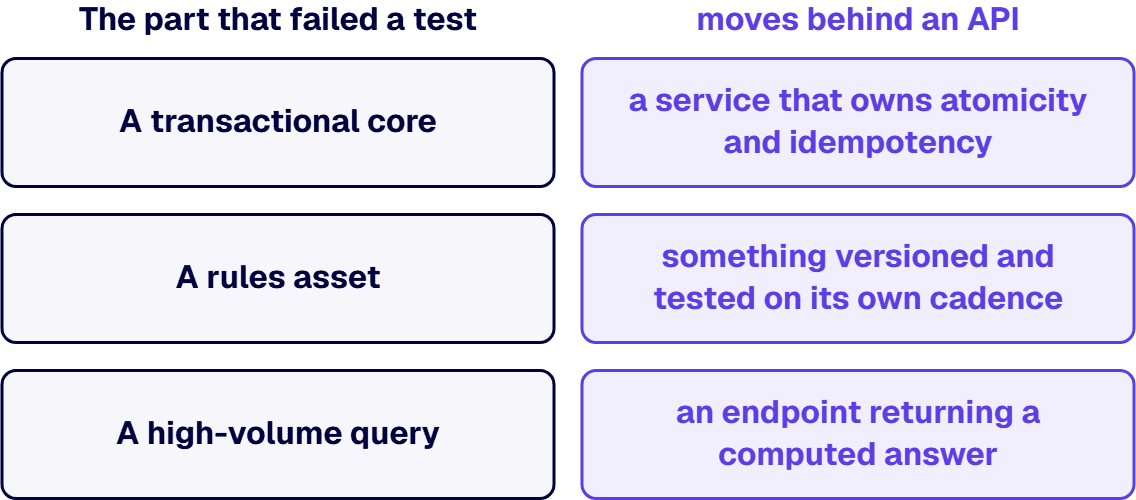
The shape is plain. Power Apps and Power Automate stay where they earn their keep: internal forms, task surfaces, approvals, notifications, and screens people already know. The part that failed a test moves behind an API. A transactional core becomes a service that owns atomicity and idempotency. A rules asset becomes something versioned and tested on its own cadence. A high-volume query becomes an endpoint returning a computed answer rather than a table the client filters.
Two things make hybrid work rather than leaving you with a second system to maintain. The first is a clean contract: the service owns the invariants, and the app never writes around it. The second is ownership: one team owns the service, one owns the app surface, and both sit in the same release conversation.
Where the external audience is the requirement and the interface is the product, the front end is a commissioned web property with its own identity model, and Enterprise Web Application Development covers that surface. That is a different build from putting a service behind an internal app, and conflating the two is how hybrid proposals get rejected on cost. Where the application stays on the platform instead, Power Apps for a Business-Critical Enterprise Application covers that build.
Hybrid is the right answer when one or two conditions fire and the rest of the application is well served. It is the wrong answer when four fire at once, because the platform is then carrying a shell that costs more to keep than to replace.
The decision runs in three steps and produces a written recommendation.
Discovery comes first, against the application rather than against a questionnaire. We work through record volumes and growth rates, the populations who need access, the transactions the business would escalate if they broke, the rules and where they live, and the control obligations behind the release process. The output is the five tests in this guide, answered with your numbers instead of with examples.
A proof of value follows only where a specific risk is worth retiring before anyone commits. Whether a query pattern survives your data volume is testable in a narrow slice. Whether an identity model works for your external population is testable too. Where nothing needs proving, we skip the step and say so.
The recommendation is written, and it carries one of four verdicts: stay, stay with a narrower scope and better governance, go hybrid, or rebuild. A fifth outcome, that this is not work i3solutions should take, is available and gets used.
i3solutions has been a Microsoft partner for 30 years and has delivered 1,500+ Microsoft platform implementations. What that buys you here is borrowed expertise: pattern recognition from applications that met these conditions before yours did, applied to your requirement before you commit to a direction. Delivery runs under Enterprise Delivery Assurance, the discipline the firm applies to land work on-time, in-scope, and in-production. The engagements behind it are documented in our case studies.
An anti-sell page that cannot say no is a sales page with better manners. Four situations belong elsewhere, and naming them saves everyone a meeting.
A licensing-only question. If what you need is the cheapest correct way to license an estate that otherwise works, that is an exercise for a licensing specialist. Architecture consulting is an expensive route to that answer.
A governance-only problem. If the estate is unmanaged rather than unfit, the work is ownership, environments, data-loss-prevention policy, and a support model. That work is worth doing, and none of it requires anyone to leave the platform.
A commodity rebuild. If the requirement is fully understood, the data model is small, and price is the deciding factor, a specialist build shop will do it for less than we will, and the result will be fine.
A pure staffing ask. If the architecture is settled and what you want is hands, that is a staffing conversation, and it deserves to be priced and scoped as one.
What is left is the case this guide was written for: an application that matters, a requirement that has moved past what the platform holds, and a decision nobody wants to get wrong in either direction.

Michael Branson co-founded i3solutions 30 years ago and brings executive, operational, and technical perspective to organizations working in complex, secure, and mission-critical environments. His insights focus on business process consulting, automation, data analytics, collaboration, secure operating models, and the operational discipline required to turn technology investments into practical business systems with measurable value.
Connect on LinkedInPower Apps stops being the right choice when one of five conditions holds and cannot be designed around. Queries that fail to delegate against tables that keep growing. A licensed population you have no way to shrink. An external audience that registers itself rather than accepting a directory invitation. A transaction that has to be atomic across systems. A release process an external examiner will audit. The condition fires against a requirement rather than against the platform, so Power Apps is not suitable in the places where a test fails and stays fine everywhere else.
The Power Apps limitations for enterprise applications that bind at scale come in three shapes, and they bind in different places. The query limit is delegation: a nondelegable query returns a bounded slice of records rather than an error, so correctness fails quietly before performance does. The identity limit is the directory: guest access assumes a person who accepts an invitation, which is a poor description of a self-registering customer population. The transaction limit is composition: work runs as discrete steps, each succeeding or failing alone, so atomicity across several tables and systems has to be hand-built and hand-recovered. Concurrency and interface control sit underneath the third limit, because both assume the application governs its own execution.
Power Apps licensing costs more than custom development at the point where headcount rather than functionality drives the bill. A custom build charges most of its cost up front and then bills hosting and maintenance against the rate of change. A licensed platform reverses the order, staying cheap to build while the invoice tracks how many people hold an entitlement. Small, bounded, internal audiences keep licensing ahead. That flips when the audience becomes everyone, or when premium connectors or on-premises data are required for every person who opens the application. Compare both over the same multi-year horizon before deciding.
Six signs show up before anyone runs a test. Workarounds have become the architecture: staging tables, pre-aggregation flows, and reconciliation jobs that exist to compensate for the platform rather than to serve the business. Rebuild regret has been said out loud in a status meeting. Technical debt sits inside formulas no one will open, uncovered by tests and unread by reviewers. Total cost at scale is now dominated by support and workaround effort rather than by the licensing line. Change requests get estimated by platform difficulty rather than by business difficulty. And the application has quietly acquired a rule against touching it, where people add screens but will not alter the data model. Two signs together justify running the architectural tests. Four means the team already knows the answer and is looking for permission to say it.
Start with the requirement rather than with the platform. Four things make the platform the faster and cheaper answer: an internal audience, data in Microsoft 365 or Dataverse, rules that fit conditions over fields, and small record counts per screen. Where all four hold, staying on Power Apps is the correct decision. If any of them is false in a way you cannot design around, the real choice is between a hybrid architecture and a commissioned build.
Dataverse, release control, support ownership, and licensing sized to the real user population are decisions that hold the application up for years. i3solutions' senior Power Platform advisors work with IT leaders who want those decisions made once, correctly, by people who have made them before.
Talk to a Senior Power Platform Advisor
US-Based | Est. 1997
© i3solutions. All rights reserved.
US-Based | Est. 1997
© i3solutions. All rights reserved.


