
By Scot Johnson, Founder / CEO, i3solutions
Scot Johnson co-founded i3solutions 30 years ago with a focus on expert-led delivery, strategic advisory, and complex Microsoft-centered solutions for organizations where technology decisions carry operational, financial, and mission risk. His insights focus on the leadership, governance, integration, automation, data, and delivery decisions that determine whether technology investments become reliable business systems.
Power Automate security consulting for regulated enterprises means hardening the platform against three audit-critical threat surfaces: data exfiltration through unsanctioned connectors, identity sprawl through over-privileged service accounts, and governance gaps through unmanaged citizen-developer flows. The work covers DLP policies, environment tiering, connector classification, service identity, and centralized monitoring.
Power Automate security consulting exists because the platform’s default settings leave regulated enterprises exposed where auditors look hardest. Citizen-built flows move data across connectors without the monitoring, privilege control, and audit logging that compliance frameworks expect, and closing those gaps is what the engagement delivers.
When IT directors and CISOs at organizations like these reach the point of selecting a Power Automate security consulting partner, they are usually past the question of whether Power Automate matters. The question is whether the deployment they have, or the one they are about to build, will hold up to audit. Adoption has outpaced governance. Citizen developers have shipped flows. Service accounts have accumulated. Connectors have been approved one ticket at a time. A security review has flagged it, an auditor has asked for evidence, or a compliance deadline is approaching, and the gap between current state and a defensible posture needs to close on a schedule.
i3solutions hardens Power Automate across DLP, environments, connectors, identity, and monitoring, the controls IT directors and CISOs in regulated industries are accountable for.
Power Automate is, by design, a low-friction automation platform. That is the source of its business value and the source of the security challenge. The same default settings that let a finance analyst build an approval workflow on a Friday afternoon also let a shadow flow exfiltrate sensitive data over the weekend. In a regulated enterprise, the default settings are not the right settings. Security consulting closes the gap between what the platform ships with and what the audit-ready end-state requires.
Generic governance frameworks treat Power Automate as one more SaaS application. The platform is more than that, and three threat surfaces consistently surface in i3solutions engagements that generic SaaS controls do not cover.
First, data exfiltration through connectors. Power Automate ships with hundreds of connectors spanning Microsoft, third-party SaaS, and custom HTTP endpoints. Without an active data loss prevention (DLP) policy, a flow can move regulated data from a controlled boundary into an uncontrolled one in a single configuration change. The data movement looks like normal user activity from the perspective of conventional network controls.
Second, identity sprawl through service accounts. Flows authenticate using connection credentials. Without a service-identity strategy, those credentials accumulate as standard user accounts with persistent, broad-scope access. A regulated environment cannot defend an audit position where flows run as named individuals who have left the company, or as shared accounts whose credentials live in two-year-old Slack threads.
Third, governance gaps through citizen-developer flows. Power Automate’s success depends on putting authoring power outside IT. That same property means flows touching regulated data can be built, deployed, and modified without the change-management discipline that applies to traditional applications. The audit question is not whether citizen developers should build flows. It is whether the platform’s environment, connector, and approval controls put guardrails around what they build.
Microsoft’s defaults reflect a product design optimized for the median customer, who is not a regulated enterprise. Default tenant-level DLP policies are permissive. Default environments are commercial-tier. Default connector approval is per-tenant rather than per-environment. Default monitoring writes to the Microsoft 365 audit log, which is read by general-purpose security tools, not by tools tuned to flow-execution patterns. None of those defaults are wrong for the median customer; they are insufficient for an organization operating under CMMC 2.0 Level 2 or HIPAA, because the audit narrative those defaults support is thinner than the framework requires. Closing the gap is design work: which environment processes what data, which connectors are approved against which classifications, which identities authenticate which flows, and where the evidence lives.
These are the signals that show up in i3solutions intake conversations. If two or more of them describe your environment, the conversation about hiring a partner is the right conversation to have.
Signal one: a security review or third-party audit has flagged Power Automate as a control gap, and the remediation plan has not landed. Signal two: an enterprise DLP policy exists at the tenant level but environments and connectors have grown past what the policy anticipated. Signal three: flows authenticate as personal user accounts rather than purpose-built service identities, and at least one of those accounts belongs to someone who has left the company. Signal four: the count of premium connectors approved across the tenant has grown past what anyone can confidently inventory in a meeting. Signal five: citizen developers have shipped flows touching regulated data, and the change-management process for those flows is informal or absent. Signal six: a compliance milestone, audit window, or regulatory deadline is on the calendar, and the path from the current state to evidence-readiness is not yet drawn.
When the IT director can name two or three of these out of memory, the engagement is scoped enough to start. If you want to discuss Power Platform Governance more broadly before narrowing to security, that’s a fair starting point too.
When the diagnostic conversation is short and the path is clear, the right next step is to bring the senior delivery team onto the program. Our Power Platform engagements are led by US-based senior architects with a multi-year track record on regulated Power Platform work. If your evaluation is far enough along that you are ready to staff the engagement, hire our Power Platform team and we will scope the kickoff against your control framework and timeline.
The work falls into a five-layer architecture. The layers are concurrent design dimensions, not a maturity model: a competent engagement makes decisions at all five in the first two weeks, and the implementation that follows ships those decisions into production with named owners.
Layer one is DLP policy design. The deliverable is an environment-aware data loss prevention policy set that classifies connectors into Business, Non-business, and Blocked categories, with different classifications applied at different environments. The Business category includes Microsoft 365 connectors, Dataverse, SQL Server, and any named line-of-business connectors that have been reviewed against the data classification they will touch. The Blocked category is explicit, not implicit. We document the rationale behind each classification because that document is what the auditor reads.
Layer two is environment tiering. The deliverable is a four-tier environment design: Development for citizen authoring, Test for QA cycles, Staging for pre-production validation, and Production for live flows. Each tier has its own DLP policy, its own connector approval list, and its own access roles. Citizen developers author in Development. Promotion to Production happens through an Application Lifecycle Management (ALM) pipeline with explicit approval, not a one-click promotion.
Layer three is connector classification. The deliverable is a connector inventory with every approved connector named, the data classifications it can touch, and the environment tiers it is permitted in. Custom connectors and HTTP connectors get separate scrutiny because they are the routes by which regulated data leaves the platform fastest. The inventory is owned and reviewed quarterly, not built once and forgotten.
Layer four is service identity strategy. The deliverable is a three-tier service identity model: managed identities for Azure-hosted dependencies, service principals for app-to-app authentication, and dedicated service accounts (with documented owners and rotation schedules) for Power Automate connection references that genuinely need a user-context credential. Personal user accounts are not approved as flow connection identities in a regulated production environment.
Layer five is centralized monitoring. The deliverable is a four-stream monitoring design: flow run history, connection authentication events, environment configuration changes, and DLP policy violations, all routed to the security operations team’s existing SIEM. The monitoring is correlated with the broader Microsoft 365 audit feed, not siloed in the Power Platform admin center.
Naming a framework is easy. Operationalizing it inside Power Automate is the work, and it looks different in each environment.
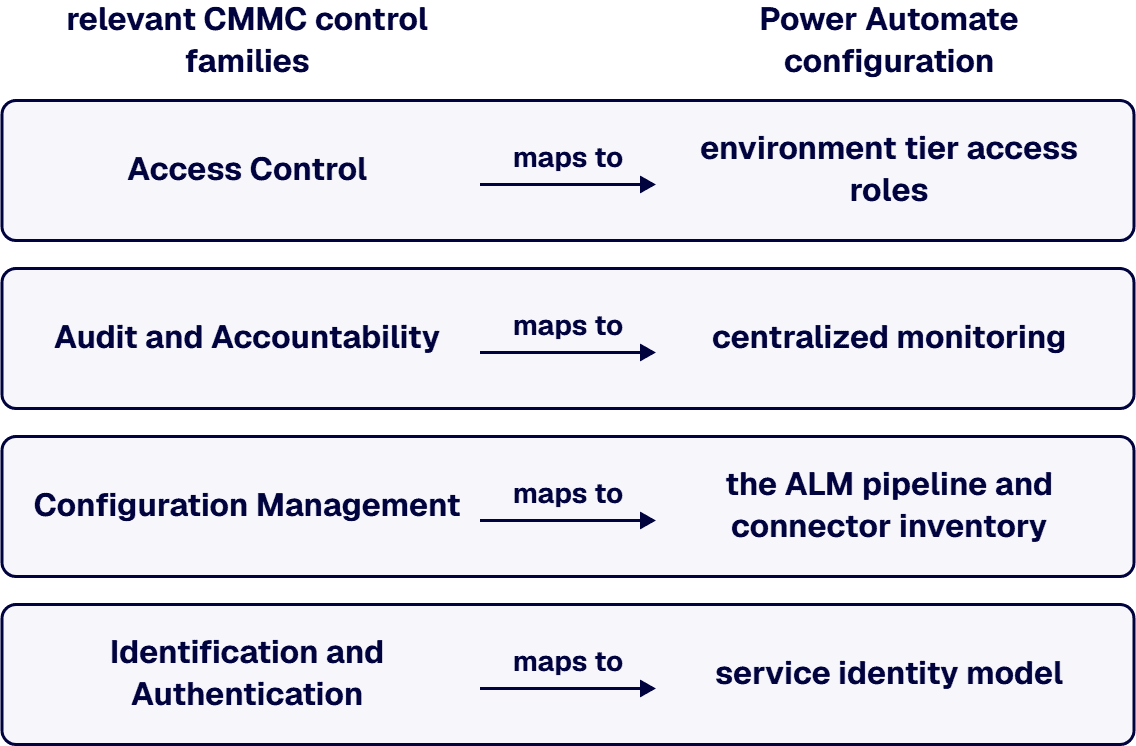
Under CMMC 2.0 Level 2, the relevant control families are Access Control (AC.L2-3.1), Audit and Accountability (AU.L2-3.3), and Configuration Management (CM.L2-3.4), with additional discipline around Identification and Authentication (IA.L2-3.5) for service identities. Each family maps to specific Power Automate configuration: AC controls map to environment tier access roles; AU controls map to the four-stream monitoring design; CM controls map to the ALM pipeline and connector inventory; IA controls map to the three-tier service identity model. Microsoft Learn’s Power Automate data loss prevention documentation is the canonical reference for the platform-side capability.
Under HIPAA, the relevant standards are the Security Rule’s Technical Safeguards (45 CFR 164.312) and the underlying NIST 800-66 guidance. The Power Automate decisions that matter are connector classification (no PHI through unblocked-by-default channels), service identity (no PHI access through personal accounts), and audit logging (the monitoring stream feeds the same SIEM that supports the rest of the HIPAA audit narrative).
Under SOC 2, the Trust Service Criteria for Security and Confidentiality drive the configuration choices. The control narrative the auditor reads is built from the same five-layer architecture; the DLP policy design, environment tiering, and connector classification artifacts each map to specific TSC criteria. Under FedRAMP and ITAR, the engagement runs in a GCC or GCC High tenant rather than commercial, with additional constraints on connector availability that change the inventory work but not the underlying architecture.
An aerospace contractor engaged i3solutions after a CMMC 2.0 Level 2 readiness assessment flagged Power Automate as a high-risk surface. The environment had grown from a small pilot to 187 production flows over two years, with no formal DLP policy below the tenant level and 23 service accounts authenticating flows. The engagement ran 12 weeks: a DLP policy redesign tied to AC.L2-3.1 and CM.L2-3.4 control families, a four-tier environment split with explicit ALM gates, a service-identity migration that retired 19 of the 23 shared accounts, and a SIEM integration delivering the audit evidence stream. The subsequent CMMC assessment cleared without findings on the Power Automate scope.
A financial services firm consolidating its SOC 2 audit boundary engaged i3solutions after the external auditor asked for control evidence the team could not produce on the schedule. The DLP policy was tenant-default. Connectors had been approved one ticket at a time with no central inventory. The engagement ran 10 weeks: a connector inventory and reclassification (172 connectors reviewed, 41 reclassified to Non-business, 11 blocked), an environment tier split that moved 64 production flows to a dedicated audit-scoped environment, and a monitoring redesign that fed the audit log into the firm’s existing SIEM. The subsequent SOC 2 audit cycle closed without exception findings on Power Automate.
A regional health system moving Power Automate adoption from pilot to enterprise scale engaged i3solutions after an internal security review identified PHI exposure risk in a citizen-developer flow emailing patient-list extracts to a shared inbox. The remediation and broader hardening ran 14 weeks: an environment tier rebuild with PHI classifications enforced at the DLP layer, a connector classification pass against HIPAA Technical Safeguards, a service-identity migration for 31 production flows touching EHR data, and centralized monitoring through the existing security operations center. Citizen-developer authoring continued; what changed was the guardrails around what they could ship to production.
Talk through your environment with a team that has remediated PHI and CUI exposure in production Power Automate flows for regulated enterprises.
The engagement is shaped to deliver an audit-ready end-state, not a deck of recommendations. Three phases, each with named deliverables and exit criteria, run Enterprise Delivery Assurance methodology end-to-end.
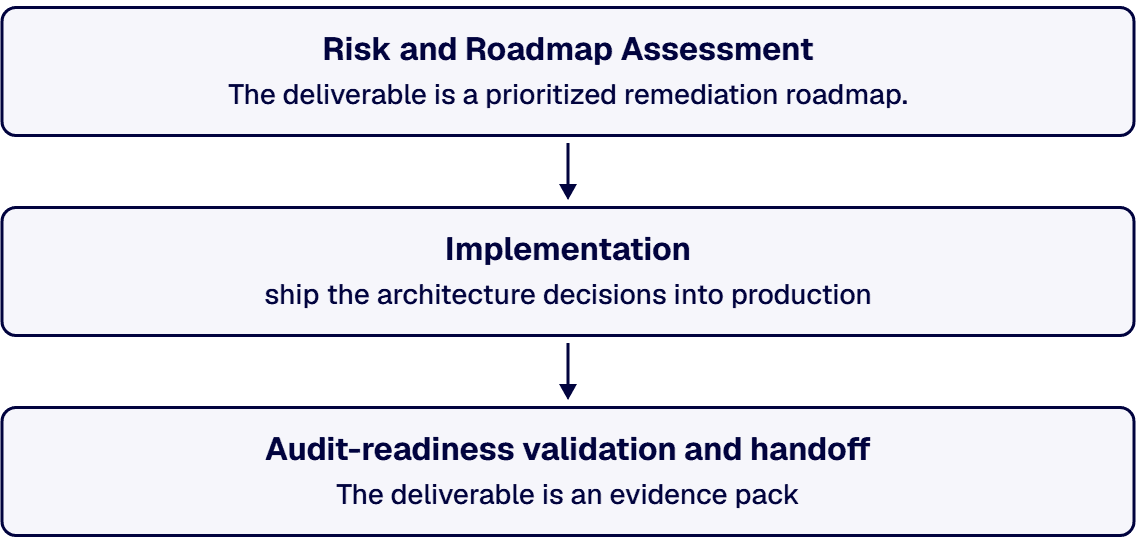
The first two to three weeks produce the diagnostic and the plan. The work covers all five layers in parallel: a DLP policy audit against the current configuration, an environment inventory tied to data classification, a connector classification review with the connector list extracted directly from the tenant, an identity surface map of every service account currently authenticating a production flow, and a monitoring gap scan against the existing SIEM and Microsoft 365 audit feed.
The deliverable is a prioritized remediation roadmap. Each item is named, owned, and scoped: which control family it serves, which layer of the architecture it implements, what the work looks like, who delivers it, and what the exit criterion is. The roadmap is the document the security architect, compliance lead, and platform owner align on before the implementation phase starts. It is also the document that survives the engagement and supports the internal team after the partner work ends. We do not leave the client a slide deck; we leave them a roadmap they can run.
The middle four to eight weeks ship the architecture decisions into production. DLP policies are designed, tested in a non-production environment, and rolled forward in a scheduled window with the platform owner. Environments are restructured, with citizen-developer authoring moved into Development, QA cycles into Test, and a Staging tier introduced where one did not exist. Connector classifications enforce: anything touching regulated data routes through Business-classified connectors only, custom connectors and HTTP connectors are reviewed individually, and the inventory becomes a maintained artifact rather than a snapshot.
The service-identity migration is the highest-care portion of the implementation. Every production flow’s connection references are audited. Personal accounts migrate to service identities matched to the three-tier model. Owned-by relationships are documented in the connector reference itself, so a future audit query returns a name. Monitoring instrumentation goes live in parallel: the four streams reach the SIEM, alerting tunes to the noise floor, and the security operations team gets playbook entries for the most common alert patterns.
The final phase converts implemented controls into audit-ready evidence. The deliverable is an evidence pack: control-by-control narrative tying each platform configuration to the relevant control family, supporting evidence (configuration screenshots, monitoring samples, policy documents) packaged for direct submission, and an audit-narrative draft that the compliance lead can adapt for the specific assessor.
The handoff to the internal team is structured: knowledge-transfer sessions with the platform owner, runbook walkthroughs with the security operations team, and an operations document the IT director can hand to a new hire on day one. Borrowed expertise from senior architects accelerates your team during the engagement; the goal is that you no longer need us for steady-state operations after we leave. If you want to extend scope to Hyperautomation in Microsoft 365 or build out a Power Platform Center of Excellence, the engagement model scales; the audit-readiness work stands on its own.
If your environment is complex enough that you want a working session before committing to an engagement, that is the more useful path. We will read the configuration, name the gaps, and tell you which of the five layers to start with. There is no obligation to continue past the working session; the goal is that you leave with a roadmap you can run with us or anyone else. To start, scope your Power Platform governance gaps with our SharePoint and M365 governance team.
These are the questions a senior buyer should ask any partner pitching Power Automate security work, including i3solutions. Use them in the first conversation; the answers tell you whether a second conversation is worth booking.
One: name three regulated-enterprise Power Automate security engagements you have led to a clean audit outcome, including the framework. A specialist names the engagement, the framework, and the year. A generalist generalizes.
Two: which control families in CMMC 2.0 Level 2 (or HIPAA, or SOC 2 TSC) does your Power Automate configuration approach map to specifically, and where do those mappings live in the deliverable? A specialist names AC.L2-3.1, AU.L2-3.3, CM.L2-3.4, IA.L2-3.5 without prompting and points at a written mapping. A generalist says “we cover CMMC.”
Three: walk us through your DLP policy design pattern across environments. A specialist describes Business, Non-business, Blocked classification logic, environment-tier differentiation, and the explicit blocked list. A generalist describes “following Microsoft best practices.”
Four: who specifically delivers this engagement, where are they located, and what is their tenure on regulated Power Platform work? A specialist names a senior architect with a US-based delivery posture and a multi-year track record. A generalist describes “our team” without specificity. (We answer this the same way: senior US-based architects, Microsoft Partner, 1,500+ implementations on the platform family.)
Five: what is your handoff model when the engagement ends? A specialist describes a structured knowledge transfer, runbooks, and an operations document the internal team can run. A generalist describes “we stay engaged as long as you need us.” The first answer is a senior team’s; the second is a managed-service vendor’s.
Six: what is the three-week, eight-week, and twelve-week deliverable I will see? A specialist names the roadmap, the implementation milestones, and the evidence pack. A generalist describes “a comprehensive engagement.”
Three named regulated-enterprise engagements: aerospace under CMMC 2.0, financial services under SOC 2, healthcare under HIPAA. The control-family mapping document is part of the Phase 1 deliverable. Our DLP design pattern is the five-layer architecture above; we describe it before reading your environment, and tune it to your specifics in the first two weeks. Senior US-based architects deliver, all tenured, Microsoft Partner, with Enterprise Delivery Assurance methodology and an on-time, in-scope, in-production track record across 1,500+ Microsoft platform implementations. The handoff is the knowledge-transfer plus runbook plus operations document model. The three-, eight-, and twelve-week deliverables are the Phase 1 roadmap, the Phase 2 implementation milestones, and the Phase 3 evidence pack.
If a partner cannot answer the six questions with the same specificity, the engagement is going to drift.
Power Automate security consulting is rarely a one-person decision. The typical stakeholder set includes a security architect, a compliance lead, a platform owner, a business sponsor, and sometimes legal. Each role needs different evidence to say yes.
The security architect needs the architectural detail: the five-layer design, the specific connector classification logic, the service-identity model, the monitoring stream design, and how all of that maps to the controls they are responsible for. The compliance lead needs the framework operationalization: the named control families, the evidence-pack structure, the audit-narrative pattern. The platform owner needs the operating model: who does what during the engagement, what the handoff looks like, what the runbooks cover. The business sponsor needs the engagement shape: the timeline, the named deliverables per phase, and the cost band that frames the budget conversation. Legal, when involved, needs the data-handling and contractual boundaries spelled out.
The page above arms you to brief each of those stakeholders with specifics they can evaluate. The role-by-role brief above is the workbook for the internal alignment conversation; H2 3 is the workbook for the budget conversation; H2 2 H3 2.2 is the workbook for compliance-lead and security-architect alignment.
Whichever path you take, the work converges on the same end-state: a Power Automate deployment that survives audit, with named controls, named owners, and an evidence pack the compliance lead can submit on schedule. When you are ready to staff the engagement and extend the program, hire our Power Platform team. Microsoft Partner with 30 years of delivery experience. 1,500+ Microsoft platform implementations across regulated enterprises.
A typical regulated-enterprise Power Automate security consulting engagement at i3solutions runs in the $60,000 to $180,000 range, depending on environment scope and framework complexity. Phase 1 (Risk and Roadmap Assessment) typically runs $20,000 to $40,000 over two to three weeks. Phase 2 (Implementation) runs $30,000 to $110,000 over four to eight weeks, scaled to connector-inventory size, the count of production flows requiring service-identity migration, and environments in scope. Phase 3 (Audit-readiness validation) runs $10,000 to $30,000 over two to five weeks. Engagements with under 25 production flows in a single environment land near the floor; CMMC 2.0 Level 2 engagements across multi-environment, multi-business-unit tenants land near the ceiling. We share a fixed-fee scoping band after the first discovery call; the band tightens to a fixed fee after the Phase 1 assessment.
Security consulting and governance consulting overlap, but the audit narrative is different. Security consulting focuses on threat surfaces, controls, and audit-evidence readiness against a named framework: DLP policy design, connector classification, service-identity strategy, monitoring instrumentation, and the five control families those map to. Governance consulting is broader: a Center of Excellence, citizen-developer enablement, ALM pipelines, and lifecycle management across the full Power Platform. Most regulated-enterprise programs eventually need both; the sequencing depends on which gap is forcing the conversation. If a security review or audit is driving the timeline, security consulting comes first because the controls go in front of the broader governance build. If adoption is driving the conversation and an audit is not on the calendar, governance consulting comes first and security consulting becomes the deeper subscope inside it.
Yes, with explicit configuration. Power Automate runs inside Microsoft 365 GCC and GCC High tenants, both of which are FedRAMP-aligned and form a defensible base for CMMC 2.0 Level 2. The platform itself is not the constraint; the configuration is. The relevant CMMC control families are AC.L2-3.1 (Access Control), AU.L2-3.3 (Audit and Accountability), CM.L2-3.4 (Configuration Management), and IA.L2-3.5 (Identification and Authentication). Each maps to specific Power Automate configuration decisions: environment tier roles for AC; centralized monitoring for AU; ALM pipelines and the connector inventory for CM; the three-tier service identity model for IA. The evidence-pack structure we build during Phase 3 is designed to feed the CMMC assessor directly with control-by-control narrative and supporting artifacts. Non-CUI workloads can run in commercial Microsoft 365; CUI workloads require GCC High and additional ITAR-aware configuration discipline.
The handoff package has four components. First, the implemented configuration: DLP policies live in the tenant, environments are tiered, connectors are classified, service identities are migrated, and monitoring is feeding the SIEM. Second, the evidence pack: control-by-control narrative mapped to the named framework, supporting evidence (configuration documentation, monitoring samples, policy documents) packaged for auditor submission, and an audit-narrative draft the compliance lead can adapt. Third, the operating runbooks: documented procedures for the security operations team, the platform owner, and the IT director, covering steady-state operations and the most common incident-response patterns. Fourth, the knowledge-transfer record: session notes, recorded walkthroughs, and a single-source operations document the internal team can hand to a new hire. The goal is that you do not need us for steady-state operations after we leave.
Most flows do not need to be redesigned. Most flows need their connection references and service identities migrated, and their hosting environment changed. The flow logic itself usually stands. What changes is the surrounding architecture: the flow that ran on a personal account in the default environment now runs on a service identity in a tier-appropriate environment, with connector classifications enforcing data-boundary discipline at the platform level. A small percentage of flows (typically 5 to 15%) need more substantive rework: flows using blocked-list connectors, flows whose logic crosses data-classification boundaries that the new DLP design will not permit, and flows whose error handling does not produce auditable evidence. Those flows get redesigned during Phase 2; the rest are migrated. The Phase 1 inventory tells you which category each flow falls into before any rework starts.

US-Based | Est. 1997
© i3solutions. All rights reserved.
US-Based | Est. 1997
© i3solutions. All rights reserved.


