Copyright i3solutions. All Rights Reserved.
Email aski3@i3solutions.com, Phone 703.652.8966
Privacy Policy | Sitemap
Power Platform Environment Strategy: What to Decide Before the Default Environment Decides for You
By Michael Branson | September 8, 2026
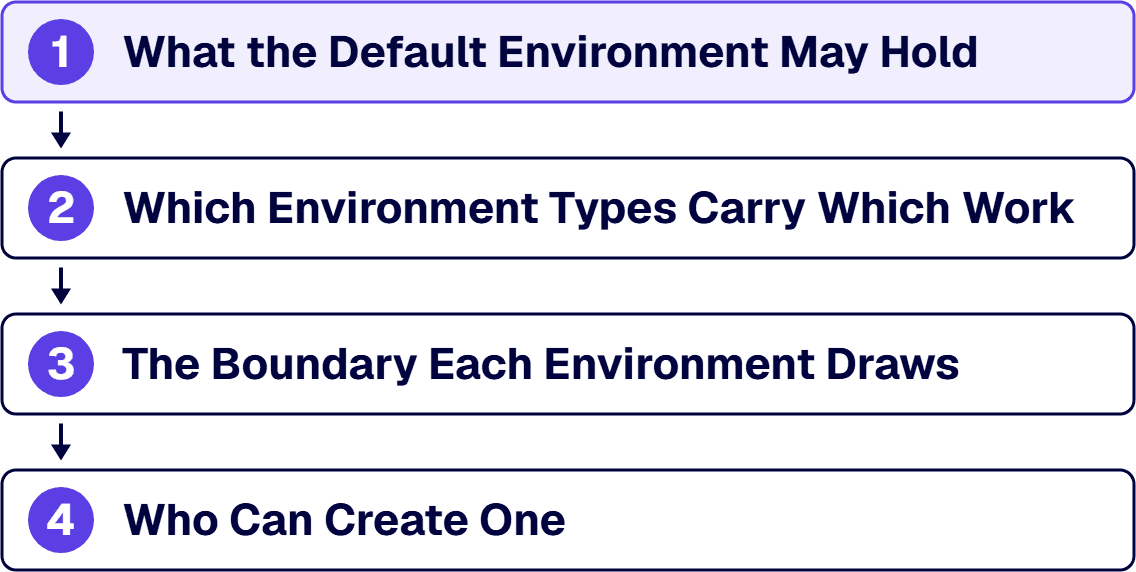
Quick answer. A Power Platform environment strategy takes four decisions: what the default environment may hold, which environment types carry which work, the boundary each environment draws, and who can create one. Leave one open and the default environment answers it by absorbing the work.
The question arrives in one of two rooms. In the first, somebody has finally run an inventory and found the applications the business depends on sitting in the same place as the ones built to try the platform out, because that is where the platform put them. In the second, a program is about to start, and an architecture review wants to know where it will run, who will be able to reach it, and what happens to it when the person who built it changes roles. Both rooms want the same artifact: the written statement that names every environment the tenant runs, the purpose each one serves, and the person who may create the next one. This page is the design of that artifact, and it says what each of the four decisions costs when it is left open.
What This Page Decides, and What It Hands Off
The subject here is topology. The four decisions below take that topology in order: what the default environment may hold, then which environment types carry which work, then the boundary each environment draws, then who can create one. Order matters here, because the first constrains the other three.
Policy structure is a different subject. Who is allowed to build what, under which controls, with what audit evidence, and who owns each control is the frame this topology sits inside, and it is worked through in Designing a Power Platform Governance Framework That Holds Up in a Regulated Enterprise. That page names environment strategy as one of the components a governance framework has to carry. This page is what that component looks like when somebody designs it.
Data policy is a different subject again. The environment is the object a data policy is scoped to, which is the only fact about data policies this page states; how those policies are designed and administered belongs to Power Platform DLP Policy Administration for Regulated Enterprises. Nothing below restates what goes in one.
Two more hand-offs, held on purpose. Application lifecycle management as a practice, meaning how a solution is versioned, tested, deployed and rolled back between the environments this page tells you to build, is the subject of the companion page Power Platform ALM: Maker Solution to Production, which is not published yet and carries no link here. And who staffs the platform function and how that group is organized belong to the Center of Excellence work listed under Related Reading. This page stops at the topology those functions operate on.
Decision One: What the Default Environment May Hold
Start here, because the platform has already taken this decision on your behalf. Microsoft’s Power Platform environments overview documentation states that each tenant has a default environment that is created automatically, and Microsoft’s Create and manage environments in the Power Platform admin center documentation states that Power Apps creates a single default environment for each tenant and all users in that tenant share it. The same overview page records, in the security column of its environment type table, that the default environment offers limited control and that all licensed users hold the environment maker role in it.
That combination is the whole of the problem. One environment exists from day one, everybody who is licensed can publish into it, and nobody had to ask. So the first application somebody builds lands there, and the process that grows around the fourth one is now load bearing in a place designed for something else. Microsoft is direct about what that place was designed for: the documentation describes the default environment as intended for experimentation, exploration and lightweight app trial development, and states that it does not provide any backup guarantees and should not be used for production workloads.
Two further facts decide how much room you have to correct this. You cannot delete the default environment, per the same overview page. And you cannot close it: Microsoft’s Develop a tenant environment strategy to adopt Power Platform at scale guidance states that although you cannot block access to the default environment, you can minimize what can be done in it. The decision available to you is therefore not whether the default environment exists, and not whether people can reach it. It is what it is allowed to hold.
The blast radius argument follows from that, and not from a general preference for tidiness. Workloads sharing one environment share its data policy, its security model, its capacity and its backup posture, so changing one of those properties for one workload changes it for the others sharing that environment. Microsoft’s environment strategy guidance puts the point in a sentence worth quoting to a sceptical maker: a shared, central environment strategy, where makers build, use and share apps in the default environment, can result in lack of isolation and makers encroaching on each other. Least privilege is the other side of the same coin. Where one environment holds both the expense form and the workflow that touches regulated records, the access model has to be sized for the second, which means the first is governed harder than it needs to be and somebody eventually routes around it.
Microsoft’s own recommendation is stated as a limit and reads best as one. The environment strategy guidance says it is best to minimize use of the default environment as much as possible and that makers should instead build in their own isolated environments, and it names the mechanism: default environment routing automatically moves makers away from creating resources in the default environment to their own personal environment. That is a setting somebody has to turn on, and it acts on resources as they are created, so it changes where the next application lands and does not move the ones already there.
The evidence for where you actually stand is producible today and does not require a survey. The Power Platform admin center’s environment list names every environment in the tenant, its type and its state, and the app and flow inventories inside the default environment are exportable from that same admin center rather than reconstructed from memory. The first decision is made against those exports, not against an estimate of how bad it probably is.
Decision Two: Which Environment Types Carry Which Work
Once the default environment has a stated purpose, the rest of the topology is an allocation problem: which work goes where, and what each destination is documented to do. Microsoft’s environments overview page defines each type, and the table below records what each is documented for and what the strategy still has to decide about it. The types are Microsoft’s; the third column is the work this page exists to make explicit.
| Environment type | What Microsoft documents it for | What your strategy still has to decide, and where the evidence comes from |
|---|---|---|
| Default | Experimentation, exploration and lightweight app trial development; no backup guarantees; not for production workloads | The allowed contents, and the promotion path out. Evidence: the default environment’s app and flow inventory, exported from the Power Platform admin center |
| Production | Permanent work in an organization; the type Microsoft says to use for any environments you depend on | Which workloads qualify, and who signs that off. Evidence: the environment list in the Power Platform admin center, read against your own criticality classification |
| Sandbox | Nonproduction work, with copy and reset available; development and testing kept separate from production | How many run against each production environment, and what a reset is allowed to destroy. Evidence: the environment list, filtered by type, in the Power Platform admin center |
| Trial | Short-term testing; expires after 30 days, per Microsoft Learn’s Power Platform environments overview; limited to one per user | Whether makers may create them at all. Evidence: the environment creation settings in the Power Platform admin center |
| Developer | A single owner’s own workspace, created by users holding the Developer Plan licence | Whether they are permitted, and how a build leaves one. Evidence: the environment list, plus the licence assignment report in the Microsoft 365 admin center |
The rows are not a menu to pick from once. A workload can sit in two of them, and when it does, the row naming the stricter recovery and audit obligation wins, because a wrong answer there is the one that cannot be corrected without moving the workload; the licensing and capacity arithmetic then decides how many environments of that kind you can afford to run, and not the reverse. Where that arithmetic says no, the answer is fewer environments with sharper boundaries, and not a production workload quietly parked in a type that was documented for testing.
One row is worth reading twice. The trial row is the platform doing your cleanup for you, which is a useful property right up until a trial becomes the place a process runs.
If your team is about to write this allocation down, the useful thing to bring is the current environment list exported from the admin center, and not a diagram of the target state. Talk to a senior Power Platform architect
Decision Three: The Boundary Each Environment Draws
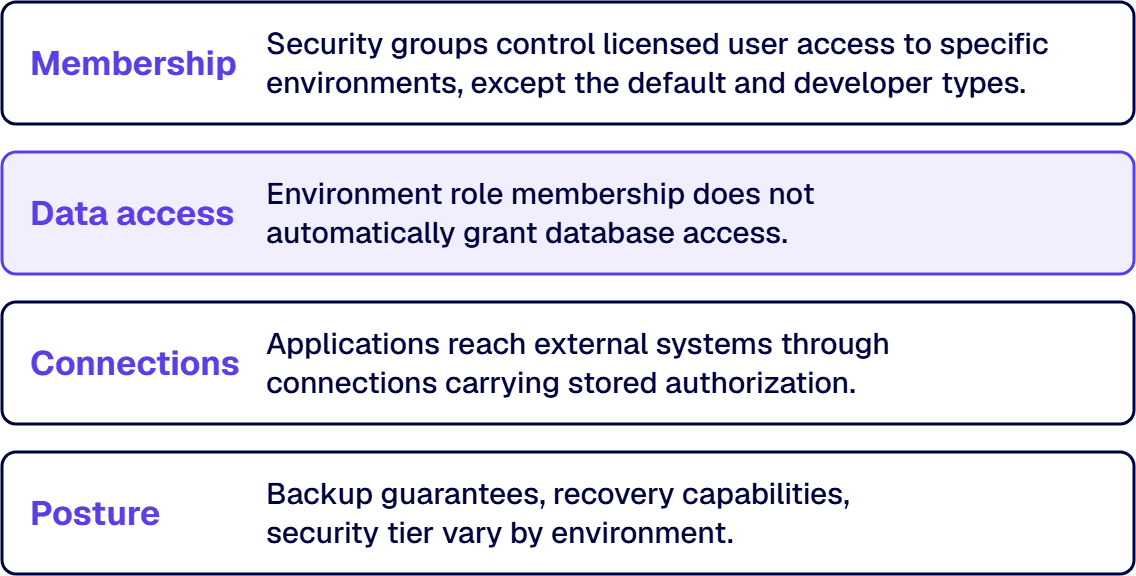
An environment is worth designing because it is a boundary, and the boundary is not one thing. It is four things, administered separately, which is where written strategies go soft.
Membership is the first. Microsoft’s Control user access to environments with security groups and licenses documentation states that where a company has multiple environments, security groups can be used to control which licensed users can be members of a particular environment. That is the mechanism the topology depends on: without it, a new environment is a new place rather than a narrower one. Security groups carry one limit that same access documentation states plainly, and it surprises people mid-design: they cannot be assigned to the default or developer environment types. A per-maker workspace is bounded by ownership and not by group membership, and the default environment is bounded by what it is allowed to hold, which decision one settles.
Data access is the second, and it is not the same as membership; treating the two as one predicate produces access reviews that pass while the underlying question is unanswered. Microsoft’s environments overview page states that users or groups assigned to the environment roles are not automatically given access to the environment’s database, where one exists, and must be given access separately. So an environment access review that reads the environment roles alone has read half the boundary. The other half is read inside the environment, and the strategy names which review covers which half.
Connections are the third boundary, and the one behind the question “what can this thing reach”. An application does not reach a system of record on its own; it reaches it through a connection that carries somebody’s authorization, and a data policy is scoped to the environment that connection lives in. That fact is why the environment is the right unit for this decision at all. What those policies contain and how they are administered are treated in the DLP policy page linked above, and this page states the boundary and stops.
Posture is the fourth, and it closes the boundary. Environments in a tenant draw on the same tenant capacity, with trial and developer environments documented as the exceptions, so a new environment is a claim on a shared pool and not a free container, and each one carries its own backup and recovery posture. Microsoft’s tenant environment strategy guidance states the range in its own words: “Developer environments typically have more relaxed rules than production environments.” Where an organization has several environments beyond the default, the same guidance says, the level of security each one requires varies with the apps and data it contains. Tiering is the practical form of that. Name two or three postures, write down what each one gets, and assign every environment to one of them, so the review question is which tier this environment sits in and not what somebody configured on the day.
Decision Four: Who Can Create One, and What Happens Afterwards
This is the decision that gets left implicit, and it decides whether the other three survive contact with a real tenant.
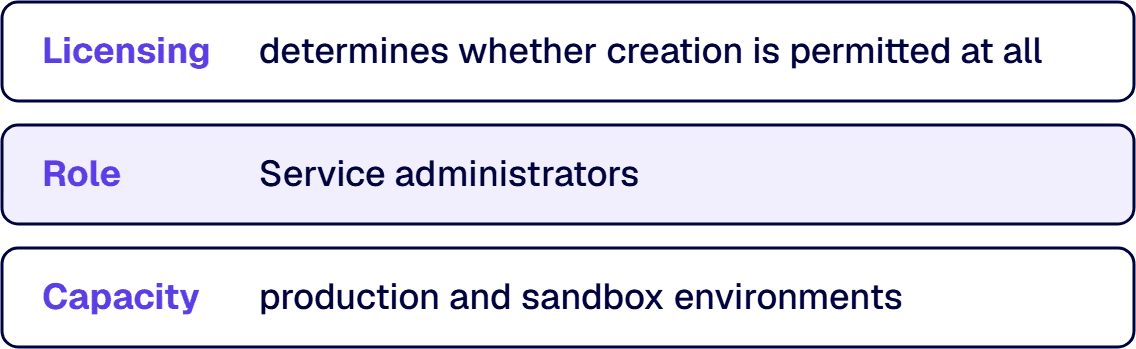
The platform’s answer starts with licensing. Microsoft’s create and manage environments documentation states that your license determines if you can create environments, and publishes the table of which licence permits which kind. It also states the exception that matters to anyone writing a policy: the licence requirement is waived for service administrators such as Power Platform admins and Dynamics 365 admins, except for trial (standard) environments. And it states a precondition that is easy to forget, that at least 1 GB of database storage capacity, per Microsoft Learn’s environment-creation guidance, has to be available for production and sandbox environments. Creation is gated by three things at once, licence, admin role and available capacity, and a policy written against only the first will be wrong in both directions. Where the licence and the admin role disagree, the type settles it: the admin role stands in for the licence except on trial (standard) environments. Capacity is different, because the documented capacity requirement attaches to the production and sandbox types as a precondition on the request rather than as a gate the type can outrank.
On top of that, the environments overview page records the controls per type: provisioning can be restricted to admins for the sandbox, trial and developer types, and production environment creation can be blocked. What cannot be blocked, per the same source, is converting a production environment to a sandbox, so restriction and inventory are two halves of one control rather than alternatives to each other.
Who should be able to create environments is not a name, it is a shape. Environment creation is an administrative act with a capacity cost and a governance consequence, so it belongs to a small, named group that answers for why each environment exists. Creating applications is a different act with a different answer, and running the two together is the mistake that turns a topology decision into a fight about whether the business is allowed to build anything. Makers build. Where they build is what the routing setting above settles, which leaves the named group to argue only about the environments carrying shared work.
Then the part a topology diagram does not carry. An environment that exists is an environment somebody has to answer for later, and three documented facts make that concrete. Trial environments expire after 30 days, per Microsoft Learn’s Power Platform environments overview, so anything left in one is scheduled to disappear, and a developer environment is available for as long as its owner’s Developer Plan is in use, which ties a workspace to one person’s licence state. In the default environment, Microsoft states that Microsoft 365 Power Platform administrators are no longer automatically assigned the Dataverse system administrator security role, and recommends assigning that role to a few trusted users to avoid an administrative lockout. An environment with no named administrator is not a governance abstraction; it is a room with no key holder on record.
So the lifecycle half of this decision has three writable answers: who is recorded as the owner of each environment, what happens when that person changes roles, and what condition retires one. State the condition as a test, because the environment list in the Power Platform admin center reports each environment’s type and state, and that export is read on a set cadence against the written statement the strategy produces, which is the record of why each one was created. An environment nobody can justify from that record is the candidate, and retiring it is a decision with a date on it.
The environment that has no owner is the one to start with, and finding it takes an export rather than an opinion. Talk to a senior Power Platform architect
How Many Environments a Large Company Needs
The number is an output of the first three decisions and not an input to them, and a page that hands you a figure is selling you somebody else’s tenant. What transfers between tenants is the rule that produces it.
Start from production and work back. One production environment is justified by a boundary somebody can state: a body of work whose data, access model and release cadence differ enough from its neighbours that sharing an environment would force the stricter posture on both. That count grows when a regulatory scope, a separate business unit or an external audience makes the shared posture untenable. Each production environment with a real release path then justifies the nonproduction environments that feed it, which is where the sandbox type earns its place, because copy and reset are the operations a release path needs and are documented as sandbox features. Developer environments sit outside that count, because they scale with makers and not with applications.
Two limits bound the total from above. Environments draw on shared tenant capacity, apart from the trial and developer types, so the count is constrained by what has been bought rather than by what would be tidy. And every environment is a thing to administer, review and evidence, so a topology with more environments than the platform function can actually review has converted a governance problem into an inventory problem. Microsoft’s tenant environment strategy guidance frames its own purpose in those terms, saying that a good tenant environment strategy is what keeps the platform manageable and secure as the number of environments grows.
The useful test at review time is not the count. It is whether somebody can name, for each environment the admin center lists, the boundary it exists to draw and the person who answers for it.
When This Is Not the Work You Need
Three readers land on this page and belong somewhere else first.
Where the estate is already built and the problem is what to do with it, the sequence starts with inventory and triage rather than topology. Governing Citizen-Developer Power Apps IT Now Has to Own works through that takeover in order, and this page becomes useful for the applications that survive it.
Volume is the second case. Where the count of apps and flows has outrun anyone’s ability to say what they do, the risk being carried is not a topology gap and reads better in Power Platform App Sprawl Governance Risk Explained. A topology designed on top of an unmeasured estate just gives the estate more places to hide.
And where the real question is who owns the platform function and who signs off a control, the answer is an operating model and not an environment diagram. Those pages are listed under Related Reading, and the four decisions above still have to be taken afterwards, by whoever that model puts in the chair.
What is left is the case this page was written for: a tenant where the default environment is doing work it was not documented for, and four decisions nobody has written down. i3solutions has been a Microsoft partner since 1997. If you are the person who has to take those four decisions, that is the conversation. Talk to a senior Power Platform architect
Frequently Asked Questions
What environment strategy should an enterprise use for Power Platform?
The strategy that takes four decisions and writes them down: what the default environment may hold, which environment types carry which work, the boundary each environment draws, and who can create one. The order matters, because the default environment’s stated purpose constrains the other three. Microsoft’s own tenant environment strategy guidance points the same way, recommending that use of the default environment be minimized and that makers build in their own isolated environments instead, with default environment routing, a setting an administrator has to turn on, as the mechanism that moves new work there. Nothing in that is a template you can adopt unread. The output is a written statement of which environments exist, what each one is for, and who may create another, and it is checked against the environment list in the Power Platform admin center rather than against a diagram.
What are the risks of the default environment?
The default environment is shared, it is open to every licensed user, and it was not built for the work that ends up in it. Microsoft documents the default environment as intended for experimentation, exploration and lightweight app trial development, states that it does not provide backup guarantees, and says it should not be used for production workloads; in its security column, the same documentation puts every licensed user in the environment maker role there. So a process that becomes load bearing inside it inherits a weaker recovery posture and a wider access model than anyone chose. Two further facts shape the fix: the default environment cannot be deleted, and access to it cannot be blocked, though what can be done in it can be minimized. The risk is therefore managed by deciding what it is allowed to hold and by routing new work elsewhere, not by closing it.
How many Power Platform environments does a large company need?
There is no number that transfers between tenants, because the count is an output of the topology rather than an input to it. The rule that produces it starts from production: one production environment per boundary somebody can state, meaning work whose data, access model and release cadence sit far enough from the next workload’s that one shared environment would push both onto the stricter posture. Each of those then brings the nonproduction environments its release path needs, and developer environments scale with makers rather than with applications. Two limits bound the total: environments draw on shared tenant capacity unless they are trial or developer environments, and each one is a thing somebody has to administer and evidence. The test at review time is whether every environment on the admin center’s environment list has a stated boundary and a named owner.
Who should be able to create environments and apps?
Creating environments and creating apps are two different questions, and answering them together is a common error. Environment creation costs capacity and has to be justified, so it belongs to a small named group who can name the reason each environment exists; Microsoft gates it three ways already, by licence, by administrator role, and by available capacity for production and sandbox environments, and provisioning of sandbox, trial and developer environments can each be restricted to admins. Creating applications is the other question, and the answer there is a much wider group, in a place chosen for them. Default environment routing is the mechanism that makes those two answers compatible, because once an administrator turns it on it redirects a maker who creates something new into their own environment instead of the shared one. Restriction alone is incomplete: the conversion of a production environment into a sandbox cannot be blocked, so the inventory read is part of the control.
What does an environment actually bound?
Four things that are administered separately. Membership, which is set with security groups naming the licensed users allowed into an environment, with the documented exception of the default and developer types, to which a security group cannot be assigned. Data access, which is not the same thing, because environment-role membership does not by itself grant access to the environment’s database; that access is granted separately. Connections, since an application reaches a system of record through a connection, and the environment is what a data policy is scoped to. And posture, meaning capacity, backup and the security tier the environment sits in. An access review that reads only the first of the four has read a quarter of the boundary.
What happens to an environment after it is created?
Somebody has to answer for an environment that exists, and the platform decides part of that on its own. A trial environment expires after 30 days, per Microsoft Learn’s Power Platform environments overview, so anything still inside it is scheduled to disappear. A developer environment lasts only while its owner keeps using the Developer Plan, which ties that workspace to the licence state of one person. And in the default environment, the Microsoft 365 Power Platform admin role no longer carries the Dataverse system administrator role automatically, so Microsoft recommends putting that role on a few trusted users to keep a named administrator on the default environment. The writable part is the rest: who is recorded as owner, what happens to that record when the owner’s role changes, and what condition retires an environment. The Power Platform admin center’s environment list reports the type and state of each one, so the retirement test is run against an export on a set cadence.
Related Reading
- Designing a Power Platform Center of Excellence That Holds Up in a Regulated Enterprise, the platform function that operates the topology this page designs
- Power Platform CoE: Centralized vs Federated vs Hybrid Operating Models, how that function is organized, and who holds the environment decisions in each shape
- Enterprise Power Platform Development & Implementation Services for Governed Operations, the practice this architecture work belongs to
About the Author
Michael Branson co-founded i3solutions and brings executive, operational, and technical perspective to organizations running complex, secure, and mission-critical Microsoft estates. He works with enterprise teams on the governance models that keep platform investments auditable and alive.