Power Platform Support Model: Who Owns the Apps Your Business Built

By Michael Branson | August 25, 2026

Quick answer. A Power Platform support model gives a maker-built app or flow two named owners and routes an incident on it to the support tier that matches what the asset does and whose data it touches. It is an ownership decision, not a platform setting.

The question arrives as a ticket nobody can close. The approval app the operations team uses every morning stopped sending, and the service desk has no script for it because the service desk did not build it, does not have access to it, and cannot see whether it ran. Somewhere in the thread a manager asks who users are supposed to call. Underneath that question sits a second one nobody has answered: who owns this thing.

An organization that adopted Power Platform to move faster has, without deciding to, created a class of software with real users and no support model. IT declines the ticket because the app was built outside its process. The business assumes IT covers anything running on a Microsoft platform. The person who built it has a day job that is not this. Everyone is behaving reasonably and the app stays broken.

The fix is a support model, and a support model is an allocation of accountability before it is anything else. This page states who is accountable for what, how an incident moves when the first person cannot resolve it, what a service level means for an app nobody was paid to build, and what happens on the day its maker changes jobs.

What This Page Decides, and What It Hands Off

This page decides one thing: who is accountable for a Power Platform asset once it has real users, and what each accountable party owes when something goes wrong. That covers the ownership record itself, the two roles behind every asset, the tiers an incident passes through, the service level attached to an asset by what it does, and the loop that brings an unowned asset back under a name.

It does not design your governance framework. Which body approves what, how connector policy is set, how governance maps to a control framework, and what the components of a framework are belong to Designing a Power Platform Governance Framework That Holds Up in a Regulated Enterprise. Read that page for the framework; read this one for the operating model that runs once the framework exists.

Nor does it choose your operating shape. Whether the platform function is centralized, federated or hybrid decides where authority sits, and that argument belongs to Power Platform CoE: Centralized vs Federated vs Hybrid Operating Models. A support model assumes the shape has been chosen and assigns accountability inside it.

Two further hand-offs, on purpose. Finding what you have, scoring it by business criticality and deciding what to keep, rebuild or retire is inventory work, and the companion guide How to Inventory and Triage Existing Power Apps and Flows owns it; the live treatment of that problem today is Power Platform App Sprawl Governance Risk Explained. This page picks up where a discovered asset has been kept and needs an owner. And the release path a solution travels from a maker’s environment into managed production, along with the environments that path requires, belong to the companion guides Power Platform ALM: Moving a Maker-Built Solution into Managed Production and Power Platform Environment Strategy: What to Decide Before the Default Environment Decides for You. This page names the accountable party for an environment and stops there.

One boundary is worth stating plainly, because a page about support models can read as a pitch for running one. i3solutions does not sell an outsourced help desk or a tiered end-user support contract, a position set out at We Do Not Run Your Help Desk. The model below is one your own organization runs. Where the work is genuinely a bought service after a go-live, Post-Implementation Support Services: Operational Excellence After Deployment is the page for that conversation.

Why IT Refuses, and Why the Refusal Is Not the Problem

The sentence that starts these conversations is that IT will not support apps it did not build. Read as an attitude, it stalls. Read as a statement about liability, it is correct, and it points at the real gap.

A support team cannot support what it cannot see or reach. Fixing a broken app means being able to open it, read its failure, and change it. For a canvas app, Microsoft’s Share a canvas app with your organization documentation sets the boundary in the permission itself: a Co-Owner “can use, edit, and share the app but not delete or change owners”, while a plain User “can use the app only”. A service-desk analyst holding User permission on an app can reproduce a failure and can do nothing about it. That is not a policy problem yet; it is an access fact, and it is fixable in the app’s own Share dialog.

Access to the app is not access to what the app touches. The same documentation is explicit that for a shared app to work as expected you must also manage permissions for the data sources it is built on, and that you might also need to share other resources the app depends on, such as flows, gateways, or connections. So an ownership record that names a person for the app and leaves the connection unnamed has moved the ticket, not resolved it.

A flow’s ownership rules are different from an app’s, and the difference decides who can act. Share a cloud flow states that you must be the creator or owner to add or remove owners from a cloud flow, and that an owner can add or remove other owners but not the flow’s creator. It also states that owners can use services in a cloud flow but cannot modify the credentials for a connection that another owner created. A platform team added as an owner can therefore restart the flow, edit its definition and read its run history, and can still be unable to repair the one thing that broke, which was somebody else’s connection.

The refusal is a request for a decision nobody has taken. IT is declining to be accountable for something it was never given authority over. The support model is where that authority is granted, in writing, for a defined set of assets, on terms the platform team can meet.

Large organizations feel this harder, because assets accumulate faster than the conversations that would assign them. The answer to who should support Power Apps built by business users is not one team. It is a division of labour, written down once and applied per asset.

The Five Asset Classes a Support Model Has to Assign

Ownership arguments stay unresolved while the thing being owned is left vague. Splitting the estate into five asset classes gives each argument a place to land, because the class decides who is accountable and where the record is read. The five are the platform, environments, apps, flows, and data.

The table below states, for each class, who carries the answer, who does the work, and the surface an auditor or a new starter reads to find out. The last column is the part organizations skip, and skipping it is what turns an ownership model into a spreadsheet that ages.

Asset class Accountable, one named person Responsible, day to day Where the responsible party is verifiable
The platform A named IT leader who answers for Power Platform as a service to the business The Power Platform administrators The admin role assignments and the tenant settings in the Power Platform admin center
Environments The platform owner, or a delegate named per environment The Power Platform administrators The environment list in the Power Platform admin center, read against the names your organization assigned
Apps A business owner in the function whose process the app carries A technical owner holding Co-Owner permission on the app The app’s Manage access pane in Power Apps, which lists current users and co-owners, and its Additional data access tab
Flows The business owner of the process the flow automates A technical owner listed as an owner of the flow The Owners section on the flow details page in Power Automate, and the connection list shown beneath it
Data The data owner for the records themselves, who often sits outside the platform function The administrator of the store the data lives in The security roles in the Dataverse environment, or the permission record of whichever source system holds the rows

Two properties of that table matter more than its contents. The first is that the accountable column holds a person, never a team: a team can be responsible for work, and only a person can answer a question. The second is that the last column names a surface someone can open today, so the responsible half of a row is checkable without asking the person who made it, while the accountable name is checkable only against your own record.

The precedence is worth settling before a disagreement forces it. When the business owner and the technical owner disagree about whether a change should ship, the business owner decides what the app should do and the technical owner decides whether it can be done safely, and a technical objection about data access outranks a business preference about timing, because the exposure outlasts the deadline. When the ownership record and the platform’s own permission list disagree about who holds technical ownership of an app, the permission list is the fact and the record is the claim: read the Manage access pane, correct the record, and treat the difference as an unrecorded change. Where the data owner and the app’s business owner disagree about who may see a field, the data owner settles it, because the records existed before the app did.

Retrofitting this table behind an estate that has been running for years is different work from writing it at the start, and the order you assign the classes in changes what it costs. Talk to a senior Power Platform architect

Two Owners Per Asset, and What Each One Answers For

Collapsing accountability into one name is how a support model fails quietly. One person cannot answer both of the questions that arrive when an app breaks.

The business owner answers whether the process is still the process. Does the approval threshold in the app match the policy the business signed off. Should the app still exist now that the team reorganized. Who is allowed to use it, and who has stopped being allowed. These are decisions the platform team cannot take and should not be asked to.

The technical owner answers for the artifact. What the app connects to, whose authorization those connections carry, which version is running, and what a proposed change would break. The first of those is read from the app’s Additional data access tab, not from memory. The technical owner is the person the platform team escalates to and the person who holds Co-Owner permission, so the role comes with an access requirement and not only a title.

The pairing is what survives a departure. When one of the two leaves, the other one is the continuity, and the record already names who to replace. A single-name asset has no such property, and its support model ends when that person’s calendar clears.

The record is short, and its shortness is the point. For each app and flow: the asset name, its environment, the accountable business owner, the responsible technical owner, the data it touches, and the tier it belongs to. Six fields, kept where your organization keeps its service records, so it is read by the people who read those records. A register of those records kept only in the platform team’s own notes is one the service desk never sees at the moment it matters.

The Four Support Tiers, and Where Each One Stops

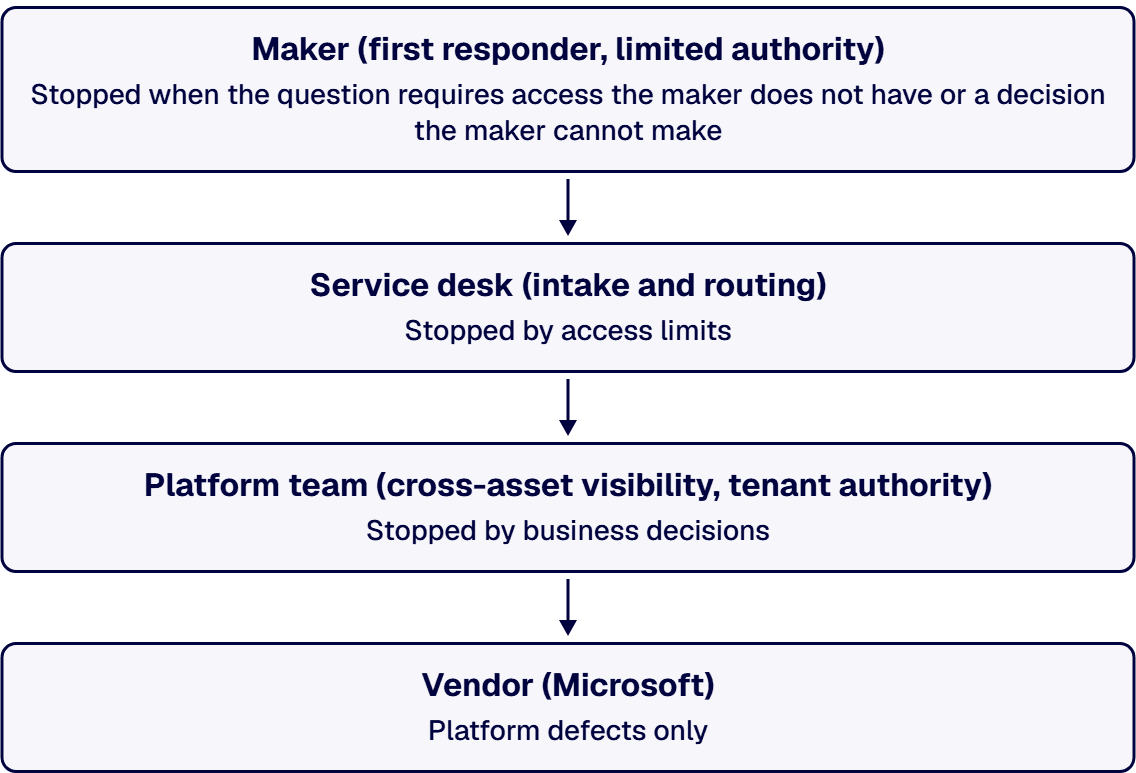
An escalation path is a sequence of people who can each do something the previous one could not. Four tiers cover a Power Platform estate: the maker, the service desk, the platform team, and the vendor. What makes the sequence work is that each tier has a stated stopping point, so a ticket moves on a fact instead of on frustration.

The maker. The person who built the asset is the first responder for the assets they still own, and their stopping point is narrow: they hold the app’s logic in their head, and the tier carries no rights over the environment, the connectors or the data policy. A maker can rewrite a formula and cannot grant themselves a connector the policy blocks. Where an asset has been handed over, the maker tier is empty by design, and the record says so.

The service desk. This tier owns intake, identification and the known-issue script: which asset is this, who owns it, is it in the register, has this failed before. Its stopping point is access. An analyst with User permission can confirm and describe a failure and cannot change the app, so the useful design gives the service desk read access to the register, which names the two owners it needs to route to, and asks it to route rather than repair.

The platform team. The environment administrators and the Power Platform admins hold the tools that reach across assets. They can read run history, reassign ownership, see which connection failed, and check a policy. Their stopping point is business meaning: the platform team can see that a flow stopped and cannot decide whether the approval it was routing should be rerun, which is the business owner’s call.

The vendor. Microsoft is the last tier for a defect in the platform itself, and it is reached differently from the other three. Opening a support request requires an active support plan, which the organization holds rather than the individual maker, so this model routes a vendor case through the platform team rather than through the person who hit the problem. The vendor’s stopping point is your own configuration: a vendor case can answer what the platform does and cannot answer how your organization has chosen to use it. Design the path so nothing waits on discovering that at the moment of the incident.

Two rules keep the sequence honest. A tier is skipped only when the skipped tier holds no capability the ticket needs, and the skip is recorded, so a pattern of skipping the service desk reads as a routing defect instead of as normal practice. And when the platform team disagrees with the business owner about severity, the higher of the two ratings governs the response and the business owner’s rating governs where the fix sits in the queue, because the cost of over-responding to one ticket is smaller than the cost of a business process failing while an argument runs.

Detection is upstream of all four tiers and is a different discipline. A flow that fails silently generates no ticket, so nobody escalates, and that story is owned in full for the automation side by When Power Automate Flows Fail Silently: Finding the Risk. A support model inherits its assumption: an incident nobody raises is not an incident this path can carry.

Service Levels for Citizen-Developed Apps

The instinct is to hand every maker-built app the same response target the core systems carry, and it fails on the first budget conversation. Nobody funded a two-hour response for a form that books meeting rooms. The workable answer is to set the level by what the asset does, not by who built it or on which platform.

Three inputs decide an asset’s tier, and they do not carry equal weight. What the process would cost the business if it stopped for a day. What data the asset touches, read against your own classification scheme. And how many people depend on it, which is the weakest of the three and the easiest to use alone. Where the three disagree, the data classification decides, unless stopping the process for a day would itself cause irreversible harm, because response time is recoverable and disclosure is not.

Write the level as a commitment about people, not about outcomes. A support level your organization can meet says who responds, within what working hours, and what they will have done by the time they hand it on. A support level that promises resolution is a promise about a defect nobody has seen yet. The distinction is what makes the commitment survive its first bad week.

Tiering has a consequence, and stating it is what makes the model credible. An asset placed in the lowest tier gets best-effort support during business hours, and the business owner accepts that in writing. Where a business owner declines to accept it, they are asking for a higher tier, which comes with the funding and the engineering standard that tier requires. The register records which tier each asset sits in and who accepted it, so the conversation happens once.

The evidence that the level is real is produced by the service system, not by the platform. Response times against tier come out of whichever ticketing system your service desk runs, joined to the ownership register by asset name and environment. If those two records cannot be joined, the service level is an intention, and the join is the first thing to build.

Deciding which of your assets belong in which tier, and what the lowest tier honestly commits to, is the conversation this section usually starts. Talk to a senior Power Platform architect

When a Maker Leaves: The Orphan-Remediation Loop

Departure is the event that tests whether a support model exists. The app keeps running, the person is gone, and the failure surfaces weeks later when something changes underneath it.

Two things break, and they break differently. The ownership record loses its technical owner, which is a paperwork problem with a straightforward fix. And the connections the departed person authenticated may lose their credentials, which is a running-software problem. Microsoft’s cloud-flow sharing documentation, cited earlier, states the requirement plainly: when you remove an owner whose credentials are used to access Power Automate services, update the credentials for those connections so that the flow continues to run properly. Removing the name without doing the second half leaves a flow whose continued running depends on a credential nobody is maintaining.

An administrator can take an app back, and the mechanism has a shape worth knowing. Microsoft’s PowerShell support for Power Apps and Power Automate documentation describes cmdlets that let creators and administrators automate many monitoring and management tasks. Its Set-AdminPowerAppOwner cmdlet takes the new owner as a parameter, and the example Microsoft documents passes the logged-in administrator, which changes the owner role of a Power App to the current user and replaces the original owner with a can-view role. Read the shape of that: reclaiming an app is an administrator action that names the new owner, so the register has to name one before the cmdlet is run. Flow permissions have their own cmdlets in the same module for reading, setting and removing an owner role. The same page also notes that a non-administrator can run the maker cmdlets and is limited to the resources they own, so this is an administrator’s path and not a self-service one.

Finding the assets before the departure is the half that pays. In managed environments, the Usage insights weekly digest lists apps and flows that have not been launched in a while, with a Last launch column showing the last date a user launched the application or flow, and its guidance where an asset is not being used is to work with its owner to update or remove it. The same digest shows the top makers of the past month, measured by total sessions of apps they own, which doubles as a concentration warning: a single name at the top of that list is a single point of failure wherever those apps carry only that one owner. Two limits belong beside that: the digest requires tenant-level analytics to be turned on, and Microsoft states that usage insights are not currently available in sovereign clouds, including the Government Community Cloud and Department of Defense environments, so a tenant in one of those clouds needs a different inventory route.

The loop, and where it hands off. An asset with no reachable owner goes back into inventory and triage, where it is scored and given a keep, rebuild or retire verdict; that work belongs to the companion guide How to Inventory and Triage Existing Power Apps and Flows, whose live treatment is the app sprawl page linked earlier. What the support model owes the loop is the entry condition and the exit condition. An asset enters when its technical owner is unreachable or its business owner declines the role. It leaves when it has both names again and a tier, or when it has been retired with the business owner’s agreement recorded. An asset that is neither owned nor retired is still running, and its state is a decision nobody has taken.

The procedural rule that keeps a departure from orphaning an asset. Add the ownership register to whatever your organization already runs when a person leaves. A departure checklist that reassigns a mailbox and not a production approval flow is the same checklist, missing one line.

When This Is Not the Work You Need

Three readers arrive here and belong somewhere else first.

Where you cannot yet list what exists, the support model has nothing to attach to. Assigning owners to an unknown set produces an ownership register that is complete about the assets someone happened to remember. Inventory comes first, and this page’s model waits for it.

Where the platform has no agreed environments and no connector policy, an ownership register built now will name people as accountable for assets they cannot control, which is worse than naming nobody. The governance framework linked at the top is the starting point, and the support model is the layer that runs after it.

And where the real question is whether to keep a maker-built app at all, a support model is an expensive answer to a retirement decision. An app carrying a process the business would not miss can be turned off, and that is cheaper than every model on this page.

What is left is the case this page was written for: apps and flows people depend on, built outside the process, running now. Bring the list you have, the names you think are accountable, and the ticket nobody could close. i3solutions has been a Microsoft partner since 1997. Talk to a senior Power Platform architect

Frequently Asked Questions

Who should support Power Apps built by business users?

Four tiers share the support of a business-built Power App, and each one has a stated stopping point: the maker, the service desk, the platform team, and the vendor. The maker is the first responder for assets they still own, and the tier carries no rights over environments, connectors or data policy. The service desk owns intake and identification, and stops at access, because an analyst holding only user permission on a canvas app can describe a failure and cannot change the app. The platform team holds the tools that reach across assets, so it can read run history, reassign ownership and see which connection failed, and it stops at business meaning, because deciding whether a stalled approval should be rerun is the business owner’s call. Microsoft is the last tier for a platform defect, and a support request depends on the plan the organization holds rather than on the maker, so this model sends a vendor case through the platform team. That tier stops at your own configuration, which a vendor case can describe and cannot decide. The answer to who supports a business-built app is therefore not one team but a written division of labour applied per asset.

What does a Power Platform support RACI look like?

A Power Platform support RACI splits the estate into five asset classes and gives each one a single accountable person, a responsible party for day-to-day work, and a surface where that responsible party is verifiable. The five classes are the platform, environments, apps, flows, and data. A named IT leader is accountable for the platform, with the Power Platform administrators responsible, read from the admin role assignments in the Power Platform admin center. The platform owner or a named delegate is accountable for an environment, with the Power Platform administrators responsible, read from the environment list in the same admin center. A business owner in the function whose process the app carries is accountable for an app, with a technical owner holding co-owner permission responsible, read from the app’s Manage access pane in Power Apps. The business owner of the automated process is accountable for a flow, with a listed flow owner responsible, read from the Owners section on the flow details page in Power Automate. The data owner for the records is accountable for data, with the administrator of the store responsible, read from the security roles in the Dataverse environment or from the source system’s own permission record. Accountability sits with a person in every row, because a team can be responsible for work and only a person can answer a question.

How do we set service levels for citizen-developed apps?

By what the asset does, not by who built it. Three inputs decide the level: what the process would cost the business if it stopped for a day, what data the asset touches read against your own classification scheme, and how many people depend on it. Where the three disagree, the data classification decides, unless a day of downtime would itself do damage that cannot be undone, because a slow response can be recovered and a disclosure cannot. Write each level as a commitment about people rather than outcomes, naming who responds, in what working hours, and what they will have done before handing the ticket on; a level that promises resolution is a promise about a defect nobody has seen. State the consequence of the lowest tier out loud, which is best-effort support in business hours, and record the business owner’s acceptance of it, so asking for more becomes a request for a higher tier with the funding and engineering standard that tier requires. The proof that a level is real comes from the service desk’s own ticketing system, joined to the ownership register by asset name and environment.

Where does a Power Platform escalation actually stop?

At Microsoft, for a defect in the platform itself, and getting there is constrained in a way worth designing around. Opening a case at all depends on the support plan the organization holds, so this model enters the vendor tier on behalf of the organization rather than through the person who hit the problem. That has two consequences for the path. Someone with the right administrative role must be reachable inside the response window an asset’s tier promises, and the platform team, not the maker or the service desk, is the route to the vendor. Before that point, the stopping rule for each internal tier is capability: a tier hands on when the next tier holds something it does not have, and a tier is skipped only when the skipped tier holds no capability the ticket needs, with the skip recorded so that a habit of skipping shows up as a routing defect.

What happens when a Power Platform maker leaves the company?

Two separate things break. The ownership record loses its technical owner, which is corrected by naming a replacement. And any connection the departing person authenticated stops working once the credentials behind it are removed; Microsoft’s guidance is that when you remove an owner whose credentials are used to access Power Automate services, you update the credentials for those connections so that the flow continues to run properly. For apps, an administrator can reclaim ownership: the Power Apps administration module includes a cmdlet that takes the new owner as a parameter, and in the example Microsoft documents it sets the logged-in administrator, changing the owner role of an app to the current user and replacing the original owner with a can-view role, so the register has to name the new owner before the cmdlet is run. Flow permissions have their own cmdlets in the same module. The prevention is cheaper than the recovery: add the ownership register to the departure checklist your organization already runs, and use the weekly usage digest available in managed environments where tenant-level analytics is turned on, which lists apps and flows that have not been launched in a while and shows the top makers by sessions of the apps they own, so a concentration of ownership in one name is visible before that person resigns. Usage insights are not currently available in sovereign clouds, so a tenant in one of those clouds needs a different inventory route.

Our IT team refuses to support apps it did not build. Where do we start?

With a list and two names, not with a policy document. Take the assets people actually depend on, and for each one write down a business owner from the function that uses it and a technical owner who holds co-owner permission on it. That second requirement is the one that converts the refusal, because fixing a broken app means being able to open it, read its failure and change it, and a support team without that permission is being asked to be accountable for something it cannot reach. Microsoft’s own permission model makes the boundary explicit: a co-owner can use, edit and share an app but cannot delete it or change its owners, while a plain user can use the app only. Expect the first pass to reveal assets nobody will claim; those go into inventory and triage for a keep, rebuild or retire verdict rather than into the support model. Sequence the rest by what the business would notice losing first.

Related Reading

About the Author

Michael Branson co-founded i3solutions and brings executive, operational, and technical perspective to organizations working in complex, secure, and mission-critical environments. His insights focus on business process consulting, automation, data analytics, collaboration, secure operating models, and the operational discipline required to turn technology investments into practical business systems with measurable value.