
Silent automation failure is an ownership problem before it is a monitoring problem. Flows built by individuals rather than by IT usually have no owner, no alerting, and no documented dependency, so a failure surfaces as a business consequence rather than as an incident. The sequence that fixes it is straightforward: inventory what exists and what depends on it, classify by business impact, assign a named owner and an alert path for anything business-critical, and set a rule for what happens to a flow when its creator leaves. Monitoring added to an unowned flow just produces alerts that nobody answers.
The automation did not crash. There was no red banner, no failed-run email, no ticket. A flow that had quietly moved work from one system to another for two years simply stopped one morning, and the business found out days later, not from an alert, but from a consequence: an approval that never arrived, a report that never landed, a compliance step that had silently stopped happening and was only caught downstream. By the time anyone traced it back to the flow, the damage was already in the record.
Here is the part that should worry you more than the one flow. The exposure was never that single automation. The exposure is that nobody in the building can tell you how many others are sitting in exactly the same state right now, running or not running business-critical work, with no owner watching and no way to know until something breaks in public.
A Power Automate flow is a chain of dependencies wearing the costume of a single reliable process. Every link in that chain is a thing that can quietly change underneath it, and most of those changes never produce an error the business sees. The failure is silent by design, not by accident, because the flow was built to run unattended and unattended is exactly what it does when it stops.
The recurring mechanisms are worth naming precisely, because each one has a different fix:
Notice that three of these four are not really software problems. They are governance problems that show up as software symptoms. Whether a connection is allowed to run on a personal account, whether a flow may touch regulated data, whether an automation is registered anywhere at all, is decided by policy, not by the platform. That policy layer is a job in its own right, and it belongs to your workflow automation governance model, and where regulated data is in scope, to how you secure Power Automate. Standing up and running that layer as a managed discipline is what our workflow automation services deliver. This page is about what happens when that layer is missing and a flow goes dark: how you find the flows, decide which ones matter, and make sure someone is accountable for each one. If you are asking “why is my Power Automate flow not working,” the answer almost always lives in the four mechanisms above, and almost never in the flow logic itself.
You cannot assign an owner to a flow you do not know exists, and the flows most likely to hurt you are precisely the ones no inventory has ever captured. The first move is not monitoring. It is discovery.
A usable inventory answers three questions for every automation in the tenant, not one:
The output of this stage is a list of automations paired with the business processes riding on them and the people, or the absence of people, responsible for each. That pairing, not a count of flows, is the asset. A tenant with 4,000 flows and a clear map of the forty that carry business-critical work is in far better shape than one with 200 flows and no idea which three would stop a close, a shipment, or an audit.
The instinct is to rank flows by how sophisticated they are. That instinct is backwards and it is dangerous. Complexity measures how hard a flow was to build. Impact measures what breaks when it stops. Those are different axes, and only one of them predicts the size of the incident.
A simple two-step flow that moves compliance evidence into an audit repository outranks an elaborate fifteen-action flow that reformats a weekly report into a prettier layout. If the reporting flow dies, someone reformats by hand and grumbles. If the evidence flow dies, a control silently stops being satisfied and you learn about it from an auditor. Rank by the consequence of silence.
Use explicit, defensible criteria so the classification survives an argument and does not depend on who is in the room:
Everything that clears the top tier on these criteria earns a named owner and an alert path in the next two sections. Everything that does not can be documented and left alone, which is a legitimate and often correct answer, covered below.
This is the section the whole article exists for, because it is the failure that monitoring cannot fix. A flow tied to a single person is a flow with an expiry date, and that date is the day that person changes teams, changes roles, or leaves. Monitoring an unowned flow only tells you faster that nobody is coming.
Ownership that survives its author is a small number of concrete commitments made per flow, not a policy document filed and forgotten:
None of this requires treating your makers as a problem. The people building these flows are usually competent staff solving real problems that no one else was solving for them, and the automations they produced have genuine value. The gap is not their skill. The gap is that they were never given a support model, an owner-of-record, or a rule for what happens to their work when they move on. You are closing that gap, not policing them.
Scale does not exempt an organization from this discipline; it raises the stakes of skipping it. i3solutions runs governed Power Platform automation for a federal defense intelligence command spanning more than 10,000 personnel across roughly 180 locations, which is enterprise scale by any measure. The lesson from an estate that size is not that scale creates chaos; it is that ownership and identity discipline are what let automation grow without accumulating silent risk. That example proves scale, not that any single flow never fails.
Only now, after inventory, classification, and ownership, does monitoring earn its place. The order matters. An alert on a flow with no owner is noise with a timestamp. An alert on a flow with a named owner and an escalation path is an incident that gets handled.
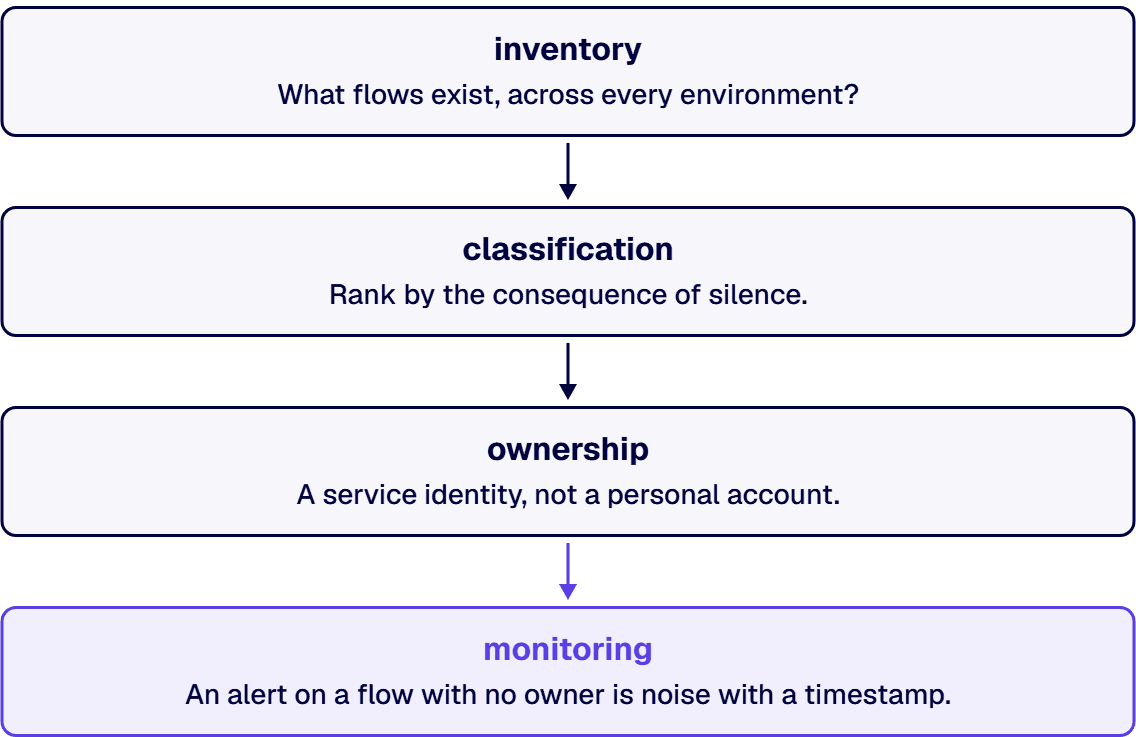
The platform tooling side of this, the run histories, analytics, Application Insights integration, Azure Monitor, dashboards, and the observability plumbing, is a subject in its own right, and this page does not restate it. For how to instrument the Microsoft stack for monitoring and observability, use the dedicated guide on Microsoft integration monitoring. What belongs here is the decision layer that sits on top of the tooling:
Not every flow you discover should be adopted, monitored, and maintained forever. Pretending otherwise is how a cleanup turns into a permanent tax. Part of doing this honestly is deciding, per flow, which of three fates it earns, and the limitations of Power Automate itself are part of that judgment.
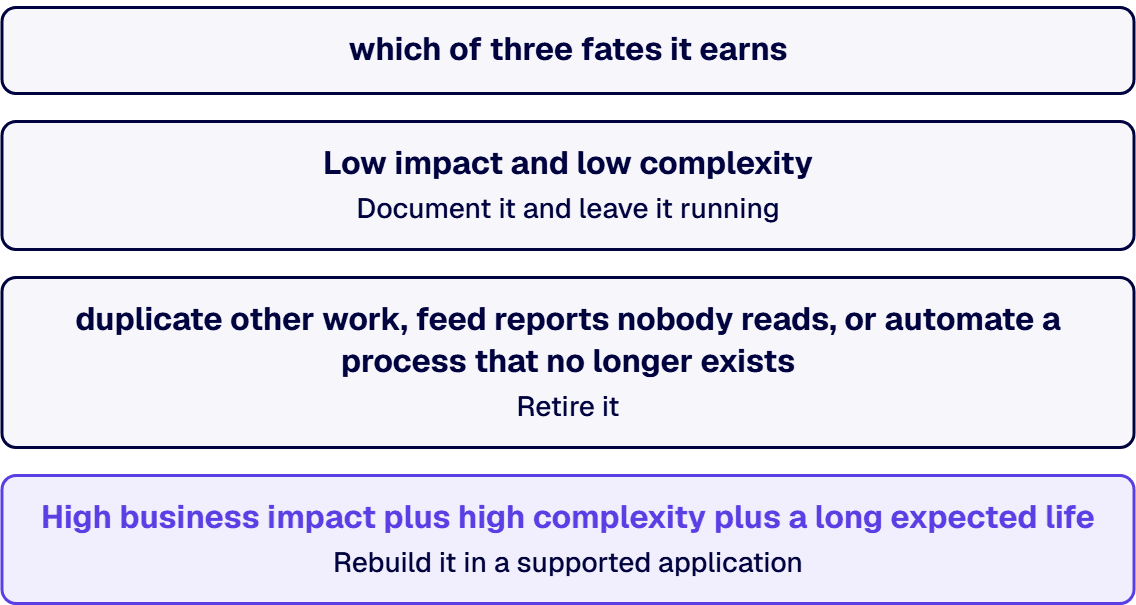
The criteria are consequence, complexity, and durability. High business impact plus high complexity plus a long expected life is the profile that justifies rebuilding. Low impact and low complexity is the profile that justifies documenting and leaving alone. The mistake is treating every flow as either disposable or sacred; almost none are either.
By default, Power Automate sends a failure notification to the flow owner when a run errors, and failures are visible in the flow’s run history. The gap that causes silent failures is twofold. First, those notifications go to the owner’s account, which is useless if the owner has left or stopped reading them. Second, a flow that quietly stops triggering, rather than running and erroring, may generate no failure at all, because from the platform’s point of view nothing failed. Reliable detection means alerting a monitored role rather than an individual, and watching for flows that have gone quiet, not only for runs that returned an error.
At the individual level, run history and the built-in analytics show recent successes and failures. At enterprise scale, you instrument flows through the platform’s observability tooling and route the signal into dashboards and alerts, which is covered in detail on the Microsoft integration monitoring guide linked above. The decision that matters more than the tooling is which flows must alert, to whom, and how you keep the signal trustworthy enough that people still respond to it. Monitoring only works once each business-critical flow has a named owner to receive the alert.
Within a flow, use configured run-after conditions and scoped error handling so that a failure is caught, logged, and surfaced rather than swallowed. Across the estate, error handling is an ownership question: a caught error is only useful if it reaches someone accountable through a monitored escalation path. The most damaging errors in practice are not the ones a flow fails to catch; they are the caught, logged errors sitting in a location no living owner monitors.
A flow that vanishes is almost always a licensing or offboarding consequence, not a platform glitch, and it is the clearest example of the ownership failure this article is about. When the person who created a flow is offboarded, their account is disabled and their license reclaimed, and flows owned by or running under that identity disappear or stop with them. Flows can also drop out of view when an environment is deleted or when your access to it changes. The durable fix is not recovering the one flow; it is running business-critical automations under managed service identities and reassigning ownership before any account is disabled, so a departure can never take a flow with it.
Power Automate is the wrong home for a process when the logic has grown complex enough to need a real application lifecycle, when the work is genuinely load-bearing and cannot tolerate an unowned single point of failure, or when the integration requires bridging a system that exposes no API, where a different tool may fit better. In those cases the right answer is to rebuild the job in a supported application or to choose the appropriate automation technology deliberately, rather than letting a cloud flow quietly become critical infrastructure that nobody signed up to maintain. Using it for the wrong job is how load-bearing work ends up somewhere no one is accountable for it.

US-Based | Est. 1997
© i3solutions. All rights reserved.
US-Based | Est. 1997
© i3solutions. All rights reserved.


