
By Michael Branson
Quick answer. As of October 2026, according to Microsoft, blocking of EWS in Exchange Online was scheduled to begin on (or soon after) October 1, 2026, rolling out tenant by tenant, in every tenant with EWSEnabled “still set to Null on October 1, 2026” (Null is the default); an administrator can still set EWSEnabled to True with an allow list after a block, with a service interruption, until April 1, 2027, and on that date EWS is fully and permanently disabled with no exceptions, so every application that still calls EWS needs a rewrite to Microsoft Graph, a replacement, or its vendor’s fix before then. Microsoft says some EWS capabilities will not come to Microsoft Graph at all, so a rewrite is not always possible and those applications need a different design. SMTP AUTH with a password is a separate change: according to Microsoft, it will be disabled by default for existing tenants at the end of December 2026, an administrator will still be able to turn it back on, and the final removal date has not been set.
If your EWS usage report lists applications nobody on the team can name, or an integration stopped sending mail after a tenant setting changed, the retirement is already an operational question for you. The questions in front of you are which applications break on which date, which ones Microsoft Graph cannot carry, what the tenant setting should be until the final shutdown, and what Microsoft’s separate change to SMTP AUTH does to the scanners, scripts and applications that send mail with a password.
If your tenant changed nothing by the end of September 2026, Microsoft changes the EWS setting for you as its deployment rolls out. Microsoft’s Exchange Team post Exchange Online EWS, Your Time is Almost Up, updated September 9, 2026, said: “The EWSEnabled property in your tenant will change on (or soon after) Oct 1, 2026, as follows:” and “Any tenant with EWSEnabled still set to Null on October 1, 2026, will see the value changed to False as the deployment rolls out. That will block EWS for all applications in the tenant at that time.”
The same post named how a tenant could stay out of that automatic change, a window that closed at the end of September 2026: “Additionally, if you proactively configure an AppID Allow List and set EWSEnabled to True by the end of September 2026, your tenant will be excluded from the October 1 automatic change to EWSEnabled=False.” A tenant that missed the month is not locked out: according to Microsoft, an administrator can still set EWSEnabled to True with an allow list after a block until April 1, 2027, and Microsoft names the cost in the same post: “If in October 2026 you realize that you still need EWS, the admin can re-enable EWS (by setting EWSEnabled to True) after we block it. But note that there will be a service interruption in this case.”
No route back exists after the final date. In the same post, Microsoft says “Starting with April 1, 2027, EWS will be fully and permanently disabled: The ability to control EWSEnabled will be removed from tenant admins.” and “There will be no exceptions past April 2027.” The summary on Microsoft Learn’s Deprecation of Exchange Web Services in Exchange Online agrees: “October 2026: EWS starts to be disabled globally for all organizations.” and “April 2027: EWS is fully disabled.”
Older notices describe October 1, 2026 as one cutoff for every tenant. Microsoft’s current posts describe a change that was scheduled to start on or soon after that day and to reach tenants as the deployment rolls out, with the permanent shutdown on April 1, 2027, as Microsoft’s post Exchange Online EWS, Your Time is Almost Up sets out. Plan on the current dates.
If you set EWSEnabled to True, the allow list decides which applications keep working. Microsoft’s post Introducing EWSAllowedAppIDs: Preparing for the Final Phase of EWS Retirement warns that “after enforcement begins, setting EWSEnabled=True without an AppID allow list effectively becomes a block-all configuration.” The same post says “Changes to this list can take up to 24 hours to take effect.”
When you leave the list to Microsoft, it is built from recent usage. Microsoft’s post Take control of your EWSAllowedAppIDs list before EWS access changes says “The list will be based on the previous 60 days of usage, and so it may miss applications that run infrequently, and it may include apps you no longer want to have access.” It also says “If an administrator has already configured EWSAllowedAppIDs, Microsoft will not overwrite or change the list.” A quarter-end or year-end job that did not run in that window is the kind of application a usage-built list can miss.
Hidden dependencies can also surface before the final date. Microsoft’s post Exchange Online EWS, Your Time is Almost Up says Microsoft may run temporary scream tests, “shorter periods of time when we turn EWS off and then back on”, which “can help expose hidden dependencies before the final cutoff.”
Planning rules for the settings:
When nobody owns the full list, start with the report Microsoft built for this job. Microsoft Learn’s Exchange Web Services (EWS) usage report page says “The Exchange Web Services (EWS) usage report displays the SOAP actions used by each application calling EWS in your organization.” It also says “Usage data is collected and aggregated weekly, not daily. It can take up to 10 days for usage to show in the report.”
Microsoft’s own advice on Deprecation of Exchange Web Services in Exchange Online includes the steps to “Investigate the EWS footprint of all internal and third party applications in your organization.” and to “Work with your vendors to prioritize their migration from EWS.” Describing Microsoft’s own deprecation effort, the same page says “The scope was also widened from third party applications to include all Microsoft applications.”
Planning rules for the inventory:
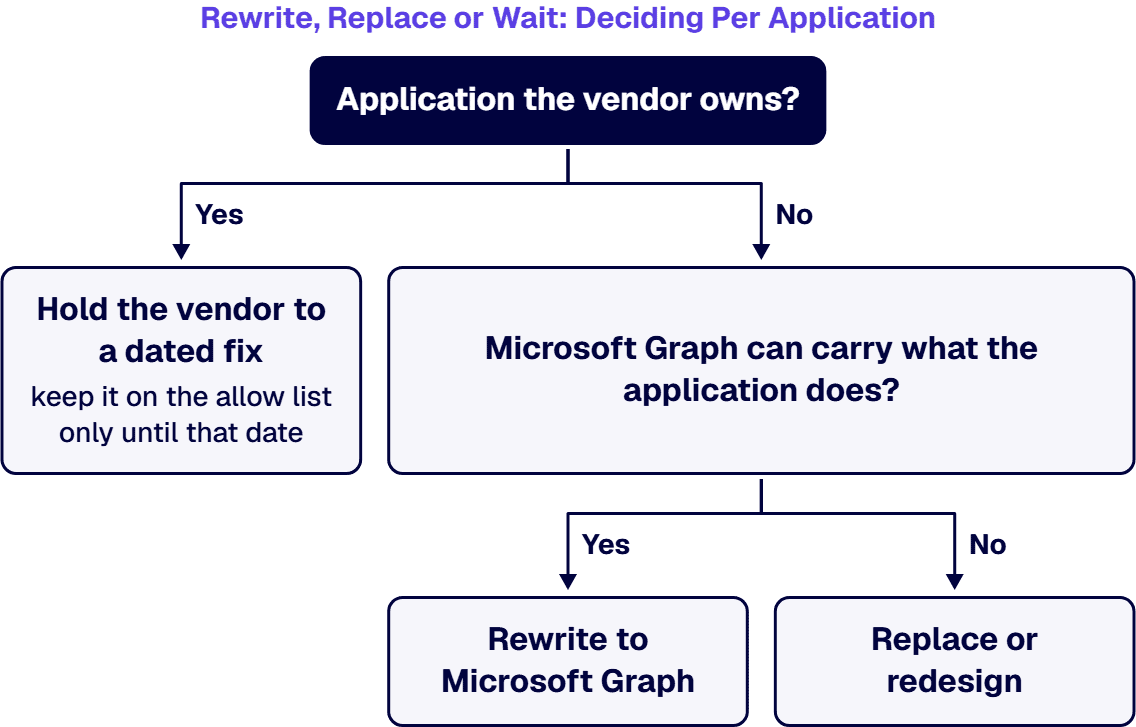
Before you fund a rewrite, check whether Microsoft Graph can carry what the application does. On Microsoft Learn’s Deprecation of Basic authentication in Exchange Online, Microsoft says “We removed the ability to use Basic authentication in Exchange Online for Exchange ActiveSync (EAS), POP, IMAP, Remote PowerShell (RPS), Exchange Web Services (EWS), Offline Address Book (OAB), Autodiscover, Outlook for Windows, and Outlook for Mac.” An EWS application that still works against Exchange Online is therefore not signing in with a password; the work is the API it calls.
The destination has limits. Microsoft Learn’s Migrate Exchange Web Services (EWS) apps to Microsoft Graph says “Microsoft Graph is not supported for Exchange on-premises. This content applies to Exchange Online and hybrid deployments only.” The deprecation page keeps a roadmap table of EWS capabilities and their planned replacements, and says “If an EWS capability isn’t listed in this roadmap table, don’t plan on a corresponding Microsoft Graph or Exchange Admin API capability being available before EWS is fully disabled.” and “Estimated availability dates are targets and might change.”
Some capabilities are not coming at all. The same page says “The following EWS capabilities won’t be added to Microsoft Graph. Plan migrations without a Graph equivalent for these capabilities.” Its list includes “Generic Public Folder CRUD” and “Discovery Mailbox access”, described as “Generic folder and item create, read, update, and delete operations in Public Folders.” and “Generic mailbox, folder, and item access for legacy Discovery Mailboxes.”
Decision criteria, per application:
Mailboxes still on Exchange Server are outside this change: in its post Exchange Online EWS, Your Time is Almost Up, Microsoft says “EWS is not being retired on-prem.” and “On-prem mailboxes may continue using EWS; cloud mailboxes must move to Graph.”
If a scanner, printer, monitoring tool or line-of-business application submits mail to Exchange Online with a username and password, it sits on a different timeline from EWS. Microsoft’s post Updated Exchange Online SMTP AUTH Basic Authentication Deprecation Timeline gives it as “Now to December 2026: SMTP AUTH Basic Authentication behavior remains unchanged.” and “End of December 2026: SMTP AUTH Basic Authentication will be disabled by default for existing tenants. Administrators will still be able to enable it if needed.”
The same post says “New tenants created after December 2026: SMTP AUTH Basic Authentication will be unavailable by default. OAuth will be the supported authentication method.” and “Second half of 2027: Microsoft will announce the final removal date for SMTP AUTH Basic Authentication.” No final removal date has been announced in the posts read for this guide.
Microsoft Learn’s Deprecation of Basic authentication in Exchange Online gives the two ways forward for an application: “Other options for sending authenticated mail include using alternative protocols, such as the Microsoft Graph API.” and “Application developers who have built apps that send, read, or otherwise process email using these protocols will be able to keep the same protocol; however, they need to implement secure, Modern authentication experiences for their users.”
Devices need their own plan. Microsoft Learn’s page How to set up a multifunction device or application to send email using Microsoft 365 or Office 365 says “Client SMTP submission using Basic authentication in Exchange Online is scheduled for deprecation, see timeline information.” and “Client SMTP submission using Basic authentication isn’t compatible with Security defaults in Microsoft Entra ID.” The same page describes other sending methods, including SMTP relay through an inbound connector, Direct Send and High Volume Email, each with its own requirements and limits on that page.
Planning rules for senders:
Devices that relay mail through an on-premises Exchange server, instead of submitting to Exchange Online, are a different question from this section’s.
If your tenant is in GCC, GCC High or DoD, the dated posts do not name your cloud. Microsoft’s post Exchange Online EWS, Your Time is Almost Up says the retirement of EWS applies “only to Microsoft 365 and Exchange Online (all environments); there are no changes to EWS in Exchange Server.” Its post Updated Exchange Online SMTP AUTH Basic Authentication Deprecation Timeline describes its changes as intended for “customers with tenants in our service (all cloud environments)”. Neither names GCC, GCC High or DoD.
What Microsoft does state for government clouds is about Microsoft Graph itself. Microsoft Learn’s Microsoft Graph national cloud deployments says “If you’re working in a Microsoft 365 GCC environment, continue using the worldwide endpoints: https://portal.azure.com and https://graph.microsoft.com.”, “If you’re working in a Microsoft 365 GCC High environment, use https://portal.azure.us and https://graph.microsoft.us.” and “If you’re working in a Microsoft 365 DoD environment, use https://portal.azure.us and https://dod-graph.microsoft.us.” It adds “Certain services and features that are in specific regions of the global service might not be available in all national clouds.”
The EWS roadmap table on Microsoft Learn’s Deprecation of Exchange Web Services in Exchange Online carries a “Sovereign Cloud availability” row, “Make Exchange workload APIs required for EWS migration available in supported sovereign clouds.”, with a target of “Q4 CY2026”, under the page’s own note that “Estimated availability dates are targets and might change.”
Put plainly, the dated posts read for this guide say “all environments” and “all cloud environments” and name no government cloud, so a government tenant confirms its own timing, and the Microsoft Graph calls its applications need in its own cloud, before planning on them. Moving a tenant into GCC High is a separate project, covered in Microsoft 365 GCC High Migration Checklist: Best Practices for Defense Contractors.
If the application is not yours to change, a rewrite is the wrong project. Four cases call for a different move:
When the applications calling EWS were built years ago by people who have since left, the work in front of you is integration engineering on your own estate. i3solutions provides US-based senior Microsoft integration developers and consultants who embed in enterprise teams to design, build and govern production-grade integrations across the Microsoft ecosystem and the systems it connects to. Those developers build Outlook and Exchange integration for mail, calendar and contact workflows, including on Microsoft Graph. Delivery is senior and US-based. See Hire US-Based Senior Microsoft Integration Developers.
For applications and workflows i3solutions built or modernized, i3solutions provides application managed services covering their operation, support and enhancement, so moving those applications’ mail calls from EWS to Microsoft Graph falls inside that service; see Application Managed Services for Custom Microsoft Applications. An i3solutions engagement does not produce managed-service ownership, a replacement for the internal team, open-ended scope expansion, or vendor lock-in.
On the wider integration estate, i3solutions designs Azure integration architecture and builds and operates Azure Logic Apps workflows for enterprise clients, including running them on an ongoing basis rather than only building them. The practice sits under Unifying Enterprise Operations Through Microsoft System Integration & Data Management.
In stages, according to Microsoft, scheduled to begin on (or soon after) October 1, 2026; before that date Microsoft said: “Any tenant with EWSEnabled still set to Null on October 1, 2026, will see the value changed to False as the deployment rolls out.” The end is fixed, according to Microsoft: “Starting with April 1, 2027, EWS will be fully and permanently disabled: The ability to control EWSEnabled will be removed from tenant admins.”
Until the final date, yes, with a cost, according to Microsoft: “If in October 2026 you realize that you still need EWS, the admin can re-enable EWS (by setting EWSEnabled to True) after we block it. But note that there will be a service interruption in this case.” Microsoft also warns that “after enforcement begins, setting EWSEnabled=True without an AppID allow list effectively becomes a block-all configuration.” After the final date, according to Microsoft, “There will be no exceptions past April 2027.”
No. Microsoft Learn says “The following EWS capabilities won’t be added to Microsoft Graph. Plan migrations without a Graph equivalent for these capabilities.” Its list includes “Generic Public Folder CRUD” and “Discovery Mailbox access”.
No. Microsoft says “EWS is not being retired on-prem.” and “On-prem mailboxes may continue using EWS; cloud mailboxes must move to Graph.” Microsoft Learn adds that “Microsoft Graph is not supported for Exchange on-premises.”
It changes on a separate timeline, according to Microsoft: “End of December 2026: SMTP AUTH Basic Authentication will be disabled by default for existing tenants. Administrators will still be able to enable it if needed.” The final date is not set, according to Microsoft: “Second half of 2027: Microsoft will announce the final removal date for SMTP AUTH Basic Authentication.”
Microsoft’s dated posts do not say by name. They describe the changes as applying to “all environments” and “all cloud environments” and name no government cloud. Microsoft Learn gives the Microsoft Graph endpoint for GCC High as https://graph.microsoft.us and for DoD as https://dod-graph.microsoft.us, and its roadmap targets “Q4 CY2026” for making the Exchange workload APIs required for EWS migration available in supported sovereign clouds, a target it says might change.

US-Based | Est. 1997
© i3solutions. All rights reserved.
US-Based | Est. 1997
© i3solutions. All rights reserved.


