

Information trapped between systems is an integration problem, not a platform problem. Four tests settle which it is: a re-key census of your highest-volume records, a reconciliation clock measured in hours per month, a supported-interface check at every seam, and an identity-and-boundary test for the cloud and the regulatory frame. When three or more manual hops, a measurable reconciliation burden, and a supported interface on each seam coexist, the platforms stay. The fix is an owned contract layer in Azure API Management, orchestration in Logic Apps and Service Bus, a data plane picked by ownership, and an evidence trail.
Most enterprises facing this decision are told to replace something. The evidence says otherwise: the platforms are doing their jobs and the failures are all at the handoffs. This page gives you the four tests that tell the two cases apart, and the named Microsoft mechanisms, tier limits and published ceilings that decide what you build once the diagnosis lands.
Yes, and there is a test that settles it rather than an opinion. If each platform performs its own job correctly and every failure appears at a handoff, where a record is re-typed, reconciled in a spreadsheet, or exported to CSV, then the seams are the problem and the platforms are not. The pattern that confirms it: a business record entered by hand into several systems, a monthly reconciliation ritual no one has automated, and no supported interface published between the systems that disagree. When those conditions hold together, replacing a platform fixes nothing, because the replacement inherits the same missing contracts. The fix is to turn each interface into an owned, versioned contract with a named owner, a monitored service level, and a retained log. i3solutions unified identity and automated provisioning across systems for 125,000 users by treating the interfaces as owned, governed contracts.
Run all four. Any one of them on its own produces a confident wrong answer.
Pick your three highest-volume business records, such as employee, customer or contract, and asset. For each one, list every system that stores it, which system is authoritative, and how the data moves: supported API, scheduled export, or a person typing. Count only the manual hops. Three or more manual copies of a single record is an integration problem, full stop. One organization’s employee records lived in three systems and reconciled in a spreadsheet. Its automated HRIS integration eliminated manual spreadsheet tracking, reclaiming over 1,000 staff hours annually.
Measure the hours per month your team spends making two systems agree that should already agree. The measurement is not a survey. It is in the month-end close checklist, in any shared workbook whose filename contains “master” or “tracker”, and in the recurring meeting where two reports get compared line by line. Put a number and a unit on it, because that number is what funds the work and what you will measure the result against. One IT systems analysis for a federal housing agency identified about $1.5 million in savings and led to processing roughly 35 percent faster by finding the real constraints.
For each pair of systems that disagree, ask one question: does the vendor publish a supported interface between them? If the only available route is screen automation, an unsupported direct read against a vendor’s database, or a CSV drop on a file share, that seam is not integrable as it stands and at least one side is a platform decision rather than an integration decision. For Dynamics 365 the supported route is the Web API at the environment’s documented host, and those hosts are cloud-specific: *.crm9.dynamics.com in GCC, *.crm.microsoftdynamics.us in GCC High, and *.crm.appsplatform.us in DoD. If an existing integration was built against the commercial host and the tenant is moving to GCC High, every endpoint string in it changes.
Confirm the record you want to unify can legally and technically exist on both sides of the seam. In the US government clouds this is decided before architecture: Dynamics 365 GCC High and DoD require Microsoft Entra Government for customer identities, while GCC uses public Microsoft Entra ID. GCC High is operated to align with the DISA SRG IL4 framework and DoD with IL5. Several Dynamics 365 applications ship in GCC only and are not available in GCC High or DoD, including Customer Voice, Guides, Human Resources, Contact Center and Project Operations. GCC High and DoD subscriptions are purchased through Volume Licensing only, with no Cloud Solution Provider channel. If the record lives in an application that does not exist in your cloud, no integration will move it, and that is a scope decision, not an architecture problem.
Three or more manual hops plus a measurable reconciliation burden plus at least one supported interface on every seam means you have an integration problem and the platforms stay. A seam with no supported interface on either side means at least one platform is in scope for replacement, and integrating around it buys a year at most. A blocked identity or availability boundary means the sequence changes: resolve the boundary first, because everything built before it will be rebuilt after it.
Point-to-point fixes accumulate into an architecture no one can change. i3solutions provides senior integration specialists who build on enterprise patterns your team can operate after the engagement ends.
Four layers, in this order. Skipping the first is the most common way these programs fail twice.
Every seam becomes a versioned API with an owner, a consumer list and a monitored service level. Three published tier facts decide the deployment, and each one has ended a design review late when it was found late:
Two more that shape capacity planning, both published in Microsoft’s feature-based comparison of Azure API Management tiers: multi-region deployment exists only in Premium, and Premium provides 12 scale units per region with a 5 GB built-in cache. The self-hosted gateway, which lets you run the gateway next to a data source you cannot expose, exists only in Developer and Premium.
Queue the writes rather than chaining them, so one slow system cannot stall the others and a failed message can be replayed instead of re-keyed. i3solutions builds Dynamics 365 integrations using named Microsoft mechanisms including Dataverse, dual write, virtual tables, Azure Logic Apps, Azure Service Bus, and Power Automate connectors, and has completed more than 20 Dynamics 365 integration engagements. i3solutions designs Azure integration architecture and builds and operates Azure Logic Apps workflows for enterprise clients, including running them on an ongoing basis rather than only building them.
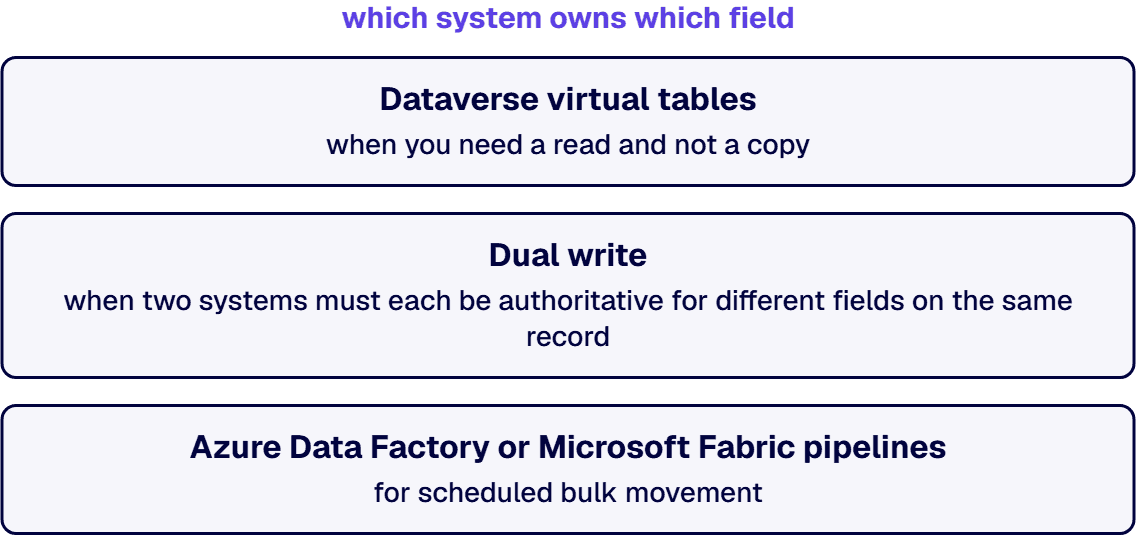
Choose the mechanism to match the ownership, not the other way around. Dataverse virtual tables when you need a read and not a copy. Dual write when two systems must each be authoritative for different fields on the same record. Azure Data Factory or Microsoft Fabric pipelines for scheduled bulk movement. None of it can be designed until one question is answered on paper: which system owns which field. That is a business decision with a named owner, and no integration platform will make it for you.
If either side is on premises, the on-premises data gateway is the seam, and Microsoft publishes its limits. Design to them at the start rather than discovering them in week nine:
The sentence that gets this past a security review: the gateway initiates outbound connections only and requires no inbound ports into your network. It serves Azure Analysis Services, Azure Data Factory, Azure Logic Apps, Microsoft Fabric, Power Apps, Power Automate and Power BI from a single installation, and its administrators are managed in the Power Platform admin center and in the Power BI service.
In a regulated estate the audit question is never “does the integration work”. It is who approved this data crossing this boundary, when, and under which control. So every interface carries a named owner, a version, a monitored service level and a retained log from the day it goes live. i3solutions has implemented governance frameworks for organizations managing 200+ integrations across Microsoft ecosystems.
Three honest conditions where this program is the wrong spend:
Week 1 produces the business case. The i3solutions Risk and Roadmap Assessment ROI variant is a one-week structured engagement that produces a business case anchored on the specific environment, the specific compliance frameworks, and the specific executive-cycle timing. Weeks 2 to 4 produce the dependency map and the re-key census, which is where estates routinely discover interfaces no one documented. Weeks 4 to 12 produce the architecture: a focused reference architecture engagement (assessment plus reference architecture document plus governance framework, 8-to-12-week duration) scopes between $150,000 and $350,000 for mid-sized regulated enterprises. i3solutions routes a senior U.S.-based engineer to a client call within one to two weeks, and delivery is U.S.-based.
One integration for a commercial real-estate operator processed work about 40% faster while retaining roughly 90% of historical data, and that speed repeats on every cycle, not once. i3solutions has delivered this pattern on Microsoft Dynamics 365 CRM integrations in a regulated healthcare environment and on enterprise application integration for a global professional services firm serving 125,000 users. i3solutions is a Microsoft Solutions Partner. On a nuclear power operator, i3solutions replaced a manual reporting process with an automated dashboard that saved over $293,000 a year and, more importantly for the control environment, removed the manual reconciliation that had been the audit exposure.
If the four tests point at your seams rather than your platforms, the next step is a scoped assessment of the integration estate, not a platform selection. Talk to a senior architect about Microsoft system integration and data management, about integration governance for the contract layer, or about legacy system integration where a seam has no supported interface.

Michael Branson co-founded i3solutions 30 years ago and brings executive, operational, and technical perspective to organizations working in complex, secure, and mission-critical environments. His insights focus on business process consulting, automation, data analytics, collaboration, secure operating models, and the operational discipline required to turn technology investments into practical business systems with measurable value.
Connect on LinkedInRun the re-key census and the supported-interface test together. If every seam has a supported vendor interface and the failures are all at manual handoffs, the platforms are adequate and the seams are not. If any seam has no supported interface on either side, at least one platform is in scope for replacement and integration only defers that.
For a single low-volume seam with a supported connector on both ends and one clear owner, yes, and you should. It stops being true at the point where a field is written by two systems, where a failed message must be replayed rather than re-entered, or where an auditor asks who approved the data crossing the boundary. At that point you need the contract layer, because a connector has no owner, no version and no service level.
Yes, provided the ERP exposes a supported API. The approval outcome is the trigger: when the form's approval status changes on its Dataverse row, a Power Automate flow writes that status to the ERP through a custom connector, which wraps the ERP's REST API. For the return direction, a second flow or an Azure Logic Apps workflow reads project status from the ERP and updates the form's record. If the ERP runs on premises, the on-premises data gateway carries reads and writes without opening inbound ports. Decide in writing which system owns each status field, and limit the trigger's Select columns to the fields the form owns, so an update written back from the ERP does not start the outbound flow again.
Reconciliation returns within a quarter, in a new place. Two systems each believe they are authoritative for the same field, the integration faithfully propagates both, and someone builds a spreadsheet to decide which one is right. That is the original silo with more moving parts. Decide which system owns which field, in writing, before any pipe is built.
Yes, with the boundary resolved first. Dynamics 365 GCC High and DoD require Microsoft Entra Government for identities, endpoint hostnames differ from the commercial cloud, several Dynamics 365 applications are not available outside GCC, subscriptions are Volume Licensing only, and the API Management Consumption tier is not available in the US Government cloud. Each of those changes the design, and all of them are cheaper to find in week one than in week nine.
Measure it per seam, not per program. The first seam retires its manual reconciliation when the contract, the queue and the ownership decision are all in place for that record, which happens inside the first architecture phase rather than at the end of the roadmap. That is the number to hold the work to, and it is why the reconciliation clock is measured in hours per month before anything is built.
Largely, yes. A data silo is a store whose records other systems cannot read or write through a supported path. Information trapped between systems is the working consequence: people re-key, export and reconcile to move it. The four tests on this page show whether the silo sits at a seam or inside a platform.
Give each seam an owned, versioned interface contract instead of a manual hop: decide which system owns each field, publish the interface in Azure API Management, move the record through Azure Logic Apps or Azure Service Bus, and keep a retained log. The platforms stay; the re-keying and reconciliation go.
Settle the seam first. An assistant reading two systems that disagree inherits the disagreement, and no readiness test fixes a contested source. Once one system owns the record, run the four data readiness tests set out in Data Readiness for AI: The Four Tests a Dataset Has to Pass for that use case: ownership, quality, access and context.
Integrations that drop messages without a trace turn into reconciliation projects and audit questions. i3solutions' senior integration advisors work with IT leaders who need durable, observable integration scoped by people who have built it at enterprise scale.
Talk to a Senior Integration Advisor
US-Based | Est. 1997
© i3solutions. All rights reserved.
US-Based | Est. 1997
© i3solutions. All rights reserved.


