
Reviewed by Michael Branson, Founder/COO, i3solutions. Michael co-founded i3solutions 30 years ago and brings executive, operational, and technical perspective to organizations working in secure, compliance-bound Microsoft environments.
The true total cost of Microsoft 365 Copilot is not the $30 per user per month license by itself. It is that per-seat fee, plus a qualifying base Microsoft 365 subscription that each Copilot user must already hold (Microsoft 365 E3 at $39 or E5 at $60 per user per month, paid yearly), plus the data-readiness and permission-remediation work that makes your content safe for Copilot to read, plus capacity for any custom agents you build, plus the ongoing governance to keep it compliant. Licensing is the visible number. Readiness and governance are where most of the real spend and most of the risk actually sit.
Copilot has one published price and several unpublished cost drivers. Microsoft 365 Copilot lists at $30.00 per user per month, paid yearly on an annual commitment, and it is an add-on: every Copilot seat requires a qualifying base Microsoft 365 subscription first (per Microsoft’s Copilot enterprise pricing page). For a regulated enterprise that base plan is typically Microsoft 365 E3 at $39.00 or E5 at $60.00 per user per month, paid yearly (per Microsoft’s Microsoft 365 enterprise pricing page). So a fully licensed Copilot seat on E5 is $90 per user per month before a single readiness dollar is spent. The four cost drivers below are the ones no license quote shows you.
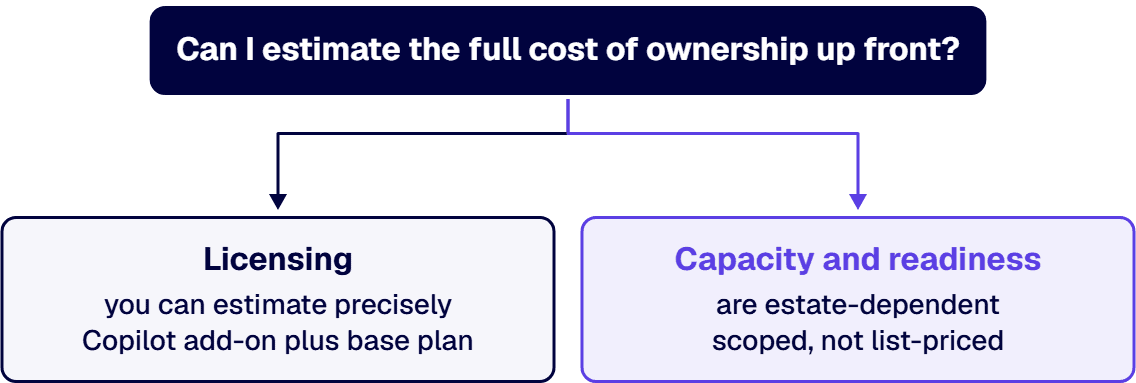
Copilot cannot be bought on its own. Each user needs both the $30 Copilot add-on and a qualifying base license, so the per-seat run rate is the sum, not the add-on. Whether E3 or E5 is the right base plan is a licensing-tier decision with its own tradeoffs (E5 folds in Microsoft Purview, Defender, and advanced compliance that Copilot governance leans on), and we answer that separately in our Microsoft 365 E3 vs E5 cost guide. For TCO, the point is simpler: budget the combined seat cost across your Copilot population, and remember that annual commitment terms mean you are pricing a year, not a pilot month.
The $30 seat covers Copilot in the Microsoft 365 apps. It does not cover the compute you consume when you extend it. Custom and autonomous agents built in Microsoft Copilot Studio draw on metered message and capacity consumption, and agents grounded in your own enterprise data can pull on Azure and Microsoft Fabric compute for the pipelines that feed them. Microsoft does not publish a single “capacity” price that fits every estate, so we will not quote one here. What matters for planning is that capacity is a variable, usage-driven line that scales with how many agents you deploy and how heavily they run, and it is easy to leave out of a first budget because the seat price looks like the whole story. Building and integrating those agents against your estate is the delivery work our custom AI consulting and integration services handle, sizing the capacity and grounding before it lands on a bill. Copilot Cowork is another usage line on top of the seat, billed in Copilot Credits, as Is Copilot Cowork Included in the Microsoft 365 Copilot License sets out from Microsoft’s own documentation. Copilot also appears inside business applications outside the Microsoft 365 apps, such as Copilot for Dynamics 365 Customer Service, which this page does not price.
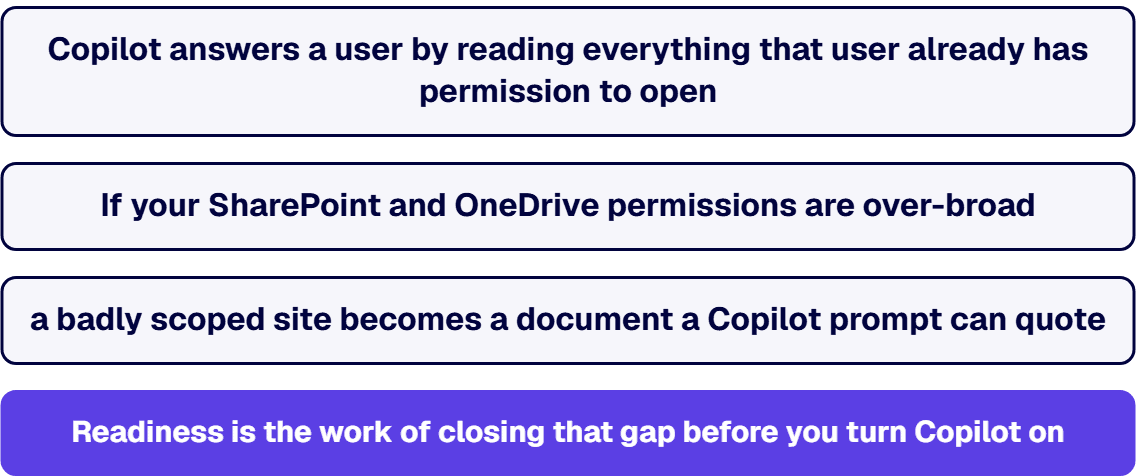
This is the component that surprises IT leaders, and it is usually the largest. Copilot answers a user by reading everything that user already has permission to open across Microsoft 365, then reasoning over it through the Microsoft Graph and the semantic index. If your SharePoint and OneDrive permissions are over-broad, Copilot does not create that exposure, but it does surface it instantly and at scale: a badly scoped site that no one ever browsed becomes a document a Copilot prompt can quote. Readiness is the work of closing that gap before you turn Copilot on. It spans permission and oversharing remediation, sensitivity labeling and data classification with Microsoft Purview, tenant controls such as Restricted SharePoint Search and SharePoint Advanced Management, and retention and lifecycle cleanup so Copilot is not grounding answers in stale content. Microsoft does not publish a dollar figure for this remediation because it depends entirely on the state of your estate, so treat it as a scoped project, not a line item.
A Copilot seat that no one uses well is pure cost. Adoption spend covers role-based enablement, prompt patterns for the work people actually do, and measuring usage through the Microsoft 365 Copilot Dashboard so you can see which seats earn their license. Governance is the standing cost that never ends: Conditional Access, data loss prevention, and audit configuration in Microsoft Purview, plus periodic review of agent permissions and a process for retiring agents that outlived their purpose. In a regulated organization this is not optional overhead; it is the difference between a compliant deployment and a data-exposure incident with your own AI as the vector.
i3solutions is a Microsoft Solutions Partner, and the readiness and governance work above is the work we are hired to do. Our engagement bands for the adjacent compliance and governance scope are owner-attested and quoted verbatim. A CMMC Level 2 implementation for a defense contractor with a defined CUI boundary typically ranges from $45,000 to $75,000, covering the Compliance Manager baseline assessment, Conditional Access redesign, DLP policy build and testing, Purview Audit Premium configuration, and post-implementation documentation. Those are the same Microsoft controls a Copilot deployment leans on, which is why regulated buyers scope the two together. And the standing value is measurable: our teams maintain dedicated compliance specialists who understand CMMC, HIPAA, SOC 2, and financial services regulations within Microsoft environments, providing audit trail documentation and access control frameworks that reduce audit preparation time by 60%.
The instinct at budget time is to defer governance and ship the licenses. That inverts the risk. i3solutions runs a governed Power Platform for a federal defense agency supporting roughly 10,000 personnel across about 180 locations, which works because it is governed, not despite it. The same holds for Copilot at scale: the governance is what lets you widen the deployment without widening your exposure. Skipping readiness does not remove its cost, it defers the cost into an incident. A total-cost view counts governance as the line that makes every other line safe to spend.
Microsoft 365 Copilot lists at $30.00 per user per month, paid yearly on an annual commitment, per Microsoft’s enterprise pricing page. That is the add-on only. Each Copilot user must also hold a qualifying base Microsoft 365 subscription, so the true per-seat cost is $30 plus the base plan, for example $39 for E3 or $60 for E5 per user per month.
You need a qualifying base Microsoft 365 subscription; Copilot cannot be licensed standalone. E3 satisfies the requirement, and E5 adds the Microsoft Purview and advanced compliance capabilities that Copilot governance relies on. Which base tier is right is a licensing-tier question we cover in our Microsoft 365 E3 vs E5 cost guide; for TCO, budget the base plan plus the $30 Copilot add-on per seat.
The costs no license quote shows are readiness and governance. Before Copilot is safe to enable you typically need permission and oversharing remediation, sensitivity labeling with Microsoft Purview, and tenant controls such as Restricted SharePoint Search. After go-live you carry ongoing DLP, audit, Conditional Access, and agent-permission review. Custom agents built in Copilot Studio also add variable, usage-based capacity cost.
Copilot reads everything a user can already open and reasons over it through the Microsoft Graph. It does not create over-broad permissions, but it surfaces them instantly, so a poorly scoped SharePoint site becomes content a prompt can quote. Readiness closes that exposure before rollout through permission remediation, classification, and tenant search controls. The scope depends on the state of your estate, so it is priced as a project.
Licensing you can estimate precisely: Copilot add-on plus base plan, times your Copilot population, on annual terms. Capacity and readiness are estate-dependent and are scoped, not list-priced, because Microsoft publishes no fixed figure for them. The reliable approach is to fix the licensing math, then scope readiness and governance against your actual tenant so the variable components are sized to your environment rather than guessed.

US-Based | Est. 1997
© i3solutions. All rights reserved.
US-Based | Est. 1997
© i3solutions. All rights reserved.


