
By Michael Branson
As of September 2026, choose per server: SQL Server 2016 reached end of support on July 14, 2026 and Windows Server 2016 follows on January 12, 2027, according to Microsoft, and for each machine Microsoft offers Extended Security Updates for up to three years, a supported upgrade, or a move to Azure, with the bridge now working differently than it did for older versions. Microsoft states that “migrating your workload to SQL Server on Azure VMs no longer provides free access to ESUs for SQL Server 2016 (13.x) instances,” that off Azure a SQL Server 2016 instance gets them “after connecting your servers to Azure Arc,” and, for Windows Server 2016 ESUs enabled by Azure Arc, that “Software Assurance is required for on-premises workloads.” According to Microsoft Learn, an in-place upgrade from installation media is supported from Windows Server 2016 to Windows Server 2019, 2022 or 2025, and SQL Server 2022 and 2025 accept upgrades from SQL Server 2016 SP3 or later, except where Microsoft steers away from in-place upgrade, such as domain controllers, or limits it, such as clusters that advance one version at a time, so a server that cannot take either path in time is the one to move or to bridge first.
The servers most exposed are the ones where a SQL Server 2016 instance and the Windows Server 2016 host under it were planned as two separate problems, by two teams, against two dates. You may have been told that moving SQL Server to Azure virtual machines makes Extended Security Updates free, that Extended Security Updates renew like any other subscription, or that an in-place upgrade is a weekend job. For SQL Server 2016 the first is no longer true, the second hides an Azure Arc and licensing decision, and the third fails on exactly the servers you can least afford to break. This guide sets out what Microsoft’s own pages, read on September 24, 2026, say about Extended Security Updates, upgrades and Azure for these two products, server by server, and marks where the i3solutions recommendation sits beside them.
If your plan has one line for “SQL Server 2016” and another for “Windows Server 2016”, it will miss the machines where one sits on the other, and those are the machines that decide the timeline. Microsoft’s SQL Server 2016 end of support is here: Plan your next steps post, published July 14, 2026, opens: “As of today, July 14, 2026, SQL Server 2016 has reached end of support.” Microsoft’s Prepare to deliver Extended Security Updates for Windows Server page states: “Windows Server 2016 reaches end of support on January 12, 2027.”
The two decisions are joined on the same host. Microsoft’s SQL Server end of support options page lists this among the considerations for upgrading SQL Server on your own servers: “If you’re on an unsupported version of Windows Server, you also need to upgrade the OS.” It adds: “Newer versions of SQL Server might not support those Windows versions.” Which Windows Server version a given SQL Server release is supported on is a pairing to confirm with Microsoft for each target, and this guide does not state one.
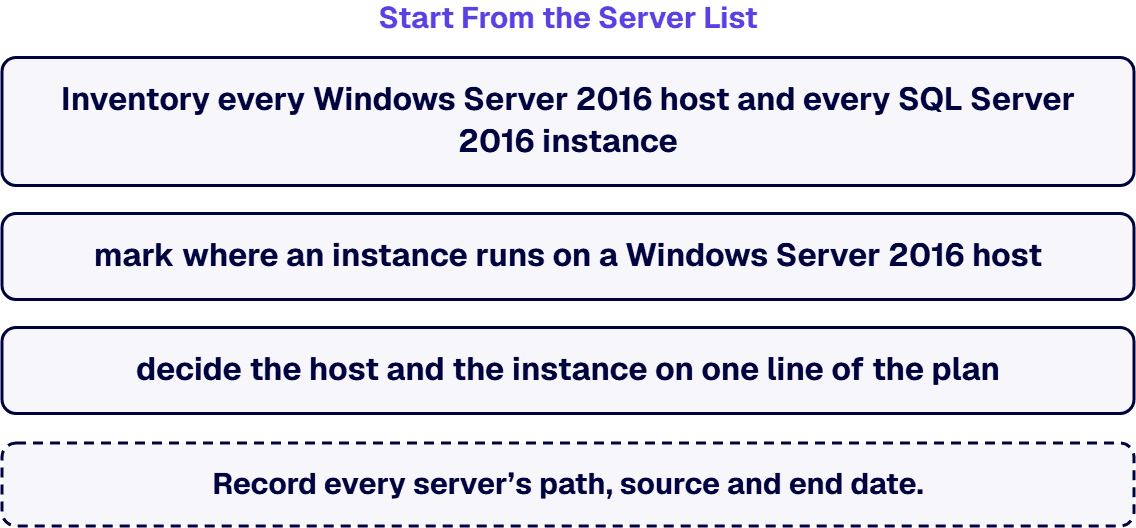
Inventory every Windows Server 2016 host and every SQL Server 2016 instance, mark where an instance runs on a Windows Server 2016 host, and decide the host and the instance on one line of the plan. Placing these servers inside a multi-year modernization plan, and deciding what goes first across the whole estate, is a separate decision this guide does not make. The same inventory can carry the boot-level change, since Secure Boot Certificate Expiration in 2026 notes that the Microsoft Windows Production PCA 2011 that signs the Windows boot loader expires on October 19, 2026.
The common failure here is carrying the rules from older versions into 2016. For SQL Server, Microsoft’s What are Extended Security Updates for SQL Server? page says: “The subscription protects your servers for up to three years after the support lifecycle ends.” The same page states the change that matters most: “Starting with SQL Server 2016 (13.x), migrating your workload to SQL Server on Azure VMs no longer provides free access to ESUs for SQL Server 2016 (13.x) instances.” Microsoft’s Extended security updates (ESUs) for SQL Server on Azure Virtual Machines page says the same from the Azure side: “Starting with SQL Server 2016 (13.x), ESUs are available through a paid subscription.” And Microsoft’s Extended Security Updates: Frequently asked questions page draws the contrast with the version before it: “ESUs are free for SQL Server 2014 (12.x) and purchasable for SQL Server 2016 (13.x).”
Off Azure, the route runs through Azure Arc. The SQL Server ESU page says: “For all other environments, including on-premises, non-Azure cloud infrastructure, or hosted environments, you can subscribe to receive ESUs after connecting your servers to Azure Arc.” It is plain about the condition: “If you can’t connect your SQL Server instance to Azure Arc, you don’t qualify for this offer.” Software Assurance under an Enterprise Agreement, Enterprise Agreement Subscription, Server and Cloud Enrollment or Enrollment for Education Solutions is one way to qualify on that page, and it names a second: “Alternatively, you can connect your instances to Azure Arc and enable a pay-as-you-go billing option to receive ESUs without Software Assurance.”
What arrives under the subscription is narrower than regular support. The SQL Server ESU page says: “Microsoft makes ESUs available if needed once a security vulnerability is discovered and rated as Critical by the Microsoft Security Response Center (MSRC).” It also says that there is no regular release cadence, that a server which applied only General Distribution Release updates during support should “install and validate the latest CU at the time you subscribe to receive ESUs,” and that the bridge ends itself when you leave: “The subscription is automatically canceled when you migrate your instance to Azure or upgrade to a supported version of SQL Server.” For federal workloads, the FAQ page adds: “Federal Government customers can get ESUs by migrating their workloads to SQL Server on Azure VMs in supported Azure Government regions.”
For Windows Server 2016, Microsoft’s Prepare to deliver Extended Security Updates for Windows Server page sets out the terms for Extended Security Updates enabled by Azure Arc. The page says: “Extended Security Updates for Windows Server 2016 provide Critical and Important security updates for up to three years, through 2030.” It also says: “You can configure Windows Server 2016 ESUs in the Azure portal starting August 3, 2026.” Configuration has therefore been open since August 3, 2026. The billing date is a different date from the end-of-support date: “Billing for Windows Server 2016 ESUs enabled by Azure Arc begins January 13, 2027.” On licensing, the page says: “Software Assurance is required for on-premises workloads.” and “The Services Provider License Agreement (SPLA) isn’t available for Windows Server 2016 ESUs.” On coverage, it says: “ESUs don’t include new features, customer-requested nonsecurity hotfixes, or design change requests.”
This guide states no price for either product. What your agreement allows, and what the subscription costs, is for your Microsoft licensing agreement and your Microsoft account team to confirm. The i3solutions recommendation: enroll only the servers that have a dated exit, and write that exit into the enrollment record. For the controls a server needs if it runs past support without Extended Security Updates, or after they end, see Microsoft Legacy System Security Consulting: Compliance-Aware Programs for Regulated Enterprises.
An in-place upgrade run under deadline on the wrong kind of server is the most expensive way to spend the time you have. Microsoft’s Plan your Windows Server upgrade page carries the supported in-place paths; in its installation-media table, the row for Windows Server 2016 reads “Windows Server 2016 No No Yes Yes Yes”, which means Windows Server 2019, 2022 and 2025 are supported targets. The same page states the version-gap rules exactly this way: “For Windows Server 2022 and earlier, nonclustered systems can upgrade up to two versions at a time.” and “Starting with Windows Server 2025, nonclustered systems can upgrade up to four versions at a time.” For clusters it says: “Cluster rolling upgrades can only advance one version at a time.”
Two more lines on that page belong in the plan. “Not all roles support in-place upgrade.” “Unlike Windows client, each Windows Server upgrade requires a separate license.” A third, the domain controller rule, is on Microsoft’s Perform an in-place upgrade of Windows Server page: “Don’t use in-place upgrade for servers that run Active Directory Domain Services (AD DS).” That page tells you to do a clean install instead, promoting new domain controllers and demoting the older ones.
For SQL Server, the prerequisite comes first. Microsoft’s Supported version and edition upgrades (SQL Server 2022) and Supported version and edition upgrades (SQL Server 2025) pages each list “SQL Server 2016 (13.x) SP3 or later” among the versions they upgrade from. The SQL Server 2025 page adds an edition note: “Web edition isn’t available in SQL Server 2025 (17.x) and later versions.”
Compatibility level is what keeps applications stable through the upgrade. The SQL Server end of support options page lists this among the benefits of upgrading: “When the database compatibility matches the legacy system, existing database applications stay protected from functional and performance changes.” That protection is also a delay: the application keeps its old behavior until someone changes the level. The i3solutions recommendation: test each application at its current compatibility level on the new version before the cutover date, then raise the level as a separate, scheduled change.
A move that changes the server’s address and nothing else is the failure to avoid in this path. The SQL Server end of support options page lists the choices, and they include these two: “Lift and shift to SQL Managed Instance for fully managed services that never reach end of support.” and “Keep server and application as-is for up to three years by subscribing to ESUs”. An as-is move of a SQL Server 2016 instance to an Azure virtual machine still carries a paid subscription for Extended Security Updates, because Microsoft’s Azure virtual machine page says: “Starting with SQL Server 2016 (13.x), ESUs are available through a paid subscription.” For a move to Azure SQL Managed Instance, note one rule from Microsoft’s ALTER DATABASE (Transact-SQL) compatibility level page, stated there for Azure SQL: “Microsoft doesn’t automatically update database compatibility level for existing databases.”
Read each row as the server you have, then the three paths. A cell that needs a fact Microsoft’s pages did not state says to confirm it with Microsoft; every other cell rests on the Microsoft pages cited in the sections above.
The i3solutions recommendation: treat an as-is move of SQL Server 2016 as a change of location, not an exit, and pair it with an upgrade or a managed-instance target. For how a governed move is planned and run, see Cloud Consulting and Migration. A first move to Azure needs a landing zone in place before workloads arrive; How Much Does an Azure Landing Zone Cost to Deploy? covers that question. If a SQL Server 2016 instance is really a data warehouse, moving it to Microsoft Fabric is a separate decision this guide does not cover. For Windows Server 2016 hosts moved to Azure, this guide makes no statement about Extended Security Updates there; confirm those terms with Microsoft.
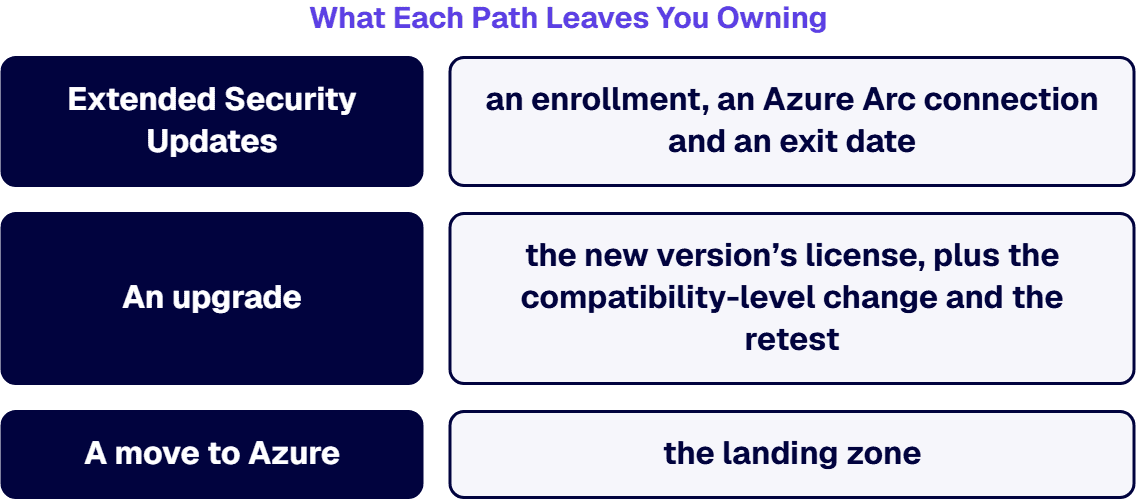
When an auditor asks about a server past support, the question is the same whichever path it took, and every path leaves something behind. Extended Security Updates leave you owning an enrollment, an Azure Arc connection and an exit date: according to Microsoft Learn, the SQL Server subscription is canceled automatically when you upgrade or migrate the instance to Azure, where an as-is SQL Server 2016 virtual machine needs its own paid subscription, and the Windows Server 2016 terms on Microsoft’s Azure Arc page run from configuration on August 3, 2026 to billing from January 13, 2027 and coverage through 2030. An upgrade leaves you owning the new version’s license, since Microsoft’s upgrade planning page says each Windows Server upgrade requires a separate license, plus the compatibility-level change and the retest. A move to Azure leaves you owning the landing zone and, if you choose Azure SQL Managed Instance, a platform that Microsoft’s SQL Server end of support options page describes as fully managed and never reaching end of support.
The i3solutions recommendation: whichever path each server takes, record the server, the path, the Microsoft source and the date the path ends. A server that is on none of the three paths is the one to name first, because it is the one with no answer when the auditor asks.
Choosing among the three paths is the wrong decision when the server is not the real problem. If the application on the server is unsupported code with no vendor and no owner, decide about the application first; that work is described in Modernize Legacy Systems without Disrupting the Enterprise. If the system may not deserve any of the three paths at all, apply the extend, wrap, rebuild or retire test in Are Our Current Systems Stable Enough to Extend, or Too Fragmented to Build On? before spending on a bridge.
If the estate is too large or too tangled to decide server by server before the Windows Server 2016 billing date, start with an assessment of the environment. i3solutions sells and delivers an enterprise IT technology assessment of a Microsoft environment as a named engagement, comprising discovery, gap analysis and a future-state roadmap. Bridge only what that assessment cannot reach in time.
A workload that has to move into a government cloud, or out of one, is a different move with its own plan, and this guide does not cover it.
If you want an outside architect on these servers, the first deliverable is the per-server plan in the table above, one row per server with its path, its Microsoft source and its end date. i3solutions plans and runs governed Azure and Microsoft 365 migrations with senior, U.S.-based engineers. i3solutions also plans and carries out Windows Server and SQL Server upgrades and moves of data, applications and entire operating systems to Azure as project work, with embedded specialists where your team needs them. As a Microsoft-focused application development and integration firm, i3solutions helps enterprises modernize operations and connect platforms, and the people on the work are senior and US-based. The wider practice is Enterprise Digital Transformation Solutions for Governed, Scalable Modernization.
No. Microsoft Learn says “Starting with SQL Server 2016 (13.x), ESUs are available through a paid subscription.” and “ESUs are free for SQL Server 2014 (12.x) and purchasable for SQL Server 2016 (13.x).”
For SQL Server 2016, Microsoft Learn says ESUs are available “after connecting your servers to Azure Arc” and “If you can’t connect your SQL Server instance to Azure Arc, you don’t qualify for this offer.” For Windows Server 2016 ESUs enabled by Azure Arc, Microsoft Learn says “You can configure Windows Server 2016 ESUs in the Azure portal starting August 3, 2026.” and “Software Assurance is required for on-premises workloads.”
Microsoft Learn says “Extended Security Updates for Windows Server 2016 provide Critical and Important security updates for up to three years, through 2030.” It also says “Billing for Windows Server 2016 ESUs enabled by Azure Arc begins January 13, 2027.”
Yes, from installation media, with exceptions. Microsoft Learn says “Starting with Windows Server 2025, nonclustered systems can upgrade up to four versions at a time.” It also says “Not all roles support in-place upgrade.” and “Don’t use in-place upgrade for servers that run Active Directory Domain Services (AD DS).” and “Unlike Windows client, each Windows Server upgrade requires a separate license.”
Service Pack 3 or later. Microsoft Learn lists “SQL Server 2016 (13.x) SP3 or later” as a supported starting point for both versions and notes “Web edition isn’t available in SQL Server 2025 (17.x) and later versions.” It also says “When the database compatibility matches the legacy system, existing database applications stay protected from functional and performance changes.”

US-Based | Est. 1997
© i3solutions. All rights reserved.
US-Based | Est. 1997
© i3solutions. All rights reserved.


