
By Scot Johnson, Founder / CEO, i3solutions. Scot Johnson co-founded i3solutions 30 years ago with a focus on expert-led delivery, strategic advisory, and complex Microsoft-centered solutions for organizations where technology decisions carry operational, financial, and mission risk.
To stabilize a struggling Dynamics 365 implementation, stop new feature work first, then run a short structured triage that separates defects blocking daily operations from design decisions that fight how the business actually runs. Most troubled implementations are not failing on technology. They fail because the platform was configured around a vendor’s template instead of the organization’s real processes, and because users quietly went back to spreadsheets when the system stopped matching their work. Stabilization means re-aligning Dynamics 365 CRM and ERP to how the business operates, repairing the data and integration layer so records can be trusted, and only then resuming a re-sequenced roadmap.
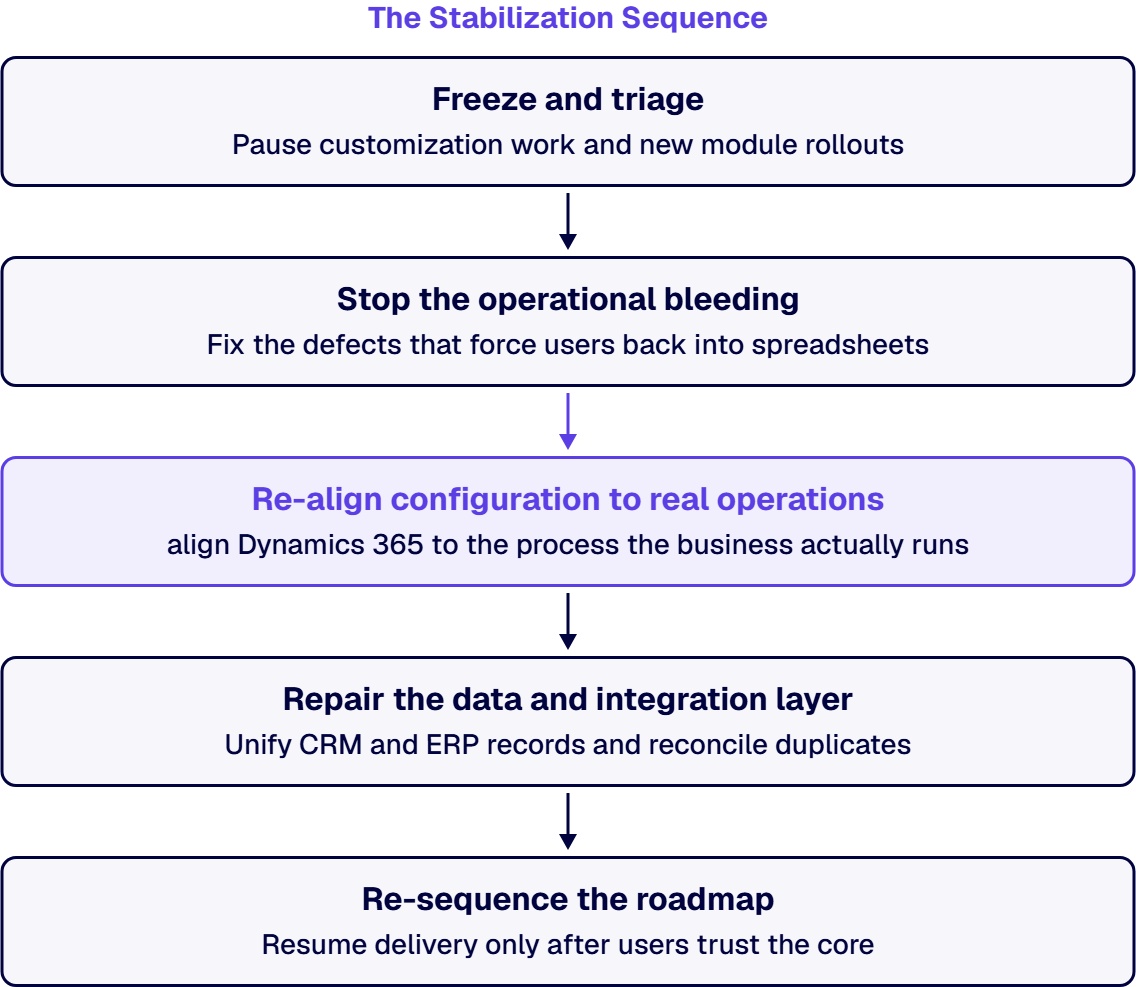
That is the answer in three sentences. The rest of this page is the sequence a steering committee can hold a rescue team to: what gets frozen, what gets fixed first, how configuration gets re-aligned to operations, and the honest criteria for deciding between recovery in place and reimplementation.
The failure pattern is consistent across CRM and ERP rollouts. The implementation was scoped by module rather than by business process, so go-live delivered software that technically works but does not match how orders, cases, or approvals actually move. Users compensate with duplicate entry and offline spreadsheets, which erodes the data, which erodes trust in every report built on it. By the time leadership calls the implementation “struggling,” the visible symptom is usually adoption, but the root cause is almost always alignment: the business was asked to bend around the platform instead of the platform being configured around the business.
A second, quieter driver is the integration layer. Dynamics 365 rarely runs alone. When its connections to Microsoft 365, the Power Platform, or a legacy ERP were built as one-off fixes during a slipping timeline, every downstream system inherits the instability.
Most struggling Dynamics 365 environments are recoverable in place once configuration follows operations instead of the other way around. Reimplementation is the right call only when the data model itself was built on wrong assumptions about the business, and that determination should be the conclusion of a triage, never the opening move. A rip and replace restarts the adoption clock at zero, discards the configuration decisions that were right, and usually re-creates the original failure under a new statement of work if the alignment problem is not named first.
If the implementing partner’s answer to instability is more licenses or another module, that is the signal to get an independent assessment. i3solutions takes over troubled Dynamics 365 environments as a rescue engagement: the same senior people who scope the recovery do the build, pairing configuration re-alignment with repair of the surrounding integration and data governance. All i3solutions Dynamics 365 developers and consultants are U.S.-based. i3solutions has delivered this pattern on Microsoft Dynamics 365 CRM integrations in a regulated healthcare environment and on enterprise application integration for a global professional services firm serving 125,000 users.
Rescue work on Dynamics 365 sits inside a wider practice: the team behind our Dynamics 365 development services also handles failed Microsoft modernization recovery when the instability extends beyond one platform.
A takeover goes faster when the handover is planned before the current partner steps back. The items below belong to your organization, and they are far easier to collect while the relationship is still working than to recover after it ends. Ask for each one in writing, then confirm it by testing it yourself rather than accepting a list.
With those items in hand, build your own plan for the first two weeks around the freeze and triage described above, and nothing more. By the end of that window your steering committee should hold three things: confirmed access to every environment and integration, an inventory of open defects and broken integrations classified as operations blocking, trust eroding, or roadmap noise, and a short list of the fixes that will stop users returning to spreadsheets. If your estate needs longer than two weeks for that, the triage should say why.
Users returning to spreadsheets and duplicate entry, reports nobody trusts, a defect backlog that grows faster than it closes, and a partner roadmap that keeps adding modules while core processes still do not match the system. Adoption decay is the leading indicator; technical defects are usually downstream of it.
Fix in place is the default. Most struggling environments recover once configuration is re-aligned to real operations and the data layer is repaired. Reimplementation is justified only when triage shows the underlying data model was built on wrong assumptions about the business, and it should be a conclusion reached from evidence, not a proposal that arrives before one.
The freeze and triage phase is short and produces the honest answer for your environment: an inventory of what is blocking operations, what is eroding trust, and what is noise. Total recovery time depends on how much of the instability sits in configuration versus the data and integration layer, so any fixed number quoted before a triage is a guess.
Yes. Rescue engagements routinely start from another partner’s implementation. The scoping team and the delivery team are the same senior, U.S.-based engineers, so the assessment you approve is the work that actually gets done.
No. Instability is an alignment and data problem, not a licensing problem. Treat a proposal that answers instability with additional modules or license tiers as a signal to seek an independent assessment before spending more.
Distrusted data is both a symptom and an accelerant: users who do not trust records stop maintaining them, which degrades the records further. Stabilization therefore includes unifying CRM and ERP records, reconciling duplicates, and re-establishing governed integrations so the data can withstand an audit.

US-Based | Est. 1997
© i3solutions. All rights reserved.
US-Based | Est. 1997
© i3solutions. All rights reserved.


