
By Justin Bowen, Sr. Vice President, Delivery Services, i3solutions. Justin has spent more than 15 years at i3solutions and more than 25 years leading project, program, and product delivery across complex technology environments.
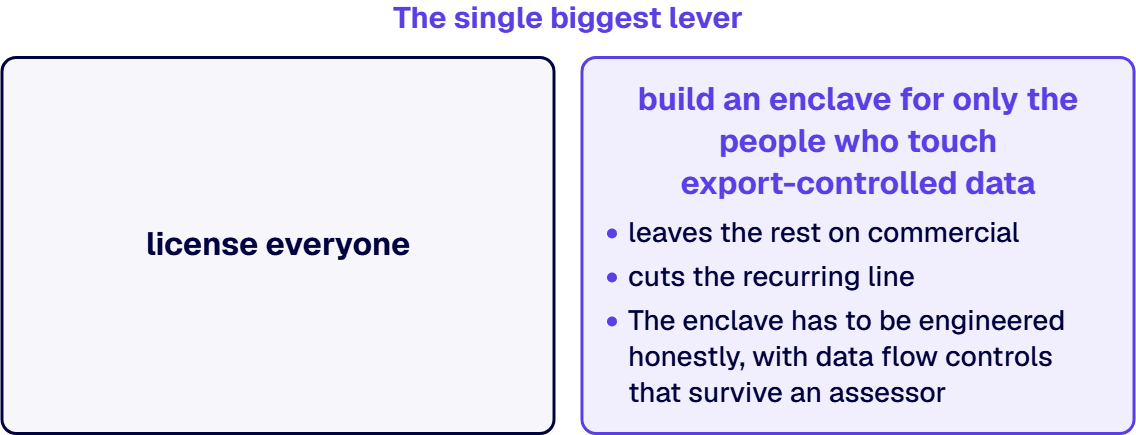
For a US defense contractor, Microsoft 365 GCC High typically runs $35.80 to $97.50 per user per month for the mainstream license tiers, a premium reseller sources place at roughly 30 to 70 percent over commercial Microsoft 365, plus a one-time migration project of about $15,000 to $25,000 for a 25-user organization, $40,000 to $80,000 at 50 to 100 users, and $90,000 to $120,000 or more at 250 or more users. Microsoft does not publish a public per-user list price for GCC High. The per-user figures above are reseller list prices published by Secureframe as of July 1, 2026 (Business Premium $35.80, G3 $65.20, G5 $97.50, F3 frontline $13.20), and the migration bands are cmmccost.com’s published estimates. Four things move the number: seat count, license mix, how much mailbox and SharePoint content you migrate, and whether you license everyone or build an enclave for only the people who touch export-controlled data.
That is the budget answer. The rest of this page shows where each figure comes from, and, before any of that, whether you actually need GCC High at all. Most contractors asking do not, and that is the most expensive mistake on this page.
Most defense contractors do not need GCC High to pass a CMMC Level 2 assessment. CMMC itself never names an environment. What forces GCC High is narrower: export-controlled data under ITAR or EAR, DFARS 252.204-7012 with paragraphs c through g in scope (incident reporting into DoD systems), a DISA SRG Impact Level 4 or higher requirement, CUI-Specified categories, or a contract clause or prime flow-down that names the environment outright. If none of those apply, GCC or even commercial Microsoft 365 with a compliant configuration is usually the defensible choice, at a fraction of the cost. We walk through that decision in detail in our guide to Microsoft 365 GCC vs GCC High.
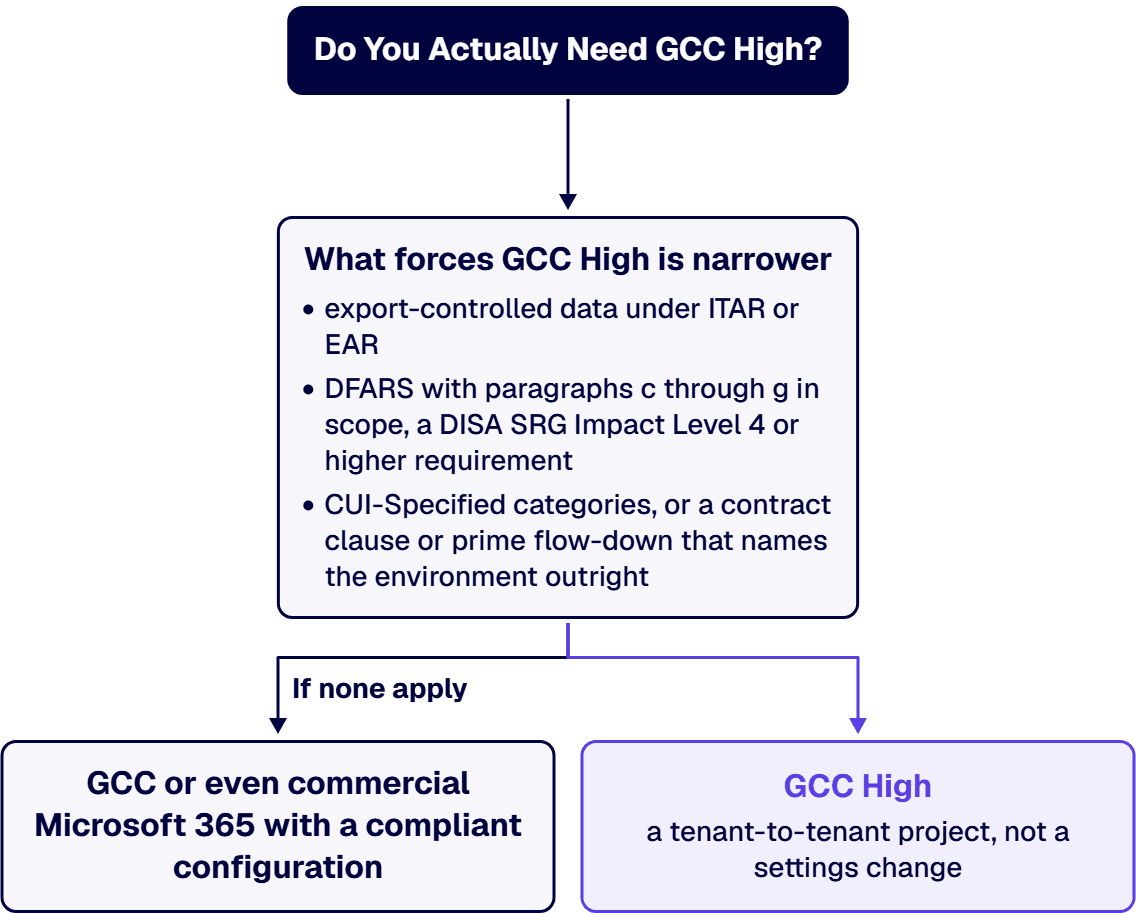
Answer that question first, in writing, with the contract clauses in front of you. Every dollar figure below assumes the answer came back yes.
You cannot buy GCC High from a public price page. Microsoft sells it only through AOS-G authorized partners and government CSP resellers, after Microsoft validates your eligibility. That is why the licensing numbers in circulation are reseller-published rather than Microsoft-published. The two most complete public sources agree closely:
| License | Secureframe reseller list (July 1, 2026) | cmmccost.com published estimate | Who it fits |
|---|---|---|---|
| Microsoft 365 F3 (frontline) | $13.20 per user per month | $12 to $15 | Shop floor and mobile-only workers |
| Business Premium for GCC High | $35.80 | n/a (newer SKU) | Contractors under 300 seats |
| Microsoft 365 G3 | $65.20 | $32 to $38 (E3 equivalent) | Standard knowledge workers |
| Microsoft 365 G5 | $97.50 | $55 to $60 (E5 equivalent) | Full security and compliance stack |
| Defender + Purview add-on | $24.40 | $15 to $22 (EMS E5 range) | G3 or Business Premium tenants closing security gaps |
Three notes a budget owner should carry into the meeting. First, these prices already reflect Microsoft’s July 1, 2026 price increase; for scale, Secureframe’s same dated table lists the commercial anchors at $39 for E3 and $60 for E5, which is what makes the uplift estimates credible (Secureframe’s guide puts GCC High at roughly 30 percent over GCC; E-N Computers, an AOS-G partner affiliate, puts the all-in premium at 40 to 70 percent in its published GCC High cost guide). Second, Business Premium for GCC High only became available on November 3, 2025, per Microsoft’s announcement, and it materially changes the math for sub-300-seat contractors who previously had no option below G3. Third, your actual price comes from your AOS-G partner and varies with commitment term and seat count; treat every figure here as a planning number.
GCC High migration is a tenant-to-tenant project, not a settings change. Microsoft provisions a fresh tenant (up to 30 days under Microsoft’s SLA, typically 2 to 4 weeks), and everything moves: identities, mailboxes, SharePoint, OneDrive, Teams. There is no native Microsoft tool for this path, so migrations run on third-party platforms such as BitTitan, AvePoint, or Quest, plus partner labor. That labor is where the money goes. The most granular published estimates come from cmmccost.com:
| Organization size | Total migration project | Typical duration |
|---|---|---|
| Small (around 25 users) | $15,000 to $25,000 | 8 to 16 weeks end to end |
| Mid (50 to 100 users) | $40,000 to $80,000 | 8 to 16 weeks |
| Large (250+ users) | $90,000 to $120,000+ | 6 to 9 months |
E-N Computers’ published worked example lands nearby from a different direction: $35,000 to $55,000 for migration and implementation at a 20 to 25 user organization simultaneously standing up its compliance program. The spread between the two sources is real and instructive. Migration cost tracks data volume and complexity more than headcount. A 25-user machine shop with tidy mailboxes sits at the bottom of the band; the same headcount with fifteen years of SharePoint customizations, workflow automations, and a full CAD vault does not. SharePoint is reliably the line item that surprises people, because customizations, integrations, and permission structures have to be rebuilt and revalidated rather than copied; we cover why in our note on GCC High’s impact on SharePoint.
The premium is not markup for a badge. GCC High runs in Azure Government datacenters on infrastructure screened to a different standard: support is restricted to US persons on US soil, the service boundary is built to meet DFARS 7012 paragraphs c through g and FedRAMP High requirements, and the sales channel itself (AOS-G validation, partner-only quoting) adds process. You are also paying, indirectly, for what the environment does not have. Some commercial features arrive late or never, and the migration tooling gap noted above is a structural cost, not a vendor inefficiency. When a CFO asks why the license line went up 40 percent, the defensible answer is that the contract’s data handling clauses priced it, not IT.
Simple arithmetic on the published figures gives a board-ready planning range. A 100-user contractor licensing everyone on G3 at Secureframe’s $65.20 list is $78,240 per year in licensing, plus a one-time migration in cmmccost.com’s $40,000 to $80,000 mid-band: call it $120,000 to $160,000 in year one, settling to about $80,000 per year thereafter, before any enclave savings. The same organization scoping a 30-user enclave cuts the recurring line by more than half. Those are planning anchors from published sources, not quotes; your AOS-G partner’s proposal and your own data inventory set the real number.
In our engagements with aerospace and defense manufacturers, the variance between an estimate and the final invoice almost always traces to scope discovered late: an uninventoried SharePoint customization, a CUI data flow nobody had mapped, a prime’s flow-down read for the first time during the project. The cost of the migration is set months before the migration, by how rigorously the environment decision and the data inventory were done. That readiness work is a fixed, bounded exercise, and it is where we start; see our CMMC technology readiness services for how we scope it.
We manage GCC High migrations end-to-end: from eligibility validation and licensing coordination with your AOS-G supplier through identity architecture, data migration, security baseline configuration, and post-migration governance. i3solutions plans and runs these migrations for regulated defense organizations, structuring each phase around the compliance evidence assessors expect.
No. GCC High is sold only through AOS-G authorized partners and government CSP resellers, after Microsoft validates your organization’s eligibility. There is no public price page and no self-serve checkout. Tenant provisioning after validation can take up to 30 days under Microsoft’s SLA.
Published estimates put the uplift between roughly 30 percent (Secureframe’s pricing guide, versus GCC) and 40 to 70 percent all-in (E-N Computers’ cost guide, versus commercial). Against the commercial anchors in Secureframe’s dated table ($39 for E3, $60 for E5), the reseller-published $65.20 for G3 and $97.50 for G5 land inside that range.
Usually not. CMMC Level 2 can be met in GCC; Microsoft 365 Commercial is not among the Office 365 services Microsoft names adequate for DFARS. GCC High becomes mandatory when ITAR or EAR data, DFARS 7012 paragraphs c through g, Impact Level 4, CUI-Specified categories, or an explicit contract clause is in play. Read the contract before the price list.
Published estimates run 8 to 16 weeks end to end for organizations under 100 users and 6 to 9 months for larger ones, including 2 to 4 weeks of tenant provisioning. Heavy SharePoint customization or large mail archives push toward the top of the band.
Yes, materially, when only a minority of users handle export-controlled data. Licensing 30 of 200 users in GCC High instead of all 200 can cut the recurring bill by more than half. The saving is only real if the enclave boundary is engineered and documented well enough to survive an assessment; a leaky enclave buys the premium and the finding.

US-Based | Est. 1997
© i3solutions. All rights reserved.
US-Based | Est. 1997
© i3solutions. All rights reserved.


