
By Matt Lawson, Senior Consultant, i3solutions. Matt has spent more than 14 years at i3solutions guiding complex enterprise technology work from scope and system design through development, acceptance, and long-term support, including Power Platform implementation across regulated and federal environments.
Hire a firm that evaluates Power Apps licensing from your application portfolio, not your headcount, because the license question is really a portfolio question in disguise. Microsoft’s published options run from $0 to $20.00 per user per month: seeded Power Apps rights already inside Microsoft 365 licenses for apps on standard connectors, Power Apps Premium at $20.00 per user per month paid yearly, a volume tier at $12.00 per user per month at a 2,000-seat minimum, pay-as-you-go metered through an Azure subscription, and a free Developer Plan for isolated build environments (microsoft.com Power Apps pricing, accessed August 2026). Which mix is right depends on which of your apps genuinely need premium connectors and Dataverse, which can live happily on SharePoint lists under the licenses you already own, and how many users each app actually reaches. A reseller answers that question with a quote. An advisor answers it with an app inventory, and the inventory usually cuts the quote.
Below: the license mechanics an evaluation must cover, the vetting questions that separate an advisor from a reseller, and what the engagement should hand you.
What you already own. Microsoft 365 licenses include seeded Power Apps rights: users can create and run canvas apps against Microsoft 365 data using standard connectors. They exclude premium and custom connectors and Dataverse-backed custom apps (Microsoft Learn, Power Platform licensing overview, accessed August 2026). A meaningful share of enterprise app demand, forms over SharePoint lists, approvals, team trackers, fits inside those seeded rights. Every app that can live there is license spend avoided, and an honest evaluation starts by finding them.
Premium, and the tier break that changes the math. Power Apps Premium at $20.00 per user per month gives a user unlimited apps and Power Pages sites with premium connectors and Dataverse. At 2,000 or more seats, the published price drops to $12.00 per user per month, a 40 percent reduction that turns some phased rollouts inside out: an organization creeping toward 2,000 Premium users one department at a time pays the higher rate the entire way, while a planned enterprise agreement crossing the threshold at once does not. Sequencing the rollout against the tier break is exactly the kind of modeling you are hiring for.
Pay-as-you-go and the per-app path. For apps with narrow or unpredictable audiences, metered billing through an Azure subscription avoids committing seats to occasional users, and government per-app plans exist for the same portfolio shape in sovereign clouds. The crossover between metered use and a committed seat is a run-rate calculation, not a guess, and it should appear in the evaluation with your actual usage numbers in it.
Dataverse capacity, the second bill. Premium licensing includes pooled Dataverse entitlements, and growing portfolios outgrow them: additional database capacity lists at $40.00 per GB per month (microsoft.com Power Apps pricing, accessed August 2026). An advisor who models license seats but not storage trajectory has priced year one and ignored year three.
Government clouds are their own path. Power Apps US Government is sold as per-user and per-app plans for Government through Volume Licensing and Cloud Solution Provider channels, and CSP is not available for GCC High. Feature and connector parity with commercial has documented exceptions. If your organization operates in GCC or GCC High, an evaluation priced from the commercial page is wrong before it starts; our comparison of GCC High versus GCC covers the environment decision itself.
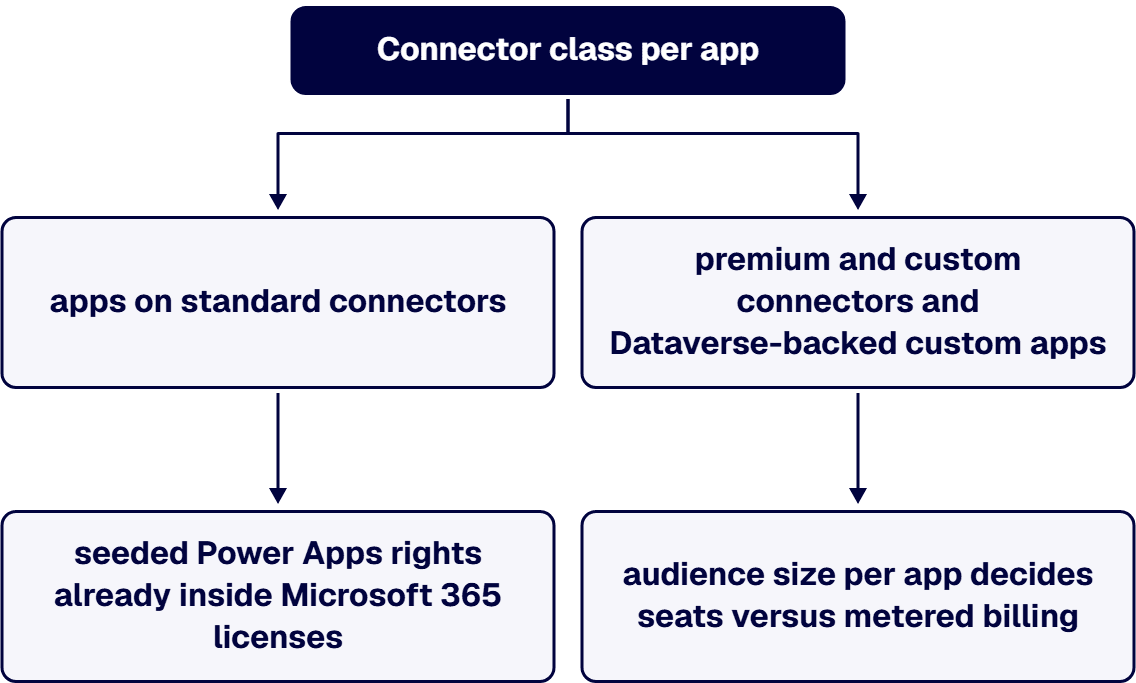
1. An app inventory before a seat count. Which apps exist (including the shadow ones), what each connects to, and how many people actually open each one. Connector class per app decides seeded versus Premium; audience size per app decides seats versus metered billing. A proposal without the inventory is a quote wearing a consulting engagement’s clothes.
2. The seeded-rights map. Require an explicit list of which current and planned apps can run on the Power Apps rights inside your existing Microsoft 365 licenses. Advisors who resell licenses have a structural incentive to skip this step. i3solutions is a Microsoft Partner with 30 years of delivery experience and does not price its advisory on your license volume, which is the incentive alignment to look for anywhere you shop.
3. Cost modeled under at least two schemes, with the tier break shown. Premium seats, the mixed model with metered billing for narrow apps, and the 2,000-seat tier if your trajectory approaches it, each priced with your real numbers over a multi-year window that includes Dataverse storage growth.
4. Governance attached to the recommendation. License sprawl and app sprawl are the same problem wearing different badges. The evaluation should land alongside environment strategy and DLP policy, the machinery covered in our treatment of citizen developer governance, because ungoverned app creation quietly converts seeded-rights users into Premium requirements.
5. Delivery capability behind the advice. Licensing recommendations create build work: consolidating duplicate apps, moving a SharePoint-list app to Dataverse when it earns it, or the reverse. A firm that also builds can execute what it recommends and stays accountable for the projected savings. One i3solutions program replaced 32 outdated InfoPath forms with Power Apps and reduced maintenance demands by 40 percent, saving an estimated $150K to $200K annually in IT labor and support; portfolio rationalization and license rationalization were the same project. That capability lives in our Power Apps development practice and its hiring guide, both part of our broader Power Platform development services.
Four artifacts, in writing: the app inventory with connector class and audience per app, the seeded-rights map naming the apps your Microsoft 365 licenses already cover, the license model comparison across schemes and years with the tier break and storage trajectory shown, and a target assignment naming who gets Premium, which apps go metered, and what governance keeps the model true as new apps appear. If the advisor’s deliverable is a SKU list, you bought a quote. If your evaluation also covers Power Automate, the flow-side licensing mechanics are their own discipline; see our guide to hiring a Power Automate licensing advisor.
Hire a licensing advisor who starts from an app inventory rather than your headcount, maps which of your apps already run on the seeded Power Apps rights inside your Microsoft 365 licenses, models cost across schemes and years, and ends in a target assignment that names who gets Premium and which apps go metered. The alignment to look for is a firm whose advice is not priced on your license volume, because an advisor who resells licenses has a structural incentive to skip the seeded-rights step.
On an estate that is already licensed, the same work runs backwards from what you hold today: an inventory of the apps in use with the connector class and audience of each, a map of what your current Microsoft 365 rights already cover, a cost comparison you can re-run as apps change, and a target assignment you can hold the advisor to. Overspend surfaces where those artifacts disagree with the assignment list you are paying for: apps on standalone seats that seeded rights would carry, seats held for users whose app is narrow or seasonal, and storage growth priced for the first year and not the third.
Ask for the arithmetic per app instead of a rule of thumb, and ask for governance attached to the recommendation, because app creation that nobody governs turns seeded-rights users into Premium ones over time. A deliverable that is only a list of SKUs is a quote, not an audit, and an audit that reports a blended saving without naming the assignments behind it is the same thing wearing a percentage. Flow-side assignments run on a separate licensing model and are scoped separately.
Yes, for a defined class of apps: canvas apps on standard connectors against Microsoft 365 data. Premium connectors, custom connectors, and Dataverse-backed custom apps require standalone licensing. Mapping your portfolio against that line is the first artifact of a real evaluation, because every app that fits under seeded rights costs nothing incremental to license.
$20.00 per user per month paid yearly at Microsoft’s published list price, with unlimited apps for the licensed user. At a 2,000-seat minimum the published price is $12.00 per user per month. Organizations between roughly 1,500 and 2,000 planned seats should model reaching the tier deliberately, because the 40 percent delta compounds across every seat, every month.
When an app’s audience is small, seasonal, or unpredictable. Metered billing through an Azure subscription charges for actual use without seat commitments, which beats a committed seat for occasional users and loses to one for daily users. The crossover comes out of your usage data, and a competent evaluation shows the arithmetic per app rather than asserting a rule of thumb.
Nothing per connector. Microsoft’s Power Apps pricing page lists no separate connector price: premium connectors come with the license, and Microsoft describes the Power Apps Premium plan as letting each licensed user run unlimited apps that connect to varying data sources, including premium connectors. The real cost of a premium connector is therefore the license for every user who runs an app that uses it, whether that is a Premium seat or metered pay-as-you-go use through an Azure subscription.
Every Premium seat adds to a pooled Dataverse entitlement, and portfolios with audit trails, attachments, and model-driven apps grow past the pool. Additional database capacity lists at $40.00 per GB per month, which is real money at enterprise scale. Storage trajectory belongs in the license model, not in next year’s surprise.
Yes. Power Apps US Government plans (per-user and per-app) are purchased through government channels, Volume Licensing or CSP, and CSP is not available for GCC High. Connector availability and feature parity also differ from commercial. Sovereign-cloud licensing is a distinct path with its own eligibility validation, so model it with a partner who has delivered there rather than from the public pricing page.
There is a strong case for it. License evaluations recommend portfolio changes, and portfolio changes are build work. A firm that does both prices the recommendation with execution attached and is still in the room when the projected savings are audited. It also removes the reseller incentive: advice priced on outcomes rather than on license volume.

US-Based Microsoft System Integrator | Est. 1997
© i3solutions. All rights reserved.
US-Based Microsoft System Integrator | Est. 1997
© i3solutions. All rights reserved.


