
By Matt Lawson, Senior Consultant, i3solutions. Matt has spent more than 14 years at i3solutions guiding complex enterprise technology work from scope and system design through development, acceptance, and long-term support, including Power Platform implementation across regulated and federal environments.
Hire a firm that treats Power Automate licensing as an architecture decision, not a procurement line item. The right license mix is determined by how your flows are built and who owns them: a per-user Power Automate Premium license at $15.00 per user per month paid yearly, a Power Automate Process capacity license at $150.00 per bot per month attached to the flow itself, or the seeded Power Automate rights already inside your Microsoft 365 licenses (Microsoft’s published pricing at microsoft.com, accessed August 2026). A firm that starts by counting heads will quote you the most expensive answer. A firm that starts by inventorying flows, connectors, and run patterns will usually find that a fraction of your users need Premium and a handful of shared flows should carry their own Process licenses instead.
This page gives you the licensing mechanics an advisor should be fluent in, the vetting questions that separate a licensing engineer from a license reseller, and what the engagement should hand you at the end.
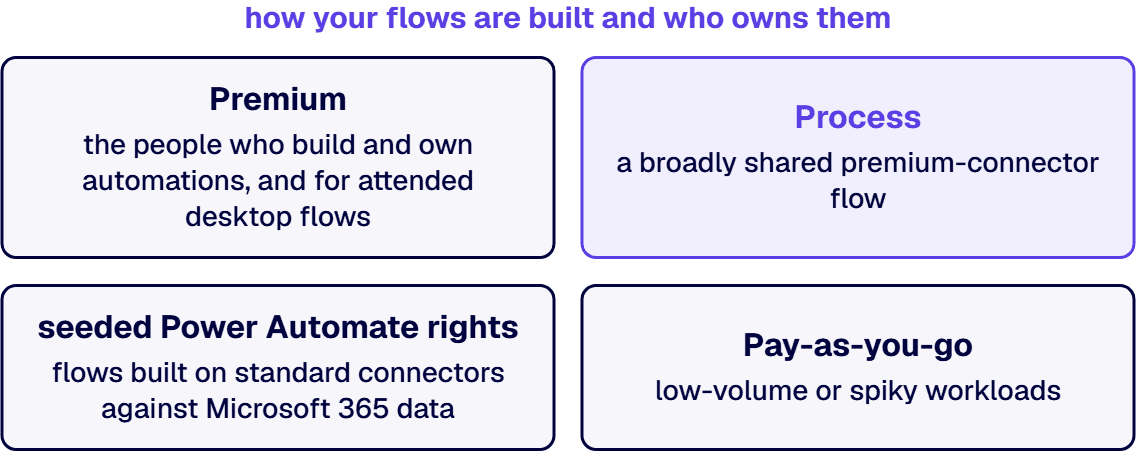
Premium is a user license. At $15.00 per user per month it entitles that person to build and run unlimited cloud flows with standard, premium, and custom connectors, register a workstation and run attended desktop flows (RPA), and use process mining. Each license carries 5,000 AI Builder credits per month, 250 MB of Dataverse database and 2 GB of file storage, and a 40,000 action-per-day limit per user (Microsoft Learn, Types of Power Automate licenses, accessed August 2026). This 5,000-credit allowance applies through October 31, 2026: Microsoft’s AI Builder licensing overview states that a Power Automate license bought or renewed from November 1, 2026 no longer receives seeded AI Builder credits, while credits already seeded on a license before that date continue through the end of that license’s contract term.
Process is a capacity license. At $150.00 per bot per month it attaches to a specific cloud flow or machine rather than a person. Assigned to a solution cloud flow, it grants premium and custom connector use regardless of who triggers the flow, with 250,000 actions per day; up to 10 Process licenses stack on one flow, or one license can be shared across a flow group of up to 25 flows. Allocated to a machine, it becomes an unattended RPA bot. This is the lever that keeps a broadly shared premium-connector flow from forcing Premium onto every person who touches it.
Hosted Process adds the machine. At $215.00 per bot per month, Microsoft hosts the RPA machine, which removes the physical-infrastructure management from unattended automation.
Your Microsoft 365 licenses already include something. The seeded Power Automate rights cover flows built on standard connectors against Microsoft 365 data. They exclude premium connectors, custom connectors, and RPA. A real advisor maps which of your existing flows are legitimately covered by seeded rights before recommending you buy anything.
Pay-as-you-go exists. Power Automate can be metered through an Azure subscription with no upfront license commitment, which suits low-volume or spiky workloads. The break-even against per-user and per-flow licensing depends on run volume, and modeling that break-even is exactly the kind of work you are hiring for.
1. A flow inventory before a license count. The advisor’s first artifact should be an inventory of your flows: which connectors each uses, who triggers it, how often it runs, and whether it is attended or unattended. A proposal priced from your headcount alone was written before anyone looked at your tenant.
2. Cost modeled under at least two licensing schemes. Require a side-by-side of the per-user path, the capacity path, and the mix, using your actual flows. The arithmetic is not subtle. One hundred Premium users cost $18,000 per year; twenty makers plus six Process-licensed shared flows cost $14,400. The judgment is in knowing which flows can carry the capacity license and which action limits will bite.
3. Fluency in the limits, not just the prices. Action limits per license, Process stacking, flow-group sharing, and the rule that a machine must be registered by a Premium user before a Process license can make it an unattended bot. Advisors who cannot answer these from memory will discover them in your production environment.
4. A position on government clouds if you operate in one. Power Automate US Government plans run in GCC, GCC High, and DoD environments with their own purchasing channels, and the Cloud Solution Provider channel is not available for GCC High. If your organization handles regulated federal data, licensing advice that ignores the sovereign-cloud path is incomplete.
5. Delivery capability behind the advice. Licensing recommendations change how flows are built: moving a flow into a solution so it can carry a Process license, restructuring a desktop flow for unattended mode, consolidating connectors. An advisor who also builds can execute the recommendation; one who only advises hands you a memo and leaves the rework to you. This is why licensing advisory pairs naturally with Power Automate development capability and with Power Automate security consulting when compliance frameworks are in scope.
A useful licensing engagement is short and ends in artifacts, not opinions: the flow inventory with connector classes and run patterns, the license model comparison with annual cost under each scheme, a target license assignment naming which users get Premium and which flows get Process, and the governance rules that keep the model true as new flows appear. The last item matters most. License sprawl is not a one-time purchase mistake; it is a governance gap, and the fix lives in the same environment and DLP policy machinery covered by a Power Platform governance practice. If the evaluation also needs to cover Power Apps, the app-side mechanics are a different discipline, and we treat them separately in our guide to hiring a Power Apps licensing advisor.
i3solutions has been a Microsoft Partner with 30 years of enterprise technology delivery experience and has delivered Power Platform programs at federal enterprise scale, including a deployment across a federal defense intelligence command spanning 10,000 personnel and 180 locations. Licensing advisory at i3solutions sits inside the Power Platform development practice, so the people modeling your license mix are the same discipline that builds and governs the flows the model describes.
No. If the flow is in a solution and carries a Power Automate Process license, it can use premium and custom connectors regardless of the license held by the person who triggers it. Premium at $15.00 per user per month is for the people who build and own automations, and for attended desktop flows, which run under the user’s own license.
Premium licenses a person; Process licenses an automation. Premium ($15.00 per user per month) covers unlimited flows for that user, attended RPA, process mining, and AI Builder credits. Process ($150.00 per bot per month) attaches to one cloud flow or machine, carries 250,000 actions per day, and provides an unattended RPA bot when allocated to a machine. Most enterprises need a mix, and the ratio is exactly what a licensing engagement determines.
Yes, with limits. Microsoft 365 plans include seeded Power Automate rights for cloud flows that use standard connectors against Microsoft 365 data. Premium connectors, custom connectors, and desktop-flow automation require Premium, Process, or pay-as-you-go licensing. An advisor should tell you which of your current flows are already covered before proposing new spend.
When run volume is low, spiky, or unproven. Pay-as-you-go bills through an Azure subscription with no license commitment, which makes it a fit for pilots and occasional-use flows. Once a flow runs steadily, a Process license or Premium seats usually cost less; the crossover point comes out of the run-volume model your advisor builds from your actual usage.
Through Power Automate US Government plans that run in the GCC, GCC High, and DoD environments, purchased through government licensing channels; the Cloud Solution Provider channel is not available for GCC High. Connector availability and feature parity also differ from commercial cloud, so a flow inventory built for a commercial tenant cannot simply be priced into a sovereign one. If you are weighing the environments themselves, start with our comparison of GCC High versus GCC.
There is a real advantage when it is. Licensing recommendations frequently require build work to realize: moving flows into solutions, restructuring for unattended RPA, retiring duplicate automations. A firm that does both prices the recommendation with its execution cost attached, and it stays accountable for whether the projected savings actually land.

US-Based Microsoft System Integrator | Est. 1997
© i3solutions. All rights reserved.
US-Based Microsoft System Integrator | Est. 1997
© i3solutions. All rights reserved.


