
By Michael Branson
The Power Automate approver license rule, in Microsoft’s licensing FAQ, reads “Users who respond to approval requests don’t need a Premium license” for a premium flow awaiting their decision. They still need a license granting Power Automate access; invoking or owning a premium flow is licensed separately.
Finance has flagged the Power Automate line on the invoice, and the question on the table is why the managers who sign off on an expense, an access request or a vendor onboarding are now sitting in the license count. The approval workflow left the pilot team months ago. It now reaches an entire division’s management chain, and the person being asked to defend the count is you, not the business unit that asked for the workflow. Microsoft’s licensing language talks about makers, owners, flow runs and connectors, and the word you need it to use, approver, is not the word it leads with.
This page answers the one question in that conversation, from Microsoft’s own Power Automate licensing FAQ and its companion pages, with the date each was read: whether a user whose only role is to approve or reject a request needs a Power Automate Premium license. It does not restate what Premium costs, which the What Is the Total Cost of Power Automate Premium for 100 Users Annually? page owns, and it does not re-explain the per-user versus per-flow choice, which the Power Automate Premium vs Process page owns and which is linked below where the per-flow license comes up. It summarizes only enough of the licensing model to place the approver inside it.
If you have been told the answer is “it depends” and nobody has produced the sentence it depends on, here it is. Microsoft’s Power Automate licensing FAQ, dated 2026-08-14 and read on September 12, 2026, poses this exact question: “There’s a premium flow that sends approval requests to a set of users and then waits for the users to approve or reject the request before it continues running. Do the approvers need a Premium license?” Its answer is one sentence: “Users who respond to approval requests don’t need a Premium license.”
That is the rule for the user whose only interaction is the response. It is not a rule that approvers need no license of any kind, and the same documentation names the license they do need. Microsoft’s Get started with approvals page, dated 2026-04-29 and read on September 12, 2026, states the condition on the responder’s side, responder being the word used here for the user who answers the request: “After you assign an approval request to a user, they can respond directly from an Outlook email, a Microsoft Teams adaptive card, or the Power Automate action center if they have a Power Automate license or an Office 365 or a Dynamics 365 license with built-in Power Automate capabilities.” So the approver needs one of those licenses, and for a manager already carrying a Microsoft 365 license with Power Automate capabilities, that condition is met by the license they hold today. The same page adds a Dataverse condition rather than a licensing one: when you assign an approval to users who are not in your environment, “they’re automatically given the Approvals User Dataverse security role”, and “Users need this role for their responses to be processed and persisted in their approvals history.”
When the license count is being challenged, the question to ask about a flow is not who approves it but whose context it runs in, because that is the axis Microsoft’s terms are written on. The same Power Automate licensing FAQ states: “Automated and scheduled flows always run in the context of the flow owner regardless of who starts the flow or what accounts are used for connections inside of the flow. Instant flows (button, hybrid triggers) run in the context of the user who invokes them, regardless of the connections used in the flow. If an automated or scheduled flow uses a premium connector, only the owner needs to have a Premium license.”
Read that against a typical approval workflow. An expense report lands in a list or a form, an automated flow picks it up and routes an approval to the manager, waits for the response, and writes the result somewhere. The flow runs in the owner’s context. The manager responds from Outlook, Teams or the action center. Under the FAQ’s own words, the owner carries the Premium requirement if the flow uses a premium connector, and the manager, as a responder, does not.
Two more sentences from the same FAQ bound the rule from the other side. First, the connector test: “If the flow doesn’t use a premium connector, you don’t need a Premium license. You can use a Microsoft 365 license.” The Get started with approvals page states that “the approvals connector is a standard connector”, so an approval flow built on standard connectors alone raises no Premium requirement for anyone in it. Second, the priority rule for a flow licensed on its own: “The Process license has the highest priority among all licenses. This priority means if a Process license is assigned to a flow, the flow always uses the Process license limits and doesn’t need an owner or running user to have a Premium license.” Which flows the per-flow Process license fits, and where the money moves when you choose it, is the question the Power Automate Premium vs Process: Which License Fits Which Flow, and Where the Money Actually Goes page answers; it is linked here rather than repeated.
The license names above are Microsoft’s, from its Types of Power Automate licenses page, dated 2026-07-20 and read on September 12, 2026: Power Automate Premium, Power Automate Process, Power Automate Hosted Process and Power Automate Free. That page also states that “Other licenses across Microsoft 365, Dynamics 365, and the Power Platform include a limited set of Power Automate capabilities”, which is the entitlement an approver holding a Microsoft 365 license is standing on.
If the invoice jumped when the workflow reached the management chain, the arithmetic behind it is simple and the rule above says it was avoidable. An approval hierarchy touches one manager per level per request, and a division’s expense, access and onboarding workflows share the same managers. Licensing each of those managers at Premium “to be safe” prices a responder as if they were a maker, on every workflow they appear in, and hands Finance a recurring line with no seat-level justification behind it. The FAQ’s responder sentence is the justification for taking them off it.
The reverse error is cheaper on the invoice and worse in a review. If the approval step is not a response to an automated flow but a button the manager presses, the flow is an instant flow and the FAQ is equally plain: “If an instant flow has premium connectors, every user who runs the flow needs a Power Automate Premium license. In such cases, instead of licensing every user, you can license the flow with a Process license.” A manager who invokes a premium instant flow is a running user, not a responder, and the FAQ’s answer to a shared instant flow with run-only users is “Everyone who invokes the flow needs a Premium license because it’s an instant flow.” Treating those managers as free approvers is the finding a procurement review lands on IT.
What separates the two cases is on the flow itself, not on the person. The FAQ says where to look: “To find out what type (automated/manual/scheduled) of flow you have, select a flow to see its ‘type’ in the details.” A flow inventory with the type and the connector list beside each flow, read from the Power Automate portal, is the artifact that settles the count in a budget review. Where a manager sits on both kinds of flow, the instant premium flow decides the license, and the approval responses ride on it.
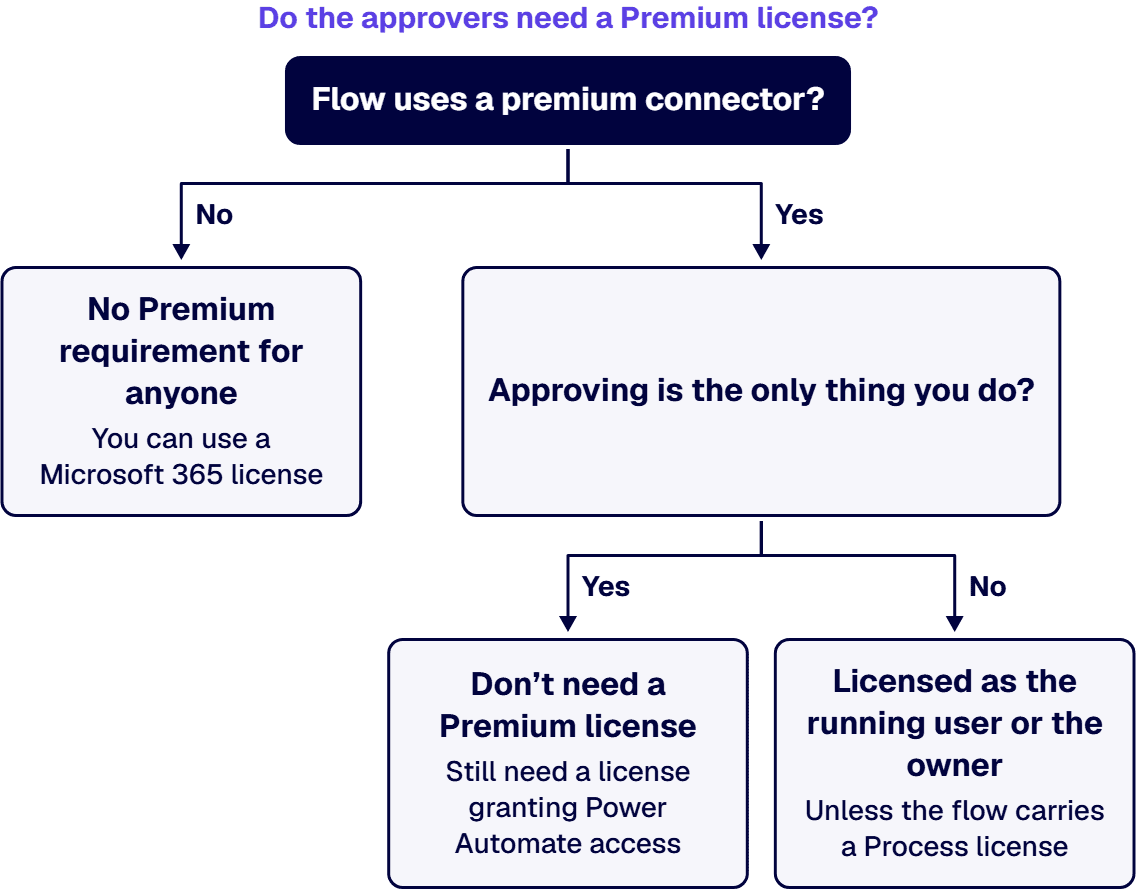
If any of the following is true of your managers, the cheap answer above is the wrong one, and the reason is a condition in Microsoft’s terms rather than caution. The first is the one just described: the same manager invokes an instant flow that uses premium connectors, anywhere in the tenant, and is licensed as a running user. The second is ownership: a manager who owns an automated or scheduled flow that uses a premium connector needs Premium as its owner, whatever else they do in it. Where two of these conditions point different ways for one manager, the condition that carries a license wins: a responder who is also a running user or an owner is licensed as the running user or the owner. The third is Microsoft’s multiplexing boundary. The FAQ’s own example is a premium flow that triggers when an item is added to a SharePoint list. If the flow only emails the owner, then in the FAQ’s words “only the owner needs a license because they’re the only person who gets value from the flow”. If instead the flow “sends an email to the user who uploads the item, both the owner and the user need a Premium license”, because, as the FAQ continues, “the user indirectly triggers the flow (by uploading an item into SharePoint) and gets value from the flow in the form of an email. Failure to license all the users falls under multiplexing.” The FAQ states that “Using multiplexing as a mechanism to reduce the number of licenses to purchase is a license violation.”
That third condition is where the honest edge of this page sits. Microsoft’s responder sentence and Microsoft’s multiplexing example are two different fact patterns, a user who responds to an approval request and a user who indirectly triggers a premium flow and receives its output, and the FAQ does not draw the line between them for you. A manager whose approval response is the only thing they do in a flow is a responder. A manager whose own submission starts a premium flow that then routes back to them is closer to the multiplexing example. Which side of that line a given workflow falls on is a read of that workflow’s trigger and its outputs, flow by flow, and not something to settle from a headcount.
The fourth condition is a posture rather than a rule. The same FAQ opens with Microsoft’s recommendation that “most organizations buy the Power Automate Premium license for every user in their organization.” An estate that follows that recommendation across its users, so that an audit does not have to trace which managers are responders and which are makers, is choosing audit simplicity over the responder exemption, and can defend that choice on the record. What it cannot defend is arriving there by accident, one workflow rollout at a time, with no inventory to show why.
A first conversation starts from artifacts your tenant can produce today rather than from a quote. The flow inventory with type and connector list per flow, the owner of each flow, the list of users who hold run-only access to each instant flow, and the license assignment report from the Microsoft 365 admin center. Read together, those show which of your approvers are responders under Microsoft’s rule and which are running users or owners, and they give Finance the seat-level justification the invoice line currently lacks. If you want a firm to run that read on your specific tenant, the How Do I Hire a Firm to Assist with Power Automate Licensing Decisions? page describes what that engagement looks like.
i3solutions implements Power Platform licensing across Power Apps per-app and per-user plans, Power Automate per-flow and per-user plans, and the Microsoft 365 default entitlements where app complexity is low. i3solutions has built and supports hundreds of production Power Automate flows across its client base. All i3solutions Power Automate developers and consultants are U.S.-based. The governance model that keeps a flow inventory current after the first read is set out on the Designing a Power Platform Governance Framework That Holds Up in a Regulated Enterprise page, and the wider practice sits under Enterprise Power Platform Development & Implementation Services for Governed Operations. To put your own inventory in front of someone who has read these terms against a live tenant before, Contact Us.
If the approver’s only role in the flow is to approve or reject the request, Microsoft’s Power Automate licensing FAQ answers no: users who respond to approval requests do not need a Premium license. The approver does need a license that grants access to Power Automate, and Microsoft’s Get started with approvals page names a Power Automate license, or an Office 365 or Dynamics 365 license carrying Power Automate capabilities, as what lets a user respond from Outlook, a Teams adaptive card or the Power Automate action center. The answer changes when the same person is more than a responder: a user who invokes an instant flow that uses premium connectors needs a Premium license as a running user, and the owner of a premium automated or scheduled flow carries the Premium requirement for that flow, in each case unless the flow itself carries a Process license.
If approving is the only thing you do in the flow, no. Microsoft’s Power Automate licensing FAQ states that users who respond to approval requests do not need a Premium license, and its Get started with approvals page states that the approvals connector is a standard connector, so an approval flow built on standard connectors raises no Premium requirement for anyone in it. What you need in order to respond is a license carrying Power Automate access, and a Microsoft 365 license with built-in Power Automate capabilities provides that. Check one thing before relying on that: whether the approval reaches you from an automated flow that runs in its owner’s context, or from an instant flow you trigger yourself, because Microsoft’s FAQ licenses every user who invokes a premium instant flow, and a responder and a running user are two different roles in its terms.

US-Based | Est. 1997
© i3solutions. All rights reserved.
US-Based | Est. 1997
© i3solutions. All rights reserved.


