
By Michael Branson, Founder and COO, i3solutions
Power Automate Premium licenses a person: $15.00 per user per month, paid yearly, covering cloud flows with premium connectors, attended desktop automation, and process mining. Power Automate Process licenses the automation itself: $150.00 per bot per month for 250,000 actions per day, unattended RPA, and no dependency on who owns or triggers the flow. Most enterprises need a deliberate mix, not a choice.
Premium and Process are not a small plan and a big plan. They are two different licensing models. Premium is a user license: it is assigned to a named person and entitles that person to build and run automations. Process is a capacity license: it is allocated to a specific automation, a cloud flow or a machine, and gives that automation its own entitlements regardless of which humans touch it.
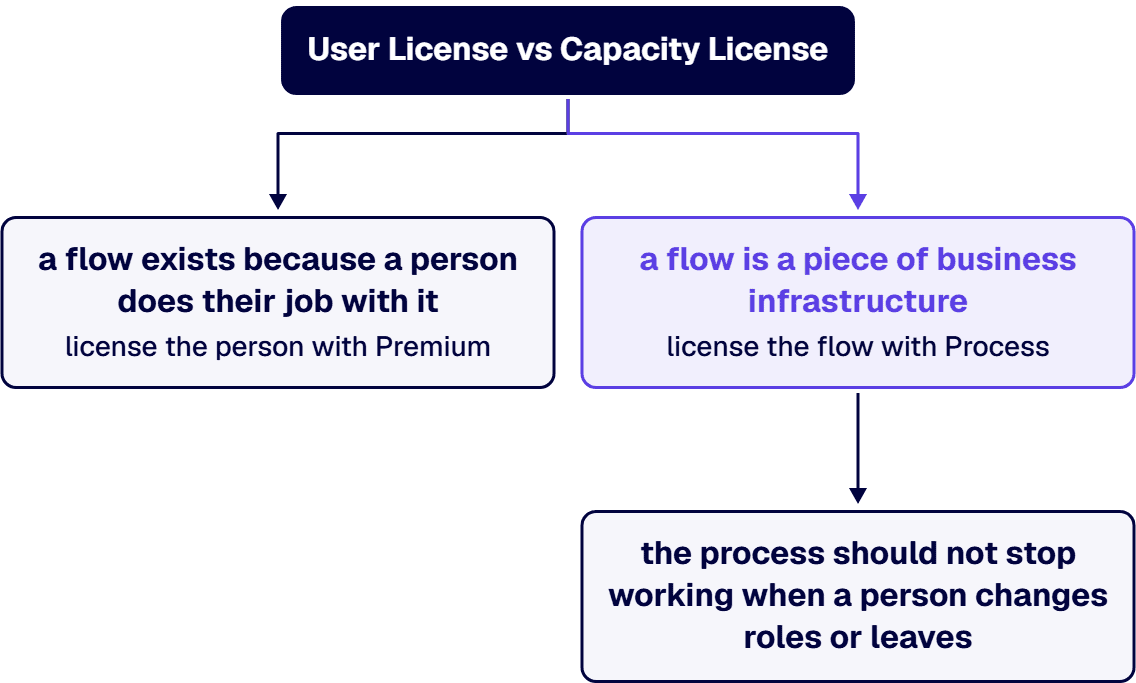
That one distinction settles most of the comparison. If a flow exists because a person does their job with it, license the person with Premium. If a flow is a piece of business infrastructure, an invoice intake process, a nightly reconciliation, an unattended bot working a queue, license the flow with Process, because the process should not stop working when a person changes roles or leaves. Everything else, price, action limits, RPA modes, follows from that split.
The Premium license gives a named user the full authoring and execution surface: unlimited cloud flows using standard, premium, and custom connectors, desktop flows in attended mode through one attended bot on the user’s registered workstation, full access to process and task mining with 50 MB of process mining data storage per license (up to 100 GB per tenant), 5,000 AI Builder credits per month, and Dataverse capacity of 250 MB database plus 2 GB file per license. This 5,000-credit allowance applies through October 31, 2026: Microsoft’s AI Builder licensing overview states that a Power Automate license bought or renewed from November 1, 2026 no longer receives seeded AI Builder credits, while credits already seeded on a license before that date continue through the end of that license’s contract term. Each Premium user carries a daily action limit of 40,000 actions.
Premium is the license Microsoft recommends for every maker, and for good reason: machine registration for desktop automation is performed by Premium users, several RPA management pages in the portal are visible only to Premium users, and attended automation exists only under a user license. A tenant with zero Premium licenses cannot operate an RPA estate at all.
The Process license attaches to an automation. Allocated to a cloud flow, it raises that flow’s entitlement to 250,000 actions per day and lets the flow use premium and custom connectors no matter what license the owning or triggering users hold. Allocated to a machine, it becomes an unattended bot that runs one desktop flow at a time. Each license includes 5,000 AI Builder credits per month and Dataverse capacity of 50 MB database plus 200 MB file. This 5,000-credit allowance applies through October 31, 2026: Microsoft’s AI Builder licensing overview states that a Power Automate license bought or renewed from November 1, 2026 no longer receives seeded AI Builder credits, while credits already seeded on a license before that date continue through the end of that license’s contract term. Process mining is not included.
Two scaling mechanics matter at enterprise volume. First, stacking: up to 10 Process licenses can be stacked on a single cloud flow, each adding 250,000 actions per day. Second, flow groups: one Process license assigned to a flow group shares its 250,000 daily actions across up to 25 cloud flows, with child flows added to the group explicitly. Stacking is not available on flow groups, so high-volume single flows and broad portfolios of small flows are provisioned differently.
For completeness: Hosted Process at $215.00 per bot per month adds a Microsoft hosted virtual machine, which removes the physical machine management from unattended RPA, and the Process Mining add-on runs $5,000.00 per tenant per month with 100 GB of data storage, available only with the Premium plan.
These are the findings we see when an enterprise licensing review meets a real tenant, and every one of them is in Microsoft’s own licensing documentation.
Unattended still needs a Premium human. The Process license bears the unattended bot, but the machine it runs on must be registered by a Power Automate Premium user. Budgeting Process licenses for an unattended estate with no Premium seats in the plan is a provisioning dead end.
The desktop flow connection user needs Premium too. When a Process-licensed cloud flow triggers a desktop flow, the user whose connection runs that desktop flow must hold a Premium license or another license with desktop flow entitlement. The Process license covers the flow, not the human connection behind the RPA step.
No solution, no Process license. A Process license can only be assigned to a flow that lives in a solution. Tenants with years of non-solution flows have a migration chore before the capacity model helps them, and that chore belongs in the plan, not in the discovery phase after purchase.
Stacking and flow groups are not interchangeable. Stacking raises one flow’s ceiling; a flow group spreads one license across up to 25 flows. Estimate demand as actions per run times runs per day, per flow, before choosing, and use the Power Platform admin center’s request reports to check each flow’s actual daily action count against the estimate.
In a regulated environment, the strongest argument for Process licensing is not connectors or action limits. It is that a production process should not be licensed through an employee. When a flow’s owner leaves and their user license is reclaimed, a personally licensed flow is exposed; a Process-licensed flow in a solution keeps its own entitlement. License hygiene is part of the audit surface: an assessor tracing a payment approval flow to a departed employee’s personal license is recording a finding, not asking a clarifying question.
The same logic applies to co-ownership. A flow that several people maintain under one person’s Premium entitlement works until the wrong person is on leave. Moving flows that the business depends on into solutions with Process capacity converts a people dependency into an infrastructure line item at a known price.
When a payment approval flow the business depends on starts failing quietly and nobody can say whose job it is to fix it, the flow has no owner, and whether to name one internally or add senior developers for Power Automate to take it over is a governance decision as much as a staffing one.
Start from the flow inventory, not the price list. Classify every production flow by owner type (person or process), RPA mode (none, attended, unattended), connector tier, and measured or estimated daily actions. Premium seats go to makers and to whoever operates the RPA estate. Process licenses go to business-critical flows, unattended machines, and anything whose action volume or co-owner list makes user licensing fragile. The break-even arithmetic is straightforward: one Process license costs the same as ten Premium seats per month, so a flow shared by a handful of licensed makers rarely justifies it, while a flow with dozens of unlicensed beneficiaries or any unattended bot almost always does.
If the question you actually came with is what Premium costs at your headcount, we keep that math current on our Power Automate Premium cost page. And if the licensing review keeps expanding, that is usually a sign the estate needs an owner, which is a role our Power Automate licensing consultants take on directly.
Bring in a partner when the licensing decision is entangled with governance debt: non-solution flows, orphaned owners, premium connectors adopted ad hoc, and no measured action volumes to size against. That debt is rarely confined to Power Automate, which is why our Power Platform development services set the environment and Center of Excellence model a licensing plan has to live inside. i3solutions has completed more than 1,500 Microsoft platform implementations. i3solutions Power Automate developers follow a three-phase delivery model designed to minimize risk while building internal capability. By year-end, i3solutions client teams typically manage 15 to 25 production flows independently while maintaining the architectural patterns i3solutions established.
Enterprise workflow automation consulting engagements typically range from $75,000 to $350,000 for Phase 1 assessment and pilot delivery, depending on process complexity, integration surface area, and compliance framework requirements. The licensing model falls out of that assessment as a byproduct: a flow inventory with owner classes, action volumes, and the Premium and Process mix priced against Microsoft’s list rates, in a form you can defend in a budget review. If that is the artifact you need, start with our Power Automate development services team.
No. Unattended RPA requires a Process license allocated to the machine, which provides one unattended bot. Premium covers attended mode only. Note the dependency runs both ways: the machine hosting the unattended bot must be registered by a Premium user, so an unattended estate needs both license types.
Not when the flow carries a Process license. A Process license assigned to a cloud flow allows premium and custom connectors regardless of the owning or triggering user’s license, which is exactly what it is for: business processes maintained by a team rather than owned by one licensed person. The flow must be in a solution for the license to attach.
Yes, up to 10 Process licenses on one cloud flow, each adding 250,000 actions per day. The alternative for many smaller flows is a flow group: one Process license shares 250,000 daily actions across up to 25 cloud flows, with child flows added explicitly. Stacking is not available on flow groups.
Hosted Process, at $215.00 per bot per month, includes a Microsoft hosted virtual machine, so unattended automation runs with no physical machine to build or manage. Process, at $150.00 per bot per month, brings your own machine. Hosted Process is a superset of Process entitlements.
A flow licensed through its owner’s Premium seat loses its premium entitlements when that seat is reclaimed. A flow in a solution with a Process license keeps its own entitlement independent of any person. For production processes in a regulated environment, that independence is the point: the license, like the process, should belong to the organization.
Estimate actions per run times runs per day, then compare against 250,000 actions per license per day and stack accordingly. After go-live, use the Power Platform request reports in the admin center to see each flow’s actual daily action count and correct the estimate with measured data.

US-Based | Est. 1997
© i3solutions. All rights reserved.
US-Based | Est. 1997
© i3solutions. All rights reserved.


