
By Michael Branson
As of October 2026, choose Entra Cloud Sync unless your estate needs a line that Microsoft Learn gives only to Entra Connect Sync, such as more than 150,000 objects in a domain, groups above 50,000 members, advanced sync rules, full attribute filtering or cross-forest object references. Microsoft calls Cloud Sync “the recommended path forward for most organizations”; its agents fail over automatically where a Connect Sync server stops synchronization while it is down, and its device sync for Microsoft Entra hybrid join was listed as preview until Microsoft’s update of September 29, 2026. According to Microsoft, Connect Sync servers below version 2.5.79.0 stopped synchronizing on September 30, 2026, and each 2.x version retires 12 months after a newer one is released.
When the upgrade notice for an Entra Connect Sync server reaches an IT leader, the next question is whether to upgrade that server or move to Cloud Sync. Both are Microsoft engines that carry on-premises Active Directory identities into Microsoft Entra ID, and the choice changes what happens when sync fails, where the audit record lives, how a second forest is handled and what a government tenant can use. This guide was written from Microsoft’s own pages as they read at the time of writing; each Microsoft fact is cited where it is used, and anything not attributed to Microsoft is i3solutions’ own recommendation. When the identity platform itself is still open, start with Which IAM Platforms Fit a Complex Hybrid Enterprise: How to Decide.
Before anyone argues engines, check the version on every Connect Sync server, because Microsoft set a date on which old versions stopped working. Microsoft’s Microsoft Entra Connect: Version release history stated, when this guide was written: “All synchronization services in Microsoft Entra Connect Sync will stop working on September 30, 2026 if you’re not on at least version 2.5.79.0.” The same page added: “If you’re unable to upgrade before the deadline, all synchronization services will fail until you upgrade to the latest version.”
The deadline is not a one-time event. The Microsoft Entra Connect: Version release history also states that “Versions of Microsoft Entra Connect Sync 2.x retire 12 months from the date that a newer version is released,” that “All Microsoft Entra Connect Sync 1.x versions are unsupported and synchronization doesn’t function,” and that “If you run a retired version of Microsoft Entra Connect, it might unexpectedly stop working.” The newest version on that page when this guide was written was 2.6.91.0, with a release status dated September 16, 2026.
A planning rule from i3solutions: bring every Connect Sync server, staging servers included, onto the newest version before choosing an engine, not only onto the minimum version the deadline names. The Microsoft Entra Connect: Version release history gives version 2.5.79.0 an end of support date of “23 Oct 2026”, so that version’s own retirement clock is already running. A move to Cloud Sync runs through a pilot or coexistence period in which Connect Sync keeps running, so the version rule applies whichever engine you end on. Name one owner for Connect Sync version currency while any Connect Sync server remains.
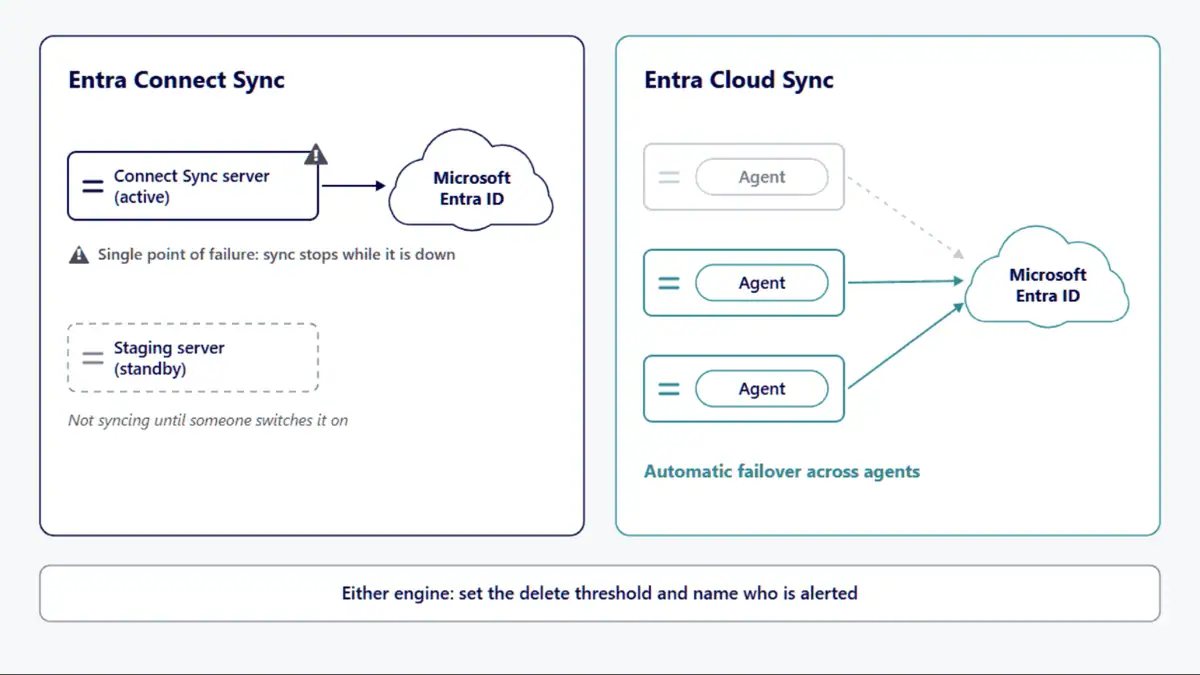
When the sync server fails, the first question is whether anything else is still synchronizing. Microsoft’s Migrate from Microsoft Entra Connect to Cloud Sync: Decision Guide puts the difference in one sentence each: “Microsoft Entra Connect creates a single point of failure”, then “if the Connect server becomes unavailable, synchronization stops until the server is restored.” and “Cloud Sync supports multiple active provisioning agents deployed across different servers, providing automatic failover capabilities.”
A Connect Sync staging server is a standby, not a second live engine. Microsoft’s Microsoft Entra Connect: Staging server and disaster recovery states: “A server in staging mode isn’t running password sync or password writeback, even if you selected these features during installation.” It takes over only when someone disables staging mode on it.
Both engines can stop a mass delete, and both need a person on the other end. For Connect Sync, according to Microsoft’s Microsoft Entra Connect Sync: Prevent accidental deletes, “the feature to prevent accidental deletes is enabled by default and configured to not allow an export with more than 500 deletes.” For Cloud Sync, Microsoft’s Accidental delete prevention says: “To use this feature, you set the threshold for the number of objects that, if deleted, synchronization should stop.” When that threshold is reached, the same page says synchronization stops and a notification goes to the email address specified.
Cloud Sync also watches its own health. Microsoft’s Cloud sync troubleshooting states: “Cloud sync monitors the health of your configuration, and places unhealthy objects in a quarantine state.” On timing, the Microsoft Entra Cloud Sync FAQ states: “Password hash synchronization is scheduled every 2-5 minutes.” It also states: “Cloud provisioning synchronization for users and groups is scheduled approximately every 10 to 20 minutes.” The same answer on Microsoft Learn qualifies that interval: the actual time depends on the number of changes pending in each sync cycle.
The i3solutions recommendation, as three rules. Name who is alerted when synchronization stops on either engine. Set the delete threshold on each engine as a decision someone signs, not a default nobody read. Place Cloud Sync agents on more than one server, because the failover Microsoft describes runs across agents on different servers.
When an auditor asks where the sync record lives and who controls the sync engine, each engine answers from a different place. For Cloud Sync, Microsoft’s Cloud sync troubleshooting states: “Provisioning logs provide a wealth of information on the state of the objects being synchronized between your on-premises Active Directory environment and Azure.”
For Connect Sync, the server itself is the control point. Microsoft’s Prerequisites for Microsoft Entra Connect states: “The Microsoft Entra Connect server must be treated as a Tier 0 component as documented in the Active Directory administrative tier model”. The i3solutions recommendation: put the server’s administrators, its access and its configuration changes in the same review as the domain controllers.
Microsoft has also announced an upcoming change for Connect Sync: enhanced admin authorization for configuration changes. Microsoft’s Microsoft Entra releases and announcements says “an authorized administrator will need to sign in and explicitly approve changes to sync settings”. The page gives it as upcoming; plan for it without assuming a date.
How long Microsoft Entra keeps audit and sign-in logs, and how to export them, is a separate question this guide does not answer. The engine decision only settles where the sync record starts: the provisioning logs and quarantine status for Cloud Sync, and the access and change record of a Tier 0 server for Connect Sync.
Once the deadline is handled, the engine choice comes down to whether your estate uses anything Cloud Sync does not yet do. Microsoft’s Migrate from Microsoft Entra Connect to Cloud Sync: Decision Guide, last updated February 24, 2026 and read on September 24, 2026, compares the two engines line by line. The lines below are the ones that decide a move, each note in Microsoft’s own words from that table; the table has other lines, some that both engines support, such as password writeback and Exchange hybrid attributes, and some that only Connect Sync supports, such as merging attributes from multiple domains.
Microsoft’s device row is older than its device sync page. Microsoft’s Configure device sync with Microsoft Entra Cloud Sync, last updated July 27, 2026, stated: “Device sync with Microsoft Entra Cloud Sync is in preview.” Microsoft’s update of September 29, 2026 no longer marks it as preview, and the page now states: “After synchronization, the devices can become Microsoft Entra hybrid joined.” It also states: “Device sync is disabled by default.” Device sync for hybrid join therefore exists in Cloud Sync and stays off until someone turns it on.
Two lines concern sign-in rather than sync. For pass-through authentication, Microsoft’s note reads: “PTA configuration managed separately from sync in Cloud Sync; PTA and Seamless SSO remain functional after migration”. For federation: “Federation configuration requires separate tools in Cloud Sync”. Which sign-in method to run, password hash synchronization, pass-through authentication or federation, is its own decision, and this guide does not make it.
Some lines run the other way. Microsoft’s Migrate from Microsoft Entra Connect to Cloud Sync: Decision Guide states: “Features like group provisioning to Active Directory, advanced source of authority management, and cloud-native identity scenarios are available exclusively in Cloud Sync.” It adds: “Organizations using Connect sync might miss access to new capabilities or require additional tools to achieve similar functionality.” The guide then sorts estates into three groups: ready for immediate migration, plan for near-term migration as features arrive, and evaluate for future migration.
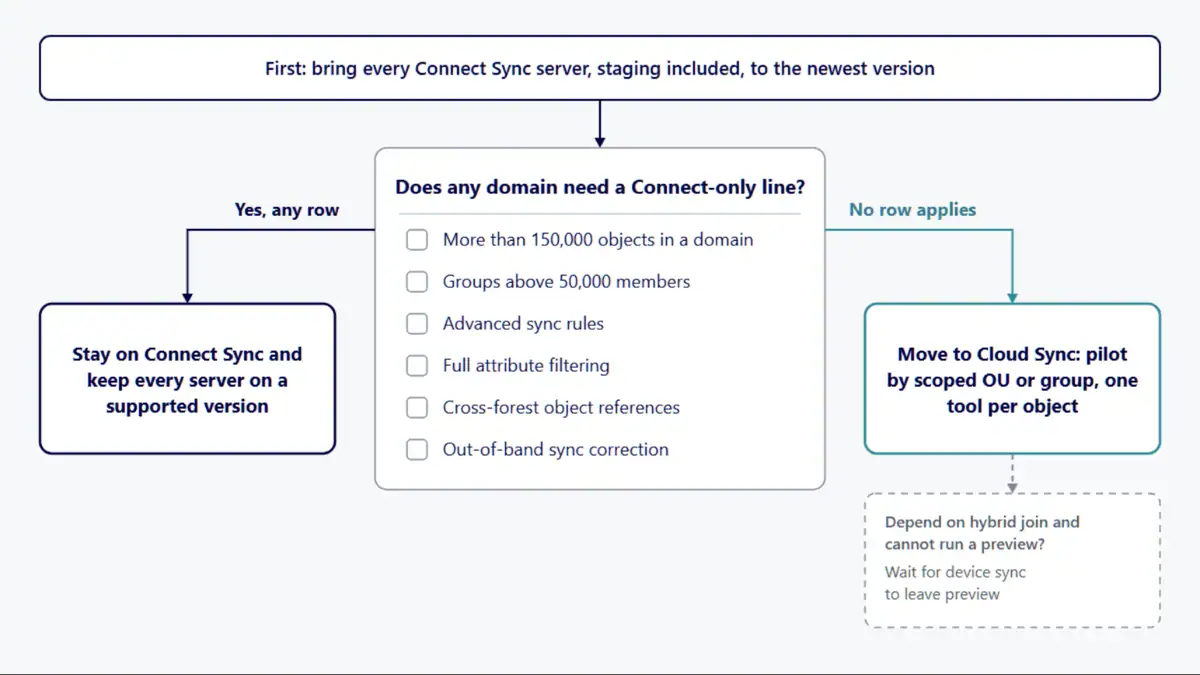
After an acquisition brings in a second Active Directory forest, the forest layout can decide the engine before any other line does. Microsoft’s Migrate from Microsoft Entra Connect to Cloud Sync: Decision Guide marks disconnected forest support as Cloud Sync only, with the note “Cloud Sync enables M&A scenarios without forest consolidation”, and marks cross-forest references as Connect Sync only: “Connect supports forest-to-forest object relationships”. An estate that needs both has to decide which forest relationships it keeps before it decides the engine.
Running both engines at once is supported as a pilot and as a topology. Microsoft’s Microsoft Entra Cloud Sync supported topologies and scenarios describes an existing forest on Entra Connect with a new forest brought on through Cloud Sync, and a pilot in which both tools run in the same forest with users and groups scoped between them. It states: “An object should be in scope in only one of the tools.” Microsoft’s Migrating from Microsoft Entra Connect to Microsoft Entra Cloud Sync adds: “During the pilot or coexistence phase, don’t remove OUs, domains, groups, users, contacts, or other referenced objects from Microsoft Entra Connect Sync scope.”
The same migration page gives the supported coexistence model: “The supported coexistence model is to keep objects in Microsoft Entra Connect Sync scope and use the cloudNoFlow and JoinNoFlow rules to prevent Microsoft Entra Connect Sync from exporting object adds, object deletes, and non-reference attribute updates.” It adds: “Each batch must remain in Microsoft Entra Connect Sync scope with the no-flow rules applied until that batch is fully migrated and ready for cutover.”
The i3solutions recommendation: pilot by scoped OU or group, keep a written list of which tool provisions each OU and group and which batches carry Microsoft’s no-flow rules, and take objects out of Connect Sync scope only at the final cutover Microsoft’s migration page describes.
Before a government tenant plans its move, check which Microsoft statements actually name its cloud. Microsoft’s What is Microsoft Entra Cloud sync? states: “Cloud sync can be used for tenants in the Microsoft Commercial, US Government, and 21Vianet (China) clouds.” Microsoft’s decision guide ticks both engines on its US Government Cloud line with the note “Both support sovereign cloud deployments”. For Connect Sync, Microsoft’s Hybrid identity considerations for the Azure Government cloud states: “To integrate a Microsoft Active Directory environment (either on-premises or hosted in an IaaS that is part of the same cloud instance) with the Azure Government cloud, you need to upgrade to the latest release of Microsoft Entra Connect”.
One tool does not reach government tenants. The Microsoft Entra Connect: Version release history, for version 2.6.91.0, records: “Added a guided migration workflow from Microsoft Entra Connect Sync to Microsoft Entra Cloud Sync.” It states: “This feature is available only in the Azure public cloud.” A tenant in the US Government cloud plans and runs its move without that workflow.
The pages read for this guide say “US Government”; they do not state, feature by feature, what is available in GCC High or DoD tenants. Confirm each feature your estate depends on with Microsoft for your cloud before planning around it. Moving into GCC High is a separate program with its own identity steps; see Microsoft 365 GCC High Migration Checklist: Best Practices for Defense Contractors.
Staying on Connect Sync is the right call when a Cloud Sync move would break something the estate depends on.
Before you sign off on a sync plan, ask for these in writing:
When the engine decision has to hold up in front of an auditor and a change board, i3solutions treats it as a design decision. i3solutions is a Microsoft Systems Integrator with experience implementing identity and access management solutions for enterprises in regulated industries. i3solutions designs and integrates hybrid identity on Microsoft Entra ID, bridging on-premises systems with cloud applications. i3solutions delivered an Entra ID integration engagement for a global consumer goods manufacturer. i3solutions regularly delivers Okta to Microsoft Entra ID migrations for enterprises.
i3solutions plans and runs governed Azure and Microsoft 365 migrations with senior, U.S.-based engineers. For regulated defense organizations, i3solutions plans and runs GCC High migrations, including the identity architecture; the GCC High tenant itself is provisioned by a certified AOS-G supplier, which i3solutions works alongside. Delivery is senior and US-based. An i3solutions engagement does not produce managed-service ownership, a replacement for the internal team, open-ended scope expansion, or vendor lock-in. The practice is described at Enterprise Entra ID Configuration & Integration Services for Modern Identity Management, within Establish Identity as a Governed Enterprise Capability.
For most estates, yes: Microsoft calls Cloud Sync “the recommended path forward for most organizations.” Stay on Connect Sync if the estate needs a line Microsoft Learn lists as Connect Sync only, such as more than 150,000 objects in a domain (“Cloud Sync currently supports up to 150,000 objects per domain”), groups above 50,000 members, advanced sync rules or cross-forest object references.
Before that date, the version history on Microsoft Learn stated: “All synchronization services in Microsoft Entra Connect Sync will stop working on September 30, 2026 if you’re not on at least version 2.5.79.0.” The same page on Microsoft Learn states that “Versions of Microsoft Entra Connect Sync 2.x retire 12 months from the date that a newer version is released.”
Yes. Microsoft’s July 27, 2026 version stated: “Device sync with Microsoft Entra Cloud Sync is in preview.” Microsoft’s update of September 29, 2026 no longer marks it as preview. It adds: “After synchronization, the devices can become Microsoft Entra hybrid joined.” It also states: “Device sync is disabled by default.”
Yes, with each object provisioned by one tool. Microsoft’s topology guidance states: “An object should be in scope in only one of the tools.” During a move, Microsoft’s migration guidance adds: “During the pilot or coexistence phase, don’t remove OUs, domains, groups, users, contacts, or other referenced objects from Microsoft Entra Connect Sync scope.”
Microsoft Learn states: “Cloud sync can be used for tenants in the Microsoft Commercial, US Government, and 21Vianet (China) clouds.” The guided migration workflow that Microsoft Learn records for Connect Sync version 2.6.91.0 is different: “This feature is available only in the Azure public cloud.”

US-Based | Est. 1997
© i3solutions. All rights reserved.
US-Based | Est. 1997
© i3solutions. All rights reserved.


