

A stalled Copilot rollout is almost always a Copilot data governance problem, which means oversharing, not Copilot itself. Copilot respects existing permissions, so it surfaces everything a user can technically open, including files they were never meant to see. The fix is a classify, restrict, monitor sequence built on Microsoft Purview and access reviews, run before enablement rather than after.
Copilot data governance moves from a backlog item to an emergency the day security halts your rollout over a file the AI could surface. The license is purchased, the pilot group is picked, and the project is stopped by one overshared document. The blocker is not the AI. It is permission debt your tenant has been accumulating for years, and it has a defined remediation path.
Blocked rollouts almost always trace back to the same mechanism, so start there. Copilot answers a user’s question by reading everything that user’s account can technically access: every site, every library, every file where a sharing link, an inherited permission, or a stale group membership grants entry. Before Copilot, a mis-shared salary file in a forgotten site was a risk that mostly failed to materialize, because the wrong person would have to know it existed, go looking, and click through. Discovery was the control, and it was doing quiet, unpaid work as your last line of defense.
Copilot removes that control completely. It does not need to know a file exists to find it; reading the whole permitted corpus is the product working as designed. Ask “what is our approach to executive compensation” and the model will happily synthesize an answer from the spreadsheet nobody remembered was shared to Everyone except external users. The permission model did not get worse the day you bought Copilot. It got exercised, in full, for the first time.
Copilot does not breach permissions. It reveals them. Every file it surfaces to a user is a file that user already had the right to open. That is why the fix is never a Copilot setting, and why turning the product off resolves nothing. The oversharing was already there, and it will still be there for the next audit, the next departing employee, and the next attacker who phishes one set of credentials.
This is also why the problem lands on the desk of a VP of IT rather than an administrator. Years of link-based sharing, site sprawl, and ungoverned self-service provisioning produce a tenant where nobody can say with confidence who can open what. That statement, unremarkable in 2019, is now the specific reason your AI program is stopped. The security team that blocked the rollout is not being obstructionist; they saw the mechanism clearly. The productive response is to show them a remediation plan with instruments, stages, and exit criteria, which is what the rest of this page contains.
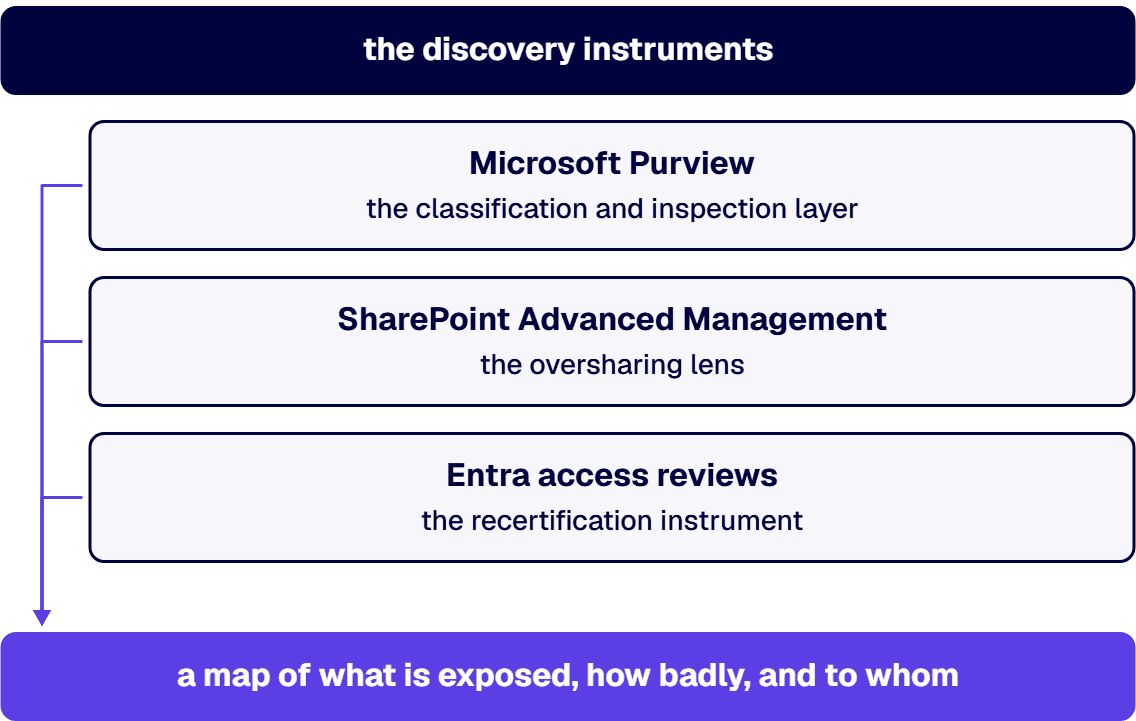
Guessing at exposure fails in audit and fails in rollout planning, so the first working session is discovery with instruments you already own or can license inside Microsoft 365. Three of them do the heavy lifting.
Microsoft Purview is the classification and inspection layer. Its content scanning finds where sensitive information actually lives (financial data, health information, personal data, contract terms) rather than where the file plan says it should live, and its Data Security Posture Management for AI capability exists precisely for this pre-enablement moment: a posture view of where sensitive information types sit relative to Copilot’s reach. What problems does Purview solve? In this sequence, one problem above all: it converts “we think there might be sensitive files in old sites” into a ranked list of locations, labels, and owners you can act on. Standing up that layer properly, from discovery and classification through the label and retention model, is the scope of Purview readiness work.
SharePoint Advanced Management is the oversharing lens. Its data access governance reports show which sites are shared broadly, which sharing links grant organization-wide entry, and which libraries changed hands as teams dissolved. The Copilot readiness workflow for SharePoint Advanced Management treats the site permissions and sharing-link activity reports as the standard pre-Copilot step, and running them typically answers the question “how do I restrict access to a SharePoint site” with something better than folklore: restrict site access by group membership, kill inherited sharing links that outlived their purpose, and put content discovery restrictions on the sites you cannot clean quickly.
Entra access reviews are the recertification instrument. An access review puts each group’s membership in front of a named owner and forces a keep-or-remove decision, which is how stale access actually leaves the tenant instead of being discussed in a meeting. It also replaces group grants with no audit trail behind them, and settles the perennial “who can approve access requests in SharePoint” argument by making ownership explicit: site owners approve site requests, and the review cycle verifies the owners are still the right people. A global professional services firm brought i3solutions in to modernize exactly this layer, and the Modernizing Identity Management to Drive Operational Efficiency case study documents the pattern: access decisions attached to accountable owners, at enterprise scale.
Run all three and you have the artifact the blocked rollout is waiting for: a map of what is exposed, how badly, and to whom. Expect it to be worse than anyone predicted. It nearly always is, and that is not a reason for embarrassment; it is the ordinary result of fifteen years of collaboration tooling that made sharing one click and unsharing a project.
If the audit is where your team lacks the hands or the Purview depth, this is a moment where borrowed expertise earns its fee quickly. You can schedule an enterprise AI advisory discussion and walk through what discovery on your tenant would look like with an engineer who has run it before.
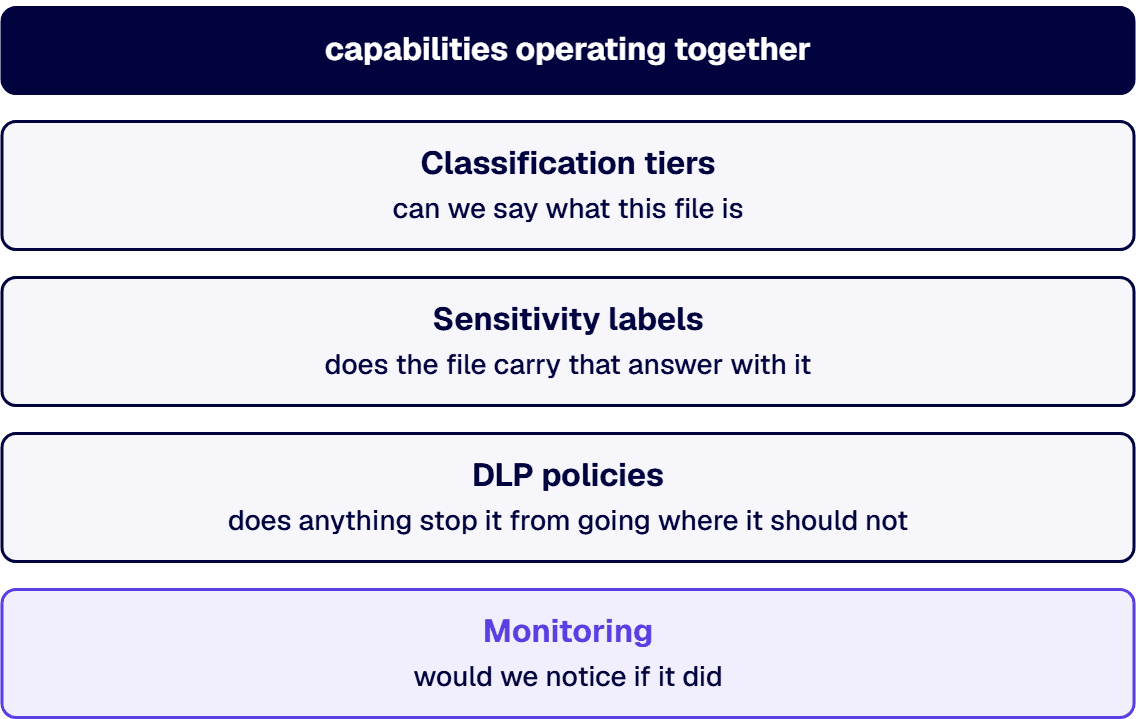
Governance fails when it is a document instead of a set of controls, so define this one by its working parts. An AI governance framework for Microsoft 365 is four capabilities operating together, and each exists to close a gap the other three leave open.
Classification tiers come first because everything downstream keys off them. Three to five tiers are enough for almost any enterprise: public, internal, confidential, restricted. The discipline is not inventing the tiers; it is deciding, in writing, which kinds of content belong in each and who owns the call for the gray cases. Without agreed tiers, labeling becomes opinion.
Sensitivity labels are the tiers made operational. A Purview sensitivity label travels with the file, drives encryption and access decisions, and, critically for this problem, tells Copilot-era controls what the file is. Labeling policy determines whether classification happens automatically by content inspection, by default at the container level, or manually by users, and a regulated tenant generally needs all three in different zones.
DLP policies are the enforcement layer. Is Microsoft Purview a DLP tool? It contains one, among other capabilities, and in this framework DLP is the part that acts: blocking the share, warning the user, or quarantining the file when content marked restricted starts moving somewhere it should not. Whether specific Purview capabilities are in your current licensing depends on your agreement; is Purview included in E3 is a question to confirm against your own subscription rather than a table on the internet, because bundling has shifted more than once and your enterprise agreement may not match the public matrix.
Monitoring closes the loop. Labels drift, new sites appear, and an acquisition can drop a million ungoverned files into the tenant overnight. Scheduled access reviews, periodic Purview scans, and alerting on unusual sharing patterns are what keep the controls true after the project team disbands. Without monitoring, governance is a snapshot; a snapshot ages.
If you want a single checklist question for each capability: can we say what this file is (classification), does the file carry that answer with it (labels), does anything stop it from going where it should not (DLP), and would we notice if it did (monitoring). Four yes answers is a working governance model. Anything less is documentation.
If you want to see how this maps to your environment before committing to anything, the enterprise Microsoft Copilot development services page describes how i3solutions structures governed Copilot enablement engagements from assessment through production.
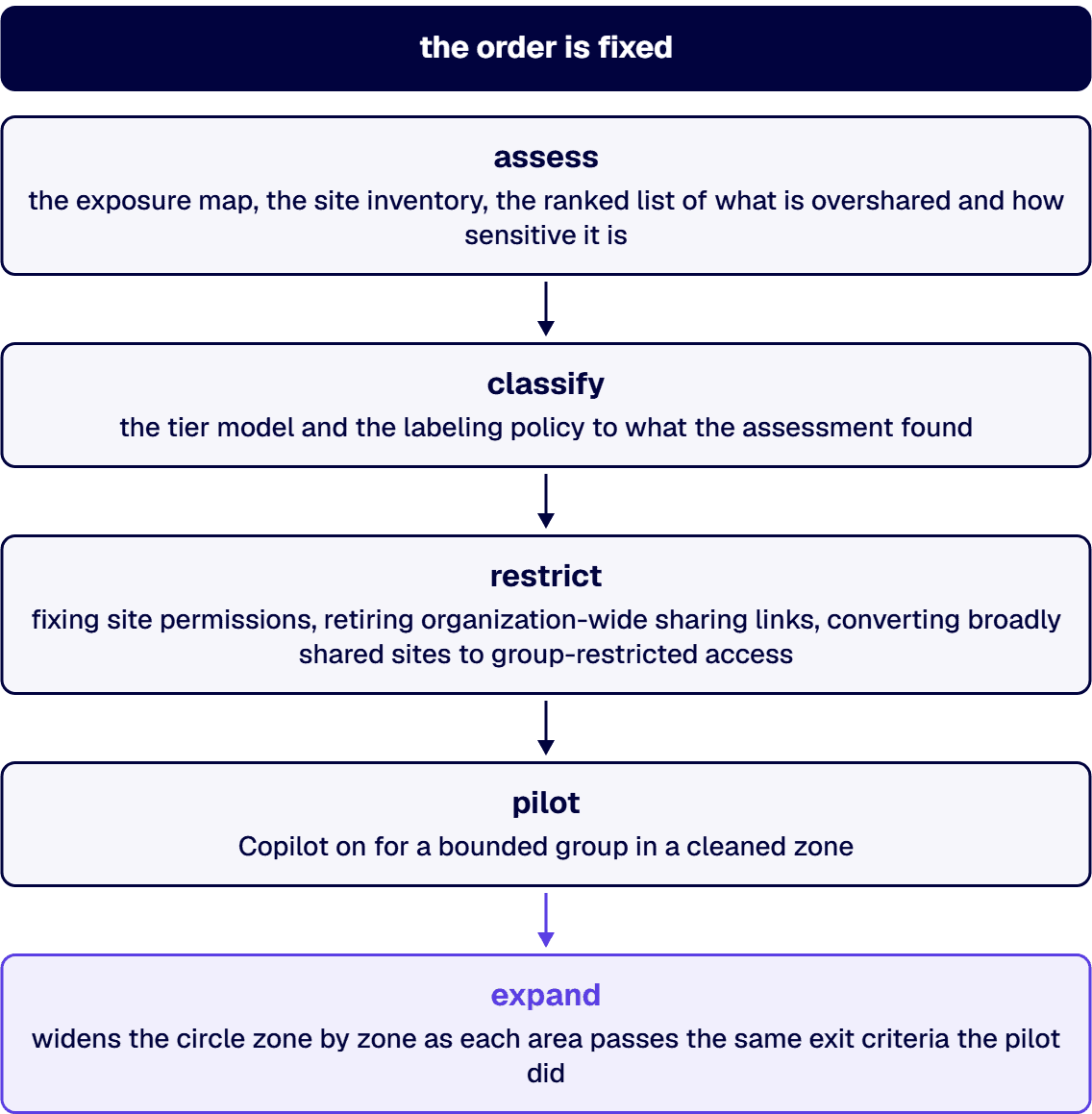
Remediation runs in five stages (assess, classify, restrict, pilot, expand), and the order is fixed because each stage produces the input the next one consumes. Reordering it does not make it faster. It makes it circular.
Assess is the audit above, taken to completion: the exposure map, the site inventory, the ranked list of what is overshared and how sensitive it is. Classify applies the tier model and the labeling policy to what the assessment found, starting with the restricted tier because that is where the rollout-blocking risk lives. Restrict is the unglamorous middle: fixing site permissions, retiring organization-wide sharing links, converting broadly shared sites to group-restricted access, and putting content discovery restrictions on anything that cannot be cleaned before enablement. Pilot turns Copilot on for a bounded group in a cleaned zone, with monitoring watching what the AI actually surfaces, because the pilot is a test of the governance as much as of the product. Expand widens the circle zone by zone as each area passes the same exit criteria the pilot did.
The citable version of the stance on timing: the honest timeline for Microsoft 365 oversharing remediation is set by the assessment, not by the enablement date, because the assessment is what tells you how much permission debt exists and how much of it blocks rollout. Any duration quoted before discovery has run is a guess wearing a project plan’s clothing. What can be said honestly in advance is structural: assessment is the shortest stage, restriction is usually the longest, and the pilot should not start until the restricted tier is labeled and enforced in the pilot zone.
A health sciences company engaged i3solutions to remediate exactly this situation: a purchased Copilot deployment stopped by counsel over data exposure concerns, years of accumulated site sprawl, and no classification in place. The engagement ran the five stages in order, and the moment that mattered was the assessment readout, where the exposure map turned an argument between IT and legal into a shared work plan. The rollout that had been stopped indefinitely restarted with a pilot group inside the first cleaned zone, and expansion followed the criteria rather than the calendar.
That engagement ran under the same discipline as the rest of i3solutions’ delivery work: Enterprise Delivery Assurance, the standard that exists so governance work of this kind lands on-time, in-scope, and in-production rather than dissolving into an open-ended cleanup program. Bounded stages with defined exits are what make a remediation finishable.
Fairness to the other path matters, because enable-then-apologize is not a strawman; it is what a large share of organizations actually do, sometimes on purpose. Turn Copilot on, watch what surfaces, fix what users report, and treat the AI itself as the discovery tool. The argument for it is real: adoption starts immediately, the organization learns from live usage instead of projections, and the remediation backlog gets prioritized by what actually surfaced rather than by what an assessment predicted might.
That path wins in specific conditions. A small tenant with a short history has less permission debt to exercise. An organization with no regulatory exposure and a high risk tolerance can absorb an internal disclosure as a lesson rather than an incident. A company whose sensitive data lives outside Microsoft 365 entirely has less at stake in the tenant Copilot reads. In those conditions, buying speed with risk is a defensible trade, and pretending otherwise would be vendor theater.
The regulated enterprise fails every one of those conditions. A health record surfaced to the wrong employee is a reportable event, not a teachable moment. A defense contractor’s controlled technical data does not get to be discovered by an apology process. And the disclosure does not wait politely for the remediation backlog: the exposure happens at the moment of the answer, in front of the user, and what has been seen cannot be unseen by a policy applied afterward. For the financial services and defense organizations that make up regulated Microsoft estates, the deciding argument is exactly this asymmetry: the cost of assess-first is measured in weeks of sequencing, while the cost of enable-first is measured in incidents, and only one of those is bounded.
So, do you need Purview before Copilot? You need its functions before Copilot: knowing where sensitive content is, labeling it, and enforcing how it moves. Purview is Microsoft’s native instrument for those functions inside 365, which makes it the default answer rather than the only conceivable one. The comparison piece on this exact decision, Secure Copilot Enablement vs Turn It On: The Enterprise AI Risk Comparison, walks the trade in more depth, and its conclusion holds here: the question is not whether to govern, it is whether you govern before the AI reads the tenant or after.
Debates end when criteria exist, so give the enablement decision a checklist instead of a meeting series. Copilot is safe to enable for a given zone when all of the following are true.
The assessment has run and its findings for that zone are dispositioned: every overshared location is either fixed, restricted from content discovery, or explicitly accepted in writing by the risk owner. The restricted tier is labeled and enforced there, meaning sensitivity labels are applied to the content that warranted them and DLP acts on those labels rather than merely logging. Broad-access sharing links older than the policy allows are gone, and site access in the zone is governed by group membership with a named owner. An access review has completed for the groups that grant entry, within the current cycle, so membership reflects decisions rather than history. Monitoring is live: someone is looking at what Copilot surfaces during the pilot, alerts exist for restricted content on the move, and a review cadence is on the calendar for after the project ends. And the people in the zone know what changed: what the labels mean, what the AI will and will not see, and where to report something that looks wrong, because an ungoverned rollout and an unannounced one fail in similar ways.
Pass all of those and the security objection dissolves, because the thing security objected to no longer exists in that zone. Miss any of them and the honest answer to “can we turn it on” is not yet, with a named gap and an owner instead of an indefinite hold. The difference between those two answers is the entire value of doing this as a sequence.
Where a rollout is blocked today, the sequence above is also the fastest credible path to unblocking it, precisely because it gives the blockers something they can approve. For the enterprise weighing whether to run it internally or bring help, the honest comparison is the same one that applies to any governance-critical build, and it is laid out in DIY AI Integration vs Architect-Led Governance: internal teams know the tenant, an experienced partner knows the failure modes, and the right split depends on which knowledge your situation is missing. The permission fundamentals underneath all of it are covered in Microsoft 365 Access and Permissions: The Complete Governance Guide, which is the natural next read if the audit findings send you deeper into the access model.
If your rollout is blocked and you want an engineer’s read on what unblocking it would take in your tenant, schedule an enterprise AI advisory discussion. You will talk to the people who would do the work, not a sales layer.

Matt Lawson has spent more than 14 years at i3solutions guiding complex enterprise technology work from scope and system design through development, acceptance, and long-term support. His expertise spans technical oversight, solution architecture, SharePoint and Microsoft 365 delivery, Power Platform implementation, business intelligence, enterprise search, and the practical application of AI to solve real business and operational challenges.
View LinkedIn ProfileThe engagement is scoped by four drivers you can reason about before anyone quotes a number: the size and age of the tenant (more sites and more years mean more permission debt to discover and fix), the volume of content that lands in the restricted tier once classification runs, how much of the remediation can be automated with policy versus handled site by site with owners, and whether monitoring and access review cadences already exist or must be stood up. The assessment stage is what converts those drivers into a defensible scope, which is why credible pricing follows discovery rather than preceding it. The number worth putting beside any quote is the cost of the alternative: a reportable disclosure in a regulated environment, which is not a budgeting exercise anyone enjoys.
Oversharing is any grant of access broader than the content warrants: a site shared to the whole organization when one team needs it, a sharing link that grants entry to anyone in the company and never expires, permissions inherited from a parent site that no longer reflect how the content is used, or group memberships that outlived the project that justified them. None of it requires a mistake at the moment of sharing. Most oversharing was reasonable when it happened and became a liability as content, teams, and sensitivity changed around it. It matters now because Copilot reads everything a user can technically access, which converts dormant oversharing into active exposure.
The platform’s controls are strong; the honest question is whether your configuration uses them. SharePoint’s security model, encryption, and compliance certifications are enterprise-grade, and the significant risk in most tenants is not the platform but the permission state: who has been granted access, through what links and groups, accumulated over years. A tenant with governed site access, labeled sensitive content, enforced DLP, and periodic access reviews is a safe place for regulated data. A tenant where nobody can say who can open what is exactly as safe as its most overshared site, regardless of the platform underneath it.
Purview includes data loss prevention, and it is more than that. It is Microsoft’s portfolio for data security, governance, and compliance across Microsoft 365 and beyond: content classification and scanning, sensitivity labeling, DLP policy enforcement, insider risk management, and audit capabilities. In a Copilot readiness sequence, DLP is one of the four working parts, and Purview supplies three of them (classification, labels, and enforcement), which is why it anchors the sequence. Which specific capabilities your licensing already includes is worth confirming against your own subscription, since bundling varies by agreement.
SharePoint can be operated in a HIPAA-compliant manner, and Microsoft supports it with a Business Associate Agreement and the compliance scope documented for Microsoft 365. Compliance, though, attaches to how you run it, not to the license. A HIPAA Security Rule assessment looks for access controls, audit trails, and safeguards around protected health information, and an overshared tenant fails those tests no matter what the platform certifies, because PHI reachable by staff with no treatment or business need is an access control failure by definition. The governance sequence on this page (classify PHI, restrict access to it, monitor movement) is substantially what closing that gap looks like inside Microsoft 365.
Sensitivity labels first, because the DLP controls for Copilot act on them. Microsoft’s Purview guidance for Microsoft 365 Copilot states: “You can further prevent Copilot and agents from summarizing labeled files and emails (whether encrypted or not) that are identified by a Microsoft Purview Data Loss Protection policy.” That makes DLP the second step, and it waits on the labels. The same guidance notes that “Sensitivity labels that are applied to containers (groups and sites) aren’t inherited by items in those containers.” Labeling a site, in other words, does not label the files inside it, so the labeling plan has to reach the files. Insider risk management comes third, and it has its own device prerequisite. Microsoft’s Risky AI usage policy template exists because “Users might inadvertently or purposefully create prompts in Microsoft AI tools that might contain sensitive information or risky intent.” Its prerequisites state that the “Microsoft Insider risk extension (on Microsoft Edge browser) or Microsoft Purview extension (on Chrome browser) must be installed on the user’s devices”. Data Security Posture Management, which replaced Data Security Posture Management for AI, runs alongside the three steps rather than after them; Microsoft describes it as providing “unified visibility and control for both traditional applications and AI apps and agents”.


If your enablement is stalled on oversharing, the fix is a classify, restrict, and monitor sequence you can run before you turn Copilot on. That is a conversation worth having with someone who has done it at enterprise scale. i3solutions architects are 100% U.S.-based.
Talk to a Senior Architect
US-Based | Est. 1997
© i3solutions. All rights reserved.
US-Based | Est. 1997
© i3solutions. All rights reserved.


