
You hire a Microsoft delivery firm to build the governance program and then embed named specialists inside your own operating model, rather than a managed IT provider to take ownership of the tenant. Post-deployment Copilot governance is a control problem, not a help desk problem: who holds the AI Administrator role, which agents exist and who approved them, which SharePoint content is still discoverable to Copilot, and who reads the permission and audit reports on a schedule. The engagement builds those controls, writes the runbooks and the review cadence, and puts senior people alongside your administrators until your team runs it without help. i3solutions delivers under a partner-led engagement model with named accountability and governance that holds up under a client audit, as distinct from contractor-only staff augmentation.
Deployment ends when licenses are assigned. Governance starts at the four surfaces that keep producing decisions after that, and a credible firm will name all four in its scope of work rather than describing “Copilot support” in the abstract.
Two of those four are configuration and two are routines. The failure we see most often is an organisation that got the configuration right at launch and never built the routines, so the configuration decays quietly for a year.
The agent count in most tenants is close to zero on the day Copilot goes live and is not close to zero six months later. Nothing about that is wrong. It is the point of the platform. What goes wrong is that nobody is counting, and no one has decided what approval means.
Microsoft ships the counting instrument. SharePoint Advanced Management includes a report described as “Get insights on agents in SharePoint: Use this report to identify recently created agents across SharePoint and OneDrive sites, and identify sites with the highest number of agents created.” Microsoft’s own framing of that product is worth reading before you scope any engagement: SharePoint Advanced Management “provides administrative governance controls for SharePoint and OneDrive”, and the documentation notes that “SAM capabilities are helpful as organizations prepare for Microsoft Copilot and agents.”
Approval is the harder half, and it is a policy question your firm should be forcing you to answer rather than answering for you:
i3solutions governs client Power Platform tenants with the Center of Excellence Starter Kit, tenant-level and environment-level DLP policies, and managed environment controls. On a Copilot governance engagement that matters because the agent estate and the Power Platform estate are the same estate, administered from the same place, and a delivery firm that treats them separately will hand you two governance programs that disagree.
Most enterprises turned on a temporary brake during rollout. Microsoft’s documentation on Restricted SharePoint Search is now unambiguous that it was never meant to be permanent, and that the product is going away: “Restricted SharePoint Search is retiring.” Microsoft directs organisations to “Use comprehensive data controls such as Restricted Content Discovery (RCD) for content discoverability.”
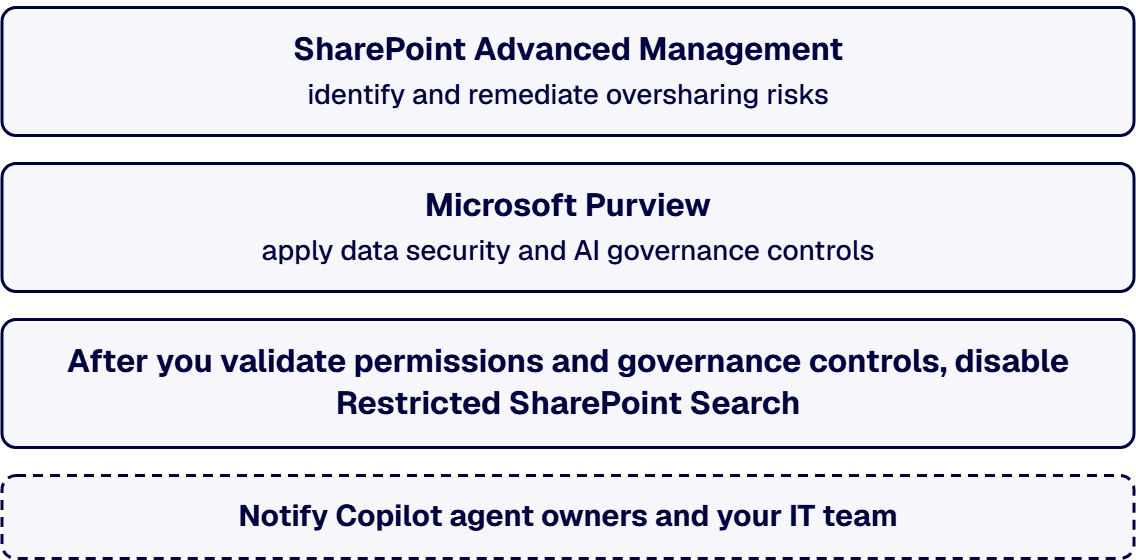
Two sentences in that same document are the reason this belongs in a governance engagement rather than in an admin ticket. Microsoft states that “it’s important to note that Restricted SharePoint Search isn’t a security boundary and doesn’t change any permissions on SharePoint sites”, and that “Restricted SharePoint Search limits to 100 sites, which isn’t sustainable as your organization scales Copilot and agentic operations.” An organisation that believes its allow list is a security control has a governance gap it cannot see, and it will keep believing that until somebody says otherwise in writing.
The path off it is a project with a beginning and an end. Microsoft’s own recommended sequence is to use SharePoint Advanced Management “to identify and remediate oversharing risks, such as broad access and unmanaged sharing”, to use Microsoft Purview “to apply data security and AI governance controls with sensitivity labels, data loss prevention (DLP), and auditing”, and only then: “After you validate permissions and governance controls, disable Restricted SharePoint Search.” Microsoft adds a change-management step most plans leave out: “Notify Copilot agent owners and your IT team that Copilot and agentic responses use existing SharePoint permissions.”
On the data side, Microsoft positions Purview as the standing surface rather than a one-off cleanup. Its documentation describes using “Data Security Posture Management or Data Security Posture Management for AI (classic) as your front door to discover, secure, and apply compliance controls for AI usage across your enterprise”, and makes the inheritance rule explicit for agents: “Where these AI apps support agents, they inherit the same security and compliance capabilities as their parent AI app.” The controls you set for Copilot are the controls your agents get, which is good news if you set them and bad news if you did not.
Ask three firms for ongoing Copilot support and you will get three different products back, and two of them will be managed IT operations wearing the word governance. The proposals look similar on page one and diverge completely on the page that describes who does what on a Tuesday.
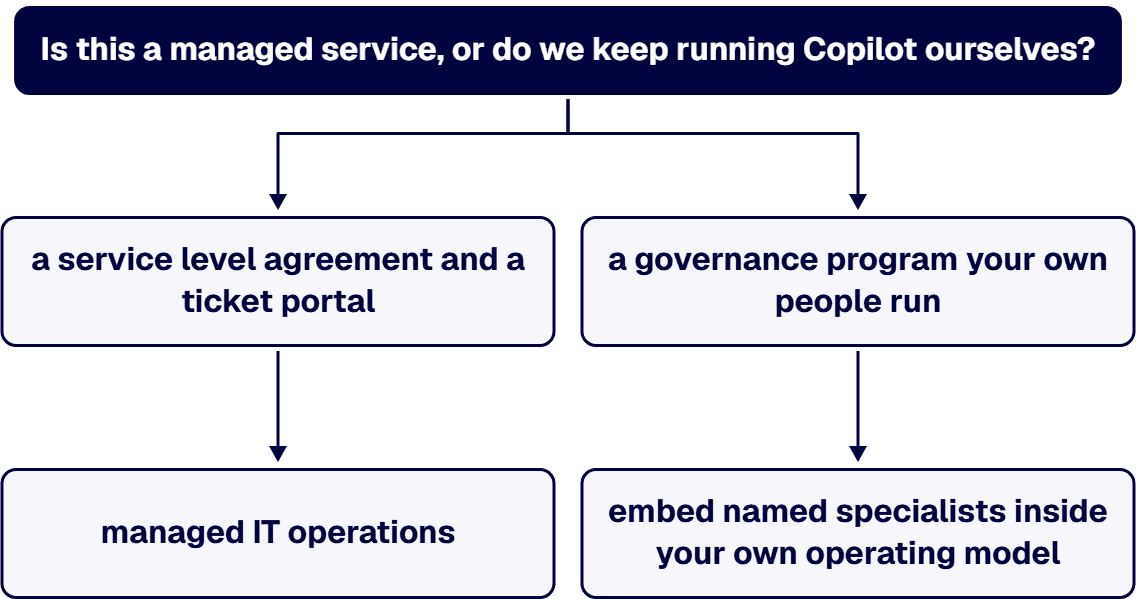
An i3solutions engagement does not produce managed-service ownership, a replacement for the internal team, open-ended scope expansion, or vendor lock-in. What it produces is a governance program your own people run, built and then staffed alongside them:
If a prospective firm answers the operating-model question with a service level agreement and a ticket portal, they have understood you to be buying managed IT operations. That is a legitimate product. It is not this one, and buying it by accident is how organisations end up unable to explain their own tenant to an auditor.
Two i3solutions cost bands are relevant, and they price different things, so read the labels carefully before comparing them to a quote.
The inputs that move either number are countable before you speak to anyone: tenant count, how many SharePoint sites are in scope for permission review, whether Restricted SharePoint Search is currently on, whether SharePoint Advanced Management and Purview are licensed, how many agents already exist, and whether a compliance framework has to be evidenced alongside the governance work. Of those, the one that moves the number hardest is the site count in scope for permission review, because it is the only input that scales with the size of the estate rather than with the size of the tenant. Everything else is a fixed cost you pay once.
Ask for the control owner map and the review calendar as named deliverables. A findings deck with no owner against each finding is an assessment, and you already had the assessment.
A reseller and a managed services provider will both quote this work, and both will be selling something other than delivery. What separates the delivery firm you want, which is the shape i3solutions works in, is testable in the first conversation:
i3solutions is a Microsoft Solutions Partner. Ask any firm you are evaluating to show the same, and to show it against the specific work you are buying rather than against a logo.
If the deployment itself is still ahead of you and you carry federal contracting obligations, the pre-deployment evaluation has its own checklist: hire a Microsoft 365 Copilot deployment firm for government contractors.
You keep running it. An i3solutions engagement does not produce managed-service ownership, a replacement for the internal team, open-ended scope expansion, or vendor lock-in. The work builds the governance program, staffs it alongside your administrators while the routines take hold, and hands it over. If what you actually want is a provider to own tenant operations and a ticket queue, that is a managed IT services purchase and it should be scoped and priced as one, by a firm that sells it.
With discoverability and the agent inventory, in that order, because those are the two that produce incidents. Microsoft’s own adoption guidance points at the Copilot Optimization Assessment for exactly this gap, noting that “It evaluates your data governance maturity and data security controls.” Doing the readiness work after deployment is common and it is not wasted. The findings are the same findings, you just get them while people are already using the product, which raises the urgency and shortens the argument about whether the work is necessary.
Split it deliberately rather than assigning it to one overloaded administrator. Microsoft’s own role separation is the model: change to Copilot scenarios requires the AI Administrator role, while viewing them requires only the Global Reader role, and Microsoft notes that “Lower permissioned accounts help improve security for your organization.” In practice a workable split is one accountable owner for tenant configuration, one for SharePoint content and permissions, one for Purview policy, and a business owner who decides whether an agent gets approved.
Two things do it, a report and a rule, and a policy document is neither. The report exists: SharePoint Advanced Management can “identify recently created agents across SharePoint and OneDrive sites, and identify sites with the highest number of agents created.” The rule is yours to set, and it has to cover who may create agents, what they may ground on, and what happens when the owner leaves. Agents built in Copilot Studio also live in Power Platform environments, so the Power Platform controls you already have are part of the answer rather than a separate program.
Search and Copilot results widen back out to whatever your permissions actually allow, which is why Microsoft’s sequence puts the remediation first and says “After you validate permissions and governance controls, disable Restricted SharePoint Search.” Microsoft also flags the human half of the change: “Notify Copilot agent owners and your IT team that Copilot and agentic responses use existing SharePoint permissions.” Expect user-visible changes in results on the day it goes off, and plan the communication before the switch rather than after the first surprised email.

US-Based | Est. 1997
© i3solutions. All rights reserved.
US-Based | Est. 1997
© i3solutions. All rights reserved.


