

Your Microsoft environment is ready for Microsoft 365 Copilot when five things are true: every target user has an eligible base plan plus an assigned Microsoft 365 Copilot add-on license; users hold Microsoft Entra ID accounts with primary mailboxes on Exchange Online; SharePoint and OneDrive oversharing has been found and remediated using Data Access Governance reports in SharePoint Advanced Management; Microsoft Purview sensitivity labels are enabled for SharePoint and OneDrive files and applied to the content Copilot can reach; and you have a named owner, an acceptable-use policy, and audit in place before the first prompt is typed. Licensing is the easy part. Permission sprawl is what actually stops the rollout.
Readiness is not a licensing question with a security appendix. It is a permissions question with a licensing prerequisite. A regulated tenant that buys 500 Copilot seats and turns them on without a permissions pass has not deployed an AI assistant. It has deployed a very fast, very polite internal search engine over every misconfigured site in the estate.
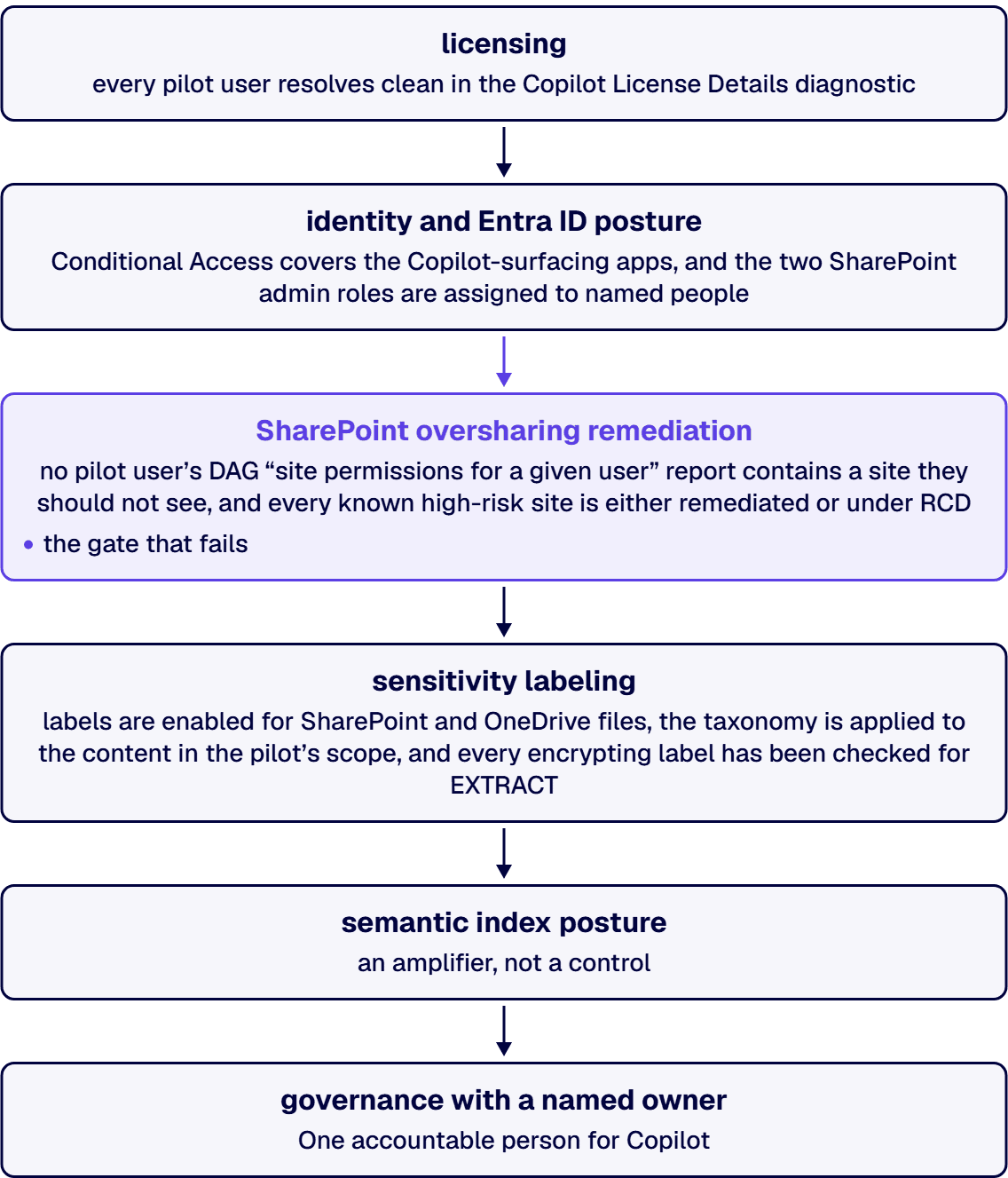
The readiness question decomposes into six gates. Each has an exit test. You do not move to the next one until the current one passes.
Microsoft 365 Copilot is an add-on. It is never a standalone purchase. Each user needs an eligible base plan plus an assigned Copilot license.
Eligible base plans include Microsoft 365 E7, E5, E3, F1 and F3; Microsoft 365 Business Basic, Standard and Premium; Microsoft 365 Apps for business and for enterprise; Office 365 E5, E3, E1 and F3; and standalone Exchange, SharePoint, OneDrive, Teams, Planner, Project, Visio and Clipchamp plans. For US government tenants, the qualifying plans are Microsoft 365 G3, G5 and F1, and Office 365 G1, G3, G5 and F3.
List price is $30.00 per user per month, paid yearly, on top of that base plan.
Two things most readiness checklists still get wrong:
Two hard constraints that quietly fail pilots: Copilot is supported only on primary mailboxes hosted on Exchange Online (not archive, group, shared or delegate mailboxes), and it is not available under device-based licensing for Microsoft 365 Apps for enterprise.
For what a governed deployment costs end to end, including the activation gap that wastes most Copilot budgets, see our Microsoft 365 Copilot licensing guide.
Exit test: every pilot user resolves clean in the Copilot License Details diagnostic in the Microsoft 365 admin center.
Every Copilot user must have a Microsoft Entra ID work or school account. That is the floor, not the target.
The target, for a regulated estate, is that Copilot inherits an identity posture you would already defend to an auditor: Conditional Access policies covering the Microsoft 365 apps Copilot surfaces in, phishing-resistant MFA on privileged roles, and no standing global admin. Copilot adds no new identity controls of its own. It runs entirely inside the ones you have. If your Conditional Access posture is weak, Copilot does not weaken it further, but it does raise the value of every account that can be compromised, because one prompt now aggregates what previously took a determined person a week of clicking to assemble.
Two Entra roles matter operationally for the work in Gate 3: SharePoint Administrator and SharePoint Advanced Management Administrator (the latter adds permission removal at scale and metadata visibility across SharePoint content).
Exit test: Conditional Access covers the Copilot-surfacing apps, and the two SharePoint admin roles are assigned to named people.
This is the gate that fails. Not licensing.
The pathologies are always the same in a large estate: sites shared with “Everyone except external users” (EEEU), “Anyone” links with no expiry, broken permission inheritance, ownerless and inactive sites nobody has reviewed in years, and unlabeled sites full of content that was safe only because it was un-findable.
Here is the part most readiness guides miss: you already own the tool to fix this. SharePoint Advanced Management (SAM) is included the moment at least one user in your tenant is assigned a Microsoft 365 Copilot license. That user does not need to be a SharePoint administrator. You do not buy SAM separately for Copilot readiness. It arrives with the first seat. (SAM’s base subscription requirement is Office 365 E3/E5/A5, Microsoft 365 E1/E3/E5/A5, or Microsoft 365 GCC, GCC High or DoD. A small number of features, such as restricted site creation by apps, still need the standalone SAM Plan 1 add-on.)
| Step | Where | What it tells you |
|---|---|---|
| Content Management Assessment | SharePoint admin center > Advanced Management > Start assessment | Guided sweep that flags overshared content, ownerless and inactive sites, and defines organizational Copilot readiness. Rerun every 30 days to track progress |
| Site permissions baseline report | SharePoint admin center > Reports > Data access governance | Snapshot of the permission structure across all SharePoint and OneDrive sites. Your exposure baseline |
| Everyone except external users (EEEU) insights | Same blade | The top 100 sites where content was shared with the whole organization in the last 28 days, plus the policies applied to them |
| Sharing links activity reports | Same blade | Sites with the most new “Anyone”, “People in the organization” and “Specific people” links in the last 28 days |
| Site permissions for a given user | Same blade | Every site one user can reach, and how that access was granted. This is the report that ends the argument |
| Sensitivity label snapshot | Same blade | Label distribution across all SharePoint and OneDrive sites. Shows you the unlabeled surface |
| Site access reviews | Initiated from a DAG report | Delegates the remediation of an overshared site to the people who actually know the content: its owners |
| Restricted Access Control (RAC) | SharePoint admin center > Policies > Access control | Hard-limits a site to a named Entra security group or Microsoft 365 group. Users outside the group lose access even if they had a link |
Restricted SharePoint Search is retiring. Since July 31, 2026, new enablement has been blocked. If a consultant proposes it as your Copilot stopgap, that recommendation is out of date. Its replacement is Restricted Content Discovery (RCD), a site-level setting that keeps a site’s content out of organization-wide search and Copilot experiences while you review it:
Set-SPOSite -Identity <site-url> -RestrictContentOrgWideSearch $true
Get-SPOSite -Identity <site-url> | Select RestrictContentOrgWideSearch
Start-SPORestrictedContentDiscoverabilityReport
To let site admins manage it themselves, with a mandatory written justification captured for audit:
Set-SPOTenant -DelegateRestrictedContentDiscoverabilityManagement $trueTwo honest caveats you should hear from a partner and rarely do. RCD is not a security boundary. It changes discoverability, not permissions: a user who already had access keeps it, and content the user recently interacted with still surfaces. And RCD is slow at scale: on sites with more than 500,000 items, an update can take more than a week to fully reflect in search and Copilot. Plan the containment step before the pilot date, not the week of it.
Exit test: no pilot user’s DAG “site permissions for a given user” report contains a site they should not see, and every known high-risk site is either remediated or under RCD.
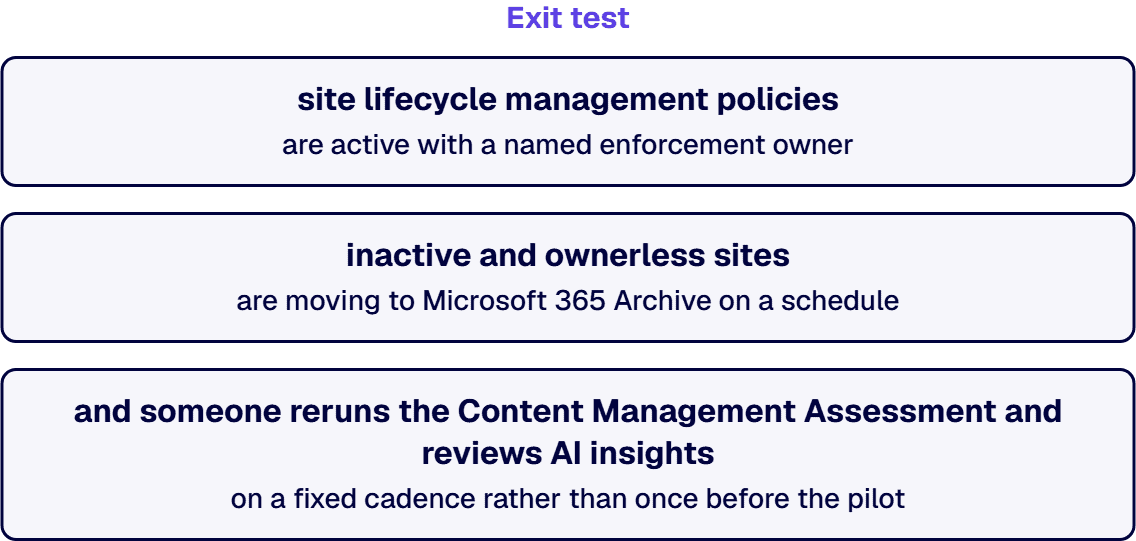
A project ends, its site goes ownerless, nobody closes it, and a few months later Copilot is answering questions out of content no one has looked at since the pilot. That is the failure pattern the access review above does not stop on its own, because it fixes the oversharing that exists today and says nothing about what the estate becomes next quarter. Three moves close that gap: turn on site lifecycle management policies (inactive-site, site-ownership, and site-attestation policies) so stale sites get flagged and closed instead of accumulating; move ownerless or inactive sites into Microsoft 365 Archive, which preserves content, permissions and metadata but removes the site from active storage and from what Copilot can retrieve until someone reactivates it; and use the SharePoint Admin Agent and AI insights on your governance reports so the admin team works from report findings and recommended actions instead of reading the estate site by site.
Each lever has a specific home in the SharePoint admin center. Site lifecycle management policies live under Site lifecycle management in the left navigation, split into inactive-site, site-ownership, and site-attestation categories, each configured with a specific enforcement action and an owner or administrator notification email. Microsoft 365 Archive sites are managed from the Archived sites page. AI insights is not a separate product: it is a Get AI insights button surfaced on specific reports, including sharing-links activity, the sensitivity label snapshot, the inactive-site policy report, and change-history reports covering the last 180 days. The SharePoint Admin Agent answers governance questions directly from the SharePoint admin center’s Copilot pane, from the Microsoft Copilot app, or from Microsoft Teams. (Microsoft’s SharePoint Advanced Management guidance for Copilot readiness, checked 4 September 2026.)
Many regulated enterprises built their SharePoint environments organically over 8 to 12 years, accumulating layers of inconsistent permissions, undocumented content types, and fragile folder structures that now create measurable audit exposure. i3solutions assessment engagements routinely find 20 to 40 percent more SharePoint sites during Phase 1 than the client internal inventory lists, which is what an estate without lifecycle governance produces. So scope the lifecycle work from the admin center site list, not from the inventory the business hands you, and treat every site a policy flags as ownerless or inactive as in scope until a named owner claims it. For the fuller modernization playbook, see our governance-first SharePoint modernization guide.
Exit test: site lifecycle management policies are active with a named enforcement owner, inactive and ownerless sites are moving to Microsoft 365 Archive on a schedule, and someone reruns the Content Management Assessment and reviews AI insights on a fixed cadence rather than once before the pilot.
Microsoft Purview sensitivity labels are what turn “Copilot respects permissions” into “Copilot respects classification”. Three specifics decide whether this works:
Auto-labeling is what makes this survivable at estate scale. A manual labeling program across a federal-sized SharePoint estate does not finish. Our Microsoft Purview technology readiness services cover the label taxonomy, auto-labeling policies and DLP that this gate depends on.
Exit test: labels are enabled for SharePoint and OneDrive files, the taxonomy is applied to the content in the pilot’s scope, and every encrypting label has been checked for EXTRACT.
Microsoft 365 Copilot maps your tenant’s content into a lexical and semantic index over Microsoft Graph. The index is what lets Copilot retrieve by meaning rather than keyword.
What it does respect: the user identity-based access boundary. Grounding only reaches content the current user is authorized to access, and existing permissions, sensitivity labels, compliance controls, audit, logging and policy enforcement are honored automatically.
What it does not do: it does not fix your permissions, and it does not know that the “Everyone except external users” grant on the compensation site was an accident in 2019. It faithfully indexes the estate you actually have. The semantic index is an amplifier, not a control. Every readiness activity above exists because of that sentence.
Before the first prompt:
Exit test: an auditor can ask “who prompted Copilot about the merger file, and what did it return?” and someone in the room can answer it.
i3solutions delivers Copilot readiness, enablement, and agent development as governed programs: classified data, enforced boundaries, named owners, and evidence your compliance team can use.
Microsoft 365 Copilot is available in GCC, GCC High and DoD, and operates inside the customer’s government cloud tenant. Prompts, responses and generated content remain in the government cloud, and Copilot inherits the compliance controls of the underlying environment.
The planning reality for a federal or defense estate: feature availability differs, releases lag commercial, and third-party integrations are more constrained the higher the isolation. A Copilot roadmap built from a commercial feature list will overpromise in GCC High. Qualifying base plans are Microsoft 365 G3, G5, F1 and Office 365 G1, G3, G5, F3. SAM is supported on Microsoft 365 GCC, GCC High and DoD base subscriptions.
Yes, and it has been since December 1, 2025, when Microsoft announced that Microsoft 365 Copilot is now available for customers in GCC High, following earlier launches in GCC and DoD. Copilot runs inside the GCC High compliance boundary, and Microsoft states it is built against FedRAMP High, DFARS, ITAR and CMMC, with data held in US-based data centers managed by screened US personnel. Compatible is not the same as identical. A GCC High deployment adds one step a commercial deployment never has to take, because several Copilot experiences that anchor a typical commercial rollout plan are not available in GCC High today.
There is one authoritative surface for this, and it is not a blog post, a roadmap entry or a partner deck. It is the feature availability table in the Microsoft 365 Copilot service description, which carries a separate column for GCC, GCCH and DoD. The December 2025 announcement named Teams among the apps in scope at launch. As of the service description last updated 21 August 2026, the table reads differently, and the table is what governs. The rows that change a GCC High readiness plan:
| Capability | GCC | GCC High | DoD |
|---|---|---|---|
| Copilot in Teams (Chat, Channel, Meetings) | Yes | Not currently available | Yes |
| Copilot in SharePoint | Yes | Not currently available | Yes |
| SharePoint agents | Yes | Not currently available | Yes |
| Copilot Analytics in Viva Insights | Yes, limited set of core metrics | Not currently available | Not currently available |
| Power Platform Connectors | Yes | Not currently available | Not currently available |
| Declarative agents | Yes | Yes, Agent Builder and admin-published only | Not currently available |
Read the first two rows twice, because they invert the assumption most planners carry into a federal Copilot project: that DoD is always the most constrained environment. Copilot in Teams and Copilot in SharePoint are available in DoD and are listed as not currently available in GCC High. If the business case was written around Teams meeting recaps or a Copilot-assisted SharePoint site, that business case does not survive contact with a GCC High tenant, and the time to discover it is before the seat block is bought, not after.
Four more constraints that apply across all three US government clouds. Word, Excel and PowerPoint Agents, Edit with Copilot in Word, Excel, PowerPoint and OneNote, and Scheduled Prompts are all listed as not currently available. Microsoft 365 Copilot Connectors are available, but external connections and partner connectors are not enabled by default in government clouds. Copilot Chat is not available in the Edge sidebar for GCC, GCC High or DoD. And the Microsoft Copilot app is not offered as a Mac desktop app in any of the three.
Microsoft publishes no per-user list price for Microsoft 365 Copilot in the US government clouds, so the commercial figure quoted in Gate 1 above does not carry over to GCC High. Checked on 24 August 2026, no government per-seat price appears on the Microsoft 365 Copilot pricing page, the Microsoft 365 Government plans and pricing page, the government plan comparison page, the License options for Microsoft Copilot article, or the service description. Those pages establish which base plans qualify, not what a seat costs. Price GCC High Copilot through your government licensing channel or partner, and treat any commercial per-seat number carried into a GCC High proposal as a placeholder rather than a quote.
Every gate above still applies, and Gate 3 still sets the schedule. Copilot in GCC High grounds in the same Microsoft Graph, honors the same permissions, and amplifies the same oversharing. SharePoint Advanced Management is supported on Microsoft 365 GCC, GCC High and DoD base subscriptions, so the Data Access Governance reports, site access reviews, Restricted Access Control and Restricted Content Discovery described in Gate 3 are available to you, and that work is still what decides whether the rollout lands or stalls. The compliance frameworks GCC High exists to satisfy make the permissions and labeling evidence matter more here, not less. The auditor who accepted the environment will ask what a cleared user could pull out of it in one prompt. Where oversharing is the open question, the sequence for closing it is set out in You Bought Copilot. Your Data Isn’t Ready for It. The Copilot Data Governance Fix.
If you are still deciding which government cloud you belong in, that is a different question with a different answer. See Microsoft 365 GCC High vs GCC Moderate for the environment comparison.
We deliberately do not publish a generic “six weeks to Copilot” timeline. The duration of Phase 2 is set by the size of your permission debt, and any partner who quotes you a week count before running the reports is quoting you a brochure. What we do commit to is the order and the exit criteria, because the order is where deployments go wrong.
The expensive failure is not that Copilot leaks data to the outside world. It does not. The expensive failure is internal: Copilot surfaces content that employees could always technically reach, but never actually found. Salary bands. Reorg drafts. Litigation notes on an inherited site with broken inheritance. A contract with a subcontractor’s rates in it.

Nothing was breached. Every permission was honored exactly as configured. That is the point, and it is why “Copilot exposed our data” is almost always a permissions incident wearing an AI costume, and why the remediation work in Gate 3 is the whole project.
The related trap is quieter and costs more: buying seats, discovering the permission debt, and freezing. The licenses keep billing while the rollout sits still. Sequence the remediation before the seat block, not after.

Justin has spent more than 15 years at i3solutions and more than 25 years leading project, program, and product delivery across complex technology environments. His work centers on turning strategy into governed execution, aligning technical teams and stakeholders, managing delivery risk, and guiding Microsoft 365, SharePoint, Power Platform, cloud, data, automation, and custom application programs through measurable production outcomes.
Connect on LinkedInIt is ready when eligible base licenses and assigned Copilot add-on licenses are in place, users have Microsoft Entra ID accounts with primary mailboxes on Exchange Online, SharePoint and OneDrive oversharing has been identified and remediated through Data Access Governance reports, Purview sensitivity labels are enabled for SharePoint and OneDrive and applied to in-scope content, and audit plus an acceptable-use policy exist before the first prompt. Licensing takes days. Permission remediation takes as long as your permission debt requires.
An eligible base plan (Microsoft 365 E7, E5, E3, F1, F3, Business Basic, Standard or Premium, Microsoft 365 Apps, or Office 365 E5, E3, E1, F3, among others) plus the Microsoft 365 Copilot add-on at a list price of $30.00 per user per month, paid yearly. In US government clouds the qualifying plans are Microsoft 365 G3, G5, F1 and Office 365 G1, G3, G5, F3.
No. Microsoft’s current license options documentation states no minimum seat commitment. Readiness guides that still cite a 300-seat minimum are repeating a requirement that is not in Microsoft’s published prerequisites.
Usually not. SharePoint Advanced Management capabilities that support a Copilot deployment unlock as soon as at least one user in the tenant is assigned a Microsoft 365 Copilot license, and that user does not have to be a SharePoint administrator. A small number of features, such as restricted site creation by apps, still require the standalone SAM Plan 1 add-on.
No, not any more. Restricted SharePoint Search is retiring and new enablement has been blocked since July 31, 2026. Use Restricted Content Discovery instead, applied per site through the SharePoint admin center or with Set-SPOSite -RestrictContentOrgWideSearch $true. Note that it limits discoverability, not permissions, and that on sites with more than 500,000 items the change can take more than a week to fully propagate.
Yes, with a condition most organizations discover the hard way. Copilot honors existing permissions and labels, but where a label applies encryption the user must hold the EXTRACT usage right in addition to VIEW before Copilot will return that content. You also have to enable sensitivity labels for Office files in SharePoint and OneDrive, or the encrypted content Copilot can use is limited to data in use inside Office apps on Windows.
Copilot grants no new access. It surfaces content users could already reach under existing permissions. In an estate with permission sprawl, that distinction is cold comfort: content protected only by being hard to find becomes easy to find. This is why oversharing remediation, not licensing, is the real gate.
Yes. Copilot is available across all three US government cloud environments and operates inside the customer’s government tenant, with prompts, responses and generated content remaining in that cloud. Expect feature availability and release timing to differ from commercial, and expect third-party integrations to be more constrained at higher isolation levels.
As of the Microsoft 365 Copilot service description last updated 21 August 2026, Copilot in Teams, Copilot in SharePoint, SharePoint agents, Power Platform Connectors and Copilot Analytics in Viva Insights are all listed as not currently available in GCC High. Copilot in Teams and Copilot in SharePoint are available in DoD, which makes GCC High the more constrained environment for those two. Declarative agents are supported in GCC High only when created with Agent Builder or published through admin controls, and Insider Risk Management is not currently available. Check the service description before committing to a rollout plan, because the table changes.
Auditing captures the Microsoft 365 Copilot activity of search, but not the actual user prompt or response, per Microsoft’s own documentation; that prompt and response content is stored in a hidden folder in the user’s mailbox, reachable through eDiscovery or Purview Data Security Posture Management (DSPM) for AI, under the retention policies for Copilot and AI apps. Audit (Standard) retains records for 180 days. Audit (Premium) retains Microsoft Entra ID, Exchange, OneDrive and SharePoint records for one year by default, and up to 10 years with the per-user add-on license. Retention policies are not retroactive, so decide this before go-live.
A defensible AI program names its owners, its boundaries, and its evidence. i3solutions’ senior AI advisors work with enterprise IT leaders who are accountable for that answer and want the governance model scoped by people who have built it.
Request an AI and Copilot Scoping Discussion
US-Based Microsoft System Integrator | Est. 1997
© i3solutions. All rights reserved.
US-Based Microsoft System Integrator | Est. 1997
© i3solutions. All rights reserved.


