
By Justin Bowen, Sr. Vice President, Delivery Services, i3solutions
Justin has spent more than 15 years at i3solutions and more than 25 years leading project, program, and product delivery across complex technology environments. His work centers on turning strategy into governed execution, aligning technical teams and stakeholders, managing delivery risk, and guiding Microsoft 365, SharePoint, Power Platform, cloud, data, automation, and custom application programs through measurable production outcomes.
Microsoft legacy system security consulting addresses CMMC, NIST 800-171, HIPAA, and DFARS controls on Windows Server, SharePoint Server, and SQL Server installations that cannot migrate on the regulator’s timeline. The work produces architecture inventories, controls maps with documented compensating controls, and remediation roadmaps.
If you are an IT or security leader at a regulated enterprise, your legacy Microsoft footprint is rarely a blank-sheet decision. Aerospace and defense manufacturers, financial services firms, healthcare systems, and other compliance-heavy organizations carry on-premises Windows Server, SharePoint Server, and SQL Server installations that must keep operating while CMMC 2.0, NIST 800-171, HIPAA, DFARS, and ITAR controls apply in full. Migration to modern platforms is on the roadmap but not on the regulator’s timeline.
i3solutions provides Microsoft legacy system security consulting for exactly this situation. As a Microsoft Solutions Partner with 1,500+ implementations across regulated Microsoft environments, the work secures what must be retained, with documented compensating controls where modern features are unavailable. This page is for buyers who already understand the legacy security problem and are evaluating who to hire for the engagement. It covers when this engagement type fits, what a credible scope includes, and how to evaluate consultants for the work.
Discuss your legacy Microsoft security scope with our senior delivery team: framework set, system inventory, and engagement shape in the first 30 minutes.
Microsoft legacy system security consulting is not for every legacy footprint, but for the systems where end-of-support has cut off the patch pipeline. Modern Microsoft security tooling covers those systems only partially, so audit exposure, breach exposure, and operational fragility compound until the legacy estate is secured or retired.
The forcing function for most Microsoft legacy security engagements is a compliance framework with teeth. CMMC 2.0 Level 2 assessments are gating Department of Defense contract eligibility for organizations handling Controlled Unclassified Information. NIST 800-171 controls are written into DFARS 252.204-7012 and apply across the defense industrial base. HIPAA Security Rule administrative, physical, and technical safeguards apply to covered entities and business associates without exception for legacy infrastructure. ITAR carries criminal penalties for export-control violations that legacy access controls may permit. The regulators do not accept “we are migrating” as a current-state answer; the controls have to be in place now, on the systems that exist now, with documented evidence the assessor can verify. (About CMMC is the official program reference.)
Microsoft Sentinel, Microsoft Defender for Endpoint, Entra ID conditional access, and Microsoft Purview are the modern Microsoft security stack and they are necessary for any current Microsoft environment. They are also limited in their coverage of legacy on-premises hosts. Defender for Endpoint has reduced functionality on Windows Server 2008 R2 and Windows Server 2012 R2 even with extended security update programs, with several prevention features available only on Windows Server 2016 and newer. SharePoint Server 2013, 2016, and 2019 cannot natively use sensitivity labels the way SharePoint Online can; on-premises information protection runs through Information Rights Management with Active Directory Rights Management Services or Azure Information Protection, with feature parity that varies by server version. SQL Server 2008 and 2012 do not support always-encrypted at the level newer versions provide, and transparent data encryption configuration differs across versions in ways that affect key management discipline. The gap is not a tooling failure; it is a coverage scope that has to be addressed with version-specific configuration and compensating controls.
Many organizations have already invested in Microsoft security tooling and a modernization program, and the legacy systems are the residue. The cloud migration moved the most-used workloads to Microsoft 365 and Azure. The Sentinel deployment covers identity and modern endpoints. The Defender rollout covers managed Windows 10 and 11 devices. The on-premises SharePoint farm running the engineering document library, the Windows Server 2012 R2 host running a legacy financial application, the SQL Server 2008 instance behind a third-party clinical system the vendor no longer updates, all sit outside the scope of those modern programs. Microsoft legacy security consulting picks up exactly that residue and brings it into a controls-mapped, audit-ready security posture without forcing the underlying systems off the platforms that still need to run them. The engagement runs alongside the broader Microsoft Consulting Services program already in flight rather than replacing it.
An aerospace prime contractor engaged i3solutions to bring a multi-version Windows Server and SharePoint Server footprint into a defensible CMMC 2.0 Level 2 posture while a planned cloud migration completed over an 18-month horizon. The legacy footprint included Windows Server 2012 R2 hosts in extended security updates, SharePoint Server 2016 farms hosting engineering document libraries with CUI, and SQL Server 2012 instances behind ITAR-relevant applications. The engagement produced an architecture inventory, a 110-control NIST 800-171 map with 14 documented compensating controls, and a remediation roadmap sequenced against the modernization program timeline.
The challenge with Microsoft legacy systems in regulated environments is structural: end-of-support changes the vendor relationship, the modern security stack covers a different surface area than the legacy footprint occupies, and the compliance obligations continue regardless of either change. Each of those three creates a specific exposure that a security program for legacy systems has to address explicitly.
When Microsoft retires mainstream support for a server product, security updates either stop entirely or move into Extended Security Updates programs with limited coverage windows and rising costs. Windows Server 2008 and 2008 R2 reached end of extended security updates for on-premises hosts in 2023; ESU continued in Azure through 2024. Windows Server 2012 and 2012 R2 reached end of extended support in October 2023, with three additional ESU years available through 2026 for hosts that enroll. SharePoint Server 2013 reached end of extended support in April 2023; SharePoint Server 2016 and SharePoint Server 2019 both reached end of extended support in July 2026. SQL Server 2008 and 2008 R2 reached end of extended support in 2019, with ESU available in Azure. SQL Server 2012 reached end of extended support in July 2022 with ESU options available. The compliance frameworks accept the vendor end-of-support reality but do not accommodate it: CMMC, NIST 800-171, HIPAA, and DFARS all require that the affected systems still meet their control objectives, with documented compensating controls where vendor patches are no longer available. End-of-support is a known condition the security program has to address, not an excuse the controls program will accept.
Microsoft Sentinel, Microsoft Defender for Endpoint, Entra ID, and Microsoft Purview were built for the modern Microsoft footprint and provide their fullest functionality there. Sentinel can ingest Windows Event Forwarding from on-premises Windows servers, but it requires explicit configuration, a connector strategy, and log volume planning that legacy environments often lack. Defender for Endpoint coverage on legacy server operating systems requires the appropriate plan and ESU enrollment, and even then some prevention features such as attack surface reduction rules and tamper protection are reduced or unavailable on the older builds. Entra ID conditional access protects identities authenticating against modern resources; legacy on-premises applications often authenticate against on-premises Active Directory only and sit outside that protection unless deliberately bridged through Application Proxy, ADFS, or pass-through authentication patterns that themselves require careful configuration to avoid creating new exposure. Microsoft Purview information protection works against documents in Microsoft 365 services; SharePoint Server on-premises requires Information Rights Management, sensitivity label support varies by server version, and the policy authoring experience differs from SharePoint Online enough that label parity across hybrid environments has to be designed deliberately. None of this means the modern stack is wrong for legacy systems; it means a security program has to make the bridges explicit and configure compensating controls for the gaps.
The exposures from undermanaged legacy Microsoft systems are not hypothetical. Audit findings from external assessors regularly cite undocumented compensating controls on legacy hosts, missing patch records, weak segmentation between legacy and modern environments, and identity controls that permit lateral movement from legacy systems into modern ones. The CMMC 2.0 Level 2 assessment scoring criteria specifically score documentation and consistency of implementation, not just the presence of a control; an organization that has compensating controls in place but has not documented them defensibly will fail on the documentation criterion. Breach exposure compounds the audit picture when legacy hosts run services that are reachable from segments that touch sensitive data; lateral-movement risk is the most common pattern observed in regulated-environment incident postmortems, and unmanaged legacy systems are recurring entry points in those postmortems. Operational fragility, the third exposure, accumulates from undocumented dependencies, missing runbooks, and security workarounds that drift from their original design intent until something breaks during a routine change window. None of the three exposures is fixed by the modern security stack alone; they require an immediate operating posture change.
A wealth management firm engaged i3solutions to address audit findings from an external assessment that cited undocumented compensating controls on a legacy SQL Server 2012 instance behind a client reporting application. The engagement produced a controls map against the firm’s regulatory framework, a compensating-controls inventory with operating runbooks, and a remediation roadmap that closed the audit findings within the assessor’s response window.
A credible Microsoft legacy security engagement produces durable artifacts, not a slide-deck assessment. The deliverables map controls to a named compliance framework, document the compensating controls in place and the ones still required, and lay out a sequenced remediation roadmap that integrates with any planned modernization program. Three components define the engagement scope, and the order matters: architecture before controls, controls before remediation. This sequencing is part of the i3solutions Enterprise Delivery Assurance model designed to land solutions on-time, in-scope, and in-production across regulated environments.
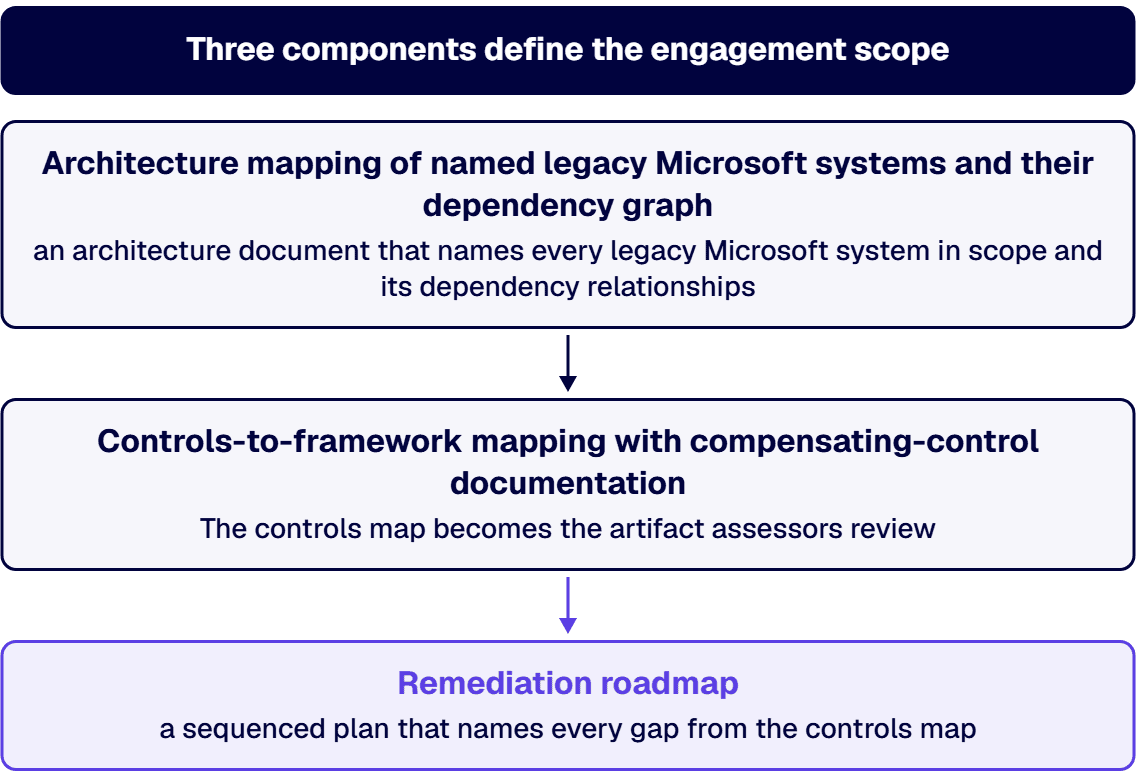
The first deliverable is an architecture document that names every legacy Microsoft system in scope and its dependency relationships. The inventory covers Windows Server hosts by version (2008, 2008 R2, 2012, 2012 R2, 2016, and where applicable 2019 still in legacy patterns), SharePoint Server farms by version (2013, 2016, 2019) including web front ends, application servers, and database servers, SQL Server instances by version (2008, 2008 R2, 2012, sometimes 2014 and 2016), and the related Active Directory forest structure, domain trust relationships, network segmentation boundaries, identity bridges to modern Microsoft 365 or Azure environments, and integrations with third-party applications. Dependency mapping is the part that catches teams off-guard most often: a legacy Windows Server 2012 R2 host that appears unused turns out to be running a scheduled job that feeds a modern Power BI dashboard, a SQL Server 2008 instance that no current application uses still receives traffic from a partner system the engineering team forgot existed, a SharePoint Server 2016 farm hosts a workflow that several Power Automate flows depend on for downstream processing. The architecture document also names the data classifications resident on each system (CUI, PHI, ITAR-controlled, FCI, public, internal) because controls scope follows data classification, not host count. The architecture document is the foundation every later deliverable rests on; an engagement that skips it produces controls maps and roadmaps that fail at implementation because the underlying inventory was incomplete.
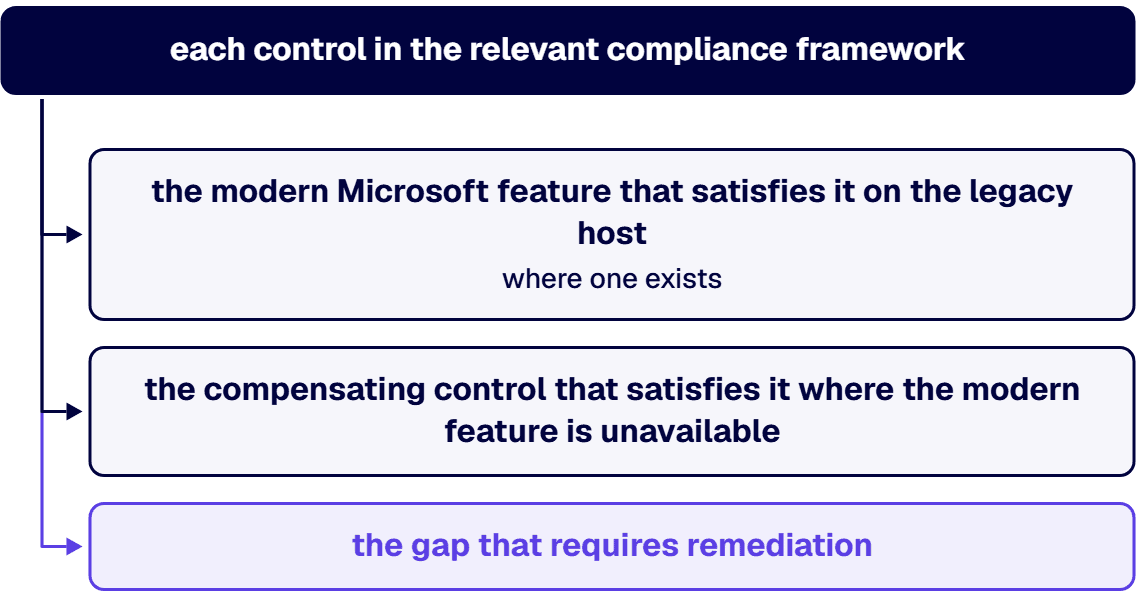
The second deliverable is the controls map: each control in the relevant compliance framework, mapped to either the modern Microsoft feature that satisfies it on the legacy host (where one exists), the compensating control that satisfies it where the modern feature is unavailable, or the gap that requires remediation. For a CMMC 2.0 Level 2 environment, the map covers all 110 NIST 800-171 controls across 14 control families. For a HIPAA-covered environment, the map covers the administrative, physical, and technical safeguards from the Security Rule. For an ITAR environment, the map covers the access control and export-control safeguards from EAR Part 734 and the relevant ITAR sections. Compensating controls follow the framework’s own guidance on documented substitution: a vendor patch that is no longer available on Windows Server 2012 R2 may be substituted by a documented combination of network segmentation, host-based intrusion detection, application whitelisting through Windows Defender Application Control or AppLocker, and reduced attack surface through service hardening and removal of unused roles, with the substitution recorded in the System Security Plan and accepted by the appropriate authorizing official. The same pattern applies to SharePoint Server farms (sensitivity-label gaps closed through site-collection-level segmentation, IRM policies, and access-review cadences) and SQL Server instances (encryption gaps closed through network-layer encryption, key-management documentation, and database-level audit configurations). The controls map becomes the artifact assessors review; documentation quality is what separates a defensible map from one that fails on the documentation criterion even when the underlying controls are in place.
The third deliverable is the remediation roadmap: a sequenced plan that names every gap from the controls map, ranks it by risk and assessment urgency, names the work required to close it, and assigns the work to a phase. Retain-vs-replace decisions are part of the roadmap, not a precondition for it. Some systems will be retained because the underlying business application has no modern replacement on the regulator’s timeline; the security program for those systems is built to the retain horizon, with compensating controls operated and verified on a defined cadence. Some systems will be replaced as part of a planned modernization program; the security program for those systems is built to the replacement timeline, with bridging controls in place during the transition window and clean cutover criteria documented. A third category often surfaces during the controls mapping work: systems that turn out to be candidates for retirement the organization had not previously considered. The roadmap names those candidates explicitly with the work required to retire them safely (data export, dependency rerouting, decommission verification). Surfacing retire candidates is one of the higher-value findings in a mid-size legacy footprint because the organization carries the security obligation on every retained system and retiring an unused one removes that obligation entirely. The roadmap integrates with whatever modernization program is already in flight, which is almost always the case in mid-to-large regulated enterprises; the security program does not compete with modernization, it accompanies it. The integration point with any broader Enterprise Application and Legacy Modernization Solutions program is named explicitly in the roadmap so neither program slows the other.
A regional health system engaged i3solutions to design a HIPAA Security Rule compensating-controls program for a legacy SharePoint Server 2016 environment hosting clinical research documents containing PHI. The engagement produced an architecture inventory, a Security Rule controls map, a compensating-controls inventory covering sensitivity-label gaps and access-review cadences, and an integration plan with the health system’s broader Microsoft 365 governance program.
Schedule a working session on framework alignment, deliverable structure, and integration with your existing modernization program. Scope before any commitment.
Three dimensions separate consultants who can do Microsoft legacy security work credibly from generalist firms who position around Microsoft security tooling deployment or DoD compliance more broadly. Each dimension is testable in a 30-minute conversation before the engagement starts, and the diagnostic tests below are the ones that reliably surface the difference. The right consultant relationship is borrowed expertise: pattern recognition from a team that has done this 600 times before, brought in to answer the specific questions your environment raises rather than to deliver a generic methodology unmodified.
Named-framework experience means the consultant has implemented controls programs against the specific framework or frameworks your environment is subject to (CMMC 2.0, NIST 800-171, HIPAA Security Rule, DFARS 252.204-7012, ITAR EAR Part 734) and can speak in the framework’s vocabulary, not in generic security vocabulary. Named-version legacy expertise means the consultant has worked with the specific legacy Microsoft versions in your environment (Windows Server 2008 R2, Windows Server 2012 R2, SharePoint Server 2013, SharePoint Server 2016, SQL Server 2008 R2, SQL Server 2012) and can describe what compensating controls actually work on those versions, not what should theoretically work. The diagnostic test is a question like “What compensating controls have you used for Defender coverage gaps on Windows Server 2012 R2 in a CMMC Level 2 environment, and what System Security Plan language did you use to document them?” A consultant with both kinds of experience answers concretely with control IDs, configuration patterns, and SSP phrasing examples; a consultant with one or neither generalizes, hedges into vagueness, or pivots to migration recommendations. The pivot to migration is itself a tell: the right consultant for legacy security work treats the legacy footprint as a controls problem to solve, not a problem to migrate away from on the consultant’s preferred timeline.
Defense-industrial-base environments often require cleared personnel for parts of the engagement. Some require US persons under ITAR. Some require all personnel to be subject to background checks under DFARS 252.204-7012 and the related FedRAMP and CMMC requirements. The right consultant either has cleared personnel available for the parts of the engagement that require them or can name explicitly which parts of the engagement they cannot staff and what the workaround is (split-team delivery, cleared subcontractor, customer-furnished access patterns). A consultant who is vague about clearance posture, or who positions offshore or nearshore delivery as an option for ITAR-controlled environments, or who treats the question as a procurement check-box rather than an operational constraint, is signaling a mismatch with regulated-environment delivery requirements. US-based senior delivery is the standing i3solutions delivery model and is non-negotiable for engagements that touch CUI, ITAR, or HIPAA-covered material; the same standard applies to any legacy security consultant your organization shortlists.
Durable artifacts are the architecture document, the controls map, the compensating-controls inventory, the remediation roadmap, and the runbooks that document how compensating controls are operated and verified on an ongoing cadence. A slide-deck assessment, by contrast, summarizes findings in a presentation format that the assessor cannot use as evidence and that the operations team cannot use as a runbook. The diagnostic test is the consultant’s sample deliverable from an analogous prior engagement: ask to see a redacted controls map, a redacted compensating-controls inventory, a redacted remediation roadmap, and a redacted operating runbook for one of the compensating controls. A consultant who can show those artifacts and walk through the documentation discipline that produced them is delivering the right kind of work; a consultant who can only show a slide deck, a “maturity heatmap,” or a “current state and future state” pair is positioning around the wrong deliverable type.
If legacy systems are carrying more risk than your team can absorb, a scoping call is the fastest way to size the fix.
Three drivers shape engagement size: the inventory (number of legacy Microsoft hosts in scope, version diversity, integration density); the framework set (single-framework versus multi-framework environments such as CMMC plus DFARS plus ITAR for a defense manufacturer); and the implementation depth (assessment-only versus assessment-plus-remediation work). Engagement bands run as follows. An assessment-only engagement for a focused legacy footprint typically lands in the low-to-mid five-figure range. An assessment plus a focused remediation program for a mid-size legacy footprint typically lands in the mid-to-high five-figure range. A full assessment-plus-remediation program for a multi-framework regulated enterprise with a substantial legacy footprint typically lands in the six-figure range, with phasing options available to spread the work across budget cycles. The Risk and Roadmap Assessment is the scoping conversation that produces the firm number for your specific environment, including the access constraints and any cleared-personnel requirements that affect timeline.
Yes, in many cases, with documented compensating controls and consistent implementation. CMMC 2.0 and NIST 800-171 are control objectives, not product mandates; the frameworks specify what must be achieved (access control, audit logging, configuration management, system integrity), not which Microsoft products must achieve it. A legacy Windows Server or SharePoint Server installation can satisfy NIST 800-171 controls when the gaps left by older versions are closed by compensating controls and the substitution is documented in the System Security Plan. The qualifier is documentation discipline. CMMC Level 2 assessors score documentation and consistency of implementation, not just the presence of a control. A compensating control that exists but is not documented in the SSP, or that is documented in the SSP but not implemented consistently across the in-scope systems, will fail on the documentation criterion even when the underlying control posture is sound.
A Microsoft legacy security assessment produces an architecture inventory of the legacy Microsoft systems in scope, a controls map against the relevant compliance framework, a compensating-controls inventory, a gap analysis with prioritized risks, and a remediation roadmap with phasing and rough effort estimates. The inventory names systems by version (Windows Server 2012 R2, SharePoint Server 2016, SQL Server 2012, etc.), their dependency relationships, and their integration points with the modern Microsoft footprint and any third-party applications. The controls map covers the framework or frameworks the environment is subject to (CMMC 2.0 Level 2, NIST 800-171, HIPAA Security Rule, DFARS 252.204-7012, ITAR), control by control, with the implementation status named for each. The assessment is not a maturity score on a five-point scale; the deliverables are operational documents the security and IT teams can act on.
Engagement duration tracks scope. An assessment-only engagement for a focused legacy footprint typically completes in six to ten weeks, depending on system count, version diversity, and access scheduling. An assessment plus a focused remediation program for a mid-size footprint typically completes in three to five months. A full assessment-plus-remediation program for a multi-framework regulated enterprise with a substantial legacy footprint typically runs six to nine months and integrates milestones with any modernization program already in flight. Schedule risk is concentrated in two phases: access provisioning at engagement start (administrative credentials, network access, document-repository access) and assessor-readiness review at engagement end (when the deliverables are reviewed against the assessor’s documentation expectations). The scoping conversation produces the firm timeline for your specific environment.
The two programs operate in parallel rather than sequentially. The legacy security program produces the architecture inventory, controls map, compensating-controls inventory, and remediation roadmap for the systems that remain in operation. The modernization program produces the migration path, target architecture, and cutover sequence for the systems that move. The two programs share inputs (the architecture inventory feeds both) and outputs (the modernization program’s sequencing decisions update the legacy program’s retain-vs-replace cadence). Integration points are named explicitly in the legacy program’s remediation roadmap so the modernization team knows which compensating controls remain in operation through which migration milestones, and the legacy team knows which systems are leaving on what timeline so the controls program does not over-invest in compensating controls for systems about to retire.
Microsoft’s ESU pages, as read in September 2026, name no fourth year for Windows Server 2012 R2. Its Lifecycle FAQ on Extended Security Updates states that ESUs for Windows Server 2012 and 2012 R2 are provided “for a maximum of three years after end of support”, with October 13, 2026 as the Year 3 end date in its table. The one extra year it names is Azure-only and for older versions: “One additional year of ESU is available for Windows Server 2008 and 2008 R2 only on Azure.” Past October 13, 2026 a 2012 R2 host receives no security updates from Microsoft, so the answer is a migration project, not another ESU year.
SharePoint Security for Regulated Organizations covers when the legacy security program intersects with SharePoint Server farms that need governance-first security configuration.
Microsoft 365 GCC High Migration Services covers the migration path for organizations evaluating GCC High as the destination for the modern footprint while the legacy security program runs in parallel.
Hybrid Microsoft Integration Security for Enterprises covers when the legacy security work intersects with hybrid integration patterns that span on-premises and cloud.

US-Based Microsoft System Integrator | Est. 1997
© i3solutions. All rights reserved.
US-Based Microsoft System Integrator | Est. 1997
© i3solutions. All rights reserved.


