
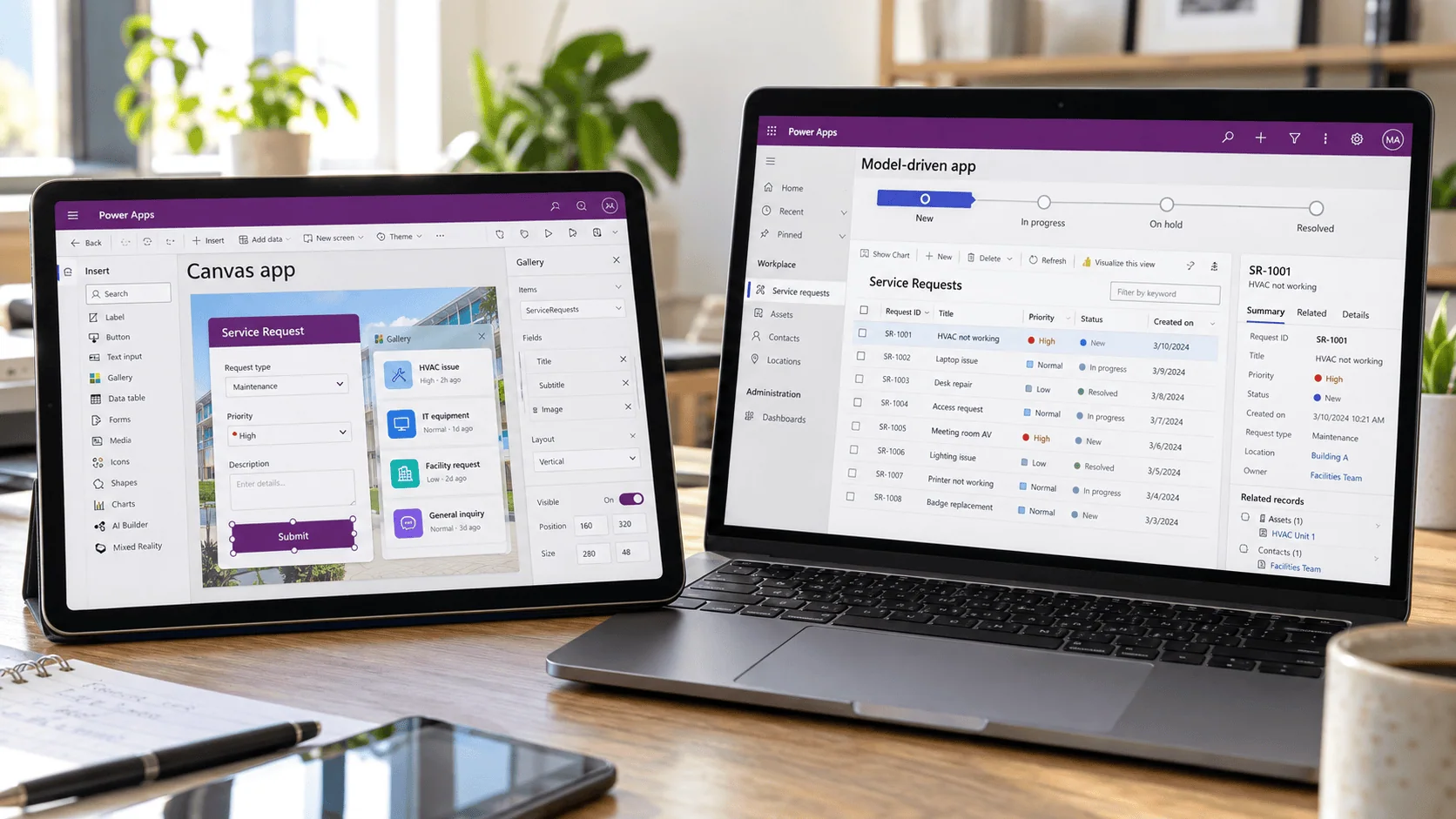
Power Apps canvas vs model driven apps represent two distinct development paradigms within Microsoft Power Apps, and choosing the wrong one for your enterprise use case creates rework, adoption failure, and governance debt. Canvas apps offer pixel-perfect design freedom and broad data connectivity. Model-Driven apps deliver enterprise-grade governance, security, and Dataverse-native consistency. In many enterprise scenarios, the most effective approach combines both.
The decision comes down to three criteria: where your data lives, how much UI customization you need, and whether compliance and audit trails are non-negotiable.
Not sure which approach fits your organization? Talk to an i3solutions Power Apps architect →
Canvas and Model-Driven Apps are two powerful paradigms within Microsoft Power Apps that are reshaping how organizations approach low-code application development. In today’s fast-paced digital landscape, CTOs and IT Managers at mid-to-large enterprises are under constant pressure to deliver high-impact software solutions that are scalable, user-friendly, and seamlessly integrated with existing systems. That’s why low-code platforms have become essential for accelerating innovation without sacrificing control.
Among these platforms, Microsoft Power Apps stands out for its deep integration with the Microsoft ecosystem: Power Automate, Power BI, and Azure services included. Canvas Apps offer pixel-perfect design freedom, ideal for tailored user experiences, while Model-Driven Apps provide structured, enterprise-grade solutions with built-in governance and security. When used together, they empower organizations to meet diverse business needs, balancing front-end flexibility with back-end consistency and compliance.
Frustrated with slow progress in your app development projects? Suffering from low-quality solutions that fail to deliver a stellar user experience or robust data governance? This blog explores how you can harness both Canvas and Model-Driven Apps under the Power Platform umbrella to achieve a hybrid approach, one that meets ambitious deadlines while ensuring robust data integrity, streamlined workflows, and future-proof scalability.
Before we delve into the synergy of combining these two development methods, let’s briefly recap their core differences. If you need a more detailed standalone comparison, check out this blog: Model-Driven Apps vs. Canvas Apps: What Are They and When Should They Be Used?.
| Criteria | Canvas Apps | Model-Driven Apps |
| Data Source | Multiple sources: SharePoint, SQL, APIs, Dataverse, and 1,200+ connectors | Dataverse only: data model drives the application structure |
| UI Flexibility | Pixel-perfect, fully custom: drag-and-drop every element | Structured and consistent: auto-generated from data model |
| Security & Governance | Connector-dependent: security managed at data source level | Row-level and field-level Dataverse security: audit trail built in |
| Best For | Task-specific, role-based, mobile-first, branded experiences | End-to-end solutions, CRM/ERP, compliance-heavy processes |
| Dataverse Required | Optional | Yes: mandatory |
| Offline Capability | Yes: supported for field scenarios | Limited: requires connectivity for Dataverse access |
The clarity of Model-Driven Apps can accelerate large-scale projects, while the creative freedom of Canvas Apps ensures polished interfaces. However, in many scenarios, a single approach may not meet all requirements. That’s where combining them comes into play.
In most cases it does, because the two app types sit on different data platforms and the license follows the data. Microsoft’s model-driven app overview states that “without a data model housed within Microsoft Dataverse, you can’t create a model-driven app,” and its comparison table lists the data platform for model-driven apps as “Dataverse only” against “Dataverse + many others using connectors” for canvas apps.
That Dataverse requirement decides the license. Microsoft’s Power Platform licensing FAQ states: “Accessing an environment with Dataverse requires all users to have a corresponding standalone Power Platform license for each service being utilized. For example, a user accessing an app running on Dataverse needs to be licensed by either the Power Apps per app or per user plan depending on the customer scenario.” A user of a model-driven app is therefore a licensed Power Apps user.
A canvas app that stays on standard connectors, such as one built over a SharePoint list, can run on the Microsoft 365 license its users already hold. Asked how many apps Microsoft 365 plans can run, the same FAQ answers: “There’s no limit on the number of applications. Customers can continue to run standalone apps to extend and customize Microsoft 365 using standard connectors.”
The gap closes as soon as a canvas app touches Dataverse or a Premium connector. The FAQ states that “A standalone Power Apps or Power Automate plan license is required to access all Premium, on-premises, and custom connectors,” and it lists the SQL, Azure, and Dynamics 365 connectors as Premium. A canvas app chosen to avoid license cost often stops being cheaper the moment it needs governed data.
When the two types work together, Microsoft counts them once. Asked whether embedded canvas apps in model-driven apps consume multiple per app plans, the FAQ answers: “No. Embedded canvas components within the model-driven app are recognized as a single app.” For what each plan costs and where the break-even sits between them, see Power Apps Premium vs Per App.
If you run a mid-to-large enterprise, you’re likely familiar with sprawling data landscapes and varied user needs. Some departments might prioritize strong data governance, while others desire a slick, branded interface to engage end-users effectively. Merging the strengths of Canvas and Model-Driven Apps can address these divergent needs.
You might be wondering how to practically implement a hybrid approach. Thankfully, Microsoft Power Apps offers several integration patterns to blend Canvas and Model-Driven functionalities.
One popular strategy is to embed a Canvas App within a Model-Driven form or dashboard using the Custom Page feature. This allows you to:
For instance, a Model-Driven CRM system for sales might use a Canvas App section to create an interactive quote builder with drag-and-drop line items and real-time cost calculations.
Another approach is to maintain a fully standalone Canvas App, often for mobile or kiosk use, that reads and writes data to the same Dataverse tables used by your Model-Driven App. This structure works best when:
Regardless of how you combine the two, Dataverse acts as a central repository. This ensures data consistency: no matter the interface users access, all information remains in sync. Beyond basic fields, Dataverse supports complex relationships, security roles, and even logic hooks (using Power Automate).
Automating business processes often involves synchronizing actions across different environments. For example, a user’s activity in a Canvas App may need to trigger a process managed by the Model-Driven environment, or vice versa. Power Automate bridges this gap by using event-driven flows to seamlessly integrate and automate these processes. For example:
Need higher skilled technical resources to hit your objectives? i3solutions can help you design an architecture that marries both app types, ensuring no trade-off between ease of use and enterprise-grade security.
Adopting a hybrid solution can be both rewarding and challenging. Here are some best practices to help you avoid common pitfalls.
Even if you embed a Canvas App into a Model-Driven environment, ensure consistent styling, navigation, and branding:
Let’s explore two scenarios illustrating how and why organizations might opt for a hybrid solution.
Sales & Marketing Integration
Field Service & Compliance
Scenario: A state National Guard organization was running critical workflows on aging InfoPath forms that no longer matched its processes or its compliance needs.
Hybrid Solution:
Outcome: The organization retired a fragile, unsupported forms platform for a governed Dataverse foundation, matching the app model to each process instead of defaulting to a single pattern for everything, the same hybrid principle driving the scenarios above.
A significant advantage of the Power Platform is its modular nature. You can tailor your hybrid approach further by adding Power BI, Power Automate, and Azure services to the mix.
Visualize data from both Canvas and Model-Driven systems in real time. A sales manager could open a Model-Driven dashboard showing pipeline statistics while a Canvas-based analytics page provides detailed charts for individual territories.
Workflow automation knits everything together by ensuring that updates flow seamlessly across systems. For example, when a marketing manager updates product pricing in the Model-Driven system, Power Automate instantly triggers an alert that refreshes the Canvas-based quote builder. As a result, sales reps see the updated pricing in real time, eliminating the need for manual re-entry and reducing the risk of costly errors.
Adopting a hybrid strategy with Canvas and Model-Driven Apps isn’t just about technical elegance: it’s about real-world ROI.
As IT leaders, you’re tasked with delivering solutions that balance robust data governance, user-focused design, and lightning-fast delivery. While Canvas and Model-Driven Apps each excel in different domains, combining these two approaches often yields the best of both worlds. You get the enterprise-scale security and data consistency of a Model-Driven framework, coupled with the visual flexibility and custom UI capabilities of Canvas.
Frustrated with slow progress or subpar solutions that hinder your digital transformation goals? A well-planned hybrid environment can significantly accelerate app development cycles, elevate user satisfaction, and ensure compliance across departments. Don’t settle for half-measures that leave your teams juggling multiple platforms. Instead, unify your approach by harnessing the synergy of both Canvas and Model-Driven Apps.
Whether you’re struggling with disjointed app experiences, slow development cycles, or inconsistent data governance, i3solutions can help you move forward with confidence. With decades of experience in Microsoft technologies and enterprise solution architecture, we specialize in designing hybrid environments that combine the strengths of Power Apps canvas and model-driven apps to deliver intuitive interfaces backed by robust data infrastructure.
Our experts work closely with your teams to assess your needs, optimize your Power Platform strategy, and accelerate time-to-value with scalable, secure, and user-friendly applications. From architecture planning and app development to integration with Power Automate, Power BI, and Azure services, we help you build solutions that deliver real business impact. Explore our wide range of services to learn how i3solutions can help you architect a next-generation digital ecosystem and see our work to discover how we’ve transformed organizations through innovative software solutions.
Whether you’re suffering from low-quality solutions, tired of missing deadlines, or simply need higher skilled technical resources to hit your objectives, i3solutions can help. Contact us today to build a future-proof environment where Canvas and Model-Driven Apps work in harmony, helping you drive innovation, optimize your processes, and deliver real value across the entire enterprise.

Scott Singleton has spent more than 19 years at i3solutions and more than 30 years designing, developing, migrating, and implementing enterprise technology solutions. His expertise is grounded in SharePoint architecture, large-scale migration, custom application development, workflow modernization, technical training, and hands-on delivery across Microsoft platforms, including SharePoint, SPFx, Power Apps, Power Automate, Power BI, and enterprise database systems.
View LinkedIn ProfileUse model-driven apps when all data lives in Dataverse, enterprise-grade security with row-level permissions is required, or compliance and audit trails are non-negotiable. Use canvas apps when you need custom UI, multiple external data sources, offline capability, or task-specific mobile experiences.
The most significant limitation is restricted UI customization. Because the interface is auto-generated from the Dataverse data model, pixel-perfect designs or highly branded layouts are not possible. Model-driven apps also require Dataverse as the exclusive data source: they cannot connect directly to SharePoint, SQL Server, or external APIs without additional configuration.
Yes. Power Apps supports embedding canvas apps within model-driven forms and dashboards using the Custom Page feature. This allows a custom canvas interface to display within a model-driven environment while keeping all data in Dataverse under model-driven governance, the foundation of the hybrid deployment pattern.
Power Apps is the platform. Canvas apps and model-driven apps are the two types of applications you build within it. Canvas apps offer custom UI design and broad data connectivity. Model-driven apps are data-first, built on Dataverse, with auto-generated interfaces. Power Apps is the platform; these are the two paradigms within it.
When different user roles need different experiences for the same underlying data. A model-driven app manages structured back-end data and complex workflows; a canvas app provides a tailored, mobile-friendly interface for field staff or specific departments. Both share the same Dataverse data: governance is maintained, user experience is optimized per role.


Every quarter an ungoverned Power Platform environment stays in production, remediation becomes more expensive, more disruptive, and harder to fund internally. i3solutions' Power Platform advisors work with enterprise IT leaders who have already identified the problem and need a structured path from diagnosis to scoped delivery.
Pressure-Test Your Power Platform Plan
US-Based Microsoft System Integrator | Est. 1997
© i3solutions. All rights reserved.
US-Based Microsoft System Integrator | Est. 1997
© i3solutions. All rights reserved.


