
Workato is the broader multi-vendor integration platform and Power Automate is the deeper Microsoft-native one, but in a regulated Microsoft estate the decision usually turns on two published facts rather than a feature list: Power Automate is deployable in the US government clouds under FedRAMP High and DISA provisional authorities to operate, and Workato publishes no list pricing at all. Both platforms scale. They scale on different meters, and only one of them will tell you what the meter costs before you are inside a sales cycle.
Workato’s own documentation and product navigation describe a broad enterprise automation platform: iPaaS and embedded iPaaS, API management, data orchestration, a data hub and master data management, B2B and EDI, low-code apps, intelligent document processing, and robotic process automation. Its unit of work is the recipe, which Workato defines as “an automated workflow that executes a series of steps to integrate and process data across multiple applications,” in five documented types: workflow, API, data pipeline, app event, and knowledge base recipes. Its concept documentation defines the execution unit just as plainly: “A job represents the flow of a trigger event through the recipe.”
Power Automate’s unit of work is the flow. Cloud flows run over standard, premium, and custom connectors; desktop flows automate applications that have no usable API by driving the interface directly. It is not a standalone integration product, and treating it as one is the most common analysis error. It is one surface of the Power Platform, sharing Microsoft Dataverse, managed environments, data loss prevention policies, and the Power Platform admin center with Power Apps and Microsoft Copilot Studio.
So the honest comparison is not feature parity. If the integration estate’s center of gravity is dozens of non-Microsoft SaaS systems with no Microsoft anchor, Workato is purpose-built for that shape of problem. If the center of gravity is Microsoft 365, Dataverse, Dynamics 365, and SharePoint with a perimeter of other systems around it, Power Automate is already inside the tenant, the identity model, and the governance boundary you have to defend anyway. Adding a second orchestration platform there is a governance decision before it is a technology one, the same test we apply when the question is custom development versus system integration.
The two vendors publish connector reach differently, and the asymmetry is worth knowing before someone hands you a comparison chart. Workato states a total: its documentation says Workato “provides over 1,000 connectors in three categories,” and it separately documents universal connectors for HTTP, OpenAPI, GraphQL, and SOAP services plus an SDK for creating “customized connectors” against “applications not directly supported by Workato’s pre-built connectors.” Microsoft publishes no total at all. Its connector reference is an alphabetical index filterable by tier, by product, and by publisher, with no count stated on it. A side-by-side chart carrying a precise connector number for both platforms therefore got the Microsoft number from somewhere other than Microsoft. The count that decides your evaluation is narrower and checkable either way: your systems, named, looked up on both reference lists, with the gaps marked for a custom connector or SDK build.
Hybrid connectivity is documented on both sides, and the difference is architectural rather than functional. Microsoft’s license comparison table lists on-premises gateways as included in Premium, Process, and Hosted Process alike, so gateway access to on-premises SQL Server or file shares is not a paid upgrade. Workato’s on-prem agent, in its own documentation, “runs within the user’s server, typically behind a firewall, and establishes a TLS WebSocket tunnel to connect out to Workato,” and “only makes outbound connections to Workato. It doesn’t require you to open any inbound ports in your firewall.” It reaches Workato’s gateways over TCP port 443 with mutual TLS, groups for high availability and load balancing, and needs at least 8 GB of RAM and 768 MB of disk per agent. Both designs pass a competent security review. They do not produce the same review, because one tunnel terminates inside your Microsoft tenant boundary and the other terminates in a third-party cloud.
Both platforms answer the no-API problem. The difference is who owns the bot. Power Automate carries robotic process automation inside the same license family as its cloud flows: the Premium user license bears one attended bot, a Process license allocated to a machine becomes one unattended bot, and a Hosted Process license carries one hosted bot on Microsoft-managed infrastructure. Workato documents RPA as a partnership. In its own words, “RPA by Workato is a complete RPA solution in partnership with Robotiq.ai, an industry-agnostic, enterprise-ready RPA client,” reached through a connector and aimed at “applications that don’t have APIs, including legacy systems such as older SAP platforms, desktop applications, and browser apps without API support.” Functionally that covers similar ground. Contractually it does not: one is a bot entitlement inside a license you already hold, the other introduces a third-party RPA client into the data path with its own vendor, its own agreement, and its own security review. If desktop automation is the main event rather than a side condition, the comparison you want is not this one; it is Power Automate against the dedicated RPA platforms.
Power Automate meters Power Platform requests, and Microsoft publishes the numbers. The official limits are 40,000 requests per user per 24 hours on Power Automate Premium, and 250,000 requests per license per 24 hours for a Power Automate Process license allocated to a cloud flow, with Hosted Process the same. Up to 10 Process licenses stack on a single cloud flow, each adding 250,000 actions per day, and the flow must live in a solution. Alternatively, one Process license on a flow group shares 250,000 actions per day across up to 25 cloud flows. Above all of that sits a five-minute ceiling of 100,000 requests that is independent of license. Desktop flow executions do not consume Power Platform requests at all.
Two footnotes matter for planning. Every organization is currently in a documented transition period with higher enforced limits, 200,000 per cloud flow for Premium and 500,000 per license for Process, and Microsoft’s instruction is to “Build your cloud flows based on official limits.” The admin center’s Power Platform request reports also give measured daily action counts per flow, so year-two capacity is an observation rather than an estimate. Which license carries that capacity is a separate decision, covered on our Power Automate Premium vs Process page.
Workato’s published meter is a unit without a rate. Its usage documentation counts tasks: the billable tasks view “visualizes the number of tasks consumed by recipes and API proxy requests across all environments, excluding high-volume recipes (HVRs),” and a high-volume recipe is defined precisely, as one that “consumes more than four million tasks in a billing cycle and resets in the following cycle.” Workato also documents that “All successfully executed operations contribute to overall usage and failed operations are excluded.” Those are real published mechanics, and they are the closest thing to a published number on the Workato side. What is not published is the rate. Its pricing page names no plans and shows no dollar figures, only “Pricing designed to support organizations of all sizes and needs” and a route to sales. That has a hard consequence: a like-for-like cost-per-volume model between these two platforms cannot be built from published sources. It is not a defect in the product, it is a procurement fact, and it belongs in the risk column of a decision that has to survive a budget review, because the Microsoft side of the model is checkable by anyone in the room and the Workato side is a quote.
For isolation at volume, Workato documents Virtual Private Workato, in which “Each organization gets a dedicated Workato environment hosted in its own AWS Virtual Private Cloud (VPC), ensuring complete isolation from other customers,” positioned for “highly regulated industries like financial services, insurance, and healthcare.” If your control environment requires dedicated infrastructure, that is the edition to price, not the commercial cloud.
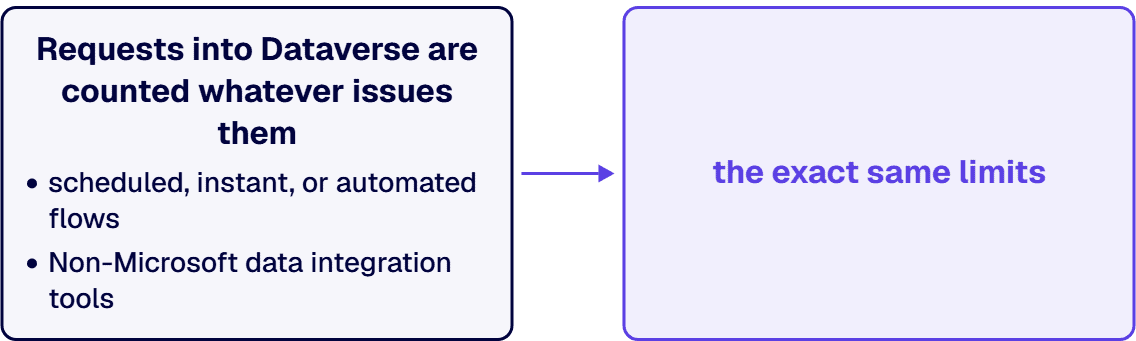
The most expensive misconception in this comparison is that moving orchestration to a third-party platform escapes Microsoft’s request limits. Microsoft answers this directly in its own licensing documentation, under the question of whether to use a non-Microsoft data integration tool to avoid hitting limits: “No. Non-Microsoft data integration tools are subject to the exact same limits as scheduled, instant, or automated flows.” Requests into Dataverse are counted whatever issues them. A recipe writing to Dataverse consumes tenant capacity the same way a flow does, which means an iPaaS purchase justified as throttling relief is a business case built on a premise Microsoft has published a contradiction to.
For public sector and defense supply chain buyers this is usually the whole decision, so it is worth stating from the primary sources rather than from reputation. Microsoft documents that the Power Automate GCC environment “is compliant with the Federal requirements for cloud services, including FedRAMP High, and DoD DISA IL2,” and is also compliant with criminal justice information requirements; that GCC High is designed to meet DISA SRG IL4 with “A Provisional Authority to Operate has been granted by DISA,” operated so that defense contractors can meet ITAR commitments and DFARS acquisition regulations; and that the DoD environment is built to DISA SRG IL5 with its own provisional authority. Customer content is stored in the United States and administrator access is restricted to screened US citizens.
Workato’s own security compliance documentation lists PCI DSS v4.0.1 Level 1, ISO 27001, ISO 27701, ISO 42001, SOC 1 Type II, SOC 2 Type II, SOC 3, HIPAA, IRAP, and NIST 800-171A Revision 2. That list covers the control families most commercial regulated buyers ask for, and the NIST 800-171A attestation is directly relevant to contractors handling controlled unclassified information. FedRAMP does not appear on that list. If your contract requires a FedRAMP-authorized service, confirm current status with Workato and in the FedRAMP Marketplace before the platform reaches a shortlist, because an unauthorized service in the data path is a finding, not a preference.
Both platforms give you environment separation and a deployment path, and both are commonly run without either. Workato documents Development, Test, and Production environments, with deployment privileges required in both source and target and platform APIs available “to integrate Workato into any existing CI/CD process.” Power Automate has solutions, managed environments, and pipelines. The failure mode is identical on both sides: production automations built directly in production, owned by an individual rather than the organization, with no inventory anyone can produce for an auditor.
That is the part worth spending on, and it is what a governance framework build and an ALM implementation actually deliver. i3solutions has implemented governance frameworks for organizations managing 200+ integrations across Microsoft ecosystems. i3solutions delivery includes ALM practices with Power Platform pipelines or Azure DevOps integration, environment separation strategies, and change control processes. i3solutions runs migrations against named control families across CMMC, HIPAA, SOC 2, and NIST 800-171, producing artifacts auditors can review. That governance and ALM work is delivered through our Power Platform development services.
For teams building automation with their own staff, senior workflow automation specialists embed alongside the people who own the processes and take on process design, low-code and pro-code workflow engineering and Azure-based orchestration within the existing backlog.
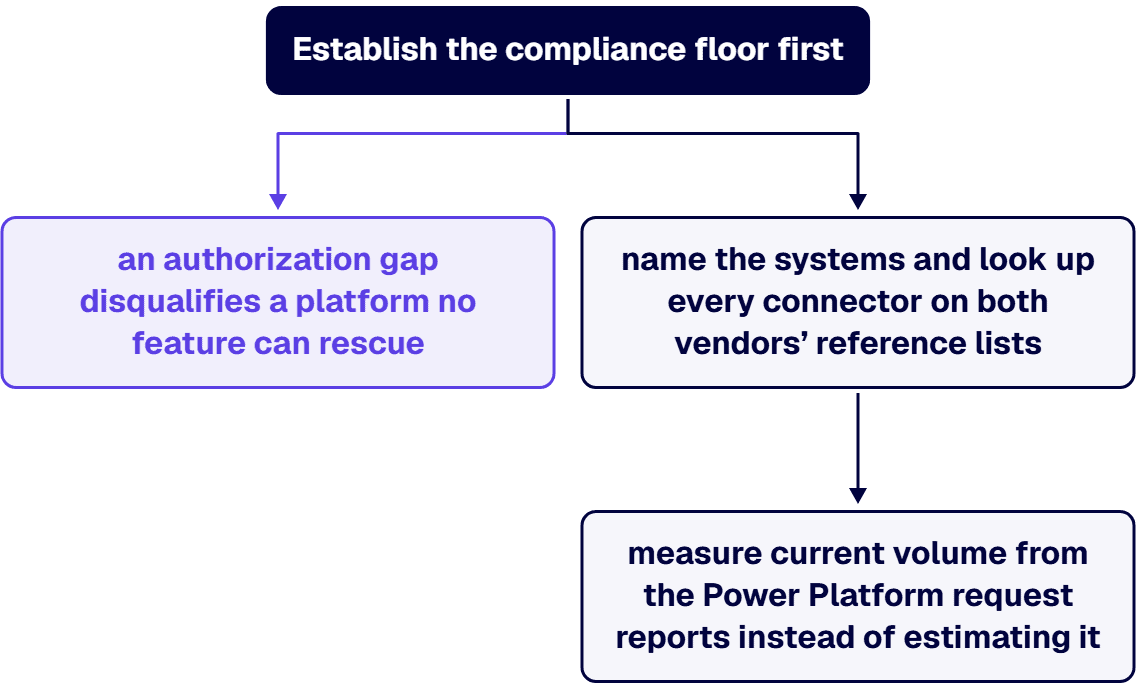
Establish the compliance floor first, because an authorization gap disqualifies a platform no feature can rescue. Then name the systems and look up every connector on both vendors’ reference lists. Then measure current volume from the Power Platform request reports instead of estimating it. Price only what is published, and mark the Workato line as a quote to be obtained rather than a number you already have. i3solutions has been a Microsoft Partner with 30 years of enterprise technology delivery experience and has delivered 1,500+ Microsoft engagements across aerospace and defense, financial services, and health sciences. The pattern that repeats is that the platform choice is rarely the expensive mistake. Running two orchestration platforms with one governance model, or none, is.
Data integration tool evaluation engagements at i3solutions typically range from $40,000 to $120,000 depending on the scope and complexity of the enterprise’s data estate. The output is a connector-level fit assessment, measured volumes against published limits, a compliance mapping for the frameworks in your contracts, and a recommendation you can defend in a budget review. That last artifact is the point: something a procurement review or an architecture committee can read without taking either vendor’s word for anything. i3solutions routes a senior U.S.-based engineer to a client call usually within one to two weeks, which is normally the fastest way to find out whether this decision is as close as it looks. If you want the decision package built and then delivered, that is the work our Power Automate development services team does, and the next step is a conversation about your connector inventory and your compliance floor.
For a Microsoft-centric estate, yes, and the qualifier is the whole answer. Power Automate covers standard, premium, and custom connectors, on-premises data gateway access included with Premium, Process, and Hosted Process alike, and first-party robotic process automation for systems with no API. Where it is not the equivalent product is a large orchestration estate between third-party systems that never touches Microsoft, which is what a dedicated iPaaS is built for.
Microsoft publishes list prices: Power Automate Premium at $15.00 per user per month, Process at $150.00 per bot per month, and Hosted Process at $215.00 per bot per month, paid yearly. Workato publishes no prices. Its pricing page carries no plan names and no figures. Its documentation describes the meter in tasks consumed by recipes and API proxy requests across all environments, with any recipe above four million tasks in a billing cycle treated as a high-volume recipe. That is a unit without a rate. Any side-by-side cost table you have been shown with Workato dollar figures in it did not get them from Workato.
No, and Microsoft says so in its own documentation: non-Microsoft data integration tools are subject to the exact same limits as scheduled, instant, or automated flows. Requests into Dataverse count against tenant capacity regardless of what issues them. If throttling is the problem, the documented remedies are Process capacity on the affected flows, stacking up to 10 Process licenses on a single flow, request capacity add-ons, or pay-as-you-go.
Power Automate has a documented US Government path: GCC compliant with FedRAMP High and DoD DISA IL2, GCC High designed to DISA SRG IL4 with a DISA provisional authority to operate and operated to support ITAR and DFARS obligations, and a DoD environment built to IL5. Workato’s published compliance list covers SOC 1, 2, and 3, ISO 27001, ISO 27701, ISO 42001, PCI DSS Level 1, HIPAA, IRAP, and NIST 800-171A Revision 2, and does not name FedRAMP. Verify current status with the vendor and in the FedRAMP Marketplace before shortlisting.
Microsoft publishes hard throughput numbers, listed in the table above, including a 100,000 request ceiling per five minutes that applies regardless of license. Workato publishes billing thresholds rather than throughput ceilings. Its documented four-million-task figure marks where a recipe becomes a high-volume recipe for billing purposes, not where the platform stops accepting work. So Microsoft’s ceiling is something you can design against before you build, and Workato’s is something you have to get in writing from the vendor before you commit.
You can, if one team owns the boundary between them and every automation on both sides lives in a versioned environment with a named organizational owner. The problem is never the second platform. It is the second unmanaged inventory: two sets of credentials, two audit trails, two answers to who owns a broken production process. Decide before purchase which platform is authoritative for which class of integration, and write it down.

US-Based | Est. 1997
© i3solutions. All rights reserved.
US-Based | Est. 1997
© i3solutions. All rights reserved.


