
By Scot Johnson, Founder / CEO, i3solutions. Scot Johnson co-founded i3solutions 30 years ago with a focus on expert-led delivery, strategic advisory, and complex Microsoft-centered solutions for organizations where technology decisions carry operational, financial, and mission risk.
For an enterprise already standardized on Microsoft 365 and Azure, Power Automate is the default choice, and the burden of proof sits with the alternatives. The licensing math alone is hard to argue with: Microsoft’s published pricing runs $15 per user per month for attended automation and $150 per bot per month for unattended RPA, on identity, data loss prevention, and audit controls the estate already operates. UiPath earns its premium when the processes you are automating live mostly outside Microsoft: legacy ERPs, mainframe screens, Citrix sessions, document-heavy workflows needing industrial-grade orchestration. Blue Prism is justified in one situation: a regulated, high-volume unattended back office where its operating model is already embedded and the cost of moving exceeds the cost of staying.
That is the verdict in three sentences. The rest of this page shows the published numbers behind it, the honest case for each platform, and the governance question that actually decides the outcome in a regulated Microsoft estate.
Two of the three vendors publish list prices; one does not. That asymmetry is itself useful in a procurement conversation.
Confirm the Microsoft and UiPath figures on the vendors’ pricing pages before you build the business case; both adjust plans periodically. But the structural point survives any price refresh: for a Microsoft enterprise, Power Automate’s marginal cost is a line item, UiPath’s is a program budget, and Blue Prism’s is a negotiation. If you hold Microsoft 365 E3 or E5 licensing, a meaningful share of attended automation capability is already paid for. The comparison is never between three platforms at list price; it is between one platform you have partially bought and two you have not.
The case for Power Automate is not that it is cheaper, although it is. It is that in a Microsoft-centric enterprise the platform sits inside the security and identity perimeter you already govern. Flows authenticate through Entra ID, data movement is constrained by the tenant’s data loss prevention policies, and run history lands where your audit tooling already looks. Connectors to SharePoint, Teams, Outlook, Dynamics 365, and Dataverse are native, and the on-premises data gateway reaches back to SQL Server and SAP GUI sessions without a separate integration layer.
There is also a workforce argument that rarely makes the vendor comparison decks. Power Automate skills exist inside your business units today, because the attended tier ships with licenses your users already hold. That is a real advantage and a real risk at once: the accessibility that makes departmental automation fast also produces ungoverned sprawl when nobody owns the guardrails. We build for both sides of that trade in our Power Automate development services practice: production-grade automations engineered by senior developers, inside a governance structure that lets citizen-built flows exist without becoming an audit finding.
If your underlying question is the broader one, whether Power Automate genuinely counts as RPA at all, we answer that separately in our comparison of Power Automate and traditional RPA.
UiPath is the strongest pure-play RPA platform in the market, and pretending otherwise would make this page less useful to you. It earns its cost in recognizable situations. If your target processes are dominated by non-Microsoft systems, an Oracle ERP, mainframe green screens, thick-client applications in Citrix or VDI, UiPath’s computer-vision-driven UI automation is more mature there than Power Automate’s desktop flows. If your portfolio is document-heavy, its Document Understanding tooling for classification and extraction at volume is a genuine differentiator. And if you are orchestrating hundreds of unattended robots with complex queueing and retry logic, UiPath Orchestrator was built for exactly that job.
The honest test: mark which of your automation candidates touch a Microsoft surface. If most of the value sits outside the Microsoft estate, UiPath’s premium buys you something. If most sits inside, you are paying an enterprise platform price to reach systems your licensing already reaches.
Blue Prism built its reputation in regulated back offices, banking, insurance, healthcare administration, on a controlled, centralized operating model: no citizen developers, tightly managed release paths, audit trails designed for regulators. If you already run a Blue Prism estate at volume with an embedded delivery team, the switching cost is real and staying can be the defensible choice.
For a Microsoft enterprise making a fresh decision in 2026, the case is harder to make. The governance capabilities that once separated Blue Prism, role-based access, audit logging, controlled promotion between environments, now have direct equivalents in the Power Platform’s managed environments, DLP policy tiers, and pipeline-based ALM. Notably, Blue Prism’s own published comparison concedes Power Automate’s integration and cost advantages for Microsoft-centric organizations and rests its argument on governance. That argument deserves a serious answer, which brings us to the part of this decision vendor comparisons skip.
The pattern we see across regulated Microsoft estates: the platform decision gets weeks of evaluation, the governance design gets a paragraph. Eighteen months later, the audit does not ask which vendor you chose. It asks who can create automations that move regulated data, which environments they run in, how credentials are stored, what the promotion path to production is, and where the run history lives.
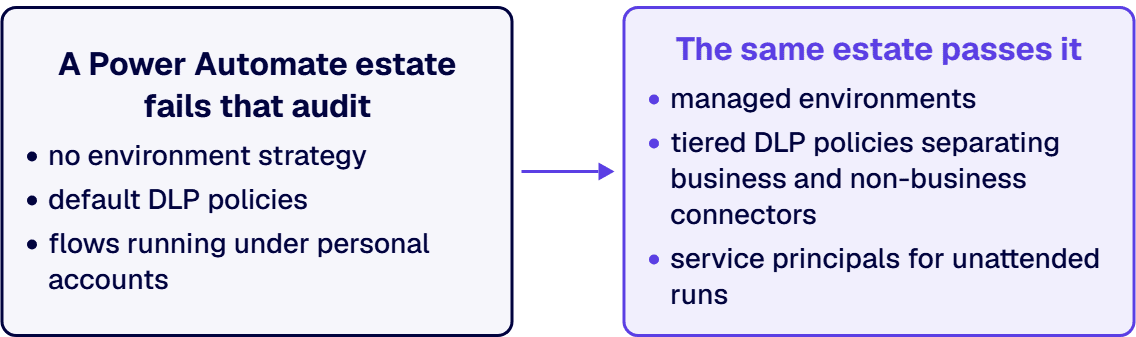
A Power Automate estate with no environment strategy, default DLP policies, and flows running under personal accounts fails that audit regardless of how good the platform is. The same estate with managed environments, tiered DLP policies separating business and non-business connectors, service principals for unattended runs, solution-based ALM with a real promotion pipeline, and Dataverse audit logging feeding your compliance tooling passes it, on licensing you largely already own. That configuration work is the true price of choosing Power Automate in a regulated industry, and it is a fraction of a multi-year Blue Prism commitment. It is the core of what our Power Platform development services team builds for enterprises in aerospace and defense manufacturing, financial services, and healthcare: environments where the automation platform has to survive an audit, not just a demo.
That is the fair reading of the whole comparison: Blue Prism sells governance as a product. In a Microsoft estate, governance is a discipline you configure into a platform you already license. Fund the discipline and you get Blue Prism-grade control at Power Automate prices. Skip it and you get sprawl, then a remediation project.
Designing, engineering and integrating the workflows themselves on Microsoft platforms is the scope of enterprise workflow automation services.
Both, by design. Cloud flows are API-based workflow automation. Desktop flows on the Process plan are genuine unattended RPA: screen-level automation of applications with no API, on your machines or Microsoft-hosted VMs, managed through the Power Platform admin center. The workflow label understates the unattended tier.
Yes, when the estate is configured for it. Managed environments, DLP policy tiers, service principal identity for unattended runs, solution-based ALM, and Dataverse audit logging are the load-bearing controls. The platform provides them; they are not on by default. Budget the governance work as part of the platform decision.
Microsoft’s published price is $150 per bot per month on the Process plan, or $215 for Hosted Process if Microsoft provides the virtual machine. Each plan covers one concurrent unattended run, so five simultaneous bots is five Process licenses. Attended automation is $15 per user per month on Premium.
When a defined slice of the portfolio genuinely needs UiPath’s strengths, typically Citrix or VDI automation, mainframe surfaces, or high-volume document extraction, and the rest is Microsoft-facing. Coexistence works when the boundary is written down: which platform owns which surfaces, one intake process, one governance standard spanning both. It fails when it is two shadow programs discovering each other at budget time.

US-Based | Est. 1997
© i3solutions. All rights reserved.
US-Based | Est. 1997
© i3solutions. All rights reserved.


