
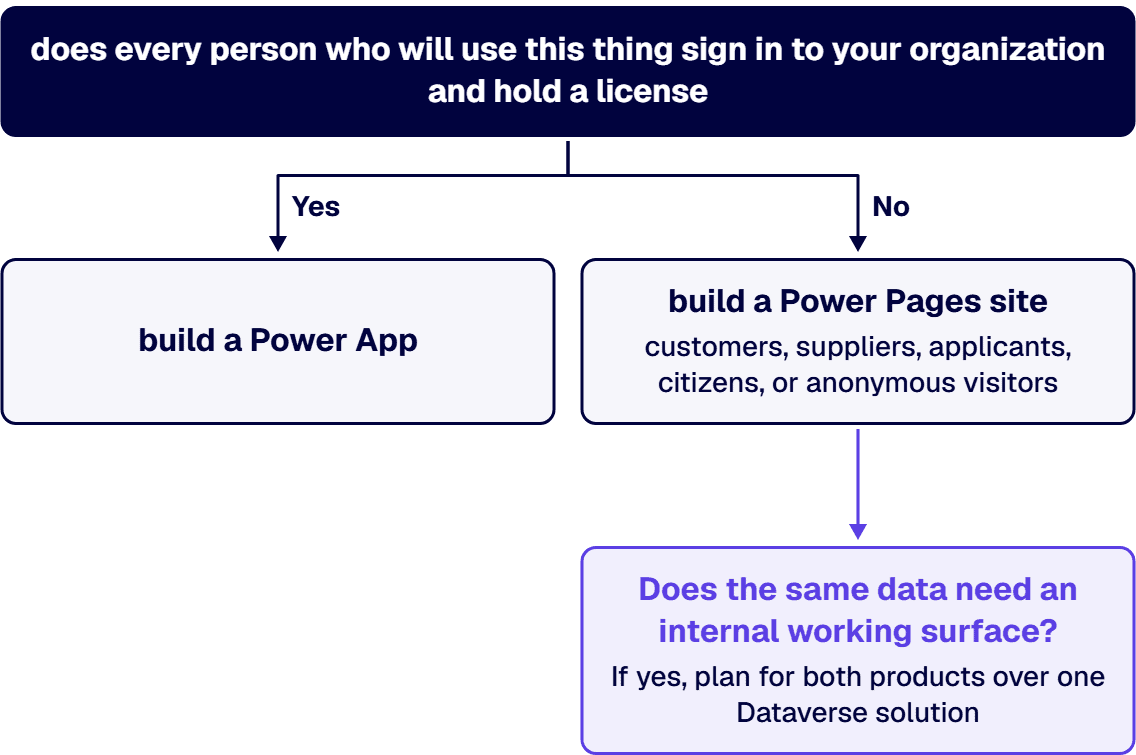
They are not alternatives to each other. One question settles it: does every person who will use this thing sign in to your organization and hold a license. If yes, build a Power App. If the users are customers, suppliers, applicants, citizens, or anonymous visitors, build a Power Pages site. Microsoft draws the line itself in its own documentation: “Power Pages is ideal for websites focused on external audiences that require more secure access to your business information.” Both products sit on Microsoft Dataverse, so they share data rather than duplicating it, and a Power Apps Premium license entitles its assigned user to “unlimited Power Apps and Power Pages.” The licensing shape is where the practical difference bites: Power Apps is priced per user per month, Power Pages is priced per site in user capacity packs, and the two units are an order of magnitude apart once an external audience passes ten people. Every price and entitlement quoted on this page links to the Microsoft page it was read from, Power Apps pricing or Power Pages pricing, both read on 20 August 2026.
Power Apps is “a suite of apps, services, and connectors, as well as a data platform, that provides a rapid development environment to build custom apps for your business needs.” It builds two application types, canvas and model-driven, and connects to data “stored either in the underlying data platform (Microsoft Dataverse) or in many online and on-premises data sources (such as SharePoint, Microsoft 365, Dynamics 365, SQL Server, and so on).” Apps run in a browser and on phone and tablet. Microsoft is explicit about the entry requirement: “You need a license to play the apps you make with Power Apps.”
Power Pages is “a secure, enterprise-grade, low-code software as a service (SaaS) platform for creating, hosting, and administering modern external-facing business websites.” It is the newest member of the Power Platform family, and Microsoft frames the shared-data point directly: with Power Pages “you can build sites by using the same shared business data stored in Microsoft Dataverse that you use for building apps, workflows, intelligent virtual agents, reports, and analytics with other Microsoft Power Platform components in your organization.”
Both products read and write the same Dataverse tables, so this is not a data-architecture decision. The two can also run together on a single solution with no integration work between them, which is the shape most enterprise deployments settle into once the external and internal halves of a process are both in scope.
Power Pages sites default to internal. Microsoft documents that “by default, all Power Pages sites are available to users who are internal to your organization,” with Microsoft Entra authentication as an extra layer that “helps to prevent accidental leaks of partially developed website data and designs.” Going live is a deliberate act: “When your website is ready to go live, change the site visibility to public. The public setting makes the site accessible to everyone over the Internet anonymously or to users authenticated through identity providers.”
External users on a Power Pages site are represented differently than internal users are in Power Apps. “Microsoft Dataverse contact records represent Power Pages users,” and those users authenticate through providers including Microsoft Entra External ID, Microsoft, and LinkedIn. Nobody in that audience needs a Power Apps license, and nobody in that audience appears in your Entra ID as an employee-shaped identity. That is the whole reason the product exists. When the external audience is why an ERP license seems necessary, read how Power Pages can reduce ERP customization and licensing costs.
Building an external portal as a shared Power App is the specific mistake this dividing line exists to prevent. It requires licensing every external user, exposes an interface designed for authenticated organizational users, and puts the site outside the security model Microsoft built for public traffic.
Every figure in this table was read on Microsoft’s own published pricing pages on 20 August 2026: Power Apps pricing and Power Pages pricing. Microsoft changes prices and entitlements; re-read those two pages before a number reaches a budget.
Dataverse database and file capacity entitlements for subscription plans are pooled at the tenant level, so the storage lines above accumulate across the estate rather than being trapped per site or per seat. One operational note on trials that catches teams out: when a Power Pages trial expires “the site is suspended but not deleted immediately,” and you have seven days to convert the trial site to production.
The two published numbers give you a crossover you can carry into a meeting, so use it rather than reaching for a spreadsheet. One authenticated capacity pack covers 100 people at $200.00 per website paid yearly on the Microsoft Power Pages pricing page read 20 August 2026, and ten Premium seats cost the same $200.00 at $20.00 user/month on the Microsoft Power Apps pricing page read the same day. Ten users is the crossover. Below ten, money is not what decides it and you should choose on identity and security instead. Above ten, the per-site unit is cheaper and the gap widens with every person added: a supplier portal expecting 2,000 authenticated users a month is 20 capacity packs, against 2,000 Premium seats for the same headcount under the per-user model. A 40-person internal process runs the other way and stays a Power App, because those 40 people already hold Entra identities and most of them already hold a license.
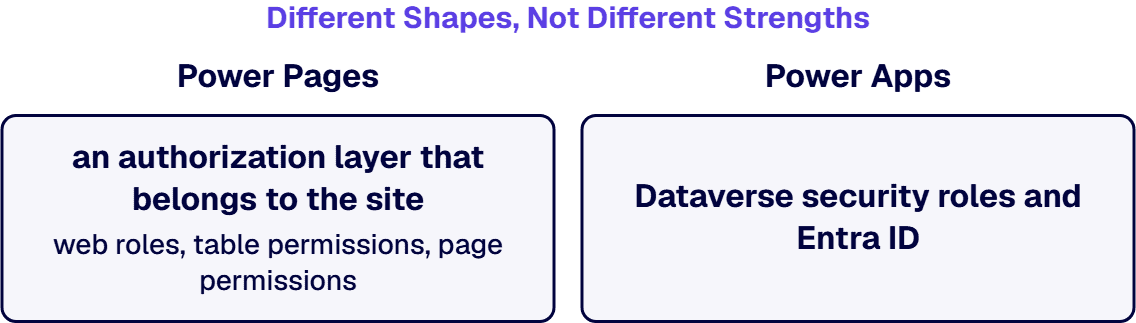
Power Pages carries an authorization layer that belongs to the site rather than to Dataverse. Microsoft lists its components as site visibility, authenticated users, web roles, table permissions, page permissions, HTTPS headers, and security scan. Web roles “link to users, table permissions, and page permissions,” and because a user can hold several, “they can get cumulative access to site resources.” Every authenticated contact is automatically assigned to the Authenticated Users web role, and unauthenticated visitors “can visit a site and get access to assets through the Anonymous Users web role.” Access to Dataverse data through lists, forms, Liquid, and the Web API is governed by table permissions, and page permissions protect content and components on individual pages.
The hosting posture is documented rather than implied. “Power Pages is hosted as Azure App Service, which has International Organization for Standardization (ISO), System and Organization Controls (SOC), and Payment Card Industry Data Security Standards (PCI DSS) compliance.” It supports TLS 1.2 with built-in Azure DDoS protection, dynamic IP restriction to limit traffic from bad actors, and “secure, configuration-driven mechanisms for admins to address top web security vulnerabilities such as injection attacks, cross-site request forgery, and server-side request forgery.” Sites can be fronted with Azure Front Door for edge caching and web application firewall capabilities, and a built-in security scan detects common threats such as cross-site scripting and insecure libraries.
Power Apps security runs through Dataverse security roles and Entra ID instead, with the platform controls arriving through Managed Environments: data policies, sharing limits, IP firewall, IP cookie binding, customer managed key, lockbox, masking rules, and conditional access on individual apps.
A Power Pages web role is not a Dataverse security role, and table permissions are a separate authorization layer specific to the site. Design a portal on the assumption that internal Dataverse roles will govern external access and nothing breaks in development, nothing breaks in user acceptance testing, and the gap surfaces in a penetration test or in live traffic instead.
Power Pages authoring runs through a design studio with five workspaces: Pages for creating and arranging webpages, Styling for themes, Data for creating and modifying the Dataverse tables behind the site, Set up for administration and site management, and Security for identifying and addressing vulnerabilities. Rendering is built on Bootstrap, which “natively provides support for building websites that are responsive, mobile-friendly, and available in various form factors.” Professional developers extend the same site using Visual Studio Code and the Microsoft Power Platform CLI, the in-product code editor, and code components.
Power Apps authoring splits by app type. Power Apps Studio builds canvas apps, described by Microsoft as making “creating apps feel more like building a slide deck in Microsoft PowerPoint,” while the app designer defines the sitemap and components for model-driven apps. Extension for professional developers covers server-side logic with Azure functions, plug-ins, and workflow extensions, client-side logic with JavaScript, integration with external data through virtual tables and webhooks, custom connectors, and embedding apps into website experiences.
Visual Studio Code with the Microsoft Power Platform CLI on the Power Pages side, and plug-ins, Azure functions and custom connectors on the Power Apps side, are both documented professional-developer paths. Enterprise deployments end up on those paths, which is worth knowing before either product is budgeted as a citizen-developer exercise.
The common enterprise shape uses both products against one Dataverse solution. An external audience submits through a Power Pages site. The records land in Dataverse. Internal staff work them in a model-driven Power App with Dataverse security roles governing who sees what. Power Automate moves the record through approvals and notifications. Power BI reports on the whole thing, and Microsoft documents the embed capability that surfaces those reports inside the Power Pages site, along with the ability to add Microsoft Copilot Studio chatbots to external-facing sites.
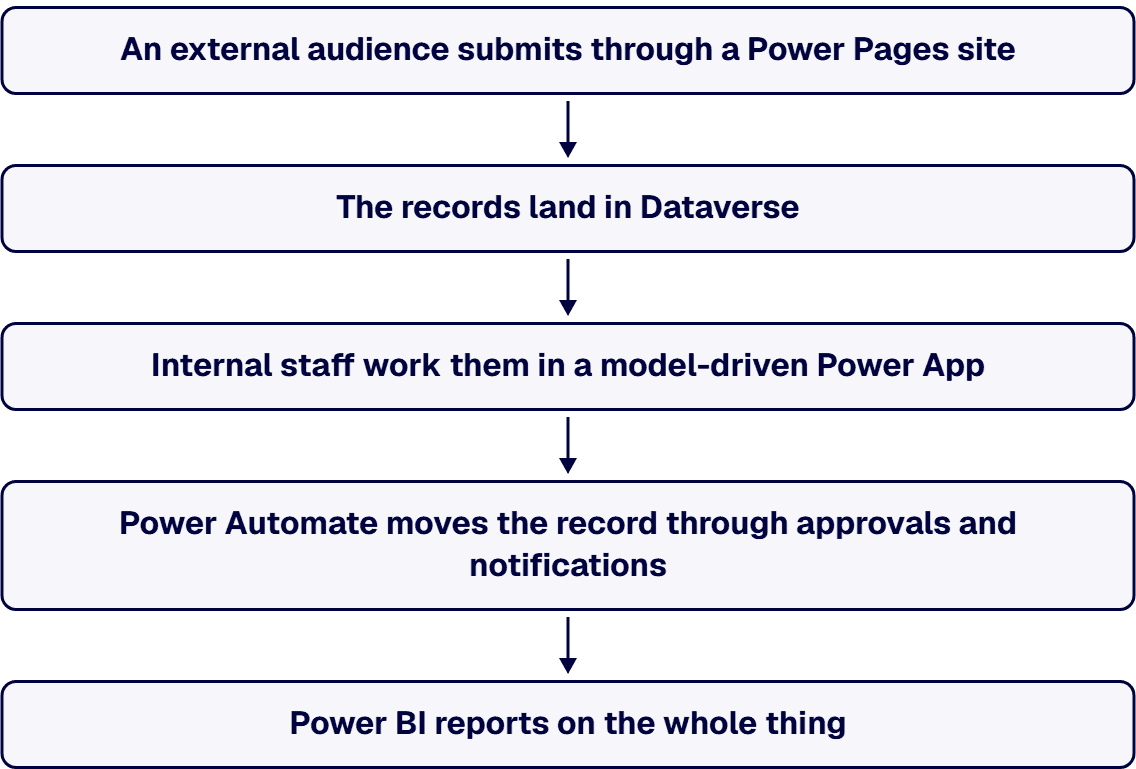
Designed that way, there is no integration layer between the portal and the back office, because there is only one data store. The alternative is where the cost shows up: a portal product in front of a separately purchased case-management tool buys a scheduled reconciliation job, a duplicate identity record per applicant, and a status field that answers differently depending on which screen it is read from. Inside the Power Platform that applicant is one Dataverse contact record, authenticated by the site and read by the internal handler under a Dataverse security role, and the Data workspace in the Power Pages design studio edits the same tables the model-driven app runs on. Nothing has to be reconciled because nothing has to be kept in sync.
1. Will every user sign in to our tenant? If yes, Power Apps. If no, Power Pages. This question alone resolves most cases.
2. How many external users per month, and are they authenticated or anonymous? This converts directly into Power Pages capacity packs, sold in 100s for authenticated users and 500s for anonymous ones, and gives you a real number rather than an estimate.
3. Does the same data need an internal working surface? If yes, plan for both products over one Dataverse solution rather than building the portal first and bolting on the back office.
4. What is the authentication provider for the external audience? Microsoft Entra External ID, Microsoft, and LinkedIn are documented Power Pages providers. Confirm this before design, because it shapes the contact record model.
5. Is the environment governed yet? Managed Environments are included as an entitlement with standalone Power Apps, Power Automate, Microsoft Copilot Studio, Power Pages, and Dynamics 365 licenses, and explicitly not included in the Developer Plan when users run their assets. A pilot built on developer environments has not been governed, whatever it demonstrated.
i3solutions is a Microsoft Partner with 30 years of delivery experience. i3solutions is a Microsoft Solutions Partner. i3solutions has completed more than 600 Microsoft platform implementations. i3solutions has used Power Pages for several of its applications. The deeper record is on the governance side of the Power Platform: i3solutions runs a governed Power Platform for a federal defense agency supporting roughly 10,000 personnel across about 180 locations, which works because it is governed, not despite it.
The delivery practices that apply on either side of this choice are the same ones. i3solutions governs client Power Platform tenants with the Center of Excellence Starter Kit, tenant-level and environment-level DLP policies, and managed environment controls. i3solutions runs client Power Platform work on a multi-tenant Center of Excellence model with separate Dev, Test, UAT, and Production environments promoted through managed solutions. i3solutions delivery includes ALM practices with Power Platform pipelines or Azure DevOps integration, environment separation strategies, and change control processes.
Three neighbouring questions have their own pages, and they answer different things than this one does. Microsoft Power Pages pros and cons evaluates Power Pages on its own terms once you have decided it is the product. How canvas and model-driven apps work together covers the choice inside Power Apps, which is the next decision after this one. Power Pages external portal security goes further into the web role and table permission model. For delivery, see Power Pages development services and Power Apps development services, both of which sit within the wider Power Platform development services that govern the tenant they run in.
If you are the person writing this up for a steering group rather than the person building it, the shortest route to a defensible recommendation is a working session on your own audience and data: the authenticated and anonymous counts, the Dataverse tables both halves would share, and the authorization design an external audience forces. That is a one-meeting artifact, and it is what a budget approval actually turns on. If you want the reasoning rather than a quote, start here.
Power Apps is a development environment for building custom business applications, in canvas or model-driven form, for users who sign in to your organization and hold a license. Power Pages is a low-code SaaS platform for creating, hosting, and administering external-facing business websites. Both are built on Microsoft Dataverse and share the same business data. The practical difference is the audience and the licensing model that follows from it: Power Apps is priced per user, Power Pages per site in user capacity packs.
No. Power Pages users are represented as Dataverse contact records and authenticate through providers such as Microsoft Entra External ID, Microsoft, and LinkedIn. Capacity is bought per site. The Microsoft Power Pages pricing page, read 20 August 2026, lists $200.00 per website paid yearly for 100 authenticated users per site per month in packs of 100, and $75.00 per website paid yearly for 500 anonymous users per site per month in packs of 500.
A Power Apps Premium license entitles the assigned user to unlimited Power Apps and Power Pages. The Microsoft Power Apps pricing page, read 20 August 2026, lists Premium at $20.00 user/month paid yearly, with a $12.00 user/month tier at a 2,000-seat minimum. That entitlement covers the assigned internal user. It does not cover the external audience visiting a public site, which is what the per-site capacity packs are for.
You can, and it is usually the wrong build. It requires a license for every external user, exposes an interface designed for authenticated organizational users, and leaves you outside the security model built for public traffic, which includes site visibility controls, web roles, page permissions, dynamic IP restriction, and a built-in security scan.
The platform posture is documented: Power Pages is hosted as Azure App Service, which carries ISO, SOC, and PCI DSS compliance, supports TLS 1.2 with built-in Azure DDoS protection and dynamic IP restriction, and can be fronted with Azure Front Door for web application firewall capabilities. What determines your actual exposure is the layer above that: web roles, table permissions, and page permissions. A site is exactly as open as the Anonymous Users web role leaves it. Review the authorization design the way you would review a firewall rule, not the way you would review a form layout.
Yes, and it is a common enterprise pattern. External users submit through a Power Pages site, the records land in Dataverse, internal staff work them in a model-driven Power App, Power Automate handles approvals and notifications, and Power BI reports are embedded back into the site. Because both products read the same Dataverse tables, there is no integration layer between the portal and the back office.
Microsoft Learn documents the lifecycle in What is Power Pages?: a trial gives access to a full-featured Power Pages environment for 30 days at no cost, and when it expires the site is suspended but not deleted immediately, leaving seven days to convert the trial site to production. Put day 30 and day 37 in the project plan on the day the trial starts, and name the production environment the site will convert into before anyone demonstrates it to a sponsor. A proof of concept the business has started relying on is the one that runs out of days.

US-Based | Est. 1997
© i3solutions. All rights reserved.
US-Based | Est. 1997
© i3solutions. All rights reserved.


