Power Apps for External Users: The Architecture and Governance Questions

By Michael Branson | September 7, 2026

Quick answer. Power Apps for external users is an architecture decision before it is a product decision, because the route you pick decides which directory admits the person and which team carries the governance afterwards. Three routes exist, and each one moves a different cost onto a different owner.

The request usually arrives already framed as a small one. Our vendors need access to the intake app. The customer wants to see status without emailing us. A programme office has forty suppliers and no way to collect anything from them except a mailbox. Someone has already worked out that the app exists and that the data is in it, so the remaining step sounds administrative.

It is not administrative. Letting somebody outside the organization into a Power Platform application changes which identity the route admits, which store the data has to sit in, what the licensing unit does to the design at scale, and who re-certifies the access after go-live. This page works through those four questions in order, for the three routes a Power Platform estate actually has.

What This Page Decides, and What It Hands Off

This page decides how external access is architected and governed once the audience is settled: which identity the route admits, which store the data has to sit in, what the licensing unit does to the design at scale, and who re-certifies the access after go-live.

It does not pick the product for you. Which of the two Microsoft products a given application needs, how their published prices compare, and where the per-user and per-site models cross over are worked through in Power Pages vs Power Apps: Which One a Given Application Needs. Read that page for the verdict and the numbers; read this one for what the verdict commits you to.

Portal security hardening is handed off as well. Authentication configuration, role-based access control, row-level and column-level enforcement, network hardening and pre-go-live validation are covered in How Power Pages Keep Your External Portals Secure, and none of that mechanism is repeated here. Where the product itself is what you are evaluating, Microsoft Power Pages: What Are the Pros and Cons? assesses it on its own terms.

Two boundaries are drawn against companion guides. Whether to build in Power Apps at all for an internal audience is the subject of the companion guide Power Apps vs Custom .NET, named here by title, and it is not re-argued here. The conditions under which Power Apps stops being the right primary architecture are set out in When Power Apps Is the Wrong Choice: Enterprise Signs, which reads the identity question from the opposite direction: there an external audience is one of the conditions for leaving the platform, and here it is an audience to be architected on it. This page assumes the platform decision is already made and the audience has grown past the tenant.

The Three Routes an External User Can Arrive Through

A Power Platform estate has three routes to an external user, and naming them precisely is most of the work. The routes are the guest-shared Power App, the Power Pages site, and the custom portal. They are not three settings on one thing: each admits a different kind of identity, puts the data under a different boundary, and hands the ongoing governance to a different owner.

Route The identity it admits Where the data has to sit Where the evidence is produced
Guest-shared Power App A guest object in the tenant that holds your employees, authenticating against their own home organization The environment the app already runs in, alongside the internal apps that share it The guest user list in the Microsoft Entra admin center, and the app’s share list in the Power Platform admin center’s environment view
Power Pages site A site visitor, anonymous or signed in through a provider configured on the site, held outside your employee directory A Dataverse database in the environment the site is built in The site’s security workspace in the Power Pages design studio, and that environment’s site list in the Power Platform admin center
Custom portal An identity your own application registers and authenticates, under a tenant configuration you choose for that purpose Wherever your application’s data layer sits, which is a decision the platform stops making for you The app registration’s sign-in log in the Microsoft Entra admin center, and an authorization record export your team has to build into the application

The precedence is worth settling before a disagreement forces it. Where the identity answer and the licensing answer point at different routes, identity decides, because a licence is a purchase and an identity in the wrong directory is a governance liability that outlives the purchase. Where the data-isolation answer and the delivery-speed answer disagree, isolation decides, for the same reason in a shorter form: the fast route is fast once. Where two routes both satisfy identity and isolation, the tie-breaker is which team will still be reviewing the access after the project that created it has ended, and the route whose reviewer already exists wins.

Working out which of the three a real audience needs, before anything is provisioned, is the conversation this table usually starts. Talk to a senior Power Platform architect

The Custom Portal, Which the Product Comparison Leaves Out

A two-product comparison has two answers. Real estates have a third, and it is chosen for one of four reasons that are worth separating from each other.

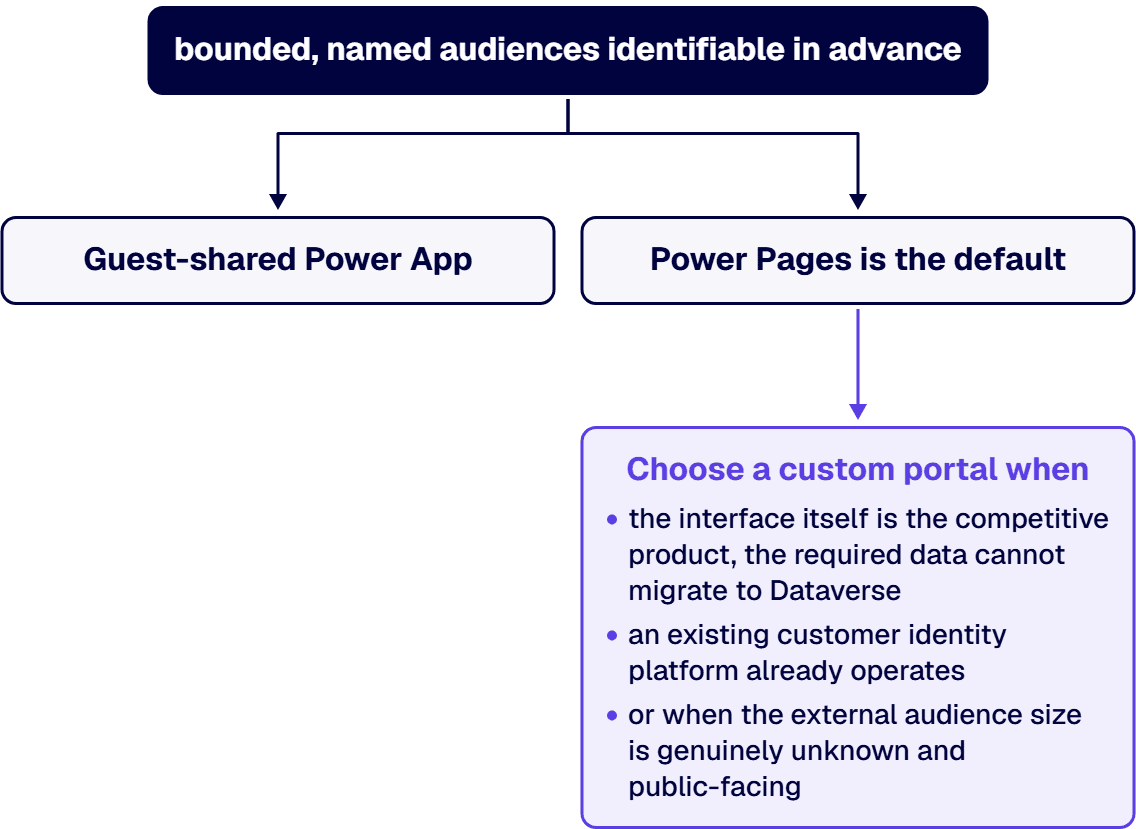
The interface is the product. Where the external experience is itself the thing being sold, and its design is a competitive question rather than a functional one, a low-code site is being asked to carry a requirement it was not shaped for.

The data cannot move into Dataverse. Microsoft’s own comparison of the two Power Platform routes puts the constraint plainly, in the accessible data sources column of its guest-access comparison table: Power Pages sites reach the data stored in Dataverse, while a canvas app reaches any of approximately 150 out-of-the-box connectors and any custom connector. Where the external audience needs to read a system of record that is not going to be replicated into Dataverse, that difference decides the architecture.

The identity is already somewhere else. An organization that already runs a customer identity platform, with sign-up flows, consent records and a support process behind it, is being asked to run a second one. That is a real cost even when the second one is cheaper.

The scale of the audience is the point. A public audience whose size is genuinely unknown is a different engineering problem from a known list of suppliers.

Against those, the custom portal takes on what the platform routes hand you: the sign-in surface, the session handling, the authorization model, the patching window, and the person who owns all four at three in the morning. The honest version of this decision is that the custom portal is correct when one of the four reasons above holds and is expensive when none of them does.

Where the answer turns out to be a portal on the platform after all, Enterprise Power Pages Development is the delivery side of that route.

Identity: Which Directory Admits the External Person

This is the question that decides the other three, and it has a clean answer, because Microsoft splits external identity into two tenant configurations.

Guests land in the directory your employees live in. Sharing a canvas app with somebody outside the organization runs through business-to-business collaboration. Microsoft’s guidance on how to Share a canvas app with guest users states that canvas apps can be shared with guest users of a Microsoft Entra tenant, that you can invite external business partners, contractors, and third parties to run your company’s canvas apps, and that the prerequisite is to enable B2B external collaboration for the tenant in Microsoft Entra ID. The same page states that Power Apps guest access uses Azure B2B. Read the consequence rather than the convenience: the person is now an object in the same directory as your staff, and any group, access package or conditional access policy that targets that directory can now reach them.

Customer-facing identity has its own tenant configuration. Introduction to Microsoft Entra External ID sets out the split directly. For consumer and business-customer applications, you register the app and manage its users “in a Microsoft Entra tenant in an external configuration”, and the documentation says that tenant “is separate from your employees and organizational resources”. For partner collaboration, the same product family lets you “determine the level of access that guests have to the Microsoft Entra tenant that contains your employees and organizational resources, which is a tenant in a workforce configuration”. Two configurations, two blast radii. Choosing between them is the identity model decision, and it is taken once.

Business guests come with no credentials for you to hold. The External ID documentation is explicit that “there are no credentials associated with business guests” and that instead “they authenticate with their home organization or identity provider, and then your organization checks their eligibility for guest collaboration”. A Power Pages audience works the same way from the other side: the Power Apps guest documentation describes Power Pages as letting organizations “create websites and share them with users external to their organization either anonymously or through the sign-in provider of their choice, such as LinkedIn, Microsoft, or other commercial sign-in provider”, where a canvas app “requires authentication via Microsoft Entra ID”. The distinction that matters for an architecture is not who authenticates the person. It is whose directory holds the record afterwards.

The default is the sprawl. What is Microsoft Entra B2B collaboration? states that “by default, all users in your organization, including B2B collaboration guest users, can invite external users to B2B collaboration”. It also separates the two controls that are routinely conflated: cross-tenant access settings “control whether users can authenticate with external Microsoft Entra tenants”, while external collaboration settings “control which users in your organization are allowed to send B2B collaboration invitations to guests from any organization”. Guest access sprawl is what that default produces over a couple of years, and the first artifact worth producing is not a policy: it is the current guest list, exported from the users view of the Microsoft Entra admin center, read against the applications those guests are actually assigned to.

Data Isolation: What the Environment Boundary Does and Does Not Do

Environments are the isolation control teams reach for, and they are a real one. They are also narrower than the reflex assumes, which is where the exposure comes from.

The Power Platform environments overview states that an environment “serves as a container to separate apps that might have different roles, security requirements, or target audiences”, which is the sentence that puts a separate environment for external-facing assets inside the container’s documented purpose. It also states that “each environment is created under a Microsoft Entra tenant, and its resources can only be accessed by users within that tenant”, and that “when you create an app in an environment, that app is only permitted to connect to the data sources that are also deployed in that same environment”.

Take those two together and the boundary’s actual shape emerges. The environment scopes which data sources an app can reach, and it sits under a tenant whose membership is the thing you just changed by inviting a guest. Isolation from the outside world is a tenant-level property; isolation between workloads is the environment-level one. An external audience admitted into the tenant is inside the first boundary already, and the second is what is left holding the line.

Three consequences follow for the design, and each one is a decision somebody has to take.

Externally reachable assets get their own environment. Not because the platform requires it, but because “different target audiences” is the documented purpose of the container, and because the alternative is an environment whose blast radius includes both the supplier form and the internal case file.

The data the external route can connect to is the data deployed in that environment. The connection constraint above is a floor you can build on: an app cannot reach a source that was not deployed alongside it, so what you decline to deploy there is what the external route cannot reach. That is a more durable design tool than a permission grant, because the source is not there to connect to in the first place.

A copy is not an isolation strategy on its own. Where the external route reads a replica, the replica needs the same owner, the same review cycle and the same classification as the original, or the isolation has been traded for a second thing to forget about. Connector-level control over what can reach what belongs with the tenant’s data policies, worked through in Power Platform DLP Policy Administration for Regulated Enterprises.

The Licensing Unit, and What It Does to an Architecture at Scale

The prices belong on the comparison page linked above and are not repeated here. What belongs here is the shape of the unit, because the unit is what bends an architecture as the audience grows.

A guest who uses an app that connects to Dataverse needs a licence, with one documented exception. The Power Apps guest documentation states it as a prerequisite: “to access an app that connects to Dataverse, the guest user must have a license with Power Apps use rights that matches the capability of the app”, and names the exception: “when an app is hosted in a Microsoft Dataverse for Teams environment”. Two qualifiers are load-bearing there and neither is decorative: the app has to connect to Dataverse, and the licence has to match the app’s capability.

The per-app plan does not travel. The same page states that “Power Apps per app plans are scoped to apps in a specific environment, so they can’t be recognized across tenants”. A per-app plan that works for an internal audience and stops being recognized at the tenant edge is exactly the kind of constraint that surfaces after the pilot, when the pilot ran inside one tenant.

Two operational limits shape the experience, not just the invoice. The documentation records that “Power Apps Mobile doesn’t support authentication using Microsoft Entra direct federation”, and that “users accessing web experiences in different Microsoft Entra tenants must access Power Apps in a standalone browser session”. An external audience told to use a separate browser session is an external audience that will call your service desk.

Put those together and the answer on enterprise scale is specific. Power Apps can serve external users, and the guest-shared route is a genuine one for a bounded, named audience that already holds identities somewhere: a joint programme team, a set of named contractors, an audit partner. It stops being the right route when the audience stops being a list. Per-seat licensing, directory membership and the review burden all grow with headcount, and each of the three costs the same to carry for the fortieth supplier as for the fourth. The per-site unit exists because that curve is the wrong shape, and the crossover is where the linked comparison page does its work.

Sizing a real audience against the unit, before anything is bought, is the part that changes the design rather than the invoice. Talk to a senior Power Platform architect

Governance: Who Re-Certifies External Access, and On What Cycle

External access is the access most likely to be granted for a reason that has since expired. The supplier finished the contract. The auditor completed the engagement. The joint programme wound down and nobody told the person who runs the directory.

Re-certification is a product capability, and it has a prerequisite. Microsoft’s guidance on how to Manage guest access with access reviews states that you can “ask the guests themselves or a decision maker to participate in an access review and re-certify (or attest) to the guests’ access”, and that “when an access review is finished, you can then make changes and remove access for guests who no longer need it”. It records that reviews can run on a group or on an application, and that you can “turn on automatic, recurring access reviews of guest users across all Microsoft 365 groups”. It also names the prerequisite in the same article: “Microsoft Entra ID P2 or Microsoft Entra ID Governance”. An access review cycle designed without checking that entitlement is a plan the reader cannot run, so the entitlement is part of the design and not a footnote to it. The wider identity-governance product scope, including what that entitlement covers, is worked through in Microsoft Entra ID Governance for Regulated Enterprises.

At scale, the reviewers are the constraint. The External ID documentation points at entitlement management as “a feature for managing identity and access for external users at scale”, which is the shape the problem takes once the audience is measured in organizations: request workflows and assignments, in place of a person reading a list. The design question is who signs. An internal sponsor per external organization is the arrangement that survives a reorganization, because the sponsor is the one with a reason to notice when the relationship ends.

The route decides who does the work. On the guest-shared route the reviewer works in the directory, because that is where the identity is. On the Power Pages route the reviewer works in the site’s security workspace in the Power Pages design studio, because that is where the site’s users are. On the custom portal route the reviewer works in whatever your application provides, which is a thing your team builds and then staffs. That third answer is the honest cost of the third route, and it is not a licence line.

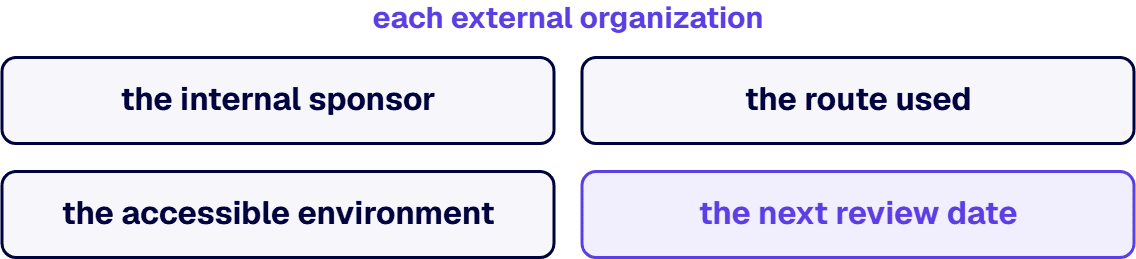
One record makes the identity, environment and review decisions checkable. Whichever route is chosen, the artifact worth committing before go-live is a short one: each external organization, its internal sponsor, the route it arrived through, the environment it can reach, and the date of its next review. The organization column is producible from the Microsoft Entra admin center’s user list filtered to guests, and the environment column from the environment list in the Power Platform admin center, so those two start as an export and the sponsor, the route and the review date are decided by the people who own them.

Standing this up the first time is ordinary work carrying an unusual amount of context, because the identity decision, the environment decision and the review cycle all have to agree with each other. i3solutions has been a Microsoft partner since 1997. That history includes a building-products manufacturer’s partner portal built with single sign-on and role-based access, which is the external-identity half of this problem read from the delivery side.

When This Is Not the Work You Need

Three readers arrive here and belong somewhere else first.

Where nobody has yet agreed which external organizations are in scope, the architecture question is premature. A route chosen against an audience nobody has enumerated is a route chosen against a guess, and the enumeration is a shorter piece of work than the rebuild.

For the reader whose external audience is one person at one partner who needs to see one thing, the honest answer is that a governed export or an existing collaboration surface will do it, and admitting an identity into the tenant to avoid an email is a poor trade.

And where the platform decision itself is still open, meaning the argument is about whether this application belongs on Power Platform at all, that argument comes first. The companion guides Power Apps vs Custom .NET and When Power Apps Is the Wrong Choice cover it, and an external-access design built under an unsettled platform decision is a design that gets taken apart.

What is left is the case this page was written for: a real audience outside the organization, a real application inside it, and a decision about which route admits them that somebody has to defend afterwards. Bring the list of external organizations, the environments you have today, and the name of whoever will run the first review. Talk to a senior Power Platform architect

Frequently Asked Questions

Can Power Apps serve external users at enterprise scale?

Power Apps can serve external users, and the route it serves them through is business-to-business guest sharing. Microsoft’s documentation records that a canvas app can be shared with guest users of a Microsoft Entra tenant, names external business partners, contractors and third parties as the audiences you can invite, and says that Power Apps guest access uses Azure B2B. Whether that is the right route at enterprise scale depends on the shape of the audience rather than its size alone. It holds up for a bounded, named audience whose members are identifiable in advance, because every one of them becomes an object in the directory that holds your employees and needs a licence with Power Apps use rights matching the app’s capability wherever the app connects to Dataverse. It stops holding up when the audience becomes an open population, because the per-seat licensing, the directory membership and the review burden each grow with headcount at a rate that does not slow as the list gets longer.

What are the three routes to letting external users into a Power Platform application?

The guest-shared Power App, the Power Pages site, and the custom portal, in that order of how much your organization takes on. The guest-shared Power App admits a guest object into the tenant that holds your employees, and the evidence is the guest list in the Microsoft Entra admin center. The Power Pages site admits a visitor, anonymously or through a sign-in provider configured on the site, held outside your employee directory, and the evidence is the site’s security workspace in the Power Pages design studio. The custom portal admits an identity your own application registers and authenticates, and the evidence is the app registration’s sign-in log in the Microsoft Entra admin center together with an authorization record export your team has to build into the application. Where the identity answer and the licensing answer point at different routes, the identity answer decides.

Should we use Power Pages or a custom portal for customer access?

Power Pages is the default for customer access on a Power Platform estate, and a custom portal is the correct answer where one of four reasons holds. Choose the custom portal when the external interface is itself the product and its design is a competitive question; when the data the audience needs cannot move into Dataverse, which matters because Microsoft states on its share-app-guests page, in the accessible data sources column of its Power Pages and canvas apps comparison, that Power Pages reaches data stored in Dataverse while a canvas app reaches approximately 150 out-of-the-box connectors and any custom connector; when the organization already runs a customer identity platform with sign-up, consent and support behind it; or when the audience is public and its size is genuinely unknown. Where none of those four holds, the custom portal is buying the sign-in surface, the session handling, the authorization model, the patching window and an owner for all four.

How is external identity handled in Power Platform?

Through Microsoft Entra External ID, which splits into two tenant configurations that decide different things. For business partners and guests, business-to-business collaboration lets you determine the level of access guests have to the Microsoft Entra tenant that contains your employees and organizational resources, which Microsoft calls a tenant in a workforce configuration. For consumers and business customers, you register the application and manage its users in a Microsoft Entra tenant in an external configuration, which Microsoft’s documentation says is separate from your employees and organizational resources. On the business-guest side your organization does not hold the credentials: the documentation states that there are no credentials associated with business guests, and that they authenticate with their home organization or identity provider before your organization checks their eligibility. The architectural question is therefore not who authenticates the person but whose directory holds the record afterwards, and that answer is taken once.

What does external Power Apps licensing cost at scale?

The published prices and the point at which the per-user and per-site models cross over are set out on the Power Pages and Power Apps comparison page linked from this one, which reads them from Microsoft’s own pricing pages. What decides the architecture is the unit rather than the figure. Microsoft’s guest documentation makes a licence with Power Apps use rights a prerequisite for a guest wherever the app connects to Dataverse, and requires that licence to match the app’s capability, with the documented exception of an app hosted in a Microsoft Dataverse for Teams environment, and that Power Apps per app plans are scoped to apps in a specific environment so they cannot be recognized across tenants. A per-seat unit grows with headcount and a per-site capacity unit does not, which is why an audience that keeps growing eventually argues for a different route rather than a bigger purchase order.

Who should review external access after the portal goes live?

An internal sponsor named per external organization, working on a cycle set before go-live rather than after an incident. Microsoft’s access review documentation states that you can ask the guests themselves or a decision maker to participate in an access review and re-certify the guests’ access, that when a review finishes you can make changes and remove access for guests who no longer need it, and that recurring reviews of guest users can be turned on automatically across all Microsoft 365 groups. It also names the prerequisite, Microsoft Entra ID P2 or Microsoft Entra ID Governance, which is worth confirming before a cycle is designed around the capability. Which surface the reviewer works in depends on the route: the directory for a guest-shared Power App, the site’s security workspace in the Power Pages design studio for a Power Pages site, and whatever your team built for a custom portal.

Related Reading

About the Author

Michael Branson co-founded i3solutions and brings executive, operational, and technical perspective to organizations working in complex, secure, and mission-critical environments. His insights focus on business process consulting, automation, data analytics, collaboration, secure operating models, and the operational discipline required to turn technology investments into practical business systems with measurable value.