Copyright i3solutions. All Rights Reserved.
Email aski3@i3solutions.com, Phone 703.652.8966
Privacy Policy | Sitemap
Power Platform Maker Enablement Without Losing Governance
By Michael Branson
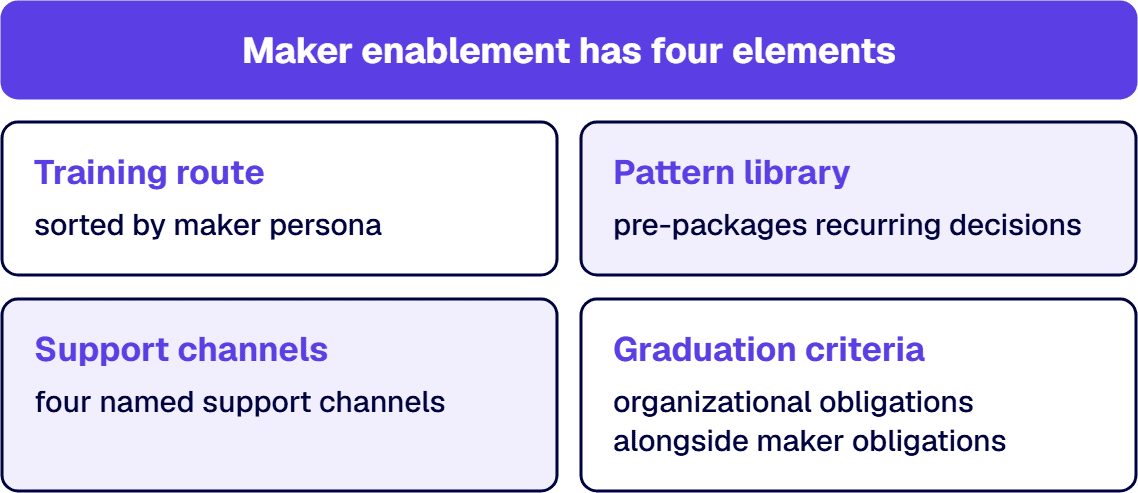
Quick answer. When an IT director realises that makers have been building apps the business now depends on, and that the platform team has never seen them, the controls that follow settle only half the problem. The decision that settles the other half is what the organization hands those makers so that building inside the guardrails is the easier route. Power Platform maker enablement is that hand-over: a training path, a library of sanctioned patterns, four named channels to ask for help, and stated criteria for graduating an app out of personal use, which together are what an organization owes makers in return for building inside the guardrails.
The argument arrives after the control work has already started. The platform team has inventoried the tenant and drawn the environment boundaries, and a connector policy is about to go live. Then a director from finance asks what her analyst is supposed to do on Monday, because the approval tracker he built last spring now runs three of her processes and he has never spoken to anyone in IT about it.
That question has no answer inside a control framework, and leaving it unanswered is how makers come to route around the framework. Controls tell a maker what is now forbidden. They do not tell him where to learn the thing he was doing badly, who to ask when a connector is blocked, which of his three apps has outgrown his own laptop, or what happens to the one that has. Answering only the first half leaves the two groups that matter with one move each: the enthusiastic people stop building, and the determined ones take the work to a tool the platform team is not watching.
That other half, written after the controls instead of beside them, settles whether makers stay inside the sanctioned path or work around it. This page states what goes into it: what a maker is taught, what a maker should not have to invent, where a maker goes when stuck, and what changes about an app on the day it stops being personal.
What This Page Decides, and What It Hands Off
This page decides one thing: what an organization gives its Power Platform makers so that building inside the guardrails is the easier route. That covers the training path across three maker personas, the pattern library that removes the decisions a maker would otherwise take alone, the four channels a maker uses for help while building, and the criteria that turn a personal tool into something the organization stands behind.
It does not design that framework. Which body approves what, how connector policy is set, how the framework maps to a control regime, and what its components are belong to Designing a Power Platform Governance Framework That Holds Up in a Regulated Enterprise. That page decides the rules; this one decides what makers are handed so the rules are followable.
It does not run the takeover of an estate IT has already inherited either. That sequence, from inventory through triage to environment and lifecycle controls, is set out at Governing Citizen-Developer Power Apps IT Now Has to Own, and the risk case for doing it at all is at Power Platform App Sprawl Governance Risk Explained. The first of those pages states that a promotion path exists. This page states what the path requires.
Three further hand-offs. Finding what you already have, scoring it by business criticality and ruling keep, fix, rebuild or retire is estate work, and the companion guide How to Inventory and Triage Existing Power Apps and Flows owns it; enablement decides what happens to the apps built after that pass. Who answers a ticket once an app is supported, with which owners and which tiers, belongs to Power Platform Support Model: Who Owns the Apps Your Business Built. The environments a graduating app moves between, along with the release path it travels, belong to Power Platform Environment Strategy: What to Decide Before the Default Environment Decides for You and Power Platform ALM: Moving a Maker-Built Solution into Managed Production. This page names the moment an app is ready for that path and stops there.
One more boundary, because it is the argument this page is most often confused with. Whether the platform function is centralized, federated or hybrid decides who runs enablement, and that argument sits at Power Platform CoE: Centralized vs Federated vs Hybrid Operating Models. In a regulated estate the prior question is which workloads may be built by makers at all, and Power Platform CoE vs Citizen Development Aerospace Defense draws that boundary against named controls. Enablement assumes both calls have been made and equips the makers who are on the permitted side of them.
Why Makers Go Around IT, and What the Detour Costs
The sentence that starts these conversations is that business users keep building things IT does not know about. Read as a discipline problem, it ends in a lockdown. Read as a routing problem, it points at something fixable.
A maker goes around IT when going through IT is slower than the deadline. The analyst with a Tuesday commitment and a blocked connector has two options: a request with an unknown response time, or a workaround he can finish tonight. He is not weighing policy against convenience; he is weighing a real deadline against a queue with no stated response time. A control that generates a request generates a queue, and Microsoft’s Maker support strategies guidance reads the same loop from the platform side: “Your Power Platform governance decisions directly affect the volume of help desk requests.” The queue is where the detour begins.
A maker builds in the wrong place when no first-day route names the right one. The default environment is where an untrained maker starts, and that starting point is an absence of routing, not a choice he made. An enablement programme that never publishes a first-day route leaves the product’s default in charge of your environment strategy.
A maker keeps an app to himself when declaring it looks like losing it. Withholding is a rational response to how graduation gets framed. If the visible consequence of admitting that six people depend on your app is that the app is taken away, reviewed, or rebuilt by somebody else, the useful move is to say nothing. The estate then grows the specific class of asset the organization most needs to see: an undeclared business-critical app whose only support is one person who has stopped mentioning it.
A graduation path with a cost and no benefit produces the refusal to declare, which makes that refusal a design outcome and not a character trait. Put a supported environment, a name to call when it breaks at month end, and release from being the only person who can fix it at eleven at night on the other side of the gate, and declaring becomes the cheaper move.
The comparison at Shadow IT vs Governed Power Platform: The Enterprise Risk Comparison sets out what the ungoverned side of that choice costs.
The Training Path: Three Maker Personas, and What Each One Needs
Maker training that is built as an end-user product tour teaches the product to a room instead of teaching a person the next thing they are stuck on. The correction is to sort makers by what they are trying to do, then attach the training to that.
Microsoft’s Establish a training and upskilling strategy for makers guidance sorts them into three maker personas: “We’ve identified three key personas for Power Platform: Explorer, Innovator, and Champion.” The value of the split is that it tells you what to stop offering. A person building a personal tracker does not need the pattern library, and a person mentoring four colleagues does not need another product overview. A maker who fits two of the three is trained at the higher one, because the extra material costs less than an Innovator who was taught as an Explorer and then built for a team on Explorer habits.
The Explorer is building for themselves and needs the guardrails stated once, in plain terms. What this person asks is how to build an app or a flow and what limits apply. The training that suits them is short and hands-on: an internal build session of the kind the training guidance describes, “hands-on workshops where participants learn to build solutions using the Power Platform products in a single day”, plus a self-paced route somebody can take at eleven at night when they are actually stuck. Attach one page to that session naming where business data may go and where it may not, and the connector policy has moved out of a document a maker has no reason to open and into the one lesson where it decides something.
The Innovator is building for a team and needs patterns, not features. An Innovator, in the words of the training guidance, is “focused on transforming teamwork and crafting solutions that drive departmental success”, so this is the person whose app is about to acquire other people’s dependence on it, and the training that pays is the training that shapes what they build: prebuilt examples to start from, which the training guidance lists as sample apps, workflows and components, a named way to store data that is not a spreadsheet in the app, and the graduation criteria stated before the app crosses them. A maker who knows the criteria at the start builds an app that meets them; a maker who learns them at the review builds a rewrite.
The Champion is teaching other people and needs standards and access. In the same guidance, Champions are “leaders in innovation”, and the training it lists for that group is different in kind: connector practice, code review standards, application lifecycle discipline, and certification. Champions are also where the cheapest support channel comes from, because makers who emerge as champions tend to take on the informal support role voluntarily, and the maker-support guidance places that observation inside its team-assisted tier.
The personas settle what to teach; they do not settle where a new maker starts or what the organization can check. A first-day route, published where a new maker will meet it, names the environment they should build in and the one thing they must not do. A maintained record of who has taken what sits in the learning and development system your organization already runs, the same place the training guidance says Microsoft Learn progress can be integrated, because a graduation criterion that depends on the maker having been trained needs somewhere to check. Neither of these is a course; both are what make a course change anything.
Sanctioned Patterns: What a Maker Should Not Have to Invent
A sanctioned pattern is a decision the organization has already taken, packaged so a maker inherits it by starting from it. Microsoft’s training guidance describes the same instinct from the training side, recommending that you “Offer prebuilt examples and frameworks to help users kickstart their projects.” The control value is a side effect of the convenience: a maker who starts from a sanctioned pattern has already taken the decisions inside it, where the data lives and how the app authenticates to the system it reads, without reading a policy.
Stock the library from the decisions makers get wrong repeatedly, not from the apps you are proudest of. In a Power Platform estate the recurring ones are narrow and predictable. Where should this data live. How does this app authenticate to the system it reads. How does a person request access to it. What does it do when the source is unavailable. A pattern that answers one of those is worth more than a polished sample app that answers none of them.
Give each pattern an owner and a review date, or it becomes advice. A pattern with no name attached ages into something people copy without knowing whether it is still right. The record is short: what the pattern is for, when to use something else, who owns it, and when it was last checked against the platform. Hold that record where makers already work, so it is found at the moment of building.
Build the library where the platform is still being maintained. Microsoft has stated that the Power Platform CoE Starter Kit “is no longer actively maintained” and that “Its core capabilities are part of the Power Platform admin center”, so an enablement programme starting today has a reason to build its library against the admin center instead of against the community kit that used to be the standard answer. Placement decides whether a pattern gets used, not the tool that holds it. A pattern library has to sit somewhere a maker passes on the way to building, because a library filed in a document management system is one a maker under deadline has no reason to open.
Sanctioning a pattern means nothing if the alternative is easier. If the sanctioned way to store data takes a maker forty minutes to set up and a personal connection takes four, the sanctioned pattern is a preference and the personal connection is the standard. Where the sanctioned route is genuinely slower, the work is to make it the faster one: cut the setup until starting from the pattern costs a maker less time than the personal connection does, because until then the pattern will be taken where somebody is watching and skipped where nobody is.
Where patterns end. Who governs the library at platform level, how components are versioned and how a reusable component is promoted are operating-model questions that sit with whoever runs the platform function. Enablement owns the contents of the library and the front door to it.
Where a Maker Goes for Help
At the moment of being stuck, a maker is not asking a policy question. The question is who do I ask. Microsoft’s support guidance draws a distinction worth borrowing before designing anything: “There are two types of support considerations to keep in mind: user support, which helps users of production solutions, and maker support, which helps makers developing solutions.” Enablement owns the second. The first belongs to the support model, and enablement stops where that model starts.
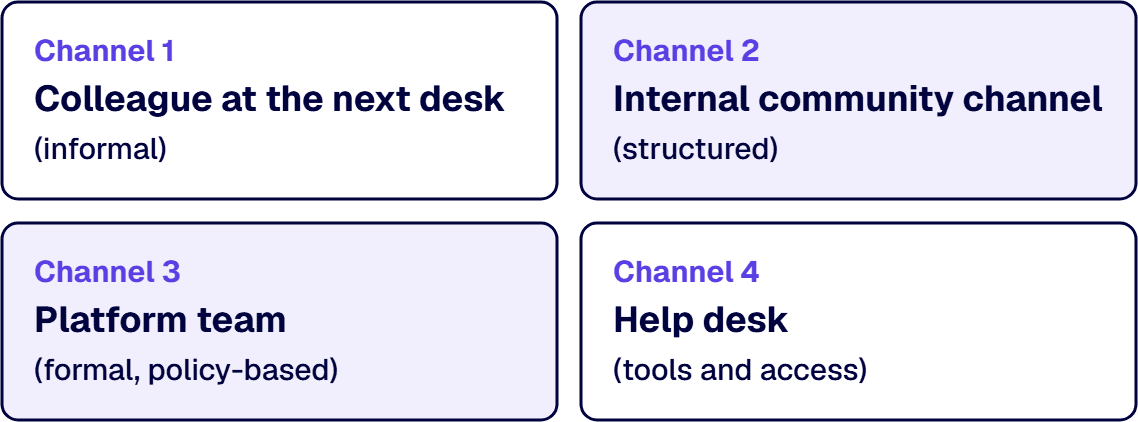
The Maker support strategies guidance is direct about the return: “Activities like building a community, training your makers, and co-development assistance can significantly decrease the volume of formal support queries and increase user experience overall.” Four channels are worth building, and they are set out here starting from the cheapest in somebody else’s time.
The colleague at the next desk. The maker-support guidance spends one line on it: “Team-assisted support (internal) is informal.” The channel runs whether or not you design it, and the one thing you can do to it deliberately is to stop it being invisible, by naming which people in each function are willing to be asked.
The internal community channel. This is the one that scales, and the guidance is clear about what makes it work and how it fails: “The goal of an internal community is to be self-sustaining, which can lead to reduced formal support demands and costs.” Put it where people already work. Two disciplines keep it alive: the platform team watches for unanswered questions, and makers who message that team privately are asked to post in the channel instead, so an answer given once is available to the next person who needs it. The channel has a second job that pays for the monitoring on its own: watching it “reveals experts and potential champions who might not be known to the CoE”, which is where the next champion is found without a nomination process.
The platform team. This is the channel for the questions a maker has no way to settle alone, because the answer is a decision somebody else holds: a connector that policy blocks, a request for an environment, a question about where a data class may go. Its work is a queue, and the length of that queue decides whether the training, the patterns and the channels are worth anything, because a maker whose request sits for two weeks has learned that the sanctioned path is the slow path.
The help desk. The guidance’s own line is that it “handles formal support issues and requests”, and for makers that means the mechanical things: access to the tool, a licence, a desktop component that will not install. The help desk needs one thing from enablement and it is not training. It needs one line in the routing rule saying which questions belong to it and which belong to the platform team, so a maker who calls the wrong one is redirected instead of queued.
The decision rule for the set. When two channels could answer a question, the cheaper one answers it and the more expensive one is where it goes when the cheaper one cannot; when the community and the platform team disagree about an answer, the platform team’s answer governs and the correction is posted in the channel, because a wrong answer left standing in a community is the one that gets copied. Where a maker cannot tell which channel to use, that is a defect in your routing rule and not in the maker.
Graduation: The Day an App Stops Being Personal
When an app graduates it gets an owner, an environment and a support path, and nobody is caught doing something wrong; a programme without it has a training path, a pattern library and no way to move an app between tiers. What starts the move is the app’s own sharing record in Power Apps rather than the maker’s account of who uses it. Microsoft’s User support: Ongoing production solution support guidance treats it as a design obligation: “When defining support models, consider a graduation path. A solution might start with productivity-level support but grow in functionality or user base to require important-level support. Define how makers can request more formal support and transition a solution to supported environments.”
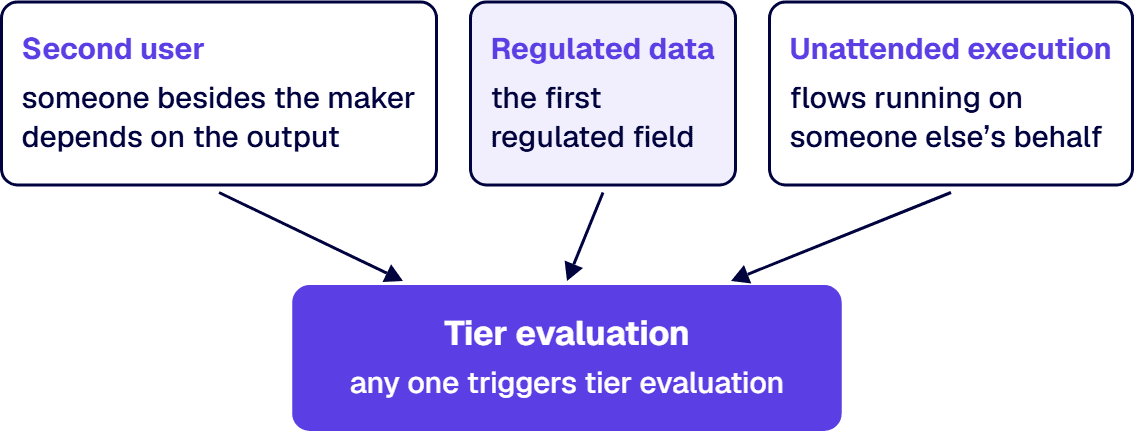
Three crossing conditions put an app in front of the tier decision, and one is enough. The first is the second person. The day somebody other than the maker depends on the output, the app has users. The second is the first regulated field, read against the data classification your organization already maintains. Third is unattended running on someone else’s behalf: a flow that acts while nobody is watching carries the maker’s authorization into decisions the maker is not present for. Any one of the three is enough on its own, and that is deliberate: an app can be trivial in two of them and still be the one that discloses a payroll record. Which tier the app then lands in is read from the three tier definitions and not from which condition fired, because a crossing opens the tier question and the tier rows answer it.
Where a maker’s account and the platform’s record disagree, the record decides the tier and the maker decides the sequence. A maker who says an app is used by two colleagues while its sharing record lists nineteen names is rarely being evasive; the app was shared once and spread from there. Read the reach from the app’s own sharing record in Power Apps, and read a flow’s owners from the Owners section on its details page, where an owner list names who can change the flow and not everyone it runs for. Set the tier from what you read, and let the maker say which of their apps is dealt with first. Reading the record rather than the account is what the support guidance asks for alongside telling makers the rules, calling for “reactive governance to identify highly shared and used solutions that might be important to your business”.
The tiers, and what each side owes. Microsoft’s support guidance defines three application tiers, productivity, important and critical, and sets out what each one implies for the lifecycle it needs, the environment it belongs in and the support behind it. The quoted cells in the table below are its own tier rows. The table states them as an exchange, because the obligation running from the organization back to the maker is what makes anybody declare an app.
| Tier | What puts an app here | What the maker owes | What the organization owes back | Where the tier is verifiable |
|---|---|---|---|---|
| Productivity | The maker is the user, or the users are direct colleagues. The tier row: “Individual productivity and small team use cases that may use existing data” | Building inside the tier’s environment and keeping business data out of connectors the policy excludes | The tools, the training route and the help channels, and no further obligation while the app stays inside this tier. The tier row: “No application lifecycle management required” and “Self-supported” | The environment the app sits in, read from the environment list in the Power Platform admin center, and the app’s sharing record in Power Apps |
| Important | Users beyond the maker’s own team, a business process that stops when the app stops, or a regulated field. Solutions here are “built in the default or a shared productivity environment” in the productivity tier row’s own words, which is the condition graduation exists to end | A named business owner besides the maker, the app moved into the environment the tier requires, and a short statement of what it does and what it connects to | A dedicated development environment, a route into the release process, and a second person who can open the app. The tier row reads “ALM required” | The environment list, the app’s Manage access pane in Power Apps, and the ownership entry wherever your organization keeps service records |
| Critical | The tier row is the definition: “Complex business applications, enterprise-wide initiatives, or mission-critical workloads that would result in significant business impact during downtime” | Handing over. The maker becomes a subject-matter expert on the process and stops being the single point of failure for the artifact | A supported build, “Dedicated dev/test/prod environments. Environments are managed by central IT”, the full lifecycle process the tier row demands, and “Formal support” at a response level the business has agreed | The environment list, the release pipeline’s own record of what was deployed, and the support register the service desk reads |
Two properties of that table matter more than its contents. The first is that the maker’s column gets shorter as the tier rises and the organization’s column gets longer, which is the incentive doing its work: at the top tier the maker is handing over a burden rather than surrendering an asset. The second is that the last column names a surface a third party can open, so a tier is checkable by an auditor who was not in the conversation where it was assigned.
A gate needs a mechanism, and this mechanism has a limit worth knowing before you rely on it. In managed environments, as Microsoft’s Limit sharing documentation states, “admins can limit how broadly users can share canvas apps, flows, and agents”, which is the control that caps how far a productivity-tier app can be shared onward from the point the rules are set. Read the limit in both directions before you plan around it. Sharing rules are enforced when a user tries to share, and the restriction “doesn’t impact any existing users who already have access to the app, flow, or agent before the application of the sharing rules”, so the control is a fence in front of future growth and not a way of pulling back an app that has already spread. Where rules are applied to an app that is already outside them, “only unsharing is allowed until the app, flow, or agent is compliant with the new rules”, and the same documentation puts the lag at up to an hour after the rules are set in the admin center. Design the gate for the apps that have not been built yet; the ones that have already spread are estate work, and How to Inventory and Triage Existing Power Apps and Flows is where that is set out.
The rule that stops graduation becoming a punishment. A declared app that crosses a threshold moves up a tier and keeps its maker involved. An undeclared app found by monitoring moves up a tier and keeps its maker involved. Making the two outcomes the same is the whole design. Once declaring costs a maker more than being found does, reactive discovery is the route the estate defaults to, and it is the expensive one because it finds an app after the dependence has formed.
When This Is Not the Work You Need
Three readers arrive here and belong somewhere else first.
Where nobody has yet listed what exists, an enablement programme trains makers while the estate that prompted the question stays unmeasured. The inventory comes first, and it is estate work before it is enablement work. Enablement then shapes what gets built after the pass, which is the half that stops the exercise repeating.
Where the environments and the connector policy have not been decided, graduation criteria point at destinations that do not exist. A tier that requires a dedicated development environment cannot be assigned in a tenant that has one environment, and a data-class trigger cannot be read against a classification nobody has written. The environment and connector decisions are the starting point, and enablement is the layer that makes them followable.
Where the organization has decided that citizen development is not permitted for the workloads in question, enablement is the wrong page. In a regulated boundary that call is made against named controls, and it is settled before an enablement budget is spent. A maker programme inside a boundary that should not have makers in it is a policy defect wearing a training budget.
What is left is the case this page was written for: an organization with makers it does not want to lose, controls it has decided to keep, and no route between the two. Bring the list of people who are already building, the one control that generates the most requests, and the app somebody has been quietly maintaining for a year. i3solutions has been a Microsoft partner since 1997. Talk to a senior Power Platform architect
Frequently Asked Questions
How do we support citizen developers without losing control?
Build the half of the programme that runs toward makers, not only the half that runs at them. Four things make up that half. A training route sorted by what a maker is trying to do, so an Explorer building a personal tracker is not handed the pattern library and a Champion mentoring colleagues is not handed another product overview. A library of sanctioned patterns holding the answers to the decisions makers keep getting wrong, so a maker who starts from one complies without reading a policy. Four channels for help while building: the colleague at the next desk, an internal community channel, the platform team, and the help desk for tools and licences. Stated criteria for the moment an app stops being personal, with the obligation running back to the maker written down beside the obligation running from them. Control comes from the guardrails the environment and connector policy set. What enablement adds is that following them is the easier route, which is what keeps the determined people from taking the work somewhere the platform team is not watching.
What training should Power Platform makers get?
Training matched to the stage the maker is at, which Microsoft’s adoption guidance sorts into three maker personas: Explorer, Innovator, and Champion. An Explorer builds for their own use. The limits get said once, in plain terms, through a hands-on session of the kind Microsoft describes as a workshop where participants learn to build solutions in a single day, plus a self-paced route available at the hour somebody is actually stuck. An Innovator is building for a team, and the training that pays there shapes what gets built: prebuilt examples to start from, a named way to store data that is not a spreadsheet in the app, and the graduation criteria put in front of a maker before an app reaches them, because criteria learned at the start shape the build and criteria learned at the review order a rewrite. A Champion teaches other people and needs standards and access more than features: connector practice, code review standards, lifecycle discipline, and certification. Two things sit outside the personas and are needed anyway. A published first-day route naming the environment a new maker should build in, and a maintained record of who has taken what, held wherever completion is already tracked, because a graduation criterion that depends on training needs somewhere to check.
How does a maker app graduate to IT-supported status?
By crossing one of three conditions and then being placed at the tier the three tier definitions select, which is a separate reading. The conditions are the second person depending on the output, the first regulated field measured against the organization’s own data classification, and unattended running on somebody else’s behalf. One condition is enough by itself: an app that looks unremarkable against the other two can be the one holding a payroll record. The three application tiers are productivity, important and critical, and Microsoft’s support guidance treats the path between them as a design obligation, stating that a solution might start with productivity-level support and grow in functionality or user base to require important-level support. What changes at each step is an exchange. At productivity the maker owes only building inside the tier’s environment, and the organization owes tools, training and help channels, with no lifecycle management required and self-support as the model. At important the maker owes a named business owner besides themselves and a move into the environment the tier requires, and the organization owes a development environment, a route into the release process and a second person who can open the app. At critical the maker hands the artifact over and stays the expert on the process, and what the organization owes is managed environments, a full lifecycle process and formal support at an agreed response level. Assign the tier from the app’s own sharing record instead of from the maker’s recollection; the maker decides which of their apps is dealt with first.
What is a sanctioned pattern, and who maintains it?
It is a decision somebody has already taken on the organization’s behalf, packaged as a starting point, a sample app, a workflow or a component in the training guidance’s own list, so that using it is quicker than working the decision out again. Stock the library from the decisions makers get wrong most often: where data should live, how an app authenticates to the system it reads, how a person requests access, and what happens when the source is unavailable. Each pattern carries a named owner, a statement of when to use something else, and a date it was last checked against the platform, so a reader can tell whether it is still current. Put the library where makers pass on the way to building. The CoE Starter Kit is not that place any more: Microsoft states that the kit is no longer actively maintained and that its core capabilities are now part of the admin center, so the Power Platform admin center is where a library started today belongs, and not the kit that used to hold it. A pattern is sanctioned in practice only when it is also the fast route: if the sanctioned route takes forty minutes and the unsanctioned one takes four, the sanctioned route is a preference, and the work is to close that gap.
Who supports a maker app after it has graduated?
A different discipline from the one that supported the maker while they were building, and Microsoft’s guidance separates the two explicitly: user support helps users of production solutions, and maker support helps makers developing solutions. Maker support is the colleague one desk over, the internal community channel, the platform team and the help desk, and its measure is how quickly a stuck maker gets unstuck. Support of a graduated app is an ownership question about who answers a ticket, who else can open it, what the “Formal support” of Microsoft’s critical tier row means in response-level terms for something nobody was paid to build, and what happens when the person who built it changes jobs. That question is the subject of the companion guide Power Platform Support Model: Who Owns the Apps Your Business Built. The handover point between the two is the graduation itself: enablement runs up to the point where an app has a tier and a business owner named for it, and the support model runs from there.
Related Reading
- Enterprise Power Platform Development & Implementation Services for Governed Operations, the practice this enablement work belongs to
- IT Governance Services for Microsoft Environments, where maker enablement is built as part of a wider governance engagement
About the Author
Michael Branson co-founded i3solutions and brings executive, operational, and technical perspective to organizations working in complex, secure, and mission-critical environments. His insights focus on business process consulting, automation, data analytics, collaboration, secure operating models, and the operational discipline required to turn technology investments into practical business systems with measurable value.