
By Scot Johnson, Founder / CEO, i3solutions. Scot Johnson co-founded i3solutions 30 years ago with a focus on expert-led delivery, strategic advisory, and complex Microsoft-centered solutions for organizations where technology decisions carry operational, financial, and mission risk.
A SharePoint platform migration, moving file shares or on-premises SharePoint Server into SharePoint Online (see SharePoint Online vs on-premises), runs from a five-figure project for a clean, small estate to well into six figures at regulated enterprise scale. Full migration project cost for defense contractors with SharePoint customizations and CMMC compliance scope typically lands in the $100,000 to $300,000 range. Tooling is the cheap part of that number, because Microsoft’s SharePoint Migration Tool is free and commercial tools such as ShareGate run $5,995 to $17,995 per year; the real budget lives in content remediation, customization disposition, permissions redesign, and cutover discipline.
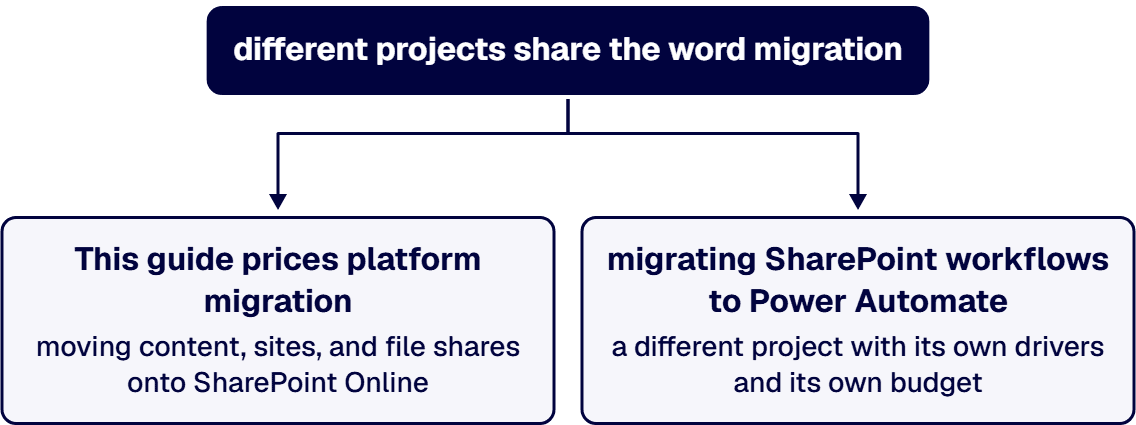
One scope note before any numbers, because two different projects share the word “migration.” This guide prices platform migration: moving content, sites, and file shares onto SharePoint Online. The separate exercise of migrating SharePoint 2010 and 2013 workflows to Power Automate is a different project with its own drivers and its own budget, and we price it separately in our SharePoint workflow migration cost guide. If your estate needs both, budget them as two lines.
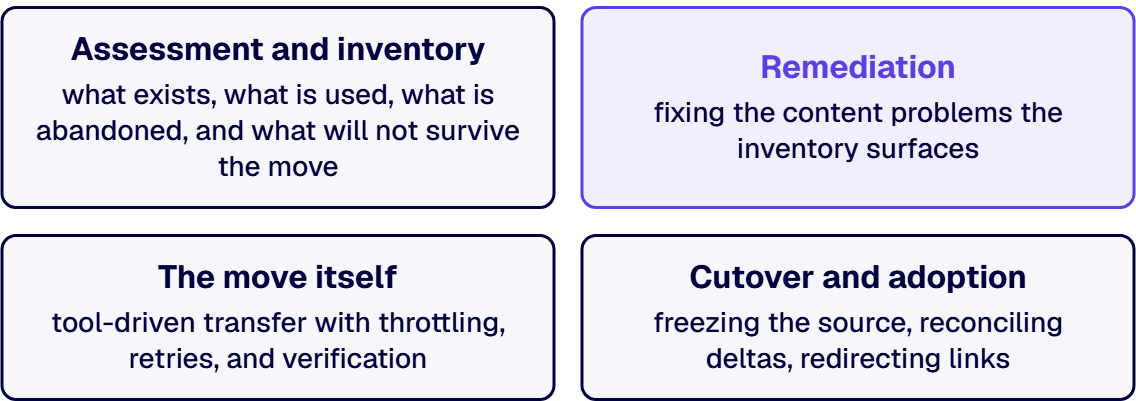
The word hides four workstreams, and the estimate is honest only when each is priced. Assessment and inventory: what exists, what is used, what is abandoned, and what will not survive the move. Remediation: fixing the content problems the inventory surfaces, broken permissions inheritance, unsupported customizations, oversized lists, orphaned users, and years of duplicated files. The move itself: tool-driven transfer with throttling, retries, and verification. Cutover and adoption: freezing the source, reconciling deltas, redirecting links, and landing users in the new structure without losing a week of productivity. The transfer is the workstream people budget for; remediation is the one that sets the actual price.
For many migrations the tool line is nearly zero. Microsoft’s SharePoint Migration Tool is free and migrates content from SharePoint Server 2010 through 2019 and from file shares into SharePoint Online, OneDrive, and Teams, with the same functionality scriptable through PowerShell. Microsoft’s Migration Manager handles file-share moves at scale from the admin center at no license cost.
Commercial tooling earns its price on complex estates. ShareGate, the most common choice, publishes annual subscriptions at $5,995 for Essentials, $9,995 for Migrate Pro, and $17,995 for Enterprise as of July 2026. What the paid tier buys is not speed so much as control: richer reporting, permissions and metadata handling, and operator productivity across thousands of site moves. On a six-figure migration the tool is two to five percent of the budget; choosing it for fit rather than price is the right frame. Our SharePoint migration tool comparison covers the selection in detail.
One storage line belongs in the same table: SharePoint Online storage beyond your tenant’s included quota bills at $0.20 per GB per month on Microsoft’s published meters, so a migration that moves every byte of a 20 TB file share into active SharePoint storage carries a recurring cost the project plan should surface, and archiving cold content is the standard mitigation. The rest of that meter family, Microsoft 365 Archive and Backup included, is priced in our SharePoint Premium cost guide.
Regulated-industry SharePoint modernization carries roughly 25 to 35 percent cost overhead versus commercial work for equivalent scope, driven by control mappings, audit-trail discipline, and zero-downtime cutover patterns. For defense contractors the overhead is concrete: content screening for CUI before it moves, destination controls that satisfy CMMC and NIST 800-171 expectations, and evidence that the migration itself did not break the compliance story. That is the delta behind the $100,000 to $300,000 band quoted above for defense migrations with customizations and compliance scope, and it is why a regulated migration quoted at commercial rates should be read as a scope gap rather than a bargain. If your migration carries compliance scope, Schedule a 30-minute scoping call before anyone quotes you a commercial-shaped number. Organizations weighing tenant environment questions alongside the move can start with our Microsoft 365 migration services overview.
Three defensible levers, in order of impact. Archive instead of migrating: content untouched for years can move to cheap archival storage or stay behind in read-only form, shrinking both the move and the recurring storage line. Disposition customizations honestly: most legacy customizations exist because the old platform lacked something the new one has natively, and rebuilding only the genuine differentiators routinely halves that workstream. Clean before, not during: deduplication and permissions cleanup done in the source costs a fraction of the same work discovered mid-migration, when it blocks a cutover window. The false lever is skipping validation, which converts a migration budget into an incident budget.
i3solutions is a Microsoft Solutions Partner, and All i3solutions SharePoint developers, architects, and consultants are 100% U.S.-based. We scope migrations from the inventory, not from the terabyte count. Enterprise SharePoint strategy assessment engagements typically run four to six weeks elapsed time with two to three i3solutions consultants. That assessment produces the content inventory, the customization disposition list, the target information architecture, and a phased migration plan with the cutover model your operations can actually tolerate. The number that comes out of that assessment is one you can defend to finance, because every line traces to something counted in your estate. Teams that need senior delivery capacity for the execution phase can hire SharePoint developers from us directly, and the practice behind this work lives at our SharePoint development services hub.
If a migration is on your roadmap, Talk to a senior SharePoint architect and bring your site inventory, however rough.
A clean file-share migration is the low end of the spectrum because Microsoft’s tooling is free and the content model is simple: the cost is planning, permissions mapping, and validation rather than transfer. Budgets rise with volume condition, deduplication needs, and how much restructuring you do on the way in, and recurring storage beyond the tenant quota bills at $0.20 per GB per month.
Microsoft’s SharePoint Migration Tool and Migration Manager are free and cover file shares and SharePoint Server 2010 through 2019. ShareGate publishes annual tiers at $5,995, $9,995, and $17,995 as of July 2026. On complex estates the paid tool earns its keep in reporting, permissions handling, and operator throughput, and on any sizable project the tool line is a small fraction of the total.
No, and conflating them is a common budgeting error. Platform migration moves content, sites, and file shares to SharePoint Online. Workflow migration rebuilds SharePoint 2010 and 2013 workflows in Power Automate, with its own discovery, redesign, and testing cycle. They are separate projects with separate cost drivers, and estates that need both should budget and sequence them deliberately.
Defense migrations with SharePoint customizations and CMMC compliance scope typically land between $100,000 and $300,000, and regulated work in general carries a 25 to 35 percent overhead versus commercial scope for equivalent size. The overhead pays for CUI screening, control-mapped destination configuration, audit evidence, and cutover patterns that keep compliance continuous through the move. The compliance program those controls belong to is priced separately in our CMMC compliance cost guide.
Pricing the transfer instead of the remediation. Moving bytes is the predictable part; the estimate-breaking work is customization disposition, permissions redesign, and content cleanup, all of which scale with the age of the estate rather than its size. An inventory-driven assessment before the quote is what keeps the project from discovering its real scope mid-flight.
Yes, and at enterprise scale you should: phase by department, site family, or business function, with each wave validated and adopted before the next moves. Phasing costs slightly more in coordination and dual-running, and repays it in risk: a problem discovered in wave two is a fix, while the same problem discovered in a big-bang cutover is an outage.

US-Based | Est. 1997
© i3solutions. All rights reserved.
US-Based | Est. 1997
© i3solutions. All rights reserved.


