
By Michael Branson, Founder/COO, i3solutions
For most regulated mid-enterprise document management, SharePoint Online is sufficient, and the additional tool you need is usually a Microsoft license rather than a second product. The decisive fact is a licensing line, not a capability line: Microsoft’s Purview service description states that marking items as a record or a regulatory record, triggering a disposition review at the end of a retention period, event-based retention, and applying a default retention label to a SharePoint document library, folder or document set all “Require these specific licenses to provide users rights,” and the licenses Microsoft lists there are Microsoft 365 E5/A5/G5, “Microsoft Purview Suite/EDU/GOV/FLW and Microsoft Defender + Purview Suite FLW,” Office 365 E5/A5/G5, and Microsoft 365 E5/A5/F5/G5 Information Protection and Governance. An E3 tenant can create retention labels but cannot declare records with them, which is exactly the capability most buyers thought they were missing a product for. A dedicated DMS earns its place in a narrower set of cases: a validated GxP environment where your obligation is to receive installation and operational qualification evidence with each release rather than to produce it yourself, a 21 CFR Part 11 electronic signature manifestation, matter-centric legal work with need-to-know barriers at a scale that runs past the unique-permission limit Microsoft publishes, physical records tracking, and folderless metadata-driven architecture as a first principle rather than a configuration choice. If none of those five describe your obligation, the gap you are feeling is governance and information architecture in an estate that grew organically, and buying a second repository does not classify the content, it relocates it, at the cost of a second license, a migration and a training cycle.
An auditor asks for proof of disposition on a controlled document and nobody can produce it. A regulatory affairs lead asks whether the submission dossier can sit in the same repository as everything else and gets three different answers from three people. None of those arrive as platform questions, and both end up as one. Somebody then says “can SharePoint do this?” and somebody else says “we should look at a real DMS,” and the argument runs for a quarter without either side writing down what the actual requirement is. The decision that ends that argument rests on where SharePoint Online and the dedicated document management category genuinely differ, on what Microsoft’s own published documentation says about the Microsoft side, and on the narrow set of obligations whose honest answer is a product i3solutions does not sell.
This page is the comparison and only the comparison. Whether SharePoint can be made to do regulated document management well, and what that configuration looks like, is answered separately on our SharePoint document management consulting page, and we are not going to restate it here.
Half the folklore in this argument is about ceilings that either do not exist or are not the ceiling people think, so the published limits are where it gets settled.
From Microsoft’s SharePoint limits service description, article date 29 May 2025, re-read 5 September 2026: a library supports up to 30 million files and folders, individual file uploads are capped at 250 GB, maximum storage per site collection is 25 TB, total tenant storage is 1 TB plus 10 GB per license purchased, and a site collection supports 2,000 lists and libraries combined. Version history supports 50,000 major versions and 511 minor versions. The full decoded file path including the file name cannot exceed 400 characters.
Then the number everyone quotes, with the correction that matters. The 5,000 item list view threshold is real, but it is a different instrument from the 30 million item ceiling and it does not appear on the limits page at all. It appears in Microsoft’s list view threshold troubleshooting article, article date 17 December 2023: “This issue occurs because SharePoint Online uses the Large List Resource Throttling feature. By default, the list view threshold is configured at 5,000 items.” The same article carries the error text that settles what kind of limit it is: “The number of items in this list exceeds the list view threshold, which is 5000 items. Tasks that cause excessive server load (such as those involving all list items) are currently prohibited.” That is a query throttle on operations that would otherwise scan the whole list, not a storage cap. A library of two million documents is entirely supported; a view that tries to return all of them is not. Any comparison that presents 5,000 as SharePoint’s document limit is comparing the wrong thing, and it comes, more often than not, from a vendor with a product to sell.
Two permission limits from Microsoft’s SharePoint limits service description are worth carrying into an architecture review, because they bite quietly. “When a list, library, or folder contains more than 100,000 items, you can’t break permissions inheritance on the list, library, or folder.” And “The supported limit of unique permissions for items in a list or library is 50,000. However, the recommended general limit is 5,000.” An estate that has been securing content item by item for years is walking toward both of those.
SharePoint also has more of the classic DMS furniture than its critics allow. Unique Document IDs exist and are automatic; Microsoft’s unique Document IDs article states that “Document ID’s are automatically assigned to uploaded documents and this ID will follow the item throughout its entire life cycle.” Records can be managed in place rather than moved. Microsoft’s own wording, in Choose how to store and manage records, is that “Managing records in place is an alternative to the traditional process of copying or moving records to another location, and then applying security and retention policies,” and where an archive model is preferred, “A Records Center site serves as an archive, and documents are copied to the archive when they became records.” Neither support article publishes an article date.
This is the single most consequential fact on the page, and it is the reason so many organizations conclude they need a new product when they need a different license.
Microsoft Purview provides genuine records management on top of SharePoint. Microsoft’s records management documentation, article date 25 August 2025, describes labelling items as a record, restrictions placed on the item once it is declared, disposition review and “proof of records deletion,” and makes one point that should decide any argument about whether SharePoint records are real records: “The most important difference for a regulatory record is that after it is applied to content, nobody, not even a global administrator, can remove the label.”
The catch is the entitlement, and Microsoft’s Purview service description, article date 3 August 2026, splits it across two lists. For retention label CREATION, the licenses that “provide user rights” are “Microsoft 365 E5/A5/G5/E3/A3/G3/F3/F1/Business Premium,” the Purview Suite editions, “Microsoft 365 E5/A5/F5/G5 Information Protection and Governance” and “Office 365 E5/A5/G5/E3/A3/G3/F3/E1/A1/G1.” But four retention label creation SETTINGS sit behind a higher tier: “Start the retention period based on an event type,” “Trigger a disposition review at the end of the retention period,” “During the retention period mark items as a record or a regulatory record,” and “After the retention period, automatically change the retention label” all “Require these specific licenses to provide users rights,” namely Microsoft 365 E5/A5/G5, “Microsoft Purview Suite/EDU/GOV/FLW and Microsoft Defender + Purview Suite FLW,” Office 365 E5/A5/G5, and Microsoft 365 E5/A5/F5/G5 Information Protection and Governance. A separate list in the same article puts four retention label POLICY deployment methods behind the same higher tier: “Auto-apply to content that contains sensitive information,” “Auto-apply to content that contains specific words, phrases, or properties,” “Apply a default retention label to a SharePoint document library, folder, or document set,” and “Using an adaptive policy scope in the retention label policy.”
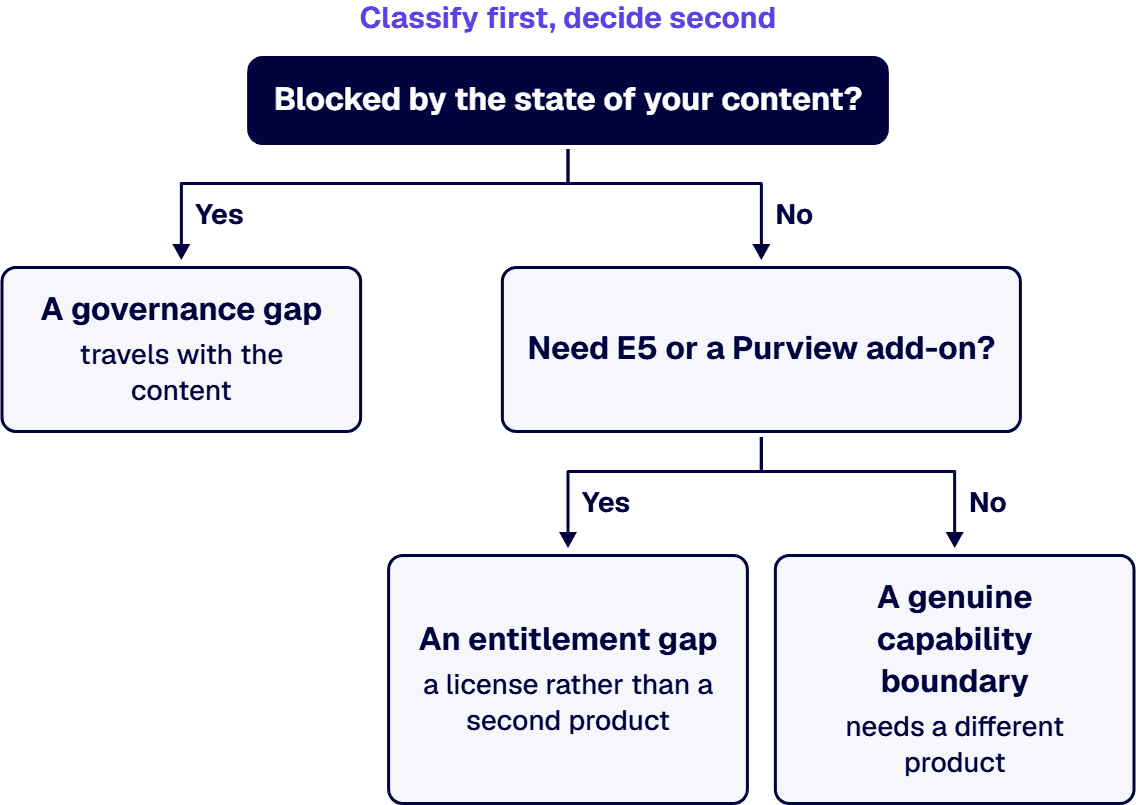
Read what that means in the room. An organization on E3 that has been told SharePoint cannot declare records has been told something true about its licensing and false about the platform. The comparison it should be running is not SharePoint against a dedicated DMS. It is the delta between its current Microsoft licensing and E5 or a Purview add-on, against the total cost of a second repository plus the integration, migration and training that comes with it. Those two numbers are rarely close, and the one people skip is the cheaper one.
Version history is where SharePoint quietly does something a records manager needs to know about. Microsoft’s version history limits documentation, article date 3 October 2024, states that when versions exceed the limits set at the library, “versions matching the criteria are marked for permanent deletion. This version deletion workflow bypasses the normal recycle bin and the deleted versions can’t be recovered from recycle bin.” On the floor below which the interface will not go, the same article is more careful than the shorthand usually is: “The UI doesn’t allow a value less than 100 major versions or less than 30 days expiration time limits to be set, but it’s possible to set the system to store fewer versions using public APIs. For reliability, any value less than 100 versions or less than 30 days expiration time limit isn’t recommended and can result in the user activity causing an inadvertent data loss.” So it is a UI floor with an API path around it, not an absolute wall, and that distinction belongs in a control description.
Two exceptions make the platform behave correctly where it counts. “For items that are subject to a retention policy (or an eDiscovery hold), the versioning limits for the document library are ignored.” And “Version deletion on documents marked as records is blocked.” So a correctly labelled record is protected from a library trimming policy, and an incorrectly labelled one is not. This is a labelling dependency rather than a product gap, and it is the kind of thing an assessor tests.
The labelling decision a records manager faces ahead of an assessor’s test starts from a written list of every record series and its retention period, made before carrying OpenText records into Purview.
For these three obligations the answer sits inside the Microsoft estate rather than in a second product. Microsoft names SharePoint Online among the services that can be configured for SEC Rule 17a-4, Microsoft Purview retention and eDiscovery holds preserve content inside SharePoint, and Microsoft supports ITAR data in its US government clouds through additional contractual commitments. Each still needs deliberate configuration.
Microsoft’s SEC Rule 17a-4 documentation lists SharePoint Online among the services with features you can configure to comply with the rule, and the choice the amended rule gives a broker-dealer between a complete time-stamped audit trail and non-rewriteable, non-erasable storage is covered in FINRA and SEC Recordkeeping and Supervision in Microsoft 365: A Guide for Financial Services IT Leaders.
Yes, inside Microsoft Purview. When a user changes an item held by a retention policy or by a label that marks it as a record, or deletes any item subject to retention, SharePoint copies the original into a hidden Preservation Hold library, and Microsoft states that permanent deletion is suspended for content under eDiscovery holds. One gap: Recycle Bin content is not indexed, so an eDiscovery search cannot place it on hold.
Microsoft’s Learn about retention for SharePoint and OneDrive page describes that library as “a hidden system location that isn’t designed to be used interactively,” states “It’s not supported to edit, delete, or move these automatically retained files yourself,” and points to compliance tools, such as those supported by eDiscovery, to reach the content. So a hold is placed and read through Microsoft Purview rather than managed by hand inside the library; what a hold does to library version limits is covered in the versioning section above.
Microsoft’s ITAR documentation lists SharePoint Online in scope for Office 365 GCC High while stating that no compliance certification exists for the ITAR, so the tenant is where an ITAR program starts rather than where it ends, which Redesigning an ITAR Export-Control Compliance Program to Be Efficient, Not Just Compliant sets out.
Five cases. Each is written as a criterion you can test your own obligation against, not as a claim about any named product. i3solutions holds no attested delivery record on any dedicated document management platform, so this page does not tell you what one does. It tells you what the Microsoft estate does and does not discharge on its own, and what to require in writing from anything you evaluate against it.
Validated GxP environments. This is the strongest case, and it is about who does the validation work rather than about features. Both the Microsoft position and the regulation itself are published, so both can be sourced. Microsoft’s FDA CFR Title 21 Part 11 documentation, article date 31 January 2024, states that “Although no certification exists for complying with CFR Title 21 Part 11, the following Microsoft enterprise cloud services undergo independent, third-party audits,” and it is careful to qualify what those audits are: “Although these regular audits and certifications don’t specifically focus on FDA regulatory compliance, their purpose and objectives are similar in nature to those of CFR Title 21 Part 11, and serve to help ensure the confidentiality, integrity, and availability of data stored in Microsoft cloud services.” It then puts the obligation where it actually sits: “Customers who build and deploy applications subject to FDA regulation are responsible for ensuring that their applications meet FDA requirements.” The regulation itself places the duty the same way. FDA’s 21 CFR 11.10, in the eCFR text of title 21 up to date as of 10 September 2026, opens “Persons who use closed systems to create, modify, maintain, or transmit electronic records shall employ procedures and controls designed to ensure the authenticity, integrity, and, when appropriate, the confidentiality of electronic records, and to ensure that the signer cannot readily repudiate the signed record as not genuine.” The first control it then requires is “Validation of systems to ensure accuracy, reliability, consistent intended performance, and the ability to discern invalid or altered records.” So the question to put to any platform, Microsoft included, is who produces the installation and operational qualification evidence, and on whose release cadence. If you ship regulated submissions and the answer is that you re-run that evidence yourself against every service update, that burden is the decision. If your GxP scope is a handful of controlled SOPs on a stable estate, the same burden is affordable in-house and a second platform will not repay its integration cost.
21 CFR Part 11 electronic signature. Microsoft’s own eSignature service is explicit about what class of instrument it is, which is what makes it a usable benchmark. Its overview, article date 11 September 2025, states that “The eSignature service uses simple electronic signatures as defined under applicable law including, but not limited, to the Regulation (EU) No 910/2014 (the eIDAS Regulation),” and that “Before you can use eSignature, you must first link your Azure subscription to pay-as-you-go billing.” The same overview records that the eSignature platform is integrated with third-party electronic signature providers, which are not named on this page. A simple electronic signature is fit for most commercial approvals and is not the same artifact as a Part 11 signature manifestation. If your obligation names Part 11 signatures specifically, that is a requirement to put in writing to every candidate and to have evidenced rather than asserted.
Matter-centric legal work with information barriers. The test here is architectural, and the numbers on the Microsoft side are the published ones quoted earlier from Microsoft’s SharePoint limits service description. A firm that secures at the item level across a large estate is the exact profile that runs into the 50,000 unique permission limit and the 100,000 item inheritance rule, and past that point a barrier cannot be changed without a re-architecture. So the question is not whether a system supports barriers. It is what changing one costs: a document re-file, a content re-index, a permission cascade, or nothing. Ask for that answer as an operation, with a timing, on an estate the size of yours.
Physical records. If non-electronic records are in scope, the requirement is a surrogate record inside the repository that stands for an item held somewhere else and carries its own metadata and its own retention. This page makes no claim in either direction about whether SharePoint Online supports that, because no Microsoft statement on it is cited here, and an uncited statement about a platform capability is exactly what this page exists to remove. Require a demonstration from every candidate, this one included, rather than taking a comparison table’s word for it.
Folderless architecture as a first principle. SharePoint can absolutely be run this way, with content types, managed metadata and views, and doing so is one of the highest value decisions in a modernization. The difference in a metadata-driven system is that the discipline is not optional; in SharePoint it is a discipline you have to impose and keep imposing. If your organization has already tried and failed to hold that discipline twice, that history is evidence about your organization and it belongs in the decision.
If you are the one who has to take this decision to a committee, the useful next step is a scoping conversation against your own estate rather than another comparison table.
The middle column is sourced line by line to Microsoft’s own documentation, cited above. The right column is deliberately not a product claim. i3solutions holds no attested delivery record on any dedicated document management platform, so the right column states the question to put to a candidate rather than an answer about one, and no product outside the Microsoft estate is named on this page.
Certification status is the one thing in a comparison that should never be taken from a comparison, including from this one. Records management certifications are held against a register, they carry dates, and they lapse. This page states no current certification status for SharePoint Online or for anything else, because no certificate was retrieved for one in the pass that wrote this, and a certification claim without its certificate and its date is not a claim. Watch the wording as well as the badge: supports the key requirements of a specification is a different statement from is certified against it, and that difference is the kind of thing that turns up in an audit finding. If a certification matters to your obligation, ask every candidate, including every Microsoft partner, for the current certificate with its date, and read it.
The organization asking this question is usually not at a capability boundary. It is at a governance boundary that has been mistaken for one. Three observations sit behind that sentence. The source for all three is i3solutions’ own delivery record across its SharePoint engagements, not the Microsoft documentation cited elsewhere on this page: for these three sentences, and only these three, no outside survey, study, analyst report or data provider is cited, and none is claimed. Each is carried here in the words i3solutions recorded it in rather than restated. Many regulated enterprises built their SharePoint environments organically over 8 to 12 years, accumulating layers of inconsistent permissions, undocumented content types, and fragile folder structures that now create measurable audit exposure. The named mechanism is one Microsoft publishes in its SharePoint limits service description. An estate secured item by item for a decade walks into the 50,000 unique-permission limit and the 100,000-item inheritance rule quoted earlier, and past that point a permission cannot be changed without a re-architecture. The symptoms present as product failures and are not. Legal teams report that broken folder structures migrated to SharePoint Online increase legal hold response times by 200 to 400% because content cannot be reliably located or classified. Financial services firms report average compliance remediation costs of $150K to $300K annually for SharePoint environments that were never properly governed. When the gap is governance rather than capability, SharePoint content management consulting turns content sprawl into audit ready governance.
The reason this matters to a build or buy decision is that none of those problems is solved by the destination. Migrate an ungoverned estate into a dedicated DMS and you have bought a second system to be ungoverned in, at a higher licence cost and with a migration in between. i3solutions assessment engagements routinely find 20 to 40 percent more SharePoint sites during Phase 1 than the client internal inventory lists. That gap is a useful proxy for how much of the current environment is understood well enough to be an input into a platform decision at all.
The sequence that follows from all of this is classify first, decide second. Establish what content you hold, what obligations attach to each class, and which of those obligations your current Microsoft entitlement already satisfies. Our classify-first approach to data classification sets out how that is done, and the governance-first modernization argument covers what it changes downstream. Only the requirements that survive that exercise are candidates for a second product.
The document management work behind this advice is on the record. Both engagements below are i3solutions client outcomes rather than industry figures, and each is stated in the words it was attested in. A global analytical research provider, serving over 900 clients across many different industries, experienced rapid growth and international expansion. With multiple divisions and more than 150 employees across various locations, the organization faced challenges managing its critical internal documents and ensuring that teams could collaborate effectively. Improved overall communication across teams and departments by 30%, ensuring that employees can share information and updates more effectively. The case study carries the engagement and identifies the client by description rather than by name.
For a federal drug-policy office, the attested outcomes are these. Centralizing package tracking with unique IDs and automating routing reduced average processing time by 45%. With hundreds of correspondence packages handled each year, this time savings equates to more than 3,000 staff hours annually reclaimed from manual routing and status checks. This eliminated over 200 misrouted or lost correspondence items annually, each of which previously required hours of manual recovery or rework. Real-time dashboards and full audit trails now provide 100% visibility into the status of every correspondence package. That last sentence is the one that answers a records question, because visibility and audit trail are what an assessor actually asks to see.
i3solutions has delivered enterprise SharePoint and Power Platform programs for aerospace and defense manufacturers, major defense organizations, a financial-services firm, a national healthcare system, and military organizations. All i3solutions SharePoint developers, architects, and consultants are 100% U.S.-based. i3solutions has completed more than 1,500 Microsoft platform implementations. i3solutions has been a Microsoft partner since 1997.
i3solutions has no attested delivery record on any dedicated document management platform. That is why no such product is named anywhere on this page and why the right-hand column of the table above is written as questions rather than as answers. A comparison written in our voice about a product we have never delivered would be an opinion wearing a table’s clothes. The asymmetry is deliberate and it is the point: the Microsoft side is sourced sentence by sentence to Microsoft’s own published documentation, and the other side is the set of questions to make a candidate answer.
i3solutions runs comparative platform-selection evaluations for clients, recommending among IAM platforms for hybrid estates and among workflow automation platforms against SOC 2 and HIPAA, rather than only implementing the Microsoft option. That record is the basis for the one claim we do make here, which is the ability to run the decision rather than only the Microsoft implementation. i3solutions advises clients on federal compliance posture as its own assessment rather than as a restatement of Microsoft’s documentation, including whether SharePoint Online meets NIST 800-53, whether Azure Government is required under the DoD Cloud Computing SRG, and whether a CMMC gap assessment is needed to bid. And where the right store is not SharePoint at all, we say so: i3solutions selects Dataverse over SharePoint as the primary relational store when a client needs scalable high-volume transactional data, and holds application secrets in Azure Key Vault.
If the answer turns out to be a validated GxP platform or a matter-centric legal system, that is a correct outcome and a specialist in that product is the right partner for it. Take the criteria on this page to them and make them answer the same questions.
If it is the Microsoft estate, the same questions are worth putting to us.
Most of these decisions stall because nobody owns the inventory, and a quarter disappears while two departments argue from different pictures of the same estate. Enterprise SharePoint strategy assessment engagements typically run four to six weeks elapsed time with two to three i3solutions consultants. What that produces for this question is a content inventory by class, the obligation attached to each class written as a control rather than as a worry, a statement of which obligations your current licensing already satisfies and which need E5 or a Purview add-on, and a shortlist of the requirements that genuinely fall outside the Microsoft estate. An i3solutions SharePoint consulting engagement produces named deliverables: a governance documentation package, architecture artifacts, and runbooks. Those are the artifacts a platform decision needs, and they retain their value whichever way the decision goes.
Testing this against your own estate is faster than testing it against a comparison table. Bring the content inventory you already have, however incomplete, and the Microsoft licensing you are currently on. An architect can tell you in one conversation whether what you are describing is an entitlement gap, a governance gap, or a genuine capability boundary that needs a different product, and which of the three answers costs the least to act on.
For most regulated mid-enterprise document management it is enough, and the thing you are missing is usually an entitlement rather than a product. Microsoft’s Purview service description places record declaration, regulatory records, disposition review and event-based retention behind specific licenses: Microsoft 365 E5, A5 or G5; the Microsoft Purview Suite in its EDU, GOV and FLW editions and Microsoft Defender plus Purview Suite FLW; Office 365 E5, A5 or G5; or Microsoft 365 E5, A5, F5 or G5 Information Protection and Governance. An E3 tenant can create retention labels but cannot use them to declare records. Before comparing platforms, compare the cost of that license step against the total cost of a second repository plus migration, integration and training. A dedicated DMS is the right answer for validated GxP environments, 21 CFR Part 11 signature, matter-centric legal work with information barriers, and physical records tracking.
No, and it is routinely misquoted. Microsoft states, in its troubleshooting documentation, that SharePoint Online uses the Large List Resource Throttling feature and that “By default, the list view threshold is configured at 5,000 items.” That is a throttle on views and operations that would scan an entire list, not a ceiling on how many documents a library can hold. The actual scale figures Microsoft publishes are in its service description: a library supports up to 30 million files and folders, individual files up to 250 GB, and a site collection up to 25 TB. The limits that genuinely constrain design are on the permissions side, where the same documentation lists 50,000 unique permissions supported per list with 5,000 recommended, and no breaking of permission inheritance on a list, library or folder holding more than 100,000 items.
Microsoft’s own answer starts by dissolving the premise. Its FDA CFR Title 21 Part 11 documentation states that although no certification exists for complying with CFR Title 21 Part 11, certain Microsoft enterprise cloud services undergo independent, third-party audits, and it adds the qualifier that matters: although those regular audits and certifications don’t specifically focus on FDA regulatory compliance, their purpose and objectives are similar in nature to those of CFR Title 21 Part 11. It then puts the obligation where it sits: customers who build and deploy applications subject to FDA regulation are responsible for ensuring that their applications meet FDA requirements. The regulation itself places the duty the same way. 21 CFR 11.10, in the eCFR text of title 21 up to date as of 10 September 2026, opens “Persons who use closed systems to create, modify, maintain, or transmit electronic records shall employ procedures and controls designed to ensure the authenticity, integrity, and, when appropriate, the confidentiality of electronic records, and to ensure that the signer cannot readily repudiate the signed record as not genuine.” The first control it then requires is “Validation of systems to ensure accuracy, reliability, consistent intended performance, and the ability to discern invalid or altered records.” So Part 11 is a property of your validated application and your procedures, not a badge a platform confers. The practical difference with a dedicated life sciences system is who carries the validation burden and on whose release cadence. On SharePoint that effort is yours, against every Microsoft service update. Whether a candidate platform carries it for you is a question to put in writing and to have evidenced rather than asserted. For an organization shipping regulated submissions, that is the deciding factor rather than any feature comparison.
It has real records management through Microsoft Purview, subject to the licensing above. Purview supports labelling an item as a record, applies restrictions to the item once declared, provides disposition review and proof of records deletion, and enforces immutability of the label itself: Microsoft states that for a regulatory record, “after it is applied to content, nobody, not even a global administrator, can remove the label.” Two behaviors are worth knowing. Items under a retention policy or eDiscovery hold ignore the document library’s version limits, and version deletion on documents marked as records is blocked. Outside those protections, versions trimmed by a library limit are permanently deleted and bypass the recycle bin, so the label is what stands between a version history and a hole in it.
Run one diagnostic test before answering. Is the thing you cannot do blocked by the product, or blocked by the state of your content? A capability boundary travels with the platform. A governance boundary travels with the content, and most of these are the second kind. Many regulated enterprises built their SharePoint environments organically over 8 to 12 years, accumulating layers of inconsistent permissions, undocumented content types, and fragile folder structures that now create measurable audit exposure. That observation and the one that follows are i3solutions’ own findings from its SharePoint delivery record rather than figures from an outside survey or study, and both are carried here in the words i3solutions recorded them in: Legal teams report that broken folder structures migrated to SharePoint Online increase legal hold response times by 200 to 400% because content cannot be reliably located or classified. None of that travels with the platform, and none of it stops travelling with the content. Migrating an ungoverned estate into a new repository reproduces the estate at a higher license cost with a migration in between. So classify first. Establish which obligations your current entitlement already satisfies, and only then decide what genuinely falls outside it.
Yes, and that is a reasonable thing to test us on. i3solutions runs comparative platform-selection evaluations for clients, recommending among IAM platforms for hybrid estates and among workflow automation platforms against SOC 2 and HIPAA, rather than only implementing the Microsoft option. i3solutions has no attested delivery record on any dedicated document management platform, which is precisely why this page names none of them and states the questions to ask instead of answers we do not hold. If your obligations land on a validated GxP platform or a matter-centric legal system, the right partner is a specialist in that product and we will say so.
Microsoft’s SEC Rule 17a-4 documentation lists SharePoint Online among the services with features you can configure to comply with the rule, and the choice the amended rule gives a broker-dealer between a complete time-stamped audit trail and non-rewriteable, non-erasable storage is covered in our FINRA and SEC recordkeeping and supervision guide.
Yes, inside Microsoft Purview. When a user changes an item held by a retention policy or by a label that marks it as a record, or deletes any item subject to retention, SharePoint copies the original into a hidden Preservation Hold library, and Microsoft states that permanent deletion is suspended for content under eDiscovery holds. One gap: Recycle Bin content is not indexed, so an eDiscovery search cannot place it on hold.
Microsoft’s ITAR documentation lists SharePoint Online in scope for Office 365 GCC High while stating that no compliance certification exists for the ITAR, so the tenant is where an ITAR program starts rather than where it ends, which our ITAR export-control compliance guide sets out.

US-Based | Est. 1997
© i3solutions. All rights reserved.
US-Based | Est. 1997
© i3solutions. All rights reserved.


