
By Michael Branson | August 25, 2026
Data pipeline operations is how a data estate is run once the pipelines are built, under four named domains: lineage and auditability, ownership and stewardship, run monitoring and failure response, and quality and cost. Where those four are undefined, the operator is whoever notices a failure first.
Integration projects finish. The connectors get built, the transformations get tested, the first load runs clean, and the programme closes. What starts that week is a different job with no launch date: somebody has to run the thing, every night, for years, and answer for what comes out of it.
The questions that job gets asked are short and awkward. Where did this number come from. Who owns this table. The overnight load failed, so is today’s dashboard wrong or just late. A regulator wants the path from a figure in a report back to the system that produced it, and wants it by Friday. Those questions are the subject here, and each one is answerable only if somebody decided in advance who answers it.
Boundaries first, so the carve is visible before the work starts.
The observability program for integration flows is a separate discipline with its own page. If the failing thing is a Logic App, a Function, a Power Platform connector or a Dynamics 365 integration, the signals, dashboards, alert-noise problem and runbooks are set out in Microsoft Integration Monitoring and Observability for Enterprises. The object here is the data pipeline: the scheduled thing that moves and reshapes rows, and the datasets it leaves behind.
Where the pressure is coming from the report and not the pipeline, the architecture decisions belong to Enterprise Reporting System Design for Microsoft Environments, which covers the semantic layer, conformed dimensions and row-level security. A number two dashboards disagree about is often a modelling problem wearing a pipeline costume.
If the estate you have is undocumented and the immediate need is to find out how bad it is, that is an assessment, and it runs before an operating model can be written. Data Integration Risk Consulting for Regulated Enterprises sets out what such an assessment inventories and what it produces.
Two boundaries point at other pages. Azure Data Factory vs Microsoft Fabric covers the platform decision, including the combined pattern; the operating model described here works on either, and the platform choice is treated as an input already made. Data Integration Discovery covers what gets defined before anything is connected: the system of record, the data contract, the latency and volume requirements. The division between that guide and this one is clean. Discovery names the owner; operations describe what the owner does on a Tuesday. How the pipelines get built in the first place is the territory of Unifying Enterprise Operations Through Microsoft System Integration, and the build-time practice for Data Factory specifically is in Azure Data Factory Best Practices: Enterprise IT Implementation Guide.
Operations gets treated as one thing called support, and then it gets staffed as an on-call rota. The rota answers one of four questions. The other three arrive by email, weeks later, from somebody who is not in IT.
Four domains cover the standing work a data estate generates once it is running, named in this order wherever this page lists them: lineage and auditability, ownership and stewardship, run monitoring and failure response, quality and cost.
The rightmost column names the admin surface a reader can open, in the same row, because a domain whose evidence no one can produce is an intention. When two domains give conflicting instructions, the domain that stops a wrong number reaching a consumer takes precedence over the domain that keeps a schedule. A failed run held back is a late number, and a late number is a smaller problem than a confident wrong one. That is the tie-breaker wherever two of the four disagree about releasing a number, and it is why the ownership register outranks the on-call rota when they disagree about who decides.
Lineage gets bought as a diagram and needed as an answer. The diagram is generated, screenshotted into a slide, and is out of date within a sprint. The answer a regulator or a finance director wants is narrower and harder: for this specific figure, on this specific report, on this specific date, name every system it passed through and every transformation applied on the way.
Microsoft’s own documentation describes where that record comes from. The Data lineage user guide records that systems like Data Factory, Data Share and Power BI capture the lineage of data as it moves, and that to view data lineage in the Unified Catalog you first search for a data product, then view data asset details. Two things follow from that sentence and both matter operationally. Lineage is a by-product of the pipelines those systems run, so for the datasets they move the capture is already happening, at the lineage scope each of them supports. And the reading surface is the catalog, so somebody has to be able to get into it and know what to search for.
Two surfaces exist here and the page names both instead of merging them. The same Microsoft page’s own title refers to the classic Data Catalog, while its Unified Catalog paragraph describes the current path. An operating model that names only one of the two sends its reader to the wrong screen whenever a dataset’s lineage sits on the other, so the register entry for each dataset records which surface holds its lineage today.
The captured lineage has documented gaps, and an operating model that pretends otherwise fails the first time somebody checks. The same Microsoft page carries a Known limitations entry: “Database Views used as source of process activity(Azure Data Factory, Synapse Pipelines, Azure SQL Database, Azure Data Share) are currently captured as Database Table objects in Microsoft Purview.” A view read by a pipeline appears as a table. The join, the filter and the business rule inside that view are not in the automatic record, so they belong in the manual half.
That is the shape of a working lineage record: an automatic half and a manual half, with the boundary between them written down.
The test for whether the record works is not whether the diagram renders. It is a drill: take one figure from one report, and walk it back to source in front of somebody who did not build it. Whatever step of that walk requires a phone call is the step where the record is missing, and that step gets written down before the phone call is forgotten.
Where a regulator has already asked and the walk-back cannot be done, the gap is worth an outside read before the next request arrives. Schedule a Meeting
“Who owns the data” gets answered with a team name, and a team name is not an owner. It is a place to forward the email to.
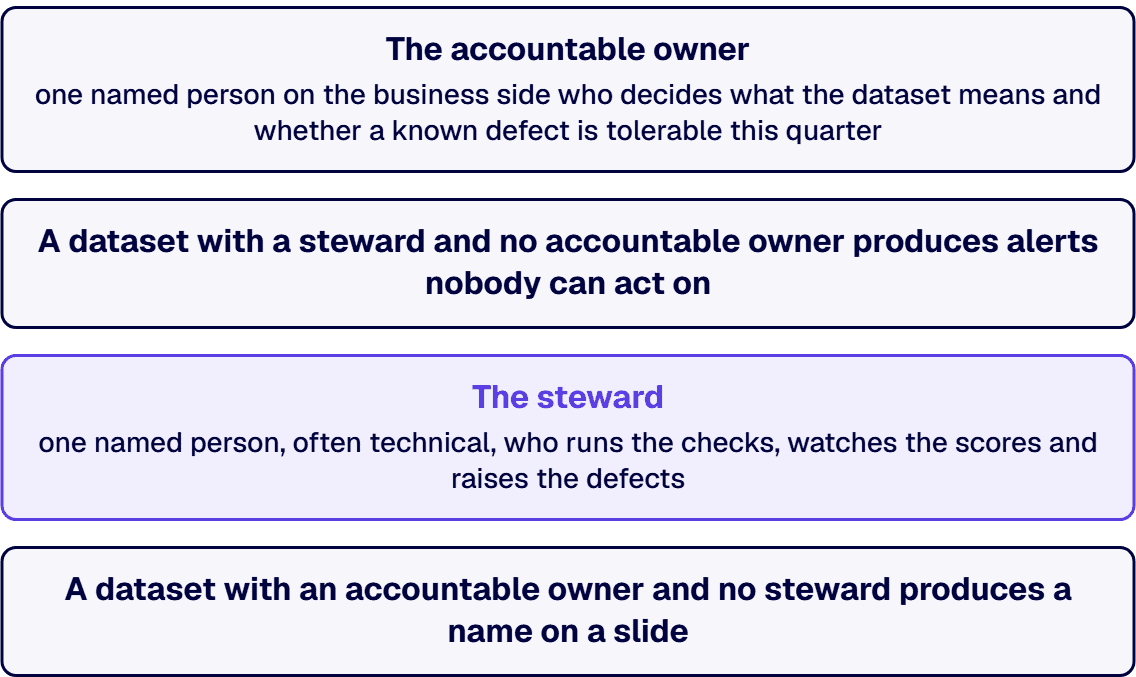
Ownership splits into two roles that get conflated, and the split is what makes the model workable. The accountable owner is one named person on the business side who decides what the dataset means and whether a known defect is tolerable this quarter. The steward is one named person, often technical, who runs the checks, watches the scores and raises the defects. One decides, one operates. A dataset with a steward and no accountable owner produces alerts no one can act on. A dataset with an accountable owner and no steward produces a name on a slide.
Microsoft’s platform names one half of this split. The Overview of data quality in Microsoft Purview Unified Catalog records that you assign users data quality steward permissions in Unified Catalog to use all data quality features, and that quality scores aggregate at the levels of data assets, data products and governance domains. The permission model has a steward in it, and the scoring model has a domain above the asset. An ownership register that names people only at the table level will not line up with a scoring surface that reports at three.
The register itself is modest and its discipline is in one column. Per dataset: the accountable owner, the steward, the domain it belongs to, the systems that feed it, the catalog surface that holds its lineage, and the date the two names were last confirmed. That last column is what separates a register from a document. An ownership record is stale from the day someone changes teams, and the defense against that is a confirmation cadence: set the interval against the organization’s own record of joiners, leavers and internal moves, and make the check a message asking two people to reply yes.
Two ownership questions come up constantly and both have an answer.
Who owns a dataset three systems feed? The accountable owner is the person who owns the decision the dataset supports, not the person who owns the biggest contributing system. A customer master fed by the CRM, the billing platform and a spreadsheet is owned by whoever answers for customer records as a whole, because the interesting failures are disagreements between the three, and no single system owner can rule on those.
What happens when the owner and the steward disagree about a defect? The accountable owner decides whether to tolerate it, and the steward’s dissent gets recorded in the register beside the decision. That recording is the entire mechanism: it costs a sentence, and it means the next audit finds a decision instead of an oversight. Where the disagreement is about whether the data is wrong, and not about whether to fix it, the quality score settles what its rules can measure and the owner still decides the response.
The readiness gates that have to be cleared before Purview itself can carry any of this, including its own control ownership, are set out in Microsoft Purview Deployment Guide. Ownership of the platform’s controls and ownership of the datasets are different registers, and conflating them is how a deployment ends up with a tool no one is accountable to.
Data Factory and Fabric both give you a run list. The run list tells you a pipeline failed. It does not tell you whether anyone should care, and that is the whole of the operational problem.
Start with what the platforms hold, because the retention window shapes the response. Microsoft’s guidance on how to Monitor Azure Data Factory states that Data Factory stores pipeline run data for only 45 days, and that you use Azure Monitor to route diagnostic logs if you want to keep the data longer. Two operating consequences follow. An investigation into a pattern that has been building since spring will not find its early evidence in the native run list. And the decision to route diagnostic logs elsewhere is one somebody makes deliberately, before the window closes, not during the incident that needs the history.
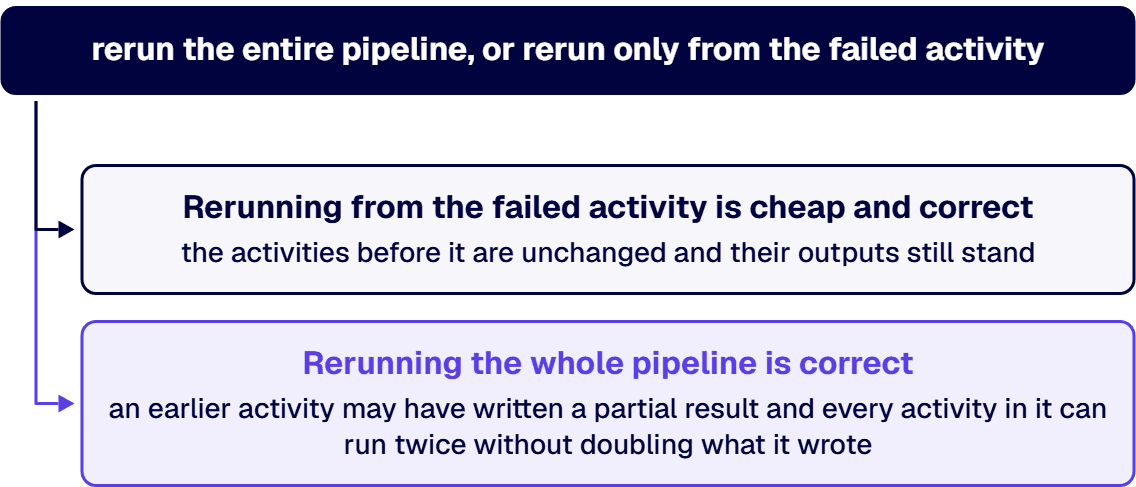
On the Fabric side, Monitor pipeline runs in Fabric Data Factory records that you can view a failed run’s properties including its Run ID and errors, and that you choose to rerun the entire pipeline, or to rerun only from the failed activity. That choice is where the operating model earns its keep, because the platform offers both and the guidance does not say which is safe for your data. Rerunning from the failed activity is cheap and correct when the activities before it are unchanged and their outputs still stand. Rerunning the whole pipeline is correct when an earlier activity may have written a partial result and every activity in it can run twice without doubling what it wrote. Somebody decides that per pipeline, once, in advance.
The per-pipeline response note is the artifact that makes the run list actionable, and it is four lines long:
When the response note and the alert disagree about the consequence for a consumer, the note wins. An alert fires on a technical condition; the note carries the business consequence, and the consequence is what decides whether somebody is woken up. This is the framework’s precedence rule applied at the smallest scale: the domain that stops a wrong number reaching a consumer outranks the domain that keeps a schedule.
Alerting itself needs one restraint, because alert fatigue is how monitoring programs die. Alert on the pipelines whose response note says a failure changes what a person sees or does. Report the rest on a daily digest somebody reads with coffee. A pipeline that has failed repeatedly with no consumer consequence recorded is telling you its response note should say so.
Three failure shapes need different handling and only one of them is a red run.
If your team is spending its mornings deciding which of last night’s failures matter, the response notes are missing and the on-call rota is absorbing the cost. Schedule a Meeting
Quality and cost sit together because they behave the same way. Both stay invisible until something surfaces them, an incident or an invoice, both drift slowly, and both are governed by a number somebody looks at on a schedule or by nothing at all.
Quality is the scheduled check that catches the third failure shape. The Purview documentation cited in the ownership section describes evaluating data quality using no-code or low-code rules, including out-of-the-box rules and AI-generated rules, applied at the column level. Read that wording for what it does and does not do: it evaluates and it scores. It does not stop a load. The rules produce a number, and the operating model decides what the number triggers.
Four rule shapes catch the failures a green run hides:
When two rules disagree, and the source total is authoritative and counted on the same grain, the reconciliation result decides. A dataset that passes volume, freshness and conformance while its totals do not match the source is wrong, and the three passing rules are measuring the shape of the data instead of its truth.
The score needs a floor and a consequence, and the consequence is the part that gets skipped. Below its floor, a dataset’s report carries a caveat and its accountable owner is told; the steward does not decide that alone. The floor is set per dataset by the owner, because a marketing list and a regulatory submission tolerate different things.
Cost is watched at the same cadence and with a narrower claim, because the platform is honest about what its own view is. In the Data Factory monitoring experience you can see the resources consumed by an individual pipeline run, and Microsoft’s note on the estimate those values produce says it does not reflect the exact amount you will be billed. So the operating use of that figure is comparative, not financial: this run against last week’s run for the same pipeline. A pipeline whose consumption doubled without a change to its code is doing something new, and that is worth an hour of somebody’s time before the invoice makes it a finance question. What a pipeline costs in absolute terms, and how the platform choice affects it, belongs to the platform decision guide named at the top and not here.
One cost figure per pipeline and one quality score per dataset, read on the same weekly cadence by the same person. That is the whole instrumentation ask, and an estate that cannot produce those two numbers is not being operated.
Some readers should not build any of this yet, and saying so costs less than selling it.
If you have one pipeline feeding one report, and both are read by the team that built them, the ownership register is a line in a wiki and the rest is over-engineering. The four domains earn their cost when datasets have consumers who did not build them.
Where no one can list the pipelines currently running, the sequence runs the other way. Inventory and risk-classify what exists first, using the assessment work linked at the top, and write the operating model for what survives that triage. An operating model over an unknown estate is a model of the pipelines somebody happened to remember. Where a pipeline in that estate already feeds a regulatory or executive number, it gets an owner and a response note while the triage runs, because the precedence rule does not wait for an inventory.
If the platform decision is still open, some of this changes shape. The four domains hold on Data Factory and on Fabric, and the surfaces, retention windows and rerun mechanics differ, so the response notes get written after the decision is made and not before.
And if the underlying complaint is that two reports show different numbers, this may be the wrong guide. Where the pipelines are sound and the semantic models disagree, the problem is in the reporting layer, and the reporting architecture page linked at the top is where that gets settled. The symptom pattern behind disagreeing systems, and what the disagreement costs while it goes unresolved, is set out in The Hidden Costs of Poor Data Synchronization Across Microsoft Systems.
Once the build is done, run them under four named domains, in this order: lineage and auditability, ownership and stewardship, run monitoring and failure response, and quality and cost; where those four are undefined, the operator is whoever notices a failure first, and each awkward question arrives with no one assigned to answer it. Test lineage with a drill: pick one figure from one report and trace it to source in front of someone who never worked on that pipeline, and treat any step needing a phone call as a gap in the record. Ownership splits into two roles per dataset, an accountable owner on the business side who decides what the dataset means and whether a known defect is tolerable this quarter, and a steward, often technical, who runs the checks, watches the scores and raises the defects. Data Factory and Fabric both give you a run list, and the run list tells you a pipeline failed without telling you whether anyone should care. Quality and cost are both governed by a number somebody looks at on a schedule or by nothing at all, and the operating model decides what that number triggers.
Establish data lineage in two halves and write down where one ends and the other begins. The automatic half is already being captured: Microsoft’s documentation names Data Factory, Data Share and Power BI among the systems that capture lineage as data moves, and the Microsoft Purview Unified Catalog is where it is read, by searching for a data product and opening the data asset details. The manual half is the semantics that capture does not carry, meaning what a column means, which business rule lives inside a database view, and why a conversion uses the rate it uses. That half matters because Microsoft’s own known limitations note that database views used as the source of a process activity in Azure Data Factory, Synapse Pipelines, Azure SQL Database and Azure Data Share are currently captured as database table objects, so the logic inside a view is not in the automatic record. Test the result with a drill: pick one figure from one report and trace it to source in front of someone who never worked on that pipeline. Any step of that trace needing a phone call is a gap in the record.
Two named people per dataset, doing two different jobs. An accountable owner on the business side settles what the dataset means and whether a known defect can be lived with this quarter. A steward, usually technical, is the one running the checks, reading the scores and raising defects. Microsoft Purview’s Unified Catalog names one half of that split: its data quality steward permission is assigned to named users so they can use all the data quality features, and quality is scored at the data asset, the data product and the governance domain. For a dataset that several systems feed, accountability sits with whoever answers for the decision the dataset supports, not with whoever runs the largest contributing system, because the failures that matter are disagreements among the sources, which no one system owner can settle. When owner and steward disagree about a defect, the owner decides the response and the steward’s dissent is recorded beside the decision.
Monitor the run, then decide in advance what its failure means for the people downstream. Microsoft states, in its guidance on how to Monitor Azure Data Factory, that Azure Data Factory keeps run data for 45 days only, and that Azure Monitor is how diagnostic logs get routed when the history has to outlive that window, so the retention decision is made before an investigation needs it. On the Fabric side, a failed pipeline run exposes its Run ID and errors, and the operator chooses to rerun the entire pipeline or to rerun only from the failed activity. The guidance presents both and does not say which is safe for a given dataset, so that rule is written per pipeline in advance. Alongside it sit three more lines: what a failure means for the consumer, the hour past which a late load becomes a wrong number in front of a decision-maker, taken from the consumer’s own schedule, and the two people who are told. Alert only on the pipelines whose failure changes what somebody sees or does, and digest the rest, because alert fatigue is how a monitoring program dies.
Answer with a path, not a diagram. The regulator wants the specific figure, on the specific report, on the specific date, traced back through each system it crossed and each transformation applied to it. That path comes from three places joined together: the lineage captured automatically as the pipelines ran, read in the Purview catalog; the pipeline’s own run record for the date in question, which is where the timing and the errors live; and the manual documentation of the logic that automatic capture does not reach, such as the rules inside a database view. The awkward constraint is retention, because Data Factory’s own run history stops at 45 days, and Microsoft documents this limit on its Monitor Azure Data Factory guidance page, so a request about last quarter finds that run record in Data Factory only if the diagnostic logs were routed somewhere durable beforehand. Rehearsal is what makes the test passable: run the walk-back on the same cadence that confirms the ownership register, on a figure nobody chose in advance, and fix whatever step needed a phone call.
Four rule shapes catch what a run that finished green can still hide. Volume checks the row count against the range expected for that day, which catches a source file that arrived empty and still reported success. Freshness compares the newest record’s timestamp against the schedule, which catches a feed that quietly stopped. Conformance compares values against their allowed set, which catches an upstream change that puts a value outside that set. Reconciliation compares a total on one side against the same total at source; it costs the most of the four, and it is the one that finds a transformation quietly producing the wrong answer. When the rules disagree, and the source total is authoritative and counted on the same grain, the reconciliation result decides, because the other three can all pass while the totals still fail to match. Microsoft Purview evaluates rules at column level and aggregates the resulting scores by data asset, by data product and by governance domain; it scores, and it does not block a load. So the operating model supplies the consequence: below a floor the accountable owner sets for that dataset, the report carries a caveat and the owner is told.
Data integration discovery, platform choice and data pipeline operations are three decisions in sequence, and they fail differently. Discovery happens before anything is connected and settles what the estate is agreeing to: which system is the source of record, what the data contract says, what latency and volume are required, and who is named as owner. Platform choice settles which tooling carries it, including whether Azure Data Factory, Microsoft Fabric or a combination is the right home. Data pipeline operations is what happens after both, indefinitely: maintaining the lineage record, confirming the ownership register, responding when a run fails, and reading the quality and cost figures on a cadence. Skipping discovery produces pipelines nobody can rule on. Skipping the platform decision produces two half-estates. Skipping operations produces an integration that worked on the day it launched, and an organization that finds out otherwise from a regulator. Where a build has already landed and one of the first two was never settled, that decision does not disappear; it arrives as an operating question, and the register is where it gets a named owner.
Michael Branson co-founded i3solutions and brings executive, operational, and technical perspective to organizations running complex, secure, and mission-critical Microsoft estates. He works with enterprise teams on the operating decisions that determine whether a data investment keeps its value after the programme closes.

US-Based | Est. 1997
© i3solutions. All rights reserved.
US-Based | Est. 1997
© i3solutions. All rights reserved.


