

Microsoft 365 integration consulting firms differ at the tenant compliance boundary, not in their connector lists. Before signing, require each firm to show which boundary the data crosses, who owns the interface after go-live, how it is evidenced at audit, and what happens if the firm leaves.
Two or three proposals are on your desk for work that connects Microsoft 365 to something outside it: a case management system, an ERP, a ticketing platform, a data warehouse, a partner tenant. They read almost the same, because they are describing the same connectors. What you suspect, and cannot yet defend in a room, is that the difference between these firms is not in the connector list at all. Your security function has already told you that data leaving the tenant changes the accreditation conversation, and no one in the procurement pack has priced that. Pick the firm that cannot hold the boundary and the finding lands on you at the next audit, on an interface no one owns. Over-scope the work to be safe and you have spent a year of budget on governance no one asked for, in front of a CFO who was told this was a connector project.
The connector is the cheapest part of the work and it is the part every proposal describes. Both firms will name the same Microsoft Graph endpoints, the same Power Platform connectors, the same middleware. That section of the two documents is close to interchangeable because it is close to identical work.
What separates the firms sits underneath that section and is absent from both: whether the interface they build crosses a boundary your accreditation depends on, and whether the firm has ever carried an interface across one and lived with it afterward. A connector list cannot tell you that. Neither can a reference call, because the reference will describe a delivery, not the two years after it.
This page is about the work, not about how to choose a firm in general. If you need the wider decision, the criteria that separate Microsoft firms for a regulated enterprise, the partner types, and how to build a selection scorecard, read How to Choose Among Microsoft Consulting Companies: A Decision Guide for Regulated Enterprises. That page owns the firm choice. This one stays on the integration scope, because scoping the work is what makes the firm choice answerable.
Before capability, scope. A Microsoft 365 integration is not one category of work. It is three, and they carry different obligations.
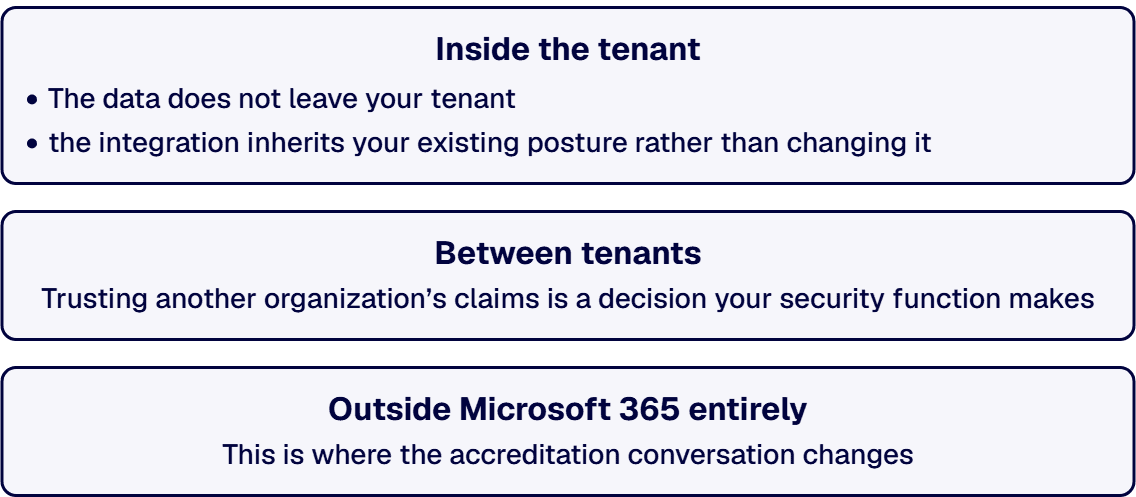
Inside the tenant. SharePoint to Teams, Exchange to a Power Platform flow, a Graph call from an app registered in your own directory. The data does not leave your tenant. The controls that already apply keep applying, and the integration inherits your existing posture rather than changing it.
Between tenants. A merger, an acquisition, a joint venture, a prime and its subcontractors. Microsoft’s own documentation describes the control surface: “The cross-tenant access settings provide granular control over inbound and outbound access, allowing you to trust multifactor authentication (MFA) and device claims from other organizations” (Microsoft Entra External ID, cross-tenant access overview, fetched 2026-09-15). Trusting another organization’s claims is a decision your security function makes, not a setting an integration firm turns on because the interface needs it.
Outside Microsoft 365 entirely. An ERP, a case system, a data warehouse, a supplier portal. This is where the accreditation conversation changes, and it is the case most of the proposals on your desk are describing.
Establish which of the three your scope contains before you read another proposal, because the capabilities that matter are different in each. If the scope discussion turns into an architecture discussion, the patterns themselves are covered in Microsoft Integration Architecture for Large Enterprises: A Reference Guide for Regulated Sectors; this page does not restate them.
One boundary this page does not cross: whether a particular data set or a particular contract brings a specific regulatory requirement into scope is a determination for your contracting officer and the clause itself. Nothing in this guide substitutes for that, and a firm that offers you a determination instead of a description has told you something about the firm.
Before a firm touches an interface that leaves your tenant, it has to be able to show you four things: which boundary the data crosses, who owns the interface contract after go-live, how the interface is evidenced at audit, and what happens to it if the firm leaves.
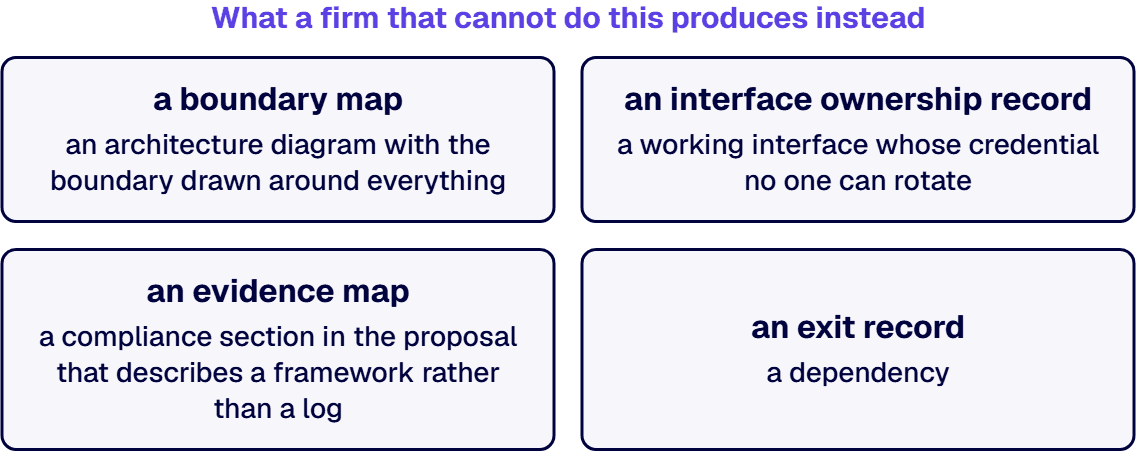
These are artifacts, not answers. Each one is something the firm produces and hands you, which is why this list survives contact with a sales conversation. If what you want instead is the set of questions to put to an integrator in a live meeting, those are staged on Questions to Ask a System Integrator. This page asks for deliverables.
The artifact: a boundary map, produced before any architecture. One page per interface, naming the source system, the destination system, the direction of flow, the data classes that move, and which of the three cases named in the previous section the interface falls into.
What showing it looks like in practice. The map names every interface in scope, not the representative one. It says which interfaces are inside the tenant and therefore inherit your existing posture, and which cross out of it and therefore change what has to be evidenced. Where an interface crosses to another organization’s tenant, the map names the specific cross-tenant setting the design depends on instead of describing the trust in prose.
What a firm that cannot do this produces instead: an architecture diagram with the boundary drawn around everything, which is the same as no boundary at all.
This is the item most proposals are silent on, and it is the one that produces audit findings two years later.
The mechanism, in Microsoft’s own words. An interface that runs without a person signed in runs as its own identity: “In app-only access, the app calls Microsoft Graph with its own identity, without a signed-in user” (Overview of Microsoft Graph permissions, fetched 2026-09-15). Granting that identity what it needs is not a developer action. The same document states: “Only Privileged Role Administrator and Global Administrator can consent to application permissions.” And the consent itself reaches further than the project: “Before you grant tenant-wide admin consent, ensure that you trust the application and the application publisher, for the level of access you’re granting” (Overview of user and admin consent, fetched 2026-09-15).
The artifact: an interface ownership record. For every non-interactive interface, the record names the application registration, the permissions consented and by whom, the credential and its rotation schedule, the named internal owner of that registration, and the date the ownership transfers. Your tenant is the owner of record from the first day, not from the last.
What showing it looks like in practice. The firm can tell you, before it starts, which permissions the design requires and why each one is the narrowest that works. A firm that plans to request tenant-wide consent and work out the scope afterward has described its own delivery method, and you have learned something.
What a firm that cannot do this produces instead: a working interface whose credential no one can rotate, because the only person who knew what would break has moved to another account.
The mechanism, in Microsoft’s own words. The platform records the operations: “Your organization’s unified audit log captures, records, and retains thousands of user and admin operations performed in dozens of Microsoft services and solutions” (Learn about auditing solutions in Microsoft Purview, fetched 2026-09-15). That same document sets out retention as a tiered capability, listing 180-day audit log retention, up to 1-year audit log retention, and 10-year audit log retention across its plans.
Which of those applies in your tenant is a licensing and configuration fact about your own estate. Establish it from Microsoft’s current documentation and your own tenant configuration, not from a statement in a proposal.
The artifact: an evidence map. For each operation the interface performs, the map names which log records it, where that log is read from, and under which retention the record sits. Where an operation produces no record, the map says so in that row rather than leaving the row out.
What showing it looks like in practice. The firm can name the surface an auditor will be shown, an admin center, an export, a report, and can produce a sample of that output during the engagement instead of promising it at the end.
What a firm that cannot do this produces instead: a compliance section in the proposal that describes a framework rather than a log, and an auditor asking you a question about an interface for which no one generated a record.
An interface outlives the engagement that built it. The application registration and its service principal are objects in your directory, described in Microsoft’s Application and service principal objects in Microsoft Entra ID (fetched 2026-09-15), and they remain there whoever created them.
The artifact: an exit record, written during delivery and not at the end. It lists every application registration, service principal, credential, secret, connection and scheduled job created for the interface; who holds each one today; what breaks if each one is disabled; and the runbook a team that has never seen this interface would follow to keep it running.
What showing it looks like in practice. The firm treats the exit record as a delivery artifact with its own acceptance, produced on a schedule you can check partway through. A firm that will produce it at handover will produce it from memory.
What a firm that cannot do this produces instead: a dependency. The contract terms that make an exit enforceable, the statement-of-work clauses and the exit clause itself, are covered in Microsoft Delivery Partner Selection Mechanics; this page is about the artifact, not the clause.
i3solutions designs and delivers integration across SharePoint, Power Platform, Dynamics 365, and Azure, with the reference architectures and operational handoff enterprise estates require.
This list is not a framework assembled from the outside. It is what our own integration work has had to produce.
i3solutions has delivered this pattern on Microsoft Dynamics 365 CRM integrations in a regulated healthcare environment and on enterprise application integration for a global professional services firm serving 125,000 users.
i3solutions unified identity and automated provisioning across systems for 125,000 users by treating the interfaces as owned, governed contracts.
That second sentence is the whole of item 2 in the checklist, stated as a delivery method, not a requirement. An interface treated as a contract has a named owner, a stated scope, an evidence trail and an end. An interface treated as a task has none of those, and it is the same interface either way until someone asks.
Be clear about the weight of this: two attested engagements is a thin record, and this page is written as a framework rather than as a track record. The checklist is defensible because the mechanisms under it are Microsoft’s and are cited to Microsoft’s documentation, not because of how many times we have run it.
Three situations where applying this list in full costs more than it protects.
The integration is entirely inside your tenant. SharePoint to Teams, a flow between two Microsoft 365 services, a Graph call from an app registered in your own directory, with no external system anywhere in scope. The boundary does not move, so items 1 and 3 collapse into your existing posture and item 2 shrinks to normal application ownership. Running the full list on an inside-tenant integration produces documents no one reads.
It is a proof of concept under a spend floor you set. Set the floor yourself before the conversation starts, in your own currency and your own numbers. Under that floor, the right instrument is a time box and a deletion date, not an ownership record. The failure to avoid is a proof of concept that quietly becomes production, so write the deletion date into the work, not into an intention.
The interface will be retired inside a year. A bridge during a migration is not an estate asset. Item 4 still applies, because something has to be turned off deliberately, but items 1 and 3 can be sized to a bridge, not to a permanent interface.
And one situation where a different page is the right one: if what you need is a way to rank a shortlist you have already assembled, the Best Dynamics 365 Integration Partners rubric answers that question instead. If the work in front of you is a governed Microsoft 365 rollout rather than an integration, Microsoft 365 Consulting Services answers that question instead.
A first conversation on this is a scoping conversation, and the output is the boundary map from item 1. We walk the interfaces you have been quoted on, sort them into the three cases, and name which ones change what you have to evidence. You leave with a document you can take to your security function and to the firms you are considering, whoever you end up retaining.

Michael Branson co-founded i3solutions 30 years ago and brings executive, operational, and technical perspective to organizations working in complex, secure, and mission-critical environments. His insights focus on business process consulting, automation, data analytics, collaboration, secure operating models, and the operational discipline required to turn technology investments into practical business systems with measurable value.
Connect on LinkedInThe connector work itself, the Graph endpoints and Power Platform pieces, is close to identical from one firm to the next. What separates firms on an ERP integration, which is a case of data leaving Microsoft 365 entirely, is whether they can produce four artifacts before the interface goes live: a boundary map naming which of the three integration cases the work falls into and which data classes move; an interface ownership record naming who holds the application registration and its permissions after go-live; an evidence map naming which log records each operation the interface performs and under which retention; and an exit record listing every registration, credential and connection the interface depends on. A firm that cannot produce these hands you an architecture diagram with no real boundary, a working interface with a credential no one can rotate, a compliance section instead of a log, and a dependency instead of a documented exit.
The same four artifacts a first conversation should produce: which boundary the data crosses, who owns the interface contract after go-live, how the interface will be evidenced at audit, and what happens to it if the firm leaves. Each is something the firm produces and hands you, not something it says in a sales conversation. A firm that plans to request tenant-wide consent and work out the scope afterward has already told you something about how it delivers, before the contract is signed.
Your tenant owns it from the first day, not from the last. An interface that runs without a signed-in user runs under its own identity, and granting that identity its permissions is a decision only a Privileged Role Administrator or Global Administrator can make. The interface ownership record names the application registration, the permissions consented and by whom, the credential and its rotation schedule, and the named internal owner, so the answer does not depend on who is still on the account after the engagement ends. The exit record, written during delivery rather than at handover, lists every registration, credential and connection the interface depends on and the runbook a new team would follow to keep it running.
A Microsoft 365 integration is not one category of work. Inside the tenant, the controls that already apply keep applying. Between tenants, a cross-tenant access setting decides whose multifactor authentication and device claims your tenant will trust, which is a decision your security function makes, not a setting an integration firm turns on because the interface needs it. Once data leaves Microsoft 365 entirely, for an ERP, a case system, a data warehouse or a supplier portal, the accreditation conversation changes: what has to be evidenced at audit is no longer covered by your existing Microsoft 365 posture, and the evidence map has to name which log records each operation and under which retention the record sits.
Start by sorting every interface you have been quoted on into the three cases: inside the tenant, between tenants, or outside Microsoft 365 entirely. That sort is the boundary map, the first of the four artifacts, and it is what a scoping conversation should produce before any architecture discussion starts. It names every interface in scope, not a representative one, says which interfaces inherit your existing posture and which change what has to be evidenced, and for a cross-tenant interface names the specific setting the design depends on instead of describing the trust in prose. With that map in hand, you can test a shortlist against the same four capabilities instead of against a connector list that reads the same on every proposal.
Data already siloed and automations built without contracts make the late fix the expensive fix. i3solutions' senior integration advisors work with enterprise IT leaders who want the integration layer designed before the next system lands on it.
Request an Integration Scoping Discussion
US-Based | Est. 1997
© i3solutions. All rights reserved.
US-Based | Est. 1997
© i3solutions. All rights reserved.


