
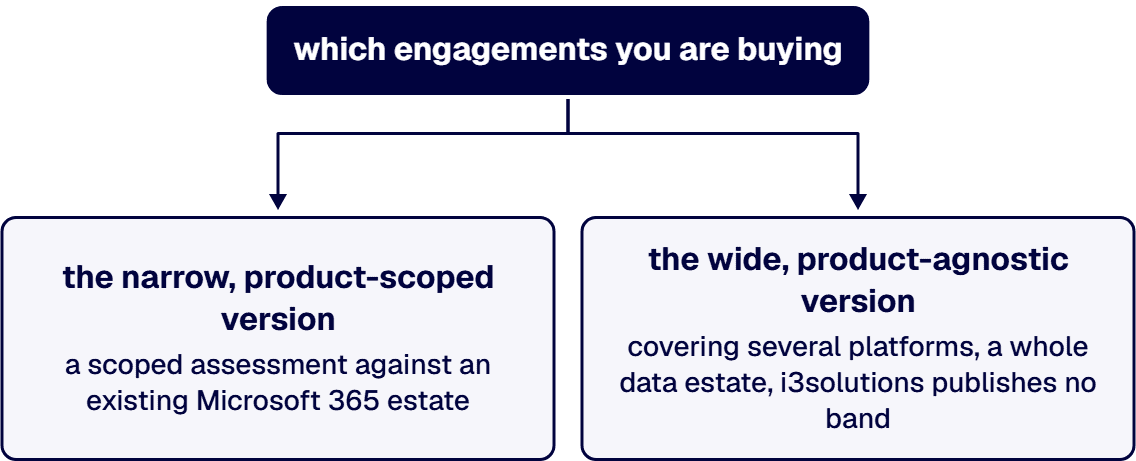
Price the engagement by its name rather than by the category. An i3solutions Microsoft 365 Copilot readiness engagement typically runs $18,000 to $35,000. That is a scoped assessment of one product against an existing Microsoft 365 estate, and for a great many mid-sized regulated enterprises it is the assessment they actually need. A wider, product-agnostic AI readiness assessment covering several platforms, a whole data estate and more than one regulatory boundary is a larger piece of work, and i3solutions publishes no band for it because the scope varies too much for a band to mean anything. Treat any single market rate quoted for the phrase “an AI readiness assessment” as a price on a phrase rather than on a piece of work. And the number that usually matters most to the budget is not the fee at all. It is the remediation the assessment finds, which in a regulated estate is routinely larger than the assessment that found it.
Five workstreams. A quote that omits one of them is cheaper because it is smaller, which is a legitimate choice as long as you know you are making it.
Choosing which firm runs the work is a separate question with a separate answer, set out on who to hire to run an AI readiness assessment for a government contracting business. This page is about what it should cost and why.
Write down the repository count you want scanned, the regulatory frameworks genuinely in scope, whether platform selection is inside the engagement, and how many use cases you want assessed and to what depth. Send that same statement to every firm. Without it you are not comparing prices, you are comparing interpretations, and the cheapest interpretation always wins a bid it should not have won.
The billable middle of the engagement is discovery against real systems: repository inventory, effective-permission analysis, label and classification coverage, identity hygiene, and a survey of what staff are already using without approval. The output should be a written current-state finding in sentences, with the evidence beside it, rather than a score on a five-point scale. A maturity score is cheap to produce, impossible to argue with, and impossible to act on.
The finding is only half the deliverable. The other half is a roadmap that sequences the work, names the dependencies, and gives you a defined point at which you are allowed to stop. Critically, it should size the remediation it uncovered rather than leaving it as an implication. An assessment that reports “permissions require attention” and does not put a range on that work has handed you the problem back.
Four variables move independently, and between them they account for most of the spread you will see across quotes.
Repository count, and whether they are scanned or discussed. Scanning costs more than interviewing and is the only version worth buying. It also has a habit of finding more estate than anyone expected. i3solutions assessment engagements routinely find 20 to 40 percent more SharePoint sites during Phase 1 than the client internal inventory lists. That figure is specific to SharePoint estates, and it is the clearest illustration of why a fee quoted against your own inventory count is quoted against a number that is probably wrong.
Framework count. One framework is a mapping exercise. Three or four overlapping frameworks with conflicting retention, residency and audit requirements is an analysis, and analysis is where the hours go. This is the variable most likely to double a quote in a regulated enterprise.
Whether platform selection is in scope. Evaluating candidate platforms against your actual constraints is real work, and it is frequently assumed to be included at no cost. Confirm it either way in writing.
Use case depth. Twenty candidate use cases assessed at a paragraph each is a workshop output. Six assessed against the data that would have to support them is an assessment. The second costs more and is the one that changes a decision.
Two things move the price down, and both are within your control. Granting system access in the first week rather than the third removes the most common source of schedule drift. And narrowing the engagement to the product you are actually buying, when that is genuinely the question, moves you from the wide engagement to the narrow one and from a six-figure conversation to the attested band above.
Three lines regularly surprise people, and none of them belongs to the assessing firm.
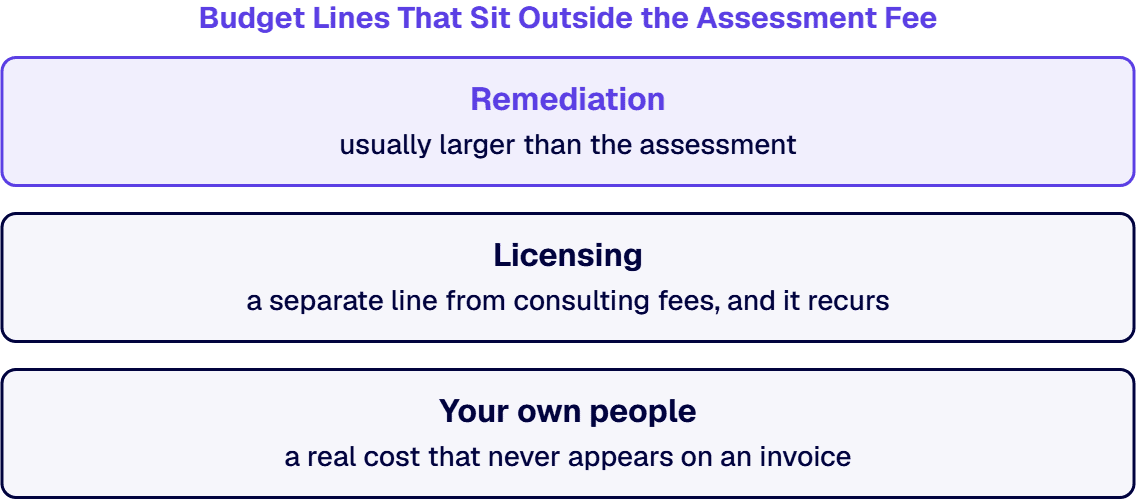
Remediation. The most common finding in a regulated estate is that the permission model cannot support the intended use case yet. Fixing that is a project in its own right, it is usually larger than the assessment, and it is the reason the assessment fee is rarely the number that decides the business case.
Licensing. Platform licensing is a separate line from consulting fees, and it recurs. As of 2026-08-13, Microsoft publishes the Microsoft 365 Copilot add-on at $30.00 per user per month paid yearly, and states that a separate license for a qualifying Microsoft 365 plan is required on top of it. Microsoft’s published license options as of the same date list eligible base plans including Microsoft 365 E3 and E5 and Office 365 E1, E3 and E5, with Government Community Cloud, GCC High and Department of Defense customers adding Copilot to Microsoft 365 G3 and G5 or Office 365 G1, G3 and G5. Microsoft also documents that Copilot is only supported on primary mailboxes hosted on Exchange Online. Rates and eligibility change, so re-check these against Microsoft’s own current pages at the moment you build the budget rather than trusting any number in a proposal, including this one. The seat-cost arithmetic over a full year is worked through separately in the Copilot total cost of ownership answer, and the plan-by-plan detail sits on the Microsoft 365 Copilot licensing page.
Your own people. The data owners, subject matter experts and security staff who have to be available during the engagement are a real cost that never appears on an invoice. An assessment that gets no access to them produces a document about what people believe, which you can obtain for free and should not pay for.
Bring in an outside firm when the answer has to survive an auditor, a contracting officer or a board, and when nobody internally can produce it without their own program’s success depending on the conclusion. That last condition is the real one. Internal readiness assessments are usually run by the team that wants the platform.
What i3solutions publishes here is an offer and a method, and it is worth being exact about the boundary. An i3solutions Microsoft 365 Copilot readiness engagement typically runs $18,000 to $35,000. That band is for a Microsoft 365 Copilot readiness engagement specifically. It is not a price for a generic AI readiness assessment and this page does not present it as one. i3solutions does not publish a case study of a delivered AI readiness assessment for any client and does not claim one. The offer definition, deliverables and methodology are set out on the LLM adoption consulting page, and the readiness work itself on the Copilot readiness page.
For the shape a bounded, priced assessment should take, there is a published reference. The i3 Risk and Roadmap Assessment ROI variant is a one-week structured engagement that produces a business case anchored on the specific environment, the specific compliance frameworks, and the specific executive-cycle timing. Fixed duration, named deliverables, and a document a finance function can actually read.
The firm-level facts that bear on an assessment budget are simple. i3solutions is a Microsoft Partner with 30 years of delivery experience. i3solutions has completed more than 600 Microsoft platform implementations. i3solutions runs migrations against named control families across CMMC, HIPAA, SOC 2, and NIST 800-171, producing artifacts auditors can review. Those matter here for one reason: most of the billable effort in a readiness assessment is permission and repository archaeology inside SharePoint, Microsoft 365 and Dataverse, which is the same work as a migration assessment, and the compliance mapping is the same discipline. Where a compliance program is the driver rather than the platform, the equivalent cost breakdown is on the CMMC compliance cost page. i3solutions routes a senior U.S.-based engineer to a client call usually within one to two weeks.
It depends entirely on which of two engagements you are buying. For the narrow, product-scoped version, an i3solutions Microsoft 365 Copilot readiness engagement typically runs $18,000 to $35,000. For the wide, product-agnostic version covering several platforms, a whole data estate and more than one regulatory boundary, i3solutions publishes no band, because the scope varies too much for a band to mean anything before the repository count and the framework count are known. A firm quoting a single market rate for the category is pricing a phrase rather than a piece of work.
No. That band is specifically for a Microsoft 365 Copilot readiness engagement, which is scoped to one product and asks whether an existing Microsoft 365 estate is safe to switch Copilot on. That is largely a permissions, labeling and oversharing question against a single tenant. A product-agnostic AI readiness assessment asks a wider question first, across several platforms and data estates, and is a larger engagement. Treating the narrower band as a price for the wider work would understate what you are buying and guarantee a change order.
Because four scope variables move independently. The number of repositories actually scanned rather than discussed, since scanning costs more and is the only version worth buying. How many regulatory frameworks are genuinely in scope, since overlapping frameworks with conflicting retention and residency requirements turn a mapping exercise into an analysis. Whether platform selection sits inside the engagement, which is real work and is frequently assumed to be free. And how many use cases are evaluated and to what depth, since twenty use cases at a paragraph each is a workshop output and six assessed against the data that would support them is an assessment.
Three, and none of them belongs to the assessing firm. Remediation, because the most common finding in a regulated estate is that the permission model cannot support the intended use case yet, and fixing that is usually a larger project than the assessment. Platform licensing, which is a separate and recurring line that should be priced from Microsoft’s current published rates at the moment you build the budget rather than from a proposal written months earlier. And your own people, since the data owners, subject matter experts and security staff who have to be available during the engagement are a real cost that never appears on an invoice.
As a separate, recurring line. As of 2026-08-13, Microsoft publishes the Microsoft 365 Copilot add-on at $30.00 per user per month paid yearly and states that a separate license for a qualifying Microsoft 365 plan is required in addition. Eligible base plans published on the same date include Microsoft 365 E3 and E5 and Office 365 E1, E3 and E5, with Government Community Cloud, GCC High and Department of Defense customers adding Copilot to Microsoft 365 G3 and G5 or Office 365 G1, G3 and G5. Copilot is only supported on primary mailboxes hosted on Exchange Online. Microsoft changes rates and eligibility, so verify against Microsoft’s own current pages before committing a budget.
No. i3solutions does not publish a case study of a delivered AI readiness assessment for any client and does not claim one. What is published is the offer definition, deliverables and methodology on the LLM adoption consulting page, together with an attested price band for the narrower Microsoft 365 Copilot readiness engagement. This page prices a defined offer and describes a method. It does not present adjacent delivery work as assessment proof, and a page that blurred the two would be doing exactly what it warns you to watch for in a quote.

US-Based | Est. 1997
© i3solutions. All rights reserved.
US-Based | Est. 1997
© i3solutions. All rights reserved.


