
By Scot Johnson, Founder / CEO, i3solutions. Scot Johnson co-founded i3solutions 30 years ago with a focus on expert-led delivery, strategic advisory, and complex Microsoft-centered solutions for organizations where technology decisions carry operational, financial, and mission risk.
Short answer: Microsoft’s cloud migration tool moves your Dynamics GP financials into Business Central online, and it moves more than most people expect: the chart of accounts, customers, vendors, items, outstanding receivables and payables, checkbooks, 1099 data, open purchase orders, and a configurable slice of history. What it does not move is the part that decides your budget. Microsoft’s documentation enumerates what comes across. Everything outside that list is a rebuild decision, not a migration task, and that is where GP projects go over.
Two dates matter, and most of the migration pages on the web get them wrong.
Dynamics GP version 18.x is governed by the Modern Lifecycle Policy. Microsoft’s own lifecycle documentation states it plainly:
A large number of competing migration pages compress this into a single sentence along the lines of “product updates and support fully end on April 30, 2031.” That is wrong, and it is wrong in the direction that makes you complacent. It hands you two extra years you do not have. Regulatory and tax updates stop at the end of 2029. For a payroll or sales-tax-exposed business, an ERP that no longer receives tax updates is unusable well before its security patches run out. Plan against 2029, not 2031.
If you are on an older build, the fixed-lifecycle dates bite sooner. Microsoft’s lifecycle table puts extended support for Dynamics GP 2016 and GP 2016 R2 at July 14, 2026, and GP 2018 and GP 2018 R2 at January 11, 2028. GP 2015 extended support ended April 8, 2025. Note the trap in Microsoft’s own wording: installing any compatible tax release or hotfix on GP 2018 moves you to version 18.5 or later, which enacts the Modern Lifecycle Policy. There is no supported way to stay on the fixed lifecycle.
The mechanism is not a bespoke ERP converter. Microsoft’s migration runs on Azure Data Factory, using a self-hosted integration runtime installed on your network to replicate from your on-premises SQL Server into the Azure SQL database behind your Business Central environment. It copies table by table, and a table that fails is logged and skipped while the migration continues. That single design fact drives most of the post-migration cleanup work nobody budgets for, because a partial success looks like a success on the status page.
Prerequisite: GP 2015 or later. Configuration happens on the GP Company Migration Configuration page. What comes across:
(Sources: Microsoft, Migrate on-premises GP data to Business Central online overview and Migrate Dynamics GP data to the cloud.)
This is the section the vendor documentation will never lead with, and it is the reason a GP migration is an ERP re-implementation wearing a migration’s clothes.
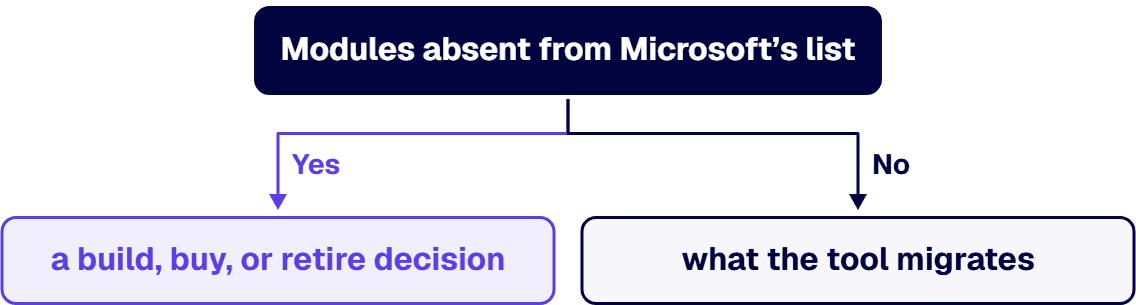
Modules absent from Microsoft’s list. Microsoft enumerates what the tool migrates. Fixed Assets, Analytical Accounting, Manufacturing, Project Accounting, and US Payroll and Human Resources are not on that list. Treat anything Microsoft does not enumerate as a build, buy, or retire decision. If you run GP Payroll, you are choosing a payroll platform, not migrating one.
Your chart of accounts is being restructured, not copied. A GP account like 000-1100-00 does not arrive as 000-1100-00. It arrives as account 1100 carrying dimensions. If your reporting, your covenants, or your grant accounting depend on segment structure, every downstream report is re-pointed. This is the single most underestimated line item in a GP migration.
Unit of Measure Schedules have no equivalent. Microsoft states it directly: there is no Business Central equivalent to the GP Unit of Measure Schedules table (IV40201). Business Central stores only the units themselves. Distribution and manufacturing businesses that lean on UofM schedules are rebuilding that model.
Historical years arrive open. Years marked historical in GP come into Business Central as open and must be closed there. Undeposited cash receipts are not migrated at all, so post and deposit before you cut over.
The tenant goes read-only. Once cloud migration is configured, non-SUPER users are moved to the Intelligent Cloud permission set and the online tenant is effectively read-only until the migration completes. Microsoft warns explicitly against pointing a migration at a production environment already in use.
We run GP-to-Business-Central the way we run any regulated legacy system integration: map the dependencies before touching the data.
Microsoft also publishes a free readiness assessment at bcmigrationassessments.com, which is a reasonable first hour of work and no substitute for step one.
i3solutions bands this the way we band any multi-system legacy estate. Typical Stage 1 dependency mapping for a mid-market regulated enterprise runs between $45,000 and $120,000 depending on estate size; the Stage 2 risk-sequenced migration plan runs between $30,000 and $75,000 depending on the phases involved; the Stage 3 stabilization plan and the migration execution that follows scope to the engagement. If GP is one of several systems you could retire, see enterprise system consolidation and what to retire first.
The variable that moves your number is not the size of your GP database. It is the count of items with a “rebuild” disposition from step one.
i3solutions has been building on the Microsoft stack for three decades. All i3solutions Dynamics 365 developers are U.S.-based, which matters when your ERP data is subject to a contract clause about where it may be handled. i3solutions has delivered this pattern on Microsoft Dynamics 365 CRM integrations in a regulated healthcare environment and on enterprise application integration for a global professional services firm serving 125,000 users.
If you want the disposition map before you commit to a platform decision, that is where we start. See our Dynamics 365 development services, our Dynamics 365 consulting practice, or hire Dynamics 365 developers directly.
Microsoft ends Dynamics GP support for product enhancements, regulatory and tax updates, and technical support on December 31, 2029. Security updates and patches, if needed, remain available until April 30, 2031. These are two different dates and they are frequently conflated. The 2031 date is security patches only. If your business depends on regulatory or tax updates, and most ERP users do, your practical deadline is the end of 2029. Older builds expire sooner: extended support for Dynamics GP 2016 and GP 2016 R2 ended July 14, 2026, and for GP 2018 and GP 2018 R2 it ends January 11, 2028.
No. It migrates what Microsoft enumerates: system and company setup, chart of accounts, customers, vendors, items, outstanding receivables and payables, open purchase orders, checkbooks and unreconciled bank transactions, 1099 data from 2024 onward, and a configurable historical snapshot. Modules Microsoft does not enumerate, including Fixed Assets, Analytical Accounting, Manufacturing, Project Accounting, and US Payroll and Human Resources, are not on the list. Treat those as rebuild, replace, or retire decisions rather than migration tasks.
It is restructured. Only the main account segment becomes the Business Central account number. Every other segment is converted into a dimension, with two nominated as Global Dimension 1 and Global Dimension 2 and the remainder auto-created as shortcut dimensions 3 through 8. A GP account of 000-1100-00 becomes account 1100 carrying dimension values. Any report, covenant calculation, or grant allocation that relies on GP segment structure has to be re-pointed at dimensions, which is usually the largest hidden cost in the project.
Microsoft’s cloud migration tool uses Azure Data Factory with a self-hosted integration runtime installed on your network to replicate data from your on-premises SQL Server into the Azure SQL database behind your Business Central environment. It copies table by table. If a table cannot be found or its schema does not match, that table fails, the error is captured, and the migration proceeds to the next one. Your minimum version is GP 2015. You configure scope on the GP Company Migration Configuration page, run replication into a sandbox first, then run a one-way data upgrade you cannot replicate over afterward.
Partly, and on Microsoft’s terms. The GP Historical Snapshot writes history into ten extension tables (Hist. G/L Account, Hist. Gen. Journal Line, Hist. Payables Document, Hist. Receivables Document, Hist. Sales Trx. Header and Line, Hist. Purchase Recv. Header and Line, and Hist. Inventory Trx. Header and Line), readable from Power BI, Power Apps, or other reporting tools. You cap the volume with an Oldest Snapshot Year. This is a reporting archive, not live transactional history, and years marked historical in GP arrive in Business Central as open years that you then have to close.
i3solutions plans and runs Dynamics GP to Business Central migrations for regulated and compliance-bound organizations, with U.S.-based Dynamics 365 developers and consultants. We lead with a dependency and disposition map rather than a data pull, because the cost of a GP migration is set by what has to be rebuilt, not by how much data has to move. Typical Stage 1 dependency mapping for a mid-market regulated enterprise runs between $45,000 and $120,000 depending on estate size; the Stage 2 risk-sequenced migration plan runs between $30,000 and $75,000 depending on the phases involved; the Stage 3 stabilization plan and the migration execution that follows scope to the engagement.
As of September 2026, migrate in four steps worked back from December 31, 2029, when Microsoft ends Dynamics GP product enhancements, regulatory and tax updates, and technical support: sort every GP module and add-on into migrates, rebuilds, or retires; redesign the chart of accounts; replicate and validate in a Business Central sandbox; then cut over after a period reconciled in both systems. Most finance teams start this project by asking how the data moves, and then discover that Fixed Assets, Analytical Accounting, Manufacturing, Project Accounting, and Payroll are not on Microsoft’s migration list at all. Microsoft ends product enhancements and regulatory and tax updates for Dynamics GP on December 31, 2029 under the Modern Lifecycle Policy, so work backward from that date in four steps. Inventory every GP module, ISV add-on, SmartList, report, and integration, and give each one a disposition of migrates, rebuilds, or retires. Redesign the chart of accounts before the first test run, because only the main segment becomes the Business Central account number and the rest become dimensions. Replicate into a Business Central sandbox environment and run Microsoft’s validation step, which you can repeat until the data upgrade, after which you cannot. Then cut over with a full period reconciled in both systems before GP is decommissioned.

US-Based Microsoft System Integrator | Est. 1997
© i3solutions. All rights reserved.
US-Based Microsoft System Integrator | Est. 1997
© i3solutions. All rights reserved.


