
By Scot Johnson, Founder / CEO, i3solutions
Scot Johnson co-founded i3solutions 30 years ago with a focus on expert-led delivery, strategic advisory, and complex Microsoft-centered solutions for organizations where technology decisions carry operational, financial, and mission risk. His insights focus on the leadership, governance, integration, automation, data, and delivery decisions that determine whether technology investments become reliable business systems.
A Dynamics 365 Business Central implementation is really two budgets, not one. The first is recurring Microsoft licensing: Business Central Essentials is $80.00 per user per month and Premium is $110.00 per user per month on Microsoft’s published US price list, both billed yearly, with a $8.00 per user Team Members license for light, read-and-approve users. The second is a one-time implementation project, and its size is set far more by the condition of your data, the number of systems Business Central connects to, and how much you customize than by how many users you have.
That is the honest answer in three sentences. The rest of this page is a cost-decision framework, not a price list: what sets the licensing line, what moves the implementation number, and what a Dynamics GP migration adds on top. For enterprise-scale, all-module programs, our companion Dynamics 365 implementation cost guide covers the Finance and Supply Chain end of the range.
Licensing is the one part of the budget with a public, fixed price. Business Central Essentials is $80.00 per user per month and Premium is $110.00 per user per month on Microsoft’s published US price list, both paid yearly, and Team Members access for light users is $8.00 per user per month. These are per-named-user subscriptions paid to Microsoft, separate from and recurring underneath whatever you pay a partner to implement.
Confirm the current figures on Microsoft’s Business Central pricing page before you build the business case, because Microsoft adjusts list prices periodically; the numbers here were taken from that page in October 2026. One rule keeps the estimate honest: you cannot mix Essentials and Premium in the same company, so the decision below is made once, for everyone.
Choose Premium only if you run manufacturing or service management; otherwise Essentials covers the full financials, sales, purchasing, inventory, and project scope most small and midmarket companies need. Premium is Essentials plus those two module families, at $30.00 per user more each month. Getting this decision right is a licensing cost lever, because it is multiplied across your entire full-user population for the life of the subscription.
Two licensing items are routinely left out of first drafts: additional Dataverse and database storage beyond the included capacity, billed per gigabyte per month, and sandbox environments for testing and staging that any disciplined go-live needs.
User count is the number everyone asks about and the one that moves the implementation total least. The real drivers are structural, the same handful on every project. Price the drivers, not the seats:
A focused, single-entity deployment on standard configuration with clean data sits at the low end of any honest range; a multi-entity rollout with several integrations, custom extensions, and a decade of history to migrate sits well above it. The gap between those two is not a discount; it is a different project.
A Dynamics GP to Business Central migration costs more than a greenfield Business Central setup because you are also paying to bring across history, custom reports, and integrations the GP system accumulated over the years. Microsoft will end product support and updates for Dynamics GP on December 31, 2029, with security patches continuing until April 30, 2031, so this is a planned migration with a real deadline rather than an emergency. The cost is driven by how much of GP’s past you choose to carry forward, so the GP-specific drivers below are worth pricing individually:
Published Business Central price ranges vary so widely because they describe different projects, so the useful exercise is not to hunt for a single number but to fix your own scope on the five axes that set it. Answer these before anyone quotes you, and the range you get back is narrow enough to defend: Essentials or Premium and how many of each, which fixes the recurring licensing line; how many legal entities, currencies, and localizations; how many integrations and to what; how much history migrates versus stays in a read-only archive; and where you draw the customization boundary.
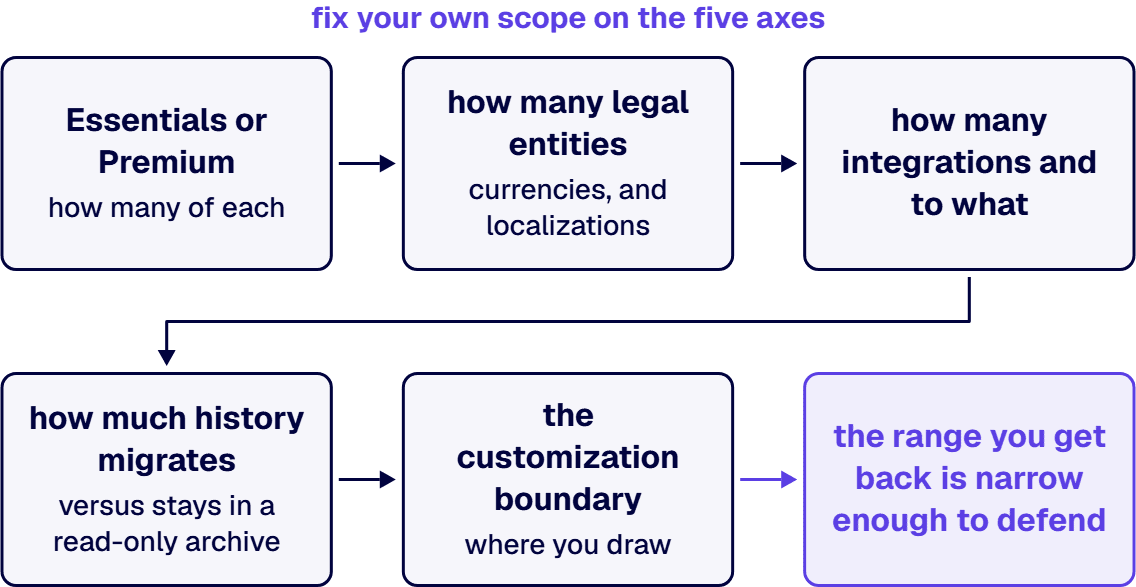
A proposal that lands far below the range for your answers has almost certainly cut scope somewhere you will pay for later. Treat a suspiciously low fixed price for an entire program before discovery as a warning, not a bargain.
i3solutions approaches Business Central as senior, US-based Microsoft engineers rather than as a license reseller, and every i3solutions Dynamics 365 developer and consultant is US-based. We scope the data and integration layers first, because that is where the variance lives, and we put a fixed-scope discovery phase in front of any implementation commitment so the number you take to the board comes from your actual GP system and integrations, not from a published band.
Delivery is phased, each phase producing a working, testable increment and a documented decision record, so a regulated organization can defend the program at audit and redirect it without sunk-cost drama. Our bias is configuration over customization, and where custom AL work is genuinely required we build it against Microsoft’s guidance so it survives the release-wave cadence without a standing maintenance tax. Organizations that want to add senior capability to an in-flight project can hire Dynamics 365 developers from us directly. As a Microsoft Solutions Partner, what moves our number is the same short list that moves any honest estimate: data condition, integration count, entity count, and the customization boundary.
It is set by data condition, integration count, number of legal entities, and how much you customize, not by user headcount. A single-entity rollout on standard configuration with clean data sits at the low end; a multi-entity deployment with several integrations, custom extensions, and years of history to migrate sits well above it. Licensing is separate and recurring, at $80.00 per user per month for Essentials and $110.00 for Premium.
Premium is Essentials plus manufacturing and service management, at $110.00 per user per month against $80.00 for Essentials on Microsoft’s published US price list. Choose Premium only if you actually run production or field service; otherwise Essentials covers financials, sales, purchasing, inventory, projects, and warehousing. You cannot mix the two types in one company.
A GP migration costs more than a fresh Business Central setup because you also pay to carry across history, custom reports, Dexterity modifications, and integrations. The single largest lever is how much transactional history you migrate versus leave in a read-only GP archive. Customizations and ISV modules do not move as-is; each is either replaced by standard capability, rebuilt as an AL extension, or retired.
Microsoft will end product support and updates for Dynamics GP on December 31, 2029, with security patches continuing until April 30, 2031. That makes this a planned migration with a real deadline, not an emergency. Moving deliberately, with time to redesign the chart of accounts and decide what history to archive, costs less and breaks less than a rushed cutover near the deadline.
Yes, in defensible ways: archive old GP history instead of migrating all of it, hold the customization boundary and adapt to standard Business Central where the process is not a differentiator, and clean up master data before migration rather than during testing. Cutting integration scope, testing, or training also lowers the quote, and reliably raises the total cost.

US-Based | Est. 1997
© i3solutions. All rights reserved.
US-Based | Est. 1997
© i3solutions. All rights reserved.


